What is an automation workflow?
Also called: Automated workflow, automation flow, automation sequence, workflow
An automation workflow is a set of steps that runs automatically when a trigger happens, such as a form submission or an overdue invoice. It sends messages, creates tasks or updates records, with waits and conditions in between.
An automation workflow is a set of steps that runs by itself when something happens. It follows a simple rule: when this happens, do that. Someone fills in your form, so they get a thank-you email, a task lands on your list and, two days later, a follow-up goes out. You build the workflow once, and it repeats for every new person without you lifting a finger.
Every automation workflow has the same backbone: a trigger that starts it, actions that do the work, and usually a few waits and conditions in between.
Why automation workflows matter for small businesses
When you run a small business, your day is full of small, repeatable jobs: confirming bookings, chasing unpaid invoices, welcoming new customers, telling a teammate that a lead came in. None of them is hard. Together they eat hours, and the ones you forget cost you money: the lead nobody called back, the invoice nobody chased.
An automation workflow takes those jobs off your plate. It does them the same way every time, at any hour, and it doesn’t forget. You spend your time on the work only you can do, like talking to customers and delivering the service.
How an automation workflow works
Think of it as a recipe your software follows:
- Trigger: the event that starts it. “A booking is made”, “an invoice is overdue”, “a contact gets the tag VIP”.
- Actions: what happens next. Send an email, send an SMS, create a task, update a contact, notify the team.
- Waits: pauses between steps. “Wait 1 day”, “wait until the day before the appointment”.
- Conditions: forks in the road. “If they paid, stop. If not, send a reminder.”
- Exit or goal: the point where the workflow ends for that person.
Example: a hair salon in Accra sets up a workflow triggered by “booking made”. Step one sends a confirmation email. The workflow waits until the day before, then sends an SMS reminder. After the appointment, it waits two days and asks for a review. If a booking is cancelled, a separate workflow sends a friendly “want to rebook?” message. The owner built both in under an hour, and they run for every client.
Automation workflow vs workflow automation
The two phrases are close. Workflow automation is the practice: using software to run repeatable business processes. An automation workflow is one specific flow you build, such as “overdue invoice reminders”. You do workflow automation by building automation workflows.
Common types of automation workflows
| Type | Typical trigger | What it does |
|---|---|---|
| Lead follow-up | Form submitted | Welcomes the lead, creates a task, follows up if there is no reply |
| Booking reminders | Booking made | Confirms, reminds, asks for a review afterwards |
| Payment chasing | Invoice overdue | Sends polite reminders until the invoice is paid |
| Onboarding | New client added | Sends welcome information and sets up first tasks |
| Win-back | Booking cancelled or no activity | Invites the person back with a simple offer |
Best practices and common mistakes
- Start with your most repeated job. Automate the task you do most often, not the fanciest idea.
- Always add an exit. A payment reminder that keeps going after payment damages trust.
- Test before going live. Run it on yourself or a test contact and read every message.
- Keep messages human. Automated doesn’t have to mean robotic. Write like you talk.
- Respect consent. Transactional messages (a booking confirmation) are different from marketing. Only send marketing to people who opted in.
- Review monthly. Check which workflows run, which fail and which nobody needs any more.
Related terms
CRM automation is automation workflows focused on contacts, deals and sales tasks. Marketing automation uses them for emails, texts and campaigns. AI sequencing is using AI to plan and write a workflow’s messages for you.
Automation workflows in startbuddi
In startbuddi, every automation workflow lives in Automations: one engine used by Customers, Bookings, Forms and Marketing, so a booking reminder and a lead follow-up are built the same way. You can start in three ways: Tell Chip what you want in plain words, Use a template, or Start from scratch.
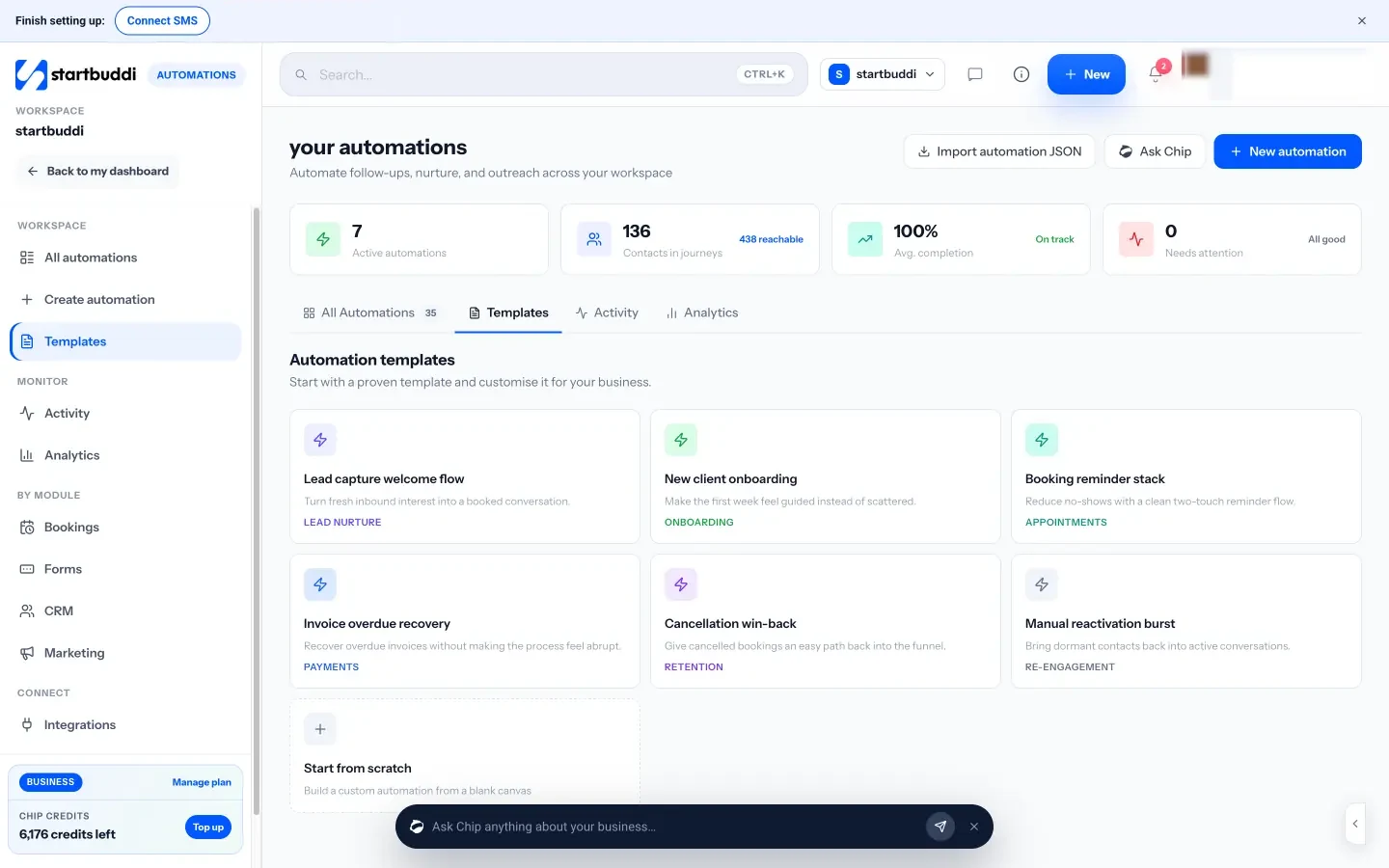
Templates include a lead capture welcome flow, new client onboarding, a booking reminder stack, invoice overdue recovery and cancellation win-back. Triggers cover forms, contacts, deals, bookings, payments, invoices, email activity and incoming WhatsApp, Facebook and Instagram messages. Steps include send email, send SMS, WhatsApp message, send payment link, wait, condition, wait for their reply, add tag, create task and notify the team.
The drag-and-drop canvas has Validate and Test buttons, and a review before activation shows how many contacts are reachable and which are suppressed. Automations is available on the Starter plan and above. See the Automations page, or follow the help guide on how to build an automation sequence.
Next step
List the three jobs you repeat most each week. Pick the one that costs you most when forgotten and sketch it as trigger, actions and exit. That is your first automation workflow. To build it for real, compare plans on the pricing page.
Related terms
FAQ
What is the difference between a trigger and an action?
The trigger is the event that starts the workflow, such as a new booking. Actions are what the workflow does in response, such as sending a confirmation email or creating a task.
Do I need to code to build an automation workflow?
No. Most small business tools use a visual builder or templates. In startbuddi you can also describe the workflow in plain words and let Chip build a draft.
How many automation workflows should a small business have?
Start with two or three that cover your most repeated jobs, such as lead follow-up, booking reminders and payment chasing. Add more once those run smoothly.
Can an automation workflow stop by itself?
Yes. Good workflows include exit rules or goals, for example stopping payment reminders as soon as the invoice is paid.
Tiwalade Joanna Okedara-Kalu is the founder, CEO and CTO of startbuddi, the business system that brings clients, bookings, invoices, projects, marketing and the Chip AI assistant into one place. Tiwalade builds software around how service businesses really work day to day, and writes about client management, getting paid on time and why small businesses outgrow the tools they start with.
Founded startbuddi and leads its product and engineering