What is email automation?
Also called: Automated email, triggered email, email workflow, autoresponder
Email automation is sending emails automatically based on rules and triggers, such as a new signup, a booking or an unpaid invoice, so the right message reaches the right person at the right time without you sending it by hand.
Email automation is sending emails automatically when something happens, instead of writing and sending each one by hand. You set a rule once, such as “when someone books a call, send a confirmation and a reminder the day before”, and the software sends the right email to the right person at the right time.
It covers everything from a single automatic welcome email to multi-step follow-up sequences. Some people call these automated emails, triggered emails or email workflows.
Why email automation matters for a small business
Time is the one thing every founder is short of. Email automation takes the repeat work off your plate: saying thank you, sending the price list, reminding people about appointments and chasing unpaid invoices. These are the emails that matter most and get forgotten first.
It also makes you faster than bigger competitors. When a lead fills in your form at 11pm, an automatic reply lands in seconds, while the other business replies the next afternoon. And it keeps your tone consistent, because you wrote the email on a calm day instead of in a rush between jobs.
How email automation works
Every automated email follows the same pattern:
- Trigger: the event that starts it, such as a new contact, a form submission, a booking, a payment or a date.
- Conditions (optional): checks that decide who gets what, such as “only if they are in Nigeria” or “only if the invoice is still unpaid”.
- Actions: what happens, usually “send this email”, sometimes followed by “wait 2 days” and another email.
Here is an example for a cleaning company. A customer books a deep clean online. Straight away they get a confirmation with what to prepare. The day before, they get a reminder. The day after the clean, they get a thank-you email asking for a review. If they haven’t rebooked in 60 days, they get a “time for your next clean?” email. The owner set this up once and it now runs for every booking.
Types of automated email
- Welcome emails: sent when someone subscribes or becomes a customer.
- Confirmations and receipts: sent after a booking, order or payment. These are transactional emails, not marketing.
- Reminders: before an appointment, event or due date.
- Follow-ups and nurture: a drip sequence that answers questions until someone is ready to buy.
- Behaviour-based emails: triggered by clicks, form answers or visits to a page.
- Payment reminders: polite nudges before and after an invoice is due.
- Re-engagement and win-back: sent to people who have gone quiet or cancelled.
Best practices for email automation
- Automate your most repeated email first. Look at your sent folder. Whatever you type most often is your first automation.
- Keep it personal. Use the person’s first name, sign with a real name and write the way you talk. Automated doesn’t have to mean robotic.
- Add stop conditions. Stop reminding someone to pay once they have paid, and stop asking for a booking once they have booked.
- Follow the rules on marketing email. Marketing emails need permission and a working unsubscribe link. The US CAN-SPAM guide from the FTC also requires a valid postal address and says opt-outs must be honoured within 10 business days. Check the rules where your customers live. This is general information, not legal advice.
- Send from your own domain. Google asks bulk senders to set up SPF, DKIM and DMARC and to offer one-click unsubscribe (see Google’s email sender guidelines). A verified domain helps your emails reach the inbox.
- Test before you switch it on. Send each email to yourself and click every link.
- Review every few months. Old prices and dead links in an automation keep going out until someone notices.
Common mistakes
The biggest mistake is automating too much at once. Twenty half-finished workflows are worse than three good ones. The second is forgetting the person on the other end: three automatic emails on the same day from three different workflows feels like spam. Map what a new customer receives in their first week and make sure it reads well as a whole.
Related terms
Marketing automation is the bigger umbrella, covering email, SMS, WhatsApp and more. A workflow is the set of triggers, conditions and steps behind each automation. Email segmentation decides which group each automated email goes to.
Email automation in startbuddi
There is one Automations engine for the whole of startbuddi, so the same place handles email follow-ups for Customers, Forms, Bookings and Marketing. Triggers include Form submitted, New contact, Booking made, Booking confirmed and Payment succeeded. Steps include Send email, Wait, Wait until, Wait for reply, Condition, Add tag, Update contact field, Create task, and Send SMS or Send WhatsApp when you want another channel in the mix.
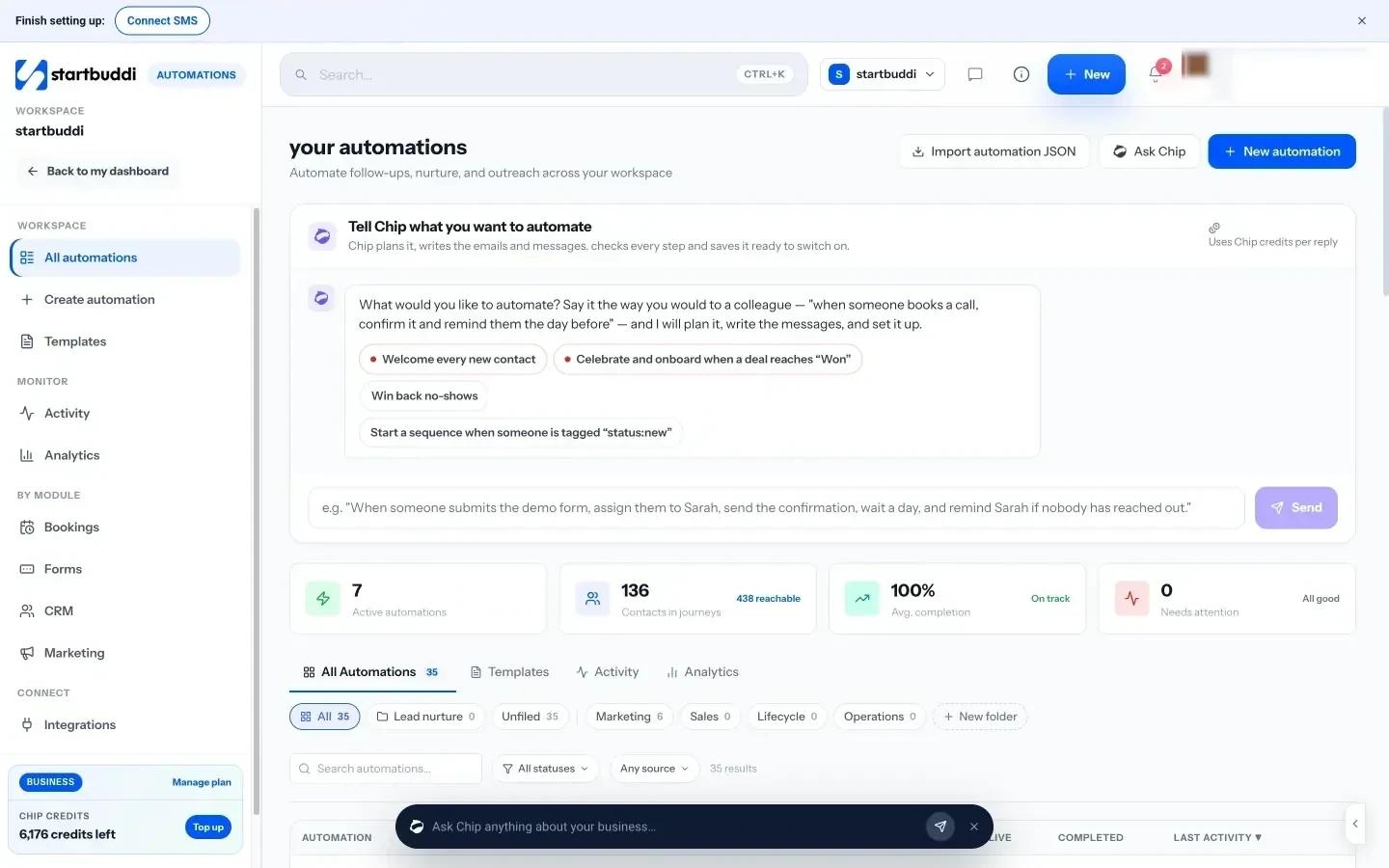
Starter templates such as Lead capture welcome flow, Booking reminder stack and Invoice overdue recovery give you a working draft to edit. Emails can go out from your own verified sending domain, set up in Email Marketing. Chip, the assistant built into startbuddi, can help you draft the wording.
Automations are included on the Starter plan and above, with a monthly number of automation runs per plan. See pricing.
Next step: find the email you send most often by hand this week, and turn it into your first automation.
Related terms
FAQ
Is email automation the same as an autoresponder?
An autoresponder is the simplest kind of email automation: one reply sent when something happens. Email automation also includes multi-step sequences, conditions and different paths for different people.
Does email automation feel impersonal?
Only if it is written badly. Short, friendly emails sent at a sensible moment usually feel more attentive than a late manual reply.
What should I automate first?
Start with a welcome or thank-you email for new enquiries, then appointment reminders, then invoice reminders. These save the most time and have the clearest benefit.
Do automated emails count towards my sending limit?
In most email tools, yes. Each automated email is a send, so check your plan's monthly allowance.
Olabimpe Salami is the email and outreach specialist at startbuddi. Olabimpe writes about the messages that bring customers in and back: email, WhatsApp and SMS campaigns, follow-ups, and turning enquiries into paying clients.
Runs email and outreach at startbuddi