What is CRM automation?
Also called: Sales automation, CRM workflows, automated follow-ups, CRM sequences
CRM automation uses simple "when this happens, do that" rules inside your customer list to send follow-ups, create tasks, assign leads and update deals automatically, so no customer is forgotten.
CRM automation means letting your customer list do routine work for you. When something happens to a contact or a deal (they fill in a form, reply to an email, go quiet for a week, pay an invoice), the system takes the next step automatically: it sends a message, creates a follow-up task, updates a status or tells the right teammate.
A CRM (customer relationship management system) stores your contacts, conversations and deals. CRM automation adds simple “when this happens, do that” rules on top, so follow-ups happen on time even on your busiest days.
Why CRM automation matters for a small business
Most small businesses do not lose customers because their product is bad. They lose them because nobody followed up. The enquiry came in on a Friday evening, the quote went out late, the reminder never got sent.
- Speed: an instant reply to a new enquiry shows you are organised and keeps the lead warm.
- Consistency: every lead gets the same good process, not just the ones you remember.
- Time back: copying details between apps, setting reminders and sending “just checking in” emails add up to hours a week.
- A tidy pipeline: deals move stage on their own, so your numbers reflect reality.
- Nothing depends on memory: if you are ill or travelling, the process still runs.
How CRM automation works
Every automation has three parts:
- A trigger: the event that starts it, such as “form submitted” or “deal moved to Proposal Sent”.
- Conditions (optional): rules that decide who goes where, such as “only if the budget is over ₦500,000”.
- Actions: what happens next, such as send an email, wait two days, create a task, add a tag or notify a teammate.
Here is an example. Musa runs a solar installation business. When someone fills in his “Get a quote” form:
- The contact is added with the tag “quote request” and a deal is created in the first stage.
- They get an instant email thanking them and asking for a photo of their roof.
- Musa’s sales rep gets a task: “Call within 24 hours”.
- If there is no reply after three days, a friendly WhatsApp follow-up goes out.
- When the quote invoice is paid, the deal is marked won and an onboarding sequence starts.
Musa set this up once. Now every enquiry gets the same fast, polite treatment.
Common types of CRM automation
| Type | Example |
|---|---|
| Lead capture | Create a contact and tag them when a form or chat comes in. |
| Follow-up sequences | A series of emails or messages spaced a few days apart. |
| Task creation | Create a “call this lead” task when a new contact is added. |
| Lead assignment | Give new leads to the right teammate. |
| Pipeline updates | Move a deal when a customer replies or pays. |
| Re-engagement | Reach out when a deal has gone quiet. |
| Onboarding | Welcome new customers with a series of helpful messages and tasks. |
Best practices and common mistakes
- Start with one automation. An instant reply to new enquiries usually gives the biggest win for the least effort.
- Keep it human. Write messages the way you would speak. Automation should save you time, not make you sound like a robot.
- Stop when people reply. Nothing annoys a customer more than a “just checking in” email after they already answered.
- Test before you switch it on. Run it on your own email address first.
- Respect consent. Only send marketing messages to people who agreed to receive them, and make it easy to unsubscribe. In Nigeria the Nigeria Data Protection Commission oversees how personal data is used; in the UK, the ICO’s direct marketing guidance applies. This is general information, not legal advice.
- Review monthly. Check which automations run, which fail and which nobody needs any more.
Related terms
A CRM is the contact and deal database that CRM automation runs on. Lead nurturing is one of the most common uses: helpful messages that move a lead towards buying. Workflow automation is the broader idea of automating any repeatable process, and marketing automation focuses on campaigns and audiences. For setup ideas, read how to set up CRM automation workflows.
CRM automation in startbuddi
In startbuddi, automations for every module run on one engine in Automations, with a CRM filter for customer, lead and pipeline work. An automation can start when a form is submitted, a contact is added, a tag is added, a contact’s stage changes, a deal is created, won, lost or goes quiet, or an invoice is paid or overdue. Steps include email, SMS and WhatsApp messages, waits, conditions, “wait for their reply”, create a task, assign to a teammate, update a contact and notify the team.
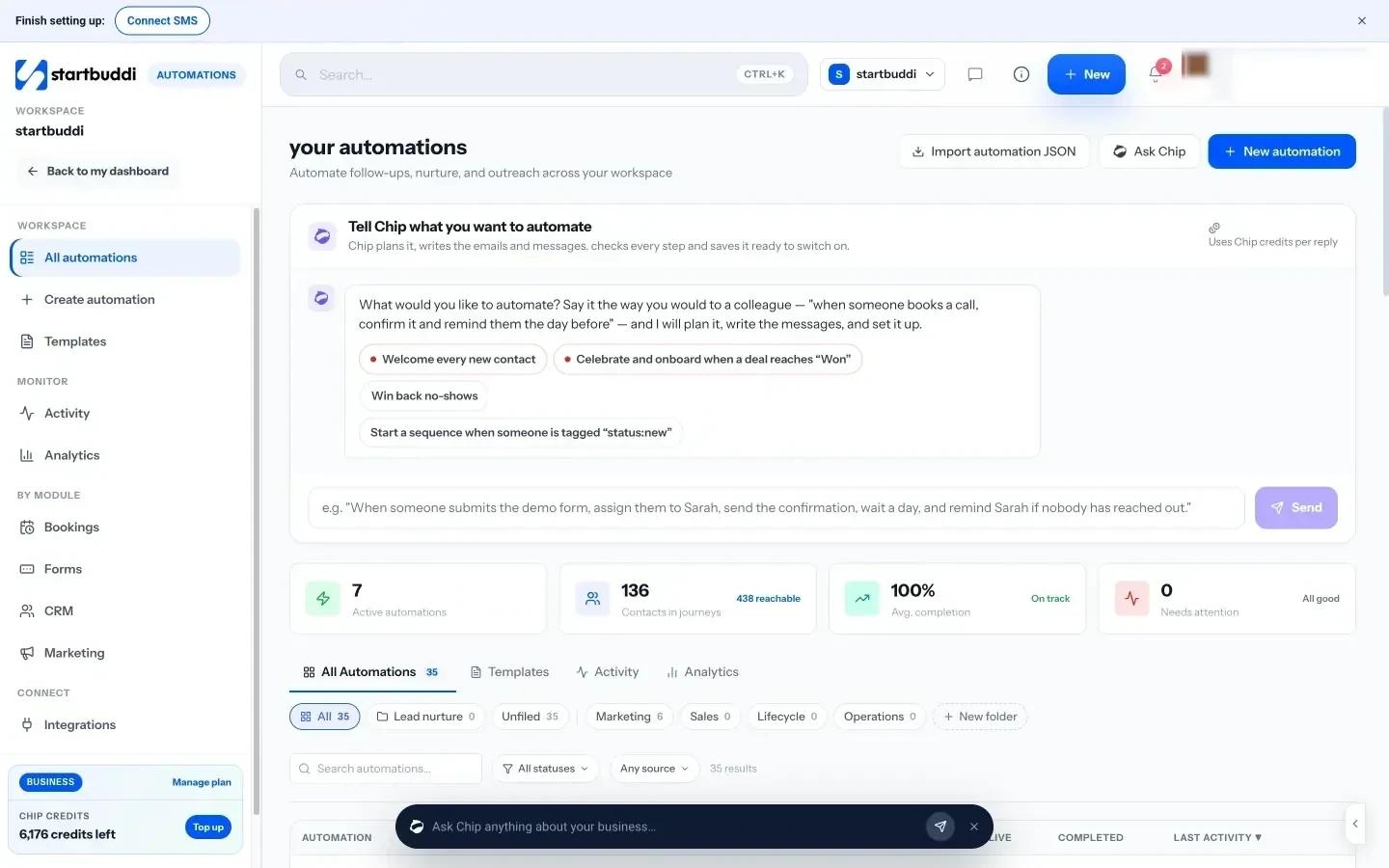
You can start from a template, build from scratch on a canvas, or tell Chip what you want in plain words. Chip plans the flow, writes the messages and saves it as a draft for you to check and switch on. Your sales pipeline also updates itself: when a contact replies, their deal moves out of the first stage, and when an invoice on a deal is paid, the deal is marked won.
Free includes 2 active automations, and Starter allows 10. Your next step: write down the one follow-up you most often forget, then turn it into your first automation. See plans on the pricing page.
Related terms
FAQ
What should I automate first in my CRM?
An instant reply to new enquiries plus a follow-up task for you or a teammate. It is quick to set up and stops leads going cold.
Will automation make my business feel impersonal?
Not if you write the messages in your own voice, keep them short and stop them as soon as someone replies. Automation handles timing; you still handle the relationship.
Is CRM automation the same as marketing automation?
They overlap. CRM automation focuses on individual contacts and deals, such as follow-ups and tasks. Marketing automation focuses on campaigns to groups, such as newsletters and journeys.
Do I need consent to send automated messages?
For marketing messages, generally yes, and you should make unsubscribing easy. Rules vary by country, so check your local data protection regulator. This is general information, not legal advice.
Tiwalade Joanna Okedara-Kalu is the founder, CEO and CTO of startbuddi, the business system that brings clients, bookings, invoices, projects, marketing and the Chip AI assistant into one place. Tiwalade builds software around how service businesses really work day to day, and writes about client management, getting paid on time and why small businesses outgrow the tools they start with.
Founded startbuddi and leads its product and engineering