10 Zoho CRM Alternatives for Service Businesses
Zoho CRM alternatives for service businesses compared: Bigin, HubSpot, Pipedrive, Capsule, Dubsado and more, with prices, free plans and honest limits.



The best Zoho CRM alternatives for a service business depend on what you miss in Zoho. startbuddi suits teams that want contacts, inbox, bookings and invoices in one place; Zoho Bigin is the simplest move if you like Zoho but want less; Pipedrive suits teams that live in a sales pipeline. HubSpot, Capsule and Dubsado are also worth a look.
startbuddi is our product. We’ve included its limits alongside everyone else’s, and every price below comes from the vendor’s own pricing page, checked on 1 October 2026.
Key takeaways
- Zoho CRM is a strong, customisable sales CRM. People leave it because they want something simpler, or because a service business needs bookings, invoices and client messages more than sales modules.
- If you want to stay with Zoho, Bigin is Zoho’s own lighter pipeline CRM, from $7 per user per month billed annually.
- For an all-in-one workspace, compare startbuddi, HubSpot and monday CRM. For client workflows (forms, contracts, invoices), compare Dubsado.
- Most tools price per user. Work out the cost for your team size before you compare plans.
- Zoho CRM exports every module to CSV, so you can move your contacts whichever tool you pick.
Zoho CRM alternatives compared
Prices are the lowest paid plan, per user per month in US dollars, billed annually unless stated. Several vendors show local currency depending on where you browse from.
| Tool | Best for | Lowest paid plan | Free plan | Standout feature |
|---|---|---|---|---|
| startbuddi | Service businesses that want CRM, inbox, bookings and invoices together | See pricing | Yes | Contacts, conversations, bookings and invoices on one client record |
| Zoho Bigin | Zoho fans who want something lighter | $7 (Express) | Yes, 1 user | Zoho’s own simple pipeline CRM |
| HubSpot | Teams that want a big free CRM and room to grow | $20 per seat (Starter, regular price) | Yes, 2 users | Free CRM with Gmail and Outlook connection |
| Pipedrive | Sales-led teams that work deal by deal | $14 per seat (Lite) | No | Visual pipelines with deal rotting |
| Freshsales | Teams that want chat, email and phone built in | $9 (Growth) | Not listed | Built-in phone and chat |
| Capsule | Small teams that want simple and tidy | $18 (Starter) | Yes, 2 users | Projects alongside the pipeline |
| Less Annoying CRM | Owners who want one plan and no tiers | $15 | No | One price with everything included |
| Dubsado | Freelancers and studios with client workflows | $335 a year (Starter) | No | Client portals, forms, contracts and invoices |
| monday CRM | Teams already working in monday boards | $12 per seat (Basic), 3-seat minimum | No | Quotes and invoices on boards |
| Copper | Teams that live in Gmail and Google Calendar | $23 per seat (Basic) | No | Works inside Gmail |
Why look for a Zoho CRM alternative?
Zoho CRM is a capable product, and many businesses run happily on it. The reasons service businesses look elsewhere are usually practical.
- It’s built around a sales team. Leads, accounts, contacts, deals and forecasts make sense for a company with salespeople. A cleaning company, salon or design studio often needs bookings, invoices and client messages more than sales modules.
- Key tools sit on paid editions. On Zoho’s pricing page, the free edition (up to 3 users and 5,000 records) leaves out email integration and mass email, multiple pipelines, web forms, forecasting and Zia AI. Those start at Standard, which costs $14 per user per month billed annually or $20 billed monthly.
- Per-user prices add up. Professional is $23 per user per month billed annually, Enterprise $40 and Ultimate $52. A team of five on Professional pays $115 a month before tax.
- Setup takes someone’s time. Zoho’s strength is customisation: layouts, workflows and processes. That pays off when someone owns the setup, and becomes a burden when the owner is also doing the work.
- Bookings, billing and campaigns are separate apps. Zoho has them, but as other products in the Zoho range, or bundled in Zoho One.
None of this makes Zoho a bad choice. It means it’s worth comparing before you renew, especially if your team is under ten people.
How we chose these alternatives
We looked for tools a small service business could set up in a week without a consultant. Each one had to:
- publish its prices on its own website;
- let you import contacts from a CSV file, which is how Zoho exports your data;
- cover the basics: contacts, a sales pipeline or client stages, notes and tasks;
- be sold directly to small businesses.
All prices and limits come from the vendors’ own pricing pages and help docs, checked on 1 October 2026. We haven’t run hands-on tests, so we describe what each plan includes rather than how it feels day to day. Prices change often, so check each vendor’s page before you buy. HoneyBook and Keap are popular with service businesses but we left them out: we couldn’t verify HoneyBook’s current pricing page, and Keap’s starting price is aimed at larger budgets.
1. startbuddi
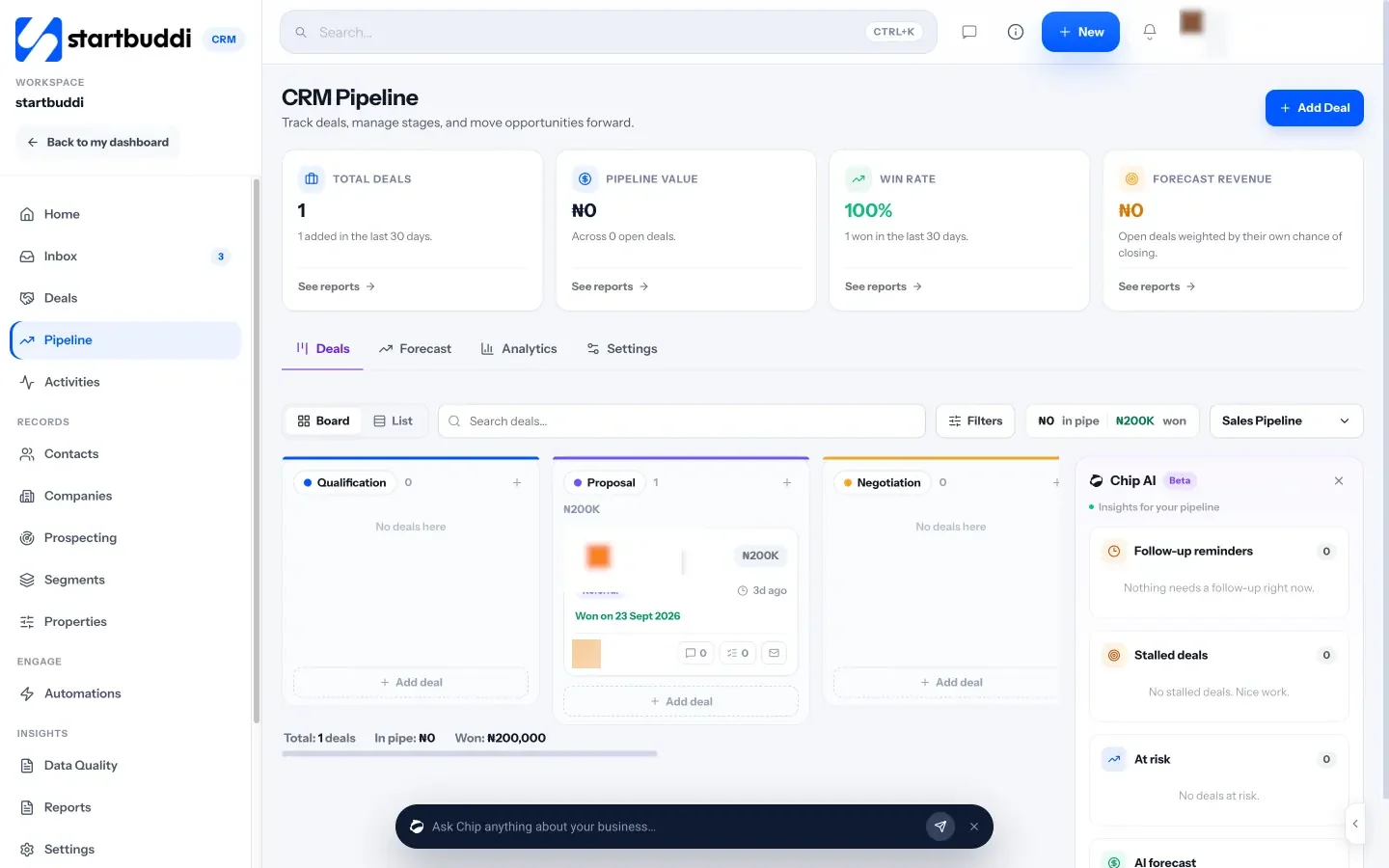
startbuddi is our product: a workspace for service businesses with contacts and deals, a customer inbox, bookings, invoices and payments, marketing, projects and documents in one place, with Chip, the AI assistant, on every screen.
Best for: small service businesses that want the CRM and the rest of the day-to-day work in one tool.
Key features:
- Contacts and companies with the full history on one record: messages, deals, invoices, bookings and form answers.
- A customer inbox for email, WhatsApp, Instagram, Messenger, SMS and website chat.
- Booking pages with availability and deposits.
- Invoices and payment links, paid by card through Stripe, or by card, bank transfer, USSD or mobile money through Paystack.
- Chip drafts replies and follow-ups, summarises clients and suggests who to contact next.
Pricing: a free plan is available. See startbuddi pricing for the paid plans.
Pros: one record for each client across sales, bookings and money; built for WhatsApp-first customers in Nigeria and across Africa as well as email-first ones elsewhere.
Cons: much less customisable than Zoho CRM (no custom modules or complex process builder); web app only, with no native mobile apps; no public API yet; the Marketing module is on paid plans; it isn’t accounting software. Moving from Zoho is a CSV import of contacts (up to 10,000 at a time), not a one-click connection, and deals don’t come across in the import.
Skip it if: you need heavy CRM customisation, a public API or the wider Zoho suite. Our startbuddi vs Zoho comparison goes feature by feature.
2. Zoho Bigin
Bigin is Zoho’s own pipeline CRM for small businesses, built to be lighter than Zoho CRM.
Best for: teams that like Zoho but find Zoho CRM too much.
Key features: pipelines for each part of the business, records and automations, and the rest of the Zoho range when you need it.
Pricing: on Bigin’s pricing page, Free is for a single user with 1 pipeline and 500 records. Express is $7 per user per month billed annually ($9 monthly) with 3 team pipelines and 50,000 records; Premier is $12 ($15 monthly); Bigin 360 is $18 ($21 monthly).
Pros: cheap, simple, and you stay with a vendor you know.
Cons: the free plan is for one user only, and pipelines and records are capped by plan.
Skip it if: your reason for leaving is Zoho itself. See our startbuddi vs Bigin comparison.
3. HubSpot
HubSpot’s free CRM is the starting point for its marketing, sales and service products.
Best for: teams that want a well-known free CRM and expect to add marketing and sales tools later.
Key features: contacts, deals and tasks; Gmail and Outlook connection on the free plan; AI agents that run on HubSpot Credits on paid plans.
Pricing: on HubSpot’s CRM pricing page, the free plan covers up to 2 users and 1,000 contacts. Starter is shown at $7 per seat per month as a limited-time offer for new customers, against a regular $20. Sales Hub Professional starts at $90 per seat per month and needs a one-time $1,500 onboarding fee.
Pros: generous free plan, a large ecosystem, and its migration service lists Zoho CRM as a supported source.
Cons: costs climb quickly from Starter to Professional, and the onboarding fee adds up. See our startbuddi vs HubSpot comparison.
Skip it if: you need bookings and invoices in the same tool without paying for several hubs.
4. Pipedrive
Pipedrive is a pipeline-first sales CRM: every deal is a card you move along stages.
Best for: sales-led service businesses, such as agencies or installers, that win work through quotes and follow-ups.
Key features: visual pipelines with deal rotting (flags deals that have gone quiet), add-ons for projects, campaigns and documents.
Pricing: on Pipedrive’s pricing page, Lite is $14 per seat per month billed annually ($24 monthly), Growth $39 ($49), Premium $59 ($79) and Ultimate $79 ($99), excluding VAT. There’s a 14-day trial and no free plan.
Pros: easy to see where every deal stands; Pipedrive’s import partner offers free migration of up to 1,000,000 records from other CRMs, including Zoho.
Cons: Lite has no automations, no email sync and no sequences; those start at Growth. Bookings and invoicing need add-ons or other tools. See our startbuddi vs Pipedrive comparison.
Skip it if: most of your work is repeat clients and bookings rather than new deals.
5. Freshsales
Freshsales is Freshworks’ CRM, with chat, email and phone built in.
Best for: teams that sell by phone and chat and want it all logged on the contact.
Key features: kanban deal view, contact lifecycle stages, built-in phone and chat, sequences and contact scoring on Pro.
Pricing: on Freshsales’ pricing page, Growth is $9 per user per month, Pro $39 and Enterprise $59, billed annually. The page lists a 21-day trial and no free plan.
Pros: low entry price; a built-in importer for Zoho CRM exports.
Cons: sequences and scoring start at Pro, and forecasting and custom modules at Enterprise. Freshworks says emails aren’t migrated from Zoho activities.
Skip it if: you rarely use the phone for sales.
6. Capsule
Capsule is a simple CRM from the UK with contacts, pipelines and projects.
Best for: small teams that want something tidy and quick to learn.
Key features: contacts and pipelines, project boards, AI summaries on Growth, and a Xero integration.
Pricing: on Capsule’s pricing page, Free covers up to 2 users, 250 contacts and 1 pipeline. Paid plans are Starter $18, Growth $36, Advanced $54 and Ultimate $72 per user per month, billed annually. Capsule offers free migration from other CRMs, including Zoho.
Pros: clean interface; projects sit next to the sales pipeline.
Cons: workflow automations, email sync and multiple pipelines need Growth.
Skip it if: you need bookings, a shared inbox or invoicing inside the CRM.
7. Less Annoying CRM
Less Annoying CRM sells one plan with everything in it.
Best for: owners who are tired of comparing tiers.
Key features: unlimited pipelines and custom fields, 25 GB of file storage per user, and free phone and email support.
Pricing: one plan at $15 per user per month plus tax, with a 30-day trial and no free plan.
Pros: predictable cost and very little to set up.
Cons: deliberately simple, with no built-in marketing, bookings or invoicing. The company advises keeping below 50,000 contacts in total.
Skip it if: you want the CRM to run your client communication too.
8. Dubsado
Dubsado is a client management tool for freelancers and studios: forms, contracts, invoices and client portals rather than a sales pipeline.
Best for: photographers, designers, planners and coaches who send proposals, contracts and invoices to every client.
Key features: client portals, invoicing with payment plans, forms and email templates, and workflows on Premier.
Pricing: on Dubsado’s pricing page, Starter is $335 a year and Premier $525 a year, with a 21-day trial. Three extra users are included.
Pros: strong client workflow from enquiry to invoice.
Cons: Starter allows only 1 active lead capture form and has no scheduling, workflows or Zapier; those are Premier only. It’s not built for a team running a sales pipeline.
Skip it if: you have several salespeople or a long list of leads to work.
9. monday CRM
monday CRM is monday.com’s CRM, built on the same boards teams use for projects.
Best for: teams already using monday.com for work.
Key features: quotes and invoices (20 a month on Basic), a communications timeline from Standard, mass email and sequences on Pro.
Pricing: on monday CRM’s pricing page, Basic is $12 per seat per month billed annually ($18 monthly), Standard $17 ($25) and Pro $28 ($41). Plans start from 3 seats, with a 14-day trial and no free plan.
Pros: flexible boards; sales and project work in one place.
Cons: the 3-seat minimum, and Basic is capped at 1,000 active contacts and deals with no custom automations.
Skip it if: you work alone or with one other person.
10. Copper
Copper is a CRM that works inside Google Workspace.
Best for: teams that run everything from Gmail and Google Calendar.
Key features: a Gmail and Calendar extension, project management and contact enrichment.
Pricing: on Copper’s pricing page, Basic is $23 per seat per month billed annually ($29 monthly), Professional $59 ($69) and Business $99 ($134). Copper’s guide to moving in links to Zoho’s export instructions.
Pros: little switching between email and CRM.
Cons: Basic is capped at 2,500 contacts with no workflow automation or bulk email; those need Professional.
Skip it if: your team doesn’t use Google Workspace.
How to choose a Zoho CRM alternative
Start with the job, not the feature list.
| If your main problem with Zoho is… | Look at |
|---|---|
| Too many apps for bookings, invoices and messages | startbuddi, HubSpot, monday CRM |
| Too complex for a small team | Bigin, Less Annoying CRM, Capsule |
| Pipeline isn’t visual enough | Pipedrive, Freshsales |
| Client workflow (proposals, contracts, invoices) | Dubsado |
| Everything lives in Gmail | Copper |
Then do three checks before you commit:
- Price your real team. Multiply the per-user price by everyone who needs a login, and check minimum seats.
- Import a sample. Export 200 contacts from Zoho and import them into your top two choices during the trial.
- Run one real week. Handle actual enquiries, follow-ups and invoices in the trial, not demo data.
Our best CRM software roundup covers more options, and our guide to organising your customers helps you decide what to track before you choose.
Migrating from Zoho CRM: step by step
- Export your data. In Zoho CRM, go to Setup, then Data Administration, then Export, and export each module you need. Zoho’s export guide explains the limits: up to 200,000 records per CSV export, and a daily number of exports that depends on your edition (10 on Free). Notes export separately, and attachments need a full data backup.
- Clean the file. Remove duplicates, test records and contacts who asked not to be contacted. Put phone numbers in one format with the country code.
- Map the fields. List the Zoho fields you actually use (name, email, phone, company, stage, owner, source, tags) and where each goes in the new tool.
- Import contacts first. Then bring deals, notes and tasks over the way the new tool supports, by import, migration service or by hand for open deals only.
- Rebuild only the automations you use. List the Zoho workflows that fired in the last month and rebuild those. Leave the rest.
- Run both for two weeks. Keep Zoho read-only while your team works in the new tool, then cancel.
Moving from Zoho to startbuddi
In startbuddi, go to Customers → Contacts → Import, drop in your Zoho contacts CSV, map the columns and choose whether to update or leave existing contacts. You can import up to 10,000 contacts at a time, add everyone to a group and tag the batch. The import covers contacts only, so recreate your open deals in the pipeline by hand. There’s no one-click Zoho connection.

If you run a service business, see how startbuddi works as a CRM for service businesses.
Try a Zoho CRM alternative with your own data
Export a sample of your Zoho contacts and test your top two choices with real enquiries for a week. Start startbuddi free, no card needed, import your contacts in a few minutes, and compare it with Zoho side by side.
Frequently asked questions
What is the best Zoho CRM alternative for a small business?
It depends on why you're leaving. For a small service business that wants bookings, invoices and client messages with the CRM, an all-in-one workspace such as startbuddi fits. If you want a lighter CRM from the same company, Zoho Bigin is the closest. For a pure sales pipeline, Pipedrive is a common choice.
Is there a free alternative to Zoho CRM?
Yes. startbuddi, HubSpot, Capsule and Zoho Bigin all have free plans, each with limits. HubSpot's free CRM covers 2 users and 1,000 contacts, Capsule's 2 users and 250 contacts, and Bigin's free plan is for a single user. Zoho CRM itself also has a free edition for up to 3 users.
Is Zoho CRM good for a service business?
It can be, especially if you have a sales team and someone to set it up. Service businesses that mainly need bookings, invoicing and client messaging often find they need other Zoho apps or Zoho One to cover that, which adds cost and setup.
How do I move my data out of Zoho CRM?
Use Zoho's export tool under Setup, Data Administration, Export. Export each module, such as contacts, accounts and deals, as a CSV file, then import the files into your new CRM. Notes export separately, and attachments need Zoho's full data backup.
What is cheaper than Zoho CRM?
Zoho Bigin starts at $7 per user per month billed annually, and Freshsales Growth at $9, both below Zoho CRM Standard at $14. Free plans from startbuddi, HubSpot and Capsule cost nothing to start. Compare the plan you would actually need, not the cheapest one.
Can I import Zoho deals into startbuddi?
Not through the contact import. startbuddi's CSV import brings in contacts only, up to 10,000 at a time, so open deals need to be recreated in the pipeline. Many teams only move open deals and keep a CSV archive of closed ones.
Tiwalade Joanna Okedara-Kalu is the founder, CEO and CTO of startbuddi, the business system that brings clients, bookings, invoices, projects, marketing and the Chip AI assistant into one place. Tiwalade builds software around how service businesses really work day to day, and writes about client management, getting paid on time and why small businesses outgrow the tools they start with.
Founded startbuddi and leads its product and engineering