
startbuddi vs Zoho: an honest comparison
Zoho CRM is a sales CRM priced per user with a free edition for 3 users, and Zoho One bundles it with 50+ other Zoho apps on one licence. startbuddi is one workspace with a CRM, shared inbox, marketing, pages, bookings and invoices built for small teams; pick Zoho if you want deep CRM customisation or the wider Zoho suite, and startbuddi if you want fewer moving parts.
startbuddi is best for
Small teams that want CRM, inbox, marketing and invoices without assembling several apps
 Zoho
ZohoZoho is best for
Sales teams that want a customisable CRM, with the option of the 50+ app Zoho One suite
At a glance
Where each one is stronger
The short version. Zoho first, because it does some things better than we do.
Zoho is stronger at
startbuddi is stronger at
Feature by feature
| Feature | startbuddi | Zoho |
|---|---|---|
| Free planFree plan: 1 seat and 250 contacts | Yes | Zoho CRM Free, 3 usersSource (opens in a new tab) |
| Contact management | Yes | YesSource (opens in a new tab) |
| Multiple sales pipelines | Yes | Standard and upSource (opens in a new tab) |
| Workflow automation | Starter plan and up | Yes, on FreeSource (opens in a new tab) |
| Mass emailCampaigns with a drag-and-drop builder and your own domain | Starter plan and up | Standard and upSource (opens in a new tab) |
| Web formsSubmissions create or update a contact | Yes | Standard and upSource (opens in a new tab) |
| InvoicesPaid online through Paystack or Stripe | Yes | Professional and upSource (opens in a new tab) |
| AI agentsChip on every screen; custom agents in AI Studio | Yes | Professional and upSource (opens in a new tab) |
| Mobile appsWeb app only; works in a mobile browser | No | YesSource (opens in a new tab) |
| Public APINot available yet; startbuddi connects to Zapier | No | Yes, 5,000 calls/day on FreeSource (opens in a new tab) |
| Wider app suiteCRM, marketing, pages, bookings, money, work and HR | One workspace | Zoho One: 50+ appsSource (opens in a new tab) |
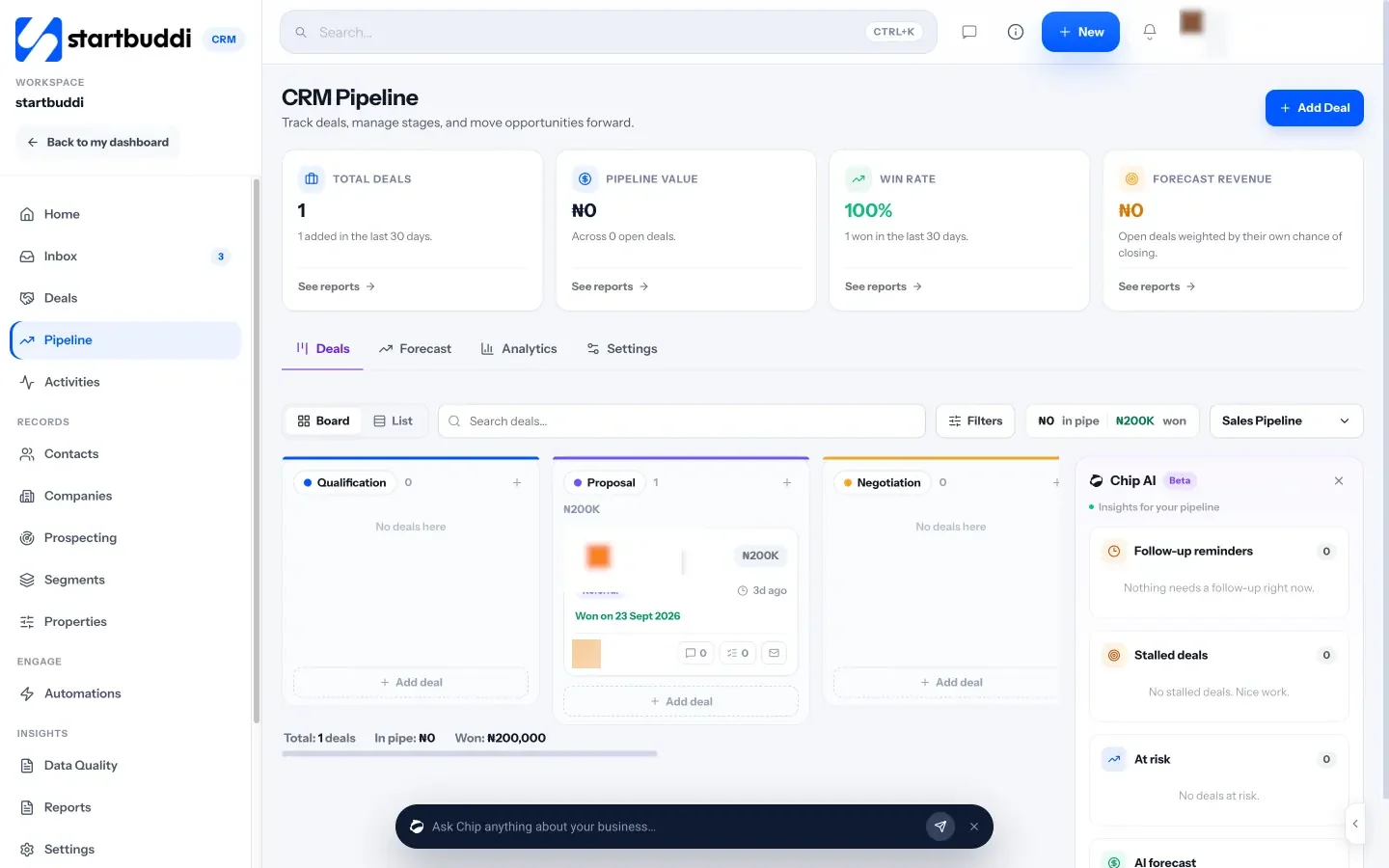
What each one looks like
Real screens, captured by us or taken from the official press kit, each dated.


Pricing side by side
List prices as each company publishes them. We never convert currencies.
startbuddi
- FreeFree
- Starter$29 a month
- Growth$79 a month
- Scale$199 a month
Zoho
- Zoho CRM FreeFree up to 3 usersSource (opens in a new tab)
- Zoho CRM Standard₹800 INR per user per month, billed annuallySource (opens in a new tab)
- Zoho CRM Professional₹1,400 INR per user per month, billed annuallySource (opens in a new tab)
- Zoho CRM Enterprise₹2,400 INR per user per month, billed annuallySource (opens in a new tab)
- Zoho CRM Ultimate₹2,600 INR per user per month, billed annuallySource (opens in a new tab)
- Zoho One All Employee₦28,490 NGN per employee per month, billed annually (every employee must be licensed)Source (opens in a new tab)
- Zoho One Flexible User₦69,300 NGN per user per month, billed annuallySource (opens in a new tab)
Switching from Zoho
What moving across involves.
- Export your data from Zoho CRMZoho CRM includes data export (the Free edition allows up to 10 exports). Export your contacts, and your leads if you keep people there, as CSV files.
- Bring it into startbuddiIn Customers → Contacts, click Import and drop in the CSV (up to 10,000 contacts at a time). Check which column goes to which field, choose whether contacts you already have are updated or left alone, then import. There is no one-click Zoho connection yet, and deals don't come across in the import, so recreate open deals in your pipeline.
- Set up your pipeline and channelsRecreate your pipeline stages in Customers → Pipeline and connect email, WhatsApp and website chat to the shared inbox.
- Rebuild workflows by handZoho workflows and custom functions don't transfer. Rebuild them in Automations, or describe one and let Chip draft it.
Sources
- Zoho CRM pricing (opens in a new tab)
- Zoho One pricing (opens in a new tab)
- startbuddi Customers (CRM) (opens in a new tab)
- startbuddi contacts and CSV import (opens in a new tab)
- startbuddi sales pipeline (opens in a new tab)
- startbuddi shared inbox (opens in a new tab)
- startbuddi email marketing (opens in a new tab)
- startbuddi forms (opens in a new tab)
- startbuddi Automations (opens in a new tab)
- startbuddi invoicing (opens in a new tab)
- startbuddi Chip & AI agents (opens in a new tab)
- startbuddi integrations (opens in a new tab)
- startbuddi pricing (opens in a new tab)
Questions people ask
Can I move from Zoho CRM to startbuddi?
Yes. Export your contacts from Zoho CRM as a CSV file and import the spreadsheet into startbuddi in Customers → Contacts. There is no one-click Zoho connection yet, and deals, workflows and templates need to be recreated.
Is startbuddi a replacement for Zoho One?
Partly. startbuddi covers CRM, marketing, pages, bookings, invoicing, projects and HR in one workspace, but it is not accounting software and has far fewer apps than Zoho One's 50+.
Does startbuddi have a free plan?
Yes. startbuddi has a Free plan for one person, and every paid plan has a 30-day trial. Zoho CRM's free edition covers 3 users.
Does startbuddi have mobile apps like Zoho?
No native apps yet. startbuddi is a web app that works in a phone's browser.
Other comparisons
All comparisons


Try startbuddi alongside Zoho.
Start on the free plan with a copy of your contacts and see how it fits before you decide.
Start with the one thing you need. The rest is there when you're ready.
Free plan available. Every paid plan starts with a 30-day trial.