How to organise your customers: from WhatsApp chats to a real pipeline
Move your customers out of WhatsApp, DMs and spreadsheets into one list, build a simple pipeline, and keep it up to date in 20 minutes a week.

This guide shows you how to organise customers when they are currently scattered across WhatsApp chats, Instagram DMs, your phone, a notebook and an old spreadsheet. It is for solo founders, freelancers, service businesses and small teams who have outgrown their memory but do not want complicated software.
Each chapter starts with the business thinking, with examples, templates and common mistakes, then shows how to do it in startbuddi. By the end you will have one customer list with the right details for each person, a simple pipeline that shows who is close to buying, and a 20-minute weekly routine that keeps it all up to date.
How to organise customers: decide what to track
- What "organised" actually means
- Why this is worth an afternoon of your time
- Why WhatsApp alone stops working
- The minimum you need to track about each customer
- Tags versus stages: a simple rule
- Leads, contacts and customers: the words explained
- One list for the whole team
- A worked example: Kemi's cleaning business
- Common mistakes when getting started
- What good looks like
- Setting up your customer list in startbuddi
If your customers currently live in WhatsApp chats, Instagram DMs, a phone contact list, a notebook and a spreadsheet you last updated in March, you are not disorganised. You are normal. Most small businesses start this way, because it is the fastest way to start. The trouble comes later, when you have enough customers that you start to forget who asked for what, who you promised to call back, and who has not bought in a while.
So how do you organise your customers? In short: put every customer in one list, decide the handful of things you need to know about each of them, give each one a clear stage (such as "new enquiry", "quote sent" or "customer"), and review that list every week so nobody slips through the cracks. This chapter covers the thinking: why it matters, and what to track. The next three chapters cover getting everyone into one list, building a simple pipeline, and keeping it alive.
What "organised" actually means
Organising your customers does not mean buying expensive software or filling in 40 fields per person. It means you can answer five questions quickly, without scrolling through chats:
- Who are my customers and potential customers? One list, not six.
- Where did each of them come from? Instagram, a referral, your website, walking past the shop.
- Where is each one up to? Just asked a question, received a quote, paid, bought three times.
- What is the next thing I need to do for each of them, and when? Send a quote on Monday, call back on Friday, check in next month.
- Who have I not spoken to in a while? Past customers who might buy again.
If you can answer those five questions in a minute, you are organised, whatever tool you use. If you cannot, you are almost certainly losing sales you have already half won.
Why this is worth an afternoon of your time
The cost of disorganisation is invisible, which is why it is easy to ignore. You never see the customer who asked for a price on a Tuesday, did not hear back, and bought from someone else on Wednesday. You never see the past client who would have booked again if you had simply checked in.
Keeping existing customers is also far cheaper than finding new ones. Research by Frederick Reichheld of Bain & Company, summarised in Harvard Business Review, found that acquiring a new customer costs five to 25 times more than keeping an existing one, and that increasing customer retention by 5 per cent increased profits by 25 to 95 per cent in the businesses studied (Harvard Business Review, The Value of Keeping the Right Customers). You cannot keep customers you have lost track of.
There is a personal benefit too. When your customer list lives in your head, you carry it everywhere: in bed, on holiday, at family events. Writing it down in one trusted place lets you stop worrying about forgetting.
Why WhatsApp alone stops working
WhatsApp is brilliant for talking to customers. It is where many of them already are, and replies are fast. But a chat app is not a customer list, and it starts to creak once you have more than a few dozen active conversations.
- Chats are sorted by the latest message, not by importance. The customer waiting for a quote drops down the list the moment your cousin sends a meme.
- Information is buried. The customer's address, budget and preferred colour are somewhere in a thread from six weeks ago.
- You cannot see the big picture. How many open quotes do you have? How much are they worth? A chat app cannot tell you.
- It lives on one phone. If a team member handles some customers, or your phone is lost, the history goes with it.
The WhatsApp Business app helps with this. It lets you add labels to chats, such as "New order" or "Pending payment", so you can filter conversations. If you are not using labels yet, start today; they are a good first step. But labels still leave your customer information inside individual chats, on one device, with no way to track values, dates or next steps. At some point you need a proper list that sits alongside your chats.
The minimum you need to track about each customer
The most common mistake when people first organise customers is to track too much. They design a spreadsheet with 30 columns, fill in five of them, and give up within a month. Start with the smallest useful set, and only add a field when you find yourself needing it.
| Field | Example | Why you need it |
|---|---|---|
| Name | Chidinma Obi | Obvious, but use their real name, not "Chidi hair client". |
| How to reach them | Phone (with country code) and email | So you can contact them on any channel, not just the one they first used. |
| Company (if a business) | Obi Events Ltd | Links several people at the same business together. |
| Source | Instagram, referral from Kemi, website form | Tells you which marketing is working. |
| Stage | Quote sent | Where they are in the buying journey (more in chapter 3). |
| Next step and date | Call to confirm date, Friday 10 Oct | The single most important field. No next step means no follow-up. |
| Value | ₦450,000 | What the job or order is worth, so you know where to focus. |
| Notes | Wants gold and white, wedding on 22 Nov | The details that make them feel remembered. |
That is eight things. For most small businesses, it is enough for the first year. You might add one or two fields that are specific to your trade: a hair salon might track "last visit" and "usual service"; a solar installer might track "roof type" and "monthly power bill"; an agency might track "monthly retainer".
Tags versus stages: a simple rule
Two ideas get muddled when people organise customers: stages and tags. Getting this right early saves a lot of tidying later.
- A stage is where someone is on their journey with you. A person is in exactly one stage at a time, and they move forward (or drop out). Example: New enquiry, then Quote sent, then Won.
- A tag is a description that can apply to many people at once, and a person can have several. Example: "Lagos", "Wedding", "VIP", "Referred by Kemi".
The rule: if it changes as they buy, it is a stage. If it describes who they are or what they like, it is a tag. Do not create a tag called "Quote sent"; that is a stage. Do not create a stage called "Lagos"; that is a tag.
Leads, contacts and customers: the words explained
Customer software is full of jargon. Here is what the common words mean in plain English, so the rest of this guide makes sense.
- Contact: any person in your list. A friend of a friend who asked a question is a contact. So is your biggest client.
- Lead: a contact who might buy but has not yet. Someone who filled in your form or asked for a price is a lead.
- Customer or client: someone who has paid you at least once.
- Company: a business you sell to. One company can have several contacts, such as the owner and the office manager.
- Deal or opportunity: a specific piece of work or order you are trying to win, with a value. One customer can have several deals over time.
- Pipeline: your list of open deals, grouped by stage, so you can see what is likely to close. Our glossary has a fuller explanation of what a sales pipeline is.
You do not need to use these words with your customers. But knowing them helps you set up any tool without getting lost.
One list for the whole team
If you work alone, your list mainly saves you from forgetting. The moment a second person talks to customers, it becomes essential. Without a shared list, two people reply to the same enquiry, or each assumes the other has, and the customer hears from nobody.
A shared list also makes holidays and sick days possible. If a team member is away, anyone can open a customer's record, read the history and pick up where they left off, instead of scrolling through someone else's phone.
A worked example: Kemi's cleaning business
Kemi is a made-up example, but her situation is typical. She runs a home and office cleaning company with four cleaners. Customers find her through Instagram, WhatsApp referrals and a flyer at a local estate. Before she organised things, her "system" was a WhatsApp Business account, her memory, and a paper diary for bookings.
She sat down for an afternoon and decided:
- Her fields: name, phone, email, address, source, stage, next step with date, value per visit, notes.
- Her stages: New enquiry, Site visit booked, Quote sent, Regular customer, One-off customer, Lost.
- Her tags: Home, Office, Estate (for the local estate), Weekly, Monthly, Deep clean.
With those decisions made, she knew exactly what to capture from every chat. The next chapter shows how she moved her existing customers into one list in a single evening.
Common mistakes when getting started
- Waiting for the perfect system. A simple list you use beats a clever one you abandon.
- Tracking too much. Every field you add is a field you must keep up to date. Start with eight.
- No "next step" field. Without it, your list is an address book, not a tool for winning work.
- Several lists. One spreadsheet for leads, another for customers, a third for your newsletter. People fall between them. Keep one list and use stages and tags to separate people.
- Keeping it on one person's phone. If more than one person talks to customers, the list must be shared.
- Forgetting privacy. You are storing personal information. Chapter 2 covers the basics of doing that responsibly.
What good looks like
By the end of this chapter you should have, on paper or in a note: the fields you will track, your stages (four to seven of them), and a starting set of tags. That is the design. Everything else in this guide is about putting it into practice.
Setting up your customer list in startbuddi
In startbuddi, customers live in Customers. It is a simple CRM (customer relationship management system, which is just a fancy name for a shared customer list with history), and it connects to your inbox, invoices, bookings and forms, so information arrives there without retyping. If you are new to the idea, our glossary explains what a CRM is.
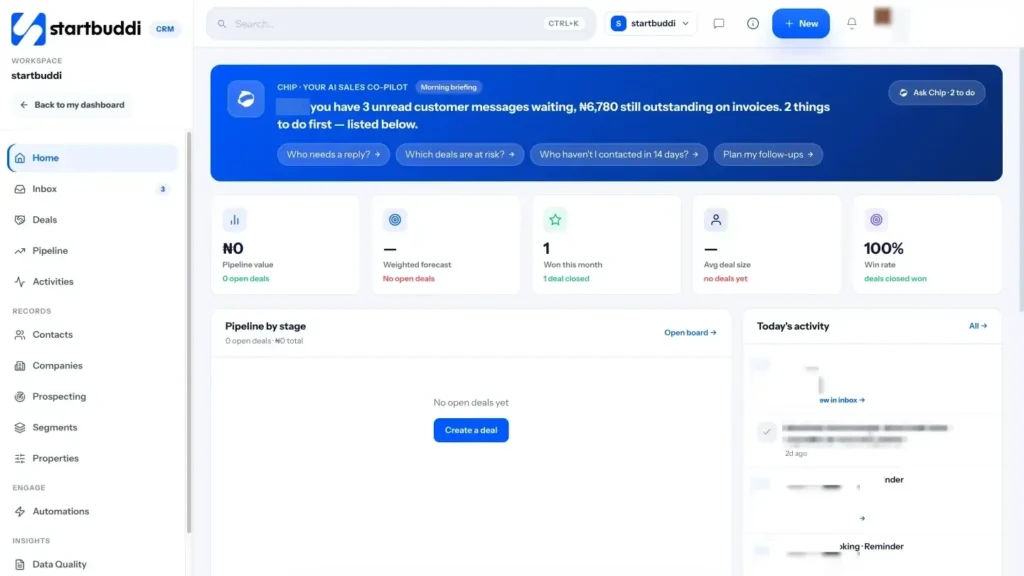
1. Start at the Customers home. Open Customers from the sidebar. The home screen opens with Chip, the AI assistant built into startbuddi, giving a one-sentence briefing: who is waiting for a reply, how many deals are open and what is owed on invoices. Below that you will find your pipeline by stage, today's activity, an inbox preview and quick actions such as Add a contact and Create a deal.
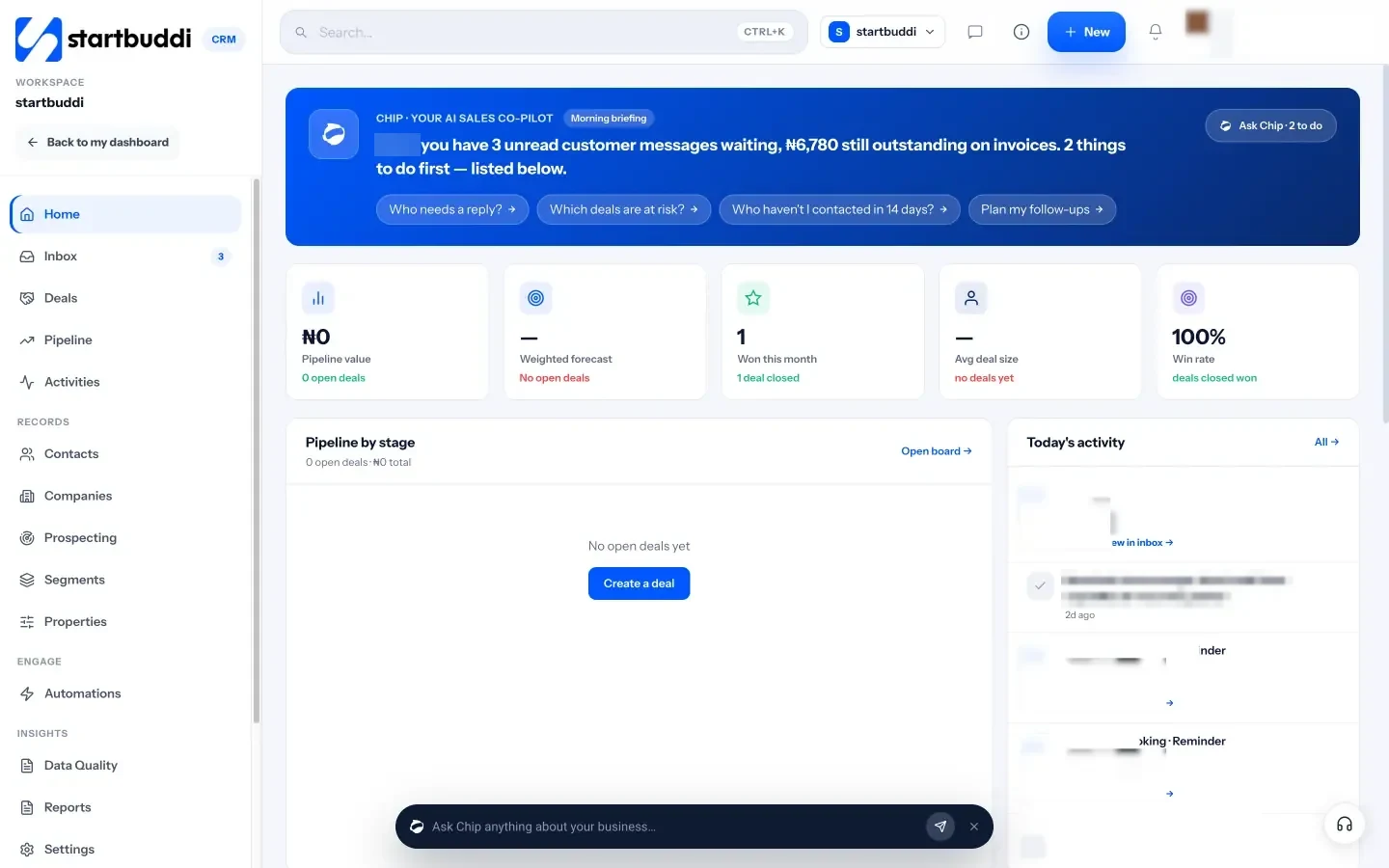
2. Look at the fields you already have. Every contact comes with built-in fields for name, email, phone, company, tags, owner, source and lead status, so most of the table above is already there. Open Properties under Records to see them all.
3. Add the fields specific to your business. In Properties, add your own fields, such as "Usual service", "Roof type" or "Monthly retainer". You can choose from types including text, number, money, date, yes or no, dropdown, multi-select, rating, email, phone, website and team member. Once a property exists, you can map a form question or a booking question to it, use it in email as a merge tag, and filter by it. Resist the temptation to add everything at once; add a few now and more when you need them.
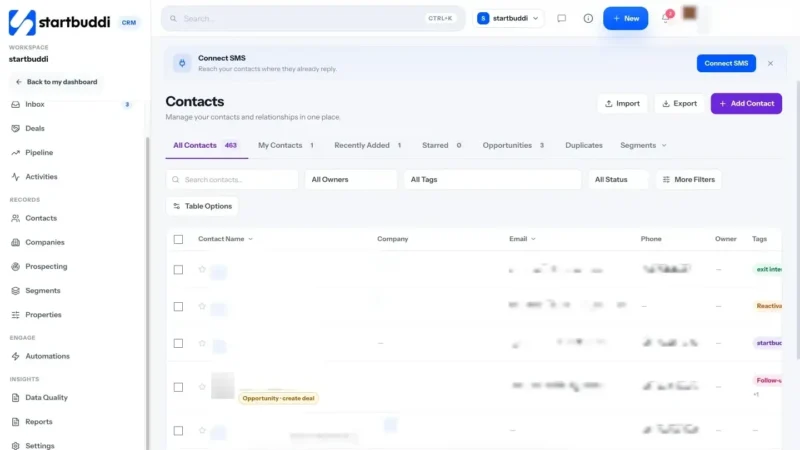
4. Check the contacts list. Open Contacts. You will see saved views (All Contacts, My Contacts, Recently Added, Starred and Opportunities) and you can switch between a table and a board view grouped by stage.

The Free plan includes up to 250 contacts, which is plenty to set up and test your system. Starter includes 2,500, Growth 15,000 and Scale 75,000. See the pricing page for everything included in each plan.
With your design decided and the basics in place, the next chapter moves your customers out of WhatsApp, your phone and your spreadsheets and into one list.
Move everyone out of WhatsApp and spreadsheets into one list
- Step 1: Make a map of where your customers are
- Step 2: Decide who makes the cut
- Step 3: Build one master spreadsheet
- Step 4: Clean the data before you import it
- Step 5: Respect privacy and consent
- Step 6: Stop the list going out of date again
- A worked example: Kemi's evening
- Common mistakes
- Special cases you will probably meet
- What good looks like
- Importing your customers into startbuddi
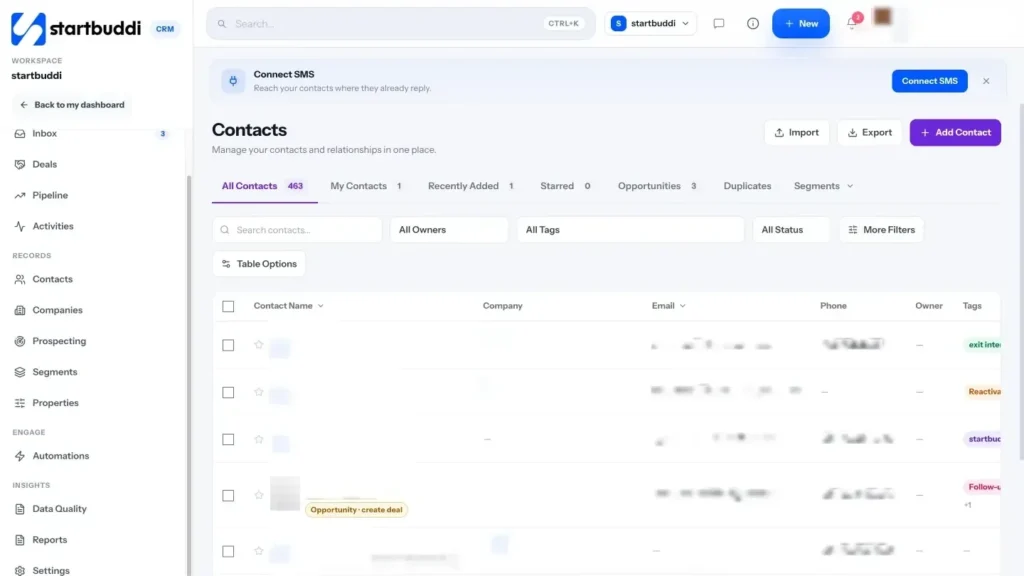
You know what you want to track. Now comes the part most people put off: getting every customer out of WhatsApp, Instagram, your phone, old spreadsheets and paper, and into one list. It sounds like a week of work. In practice, most small businesses can do the bulk of it in one focused evening, as long as they follow a plan and do not try to make it perfect first time.
Step 1: Make a map of where your customers are
Before you move anything, list every place customer details currently live. Be honest; include the scraps. A typical list looks like this:
- WhatsApp Business chats (and maybe a personal WhatsApp too)
- Instagram and Facebook direct messages
- Your phone's contact list, or Google Contacts
- Email inbox
- A spreadsheet or two, often out of date
- A notebook or order book
- Your bank statements (people who have paid you)
- Your accounting or invoice tool, if you use one
Next to each, write roughly how many customers are in it, and whether they are current (spoken to in the last three months) or old. This tells you where to start: usually with the source that holds the most current customers.
Step 2: Decide who makes the cut
You do not have to import everyone you have ever spoken to. A clean list of 150 real customers and warm leads is far more useful than 2,000 names you do not recognise. A simple rule:
- Import: anyone who has paid you, anyone with an open enquiry or quote, and anyone who asked to hear from you.
- Consider: people who enquired in the last year but did not buy. They are worth keeping as leads if you have a reason to follow up.
- Leave out: random numbers, wrong numbers, suppliers (unless you want them in a separate group), family and friends.
Step 3: Build one master spreadsheet
The easiest way to combine lots of sources is to gather everything into one spreadsheet first, then import that single file. Use the fields you chose in chapter 1 as column headings. Here is a template:
| First name | Last name | Phone | Company | Source | Stage | Tags | Notes | |
|---|---|---|---|---|---|---|---|---|
| Chidinma | Obi | +2348030000000 | chidinma@example.com | Obi Events Ltd | Quote sent | Wedding; Lagos | Wedding 22 Nov, gold and white | |
| David | Mensah | +233240000000 | Referral | Customer | Office; Monthly | Invoice to accounts team |
Then fill it from each source in turn:
- Phone or Google Contacts: most phones sync contacts to a Google or Apple account. From Google Contacts you can export your contacts as a Google CSV file, which opens in any spreadsheet (Google Contacts help, export contacts). Delete the rows for people who are not customers.
- WhatsApp: there is no one-click export of customers from WhatsApp. Work through your chats, starting with the most recent, and add each customer's name, number and any key details to the sheet. If you use labels in WhatsApp Business, filter by label to speed this up. It is tedious but it is also useful: you will spot people who are waiting on you.
- Instagram and Facebook DMs: same approach. Ask current enquirers for a phone number or email if you do not have one; a handle alone is fragile.
- Old spreadsheets: copy and paste into your master sheet, then rename columns to match.
- Notebooks and order books: type up the customers from the last 12 months. Leave older ones unless they were regulars.
Step 4: Clean the data before you import it
Ten minutes of cleaning saves hours of confusion later. Go through the sheet and fix these common problems:
- Phone numbers without country codes. Write every number in international format, such as +234 for Nigeria, +233 for Ghana, +254 for Kenya, +44 for the UK. Numbers starting with 0 cause trouble later when you try to message them.
- Duplicates. The same person saved as "Chidi", "Chidinma Obi" and "Chidi Events". Sort by phone number and email to find them, then merge into one row.
- Names in the wrong column. "Mrs Ade (fabric lady)" should become first name "Ade", with "Fabric" as a tag.
- Several people in one row. Split them. Each person gets their own row; if they work at the same business, give them the same company name.
- Mixed-up stages. Use exactly the stage names you chose. "Quote sent", "quote sent" and "Sent quote" will become three different things.
- Emails with typos. Look for obvious mistakes such as "gmial.com" or missing dots. A wrong email means your invoices and receipts never arrive.
- Tags crammed into notes. If you wrote "VIP, Lagos, weekly" in the notes column, move those words into the tags column, separated the same way every time.
Before you import, save a copy of the cleaned file with the date in its name, such as "customers-2026-10-02.csv". If anything goes wrong, you can start again from a known good version.
Step 5: Respect privacy and consent
A customer list is personal data, and most countries have rules about how you collect, store and use it. You do not need to be a lawyer to get the basics right, but you do need to take them seriously.
In Nigeria, the Nigeria Data Protection Act 2023 applies, overseen by the Nigeria Data Protection Commission. In the UK, the UK GDPR applies, and the Information Commissioner's Office explains the six lawful bases for using personal data, including consent, contract and legitimate interests (ICO, a guide to lawful basis). Similar laws exist across Africa, Europe and beyond.
In practice, for a small business, that means:
- Only keep what you need to serve the customer.
- Keep it secure: not in a spreadsheet emailed around, and not on a shared phone without a lock.
- Keep a note of whether each person has agreed to receive marketing. A customer who asked for a quote has not automatically agreed to your weekly newsletter.
- If someone asks you to delete their details or stop messaging them, do it.
This is general information, not legal advice. Check the rules that apply where you and your customers are, and ask a professional if you are unsure.
Step 6: Stop the list going out of date again
Importing once is the easy part. The real win is making sure new customers land in your list automatically, so you never have to do this big clean-up again. The best ways:
- A form on your website or link in bio, so enquiries arrive with name, email and phone already filled in.
- Online booking, so everyone who books becomes a contact.
- A shared inbox that connects WhatsApp, email and website chat to your customer list.
- A habit: any customer who reaches you another way (a phone call, a walk-in) gets added the same day.
A worked example: Kemi's evening
Kemi, the cleaning business owner from chapter 1, blocked out a Thursday evening. She exported her Google Contacts and deleted everyone who was not a customer, leaving 90 rows. She then scrolled through her WhatsApp Business chats from the last six months and added 40 more people, with notes on what each had asked for. Her old booking diary gave her 15 regular customers who were missing from both. After sorting by phone number, she found 12 duplicates and merged them.
She ended with about 130 clean rows, each with a stage and at least one tag. Along the way she found three people who had asked for a quote weeks ago and never heard back. She messaged them that night, and one booked a deep clean the following week. Finding forgotten leads like this is a common side effect of a first clean-up.
Common mistakes
- Trying to import everything at once, unchecked. Clean first, then import.
- Keeping the old list "just in case" and updating both. After you import, stop using the old spreadsheet. Two lists always drift apart.
- Adding people to marketing without asking. Keep customers and marketing consent separate.
- Losing the source. Record where each person came from while you still remember.
Special cases you will probably meet
Customers split across a business and a personal WhatsApp. Many owners started selling from their personal number and later moved to WhatsApp Business. Go through both. Then tell regular customers which number to use from now on, and put that number on your invoices, your link in bio and your Google listing, so new messages arrive in one place.
Several team members with their own phones. Ask each person to fill in the same master spreadsheet from their own chats, using the same columns and stage names. Add a column for "Owner" so you know who has the relationship. Merge duplicates at the end, because two staff often serve the same customer.
Customers you only know by first name. Import them anyway, with whatever you have, and add a tag such as "Needs details". Next time they get in touch, ask for their full name and email ("so I can send your receipt") and complete the record.
Business customers with several contacts. Add each person separately and give them the same company name. That way you can see everyone at a business together, and you know who to send quotes to and who approves invoices.
People who owe you money. Mark them clearly while you are importing, with a note of what they owe and since when. They are the first people to follow up once your list is live.
What good looks like
At the end of this chapter, you should have one list that includes every current customer and open lead, with a phone number in international format, a stage and a source for each person. Your old spreadsheets should be archived, not updated. And every new enquiry, from any channel, should have an obvious route into that one list.
Importing your customers into startbuddi
Once your master spreadsheet is clean, getting it into Contacts & companies takes a few minutes. For a detailed walkthrough, see the help article on how to import contacts.
1. Save your spreadsheet as CSV. In Google Sheets or Excel, save or download the file as CSV (comma-separated values). The importer accepts CSV files only.
2. Start the import. Open Customers, go to Contacts and click Import. Drop your CSV into the box or choose the file. You can import up to 10,000 contacts at a time.
3. Map your columns. The importer shows each column in your file, its first value, and where it will go. Match them up, and choose "Don't import" for any column you do not need. If you created custom properties in chapter 1, they appear here too.
4. Decide what happens to duplicates. If someone is already in your contacts, you can choose to update them or leave them alone. You can also add everyone in this file to a group, give them all a tag (for example "Imported from WhatsApp"), and add a note to every contact.
5. Import and check. Click import, then look through the list. The See past imports link shows the history of each import, including rows that were duplicates, failed or skipped. (Import history is visible to admins.)
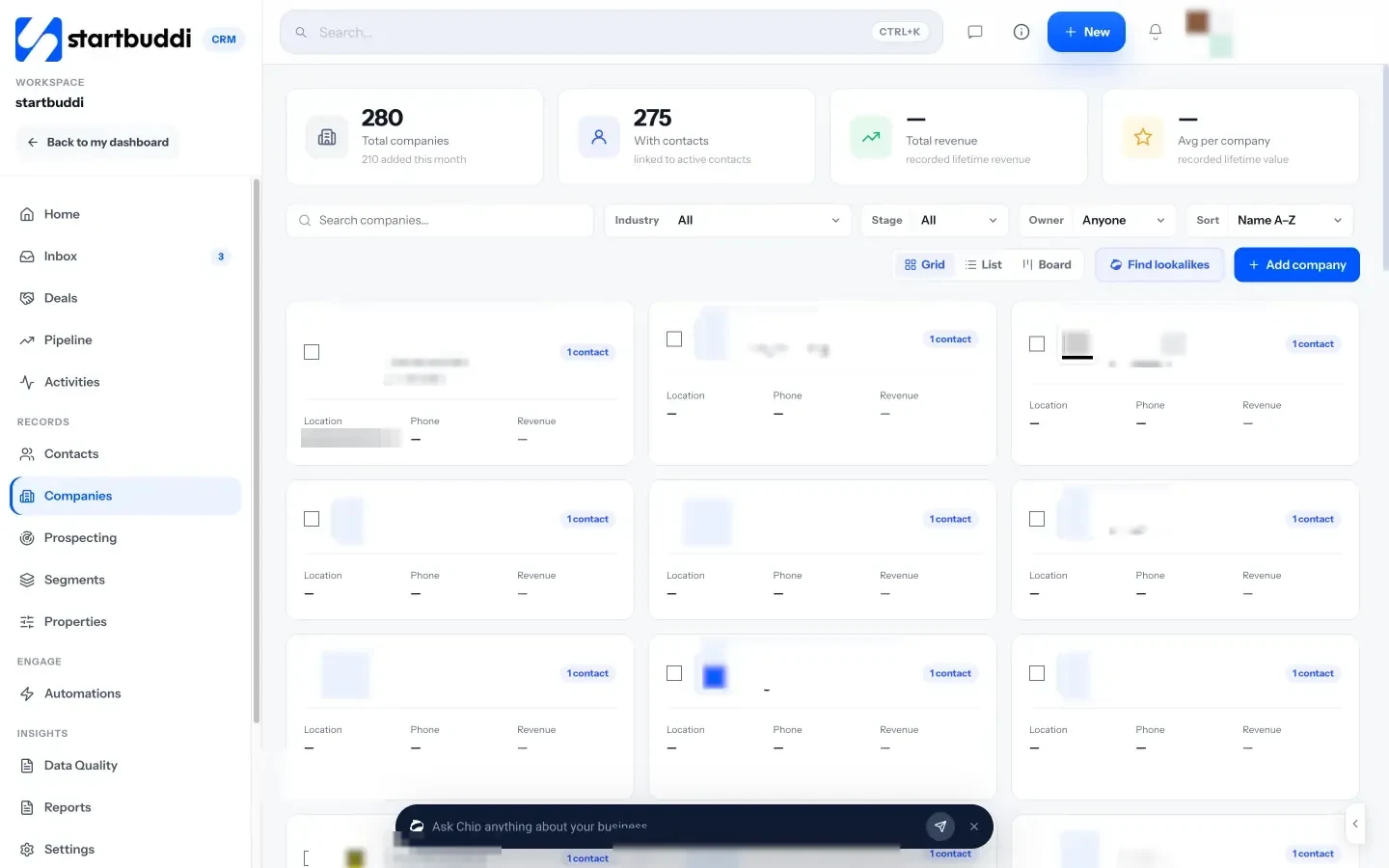
6. Add businesses as companies. If you sell to businesses, open Companies and click Add company. Start with the website address; the app tries to find the logo and details for you, and you can edit anything it fills in. Companies also appear automatically when you set a company on a contact.
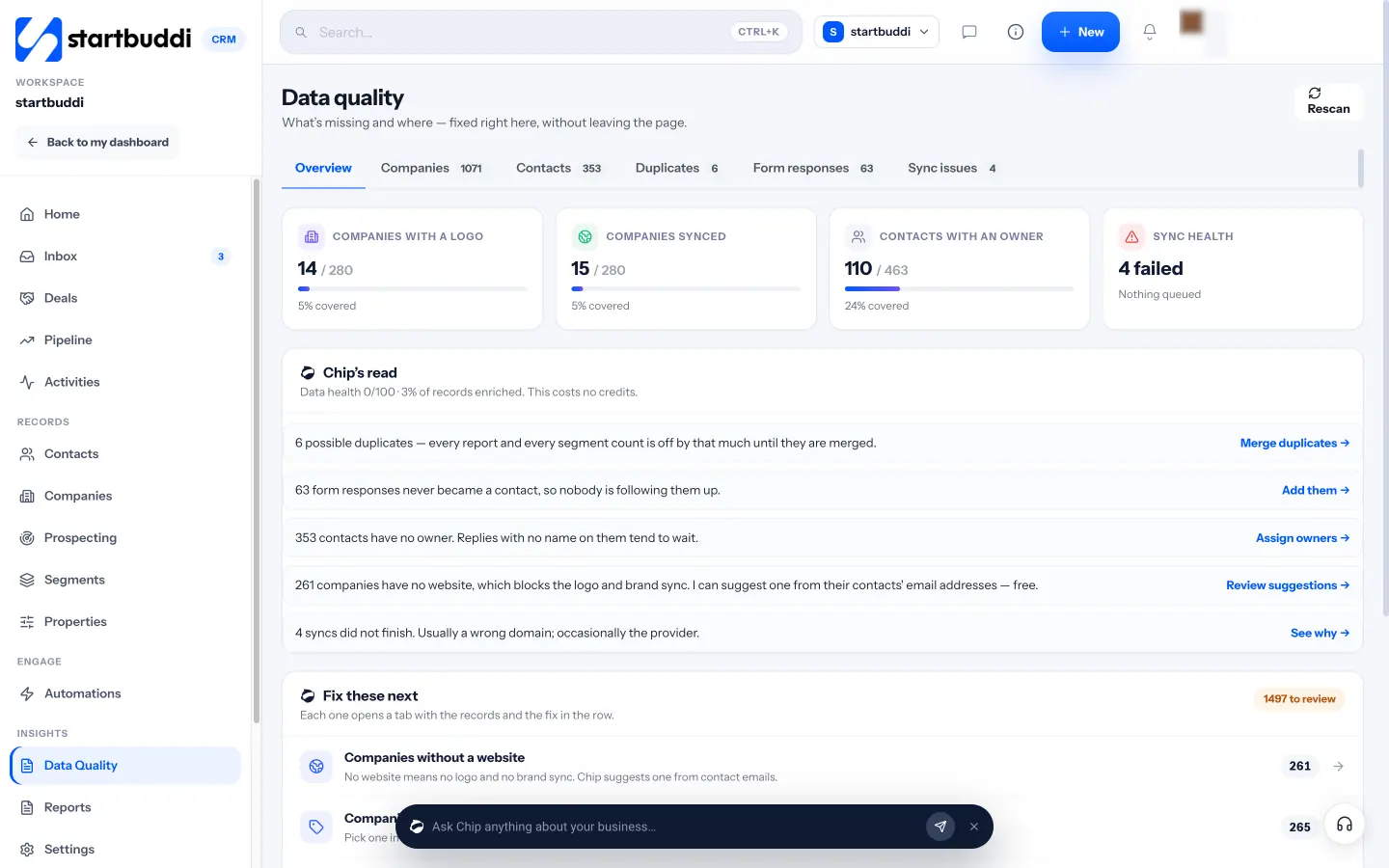
7. Tidy up with Data Quality. Under Insights, open Data Quality. It shows what is missing and where, and lets you fix it on the spot: contacts without an owner, companies without a website or industry, possible duplicate contacts, and form responses that are not yet in your contacts. For duplicates, it matches on the same email, phone, or name and company, and lets you merge them and keep the fullest record.
8. Let new customers add themselves. From now on, contacts are created from your forms, bookings, website chat and marketing sign-ups, so your list stays current without retyping. For one-off additions, use Add Contact: a name, an email or a phone number is enough to start.
Your customers are now in one place. The next chapter turns that list into a pipeline, so you can see at a glance who is close to buying and what to do next.
Build a simple pipeline that shows who is ready to buy
- What a pipeline is, in plain words
- Design stages around what the customer does
- Example pipelines for different businesses
- Put a value and a date on every deal
- Always record why deals are lost
- Qualify early, and politely
- Contacts, deals and stages: how they fit together
- How often to update your pipeline
- A worked example: Kemi's board on a Monday
- Common pipeline mistakes
- What good looks like
- Building your pipeline in startbuddi
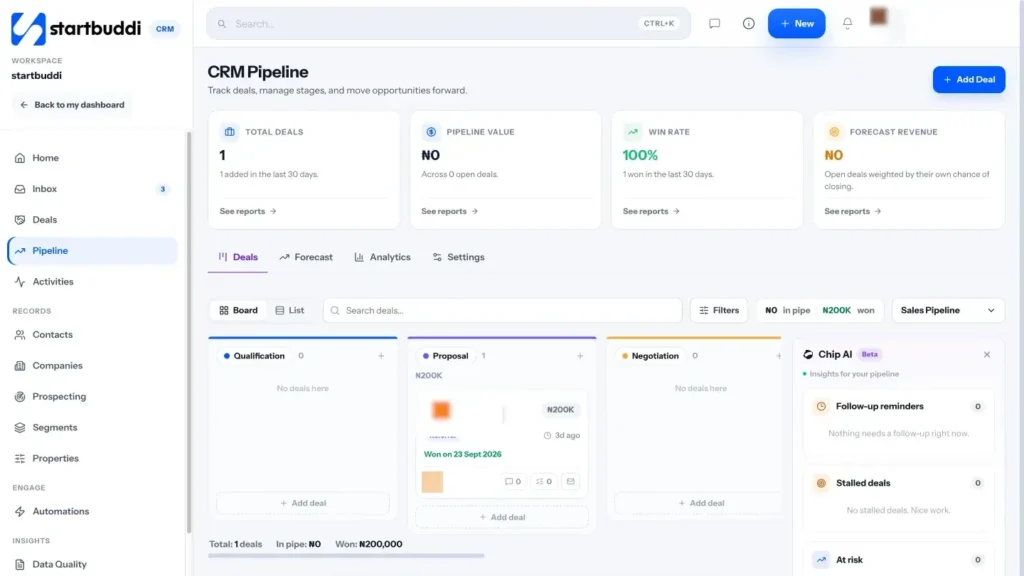
A list of customers tells you who you know. A pipeline tells you what is about to happen: who is close to buying, who is stuck, and how much money is likely to come in over the next few weeks. It is the step that turns a tidy address book into something that helps you win work. This chapter explains how to design a pipeline that fits a small business, with example stages for different trades, and then shows you how to set it up in startbuddi.
What a pipeline is, in plain words
A pipeline is a set of columns, one for each step a customer goes through from first contact to paying you. Each potential sale (a "deal") sits as a card in one column. As the customer moves forward, you move the card along. At any moment you can look across the board and see how many deals are at each step and what they are worth.
That is all it is. The value comes from three things it makes obvious that chats and spreadsheets hide:
- What needs doing next. A card in "Quote sent" for ten days needs a follow-up.
- Where deals get stuck. If most deals die between "Site visit" and "Quote sent", your quoting is too slow.
- What is coming. The total value in your later stages is a rough forecast of next month's income.
Design stages around what the customer does
The most useful rule for pipeline stages is this: each stage should be defined by something the customer has done, not something you hope. "Interested" is a feeling. "Asked for a quote" is a fact. Facts make it obvious where a card belongs, and they stop the pipeline filling with wishful thinking.
Keep it short. Four to seven stages is enough for almost any small business. Every stage you add is another decision to make each time you update a card.
Here is a general-purpose pipeline that works for many service businesses:
| Stage | A card moves here when… | Your next step |
|---|---|---|
| New enquiry | Someone asks a question or fills in your form | Reply the same day and ask what they need |
| Qualified | You know they have a real need, a rough budget and a timeframe | Book a call or visit, or prepare a quote |
| Quote sent | They have your price in writing | Follow up in 2 to 3 days |
| Negotiation | They have come back with questions or changes | Answer quickly and agree final terms |
| Won | They say yes (ideally with a deposit paid) | Send the invoice and start the work |
| Lost | They say no, or go silent after several follow-ups | Record why, and add a reminder to check in later |
Example pipelines for different businesses
Your stages should use your words. Here are a few examples to borrow from.
A cleaning or trades business (like Kemi's from the earlier chapters): New enquiry, Site visit booked, Quote sent, Booked, Regular customer, Lost.
A design or marketing freelancer: New enquiry, Discovery call, Proposal sent, Deposit paid, Lost.
An events or wedding business: Enquiry, Date checked, Quote sent, Contract signed, Deposit paid, Event done, Lost.
A solar installer: Enquiry, Energy assessment, Quote sent, Financing agreed, Installation booked, Installed, Lost.
An online shop with bigger orders (wholesale or custom work): Enquiry, Samples sent, Order confirmed, Paid, Delivered, Lost.
Notice that a customer can move through the pipeline more than once. When Kemi's regular client asks for an extra deep clean before Christmas, that is a new deal in the same pipeline, attached to the same contact.
Put a value and a date on every deal
A deal card with no value and no date is just a name. Two small additions make the whole board useful:
- Value: your best estimate of what the deal is worth. If you have sent a quote, use the quote. If not, use your typical job size. It does not need to be perfect.
- Expected close date: when you think they will decide. This lets you sort by what is closing soon and spot deals that have gone past their date.
With values in place, you can add up each column. If the "Quote sent" column is worth ₦2 million and roughly one in three quotes turns into a job for you, you can expect roughly ₦660,000 from those quotes. That is a simple forecast, and it is far more useful than a guess.
Always record why deals are lost
Lost deals are some of the most useful information you have, and many businesses throw it away. When a deal is lost, write one line on why: "Price too high", "Went with a cheaper supplier", "Timing, maybe next year", "No reply after three follow-ups". After a few months, patterns appear. If "price" keeps coming up, you might need to explain your value better, or you might be targeting the wrong customers. If "no reply" is the most common reason, your follow-up needs work (chapter 4).
Also, "lost" is often "not now". A customer who could not afford you in March might be ready in September. Add a reminder to check in, and treat them as a warm lead later.
Qualify early, and politely
Not every enquiry is a real opportunity, and chasing poor-fit leads takes time from good ones. Qualifying just means asking a few questions early to see if there is a fit. A simple version for small businesses:
- Need: what exactly are they looking for?
- Budget: have they got a rough figure in mind? (Offering a price range helps.)
- Timing: when do they need it?
- Decision: are they the person who decides, or is someone else involved?
You can ask these naturally in a chat: "Happy to help! So I can give you an accurate price, roughly how big is the space, and when would you like us to start?" Customers usually appreciate it, because it shows you are taking their request seriously. For a structured way to rank leads, see our post on lead scoring for small businesses.
Contacts, deals and stages: how they fit together
It helps to be clear about the difference between a contact's status and a deal's stage, because many tools have both.
- A contact is the person. Their status describes the relationship overall: new lead, customer, past customer.
- A deal is one specific thing they might buy. Its stage describes how close that one sale is.
One contact can have several deals, some won and some open. A company that hired you for a website last year and is now asking about a logo is a customer (the contact) with a new open deal (the logo) in your pipeline. Keeping these separate means your pipeline only ever shows live opportunities, while your contact list shows everyone.
How often to update your pipeline
A pipeline is only as useful as it is current. The simplest routine has two parts.
- As things happen: when a customer books, accepts, pays or says no, move the card straight away. It takes seconds if you do it at the time, and minutes of detective work if you leave it.
- Once a week: look at every open card. Does it have a next step and a date? Has it sat still for more than a week or two? If so, follow up, or mark it lost with a reason.
If a tool can move cards for you based on real events, such as a reply or a paid invoice, let it. The fewer manual updates you need, the more likely the board stays true.
A worked example: Kemi's board on a Monday
On Monday morning, Kemi opens her pipeline. There are six new enquiries from the weekend, three site visits booked for this week, five quotes sent and two in negotiation. She sees at a glance that two of the quotes were sent more than a week ago with no reply, so she messages both. One of the new enquiries is for a large office, so she moves it straight to "Qualified" after a quick call and books a visit. By 9:30 she knows exactly what her week looks like, and nobody has been forgotten. (Kemi is a made-up example, but a Monday review like this is a habit worth copying.)
Common pipeline mistakes
- Too many stages. If you hesitate about which column a card belongs in, merge stages.
- Stages based on your actions, not theirs. "Called them" is not progress; "they booked a visit" is.
- Cards that never move. A deal in the same stage for a month is either lost or needs a push. Decide which.
- No value on deals. Without values, you cannot tell a small job from a big one or forecast anything.
- Deleting lost deals. Mark them lost with a reason instead.
- Several pipelines too early. Start with one. Add a second only if you sell something with a genuinely different process, such as one-off jobs versus monthly contracts.
What good looks like
A healthy pipeline has every open deal in a column, each with a value, an expected close date and a clear next step. Cards move every week. You review it at the same time each week, and you can tell someone roughly how much work is likely to come in next month.
Building your pipeline in startbuddi
The sales pipeline in Customers is a board of stages you can drag deals across, connected to your contacts, inbox and invoices.
1. Open the Pipeline. In Customers, click Pipeline. You get a board with default stages (New Leads, Qualified, Proposal Sent, Negotiation, Won and Lost), which match the general-purpose pipeline above. Tabs across the top give you the Deals board or list, a Forecast view, Analytics and Settings.
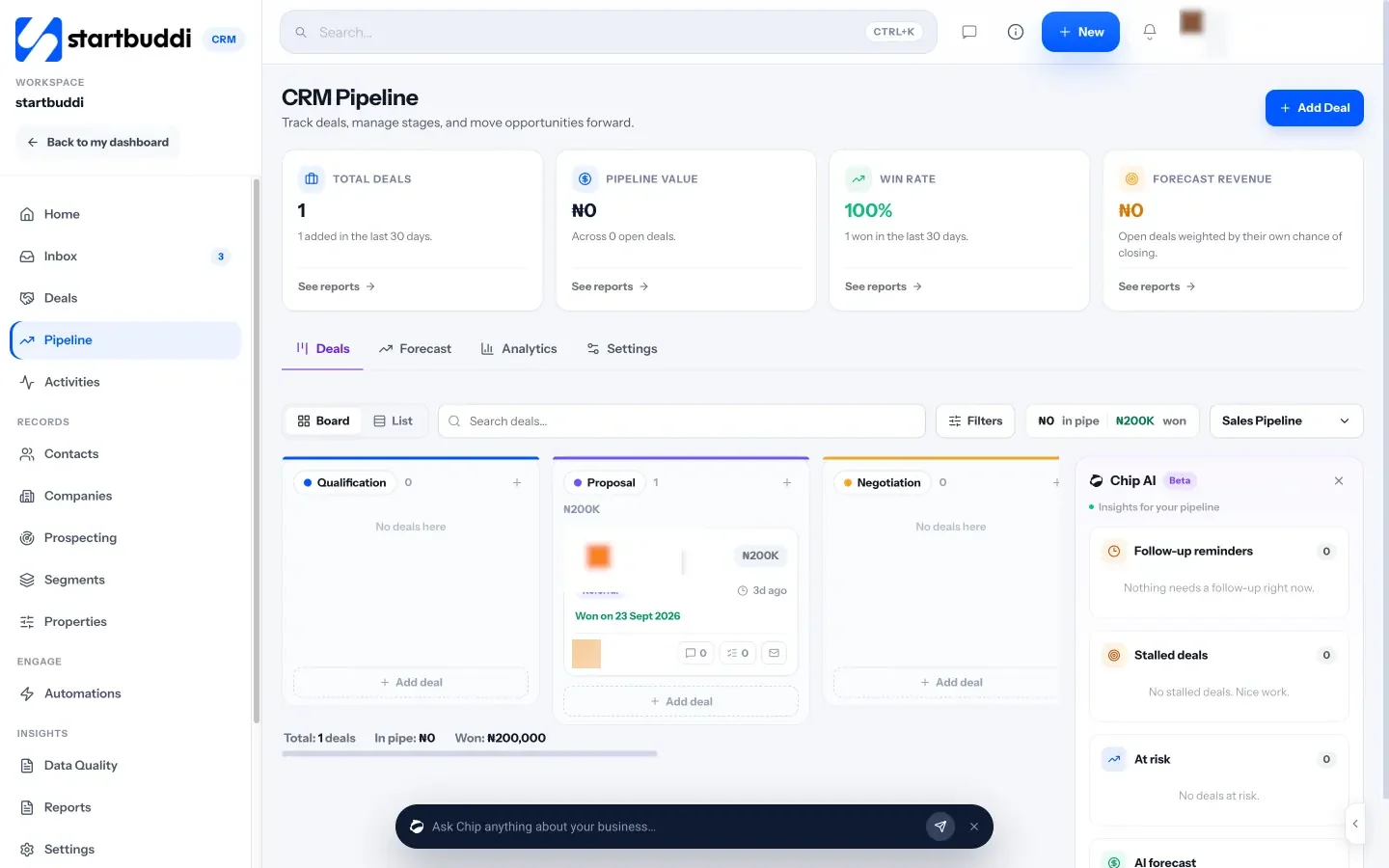
2. Rename stages to your words. Double-click a stage title to rename it, for example "Proposal Sent" to "Quote sent" or "Site visit booked". Removing a stage takes the column off the board, but the deals in it are never deleted with it. For a bigger redesign, open Manage Pipelines and use the Stage Builder, where each stage can have its own colour.
3. Add your first deals. Click Add Deal. Give it a name (for example "Office deep clean, Obi Events"), pick the contact, enter the value, choose the stage and set an expected close date. You can add a company, an owner, a probability, tags and notes too. Go through your open quotes and enquiries from chapter 2 and add a deal for each.
4. Move deals as things happen. Drag a card to the next column when the customer takes the next step. When a deal is decided, use Mark as won or Mark as lost, and add a reason such as budget, timing or went with a competitor. In the pipeline settings you can require a reason whenever a deal is marked lost, which builds the habit for you.
5. Let the pipeline update itself where it can. In the pipeline settings there is an option to keep the board current automatically. As the app explains, when a contact replies, their deal moves out of the first stage, and when an invoice on a deal is paid, the deal is marked won. Every move is written to the deal's history with the reason, so you can always see why something moved.
6. Use the Deals page for a list view. Deals shows the same deals as a board, table or list, with totals for pipeline value, open deals, won this month and win rate. Filters let you find deals by owner, stage, value, or those closing in the next 7, 30 or 90 days, or past their close date.
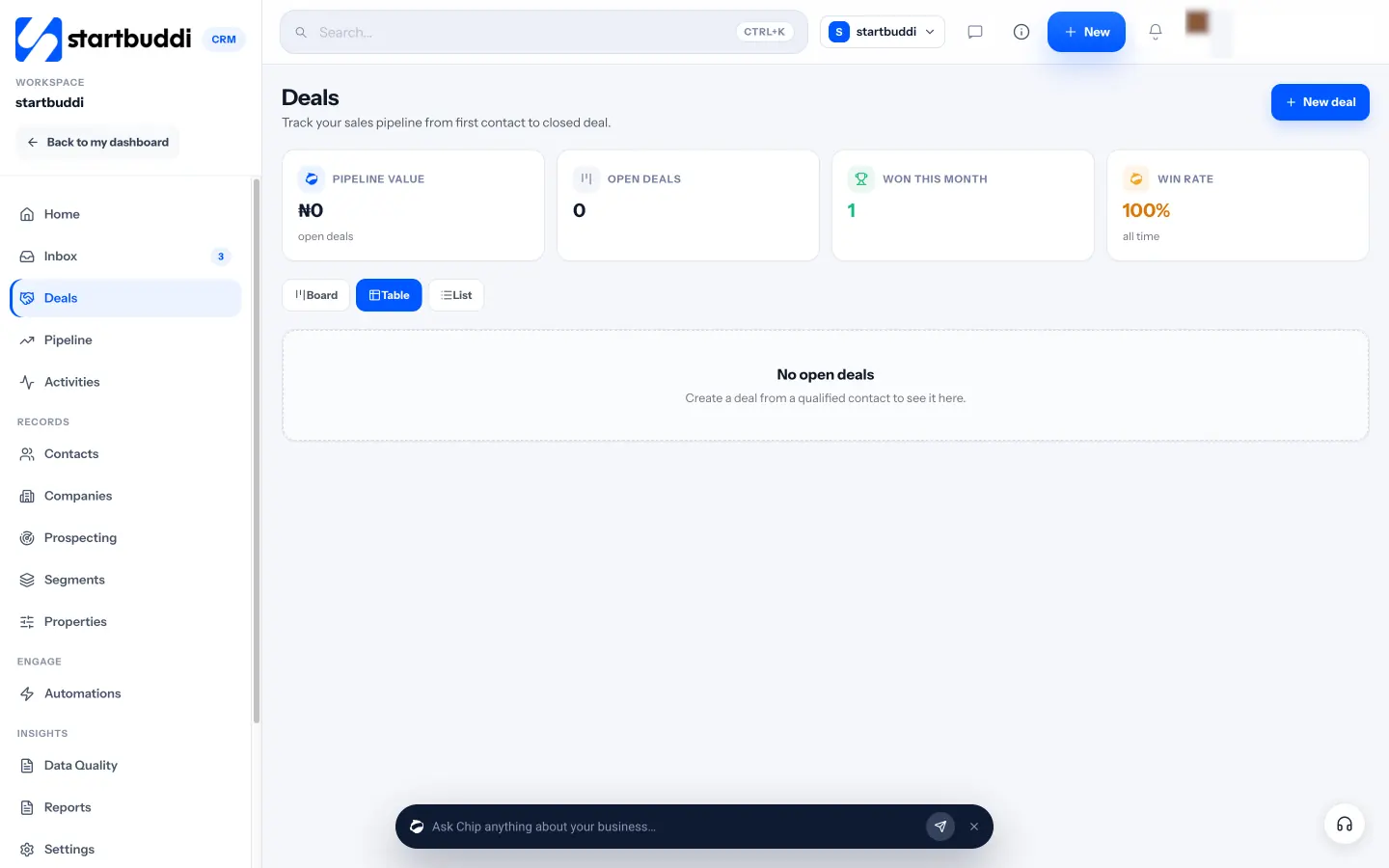
7. Check the Forecast tab. The Forecast tab shows forecast revenue, win rate, open deals, a weighted pipeline by stage and the deals likely to close soon. It is a quick answer to "how is next month looking?". Chip also flags deals to look at, such as ones that have stalled, and suggests moving a deal to the next stage, which you can accept or put aside.
Deals and the pipeline are included with Customers. When you win a deal, you can go straight to invoicing it, which our guide on how to send your first invoice covers step by step. The final chapter is about keeping all of this alive week after week.
Keep it alive: one inbox, clear next steps and a weekly review
- The three habits that keep a customer system alive
- Habit 1: bring conversations into one inbox
- Habit 2: always set a next step
- Save replies you type again and again
- Don't forget your existing customers
- Groups that keep themselves up to date
- Habit 3: the 20-minute weekly review
- A worked example: Kemi, three months on
- Common mistakes that kill a customer system
- What good looks like
- Keeping it alive in startbuddi
- Your next step
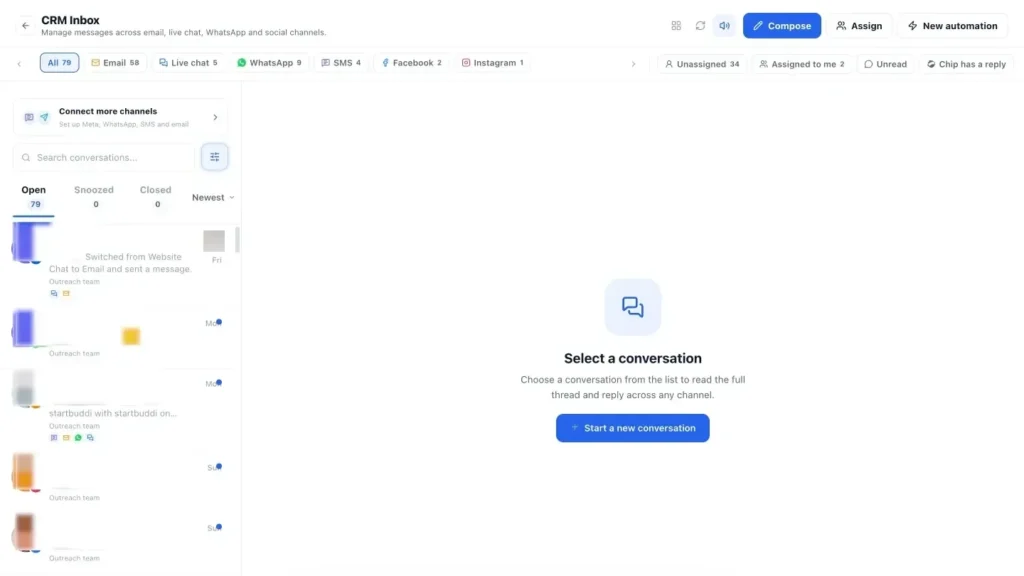
Setting up a customer list and a pipeline is a good afternoon's work. Keeping them useful for the next year is where most businesses slip. Within a few weeks the list stops being updated, conversations drift back into scattered chats, and the pipeline becomes a museum of old deals. This chapter is about the habits and simple systems that stop that happening: fast replies, follow-ups that happen on time, groups that keep themselves up to date, and a weekly review that takes about 20 minutes.
The three habits that keep a customer system alive
You do not need discipline for everything. You need three habits, and a tool that makes each of them easy.
- Every conversation lands in one place. If messages arrive in five apps, your list will always be behind. Bring them together.
- Every open conversation has a next step. After each reply, ask: what happens next, and when? Write it down.
- Once a week, you look at the whole picture. Twenty minutes to catch anything that slipped.
The rest of this chapter takes each habit in turn.
Habit 1: bring conversations into one inbox
Most small businesses talk to customers on at least three channels: WhatsApp, email and Instagram, often with a phone call or website chat on top. When each channel lives in a different app, nobody can see the full story, and replies depend on who happens to check which app.
A shared inbox pulls these channels into one list of conversations, each linked to the customer's record. The benefits are simple but large:
- You see every unanswered message in one place, whatever the channel.
- When a customer emails after chatting on WhatsApp, you see both in their history.
- More than one person can handle messages without stepping on each other.
- Notes you add while replying end up on the customer's record automatically.
Fast replies matter. When someone asks a question and waits hours for an answer, they often ask someone else too. Aim to reply to every new enquiry the same working day, even if the reply is "Thanks! I will send a full quote by tomorrow midday."
Habit 2: always set a next step
The single field that keeps a pipeline moving is "next step and date". Every open deal and every warm lead should have one. It can be tiny: "Send photos of past work, Tuesday", "Call to check they received the quote, Thursday", "Check in after their holiday, 15 November".
Here is a simple follow-up rhythm for new leads that you can adapt:
| When | What to do | Example message |
|---|---|---|
| Same day | Reply and ask one qualifying question | "Thanks for asking! How many rooms is it, and when were you hoping to start?" |
| 2 to 3 days after a quote | Check it arrived and offer to answer questions | "Just checking the quote reached you. Happy to talk it through if useful." |
| A week after a quote | Add something useful, not just "any news?" | "Here are some before-and-after photos from a similar office we cleaned last month." |
| Two weeks after a quote | Ask directly, and make it easy to say no | "Should I keep this date free for you, or has the plan changed? Either is fine." |
| After that | Mark lost with a reason, set a reminder for later | Check back in three months. |
The "make it easy to say no" message is worth highlighting. People who have gone quiet often feel awkward about telling you they chose someone else. Giving them permission to say so gets you an answer, and an answer is better than silence. Our post on how to follow up with leads without being pushy has more examples.
Save replies you type again and again
Look at your last 30 customer conversations and you will notice the same questions coming up: prices, availability, location, how to pay, how long a job takes. Writing the answer fresh every time is slow, and the quality varies depending on how busy you are.
Write your best answer to each common question once, and save it as a ready-made reply. The WhatsApp Business app and most shared inboxes let you do this. Good saved replies:
- Answer the question in the first line.
- End with a question that moves things forward, such as "Which day suits you?"
- Leave space to add the customer's name and one personal detail before sending.
Saved replies make fast responses possible without sounding like a robot, which helps the first habit and the second at the same time.
Don't forget your existing customers
Most follow-up advice is about new leads, but your existing customers are usually where the easiest revenue sits. They already trust you. A few habits that help:
- A check-in after the job. A week after you finish, ask if everything is working well. It catches problems early and opens the door to more work.
- Ask for a review or referral when they are happy, not months later.
- Remember the timing of repeat needs. If a client books a deep clean every quarter, or needs their website renewed every year, set a reminder a few weeks before.
- Look at who has gone quiet. Past customers who have not bought in six months are worth a friendly message.
For new clients, a proper welcome makes a big difference to how long they stay. See the client onboarding checklist for a step-by-step version.
Groups that keep themselves up to date
Once your customers are tagged and staged, you can create groups (often called segments) based on rules, such as "customers in Lagos who have not bought in 90 days" or "leads from Instagram with a quote sent". The best groups update themselves as your data changes, so you never maintain the list by hand.
Useful groups for most small businesses:
- Waiting on me: open deals with a next step date in the past.
- Quiet customers: paid before, no contact in 90 days.
- Hot leads: recent enquiries with a quote sent.
- VIPs: your top customers by value, who deserve a personal touch.
- By location or service: useful when you run an offer in one area or for one service.
Groups are also how you send the right message to the right people. If you want to email only your office customers about a new service, a group makes that one click, as long as they have agreed to receive marketing (see chapter 2).
Habit 3: the 20-minute weekly review
Put a recurring 20-minute slot in your calendar, the same day each week. Monday morning or Friday afternoon both work. Then run through this list:
- Inbox: is anyone waiting for a reply? Answer or set a next step.
- New contacts: check everyone added this week has a stage, a source and, if relevant, a deal.
- Pipeline: look at every open deal. Any without a next step? Any stuck for more than two weeks? Follow up or mark lost with a reason.
- Quiet customers: pick three past customers you have not heard from, and send each a personal message.
- Numbers: glance at how many new leads came in, how many deals you won, and where they came from.
That last step is where the system starts paying you back. After a couple of months you will know which channels bring your best customers, which stage most deals get stuck at, and what your typical win rate is. Those are the facts you need to decide where to spend your limited time.
A worked example: Kemi, three months on
Three months after her first clean-up, Kemi's routine looks like this. Messages from WhatsApp, Instagram and her website chat all land in one inbox, which she and her assistant share. Every enquiry becomes a contact automatically, and quotes become deals. On Monday mornings she spends 20 minutes on her review. Her pipeline tells her that most of her office clients come from referrals, while Instagram brings mostly one-off home cleans, so she has started asking happy office clients for introductions. (Kemi is a made-up example, but each of these steps is something you can copy.)
Common mistakes that kill a customer system
- Letting one channel escape. If Instagram DMs are handled outside your system, those customers slowly disappear from your view.
- Skipping the weekly review. It is the habit that catches everything else. Protect the slot.
- Automating before you understand the process. Get a manual routine working first, then automate the parts you repeat.
- Messaging everyone the same way. Personal notes to the right few beat bulk messages to everyone.
- Nobody owns it. In a team, make one person responsible for the list staying clean, even if everyone uses it.
What good looks like
Six months from now, a good customer system means you can answer the five questions from chapter 1 in under a minute: who your customers are, where they came from, where each one is up to, what happens next, and who you have not spoken to in a while. Nothing important lives only in a chat or in your head.
Keeping it alive in startbuddi
Customers in startbuddi is built around these three habits: one inbox, next steps on every record, and a quick view of what needs attention.
1. Connect your channels to the Inbox. Open Inbox in Customers and connect your channels. The customer inbox brings WhatsApp, email, SMS, website chat, Instagram and Facebook conversations into one list. You can assign conversations, add internal notes your team can see but customers cannot, snooze, resolve and switch the reply channel. From a conversation you can create a deal, add a task or book a meeting. WhatsApp and SMS need the Starter plan or above.

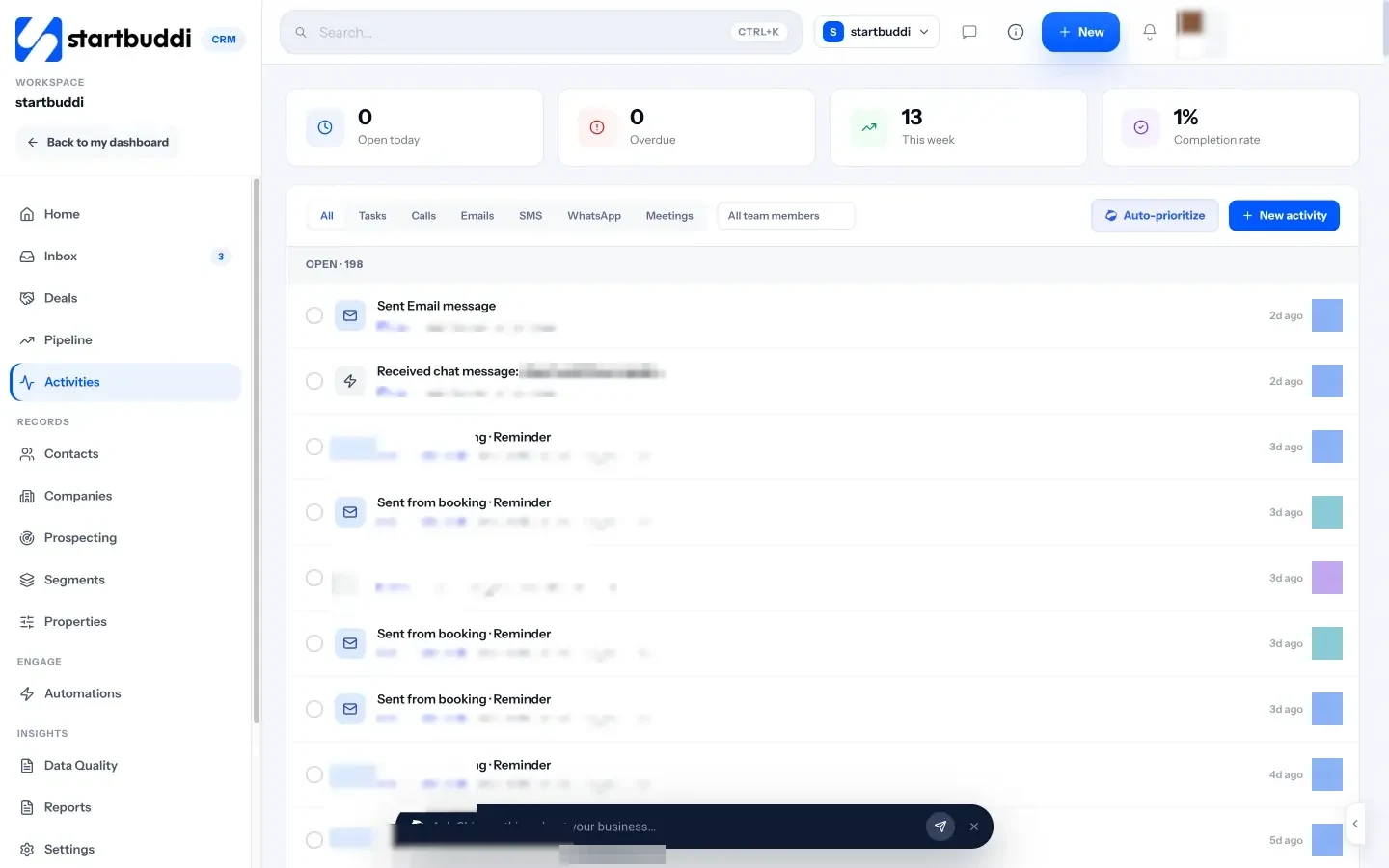
2. Log next steps as activities. Activities lists every call, email, message, meeting and follow-up, with counts for what is open today, overdue and due this week. Use New activity to add a follow-up with a contact, due date and priority, and mark it done when it is finished. On a contact's page, the menu lets you add a task, add a note or book a call.
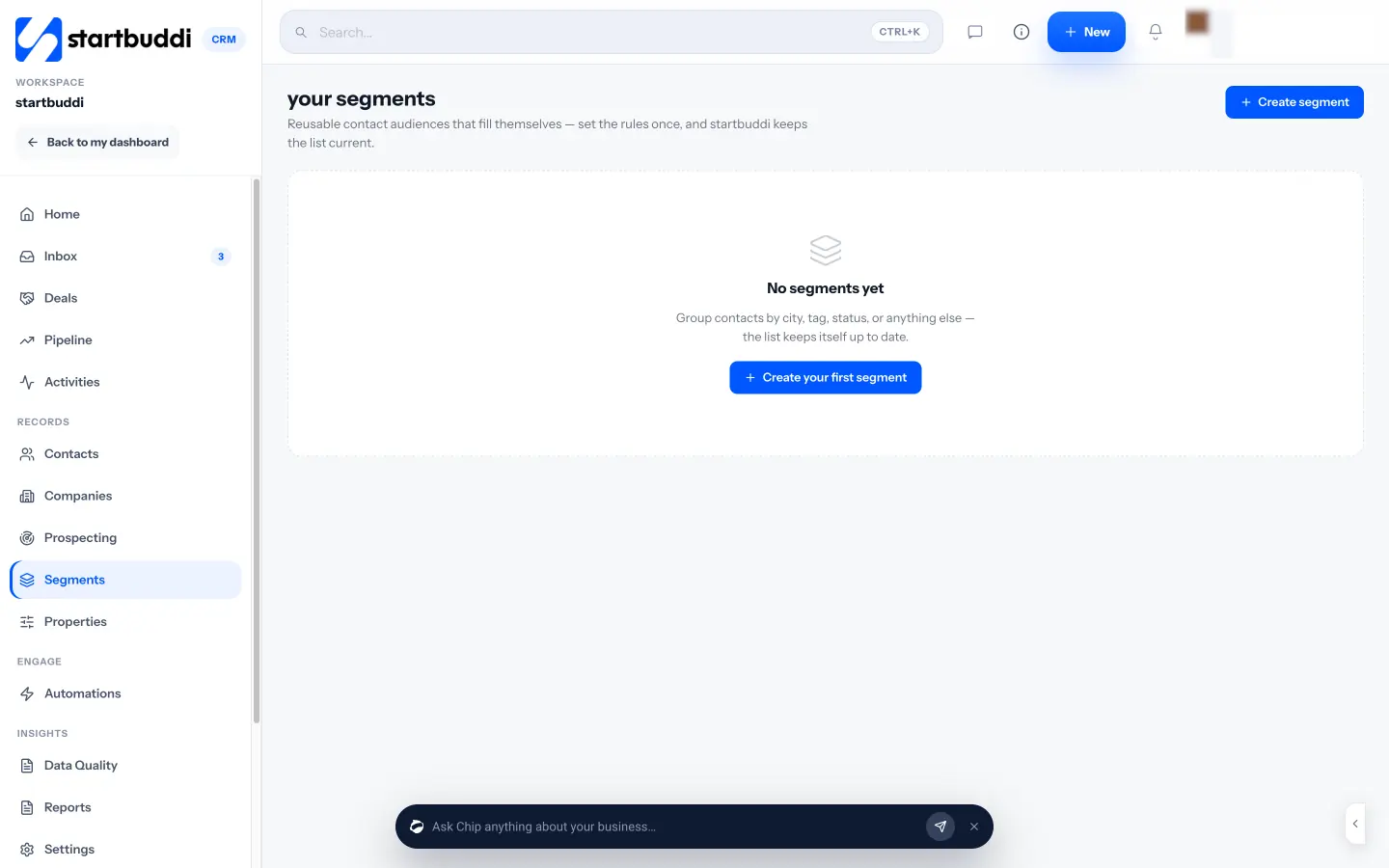
3. Build groups with Segments. Open Segments and click Create segment. Set rules (for example, city is Lagos and last contacted more than 90 days ago) and you will see an estimated size and a live preview. As the app puts it, segments fill themselves: set the rules once and the list stays current. The same segments appear as filters on your contacts list and as audiences in email marketing. Marketing campaigns need the Starter plan or above.
4. Ask Chip what needs attention. On the Customers home, Chip's briefing tells you who is waiting on you, and you can click prompts such as "Who needs a reply?", "Which deals are at risk?", "Who haven't I contacted in 14 days?" and "Plan my follow-ups". It is a fast start to your weekly review. You can also ask Chip to draft a reply in the inbox, and edit it before you send.
5. Automate the follow-ups you repeat. Once your routine is working, you can let some of it run itself. On a contact's page, Nurture with Chip (currently in beta) drafts a short follow-up email sequence from that person's real history; you edit the steps, then enrol them. In Automations you can set up rules such as creating a follow-up task when a lead is added. Free includes 2 active automations and Starter 10, and Chip replying to customers on its own needs Growth or above.
6. Check your numbers monthly. Reports in Customers shows your win rate, average deal size, sales cycle, lead response time and time in each stage, plus where clients came from and how invoicing is going. Once a month, look at it and ask one question: where should I spend more time?
Your next step
You now have the full path: decide what to track, bring everyone into one list, build a simple pipeline, and keep it alive with one inbox, clear next steps and a weekly review. The quickest way to start is to create a free account, import your first customers from a spreadsheet, and set up your pipeline this week. The Free plan includes up to 250 contacts, and every paid plan comes with a 30-day trial. See the plans and get your customers organised today.
Olabimpe Salami is the email and outreach specialist at startbuddi. Olabimpe writes about the messages that bring customers in and back: email, WhatsApp and SMS campaigns, follow-ups, and turning enquiries into paying clients.
Runs email and outreach at startbuddi