How to send an SMS campaign in startbuddi

To send an SMS campaign, open SMS in Marketing, click Create SMS, choose who should get it, write your message and press Send Now or schedule it for later. It works straight away on the built-in SMS, so there is nothing to set up before your first text.
Who can do this: the Marketing module is locked on the Free plan, and SMS needs the Starter plan or above. Each plan includes a monthly SMS allowance (Starter 50, Growth 200, Scale 500; 20, 80 and 200 when you pay in naira). If you connect your own SMS provider, those texts are paid to that provider. See the SMS marketing page for what else is included.
Good texts are short, lead with the offer or the reason you’re writing, use the person’s name and end with one clear action, such as a link or “reply YES”. Send at a sensible local time, and only to people who agreed to hear from you.
New to bulk texting? Our explainer on what bulk SMS is covers the basics, including why people must agree to hear from you first.
Steps
- Open SMS in Marketing
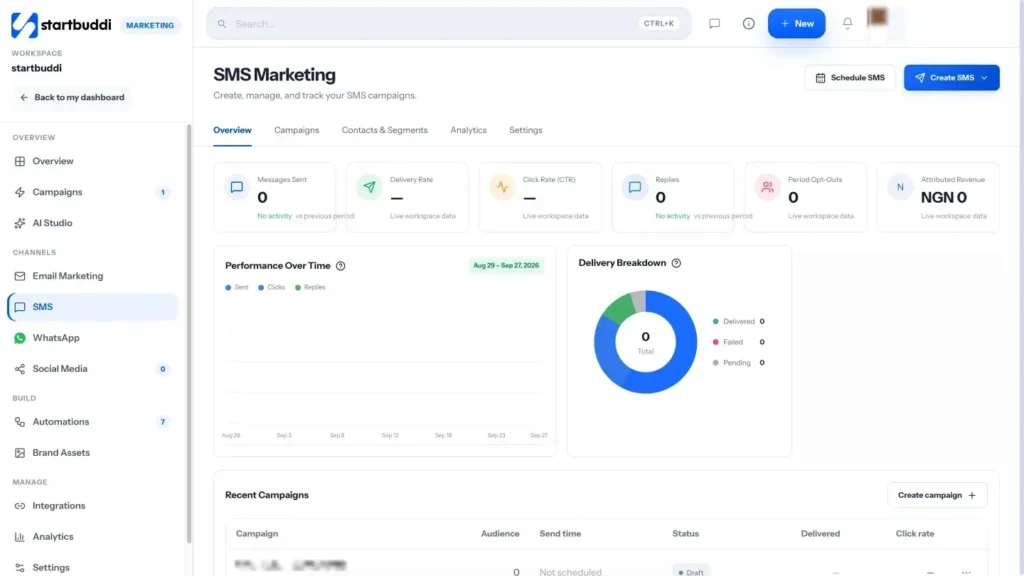
Go to Marketing and click SMS in the left rail. The Overview tab shows messages sent, delivery rate, clicks, replies and opt-outs. Open the Settings tab once to check how your texts go out: by default they use the built-in SMS, and the SMS readiness checklist shows anything still missing.
- Check who can receive your texts
Open the Contacts & Segments tab. Only contacts with a phone number appear here, and the opt-in filter shows who is Opted in, Pending or Opted out. To add people, use Add contact for one number or Import numbers to upload a CSV with a phone, mobile or number column. Imported numbers are saved to your main contact list.
- Click Create SMS and choose your audience
Click Create SMS. Give it a Campaign Name your customers never see (for example "Flash Sale, 20% off"). Under Audience / Segment, pick All Customers or one of your lists, then check the Sender ID, the name that shows as the sender on the phone.
- Write and personalise the message
Type your text under Message Content. Click Insert Merge Tag or one of the tag buttons ({first_name}, {last_name}, {phone}, {city}) to personalise it. Watch the counter under the box: one SMS is 160 characters, longer texts are split into more segments, and a message can be up to 918 characters. The phone preview on the right shows how it will land.
- Send it now or schedule it
Click Send Now to send straight away. To send later, click Next: Schedule, pick the send date and time, then click Schedule Campaign. Not ready yet? Click Save Draft and come back to it from the Campaigns tab.
- Track results and replies
Open the Campaigns tab to see each campaign's status (Sent, Scheduled, Draft, Paused or Cancelled). From a row you can rename, pause, resume or archive it, or delete a draft. The Analytics tab shows activity over time and has Export Report. Replies are counted in your numbers and also appear as conversations in your customer inbox.
Troubleshooting
Why can't I open SMS?
The whole Marketing module, including SMS, is locked on the Free plan. Unlock Starter or above (every paid plan starts with a 30-day trial) and SMS appears in the Marketing rail.
How do opt-outs work?
When someone replies STOP, UNSUBSCRIBE, CANCEL, END or QUIT, they come off your SMS list and every campaign skips them. Replies are read automatically on the built-in SMS, Twilio and Africa's Talking. On Termii and Brevo, startbuddi doesn't read replies yet, so remove those people yourself.
Can I send through my own Termii, Africa's Talking, Twilio or Brevo account?
Yes. Open the SMS Settings tab and use the connect panel: paste your API key, enter a sender ID (up to 11 characters), add the extra details Twilio or Africa's Talking ask for, then click Connect for your provider. Use Send test to check a text arrives.
Why did my message count as two texts?
Each SMS segment holds 160 characters. Go past that and the message is split into more segments, and each one counts towards your allowance or your provider's bill. Trim the text until the counter shows one segment.
Olabimpe Salami is the email and outreach specialist at startbuddi. Olabimpe writes about the messages that bring customers in and back: email, WhatsApp and SMS campaigns, follow-ups, and turning enquiries into paying clients.
Runs email and outreach at startbuddi