8 Pipedrive Alternatives for Small Sales Teams
Pipedrive alternatives for small sales teams compared: HubSpot, Bigin, Zoho CRM, Freshsales, Capsule, Close and more, with sourced prices and real limits.



The best Pipedrive alternatives for a small sales team are startbuddi if you want the pipeline, customer messages and invoices in one place; HubSpot if you want a free CRM with room to grow; and Zoho Bigin if you want the cheapest simple pipeline. Close suits teams that sell by phone, and Capsule suits teams that want something tidy.
startbuddi is our product. We’ve listed its limits next to everyone else’s, and every price below comes from the vendor’s own pricing page, checked on 1 October 2026. Prices change, so check before you buy.
Key takeaways
- Pipedrive is a good, focused sales CRM. Small teams usually leave because of per-seat costs, features held back for higher plans, or add-ons for things like web forms and email campaigns.
- Pipedrive has no free plan. HubSpot, Bigin, Zoho CRM, Capsule and startbuddi all have one, with limits.
- If you mainly want a cheaper pipeline, look at Bigin, Freshsales or Capsule. If you want fewer tools overall, look at startbuddi or HubSpot.
- Work out the price for your whole team. Almost every tool here charges per user.
- Pipedrive exports deals, people and organisations as CSV or XLSX, so your data can move with you.
Pipedrive alternatives compared
Lowest paid plan, per user per month, billed annually unless stated. Vendors show local currency depending on where you browse from, which is why Zoho CRM is in naira here.
| Tool | Best for | Lowest paid plan | Free plan | Standout feature |
|---|---|---|---|---|
| Pipedrive (for reference) | Teams that live in a visual pipeline | $14 per seat (Lite) | No, 14-day trial | Pipeline-first design, 500+ integrations |
| startbuddi | Service teams that sell, message and invoice in one place | See pricing | Yes | A paid invoice marks the deal won |
| HubSpot | Teams that want a free CRM and room to grow | $7 per seat (Starter, limited-time offer; $20 monthly) | Yes, up to 2 users | Large free CRM with a path to marketing and service tools |
| Zoho Bigin | Teams that want the cheapest simple pipeline | $7 (Express) | Yes, 1 user | Built-in phone and mobile apps on every edition |
| Zoho CRM | Teams that need customisation | ₦10,780 (Standard) | Yes, 3 users | Workflows, cadences and forecasting from the first paid tier |
| Freshsales | Teams that want chat, email and phone together | $9 (Growth) | No, 21-day trial | Chat, email and phone on the entry plan |
| Capsule | Small teams that want simple and tidy | $18 (Starter) | Yes, 2 users | 30,000 contacts on the entry plan |
| Less Annoying CRM | Owners who hate tiers | $15 | No, 30-day trial | One plan, everything included |
| Close | Teams that sell by phone and email | $9 (Solo, 1 user) | No, 14-day trial | Calling and SMS built in, charged at cost |
Why look for a Pipedrive alternative?
Pipedrive’s own pricing page (checked on 1 October 2026) shows four plans: Lite at $14, Growth at $39, Premium at $59 and Ultimate at $79 per seat per month, billed annually, with a 14-day free trial and no free plan. Prices exclude VAT. Here is why small teams start looking elsewhere.
The useful features start on Growth. Full email sync with tracking, automations and email sequences are listed from the Growth plan. A three-person team that wants them pays $39 × 3 = $117 a month, billed annually.
Some things are add-ons. LeadBooster (lead capture) starts from $32.50, Campaigns (email marketing) from $13.33, Smart Docs from $32.50 and Projects from $16, according to the same page. Contracts and e-signatures are listed on Premium.
It’s a sales tool, not a whole business tool. Pipedrive is built for managing deals. If your team also juggles WhatsApp enquiries, bookings and invoices, you end up paying for and connecting more apps.
You have to pay to keep using it. Without a free plan, a part-time salesperson or occasional user still needs a paid seat.
None of these make Pipedrive a bad choice. If your team lives in the pipeline and wants a mature sales tool with a big marketplace, it’s hard to beat. The point is to know what you’re paying for.
How we chose these Pipedrive alternatives
We looked for tools a team of one to ten people could set up without a consultant. Each one had to offer a visual sales pipeline, a published price, and either a free plan or a free trial. We read each vendor’s pricing page and plan details on 1 October 2026, and we haven’t run hands-on tests, so we describe what each plan includes rather than how it feels.
We left out enterprise-only tools and tools built mainly for marketing. If you’re comparing broader CRMs, our best CRM software list covers more options.
1. startbuddi
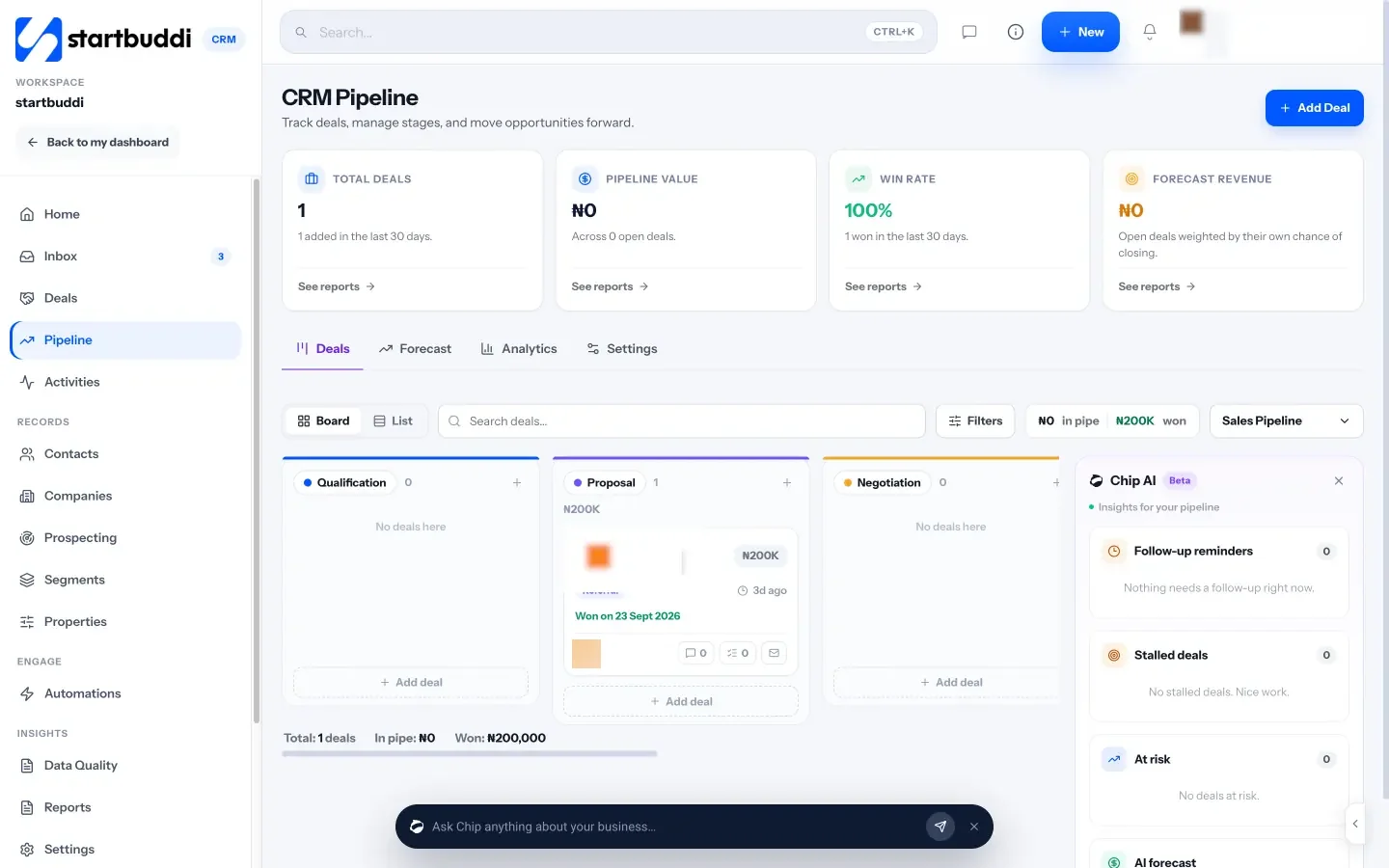
startbuddi is a workspace for small service businesses: contacts and deals, a customer inbox, bookings, invoices and payments, marketing, projects and documents in one place, with Chip, the AI assistant, on every screen.
Best for: small service teams whose sales happen in WhatsApp, email and chat, and who want the deal, the conversation and the invoice on one record.
Key features:
- A sales pipeline with board, table and list views, several pipelines, and a stage builder. Default stages are New Leads, Qualified, Proposal Sent, Negotiation, Won and Lost, and you can rename them.
- Deals move on their own: when a contact replies, their deal leaves the first stage, and when an invoice on a deal is paid, the deal is marked won. Every move is written to the deal’s history.
- Forecast and win rate on the pipeline, with Mark as won or lost and an optional reason.
- A customer inbox for email, WhatsApp, Instagram, Messenger, SMS and website chat.
- Invoices and payment links, paid by card through Stripe, or by card, bank transfer, USSD or mobile money through Paystack.
- Chip flags stalled and at-risk deals and suggests the next stage (some of these panels are labelled Beta).
Pricing: a free plan is available. See startbuddi pricing for the paid plans. The Marketing module is on paid plans only.
Pros: no separate tools for the inbox, invoicing and pipeline; deals update from real events instead of manual drags; built for WhatsApp-first customers in Nigeria and across Africa as well as email-first ones elsewhere.
Cons: less sales depth than Pipedrive; no native iOS or Android apps (it’s a web app that works in a mobile browser); no public API or webhooks yet; you can’t call contacts from the CRM; moving from Pipedrive is a CSV import of contacts (up to 10,000 at a time), and deals don’t come across in the import.
Skip it if: your team runs high-volume outbound calling, needs a public API, or wants a large integration marketplace. Our startbuddi vs Pipedrive comparison goes feature by feature.
2. HubSpot
HubSpot is a large CRM platform with a free tier and paid hubs for sales, marketing and service.
Best for: teams that want to start free and may later need marketing and service tools from the same vendor.
Key features: contacts, companies, deals and activities in the free tools; on Sales Hub Starter, workflows (up to 50) and up to 15 pipelines; AI help across the platform.
Pricing: the free tools cover up to 2 users. HubSpot’s Sales Hub pricing shows Starter at $7 per seat per month billed annually as a limited-time offer, and $20 per seat on monthly billing. Professional is $90 per seat per month billed annually, plus a one-time $1,500 onboarding fee.
Pros: a generous free CRM; a clear path to more advanced tools; lots of learning material.
Cons: the jump from Starter to Professional is steep; the Starter offer is time-limited, so check the price you’ll pay at renewal.
Skip it if: you know you’ll need Professional-level features soon and the onboarding fee doesn’t fit your budget. See startbuddi vs HubSpot for a closer look.
3. Zoho Bigin
Bigin is Zoho’s simple pipeline CRM for small businesses moving off spreadsheets.
Best for: small teams that want a Pipedrive-style pipeline for less.
Key features: team pipelines, workflows, a built-in phone, and mobile apps for iOS, iPadOS, Android and macOS on every edition. Express adds email and WhatsApp Business integration.
Pricing: Bigin’s pricing page shows a free edition for 1 user with one pipeline and 500 records. Express is $7 per user per month billed yearly ($9 monthly), with 3 team pipelines and 30 workflows. Premier is $12 yearly ($15 monthly) and Bigin 360 is $18 yearly ($21 monthly).
Pros: the lowest entry price here; mobile apps on every edition; easy to grow into Zoho’s wider set of apps.
Cons: the free edition is for one person only; pipeline and workflow limits on Express may be tight for a busy team.
Skip it if: you need deep customisation (look at Zoho CRM) or one tool for invoicing and messaging too. See startbuddi vs Bigin.
4. Zoho CRM
Zoho CRM is Zoho’s full, highly customisable CRM.
Best for: teams that want to shape the CRM around their own process and don’t mind setting it up.
Key features: workflows and assignment rules, cadences, reports and dashboards, and sales forecasting from Standard; CPQ and process automation from Professional.
Pricing: Zoho’s CRM pricing page, viewed from Nigeria, shows Standard at ₦10,780, Professional at ₦17,710, Enterprise at ₦30,800 and Ultimate at ₦40,040 per user per month, billed annually, plus local taxes. A free edition covers 3 users. Prices show in your local currency, so yours may differ.
Pros: a lot of CRM for the money; free for up to 3 users; strong customisation.
Cons: more set-up than Pipedrive; the number of options can slow a small team down.
Skip it if: you left Pipedrive because it felt like too much. Our Zoho CRM alternatives page covers the other direction, and startbuddi vs Zoho compares the two.
5. Freshsales
Freshsales is the sales CRM from Freshworks.
Best for: teams that want chat, email and phone in the CRM from the entry plan.
Key features: kanban view, contact lifecycle stages, chat, email and phone, email templates, custom fields and basic workflows on Growth. Pro adds contact scoring, deal insights, territory management and sales sequences.
Pricing: the Freshsales pricing page lists Growth at $9, Pro at $39 and Enterprise at $59 per user per month, billed annually, with a 21-day trial. Branded documents ($19 per user per month) and the Freddy AI Agent ($49 per 100 sessions) are add-ons.
Pros: a low entry price with phone and chat included; a long trial.
Cons: sales sequences start on Pro, at the same price as Pipedrive Growth; no free plan is listed.
Skip it if: sequences are the main reason you’re leaving Pipedrive, since the saving disappears on Pro.
6. Capsule
Capsule is a simple CRM for small businesses, with pipelines and project boards.
Best for: small teams that want a tidy CRM without many settings.
Key features: Starter includes 30,000 contacts, email templates, a shared mailbox, basic reporting and goals. Growth adds workflow automations, multiple sales pipelines, email sync and AI summaries.
Pricing: Capsule’s pricing page shows a free plan for up to 2 users and 250 contacts with one pipeline, then Starter at $18, Growth at $36 and Advanced at $54 per user per month, billed annually, with a 14-day trial. The Marketing add-on starts from $11 a month.
Pros: clean and easy to learn; a free plan for two people; projects alongside sales.
Cons: automations and more than one pipeline need Growth.
Skip it if: you need several pipelines on a tight budget. See startbuddi vs Capsule.
7. Less Annoying CRM
Less Annoying CRM is a deliberately simple CRM with one plan.
Best for: owner-led teams that want one price and no plan tiers to compare.
Key features: unlimited contacts and companies, unlimited pipelines, tasks, email logging, mobile access, user permissions and unlimited custom fields.
Pricing: the Less Annoying CRM pricing page shows $15 per user per month, with a 30-day free trial and no credit card. There are no tiers.
Pros: easy to understand; unlimited pipelines at one price; free support.
Cons: the pricing page doesn’t list automation or email marketing, so plan on other tools for those.
Skip it if: you want automated follow-ups inside the CRM. See startbuddi vs Less Annoying CRM.
8. Close
Close is a sales CRM built around calling, email and SMS for teams that do a lot of outreach.
Best for: small sales teams that spend their day on the phone and in the inbox.
Key features: calling, email and SMS on every plan, with calls and texts charged by usage at cost; automated workflows from Growth; monthly AI credits on each plan.
Pricing: Close’s pricing page lists Solo at $9 per user per month billed annually ($19 monthly) for 1 user and 10,000 leads, Essentials at $35 ($49 monthly), Growth at $99 ($109 monthly) and Scale at $139 ($149 monthly), with a 14-day trial.
Pros: strong for phone-led selling; communication tools built in rather than added on.
Cons: Solo is for one person; automated workflows need Growth, which costs more than any Pipedrive plan.
Skip it if: your customers mostly reach you by WhatsApp or social messages rather than calls and email.
How to choose a Pipedrive alternative
Start with what you’re actually missing in Pipedrive, then match it:
| If you want | Look at |
|---|---|
| The lowest cost for a basic pipeline | Bigin, Freshsales Growth, Close Solo (one person) |
| A free plan for a small team | HubSpot (2 users), Zoho CRM (3 users), Capsule (2 users), startbuddi |
| Fewer tools: inbox, invoices and pipeline together | startbuddi, HubSpot |
| Phone-led selling | Close, Freshsales |
| One price with no tiers | Less Annoying CRM |
| Heavy customisation | Zoho CRM |
Then price it for your real team. A tool at $9 per user with sequences on a $39 plan isn’t cheaper than Pipedrive if you need sequences. Write down your must-haves, check which plan includes each one, and multiply by the number of seats.
Finally, test with your own data. Import a few hundred contacts, rebuild one pipeline with your real deal stages, and run it alongside Pipedrive for two weeks before you switch. If you’re still shaping how your team sells, our guide to the sales process for small business is a good place to start.
Migrating from Pipedrive: step by step
- Export your data. Pipedrive’s guide to exporting data explains that admins can open the account menu and go to Tools and apps, then Export data, to download deals, people and organisations as CSV or XLSX files. You can also export a filtered list view that combines deal, person and organisation fields.
- Clean the file. Remove duplicates and old contacts, and make sure each column has a clear heading.
- List your stages and automations. Write down each pipeline stage and what every automation does. These don’t transfer between tools.
- Import and rebuild. Import contacts into the new tool, recreate your stages, then add open deals and rebuild automations.
- Run both for a short overlap. Keep Pipedrive read-only for a couple of weeks so nothing gets lost, then cancel.
Moving from Pipedrive to startbuddi
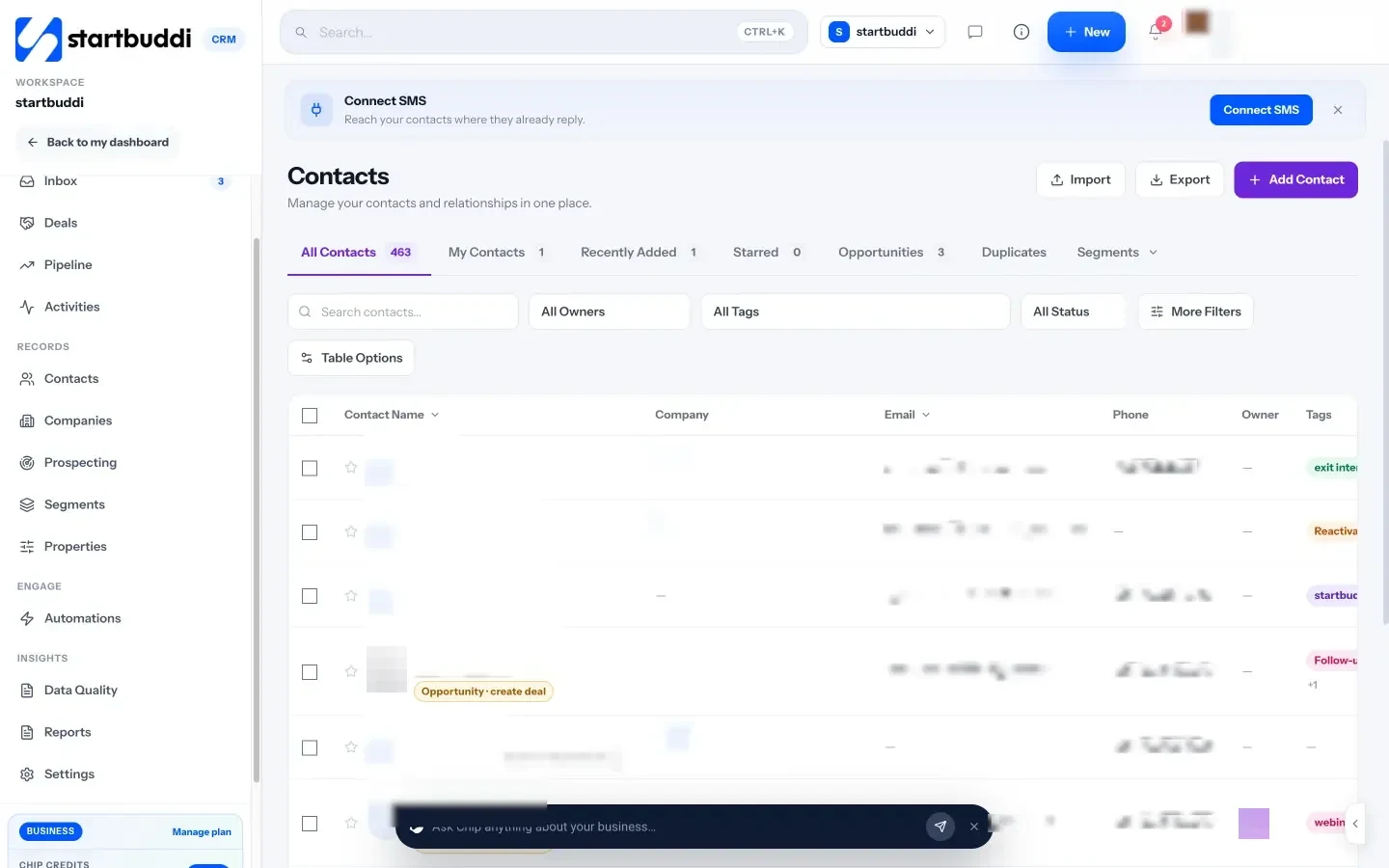
- In Customers, open Contacts and click Import. Upload your people CSV, map each column to a startbuddi field, review and import, up to 10,000 contacts at a time.
- In Pipeline, open Manage Pipelines, create a pipeline and match your Pipedrive stages in the stage builder.
- Add your open deals with Add Deal, picking the contact, value and stage. Deals don’t come across in the CSV import, so a team with dozens of open deals should set aside an afternoon.
- Connect your email and WhatsApp in the inbox so replies start moving deals, and turn on Paystack or Stripe so paid invoices mark deals won.
- Rebuild your follow-ups in Automations.
Try a Pipedrive alternative with your own data
Export your Pipedrive contacts, import them into startbuddi and rebuild one pipeline to see how it fits. Start free with startbuddi, no card needed, or read how it works as a CRM for service businesses.
Frequently asked questions
What is the best Pipedrive alternative for a small team?
It depends on why you're leaving. For a cheaper simple pipeline, Zoho Bigin starts at $7 per user per month billed yearly. For a free CRM that can grow, HubSpot's free tools cover 2 users. For sales, messaging and invoicing in one place, startbuddi has a free plan.
Is there a free alternative to Pipedrive?
Yes. HubSpot's free tools (up to 2 users), Zoho CRM's free edition (3 users), Bigin's free edition (1 user), Capsule's free plan (2 users, 250 contacts) and startbuddi's free plan all cost nothing. Each has limits, so check users, contacts and pipelines against your needs.
Why do people switch from Pipedrive?
The usual reasons are per-seat pricing, features such as email sync and automations starting on the Growth plan, and paid add-ons for lead capture, email campaigns and documents. Some teams also want messaging and invoicing in the same tool. Others simply need a free plan for occasional users.
Is Pipedrive cheaper than HubSpot?
At entry level, HubSpot's Starter offer is cheaper: $7 per seat per month billed annually, against $14 for Pipedrive Lite, but the HubSpot price is a limited-time offer. Higher up, Pipedrive Growth is $39 per seat while HubSpot Sales Hub Professional is $90 per seat plus a $1,500 onboarding fee.
How do I export my data from Pipedrive?
Admins open the account menu, go to Tools and apps, then Export data, and choose deals, people or organisations as CSV or XLSX. You can also export a filtered list view. Pipedrive keeps exported files available for 28 days.
Can I import Pipedrive deals into startbuddi?
Not through the CSV import. startbuddi's import brings in contacts only, up to 10,000 at a time. Recreate your stages in the pipeline and add open deals by hand, which is quick for a small team with a few dozen deals.
Omolola Akiyode is the operations and project manager at startbuddi, leading cross-functional projects and the content that helps founders get set up. Omolola writes about projects, websites and getting found online, and turns complex ideas into clear, practical steps.
Runs operations and projects at startbuddi