Sales process for small business: a simple, repeatable way to win more clients
Build a sales process your small business can repeat: clear stages, fast replies, qualifying questions, proposals, follow-ups and the numbers that show it is working.


A sales process for small business is simply the set of steps you take every time someone shows interest, from the first message to the signed agreement and the first payment. Write those steps down, do them the same way each time, and you stop losing good leads to forgetfulness. This guide is for solo founders, freelancers, agencies and small service businesses who sell through conversations: WhatsApp chats, calls, emails and meetings, rather than a checkout button.
Each chapter starts with the business idea: why it matters, how to think about it, examples, templates you can copy and the mistakes to avoid. Each one ends with how to do it in startbuddi, with screenshots of the real app. By the end you will have a written sales process with five or six stages, a qualifying checklist, a discovery call outline, a proposal and follow-up routine, and a short list of numbers that tell you whether it is working.
What a sales process is and how to design yours
- Why it matters even if you are a team of one
- Example: a two-person web design studio
- Write your process on one page
- 1. Build your pipeline stages
- 2. Let real events move deals
- 3. Check the numbers on the home screen
Most small businesses do not have a sales problem. They have a memory problem. Someone asks about your services on Instagram on Tuesday, you reply on Wednesday, you mean to send prices on Friday, and by the following week the conversation has slipped under forty others. Nobody said no. You just never got to a yes. A sales process fixes this by giving every enquiry the same path, so nothing depends on you remembering.
Here is the short answer. A sales process is a repeatable list of stages that a potential customer moves through, with a clear action at each stage and a clear sign that they are ready for the next one. For most small service businesses, five or six stages are enough: new enquiry, qualified, conversation or discovery, proposal sent, decision, and won or lost. You can run it in a notebook, a spreadsheet or a CRM. What matters is that it exists and that you use it for every lead.
What is a sales process for small business?
Large companies talk about sales methodologies, sales enablement and revenue operations. You do not need any of that. For a small business, a sales process is a written answer to three questions:
- What are the steps? The stages a buyer goes through with you, in order.
- What do I do at each step? The action you take, such as reply, ask qualifying questions, book a call, send a proposal or chase a decision.
- How do I know they have moved on? The event that moves someone to the next stage, such as "they booked a call" or "they said the budget is approved".
That third question is the one most people skip, and it is the one that makes the process useful. "Interested" is a feeling. "Booked a call for Thursday" is a fact. When each stage is defined by something the customer did, you can look at your list and know exactly where everyone stands.
A sales process is not the same as a sales pipeline, although the words are often used together. The process is the set of steps. The sales pipeline is the live view of everyone currently moving through those steps, usually shown as columns on a board. You design the process once and look at the pipeline every day.
Why it matters even if you are a team of one
It is tempting to think a process is only for sales teams. In practice, the smaller you are, the more you need one, because you are also doing the work, the admin and the marketing. Three things change when you have a written process:
- You reply faster. You know what the first reply says and what you ask, so you do not put it off until you have time to think.
- You follow up. Every lead has a next step and a date. Silence becomes a task instead of a guess.
- You learn. When you record where deals are won and lost, patterns appear. Maybe most people drop out after the price. Maybe referrals close twice as often as ads. You cannot fix what you cannot see.
The six stages of a simple sales process
Here is a sales process that fits most service businesses: agencies, consultants, photographers, cleaners, coaches, builders, caterers and IT providers. Use it as a starting point and rename the stages to match your words.
| Stage | What it means | Your action | Moves on when |
|---|---|---|---|
| 1. New enquiry | Someone has shown interest: a form, a message, a call, a referral. | Reply, thank them, ask two or three questions. | They answer your questions. |
| 2. Qualified | They have a real need, a rough budget and a timeline you can meet. | Offer a call or a visit. | A call or visit is booked. |
| 3. Discovery | You are learning the details: goals, scope, constraints, who decides. | Run the call, take notes, agree next steps. | You have enough to price the work. |
| 4. Proposal sent | They have your price and scope in writing. | Follow up on a set schedule. | They accept, ask for changes or decline. |
| 5. Negotiation | You are adjusting scope, timing or terms. | Agree changes in writing. | They sign or pay a deposit. |
| 6. Won or lost | A decision has been made. | Onboard the client, or record why you lost. | The deal is closed either way. |
If you sell something simpler, such as a fixed-price service booked online, you might only need three stages: enquiry, booked, paid. If you sell large projects to businesses, you might add a stage for "decision maker met" or "legal review". The rule of thumb is to add a stage only when the action you take changes. If two stages lead to the same action, merge them.
Example: a two-person web design studio
Amara and Tunde run a small web design studio in Nairobi. Enquiries come from their website form, Instagram and referrals from past clients. Before they had a process, each of them kept leads in their own head and their own WhatsApp. After a month of writing it down, their stages look like this:
- New enquiry: reply within two working hours with a short message and three questions (what the site is for, rough budget, deadline).
- Qualified: budget is at least KES 150,000 and the deadline is at least four weeks away. Offer a 30-minute video call.
- Discovery: the call uses the same outline every time. Notes go on the contact record, not in a notebook.
- Proposal sent: proposal within two working days of the call. Follow-ups on day 2, day 5 and day 10.
- Negotiation: any change to scope is written into a revised proposal.
- Won: 50% deposit invoice sent the same day. Lost: one-line reason recorded.
This is a made-up example, but it shows the shape: each stage has a time limit and a trigger. Nothing is vague.
Map how your customers actually buy
Before you fix your stages, spend ten minutes looking at the process from the buyer's side. Your customer is not moving through "qualified" and "discovery". They are going through their own steps: noticing a problem, looking for options, comparing a few, checking with someone else, and deciding. A good sales process lines up with those steps instead of fighting them.
Pick your last five customers and write down, for each one, how they first heard of you, what they asked first, how many conversations it took, what made them hesitate and what finally made them say yes. You will usually see the same pattern three or four times. For example:
- A homeowner hiring a plumber wants to know two things before anything else: can you come this week, and roughly what will it cost. Your first reply should answer both.
- A small company choosing an accountant wants reassurance that you understand their industry and will not miss a deadline. Your discovery call should cover both, with an example.
- A bride booking a photographer wants to see similar weddings and to feel she can trust you on the day. Your proposal should include a gallery link and a clear plan for the day.
Whatever you learn goes into your process as an action. If buyers always ask about availability first, availability goes in your first reply template. If they always need a partner's approval, your follow-up schedule allows time for that conversation and offers a short summary they can forward.
Write your process on one page
Your finished process should fit on one page. Here is a simple template to fill in:
| Stage name | Enters when | My action and time limit | Leaves when | Tool or template used |
|---|---|---|---|---|
| New enquiry | Form, message or referral arrives | Reply within 2 working hours | They answer my questions | First-reply template |
| Qualified | Need, budget and timing fit | Offer a call within 1 day | Call is booked | Booking link |
| ... | ... | ... | ... | ... |
Print it, pin it above your desk or save it where your team can see it. Review it every three months, because your process should change as you learn what works.
Work backwards from your revenue goal
The best reason to have a process is that it lets you do simple maths about the future. If you know roughly how many people move from one stage to the next, you know how many enquiries you need to hit a monthly target. This is sometimes called a sales funnel calculation, and it takes five minutes.
Here is a worked example. The figures are illustrative, so replace them with your own once you have a few months of data.
| Step | Assumption | Result |
|---|---|---|
| Monthly revenue goal | $8,000 | |
| Average deal size | $2,000 | 4 new clients needed |
| Proposals that are won | 40% | 10 proposals needed |
| Discovery calls that lead to a proposal | 60% | about 17 calls needed |
| Enquiries that qualify and book a call | 30% | about 56 enquiries needed |
Fifty-six enquiries a month is about 13 a week. Now you know what your marketing has to produce, and you know which lever to pull. If you cannot get more enquiries, raise the average deal size or improve the proposal win rate. Raising the win rate from 40% to 50% cuts the enquiries you need from 56 to about 45.
The same maths works in any currency. A Lagos catering business aiming for ₦3,000,000 a month with an average event of ₦600,000 needs five events. A London bookkeeper aiming for £5,000 a month in new retainers at £250 a month needs twenty new clients over the year, not all at once. The point is to turn a vague hope into a number of conversations you can plan for.
Common mistakes when setting up a sales process
These are the ones that come up again and again with small teams.
- Too many stages. Twelve stages look thorough but nobody keeps them up to date. Start with five or six.
- Stages defined by feelings. "Warm" and "very interested" mean different things to different people. Use events: booked, sent, signed, paid.
- No time limits. A proposal that has sat for 45 days is not "pending". Decide how long each stage can last before you chase, and how long before you close the deal as lost.
- Not recording losses. Lost deals are where the lessons are. One line on why is enough: price, timing, went with someone else, no reply.
- Keeping it in your head. If you are ill for a week, could someone else pick up your leads? If not, the process is not written down yet.
How to set up your sales process in startbuddi
In startbuddi, your contacts, conversations, deals, quotes and invoices sit in one place, under Customers and Money Manager. That matters for a sales process because each stage usually lives in a different tool: messages in WhatsApp, notes in a notebook, prices in a Word file, invoices in another app. When they sit together, a deal can move forward on its own when something real happens.
1. Build your pipeline stages
Open Customers, then Pipeline. A new sales pipeline starts with default stages: New Leads, Qualified, Proposal Sent, Negotiation, Won and Lost. That is very close to the six-stage process above. Double-click a stage title to rename it, or open Manage Pipelines to use the Stage Builder, pick colours and add or remove stages. Deleting a stage never deletes the deals in it.
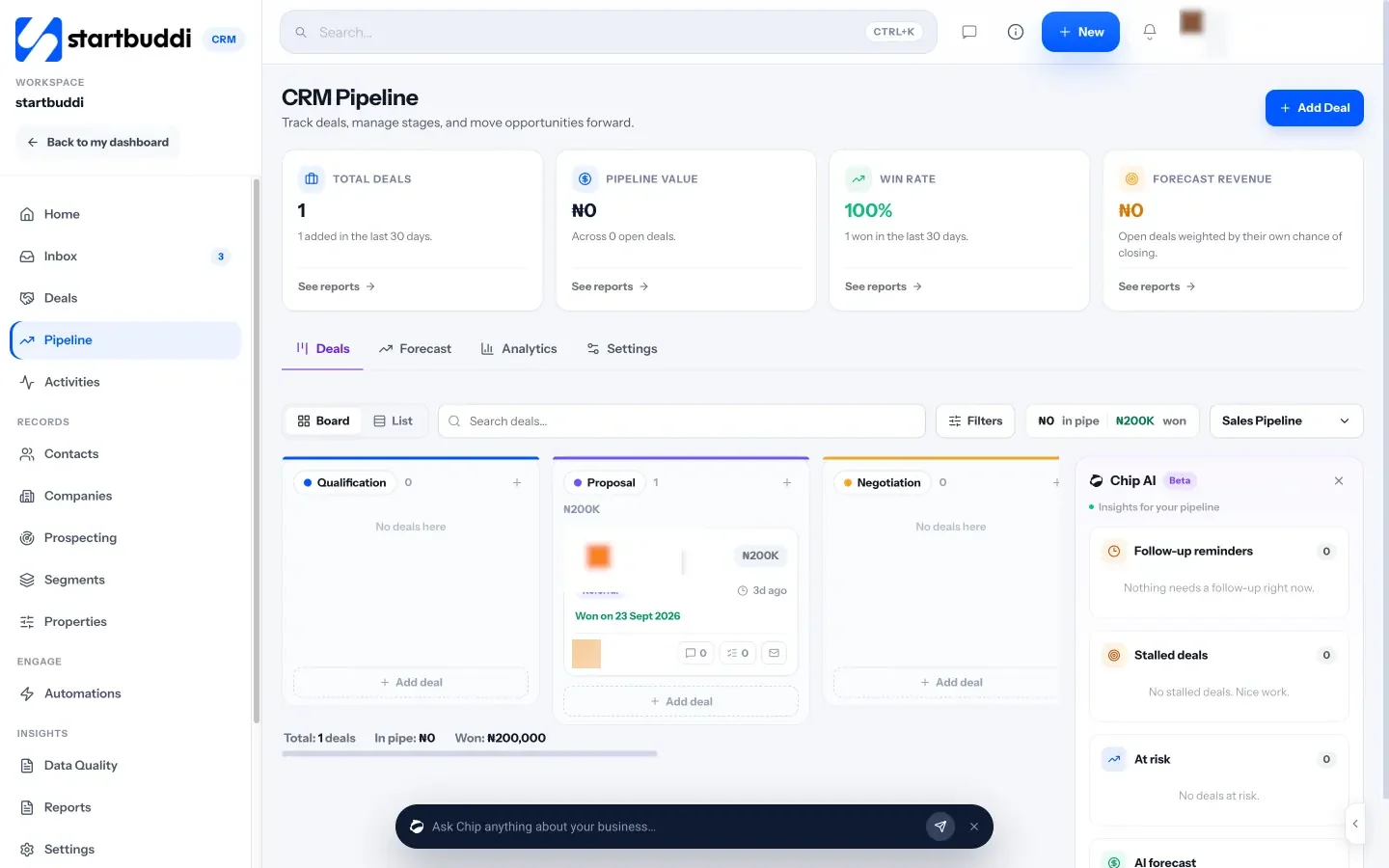
If you sell two very different things, such as one-off projects and monthly retainers, you can run more than one pipeline and set one as the default. The pipeline settings also let you require a reason when a deal is marked lost, which makes the "record why you lost" habit automatic.
2. Let real events move deals
This is where an all-in-one system helps. In startbuddi, when a contact replies, their deal moves out of the first stage, and when an invoice on a deal is paid, the deal is marked won. Every move is written to the deal's history with the reason, so you can see how and when it happened. You still drag cards yourself for everything else, but the two moments people most often forget to record are handled for you.
3. Check the numbers on the home screen
The Customers home page opens with a short briefing from Chip, the AI assistant, built from the numbers on the page: unread messages, open deal value and money still owed on invoices. Below it are live figures for pipeline value, won this month, average deal size and win rate. Those are the same numbers you used in the revenue maths above, so you can check your assumptions against reality every week. There is more on reading them in chapter 4.
With your stages written down and set up as a pipeline, the next job is to fill it with the right people. Chapter 2 covers where leads come from and how to decide quickly which ones deserve your time.
Find and qualify leads, and reply fast
- Capture leads in a way that saves typing
- A first-reply template you can copy
- A qualifying message for WhatsApp or DMs
- Say no kindly and quickly
- Know which lead sources are worth your time
- 1. Put every lead in one contact list
- 2. Let forms and bookings create contacts for you
- 3. Reply from one inbox
- 4. Find new prospects when enquiries are quiet
A pipeline full of the wrong people is worse than an empty one, because it eats the hours you should spend on buyers who are ready. This chapter covers the first two stages of your sales process: getting enquiries in, and qualifying them quickly so you know who deserves a call. It also covers the part most small businesses get wrong, which is how fast they reply.
Where small business leads come from
A lead is anyone who might buy from you and has given you a way to reach them. For most small businesses, leads come from a handful of places. It helps to know which ones, because each needs a slightly different first reply.
| Source | Typical example | What they usually need first |
|---|---|---|
| Referrals | "My friend Kemi said you did her kitchen." | A warm reply that mentions the referrer and a quick call. |
| Website form | A contact or quote request form. | A fast reply, a price range and a booking link. |
| Social media and DMs | "How much for a logo?" on Instagram. | A friendly reply that moves the chat to a channel you can track. |
| Google search and maps | A call or message after finding your Google Business Profile. | A clear answer to "can you help and when?" |
| Past customers | A returning client asking for more work. | Priority treatment. They already trust you. |
| Outreach | People you contacted first. | Patience. They did not ask to hear from you. |
Whatever the source, the first rule is the same: every lead goes into one list, with the source recorded. If half your leads live in WhatsApp, a quarter in email and the rest in your head, your process cannot work. The simplest fix is a single contact list where every new enquiry is added the day it arrives. If you want a fuller guide to building that list, read how to create a customer database.
Capture leads in a way that saves typing
The more leads you have to copy by hand, the more you will miss. A contact form on your website or link in bio that adds people straight to your contact list removes that step. So does a booking page, where the person picks a time and leaves their details in one go. For more on building forms that people actually finish, see how to build a lead capture form that converts.
Reply fast: the cheapest sales improvement you can make
If you change only one thing after reading this guide, make it your reply time. People who send an enquiry are often contacting two or three businesses at once. The first one to reply with something useful has an advantage that is hard to beat later.
The Harvard Business Review study mentioned in chapter 1 also found that firms contacting leads within an hour were more than 60 times as likely to qualify them as firms that waited 24 hours or longer (HBR). That study looked at larger US firms, but the logic applies even more to a small business: the person who asked is thinking about the problem right now.
You cannot be on your phone all day, so set a standard you can keep:
- During working hours: reply within two hours, even if it is only to say you will send details later that day.
- Outside working hours: an automatic reply that says when you will answer, and offers a booking link or price list in the meantime.
- At weekends: decide whether you check once or not at all, and say so in your auto-reply.
A first-reply template you can copy
Hi Sarah, thanks for getting in touch about a new website for your bakery. Most of our small business sites cost between $1,500 and $3,000 depending on the number of pages and whether you sell online. To point you in the right direction, could you tell me: 1) roughly how many pages you need, 2) whether you want to take orders online, and 3) when you would like it live? If it is easier to talk, you can pick a 20-minute slot here: [booking link]. Speak soon, Amara
Notice what this does. It gives a price range straight away, which filters out people with a much smaller budget without an awkward conversation. It asks questions that are easy to answer. And it offers one clear next step.
How to qualify leads without interrogating people
Qualifying means deciding whether a lead is worth a proper conversation. It protects your time and, just as important, it protects theirs. A small business owner who spends an hour on a call with someone whose budget is a tenth of the price has lost an hour they could have spent on paid work.
Sales teams often use a checklist called BANT: budget, authority, need and timing. It is a useful starting point, but for small businesses the questions need to be softer. Here is a version that works in a friendly message or the first five minutes of a call.
| What you need to know | How to ask it naturally | A good sign | A warning sign |
|---|---|---|---|
| Need | "What made you start looking for help with this now?" | A specific problem or goal. | "Just seeing what is out there." |
| Budget | "Most projects like this cost between X and Y. Does that fit what you had in mind?" | "Yes" or "at the lower end". | Silence, or a figure far below your minimum. |
| Timing | "When would you ideally like this done?" | A real date or event. | "Sometime, no rush." |
| Decision | "Is anyone else involved in choosing who you work with?" | They decide, or they name who does. | They cannot say who decides. |
| Fit | "Have you worked with someone on this before? How did it go?" | Clear expectations. | Bad experiences with every past supplier. |
You do not need a perfect score. A lead with a real need, a budget in your range and a date in the next three months is qualified. A lead with none of those can go into a "later" list and receive your newsletter instead of your time.
A qualifying message for WhatsApp or DMs
On messaging apps, long paragraphs get ignored. Break your questions into a short, friendly message that is easy to answer with a thumb:
Hi Tomi, thanks for your message! Happy to help with the event. Three quick questions so I can give you a proper price: 1) What's the date? 2) Roughly how many guests? 3) Is it at your venue or do you need one? Most of our events for 50 guests come to between ₦900,000 and ₦1,400,000, depending on the menu.
Numbered questions make it easy to reply "1) 14 Dec 2) about 60 3) our venue", which is everything you need to decide the next step.
Say no kindly and quickly
Some leads will not fit. The kindest thing to do is tell them early, with a short reason and, where you can, a pointer elsewhere. "Thanks for asking. Our minimum project is $1,500, so for a single landing page you might be better with a template tool. If your plans grow, we would love to hear from you." That person may well come back later, or refer someone who is a better fit.
Look after the leads who are not ready yet
Many enquiries are real but early. The person likes what you do, but the budget is next quarter, or the office move is next year. These are not lost deals. They are future deals, and they deserve a light-touch plan rather than a hard sell.
- Tag them. Mark them as "later" or "not yet" with the month they mentioned.
- Keep in touch without pressure. A useful email every month or two, such as a short tip, a new example of your work or a seasonal reminder, keeps you in mind. This is called lead nurturing.
- Set a reminder for the date they gave you. "You mentioned you were planning the new site for January. Is that still the plan?" is one of the easiest messages to send and one of the most effective.
Only add people to marketing emails if they have agreed to receive them, or where the rules in your country allow it. A personal one-to-one follow-up is different from a newsletter, and it is almost always welcome when you promised it.
Know which lead sources are worth your time
After two or three months of recording sources, add up the results. A simple table like this one shows where to spend next month's effort. The figures below are illustrative.
| Source | Leads | Won | Won rate | Average deal |
|---|---|---|---|---|
| Referrals | 10 | 5 | 50% | $2,400 |
| Website form | 30 | 6 | 20% | $1,800 |
| Instagram DMs | 40 | 3 | 7.5% | $900 |
In this example, Instagram produces the most leads but the fewest and smallest wins. That does not mean you should stop posting, but it does mean an hour spent asking happy clients for referrals is probably worth more than an hour spent answering "how much?" DMs. Numbers like these turn guesswork into a plan.
Mistakes to avoid at the top of the process
- Sending a price list with no conversation. For simple services this can work. For anything custom, a bare price list invites people to compare you on price alone.
- Booking a call with everyone. Calls are expensive. Qualify in writing first.
- Letting DMs stay in DMs. Move serious leads to a place you can track, with their name, contact details and source recorded.
- Forgetting the source. Without it you cannot tell which marketing is worth paying for.
How to capture and qualify leads in startbuddi
In startbuddi, leads can reach your contact list from several doors without any copying: forms, bookings, website chat, marketing sign-ups and manual entry. Here is how to set up the first two stages of your process.
1. Put every lead in one contact list
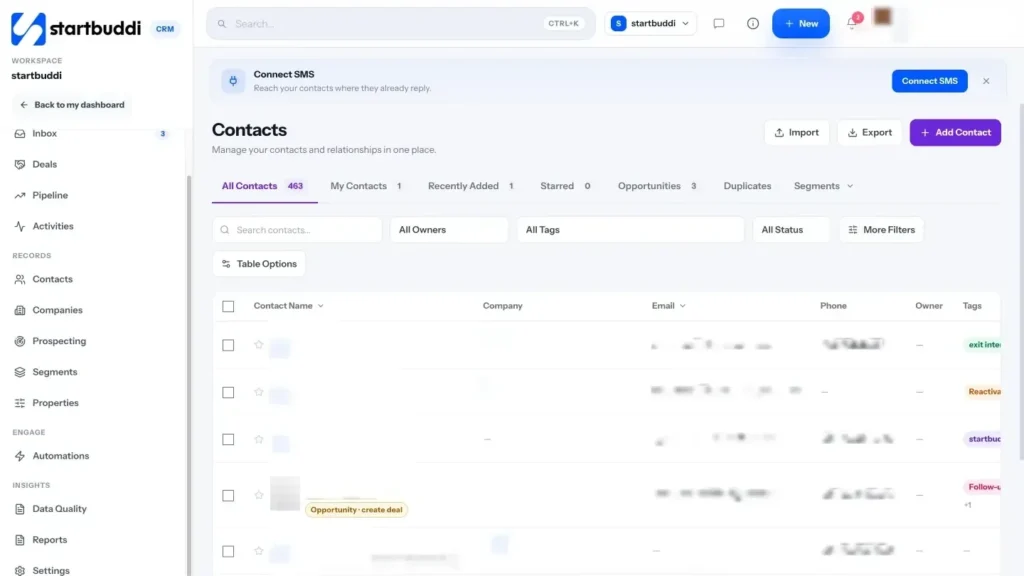
Open Customers, then Contacts. Use Add Contact for anyone who reached you by phone or DM: a name, an email or a phone number is enough to start. If your leads currently live in a spreadsheet, use Import to upload a CSV of up to 10,000 contacts at a time, map the columns and choose what happens to duplicates. Every contact has a source and a lead status (New, Qualified or Disqualified), so the qualifying step in your process has a home.

Filters include source, lead status and Last contacted, so a filter such as "status New, last contacted never" shows exactly who is still waiting for a first reply. Save it as a segment and it becomes a one-click list you check every morning. You can also switch to a board view grouped by lead stage and drag people between stages.
2. Let forms and bookings create contacts for you
Build a quote or enquiry form in Forms (there is a Lead Capture template to start from), share the link or embed it on your site, and choose in the form's settings to add or update the submitter in your contacts. Each answer can be saved to a contact property, so "budget" and "timeline" become fields you can filter on. Bookings work the same way: when someone books a discovery call on your booking page, they are created or updated as a contact.
3. Reply from one inbox
The Inbox inside Customers brings email, WhatsApp, SMS, website chat, Instagram and Facebook messages into one place, so DMs stop living in separate apps. You can use quick replies for your saved first reply, and Chip can draft a reply for you to edit. WhatsApp and SMS need the Starter plan or above. There is a step-by-step guide in how to use the inbox.
4. Find new prospects when enquiries are quiet
If you sell to businesses, Prospecting lets you describe your ideal customer in plain words, for example "owners of dental clinics in Manchester with 5 to 20 staff". Chip searches the web and business listings and returns companies and people with the reasons and sources for each match. You choose who to convert into contacts. Work emails and phone numbers are only looked up when you ask, and that uses Chip credits. Personal emails and personal phone numbers are never looked up.
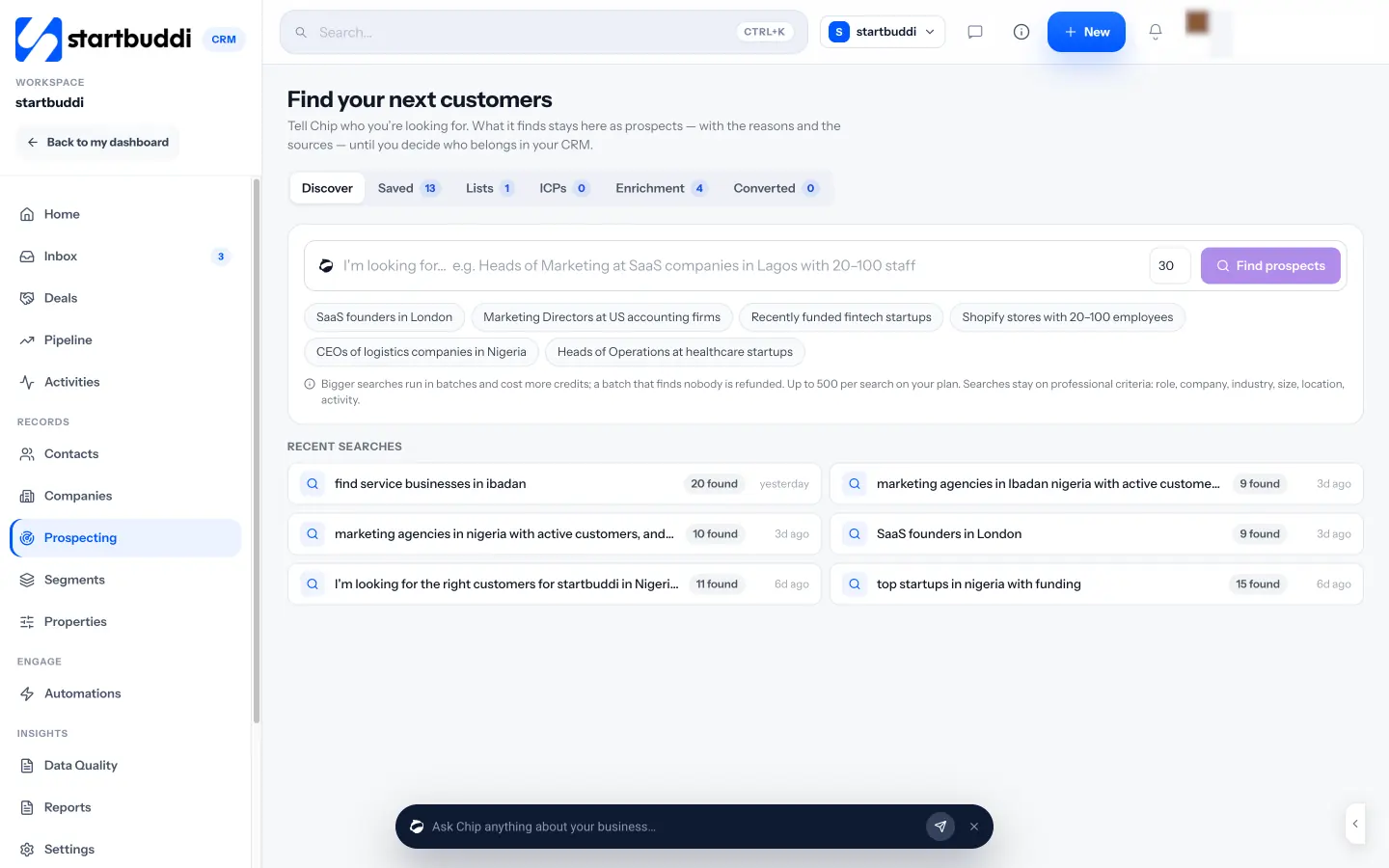
With leads coming in and a quick way to sort them, the next stage is where most deals are really won: the discovery conversation and the proposal. That is chapter 3.
Discovery calls, proposals and follow-ups that get a decision
- Questions that uncover the real reason they are buying
- Price the value, not the hours
- Use options to change the question
- Handle the common objections
- A follow-up message you can copy
- After a no: leave the door open
- 1. Book the discovery call and keep notes on the record
- 2. Create the deal and log the next step
- 3. Send an estimate, proposal or contract from Money Manager
- 4. Let Chip draft the follow-ups
Discovery and proposals are the middle of your sales process, and they are where small businesses win or lose most deals. A good discovery conversation means your proposal answers exactly what the buyer cares about. A good follow-up routine means that proposal gets a decision instead of silence. This chapter gives you an outline for the call, a structure for the proposal and a follow-up schedule you can copy.
Run a discovery call that makes the proposal easy
Discovery is the conversation where you learn what the buyer is trying to achieve, what is in the way, and what a good result looks like to them. It is not a pitch. The more they talk, the better your proposal will be, and the more they will trust you with the work.
A 30-minute call is enough for most small projects. Here is an outline that works for most service businesses.
- Open (2 minutes). Thank them, confirm how long you have, and say what you will cover: "I'd like to understand what you need, then tell you how we would approach it and what happens next."
- Their situation (8 minutes). "Tell me about the business and where this project fits." "What have you tried so far?"
- The goal (8 minutes). "If this goes well, what is different in six months?" "How will you know it worked?"
- The constraints (5 minutes). Budget range, deadline, who else is involved, anything that must or must not happen.
- Your approach (5 minutes). A short outline of how you would do it, with one example of similar work.
- Next steps (2 minutes). "I'll send a proposal by Thursday. Can we book 15 minutes on Monday to go through it?"
The last step is the one to protect. Booking the review call before you hang up turns "I'll have a look and get back to you" into a date in both diaries. It is the single biggest improvement most small businesses can make to their proposal win rate.
Questions that uncover the real reason they are buying
People rarely buy a service for the reason in their first message. Someone asking for "a new website" may really want more bookings, or to look credible to a bank, or to stop being embarrassed when customers ask for their link. These questions help you find that reason:
- "Why now? What changed?"
- "What happens if you do nothing for another six months?"
- "What would make this project a success for you personally?"
- "What worried you about the last supplier you used?"
When the real reason appears, write it down in their words and put it at the top of your proposal. A proposal that opens with "You told us you are losing weekend bookings to the salon down the road because customers cannot book online" is far more persuasive than one that opens with your company history.
Write a proposal that gets a decision
A proposal is a written offer: what you will do, what it costs and what happens next. For small projects, one or two pages is enough. For larger work, keep the core to four or five pages and put detail in an appendix. The job of the proposal is to make saying yes easy, not to show how much you know.
Here is a structure you can reuse.
| Section | What goes in it | Length |
|---|---|---|
| Their goal | The problem and the result they want, in their words. | One paragraph |
| What you will do | Deliverables as a list, with what is included and what is not. | Half a page |
| Timeline | Key dates and what you need from them at each point. | A short table |
| Price | The total, what it covers, tax, and payment terms (for example 50% deposit). | A short table |
| Options (optional) | Two or three packages at different levels. | A short table |
| Next step | Exactly how to accept: sign, reply or pay the deposit. | Two sentences |
For a longer walk-through with examples, read how to write a business proposal, or start from the free business proposal template.
Price the value, not the hours
Buyers compare prices, but they decide on value. Your proposal should connect the price to the result they told you they wanted. If a new booking system is expected to bring in ten extra appointments a month at $60 each, that is $600 a month, or $7,200 a year. A $2,500 project that pays for itself in about four months is an easy decision. The same $2,500 presented as "25 hours at $100 an hour" invites the buyer to question every hour.
You do not need to promise results you cannot control. You can simply show the maths using their numbers: "You mentioned you lose about ten bookings a month. If online booking recovers even half of those, the project pays for itself within the year." Keep it honest and specific, and let the buyer do the rest.
Always state what the price includes and excludes, whether tax is included, and how long the price is valid. A validity date, such as 30 days, gives the buyer a gentle reason to decide and protects you if your costs change.
Use options to change the question
When a proposal has one price, the buyer's question is "yes or no?". When it has three well-designed options, the question becomes "which one?". A simple way to structure them:
- Essential: the minimum that solves the core problem.
- Recommended: what you would advise, with the extras that make the biggest difference.
- Complete: everything, including ongoing support.
For example, a bookkeeping practice in Toronto might offer monthly bookkeeping at CAD 300, bookkeeping plus quarterly review calls at CAD 450, and bookkeeping, reviews and year-end preparation at CAD 650. Most buyers pick the middle option, which is why it should be the one you would genuinely recommend. Never invent options you do not want to sell.
A follow-up routine that is polite and persistent
Most proposals do not get an instant answer. The buyer is busy, needs to talk to a partner, or is waiting for another quote. Following up is not pestering. It is part of the service. The trick is to follow up on a schedule, with something useful each time, and to stop at a clear point.
| When | What to send |
|---|---|
| Same day | The proposal, with a one-line summary and the review call date. |
| Day 2 | "Did it arrive safely? Any questions before Monday?" |
| Day 5 | Something useful: a relevant example, a short answer to a worry they raised. |
| Day 10 | "Is this still a priority? Happy to adjust the scope or timing if that helps." |
| Day 20 | A friendly close: "I'll assume the timing isn't right and close this for now. The offer stands until [date]." |
That last message often gets a reply, because it gives the buyer permission to be honest. Either way, you can move the deal to won or lost and stop thinking about it. There is more on follow-up timing and wording in how to follow up with leads.
Handle the common objections
- "It's more than we expected." Ask what they expected and why. Then offer a smaller scope, a phased plan or staged payments. Avoid cutting your price for the same work, because it teaches buyers to ask every time.
- "We need to think about it." Ask what they need to think about. Usually it is one specific worry you can answer.
- "We're getting other quotes." Fine. Ask what they will compare, and make sure your proposal is clear on those points.
- "Not right now." Ask when would be right, and set a reminder for that date.
A follow-up message you can copy
Hi David, I hope the week is going well. I wanted to share a quick example that's close to what we discussed: we helped a clinic in Leeds move their bookings online last spring, and they stopped taking weekend calls within a month. Here's the short case note: [link]. Do you have any questions about the proposal I can answer before our call on Monday? Best, Priya
It is short, it gives something of value, it refers back to the conversation and it ends with a direct question. That combination gets far more replies than "just checking in".
After a no: leave the door open
When a buyer says no, thank them, ask what made the difference if they are happy to say, and offer to stay in touch. Something like: "Thanks for letting me know, and good luck with the project. If anything changes, or you need help with the next phase, I'd be glad to hear from you." Then record the reason and, if they agree, add them to your newsletter. A surprising number of lost deals come back months later, when the cheaper option has not worked out or the timing has changed.
Two things to avoid after a no. First, do not argue or send a discounted counter-offer they did not ask for; it makes your original price look padded. Second, do not delete the contact. The notes from your discovery call are exactly what you need if they return.
Mistakes in the middle of the process
- Pitching in the discovery call. If you are talking more than half the time, you are not discovering.
- A proposal without a next step. Tell them exactly how to say yes.
- Vague scope. "Social media management" means different things to everyone. List what is included and what is not.
- Chasing with "just checking in". Add something useful to every follow-up, or at least ask a direct question.
- Never closing deals as lost. An old pipeline full of dead deals makes your numbers meaningless.
How to run discovery, proposals and follow-ups in startbuddi
1. Book the discovery call and keep notes on the record
Share a booking page so qualified leads pick their own time, or use Book a call from the contact's menu, which checks for clashes with your existing bookings and adds a meeting link. During or after the call, add notes on the contact under Summary & notes. Notes added there or in the inbox appear in both places.
2. Create the deal and log the next step
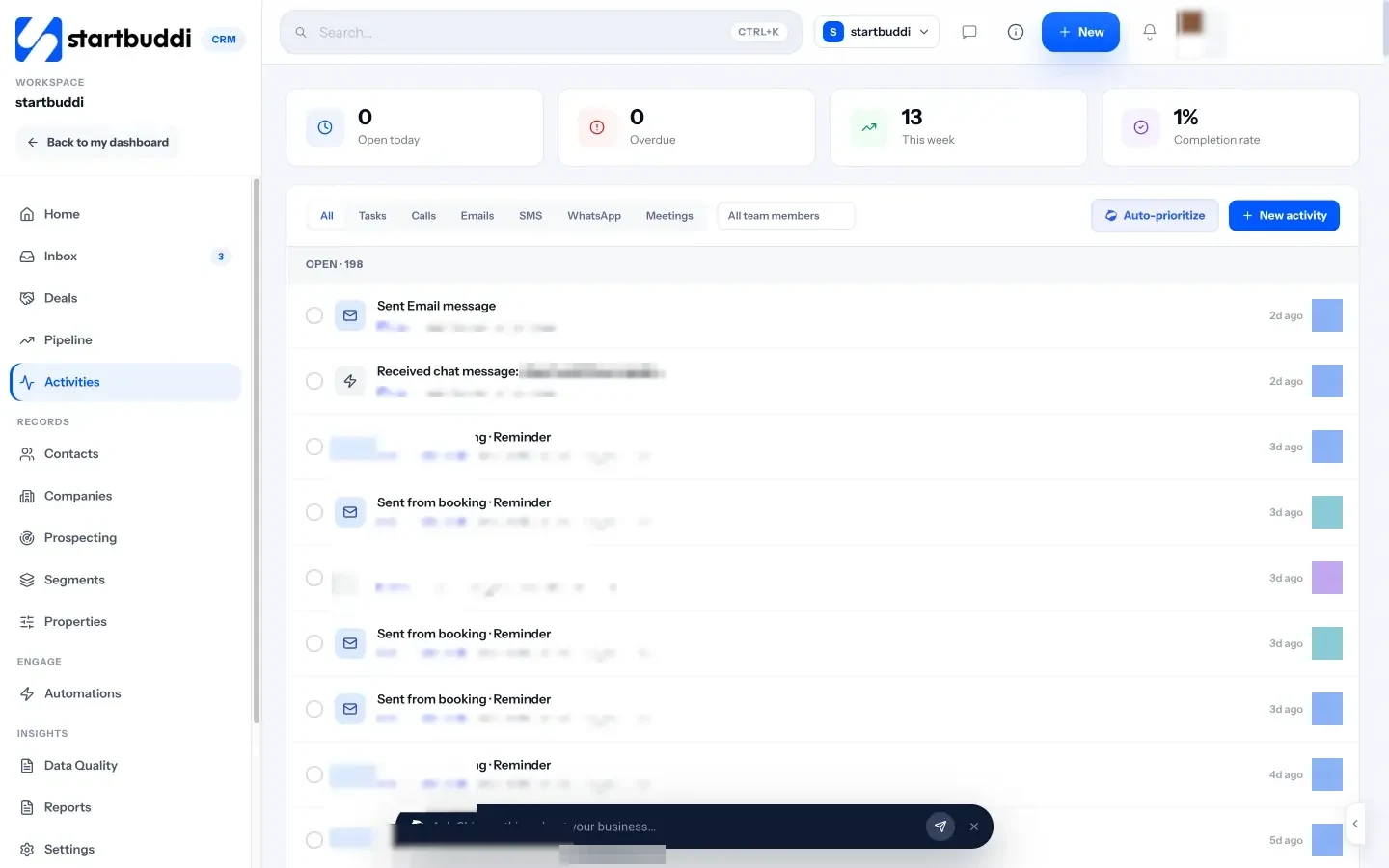
From the pipeline, use Add Deal with a name, the contact, a value and a stage, plus an expected close date. Then add an activity for the follow-up. Activities in Customers lets you log calls, emails, WhatsApp messages, meetings and follow-ups with a due date, and shows what is open today and overdue. Your day 2, day 5 and day 10 follow-ups become a list rather than a memory.
3. Send an estimate, proposal or contract from Money Manager
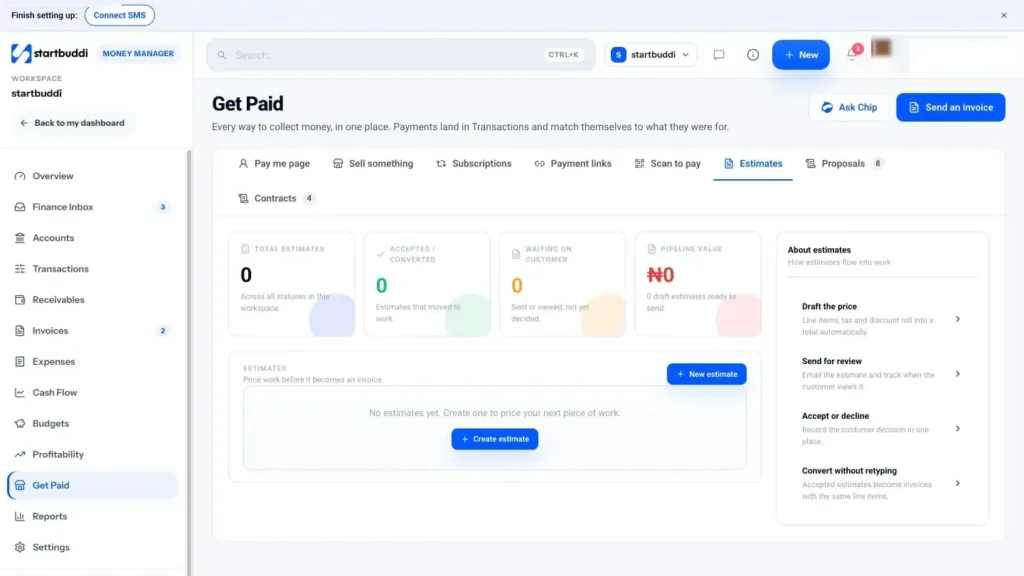
Open Money Manager, then Get Paid. The Estimates tab lets you price the work with line items, tax, discount and notes such as "Valid for 30 days. 50% deposit to begin." Send it by email. The customer replies to the email to accept, decline or ask for changes, and you click Mark accepted. An accepted estimate converts to an invoice with the same line items, so nothing is retyped. The help article on sending an estimate walks through each step.
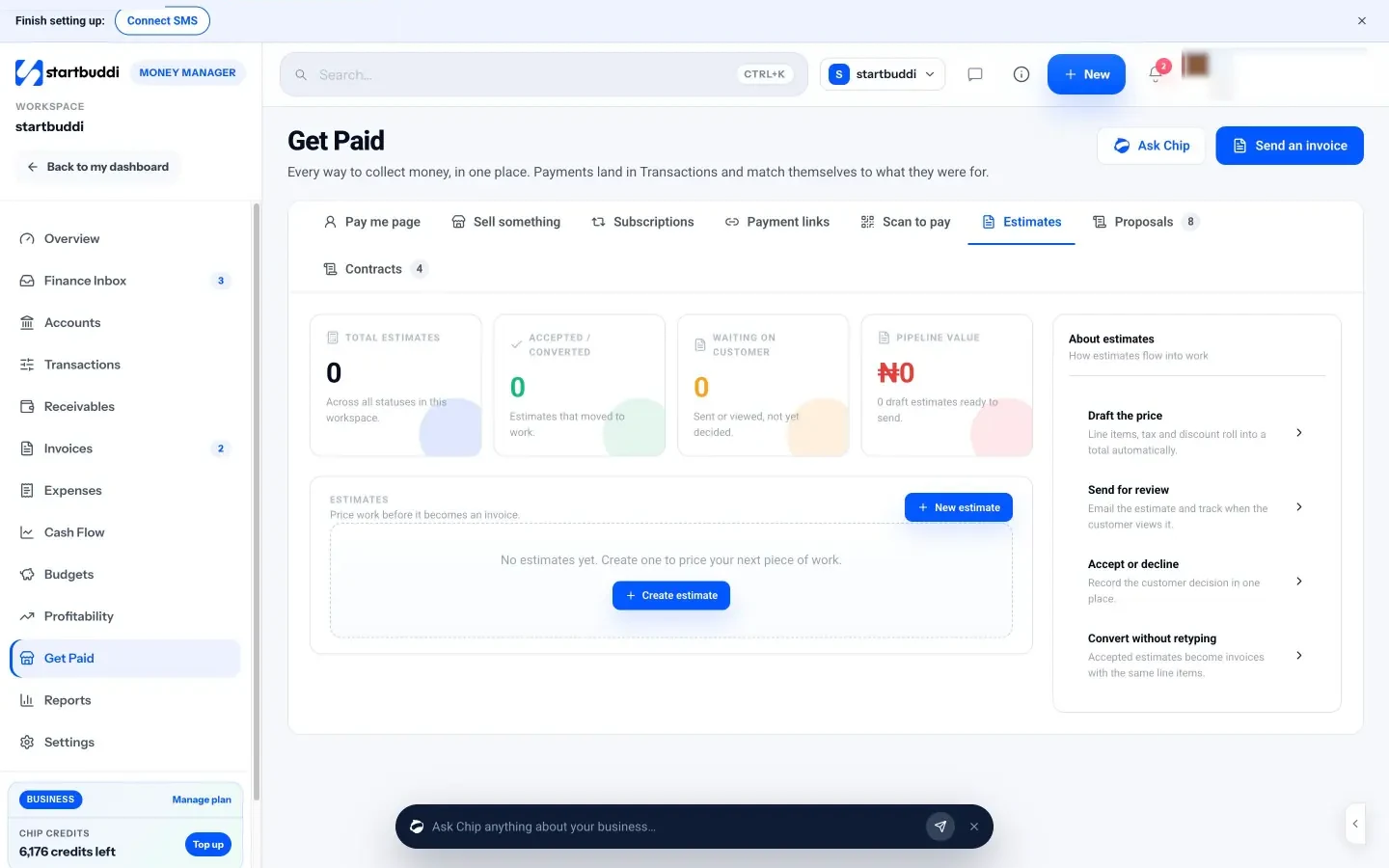
For bigger projects, the Proposals and Contracts tabs create documents from templates (for example Project Proposal, Freelance Contract or Website Development Contract), which you edit, add signers to and send for signature. Signers sign on a secure page, and the status moves to Signed when everyone has signed. The contract templates are a starting point, not legal advice, so have anything important reviewed. See estimates, proposals and contracts for more.
4. Let Chip draft the follow-ups
On a contact, Nurture with Chip (in beta) drafts a short follow-up sequence using that contact's real history. You set the goal, the number of emails and the tone, edit each step, then enrol them or save it without enrolling. Sequences run through Automations: Free includes 2 active automations, and Starter allows 10. If you prefer to write each follow-up yourself, Chip can still draft a single reply in the inbox for you to edit.
When the buyer says yes, the last stage begins: closing the deal properly, handing over to delivery and learning from the numbers. That is chapter 4.
Close, hand over and measure your sales process
- Hand over from sales to delivery
- A handover note template
- A worked example: reading the numbers
- Signs your sales process needs changing
- What to automate first, and what to keep personal
- 1. Mark won or lost, with a reason
- 2. Take the deposit and start the work
- 3. Check your numbers once a month
- 4. Ask Chip what needs attention
- Keep your data tidy
- A 20-minute monthly sales review
- Your next step
The end of a sales process is not the "yes". It is the moment the client has signed, paid their deposit and knows exactly what happens next. This chapter covers closing cleanly, handing over to delivery, recording losses honestly, and the five numbers that tell you whether your sales process is working. It finishes with how to choose sales tools for a small business, and how to review your process each month in startbuddi.
Close the deal properly
A verbal yes is good news, but it is not a closed deal. Until there is a written agreement and, for most service businesses, a deposit, plans can change. Close every won deal with the same three steps:
- Confirm in writing. A signed contract, an accepted estimate, or at minimum an email or message that says "yes, go ahead" to a specific scope and price.
- Take a deposit or first payment. A deposit confirms commitment and protects your cash flow. Many service businesses ask for 25% to 50% up front. Our deposit calculator helps you work out a fair amount.
- Book the kickoff. A date for the first meeting or the first visit, so the client feels momentum straight away.
Do all three on the same day if you can. The period between "yes" and the first payment is when buyer's remorse is most likely, and a quick, organised start is the best cure.
Hand over from sales to delivery
In a one-person business, you hand over to yourself, which sounds unnecessary until you realise how much detail lives only in the sales conversation. In a team, a poor handover is the most common reason clients feel they have to repeat themselves. Write a short handover note for every won deal:
- The client's goal, in their words.
- What was promised: scope, dates, price and anything unusual you agreed.
- Who the contacts are and how they like to communicate.
- Any worries they raised during the sale.
For the first week of the relationship, a client onboarding checklist keeps things on track. Our client onboarding checklist is a good starting point.
A handover note template
Client: Riverside Dental, Manchester. Main contact: Dr Okafor (prefers email, replies evenings). Goal in their words: "Stop patients ringing to book check-ups." Scope agreed: online booking for three services, reminder emails, staff training session. Not included: website redesign. Dates: live by 1 March. Price and terms: £2,400, 50% deposit paid, balance on launch. Worries raised: older patients may not book online, so keep the phone option visible.
It takes five minutes to write and saves hours of "what did we promise them?" later. Keep it on the client's record, where everyone who works on the account can find it.
Record why you lose
You will lose more deals than you win. That is normal. What matters is that every loss teaches you something. When a deal ends, record one of a small set of reasons:
- Price: too expensive for them.
- Timing: not ready yet.
- Competitor: chose someone else.
- Fit: they needed something you do not do.
- No reply: went silent after the proposal.
After a few months, the pattern tells you what to change. If most losses are "no reply", work on follow-up. If most are "price", either qualify on budget earlier or show value more clearly. If most are "fit", tighten who you market to. Where you can, ask lost buyers one question: "Would you mind telling me what made the difference?" Many will answer, and the answers are gold.
The five numbers that show your sales process is working
You do not need a dashboard of twenty charts. These five numbers, checked once a month, tell you almost everything.
| Number | How to work it out | What it tells you |
|---|---|---|
| Win rate | Deals won ÷ (deals won + deals lost) | How good your proposals and follow-up are. |
| Average deal size | Total value of won deals ÷ number of won deals | Whether you are selling the right size of work. |
| Sales cycle | Average days from enquiry to won | How long cash takes to arrive after marketing. |
| Lead response time | Average time to your first reply | Whether you are losing leads to slow replies. |
| Pipeline value | Total value of open deals | Whether next month is likely to be busy or quiet. |
A worked example: reading the numbers
Say that in one quarter a small marketing agency in Cape Town sent 24 proposals. It won 9 and lost 12, with 3 still open. The won deals were worth a total of R270,000.
- Win rate: 9 ÷ (9 + 12) = 43%.
- Average deal size: R270,000 ÷ 9 = R30,000.
- If the average sales cycle was 24 days, a lead arriving on 1 March typically becomes revenue in late March, and the first payment arrives after that.
Now the agency can test changes. If it adds a review call to every proposal and the win rate rises to 50% next quarter on the same 21 decided deals, that is about 10 or 11 wins instead of 9, roughly R30,000 to R60,000 more revenue from the same number of leads. That is why these numbers are worth tracking: they turn small habits into money you can measure.
There is one more useful number: sales velocity. It combines the others into a rough estimate of revenue per day from your pipeline: (number of open deals × win rate × average deal size) ÷ sales cycle in days. With 15 open deals, a 43% win rate, R30,000 average and a 24-day cycle, velocity is about R8,000 a day. You do not need to track it closely, but it shows that any improvement to one of the four inputs improves the result.
Forecast next month from your pipeline
Once your stages are in use, your pipeline can tell you roughly what next month looks like. The simplest method is a weighted forecast: multiply each open deal's value by the chance it closes, based on its stage, then add them up.
| Stage | Open deals value | Rough chance of closing | Weighted value |
|---|---|---|---|
| Qualified | $12,000 | 10% | $1,200 |
| Discovery done | $9,000 | 25% | $2,250 |
| Proposal sent | $10,000 | 40% | $4,000 |
| Negotiation | $4,000 | 70% | $2,800 |
| Total | $35,000 | $10,250 |
The percentages here are examples. Use your own stage-to-won rates once you have them. A forecast like this is never exact, but it answers the practical question: do I need to push marketing this month, or should I be planning capacity for the work that is about to land?
Signs your sales process needs changing
- Deals pile up in one stage. If most deals sit at "proposal sent", your proposals or follow-ups need work. If they sit at "new enquiry", you are too slow to reply.
- Your win rate falls while leads rise. You may be attracting the wrong people. Tighten your qualifying questions.
- Your sales cycle grows. Look for a step where buyers wait for you, such as a slow proposal or a missing price range.
- You keep skipping a stage. If nobody ever uses "negotiation", remove it. A process should describe reality.
Sales tools for small businesses: what you actually need
You can run a good sales process with a spreadsheet and discipline. Most small businesses outgrow that when they pass about 20 open conversations, or when a second person starts selling. At that point, a CRM app for small business pays for itself in leads you no longer forget. Here is what to look for, in order of importance.
- One contact list with the full history. Every message, note, call and deal on one record.
- A pipeline board you can drag. Your stages, your words.
- Reminders and follow-up tasks. The tool should tell you who to chase today.
- The channels you already use. If your customers talk to you on WhatsApp, a CRM without WhatsApp will always be half empty.
- Quotes and invoices nearby. Moving a won deal into an invoice should not mean retyping it in another app.
- Simple reports. Win rate, deal size and cycle length without building your own spreadsheet.
- A price that fits. A free tier or trial long enough to test your real process.
Our buyer's guide to the best CRM software for small business compares options, and what is a CRM and why you need one explains the basics if you are new to the idea. Whatever you choose, set it up around your written process, not the other way round.
What to automate first, and what to keep personal
Automation saves time in a sales process, but not every step should be automatic. A good rule for small businesses is to automate the reminders and the routine messages, and keep the real conversations personal.
| Automate | Keep personal |
|---|---|
| An instant "thanks, we got your message" reply with a booking link | The first real answer to their question |
| Reminders to you when a proposal has had no reply for a few days | The follow-up message itself, at least for larger deals |
| Booking confirmations and reminder emails | The discovery call |
| The deposit invoice once a deal is won | Negotiation and any change to scope |
| A welcome email when someone becomes a client | The kickoff meeting |
Start with one automation, check that it behaves the way you expect, then add the next. Automations that nobody checks are how businesses end up sending "welcome" emails to people who cancelled.
How to close, hand over and measure in startbuddi
1. Mark won or lost, with a reason
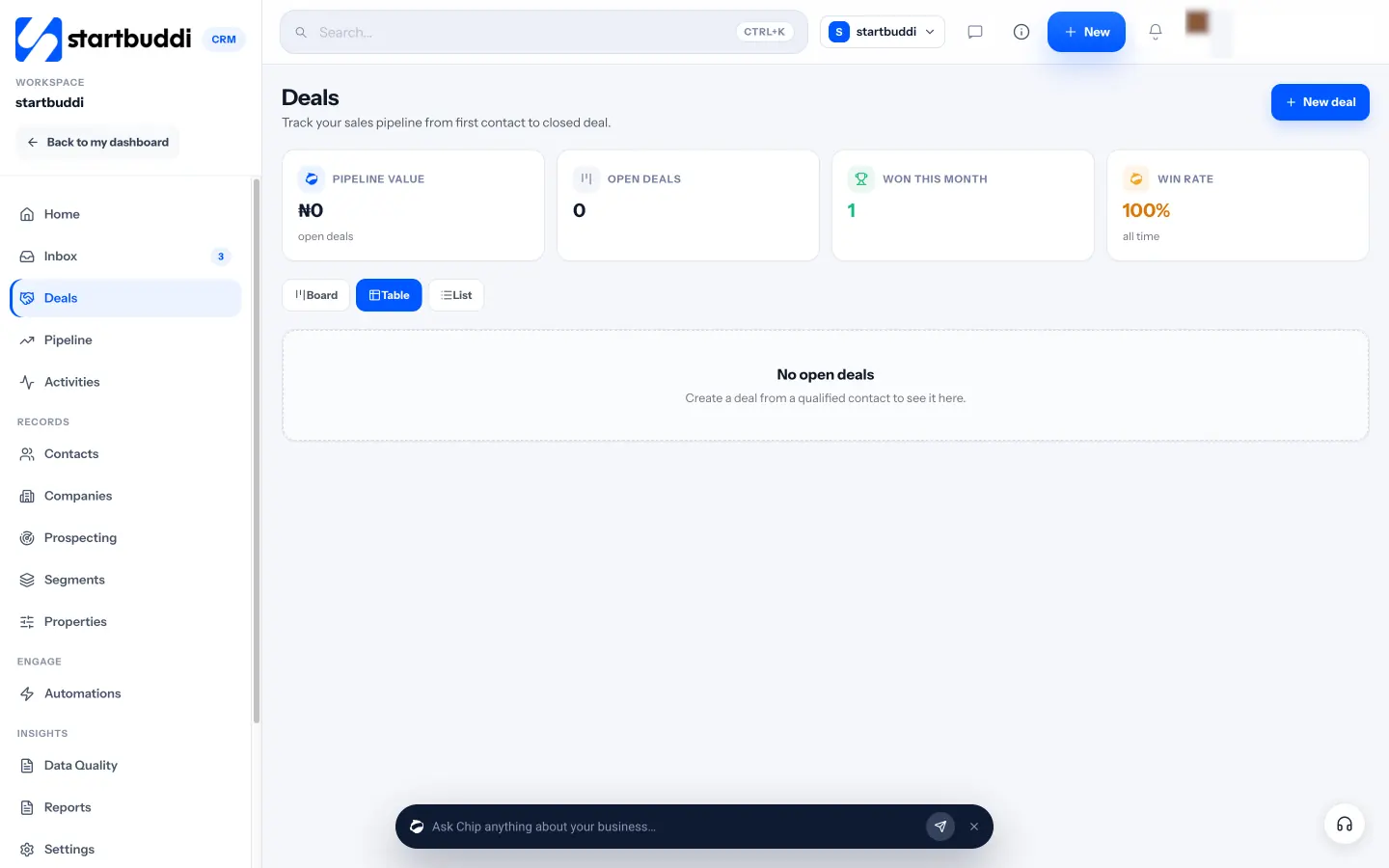
Drag the deal to Won, or use Mark as won or Mark as lost on the deal and add an optional reason such as budget, timing or went with a competitor. Turn on "Require a reason when marking Lost" in the pipeline settings to make the habit stick. If you invoice the deposit from Money Manager and it is paid, the deal is marked won for you.
2. Take the deposit and start the work
From the contact, Create an invoice opens Money Manager with the invoice pre-addressed, or convert the accepted estimate. Clients can pay online through Paystack or Stripe when you connect one, or by bank transfer using the details on the invoice. When a deal is won, Chip offers to create a client portal, a private page where the client can follow the project, approve deliverables and see invoices. Client portals are available to invite clients on Starter and above; Free lets you build and preview one. See client portals for how they work.
3. Check your numbers once a month
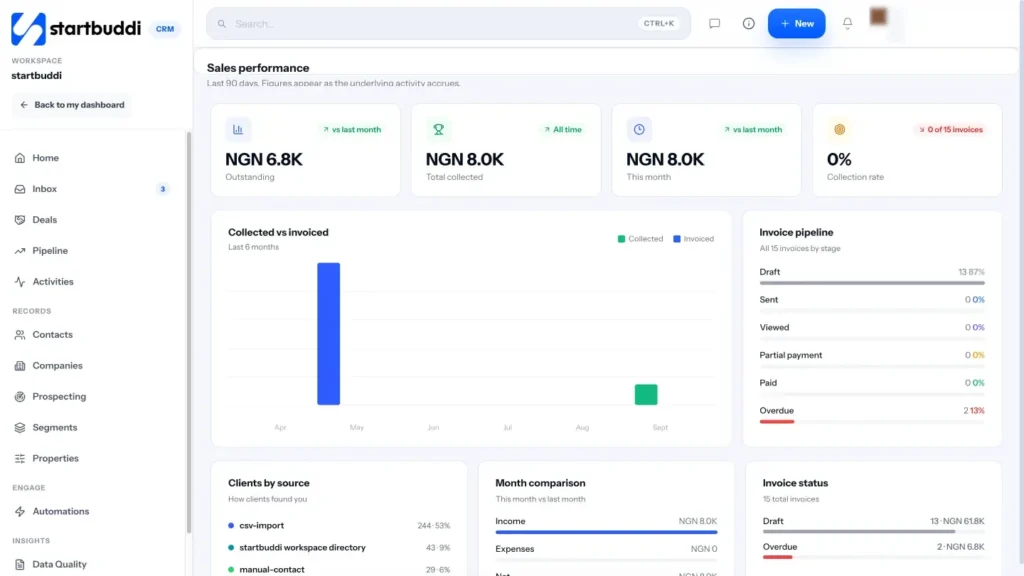
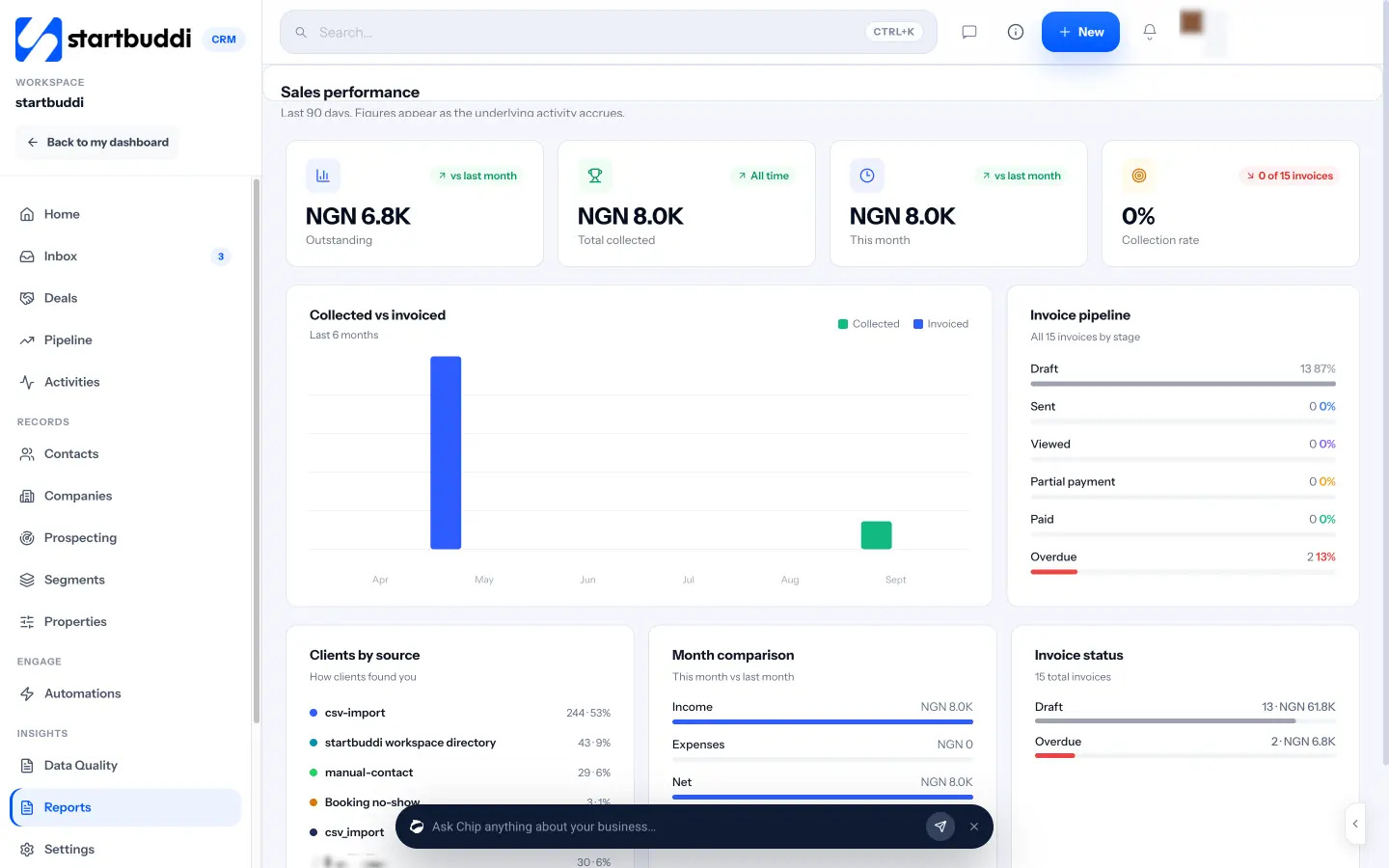
Open Customers, then Reports. The Sales performance block covers the last 90 days: win rate, average deal size, sales cycle, sales velocity, lead response time, forecast accuracy, time in stage and stage conversion. Those are the numbers from the table above, worked out for you from your real deals. The pipeline's Forecast and Analytics tabs show expected revenue and how deals are spread across stages.
4. Ask Chip what needs attention
The Customers home page has prompts such as "Which deals are at risk?" and "Plan my follow-ups". The pipeline shows a strip when Chip spots deals worth a look, with a suggested move to the next stage that you can accept or put aside, and an insights drawer lists follow-up reminders and stalled deals. You stay in charge of every move; Chip just makes sure nothing is forgotten.
Keep your data tidy
Reports are only as good as the records behind them. Data Quality, under Insights in Customers, lists what is missing and where: contacts without an owner, possible duplicate contacts, and form responses that never made it into your contacts. You can fix most of them in the same row, for example by assigning an owner or merging two duplicates into the fullest record. Ten minutes here once a month keeps your win rate and lead source figures honest, especially if more than one person adds contacts.
A 20-minute monthly sales review
- Close any deal with no activity for 30 days: won, lost or a new next step.
- Read the five numbers and compare them with last month.
- Read the loss reasons and pick one thing to improve.
- Check where this month's leads came from and put more effort into the best source.
Your next step
Write your stages on one page today, then set them up as a pipeline and add every open conversation to it. The Free plan includes the full pipeline and 250 contacts, and every paid plan starts with a 30-day trial. Compare plans, or read the step-by-step pipeline setup guide to get started.
Tiwalade Joanna Okedara-Kalu is the founder, CEO and CTO of startbuddi, the business system that brings clients, bookings, invoices, projects, marketing and the Chip AI assistant into one place. Tiwalade builds software around how service businesses really work day to day, and writes about client management, getting paid on time and why small businesses outgrow the tools they start with.
Founded startbuddi and leads its product and engineering