Best Online Collaboration Tools for Small Businesses in 2026: Options Compared
The best online collaboration tools for small business, compared: chat, video, docs, whiteboards and files, with free plans, prices and honest limits.



The best online collaboration tools for small business cover four jobs: chat, video calls, shared documents and a place for tasks. Google Workspace or Microsoft 365 is the sensible base for email, docs and meetings. Slack suits teams that live in chat. startbuddi suits service businesses that want team chat, calls, docs and projects next to their clients.
startbuddi is our product. We’ve listed its limits next to everyone else’s, and every price below comes from the vendor’s own pricing page, checked on 1 October 2026.
Key takeaways
- Most small businesses need a base suite (Google Workspace or Microsoft 365) plus one or two specialist tools, not ten.
- Microsoft 365 Business Basic includes Teams, email and 1 TB of storage per user for $7.00 a user a month, paid yearly, which is hard to beat on price.
- Free plans are real but limited: Slack keeps 90 days of messages, Zoom’s free meetings stop at 40 minutes, and Miro’s free plan has 3 editable boards.
- Each extra tool is another login, another bill and another place to search. Count the whole stack, not one subscription.
- If most of your collaboration is about clients, choose tools that keep the conversation next to the client record.
Online collaboration tools compared
Prices are the lowest paid business plan, per user per month, billed annually, as each vendor shows them, unless the table says otherwise.
| Tool | Best for | Lowest paid plan | Free plan | Standout feature |
|---|---|---|---|---|
| startbuddi | Service businesses that collaborate around clients | See pricing | Yes (owner only) | Chat, calls, docs and projects linked to clients |
| Google Workspace | Teams on Gmail who write and share documents | €6.80 Business Starter (price shown in euros) | No | Docs, Sheets, Meet and Drive with real-time editing |
| Microsoft 365 | Teams on Outlook and Office files | $7.00 Business Basic | No | Teams, email and 1 TB storage in one plan |
| Slack | Teams that run the day in chat | $7.25 Pro | Yes, 90 days of history | Channels and app integrations |
| Zoom Workplace | Businesses with frequent client video calls | $14.16 Pro | Yes, 40-minute meetings | Reliable meetings and AI Companion on paid plans |
| Notion | Teams that write a lot and want a wiki | $10 Plus (monthly) | Yes | Pages and databases in one place |
| Miro | Workshops, planning and brainstorming | $8 Starter | Yes, 3 editable boards | Infinite whiteboard with templates |
| Dropbox | Teams sharing large files with clients | $15 Standard (as listed) | Yes, 2 GB | File recovery and large transfers |
| Loom | Teams that explain things with short videos | $18 Business | Yes, 25 videos per person | Screen recordings instead of meetings |
How we chose these collaboration tools
Each tool had to:
- help a team work together on the same thing, whether that’s a message, a call, a document, a board or a file;
- offer a free plan or a free trial;
- publish its prices on its own site, so we could check them;
- work in a browser and on a phone.
We read each vendor’s pricing pages on 1 October 2026. We haven’t run hands-on tests, so we describe what each plan includes rather than how it feels day to day. Some vendors show prices in your local currency and change them by country, so check before you buy.
What small business collaboration really needs
Collaboration sounds abstract. In a small business it usually means five things:
- Quick questions that shouldn’t wait for a meeting: chat.
- Conversations that need a face or a voice: video and audio calls.
- Work you write together: shared documents and spreadsheets.
- Who does what by when: a task management system.
- Files that clients and suppliers send: shared storage.
The trap is buying a separate tool for each and then losing an afternoon a week hunting for which app a decision was made in. Our piece on collaborative task management covers how tasks get lost in chat threads and how to stop it.
1. startbuddi
startbuddi is an all-in-one workspace for service businesses: clients, messages, bookings, projects, documents and invoices in one place, with an AI assistant called Chip. For collaboration it has four parts.
Best for: agencies, consultants and service teams whose collaboration is mostly about clients and projects.
Key features
- Chat: channels (public or private), direct messages, group chats and a discussion room for every project. Typing @ links a teammate or a record such as a project, customer, document or booking.
- startbuddi Live: drop-ins (quick audio rooms in chats, DMs and projects), video meetings that guests join from a link, host controls and breakout rooms. Live, with recording and Chip notes, comes with Starter, and calls with clients inside the client portal come with Growth.
- Documents: docs, sheets and decks with real-time co-editing, comments, version history, share links and e-signatures.
- Whiteboards: real-time boards with sticky notes, mind maps and dot voting; selected notes turn into tasks.
- Client portals: a private page per client to follow progress, approve work and message you. Clients sign in with an email link and don’t take a seat. Read more about what a client portal is.
- Ask Chip in a chat to summarise the conversation, list decisions or find the tasks and owners mentioned.
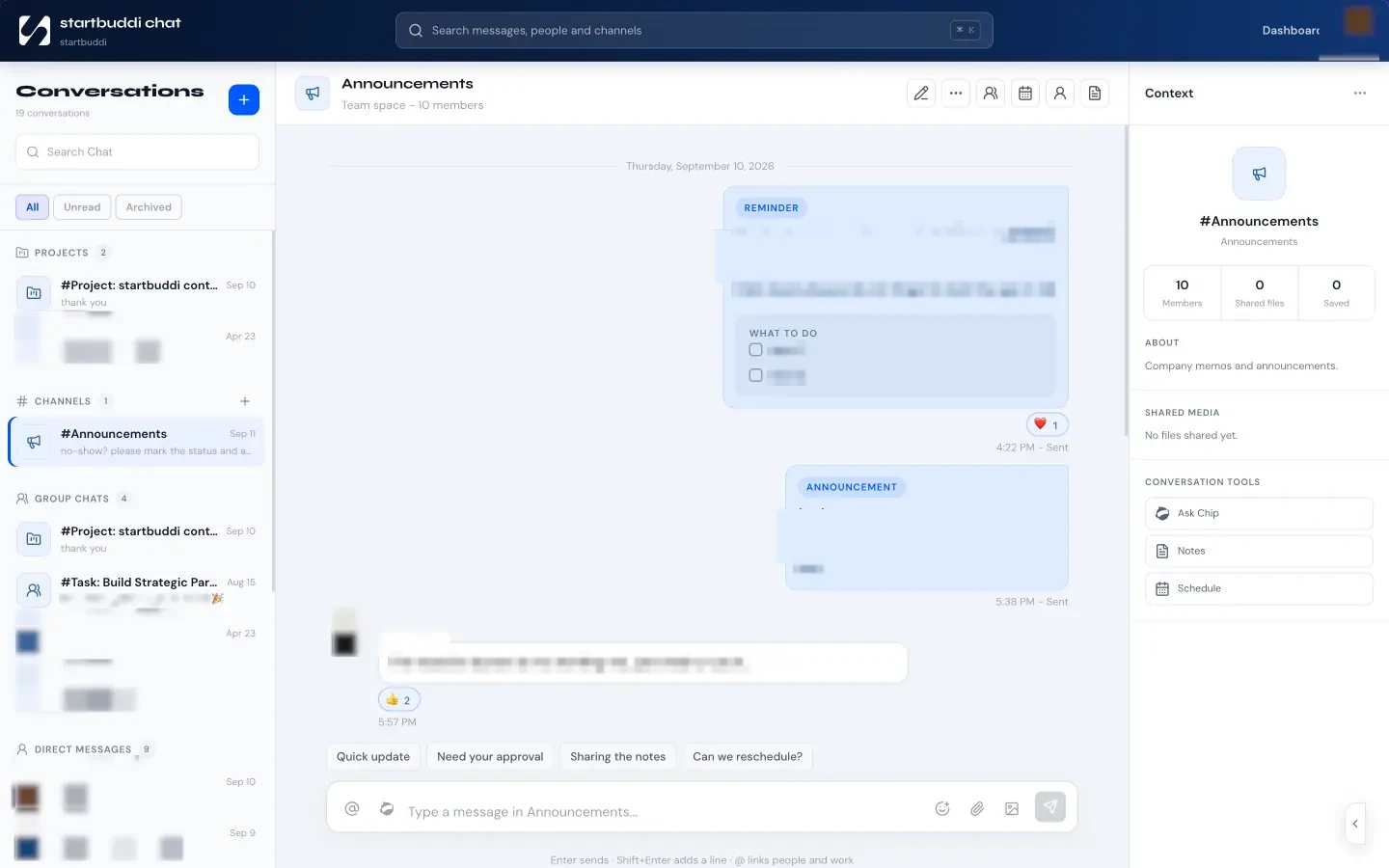
Pricing: a free plan is available. See startbuddi pricing for what each plan includes.
Pros
- Conversations, calls, docs and tasks sit next to the client and project they’re about.
- One login and one bill for chat, meetings, docs and projects.
- Client portals and guest meeting links make it easy to bring clients in without giving them a seat.
Cons
- The Free plan includes only the owner’s seat; teammates need a paid plan.
- It doesn’t host business email, so you’ll keep Google Workspace or Microsoft 365 for that.
- Chat replies are quoted replies in the main conversation, not separate threads, and there are no typing indicators.
Who should skip it: teams that only need internal chat and are happy with their CRM, invoicing and project tools.
2. Google Workspace
Google Workspace bundles Gmail on your own domain, Docs, Sheets, Slides, Drive, Meet, Chat and Calendar.
Best for: teams that already use Gmail and write documents together.
Key features: real-time editing in Docs and Sheets, Google Meet video meetings, shared drives and Google Chat. Business Starter includes 30 GB of pooled storage per person and meetings for up to 100 participants; Business Standard raises that to 2 TB and 150 participants with recording.
Pricing: Google shows prices in your local currency. On 1 October 2026 the page we saw listed Business Starter at €6.80 per user a month and Business Standard at €13.60, with a 10% discount for new customers’ first 12 months on up to 20 users. Plans cover up to 300 users.
Pros
- The best real-time document editing for most teams.
- Email, calendar, docs and meetings in one subscription.
Cons
- No free plan for a business domain.
- Google Chat is simpler than Slack for teams that live in channels.
Who should skip it: teams already committed to Microsoft Office files.
3. Microsoft 365 (with Teams)
Microsoft 365 for business combines Outlook email, Teams, OneDrive and SharePoint storage, and the Office apps.
Best for: teams who work in Word and Excel files or deal with corporate clients who do.
Key features: Teams for chat, calls and meetings; 1 TB of cloud storage per user; Planner, Forms and Bookings. Business Basic has web and mobile Office apps; Business Standard adds desktop apps.
Pricing: Business Basic is $7.00 per user a month, paid yearly. Business Standard is $23.50 and Business Premium $32.00, paid yearly, both now sold with Copilot. Plans cover 1 to 300 users.
Pros
- Teams, email and storage in the cheapest plan.
- Familiar to corporate clients and partners.
Cons
- Business Basic has no desktop Office apps.
- The lowest prices need a yearly commitment.
Who should skip it: Google-first teams.
4. Slack
Slack is team chat organised into channels, with thousands of app integrations.
Best for: teams that run their day in chat and use many other tools.
Key features: channels, direct messages, huddles, Slack Connect for chatting with other companies, and app integrations.
Pricing: Free keeps 90 days of message history, allows 1:1 huddles only and up to 10 app integrations. Pro is $7.25 per user a month billed annually ($8.75 monthly) and adds unlimited history, group huddles and unlimited apps. Business+ is $15 billed annually.
Pros
- The most polished chat experience.
- Connects to almost every other tool.
Cons
- The free plan’s 90-day history means old decisions disappear.
- It’s only chat: you still need docs, tasks and video elsewhere.
Who should skip it: teams that already get chat in Microsoft Teams or another tool they pay for.
5. Zoom Workplace
Zoom Workplace is best known for video meetings, with an AI Companion on every plan and unlimited use of it on paid plans.
Best for: businesses that meet clients by video several times a week.
Key features: meetings for up to 100 participants on Pro and 300 on Business, cloud storage for recordings and AI Companion meeting summaries.
Pricing: Basic is free with meetings of up to 40 minutes and 100 participants. Pro is $14.16 per user a month billed annually ($16.99 monthly), with meetings of up to 30 hours and 10 GB of cloud storage. Business is $18.33 billed annually ($21.99 monthly).
Pros
- Meetings of up to 30 hours on Pro.
- AI Companion summaries included on paid plans.
Cons
- The 40-minute limit on free meetings cuts off longer client calls.
- Another subscription on top of your email and chat tools.
Who should skip it: teams whose suite (Google Meet or Teams) already covers their meetings.
6. Notion
Notion is a workspace of pages and databases: wikis, meeting notes, project trackers and docs in one place.
Best for: teams that document a lot and want a shared wiki.
Key features: pages, databases with subtasks and dependencies, forms, sites and Notion Calendar.
Pricing: Free has blocks limited once two or more members share a workspace, 10 guests and 7 days of page history. Plus is $10 per member a month and Business $20, paid monthly; yearly billing saves up to 20%.
Pros
- Excellent for wikis, handbooks and meeting notes.
- Very flexible.
Cons
- No built-in video calls.
- You design the structure yourself, which takes time.
Who should skip it: teams who want ready-made tools rather than building blocks. See startbuddi vs Notion for a side-by-side.
7. Miro
Miro is an online whiteboard for workshops, planning and brainstorming.
Best for: teams that plan visually or run workshops with clients.
Key features: an infinite canvas with templates, sticky notes, diagrams and AI features.
Pricing: Free gives 3 editable boards and unlimited members. Starter is $8 per member a month billed annually, with unlimited and private boards. Business is $20. Annual billing saves 20%.
Pros
- The richest whiteboard on this list.
- Lots of templates for workshops.
Cons
- Only 3 editable boards on Free.
- A specialist tool you’ll use for a fraction of the week.
Who should skip it: teams that brainstorm rarely; a basic whiteboard in another tool may do.
8. Dropbox
Dropbox is cloud storage and file sharing, with recovery and large file transfers.
Best for: photographers, designers, architects and anyone sharing large files.
Key features: team folders, file recovery, large file transfers, PDF editing and e-signatures.
Pricing: Basic is free with 2 GB. Standard is listed at $15 per user a month for one or more people, starting at 3 TB for the team, with 180-day file recovery. Advanced is $24 per user a month for three or more people, starting at 15 TB.
Pros
- Very good with large files and recovery.
- Simple sharing with clients.
Cons
- Overlaps with storage already included in Google Workspace or Microsoft 365.
- The free 2 GB fills quickly.
Who should skip it: teams whose suite storage is enough.
9. Loom
Loom records your screen and camera so you can explain something in a short video instead of a meeting.
Best for: teams that hand over work across time zones or explain designs to clients.
Key features: screen and camera recording, transcripts in 50+ languages, comments and reactions.
Pricing: Starter is free with up to 25 videos per person and 5 minutes per recording. Business is $18 per creator a month and Business + AI $24, with annual billing saving up to 17%.
Pros
- Replaces many short meetings.
- Transcripts in 50+ languages on the free plan.
Cons
- The 5-minute limit on Starter is tight.
- One more subscription for a single job.
Who should skip it: teams that sit in the same office most days.
Worked example: the cost of a stack for six people
These figures are illustrative, using the published prices above, billed annually, before tax.
| Stack | What you buy | Monthly cost |
|---|---|---|
| Separate tools | Slack Pro for 6 ($43.50) + Zoom Pro for 2 hosts ($28.32) + Miro Starter for 6 ($48) | $119.82, plus email |
| One suite | Microsoft 365 Business Basic for 6 (6 × $7.00) | $42.00, email included |
The separate-tools stack costs almost three times as much and still needs an email provider. It may be worth it: Slack’s chat and Miro’s boards are better than the suite’s versions. But it’s worth knowing what you pay for, and how many places a decision can hide.
If much of your collaboration is with clients, also count the tools you use to reach them: your CRM, booking page, invoicing and client updates. A workspace that covers those and your team’s chat and calls can replace more than one line in this table.
How to choose online collaboration tools for small business
- Pick your base suite. Gmail users choose Google Workspace; Outlook users choose Microsoft 365. This covers email, docs, storage and meetings.
- Find the gaps. Is chat in the suite good enough? Do you need a whiteboard? Where do tasks live?
- Fill each gap with one tool, and agree what goes where: chat for quick questions, tasks for anything with a deadline, docs for anything that needs to last.
- Check the client side. Can clients join a meeting from a link, comment on a document or follow a project without a paid seat?
- Review after 90 days. Cancel anything nobody opens.
Our guide on how to manage a remote team covers the routines that make these tools work, and our list of the best task management apps helps with step two. If you’re moving off ClickUp, see our ClickUp alternatives.

Bring your team and clients into one place
If your team’s conversations are mostly about clients and projects, keep them next to the clients and projects. Start free with startbuddi, no card needed, or see how team chat works. Agencies can read how it works as an all-in-one workspace.
Frequently asked questions
What are the best online collaboration tools for small business?
The best online collaboration tools for small business are a base suite plus a few specialist tools. Google Workspace or Microsoft 365 covers email, documents, storage and meetings. Slack suits chat-heavy teams, Miro suits visual planning, and startbuddi suits service businesses that want chat, calls, docs and projects next to their clients.
Are there free collaboration tools for small business?
Yes. Slack, Zoom, Notion, Miro, Dropbox and Loom all have free plans, with limits such as 90 days of Slack messages, 40-minute Zoom meetings and 3 editable Miro boards. startbuddi has a free plan for the owner's seat. Google Workspace and Microsoft 365 business plans don't have free tiers.
Do I need Slack if I have Microsoft Teams?
Usually not. Microsoft 365 business plans include Teams for chat, calls and meetings, so most small teams on Microsoft 365 don't need Slack as well. Teams that rely on many third-party apps or chat with lots of other companies sometimes add Slack for its integrations.
How many collaboration tools should a small team use?
Most small teams do well with three to five: a suite for email and documents, one place for chat, one for tasks, and perhaps a whiteboard or video tool. Every extra tool adds a login, a bill and another place to search. Agree what goes where so decisions don't get lost.
What is the cheapest way to get chat, video and documents in one place?
On published prices checked in October 2026, Microsoft 365 Business Basic at $7.00 per user a month, paid yearly, includes Teams chat and meetings, web Office apps, email and 1 TB of storage. Google Workspace Business Starter is similar for Gmail users. All-in-one business workspaces like startbuddi also combine chat, calls and docs with client and project tools.
How do I collaborate with clients without giving them a paid seat?
Use tools with guest access. Video meeting links let clients join without an account, shared document links can allow comments, and client portals let clients follow progress and approve work. In startbuddi, clients join meetings from a link and sign in to their portal with an email link, without taking a seat.
Tiwalade Joanna Okedara-Kalu is the founder, CEO and CTO of startbuddi, the business system that brings clients, bookings, invoices, projects, marketing and the Chip AI assistant into one place. Tiwalade builds software around how service businesses really work day to day, and writes about client management, getting paid on time and why small businesses outgrow the tools they start with.
Founded startbuddi and leads its product and engineering