Best Task Management App for Small Businesses in 2026: Options Compared
The best task management app for small business depends on team size and how you work. We compare 10 apps on price, free plans and limits (October 2026).


Photo: Kelsy Gagnebin / Unsplash
The best task management app for small business depends on how many people share the work and what the tasks are about. Todoist suits owners and small teams who want a fast, simple list. Trello suits teams who think in boards and cards. startbuddi suits service businesses whose tasks come from clients, bookings and invoices.
Asana suits growing teams, and Microsoft Planner makes sense if you already pay for Microsoft 365. startbuddi is our product. We’ve listed its limits next to everyone else’s, and every price below comes from the vendor’s own pricing page, checked on 1 October 2026.
Key takeaways
- A task app and a project management tool overlap, but they aren’t the same thing. If you mostly need “who does what by when”, a task app is cheaper and quicker to set up.
- Free plans are genuinely usable for one or two people: Todoist, Trello, Asana, ClickUp, TickTick and monday all have one, with limits on projects, boards or seats.
- For a team of five, paid task apps run from about $25 to $55 a month on annual billing, before you add anything else.
- If you already pay for Microsoft 365 or Google Workspace, you have a task app included. Try it before you buy another one.
- Pick on one test: does the app make it obvious, every morning, what each person must do today and what is overdue?
Best task management apps compared
Prices are the lowest paid plan, per user per month in US dollars, billed annually, as each vendor shows them. “Free plan” means a plan you can use with a team, not just a trial.
| App | Best for | Lowest paid plan | Free plan | Standout feature |
|---|---|---|---|---|
| startbuddi | Service businesses whose tasks come from clients and jobs | See pricing | Yes (owner only) | Tasks sit next to the client, project, booking and invoice |
| Todoist | Owners and small teams who want a fast list | $5 Pro (1 person), $8 Business per user | Yes, 5 personal projects | Quick capture and clean daily views |
| Trello | Visual teams who like boards and cards | $5 Standard | Yes, up to 10 collaborators | Kanban boards that anyone understands in a minute |
| Asana | Growing teams with repeatable processes | $10.99 Starter | Yes, up to 2 users | Timeline, automations and forms from the first paid plan |
| ClickUp | Teams that want one app for tasks, docs and whiteboards | $7 Unlimited | Yes, with 60MB storage | Lots of views and features in one place |
| Microsoft Planner | Businesses already on Microsoft 365 | $7 Microsoft 365 Business Basic (includes email and Teams) | No | Tasks inside Teams and Outlook |
| monday work management | Teams that want colourful, customisable boards | $9 Basic per seat | Yes, up to 2 seats | Flexible boards with columns you design |
| TickTick | Owners who want tasks and a calendar in one app | $49.99 a year Premium (1 person) | Yes, 9 lists | Full calendar views on Premium |
| Any.do | Small teams who live in WhatsApp | $4.99 Teams per member | Yes (personal) | WhatsApp reminders on paid plans |
| Google Tasks | Solo owners on Gmail and Google Calendar | Comes with a Google account | Yes | Tasks from Gmail, Calendar and Chat spaces |
How we chose these task management apps
Each app had to:
- let you create tasks with an owner and a due date, and see what is overdue;
- work on a phone as well as a computer, because most owners plan on the move;
- publish its prices on its own website, so we could check them;
- be sold to small businesses directly, without a sales call.
We read each vendor’s pricing and help pages on 1 October 2026. We haven’t run hands-on tests, so we describe what each plan includes rather than how it feels day to day. Prices change often and can differ by country, so check before you buy. For heavier tools with Gantt charts and budgets, see our list of the best project management software.
What a small business task app needs to do
A task management system is where every job and follow-up lives until it’s done. For a small business it needs four things: fast capture (or people drift back to WhatsApp notes), one owner and one date per task, a daily view of today’s work and anything overdue, and shared context, meaning the task links to the client, job or document it’s about.
Context is where apps differ most. Pure task apps are excellent at the first three. Business workspaces trade some speed for the fourth.
1. startbuddi
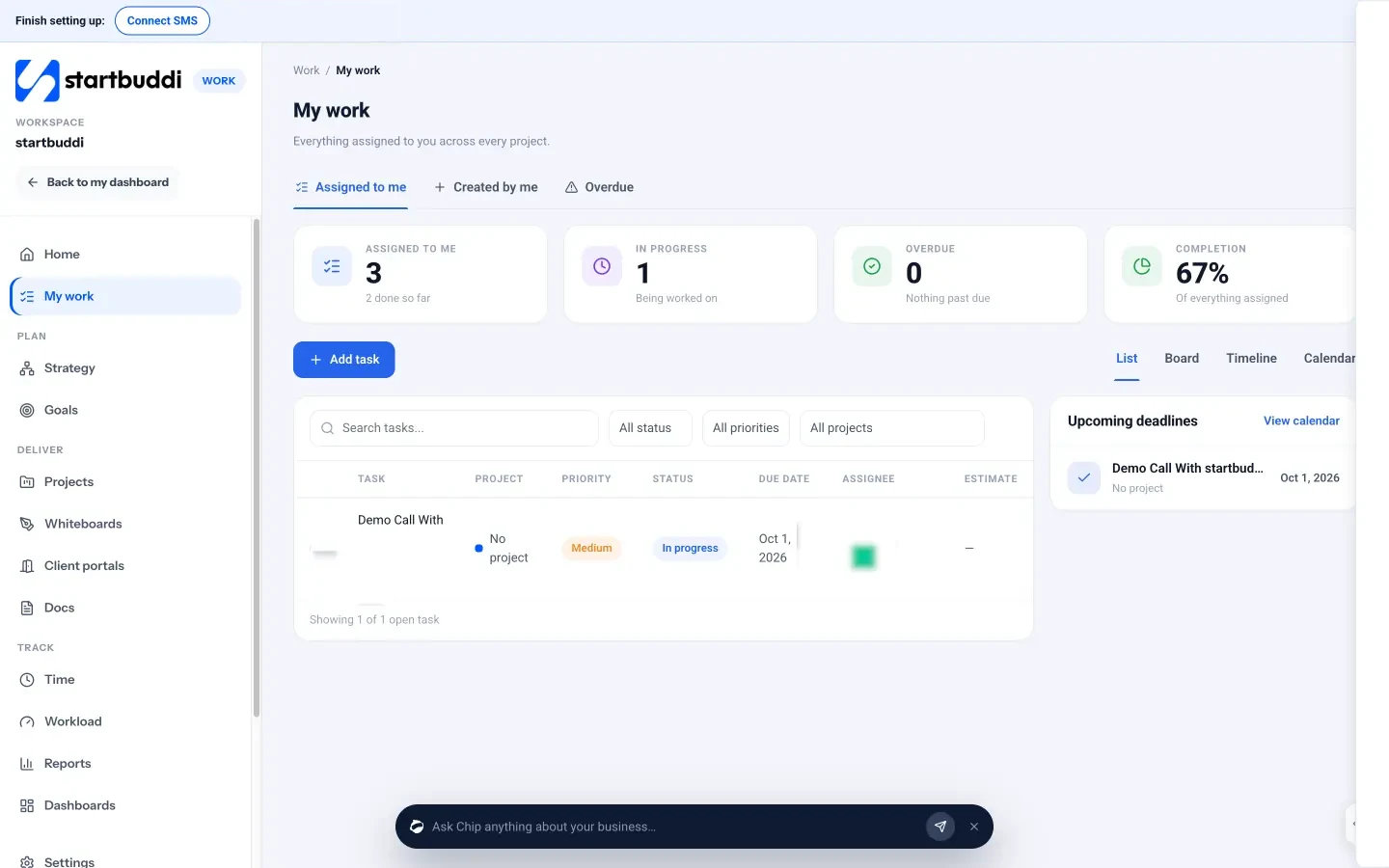
startbuddi is an all-in-one workspace for service businesses: clients, messages, bookings, invoices, projects and tasks in one place, with an AI assistant called Chip. Tasks live in the Work module under My work.
Best for: salons, agencies, consultants, cleaners, trades and other service businesses whose to-do list is mostly about clients and jobs.
Key features
- My work shows every task assigned to you across every project, with tabs for Assigned to me, Created by me and Overdue.
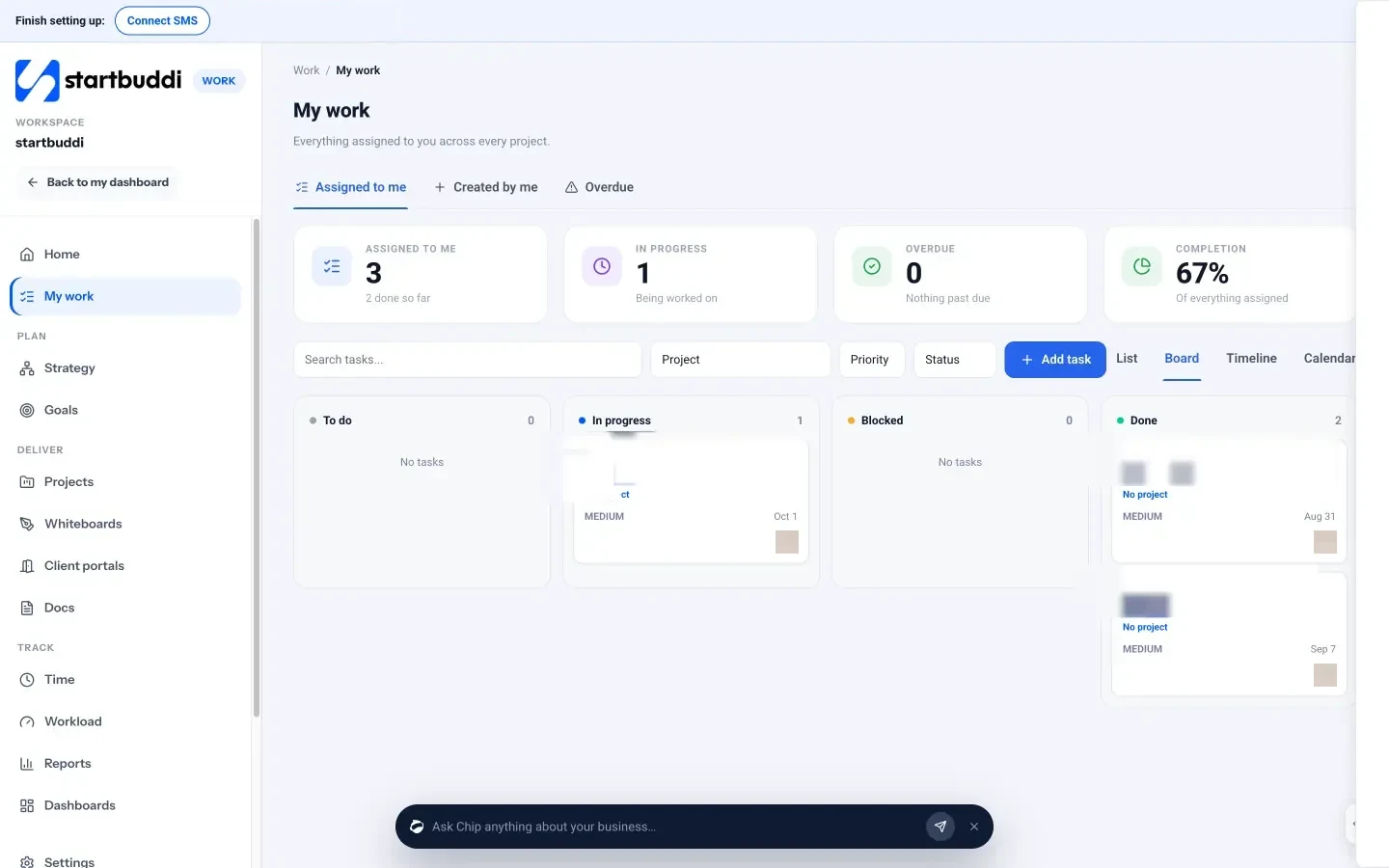
- List, Board, Timeline and Calendar views. The board groups tasks by status, from To do to Done.
- Each task has an owner, status, priority (Urgent, High, Medium, Low), due date, subtasks, estimate and repeats (daily, weekly or monthly).
- Dependencies (“blocked by” and “blocking”), time logged on the task, comments with @mentions, file attachments and links to documents.
- Type @chip in a task comment to ask Chip about that task.
- The same workspace holds the client record, the booking, the invoice and the project, so a task can sit next to the job it belongs to.
Pricing: a free plan is available. See startbuddi pricing for what each paid plan includes.
Pros
- Tasks connect to clients, bookings, projects and invoices without another tool or a Zapier bill.
- Recurring tasks, subtasks and dependencies are there from the start.
- Team chat, documents and client portals are in the same workspace.
Cons
- The Free plan includes only the owner’s seat. Inviting teammates needs a paid plan.
- It’s a whole business workspace. If you only want a personal to-do list, it’s more than you need.
- Fewer third-party integrations than the big task apps.
Who should skip it: anyone who wants only a to-do list, or a team that is happy with its CRM and invoicing tools and just needs tasks.
2. Todoist
Todoist is a task list app known for fast capture and tidy daily views. It works for one person and scales to a small team with shared projects.
Best for: owners and teams of two to ten who want a list, not a system.
Key features
- Projects, filter views and task reminders on every plan, with custom reminders on Pro.
- Shared team projects and a team workspace on the Business plan.
- Calendar layout on paid plans.
Pricing: according to Todoist’s plans and pricing FAQ, Pro is $5 a month billed yearly ($60 a year) or $7 monthly, for one person. Business is $8 per user a month billed yearly or $10 monthly. The free Beginner plan allows 5 personal projects and 3 filter views.
Pros
- Very quick to add and organise tasks.
- Cheap for a single owner on Pro.
Cons
- No team workspace on Free or Pro; shared team projects need Business.
- No client records, time tracking or invoicing, so tasks don’t link to the job’s money.
- The free plan’s 5-project limit fills up quickly.
Who should skip it: teams that need boards, timelines or tasks tied to client work.
3. Trello
Trello is a board app. Each task is a card you drag between columns, which makes it the easiest way into a kanban board.
Best for: small teams who like to see work moving from left to right.
Key features
- Boards, lists and cards with checklists, due dates and attachments.
- Automation with a monthly allowance of Workspace command runs.
- Calendar, Timeline, Table and Dashboard views on Premium.
Pricing: Free allows up to 10 collaborators and 10 boards per Workspace, with 250 command runs a month. Standard is $5 per user a month billed annually ($6 monthly) with unlimited boards. Premium is $10 billed annually ($12.50 monthly) and adds the extra views.
Pros
- Anyone understands a board in a minute.
- Generous free plan for a small team.
- Lots of Power-Ups to extend it.
Cons
- Calendar and timeline views need Premium.
- Big boards get cluttered; it’s harder to see “my tasks today” across many boards.
- Tasks don’t connect to clients or invoices without add-ons.
Who should skip it: people who prefer a plain list, or teams that need cross-board reporting on a small budget. Our startbuddi vs Trello comparison covers the difference in detail.
4. Asana
Asana is a work management app built around projects, tasks and automations. It is more structured than Todoist or Trello.
Best for: teams of five or more with repeatable processes, such as onboarding a client the same way every time.
Key features
- List, board and calendar views on every plan.
- Timeline and Gantt views, unlimited automations, forms and reporting dashboards from Starter.
- Goals, portfolios, time tracking and approvals on Advanced.
Pricing: the Personal plan is free for up to 2 users. Starter is $10.99 per user a month billed annually ($13.49 monthly). Advanced is $24.99 billed annually ($30.49 monthly).
Pros
- Strong structure for recurring processes.
- Automations and forms on the first paid plan.
- Scales well as the team grows.
Cons
- The free plan stops at 2 users.
- More set-up than a simple list app.
- Priced per user, which adds up for a growing team.
Who should skip it: solo owners and two-person teams who don’t need automations or timelines.
5. ClickUp
ClickUp aims to put tasks, docs, whiteboards, chat and dashboards in one app. It has more views and settings than most tools on this list.
Best for: teams who want one flexible work app and are happy to spend time setting it up.
Key features
- Many views, including list, board, calendar and Gantt.
- Docs, whiteboards, team chat and automations.
Pricing: Free Forever includes 60MB of storage, 3 whiteboards and 100 automation runs a month, with Gantt charts and dashboards as trials. Unlimited is $7 per user a month billed annually ($10 monthly). Business is $12 billed annually ($19 monthly). AI is an add-on: Brain AI at $9 per user a month or Everything AI at $28.
Pros
- A lot of features for the price on Unlimited.
- Very flexible: almost any workflow can be modelled.
- Unlimited guests on Free.
Cons
- The choice of views and settings can overwhelm a small team.
- 60MB of storage on Free runs out fast if you attach files.
- AI costs extra per user.
Who should skip it: owners who want to be productive on day one with no set-up.
6. Microsoft Planner (with Microsoft 365)
Microsoft Planner is the task app inside Microsoft 365. It shows up in Teams and works with Outlook and Microsoft To Do.
Best for: businesses that already use Outlook and Teams.
Key features
- Plans with buckets, tasks, checklists and due dates.
- Tasks visible inside Teams channels.
- Comes with Microsoft To Do for personal lists.
Pricing: Microsoft’s business plans page lists Microsoft 365 Business Basic at $7.00 per user a month, paid yearly, including Planner, To Do, Teams, business email and 1 TB of storage per user.
Pros
- No extra cost if you already pay for Microsoft 365.
- Email, chat and files in the same subscription.
Cons
- No free plan for a business.
- Simpler than dedicated task apps; fewer views and automations.
- The annual commitment is the cheapest option.
Who should skip it: Google-based businesses, or teams who don’t want a Microsoft subscription.
7. monday work management
monday work management uses colourful boards where every column is something you define: status, owner, date, number and so on.
Best for: teams who want to design their own tracker without code.
Key features
- Boards with custom columns and many templates.
- Timeline, Gantt and calendar views from Standard.
- Automations from Standard; time tracking on Pro.
Pricing: Free covers up to 2 seats and 3 boards. Basic is $9 per seat a month, Standard $12 and Pro $19, all billed annually. Seats are sold in team-size bundles, so check the total for your team size.
Pros
- Highly visual and flexible.
- Grows into a full work platform.
Cons
- Automations and timeline views start at Standard.
- Seat bundles can mean paying for seats you don’t use.
- The free plan is very small.
Who should skip it: one or two people who just need a shared list.
8. TickTick
TickTick is a personal task app with lists, a calendar view and shared lists.
Best for: owners who run their day from a calendar and want tasks and appointments in one view.
Key features
- Lists with up to 999 tasks each on Premium.
- A basic calendar view on Free and full calendar views on Premium.
- Shared lists for a few people.
Pricing: Premium is US$49.99 a year. Free allows 9 lists, 99 tasks per list and up to 2 members on a shared list; Premium raises that to 299 lists and 29 members.
Pros
- Very good value for one person.
- Tasks and calendar in one view.
- Simple enough to set up in minutes.
Cons
- Built for individuals, not teams.
- Shared lists are small, even on Premium.
- No business features such as clients or time billing.
Who should skip it: any team of more than two or three people.
9. Any.do
Any.do is a to-do and planner app with a Teams plan for small groups.
Best for: small teams who want reminders where they already are, including WhatsApp.
Key features
- Tasks, lists, a calendar and a daily planner on the free plan.
- WhatsApp reminders, recurring tasks and location reminders on Premium.
- Shared project boards on Teams.
Pricing: Premium is $4.99 a month billed annually ($7.99 monthly). Teams is $4.99 per member a month billed annually ($7.99 monthly). There’s also a Family plan.
Pros
- WhatsApp reminders suit teams who don’t check email.
- Cheap per member.
- Simple to learn.
Cons
- Recurring tasks need a paid plan.
- Lighter on reporting and views than Asana or ClickUp.
- Team features only on the Teams plan.
Who should skip it: teams that need timelines, dependencies or client records.
10. Google Tasks
Google Tasks is the simple list built into Gmail, Google Calendar and Google Chat. According to Google’s help page, you can add details and subtasks, set due dates and notifications, and create and assign group tasks in a Chat space.
Best for: solo owners who already run their business from Gmail and Google Calendar.
Pricing: it comes with a Google account; there’s no separate Tasks subscription.
Pros: already there if you use Gmail, tasks show in Google Calendar, nothing to set up.
Cons: very basic, with no boards, reporting or dependencies; team features depend on Google Chat spaces.
Who should skip it: any team that needs to see who is doing what across several people.
Worked example: what a five-person team pays
These are illustrative totals for a team of five on the lowest paid team plan, billed annually, using the prices above. They don’t include tax or currency conversion.
| App and plan | Price per user a month | Team of 5 a month | Team of 5 a year |
|---|---|---|---|
| Any.do Teams | $4.99 | $24.95 | $299.40 |
| Trello Standard | $5.00 | $25.00 | $300.00 |
| ClickUp Unlimited | $7.00 | $35.00 | $420.00 |
| Microsoft 365 Business Basic (Planner) | $7.00 | $35.00 | $420.00 |
| Todoist Business | $8.00 | $40.00 | $480.00 |
| Asana Starter | $10.99 | $54.95 | $659.40 |
The spread is about $30 a month, which matters less than you’d think. If a better daily view saves each person 15 minutes a day, that’s over 6 hours a week across the team.
Two things change the maths: Microsoft 365 also includes email, Teams and storage, and a workspace that replaces your booking or invoicing tool can cost less than a task app plus other subscriptions.
How to choose the best task management app for small business
Answer these five questions in order.
- How many people need it? One person: Todoist Pro, TickTick or Google Tasks. Two to ten: Todoist Business, Trello, Asana, Any.do or startbuddi. Over ten: Asana, ClickUp or monday.
- List or board? If your work moves through stages (enquiry, in progress, waiting on client, done), a board helps. If it’s a stream of follow-ups, a list is faster.
- What are the tasks about? If most tasks are “call this client”, “send that quote” or “chase this invoice”, choose an app that knows who the client is. That’s the gap startbuddi fills.
- What do you already pay for? Microsoft 365 includes Planner. Google Workspace includes Tasks. Use them for a fortnight before you buy anything.
- Who will set it up? ClickUp and monday reward an afternoon of set-up. Todoist and Trello work in ten minutes.
Then trial it for two weeks with real work and see whether anything still slips back into WhatsApp. Our guide on how to delegate tasks covers how to hand work over so it actually gets done.
Common mistakes when choosing a task app
- Buying for the team you might have. A team of three doesn’t need portfolio dashboards. Choose for the next 12 months.
- Setting up too much on day one. Start with one project or board, one status list and a due date on every task. Add labels later.
- Running two systems. If tasks still live in WhatsApp groups, the app becomes a second list nobody trusts. Agree that “if it’s not in the app, it’s not a task”.
- Forgetting recurring work. Weekly invoicing and monthly payroll prep should be recurring tasks, not things you remember.
Try startbuddi for your team’s tasks
If your to-do list is mostly clients, jobs and follow-ups, keep it in the same place as the clients and jobs. Start free with startbuddi, no card needed, and see how My work fits your day. Running the business on your own? Read how it works for solo founders.
Frequently asked questions
What is the best task management app for a small business?
The best task management app for a small business is the one your team will open every day. Todoist is the simplest for owners and small teams, Trello suits visual teams, and Asana suits growing teams with set processes. If your tasks are mostly about clients and jobs, a workspace like startbuddi keeps tasks next to the client, booking and invoice.
Is there a free task management app for business?
Yes. Todoist, Trello, Asana, ClickUp, TickTick, monday and Any.do all have free plans, and Google Tasks comes with a Google account. The limits differ: Trello's free plan allows up to 10 collaborators per Workspace, while Asana's stops at 2 users and monday's at 2 seats. startbuddi has a free plan for the owner; teammates need a paid plan.
What is the difference between a task app and project management software?
A task app tracks individual to-dos with owners and due dates. Project management software adds structure around groups of tasks: timelines, milestones, dependencies, budgets and reports. Small teams often start with a task app and move to project management software when projects get longer or involve more people.
How much does a business task management app cost?
For a small team, paid task apps cost roughly $5 to $11 per user a month on annual billing, based on vendors' published prices in October 2026. A team of five pays about $25 to $55 a month. Some options are included in subscriptions you may already have, such as Microsoft 365 or a Google account.
Can I manage team tasks in WhatsApp instead?
You can, but tasks in chat get buried under new messages and nobody can see what's overdue. A task app gives every task an owner and a date and shows the list in one place. Many teams keep WhatsApp for quick conversation and move anything with a deadline into the task app.
Which task app works best for client work?
For client work, choose an app that links tasks to the client or project they belong to. startbuddi connects tasks to client records, bookings, projects and invoices in one workspace. Asana and ClickUp can do similar things with more set-up and integrations.
Tiwalade Joanna Okedara-Kalu is the founder, CEO and CTO of startbuddi, the business system that brings clients, bookings, invoices, projects, marketing and the Chip AI assistant into one place. Tiwalade builds software around how service businesses really work day to day, and writes about client management, getting paid on time and why small businesses outgrow the tools they start with.
Founded startbuddi and leads its product and engineering