What is a kanban board?
Also called: Kanban, task board, card board, project board, work board
A kanban board is a visual way to manage work where each task is a card and each column is a stage, such as To do, In progress and Done, so everyone can see what is waiting, moving and finished.
A kanban board is a visual way to manage work where each task is a card and each column is a stage, such as To do, In progress and Done. As work moves forward, you move the card to the next column. One look at the board tells you what is waiting, what is being worked on, and what is finished, without a status meeting.
You can build one with sticky notes on a wall or in software. Either way, the idea is the same: make the work visible, and limit how much is in progress at once so things actually get finished.
Why a kanban board matters for a small business
Small teams juggle client work, admin and sales at the same time. Tasks pile up in inboxes and heads, and it is hard to tell what is stuck. A kanban board fixes that with almost no setup.
- Everyone sees the same picture. No more “where are we with the Adeyemi order?”
- Bottlenecks show up. If ten cards sit in “Waiting for client”, you know where to push.
- Less multitasking. Limiting cards in progress means fewer half-finished jobs.
- It fits ongoing work. Unlike a fixed project plan, a board works for a steady flow of orders, requests or content.
- It is easy to learn. Anyone who has moved a sticky note can use one.
How a kanban board works: an example
Claire runs a three-person print shop in Manchester. Orders come in by email, phone and walk-in. She sets up a board with five columns:
- New order: every order lands here as a card with the customer, item and due date.
- Artwork: someone is preparing or checking the design.
- Waiting for approval: the proof has gone to the customer.
- Printing: on the press, with a limit of four cards at once.
- Ready to collect: done, customer notified.
Within a week she notices cards stacking up in “Waiting for approval”. She starts sending proofs with a one-line reminder the next morning, and orders move through two days faster. The board did not do the work, but it showed her where the work was stuck.
Key parts of a kanban board
| Part | What it does |
|---|---|
| Columns | The stages your work passes through, left to right. |
| Cards | One piece of work each, with a title, owner and due date. |
| Work-in-progress (WIP) limits | A maximum number of cards allowed in a column at once. |
| Swimlanes | Optional horizontal rows to separate clients, people or types of work. |
| Done column | Where finished work goes, so you can see what the team achieved. |
Kanban vs other ways of planning
A kanban board shows work by status. A Gantt chart shows work by date, which suits projects with a fixed deadline and tasks that depend on each other. Scrum, a popular agile method, plans work in fixed sprints of a few weeks. Kanban has no sprints: work flows in continuously and is pulled into progress when there is room. Many small teams use a board for day-to-day work and a timeline for bigger launches.
Best practices and common mistakes
- Keep cards small. “Build the website” is a project, not a card. Break it into pieces that take a day or two.
- Set work-in-progress limits. Without them, everything ends up “in progress” and nothing gets done.
- Put every task on the board. If half the work lives in WhatsApp, the board gives a false picture.
- Look at it together. A five-minute look at the board each morning replaces most status updates.
- Agree what “done” means. Does a design card move to Done when you finish it, or when the client approves it? Write the rule at the top of the column so everyone moves cards the same way.
- Clear the Done column. Archive finished cards regularly so the board stays readable.
- Do not create too many columns. More than six or seven stages usually means the process needs simplifying, not the board.
For more on running a board with a team, read our post on collaborative task management.
Related terms
Agile project management is the wider family of methods kanban belongs to. A task management system is the software that usually gives you a board view alongside lists and calendars.
Kanban boards in startbuddi
In startbuddi, tasks live in Work, and you can switch any task list to a Board view. My work shows every task assigned to you across all projects, grouped into columns by status, and you drag a card to move it. The default statuses are To do, In progress, Review and Done, and each project can add its own custom statuses to match how you work.
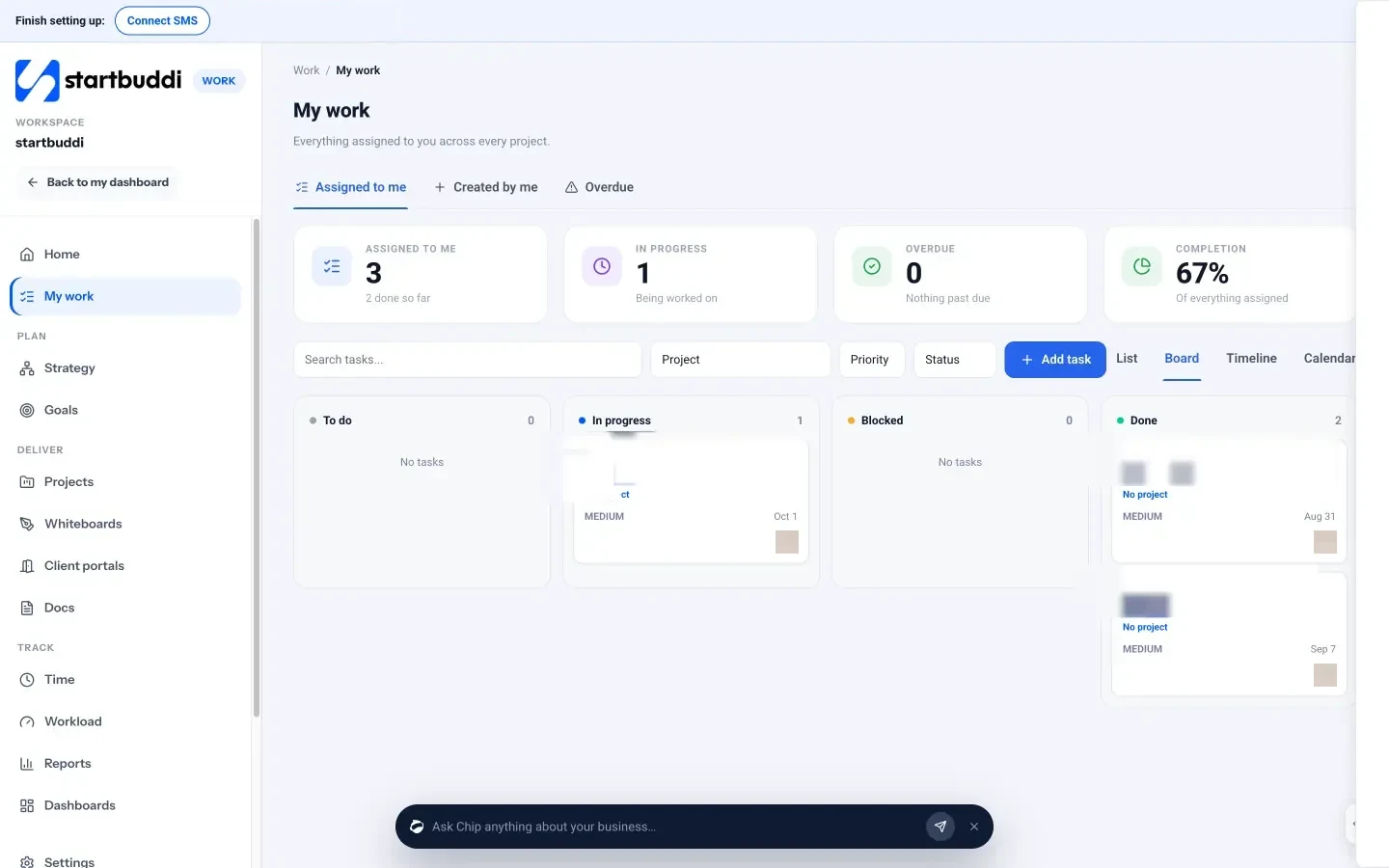
Click a card to open it: you can set priority, assignee and due date, add subtasks, log time, attach files and comment. The same tasks also appear in List, Timeline and Calendar views, so you are never managing two copies. Your next step: move this week’s work onto a board with three columns and see what is really in progress.
Related terms
FAQ
What are the basic columns on a kanban board?
To do, In progress and Done. Add more stages only when work regularly waits somewhere you cannot see.
What is a WIP limit?
A work-in-progress limit is the maximum number of cards allowed in a column at once. It stops people starting new work before finishing what they have.
Is kanban the same as Scrum?
No. Both are agile methods, but Scrum plans work in fixed sprints, while kanban lets work flow continuously and uses limits instead of sprints.
Can I use a kanban board on my own?
Yes. Many freelancers use a personal board to see their clients' work at a glance and avoid taking on too much at once.
Tiwalade Joanna Okedara-Kalu is the founder, CEO and CTO of startbuddi, the business system that brings clients, bookings, invoices, projects, marketing and the Chip AI assistant into one place. Tiwalade builds software around how service businesses really work day to day, and writes about client management, getting paid on time and why small businesses outgrow the tools they start with.
Founded startbuddi and leads its product and engineering