9 ClickUp Alternatives That Feel Simpler
ClickUp alternatives for small teams who want less set-up: Asana, Trello, Basecamp, Notion, startbuddi and more, with prices and honest limits for 2026.



The best ClickUp alternatives are the ones that do less, more clearly. Trello suits teams who want a board and nothing else; Basecamp suits teams who want flat pricing and calm, simple projects; startbuddi suits service businesses that want projects tied to clients and invoices. Asana, Notion and Todoist are also worth a look.
startbuddi is our product. We’ve listed its limits alongside everyone else’s, and every price below comes from the vendor’s own pricing page, checked on 1 October 2026.
Key takeaways
- ClickUp packs tasks, docs, whiteboards, chat, dashboards and AI into one app. People look for ClickUp alternatives when that breadth costs more set-up time than it saves.
- If you want flat pricing with unlimited users, Basecamp’s paid plans don’t charge per person.
- If you only need a board, Trello’s free plan covers up to 10 collaborators per Workspace.
- If your projects are client work, look at a tool that links the project to the client record and the invoice.
- ClickUp lets Workspace owners and admins export tasks to CSV, so you can keep a record before you move.
ClickUp alternatives compared
Prices are the lowest paid plan per user per month, billed annually, as each vendor shows them, unless the table says otherwise.
| Tool | Best for | Lowest paid plan | Free plan | Standout feature |
|---|---|---|---|---|
| startbuddi | Service businesses running client projects | See pricing | Yes (owner only) | Projects, tasks, clients and invoices in one workspace |
| Trello | Teams who want a simple board | $5 Standard | Yes, up to 10 collaborators | Cards and lists anyone understands |
| Basecamp | Teams who want flat pricing | $25 a month flat (Freelancer, 3 projects) | Yes, 1 project | Unlimited users on every paid plan |
| Asana | Growing teams with set processes | $10.99 Starter | Yes, up to 2 users | Timelines, automations and forms on the first paid plan |
| Notion | Teams who want docs and tasks together | $10 Plus (monthly) | Yes | Pages and databases in one place |
| monday work management | Teams who want to design their own boards | $9 Basic per seat | Yes, up to 2 seats | Custom columns and colourful boards |
| Todoist | Small teams who need a shared list | $8 Business | Yes, 5 personal projects | Fast task capture |
| Zoho Projects | Budget-minded teams that need Gantt and timesheets | ₦3,080 Premium (price shown in Nigeria) | Yes, up to 5 users | Gantt, budgets and timesheets |
| Wrike | Teams of 2 to 15 that need structure | $10 Team | Yes | Strong planning views for larger teams |
Why look for a ClickUp alternative?
ClickUp is a capable tool, and plenty of teams love it. The reasons people look elsewhere tend to be about fit rather than quality.
- There’s a lot to set up. ClickUp offers many views, spaces, folders, lists and settings. That flexibility suits teams with someone who enjoys configuring tools. For a five-person agency, it can mean weeks before the setup settles.
- Key features have limits on lower plans. On ClickUp’s pricing page, the Free Forever plan includes 60MB of storage, 3 whiteboards and 100 automation runs a month, with Gantt charts and dashboards as trials only. Unlimited ($7 per user a month billed annually, $10 monthly) gives 10 whiteboards and 1,000 automation runs; unlimited dashboards start on Business ($12 annually, $19 monthly).
- AI is priced on top. ClickUp lists Brain AI at $9 per user a month and Everything AI at $28 per user a month as add-ons. For a team of six on Unlimited, adding Brain AI more than doubles the bill.
- Work and clients live apart. ClickUp is a work app. If your projects are for paying clients, you still need separate tools for the client record, the proposal and the invoice.
None of this makes ClickUp a poor choice. It means it’s worth comparing two or three simpler tools before you renew.
How we chose these alternatives
Each tool had to:
- manage projects and tasks with owners and due dates;
- publish its prices on its own website, so we could check them;
- be easier to start with than ClickUp, by needing fewer decisions on day one;
- have a free plan or a free trial.
We read each vendor’s pricing and help pages on 1 October 2026. We haven’t run hands-on tests, so we describe what each plan includes rather than how it feels. Prices change and can differ by country, so check before you buy. For a broader list, see the best project management software.
1. startbuddi
startbuddi is an all-in-one workspace for service businesses: clients, messages, bookings, proposals, projects, tasks and invoices in one place, with an AI assistant called Chip.
Best for: agencies, consultants and other service businesses whose projects are for paying clients.
Key features
- Projects with Tasks, Timeline (a Gantt chart with dependencies and a critical path), Milestones, Sprints, Budget and Activity tabs.
- My work: every task assigned to you across projects, in List, Board, Timeline or Calendar view.
- 14 project templates, including Client delivery, Website project, Consulting engagement and Event planning.
- Time tracking with timers and billable hours, and a team Workload view.
- Client portals where clients follow progress and approve work, signing in with an email link.
- Team chat with a room for every project, plus whiteboards and documents in the same workspace.
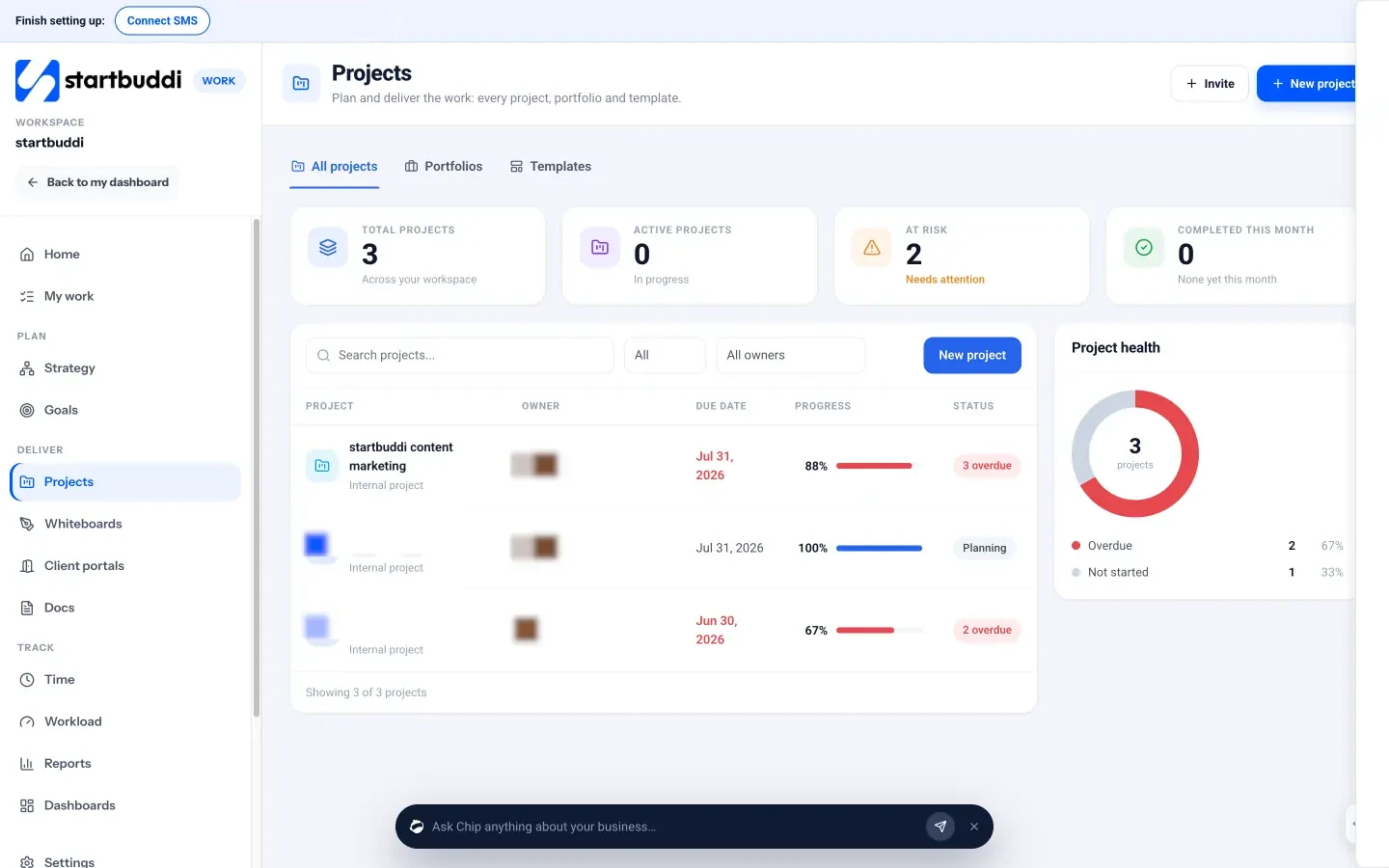
Pricing: a free plan is available. See startbuddi pricing for what each paid plan includes.
Pros
- Projects sit next to the client, proposal and invoice, so you don’t need a separate CRM or invoicing tool.
- Templates mean a new client project starts with milestones and tasks already in place.
- Client portals are built in.
Cons
- The Free plan includes only the owner’s seat; teammates need a paid plan.
- Fewer third-party integrations than ClickUp.
- No import from ClickUp; you recreate active projects, ideally from a template.
Who should skip it: product and engineering teams who need only a work app, with no client records or invoicing.
Our startbuddi vs ClickUp page compares the two feature by feature.
2. Trello
Trello is a board app: each task is a card that moves between lists.
Best for: small teams who want a visual board and very little set-up.
Key features: boards, lists and cards with checklists and due dates; automation with a monthly allowance of command runs; Calendar, Timeline, Table and Dashboard views on Premium.
Pricing: Free allows up to 10 collaborators and 10 boards per Workspace. Standard is $5 per user a month billed annually ($6 monthly). Premium is $10 billed annually ($12.50 monthly).
Pros
- The simplest tool on this list to learn.
- Generous free plan for a small team.
Cons
- Timeline and calendar views need Premium.
- Harder to see one person’s work across many boards.
Who should skip it: teams who need dependencies, budgets or time tracking.
3. Basecamp
Basecamp organises work into projects, each with to-dos, a message board, chat, a schedule and files.
Best for: teams who want calm, simple projects and a predictable bill.
Key features: to-dos, Card Tables (Basecamp’s take on kanban), message boards, group chat, schedules, docs and files, and automatic check-ins.
Pricing: Basecamp says there are no per-user fees. Free covers 1 project. Freelancer is $25 a month (3 projects, 5 GB), Studio $59 (10 projects, 25 GB) and Pro $99 (25 projects, 100 GB). The Unlimited Edition is $299 a month, billed annually, with unlimited projects and 1 TB.
Pros
- Unlimited users on paid plans, so adding a freelancer costs nothing.
- Very little to configure.
Cons
- Plans are capped by active projects, so busy agencies may need a higher tier.
- No Gantt charts or detailed dependencies.
Who should skip it: teams who need detailed scheduling or reporting.
4. Asana
Asana is a work management app built around projects, tasks and automations.
Best for: teams of five or more with repeatable processes.
Key features: list, board and calendar views on every plan; Timeline and Gantt views, unlimited automations, forms and reporting dashboards from Starter; goals, portfolios and time tracking on Advanced.
Pricing: Personal is free for up to 2 users. Starter is $10.99 per user a month billed annually ($13.49 monthly). Advanced is $24.99 billed annually ($30.49 monthly).
Pros
- Clear structure without ClickUp’s number of settings.
- Automations and timelines on the first paid plan.
Cons
- The free plan stops at 2 users.
- Costs more per user than ClickUp’s Unlimited plan.
Who should skip it: solo owners and very small teams on a tight budget.
5. Notion
Notion is a workspace of pages and databases. Many teams build task boards and project trackers inside it.
Best for: teams who write a lot (briefs, wikis, meeting notes) and want tasks in the same place.
Key features: pages, databases with subtasks and dependencies, forms, sites and Notion Calendar.
Pricing: Free is $0, with blocks limited once two or more members share a workspace and 7 days of page history. Plus is $10 per member a month and Business $20, paid monthly; Notion says yearly billing saves up to 20%.
Pros
- Docs and tasks live together.
- Very flexible databases.
Cons
- You build your own task system, which brings back some of the set-up you were trying to avoid.
- The free plan is limited for teams.
Who should skip it: teams who want a ready-made project tool rather than building blocks.
6. monday work management
monday work management uses boards where you define each column: status, owner, date and so on.
Best for: teams who want a visual tracker and are happy to design it.
Key features: custom boards and templates; timeline, Gantt and calendar views and automations from Standard; time tracking on Pro.
Pricing: Free covers up to 2 seats and 3 boards. Basic is $9 per seat a month, Standard $12 and Pro $19, billed annually. Seats are sold in team-size bundles.
Pros
- Very visual and easy to read at a glance.
- Lots of templates.
Cons
- Timeline views and automations need Standard.
- Seat bundles can mean paying for seats you don’t use.
Who should skip it: a two-person team that just needs a list.
7. Todoist
Todoist is a task list app with shared team projects on its Business plan.
Best for: small teams whose “projects” are really lists of follow-ups.
Key features: projects, filter views and reminders; a calendar layout on paid plans; a team workspace with roles on Business.
Pricing: Pro is $5 a month billed yearly for one person. Business is $8 per user a month billed yearly ($10 monthly).
Pros
- About as simple as task software gets.
- Low price per user.
Cons
- No Gantt charts, budgets or time tracking.
- Team features need Business.
Who should skip it: teams who run multi-stage projects with dependencies. Our list of the best task management apps compares Todoist with other list apps.
8. Zoho Projects
Zoho Projects is a project tool from the Zoho suite, with Gantt charts, timesheets and budgets.
Best for: teams who need Gantt and timesheets on a budget, especially if they already use Zoho apps.
Key features: unlimited projects, custom views, budgets and timesheets on Premium; critical path, baselines and a portfolio dashboard on Enterprise.
Pricing: Free covers up to 5 users, 3 projects and 5 GB. Zoho shows prices in your local currency; for a visitor in Nigeria on 1 October 2026, Premium was ₦3,080 per user a month and Enterprise ₦6,930, both billed annually.
Pros
- Good value for Gantt and timesheets.
- Free plan for up to 5 users.
Cons
- Free allows only 3 projects.
- Best value comes from using other Zoho apps alongside it.
Who should skip it: teams who want the fewest possible settings.
9. Wrike
Wrike is a project management platform aimed at teams that need structure and reporting.
Best for: teams of a dozen or more with formal planning.
Key features: project and task management, board and table views on the free plan, with more planning features on paid plans.
Pricing: Team is $10 per user a month for 2 to 15 users. Business is $25 per user a month for 5 to 200 users. There’s a free plan for essential task management.
Pros
- Built for structured, multi-team work.
- Clear user ranges per plan.
Cons
- Closer to ClickUp in depth than the other tools here, so it won’t feel much simpler.
- Business costs $25 per user.
Who should skip it: small teams leaving ClickUp because it felt like too much.
Worked example: a six-person agency
These figures are illustrative, using the published prices above, billed annually, before tax.
| Option | Calculation | Monthly cost |
|---|---|---|
| ClickUp Unlimited | 6 × $7 | $42 |
| ClickUp Unlimited with Brain AI | 6 × ($7 + $9) | $96 |
| Trello Standard | 6 × $5 | $30 |
| Asana Starter | 6 × $10.99 | $65.94 |
| Basecamp Studio (10 projects) | flat | $59 |
At six people, Basecamp’s flat price sits between Trello and Asana. At fifteen people, Basecamp Studio is still $59, while ClickUp Unlimited would be $105 and Asana Starter $164.85. Flat pricing gets better the more people you add; per-user pricing is cheaper for very small teams. If your projects are client work, also count what you pay for your CRM and invoicing tools, because some alternatives replace those as well.
How to choose a ClickUp alternative
- You want less to configure: Trello, Basecamp or Todoist.
- You want structure without ClickUp’s settings: Asana.
- You want docs and tasks together: Notion.
- You want Gantt and timesheets on a budget: Zoho Projects.
- Your projects are for clients: startbuddi, which keeps the client, project and invoice together. The guide on how to run client projects explains what that workflow looks like.
Whichever you pick, test it with one real project for two weeks before moving everything. If you’re unsure what counts as project management software versus a task list, start with what your team checks each morning.
Migrating from ClickUp
- Export your tasks. According to ClickUp’s help centre, a Workspace owner or admin goes to Settings, then Imports / Exports, then Export Items, picks the locations and downloads a CSV. The file includes task names, descriptions, statuses, dates, assignees, checklists and comments. Export only the spaces you need, as large exports can fail.
- Export your docs separately; they aren’t in the task CSV.
- List what’s active. Most teams only need to move open projects. Keep the CSV as an archive for finished work.
- Recreate active projects in the new tool, using its templates where possible. In startbuddi, open Work, then Projects, then Templates, and start from Client delivery or another template.
- Run both for a week, then switch ClickUp to read-only for your team and cancel before the renewal date.
Try a simpler home for client projects
If your projects are for clients, run them where the client already lives. Start free with startbuddi, no card needed, or see how agencies use it for project management. More tool round-ups are on our alternatives hub.
Frequently asked questions
What is the best ClickUp alternative for a small team?
The best ClickUp alternative for a small team depends on why you're leaving. Trello is the simplest for visual boards, Basecamp has flat pricing with unlimited users, and Asana gives structure with fewer settings. Service businesses running client projects can use startbuddi to keep projects, clients and invoices together.
Is there a free alternative to ClickUp?
Yes. Trello, Asana, Notion, monday, Todoist, Zoho Projects, Wrike and Basecamp all have free plans, with limits. For example, Trello's free plan covers up to 10 collaborators per Workspace, Zoho Projects' covers up to 5 users and 3 projects, and Basecamp's covers 1 project. startbuddi has a free plan for the owner's seat.
Which is simpler than ClickUp?
Trello, Basecamp and Todoist are simpler than ClickUp because they offer fewer views and settings. Trello is a board of cards, Todoist is a shared list, and Basecamp gives each project the same fixed set of tools. They do less, which is the point if ClickUp felt like too much.
Can I move my data out of ClickUp?
Yes. ClickUp lets Workspace owners and admins export task data to a CSV file from Settings, then Imports / Exports. The export covers tasks, statuses, dates, assignees, checklists and comments. Docs are exported separately.
Is ClickUp cheaper than Asana?
On published prices checked in October 2026, ClickUp Unlimited is $7 per user a month billed annually and Asana Starter is $10.99. ClickUp's AI is an add-on from $9 per user a month, while Asana Starter includes a small monthly allowance of AI requests. Compare the plan that has the features you actually need.
Omolola Akiyode is the operations and project manager at startbuddi, leading cross-functional projects and the content that helps founders get set up. Omolola writes about projects, websites and getting found online, and turns complex ideas into clear, practical steps.
Runs operations and projects at startbuddi



