Email marketing for beginners: build a list, send your first campaign and grow
A four-part guide to email marketing for beginners: why it works, how to build a list with permission, how to write and send your first campaign, and what to measure and automate.

This is a guide to email marketing for beginners: what it is, why it still earns its place in a small business, and how to go from zero subscribers to a first campaign you are proud of. It is written for solo founders, freelancers, service businesses and small shops who know they should “do email” but have never set it up, or who send the odd message from their personal inbox and hope for the best.
Each chapter starts with the business thinking: why it matters, how to plan it, examples and templates you can copy, the rules you need to follow and the mistakes to avoid. Each one ends with how to do it in startbuddi. By the end you will have a permission-based list, a sender your customers recognise, a welcome email that sends itself, a simple monthly campaign rhythm and three numbers to watch.
Email marketing for beginners: how it works and why it pays
- Why email still matters when everyone is on social media
- Email compared with the other channels you already use
- How email marketing actually makes money
- The five types of email every small business needs
- How to think about your emails: help first, sell second
- Set a realistic rhythm
- What email marketing looks like for different businesses
- What you need before you start
- Common beginner mistakes
- Doing this in startbuddi: see the whole picture first
Email marketing is sending useful, planned emails to people who have asked to hear from you, so they remember you, trust you and buy from you when the time is right. That covers a welcome email when someone signs up, a monthly newsletter, an announcement when you launch something, and a reminder that a sale ends tonight. It does not cover buying a list of strangers and blasting them, which is both illegal in many countries and a fast way to ruin your sending reputation.
If you only have a minute, here is the short version of email marketing for beginners: collect addresses with clear permission, send a welcome email straight away, then send one genuinely useful email on a regular rhythm, each with one clear action. Watch clicks and replies, not just opens. Everything else in this guide is detail on those five points.
Why email still matters when everyone is on social media
Social media is where people discover you. Email is where you keep them. The difference is ownership. A social platform decides who sees your post, and it can change its rules, its algorithm or your account status overnight. Your email list is a list of people who gave you their address. You can take it with you from one tool to another, and a message you send lands in the inbox of everyone who is still subscribed.
Email is also quiet and patient. A post scrolls away in hours. An email sits in the inbox until the reader deals with it, and many people search their inbox later ("that bakery that did the birthday cakes"). For a small business with a long buying cycle, such as a consultant, a wedding photographer or a builder, being findable in someone's inbox six months later is worth a lot.
Finally, email is cheap per message. Once your list and templates exist, sending to 500 people costs little more time than sending to 50. That is why the owners who do email well treat it as their most reliable follow-up channel, and use social media and WhatsApp to feed it. If you want the full picture of how the channels fit together, our small business marketing playbook for WhatsApp, email and SMS covers the plan across all three.
Email compared with the other channels you already use
You do not have to choose one channel. Each does a different job, and email works best when you know what it is good at.
| Channel | Best for | Weakness |
|---|---|---|
| Regular updates, longer tips, offers, receipts and follow-ups people can find later | Slower to get read than a text; needs a sender setup | |
| Social media | Being discovered by new people, showing your work | The platform decides who sees each post |
| Quick conversations, confirmations, customers who live on their phone | Marketing messages need opt-in and approved templates; people mute chatty businesses fast | |
| SMS | Short, urgent messages such as reminders | Costs per message and has little room for content |
A common pattern for a small business is: social media brings people in, a form on your page turns them into subscribers, email keeps them warm, and WhatsApp or a call closes the sale.
How email marketing actually makes money
It helps to see the chain from subscriber to sale, because every chapter of this guide improves one link in it.
- Someone joins your list. They fill in a form on your page, tick a box at checkout, or agree in person.
- The email arrives in their inbox. This depends on your sender setup and reputation (chapter 3).
- They open it. This depends on who it is from, the subject line and the preview text.
- They click or reply. This depends on whether the email is useful and has one clear action.
- They buy, book or enquire. This depends on your offer and on how easy the next step is.
Here is a worked example to show the scale. Say you run a small photography studio with 500 subscribers and you send one email a month about a seasonal mini-session. Mailchimp's published benchmarks put the average click rate across all its users at about 2.6% (Mailchimp email marketing benchmarks, data last updated December 2023). At that rate, around 13 people click. If one in four of those books a $150 session, that is three bookings and about $450 from one email. In naira that might be ₦75,000 sessions; in pounds, £120. Your numbers will be different, and a small, warm list often does better than the average, but the maths shows why a list of a few hundred people who know you is worth building.
Notice that the example uses clicks, not opens. Open rates are less reliable than they used to be because some email apps load images on the reader's behalf. Apple Mail Privacy Protection, for example, can mark an email as opened even when nobody read it (Mailchimp, Apple Mail Privacy Protection FAQ). Treat opens as a rough signal and clicks, replies and sales as the real ones.
The five types of email every small business needs
Beginners often think email marketing means "a newsletter". In practice, most of the value comes from a handful of email types, some sent once and some sent on a rhythm.
| Email type | When it sends | What it does | Example |
|---|---|---|---|
| Welcome email | Straight after someone joins | Says thanks, delivers what you promised, sets expectations | "Here is your price list, and what to expect from us" |
| Newsletter | Weekly, fortnightly or monthly | Keeps you in mind with tips, news and one offer | "Three ways to keep your lawn green in a dry spell" |
| Announcement | When something new happens | Launches a product, service, date or location | "We now deliver to Abuja" |
| Promotion | A few times a year | Drives sales with a time-limited offer | "Black Friday: 20% off all courses until Sunday" |
| Follow-up | After an action, such as a booking or no reply | Nudges the next step | "Did you still want that quote?" |
Start with the welcome email and a monthly newsletter. They are enough to build the habit, and you can add promotions and follow-ups once you have a feel for what your readers respond to.
How to think about your emails: help first, sell second
A simple rule keeps most beginners out of trouble: for every email that asks for money, send two or three that give something useful. Useful can mean a tip, a checklist, a behind-the-scenes story, an answer to a question customers often ask, or early access to something. When your readers learn that your emails are worth opening, your sales emails get opened too.
It also helps to write to one person. Picture a real customer, such as the café owner who booked you last spring, and write as if you were emailing only them. You will naturally use plainer words, shorter sentences and a friendlier tone than if you were writing to "our valued subscribers".
Set a realistic rhythm
Consistency beats volume. One good email every month, every month, does more than four emails in January and silence until June. Choose a rhythm you can keep in your busiest season, not your quietest. For most small businesses that means:
- Monthly if you are a service business, a consultant or a trade.
- Fortnightly or weekly if you sell products, run classes or have news every week.
- Plus a welcome email and one or two promotions a year around your busy seasons.
Put the send dates in your calendar for the next three months now. Treat them like client appointments.
What email marketing looks like for different businesses
The same principles apply everywhere, but the emails look different depending on what you sell. A few examples:
- A hair salon in Lagos sends a monthly email with one styling tip, the next month's open slots and a reminder that regulars can rebook with one click. Its best email each year is the December "book before the rush" message.
- A management consultant in Toronto sends a short fortnightly note with one lesson from recent client work (names removed) and an invitation to reply. The emails rarely sell anything directly; they keep her in mind until a reader's company has a problem she solves.
- An online plant shop in Melbourne sends weekly: new arrivals, a care tip and occasional restock alerts. Most revenue comes from the restock emails, which go only to people who clicked on that plant before.
- A web design agency in Johannesburg sends a quarterly case study and a monthly "what changed on the web this month" note to past clients and leads, then follows up personally with anyone who clicks twice.
- A tutoring centre in Pune emails parents before each exam season with a revision timetable and a reminder of the extra sessions on offer.
In every case, the email is useful on its own, it goes to people who chose to receive it, and it points to one next step.
What you need before you start
You do not need much. Before chapter 2, make sure you have:
- A clear promise: who your emails are for, what they get and how often.
- A business domain, such as yourbusiness.com, so you can send from your own address. If you do not have one yet, you can still start collecting subscribers and set up the domain later.
- A place to collect signups: a form on your page, your link in bio or a QR code.
- An email tool that handles unsubscribes, your postal address in the footer and sending at volume. Personal inboxes are not built for this.
- Two hours a month in your calendar for writing and checking results.
Common beginner mistakes
- Emailing people who never agreed. Business cards, WhatsApp groups and old client lists are not automatic permission. Chapter 2 explains the rules.
- Sending from a free personal address. A Gmail or Yahoo address for bulk email looks less trustworthy and struggles with delivery. Chapter 3 covers using your own domain.
- Too many links and messages. An email with ten links and four offers gets fewer clicks than one with a single clear action.
- Writing for yourself. "We are delighted to announce our restructured service tiers" means nothing to a customer. "You can now book a 30-minute call for $40" does.
- Giving up after two sends. Lists grow slowly and trust builds slowly. Judge the channel after six months, not six weeks.
Doing this in startbuddi: see the whole picture first
Email marketing in startbuddi lives in the Marketing module under Email Marketing. The Marketing module is available on the Starter plan and above, not on Free, and every paid plan starts with a 30-day trial. Before you write anything, it is worth a quick tour so you know where things are.
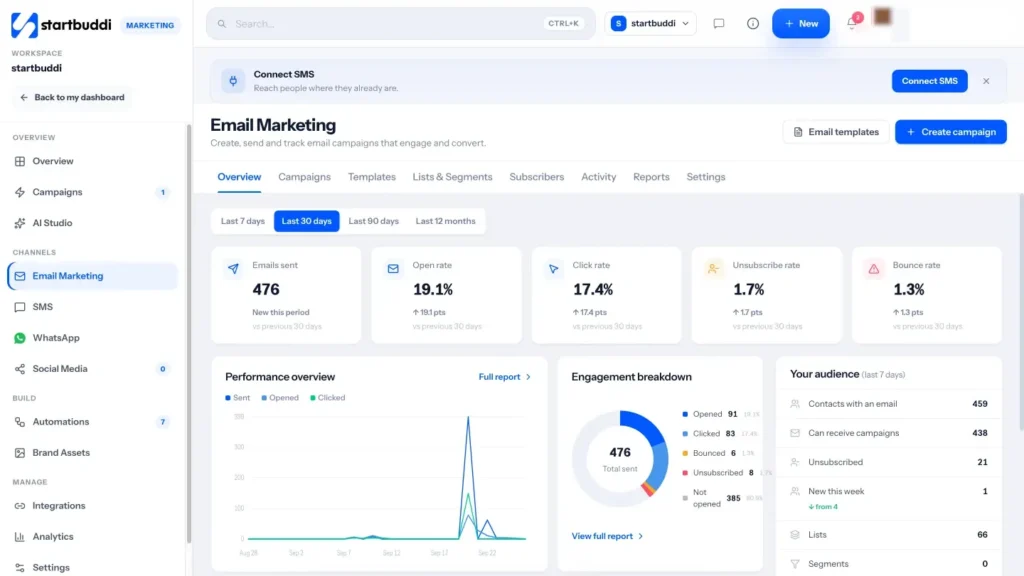
1. Open Email Marketing. From the sidebar, go to Marketing, then Email Marketing. The Overview tab shows emails sent, open rate, click rate, unsubscribe rate and bounce rate for the period you choose (7 days, 30 days, 90 days or 12 months), each compared with the previous period.
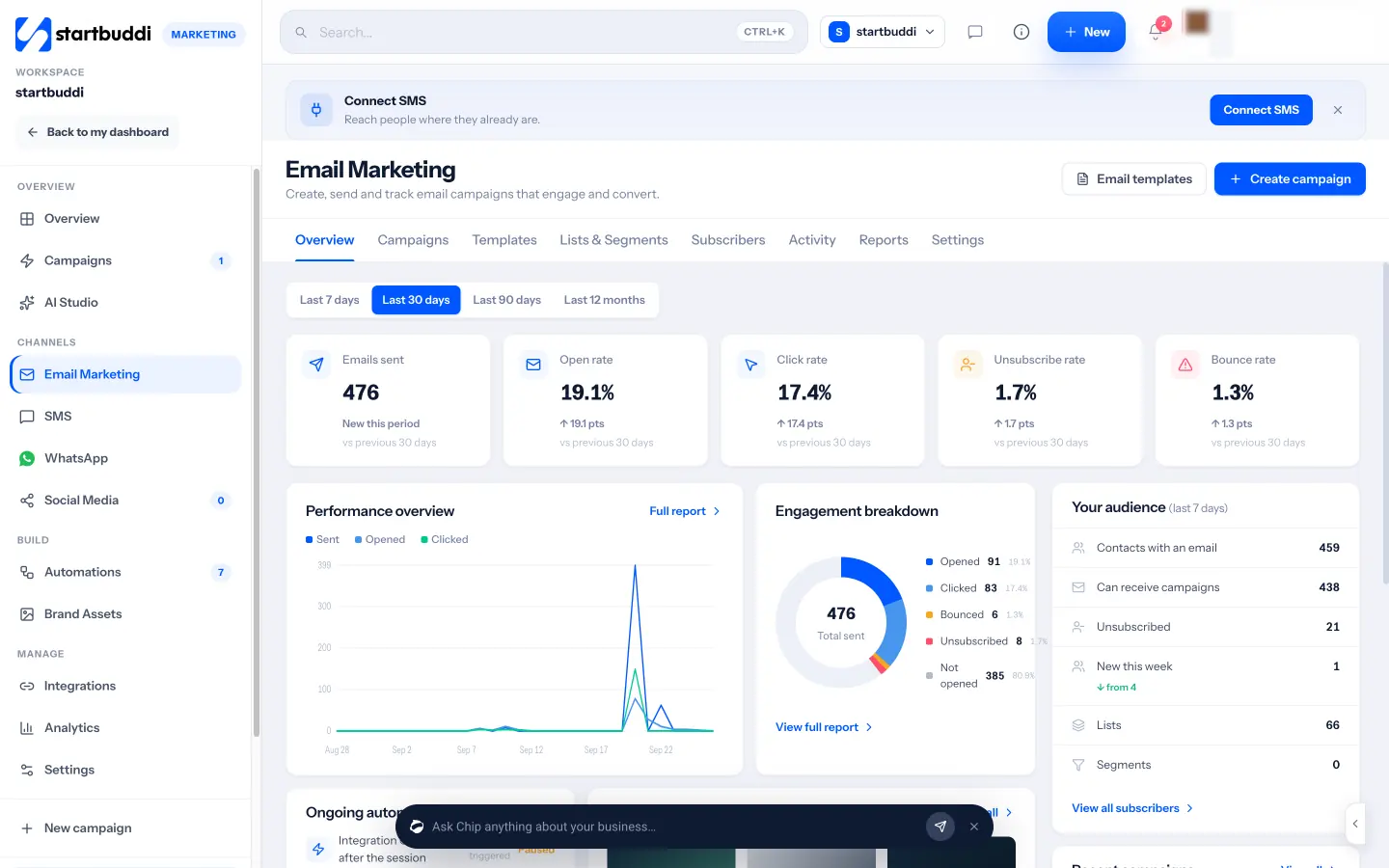
2. Check your audience panel. On the right of the overview, Your audience shows how many contacts have an email address, how many can receive campaigns, how many have unsubscribed and how many joined this week. This is the honest size of your list, because it leaves out people you are not allowed to email.
3. Look at the tabs. Across the top you will find Campaigns, Templates, Lists & Segments, Subscribers, Activity, Reports and Settings. You will use most of them in the next three chapters.
4. Set your brand once. In the Marketing rail, open Brand Assets and add your logo, your colours, your fonts and a short Voice & tone description. When you start an email from blank, the visual builder applies your brand kit, and Chip uses your voice when it drafts copy for you. Our brand kit page explains what each setting does.
Your contacts in Email Marketing are the same people as in Customers, so a client you add after a call and a subscriber who signs up on a form sit in one list. You can read more on the email marketing product page, and the next chapter shows how to fill that list the right way.
Build an email list the right way, with permission
- Permission first: the rules in plain words
- Where your first subscribers come from
- Give people a reason to join
- A signup form template you can copy
- Asking in person without feeling awkward
- How fast will your list grow? A worked example
- What to do with contacts you already have
- Double opt-in or single opt-in?
- Organise your list with lists, segments and tags
- Keep the list clean
- Doing this in startbuddi: build and organise your list
Your list is the foundation of everything else. A small list of people who chose to hear from you will beat a big list of strangers every time: better delivery, more clicks, fewer complaints and no legal risk. This chapter covers where subscribers come from, what permission means in different countries, how to write a signup offer people want, and how to keep the list clean as it grows.
Permission first: the rules in plain words
Almost every country has rules about marketing email. They differ in detail, but they share three ideas: have a lawful reason to email the person (usually their consent), say clearly who you are, and let them stop at any time. This is general information, not legal advice, so check the rules where you and your subscribers are.
- United States. The CAN-SPAM Act does not require opt-in consent, but it does require a valid physical postal address in every message, honest subject lines and a working opt-out that you honour within 10 business days. Each email that breaks the law can cost a penalty of up to $53,088 (FTC, CAN-SPAM compliance guide).
- United Kingdom. Under PECR you generally need specific consent to send marketing emails to individuals. There is a "soft opt-in" for your own customers about similar products, as long as you gave them a clear chance to opt out when you collected their details and in every message since (ICO, electronic mail marketing).
- Canada. Canada's Anti-Spam Legislation requires consent, identification and an unsubscribe mechanism in every commercial electronic message (CRTC, CASL frequently asked questions).
- Nigeria. The Nigeria Data Protection Act 2023 governs how you collect and use personal data, including email addresses, and is enforced by the Nigeria Data Protection Commission.
- South Africa. POPIA sets rules for direct marketing by electronic communication, overseen by the Information Regulator.
The safest approach for a small business trading across borders is simple: only add people who actively agreed to marketing email, record when and how they agreed, include your postal address and an unsubscribe link in every email, and remove people the moment they ask.
Where your first subscribers come from
You probably have more potential subscribers than you think. The trick is to ask everywhere you already meet people.
- Existing customers. Past clients are your warmest audience. Where the rules allow a soft opt-in, you may be able to email them about similar services; otherwise send one personal message asking if they would like to join.
- A signup form on your page. Your website, landing page or link in bio should have a short form with a clear reason to join.
- At checkout or booking. An unticked box that says "Send me tips and offers by email" catches people at the moment they trust you most.
- In person. A QR code on the counter, on a flyer or on a business card that opens your signup form.
- Social media. A post every few weeks that explains what subscribers get, with a link to the form.
- Events and webinars. Registrations can include a separate, optional box to join your list.
Our post on how to grow an email list from zero goes deeper into signup ideas for each type of business.
Give people a reason to join
"Subscribe to our newsletter" is a weak offer, because nobody wants more email for its own sake. A good signup offer answers the question "what do I get, and how often?" Here are offers that work for small businesses:
| Business | Signup offer |
|---|---|
| Bakery or café | "Be first to hear about new bakes and get a free coffee on your birthday" |
| Accountant or consultant | "A one-page tax deadline calendar, plus one practical tip a month" |
| Fitness coach | "A free four-week home workout plan" |
| Online shop | "Early access to new drops and restocks" |
| Salon | "Last-minute appointment slots before we post them anywhere else" |
| B2B service | "Our pricing guide and a monthly case study" |
Keep the form short. Name and email is enough to start. Every extra field you add costs signups, so only ask for something else if you will use it straight away, such as city for a business with several locations.
A signup form template you can copy
Here is a simple form that works for most small businesses. Change the words to match your offer.
Get our one-page wedding planning checklist
Plus one planning tip a month from our team. Free, and you can unsubscribe any time.First name: [ ]
Email: [ ]
[ ] Yes, email me the checklist and monthly tips from Bloom Events.[Send me the checklist]
We never share your email. Privacy policy.
Notice what it does: it names the reward, says how often you will email, gives a plain consent line and a button that repeats the reward. The button does not say "Submit".
Asking in person without feeling awkward
If you meet customers face to face, the moment after a good experience is the best time to ask. A short script helps: "We send one email a month with tips and first pick of our free slots. Would you like it? You can scan this and it takes ten seconds." Point to a QR code rather than writing addresses on paper, which leads to typos. Never add someone who said "maybe later".
How fast will your list grow? A worked example
It helps to set expectations, because early growth feels slow. Suppose 800 people visit your page each month and 3% of them sign up because you offer a genuinely useful checklist. That is 24 new subscribers a month. Add 10 a month from customers who tick the box at booking and 6 from a QR code at your counter, and you have around 40 a month, or roughly 480 in a year before anyone unsubscribes. That is a list big enough to fill a workshop or sell out a seasonal offer. The numbers here are illustrations, so plug in your own traffic and signup rate, but the lesson holds: small, steady sources add up.
Where are the quick wins? Usually a better offer (a checklist or a discount people actually want) and asking at more moments (booking, checkout, after a good review). Placing the form higher on your page, above the fold, and repeating it at the end also helps.
What to do with contacts you already have
Most business owners start with a spreadsheet, a phone full of numbers and years of client emails. Before you add those people to marketing emails, sort them into three groups:
- People who clearly agreed, for example they ticked a box on a past form. Add them as subscribed and note where the consent came from.
- Past customers who never ticked anything. Depending on your country, you may be able to rely on a soft opt-in for similar products, or you may need to ask first.
- Everyone else, such as people from a networking event. Store them as contacts but do not send marketing email until they agree.
For groups 2 and 3, a one-off personal invitation works well and respects the rules in most places:
Subject: Would you like our monthly tips?
Hi Grace, you booked a garden tidy with us last year, thank you again. Once a month we send one seasonal gardening tip and first pick of our spring slots. Would you like to receive it? Just click here to join: [link]. If not, no problem, you will not hear from us about it again.
People who click join your list with a clear record of consent. People who ignore it stay as contacts you can still serve, but you do not email them marketing.
Double opt-in or single opt-in?
With single opt-in, people are added as soon as they submit the form. With double opt-in, they get a confirmation email and are only added when they click the link. Double opt-in gives you stronger proof of consent and fewer fake or mistyped addresses, at the cost of losing some people who never confirm. Many small businesses start with single opt-in, a clear consent line and a welcome email that goes out immediately, which quickly reveals typos through bounces. If your forms attract a lot of spam signups, or you sell mainly into strict-consent markets, consider a confirmation step.
Organise your list with lists, segments and tags
Once you have more than a few dozen subscribers, you will want to send different emails to different people. Three tools help:
- Lists are groups you add people to by hand, such as "Workshop attendees 2026".
- Segments fill themselves from rules, such as "lives in Lagos" or "clicked an email in the last 30 days".
- Tags are labels on a contact, such as "wholesale" or "VIP".
Beginners do not need many. A useful starting set is: all subscribers, customers who have bought, people who have not bought yet, and a segment by location if you serve more than one area. Our glossary entry on email segmentation explains the idea in more depth.
Keep the list clean
A clean list delivers better, because inbox providers watch how people react to your emails. A few habits keep it healthy:
- Remove hard bounces (addresses that do not exist) straight away. Most tools do this automatically.
- Honour unsubscribes immediately and never re-add those people.
- Every six months, look at people who have not clicked anything in a long time. Send them one "do you still want these emails?" message and remove anyone who does not respond.
- Import only people with a clear consent record, and mark everyone else as not subscribed.
Doing this in startbuddi: build and organise your list
In startbuddi there is one contact list for every channel, so your subscribers, clients and leads are the same records. Each contact has a marketing status that controls whether you can email them.
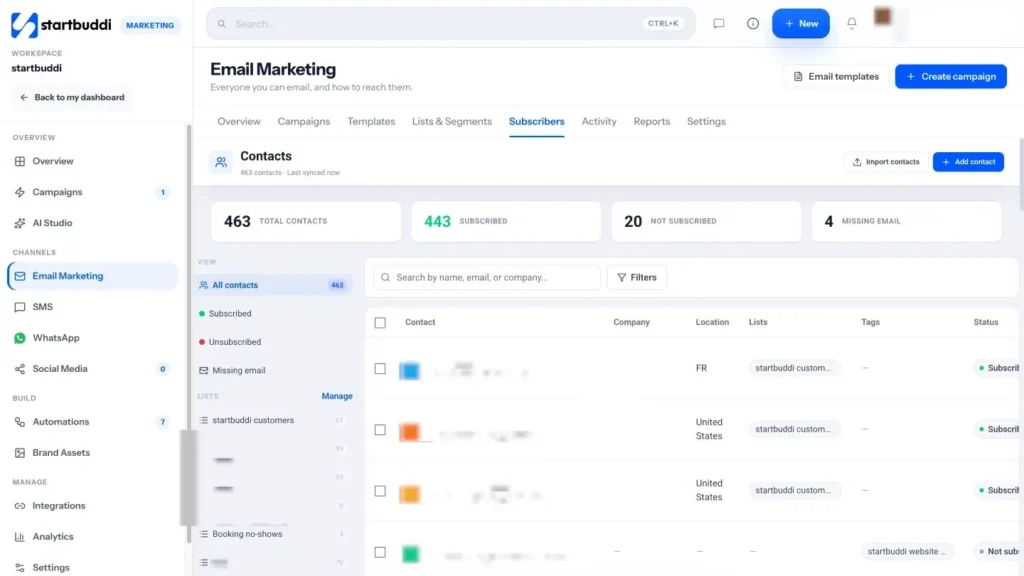
1. Import the contacts you already have. Go to Email Marketing, open the Subscribers tab and click Import contacts. Upload a CSV, then choose how to handle people who already exist (create new and update existing, only create new, or only update existing, matched by email). On the same step you set the marketing status for everyone in the file: Not subscribed, Subscribed or Transactional only. Only choose Subscribed for people who actually agreed. Then map your columns to contact fields, review the validation report (valid rows, duplicates, invalid emails) and finish.
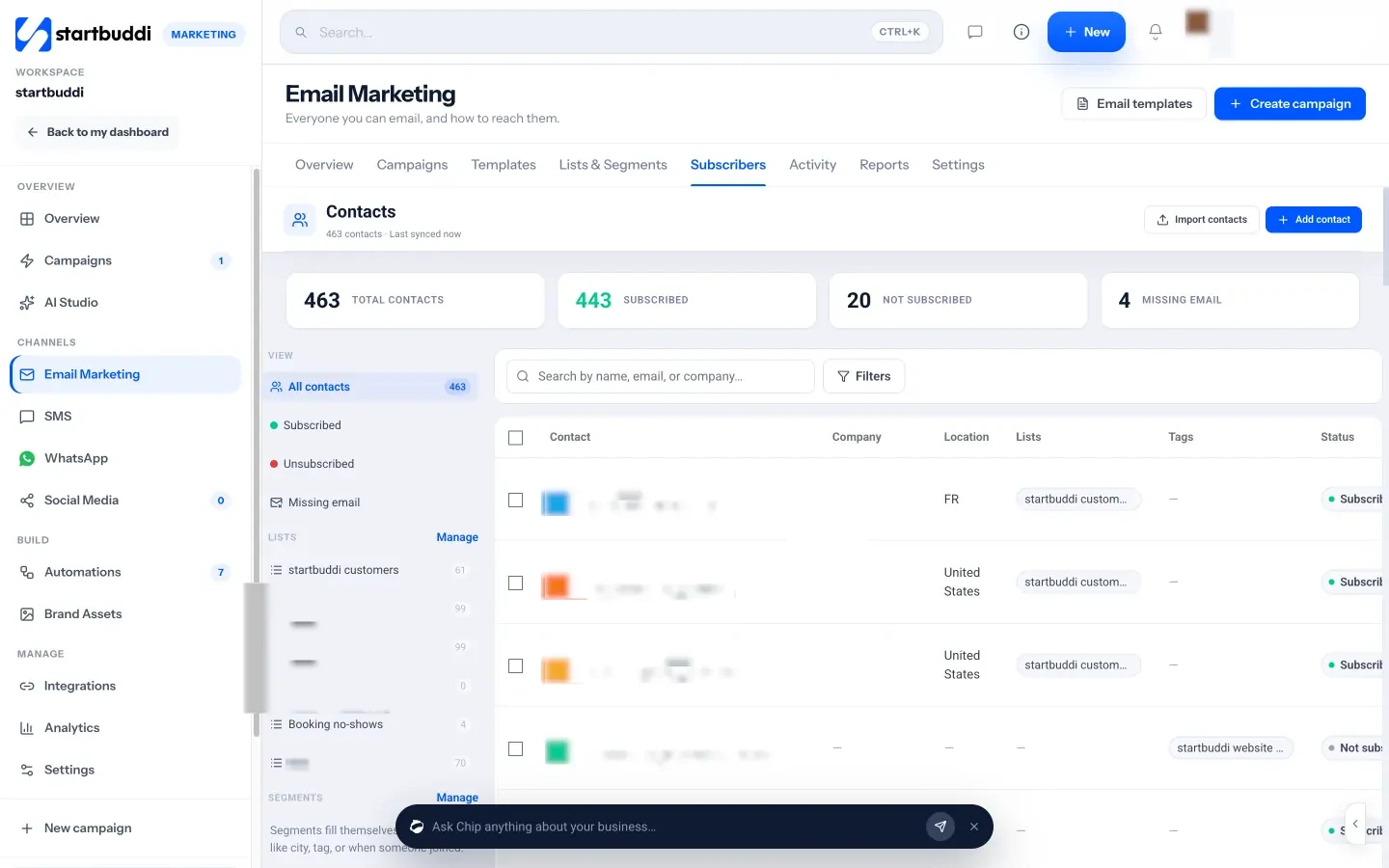
2. Check each contact's status. A contact can be Not subscribed ("Store the contact, but exclude from marketing campaigns"), Subscribed ("You have permission to send marketing emails"), Transactional only, or Suppressed ("Never send until manually cleared"). You can also record the consent source and consent date on a contact, which is useful proof if anyone ever asks.
3. Add a signup form. In Forms, click Create form, give it a name and add fields. In the field settings, turn on Counts as marketing consent for your consent checkbox, and in the form's settings choose to add or update the submitter in your contacts and mark them as a marketing contact. Share the direct link, embed it on your site, add it as a popup button or print the QR code. The Forms page covers the options.
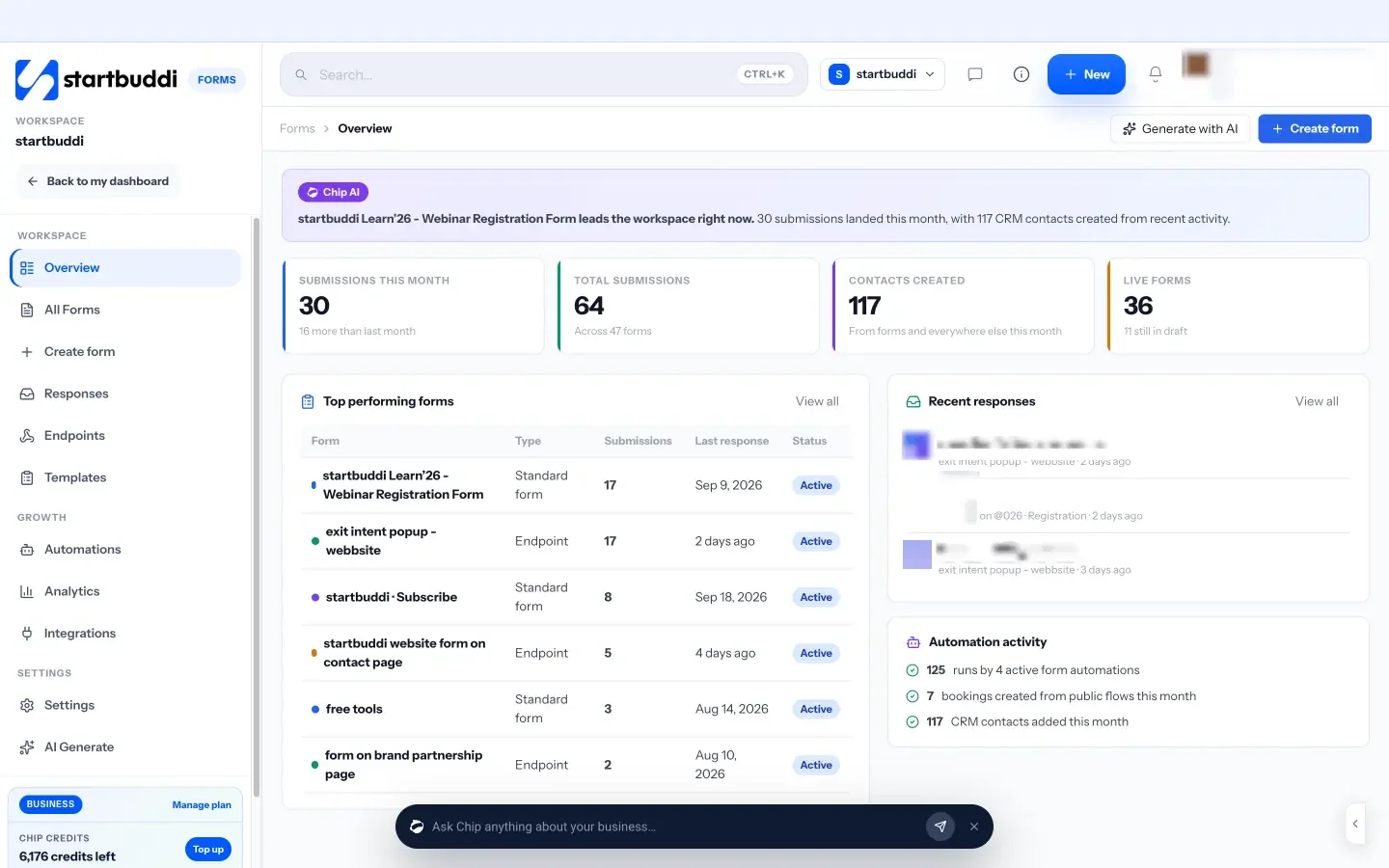
4. Create your first lists and segments. Open Lists & Segments and click Create list for groups you manage by hand, or Create segment for groups that fill themselves from rules such as city, tag, date added, whether someone opened or clicked a campaign, filled in a form, made a booking, or has a paid or unpaid invoice. From any row, Email this group starts a campaign to exactly those people. The audiences page lists every rule you can use.
5. Let the platform protect you. Every send checks a suppression list and skips anyone who unsubscribed, bounced or has no email. When you pick an audience, startbuddi shows how many people are eligible and, if you click through, why the others are skipped.
With a list that is clean and legal, you are ready to write. The next chapter walks through your first campaign.
Write and send your first email campaign
- Set up your sender before you write anything
- Subject lines and preview text
- The shape of a good email
- Designed email or plain text?
- Templates you can copy
- Writing tips for people who do not like writing
- Personalisation that actually helps
- Make your emails easy for everyone to read
- Check before you send
- Good sending habits that protect your inbox placement
- When to send
- Plan your first campaign in 30 minutes
- Doing this in startbuddi: your first campaign in four steps
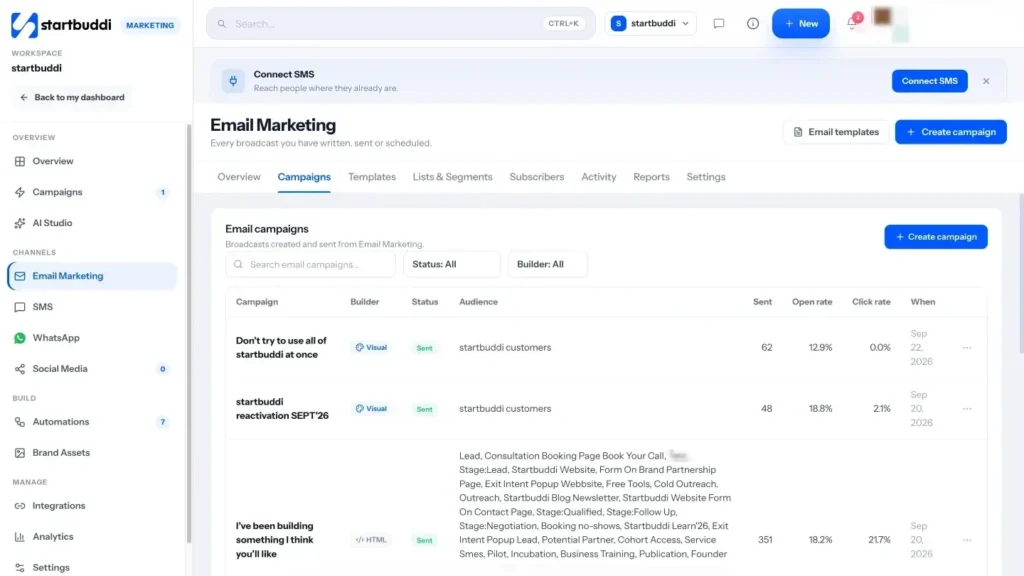
Now for the part most people picture when they think of email marketing: writing and sending an email. Good news first: a first campaign does not need a designer, a big budget or clever copywriting. It needs a sender people recognise, a subject line that makes the email worth opening, a short body with one clear action, and a quick check before it goes. This chapter covers each of those, with templates you can adapt.
Set up your sender before you write anything
Who the email is "from" is the first thing people see, and it affects whether the email reaches the inbox at all. Get three things right.
- From name. Use a name people know: your business name, or "Amara at Brightside Cleaning". Keep it the same every time.
- From address on your own domain. Send from something like hello@yourbusiness.com rather than a free Gmail or Yahoo address. It looks more trustworthy and is what inbox providers expect from a business.
- Authentication. Your domain needs DNS records that prove you are allowed to send from it, known as SPF, DKIM and DMARC. Your email tool gives you the records to paste in at your domain registrar.
This is not optional any more. Since February 2024, Google has required everyone sending to Gmail to set up SPF or DKIM, and anyone sending more than 5,000 messages a day to Gmail addresses to set up SPF, DKIM and DMARC, offer one-click unsubscribe on marketing email and keep spam complaints below 0.3% (Google, email sender guidelines). Even if you are nowhere near 5,000 a day, following the same standards gives your emails the best chance.
Subject lines and preview text
The subject line has one job: to make the right people want to open the email. The preview text (the grey line shown after the subject in most inboxes) backs it up. Some patterns that work well for small businesses:
- Be specific. "3 ways to cut your electricity bill this winter" beats "November newsletter".
- Lead with the benefit. "Your free home workout plan is inside".
- Use a number or a question. "Is your gutter ready for rainy season?"
- Keep it short. Phones cut off long subjects. Aim for roughly 30 to 50 characters.
- Be honest. A subject that promises something the email does not deliver annoys readers and, in the US, breaks CAN-SPAM.
Write the preview text as a second line of the subject, not a repeat of it. Subject: "Last-minute slots this Saturday". Preview: "Three openings for cuts and colour, first come first served."
The shape of a good email
Most effective small business emails follow the same simple structure:
- A greeting with the reader's first name if you have it.
- One opening line that says why you are writing.
- The useful part: the tip, the news or the offer, in two to four short paragraphs or a short list.
- One call to action: a single button or link that says exactly what happens, such as "Book your slot" or "Read the full checklist".
- A sign-off from a real person, and an invitation to reply.
- The footer: your business name, postal address and an unsubscribe link.
Keep it short. If an email scrolls for more than two phone screens, it is probably two emails.
Designed email or plain text?
You do not need a heavily designed email. Plain, personal emails often feel more like a message from a person and get more replies. Designed emails with your logo, colours and images suit product launches, shops and event invitations. A good middle ground for most service businesses is a clean layout with your logo at the top, one image at most, readable text and one button.
Templates you can copy
Welcome email
Subject: Welcome, here is your price list
Preview: Plus what to expect from us (about one email a month)Hi {{first_name}},
Thanks for joining. As promised, here is our full price list: [link].
About once a month we will send you one practical tip for looking after your home, plus first pick of any free slots. No spam, and you can unsubscribe with one click at the bottom of any email.
If you have a question right now, just hit reply. It comes straight to me.
Tunde
Owner, Brightside Cleaning
Monthly newsletter
Subject: The 10-minute kitchen reset (and a spring offer)
Preview: The routine our cleaners use, step by stepHi {{first_name}},
Most kitchens get messy in the same three places. Here is the 10-minute reset our team uses at the end of every job: [three short steps].
This month only: book a deep clean before 30 April and we will do the oven for free.
[Book a deep clean]
Speak soon,
Tunde
Announcement
Subject: We now cover Westlands and Kilimani
Preview: Same team, same prices, two new areasHi {{first_name}},
Quick news: from next Monday we are taking bookings in Westlands and Kilimani. If you have friends or family there, we would love an introduction.
[See available dates]
Promotion
Subject: 48 hours only: 20% off gift cards
Preview: The easiest present you will buy this yearHi {{first_name}},
Until midnight on Sunday, every gift card in our shop is 20% off. They never expire and can be used for any treatment.
[Buy a gift card]
Thanks for being one of our regulars,
Zainab and the team
Writing tips for people who do not like writing
Many business owners put off email because writing feels slow. A few habits make it much faster:
- Keep an ideas list. Every time a customer asks a question, add it to a note. Each question is a future email.
- Write the call to action first. Decide what you want the reader to do, then write only what they need to know to do it.
- Talk, then tidy. Record yourself explaining the tip to a customer, then turn the transcript into short paragraphs.
- Use AI for a first draft, not the final word. An AI assistant can turn your notes into a draft in seconds. Always check facts, prices and dates, cut anything generic, and add one detail only you would know, such as a story from last week's job.
- Reuse what works. Save your best emails as templates and change the content, not the structure.
Personalisation that actually helps
First names in the greeting are nice, but the personalisation that moves results is relevance: sending the right email to the right group. A pet groomer who emails dog owners about dog grooming and cat owners about cat grooming will get more bookings than one who sends both groups the same message with their first name at the top. Use your segments from chapter 2 to send fewer, more relevant emails.
Make your emails easy for everyone to read
Accessible emails are simply better emails. Use a readable font size, strong contrast between text and background, descriptive link text ("See this week's slots" rather than "click here"), alt text on images, and never put important information only inside an image. Many readers see your email on a small phone screen in bright sunlight, so design for that.
Check before you send
Every experienced sender has a story about the email that went out with "[FIRST NAME]" in the greeting or a broken link. A two-minute check prevents it:
- Is the subject clear and not cut off on a phone?
- Is there preview text?
- Do all the links work, and is there one obvious action?
- Do images have alt text, in case they do not load?
- Does the personalisation fall back gracefully if a name is missing?
- Did you send a test to yourself and read it on your phone?
Good sending habits that protect your inbox placement
Inbox providers such as Gmail and Outlook decide where your email lands based largely on your history. A few habits keep that history clean:
- Start gently with a new domain. If you have never sent bulk email from your domain, begin with your most engaged subscribers and a modest volume, then grow over a few weeks. A sudden large send from a brand new domain looks suspicious.
- Send to people who want it. Recent subscribers and recent customers react best. Old, cold addresses cause bounces and complaints.
- Make unsubscribing easy. If people cannot find the unsubscribe link, they press "report spam" instead, which hurts you far more.
- Let people reply. Use a reply-to address that a person reads. Replies are a strong positive signal, and they are often where the sales conversations start.
- Keep a steady rhythm. Long silences followed by a burst of emails lead to complaints from people who forgot they signed up.
When to send
There is no universal best time. It depends on your readers. A good starting point is a weekday morning in your readers' main timezone, then adjust based on your own results. Consistency matters more than the exact hour: if subscribers learn your tips arrive every first Tuesday, they look out for them.
Plan your first campaign in 30 minutes
If a blank page stops you, answer these five questions in a note, then turn the answers into the email:
- Who is it for? For example, all subscribers, or only past customers.
- What is the one useful thing? A tip, a piece of news, or an answer to a common question.
- What do I want them to do? Book, buy, reply, read or share.
- Why now? A season, a deadline, limited slots or something new.
- What will I call it? Write three subject lines and pick the clearest.
A plumber in Birmingham might answer: all subscribers; how to stop pipes freezing; book a boiler service; the first cold snap is forecast; "Three things to do before the frost". That is a complete email in outline, and it took five minutes.
Doing this in startbuddi: your first campaign in four steps
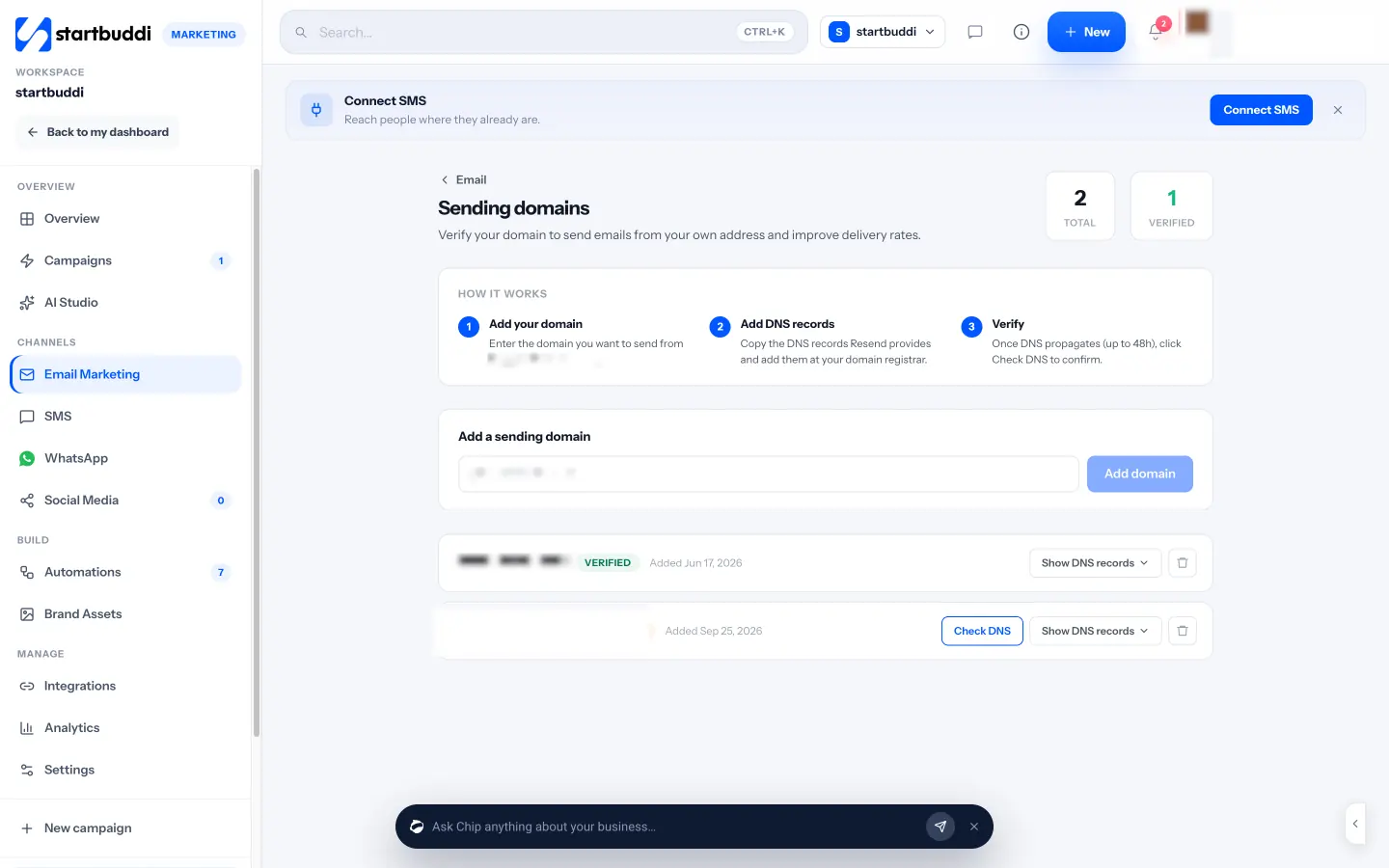
1. Verify your sending domain. In Email Marketing, open Settings, find Sending domain and click Manage (or go straight to Sending domains). Add your domain, copy the DNS records to your domain registrar and click Check DNS once they have had time to update, which can take up to 48 hours. On the same Settings tab, set your From address and the postal address that appears in the footer of every marketing email. Own-domain sending is on every paid plan. Until your domain is verified, marketing email from the shared startbuddi sender is capped at 1,000 a month and 200 a day, whatever your plan.
2. Name the campaign and choose the audience. Click + Create campaign and give it an internal name (recipients never see it). On the Audience step, tick the lists or segments you want, or build a rule By properties. You can exclude groups, and you can Ask Chip to build an audience by describing the people in plain words, such as "customers in Accra who booked in the last six months". The estimated recipients count shows who is eligible and who will be skipped.
3. Write the message. On the Message step, set the From name and address, where replies go, the subject and the preview text. Then choose how to build the body: Create with Chip (Chip writes the subject, preview, copy and call to action from your brief, using your brand voice), Use a template, Start blank in the drag-and-drop builder with your brand kit applied, or the HTML builder. Merge tags such as {{first_name}} personalise the email, and a missing first name reads as "there". The unsubscribe link, your postal address and a preferences link are added automatically.
4. Review, then send. The Review step runs the checks from the list above for you: missing subject or preview text, subjects cut off on phones, empty or broken links, images without alt text and "nothing to click". Chip's read gives a short summary with suggested fixes, and you can Send a test to yourself or a teammate. On the Send step choose Send now, Schedule in your timezone, or Smart send, which picks the hour your readers open most once you have enough history.
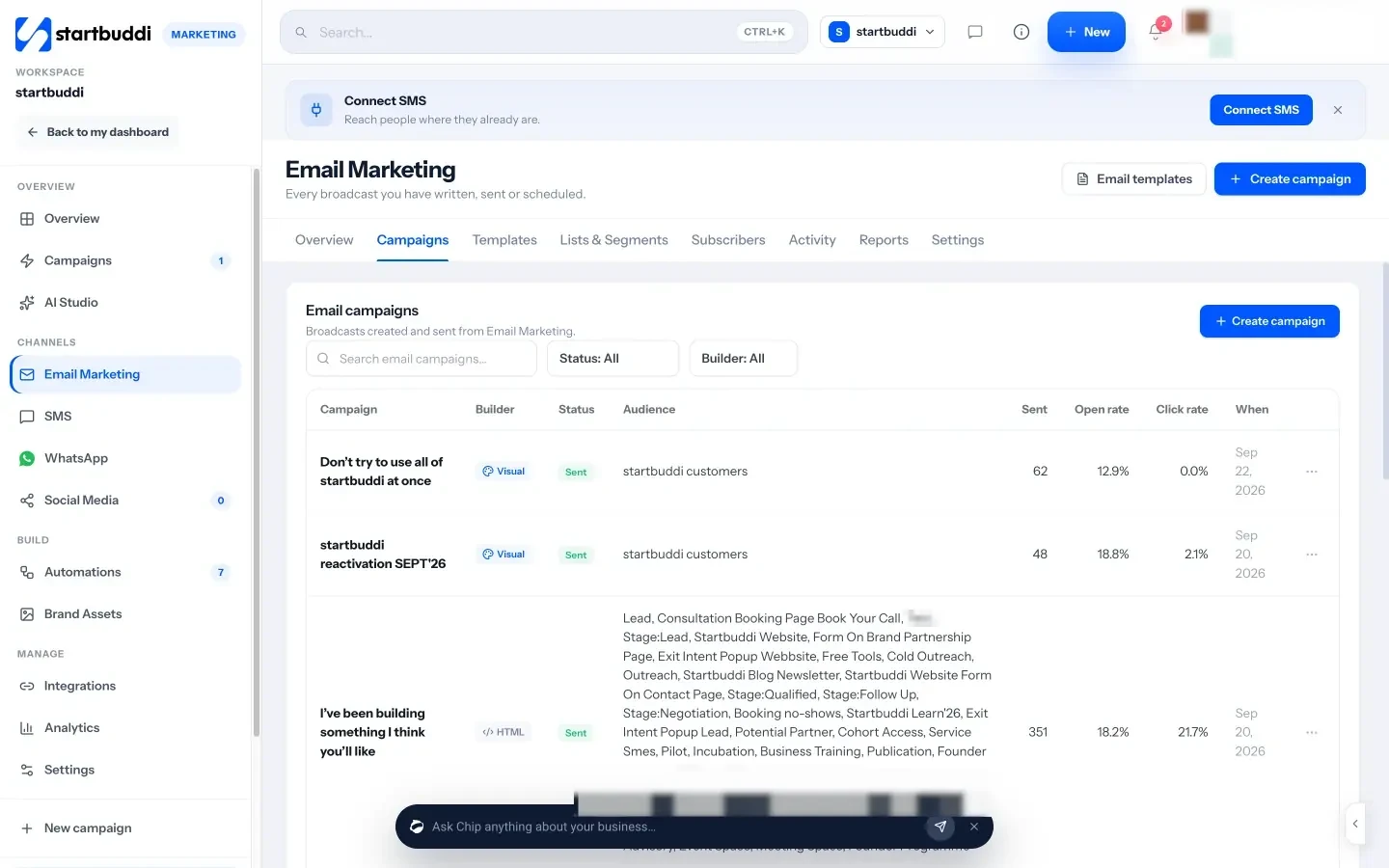
Replies to your campaigns land in the Customers inbox, labelled with the campaign they answer, so a "yes, I'd like a quote" never gets lost. If you prefer a step-by-step walkthrough with every button, the help article on how to build an email campaign covers it. The last chapter shows how to learn from what you sent and let some emails send themselves.
Measure, automate and choose email marketing tools for small business
- The numbers to watch, and the ones to ignore
- Reading a report: a worked example
- Test one thing at a time
- Three automations every beginner should set up
- Grow relevance as your list grows
- Warning signs to act on
- Mistakes to avoid when you automate
- Ask your happiest readers to spread the word
- A simple monthly routine
- How to choose email marketing tools for small business
- Free email marketing tools for small business: what to expect
- Doing this in startbuddi: reports, tests and automations
- Your next step
Sending your first campaign is a milestone. The businesses that get real results from email do two more things: they look at what happened and adjust, and they set up a few emails that send themselves at the right moment. This chapter covers the numbers that matter, simple tests, the three automations worth building first, and how to choose email marketing tools for a small business without overpaying.
The numbers to watch, and the ones to ignore
Email tools show a lot of metrics. As a beginner, focus on these:
| Metric | What it tells you | How to read it |
|---|---|---|
| Click rate | Share of recipients who clicked a link | Your best everyday measure of whether the email was useful. Compare against your own past sends. |
| Replies and conversions | Enquiries, bookings or sales that came from the email | The number that pays the bills. Track it even if only in a note. |
| Unsubscribe rate | Share who opted out | A few per send is normal. A sudden jump means the content or frequency missed. |
| Bounce rate | Emails that could not be delivered | Should stay low. A high rate points to old or mistyped addresses. |
| Open rate | Share who appear to have opened | Useful for comparing subject lines, but inflated by privacy features. Do not celebrate or panic over it. |
For context, Mailchimp's published benchmarks for all its users show an average unsubscribe rate of about 0.22% per campaign and a click rate of about 2.6% (Mailchimp benchmarks). Treat any benchmark as a loose guide. Your own trend over six months matters far more than an industry average.
Reading a report: a worked example
Here is how to turn numbers into a decision. A yoga studio sends its monthly newsletter to 620 subscribers. The report shows 14 unsubscribes, 11 bounces, and 19 clicks, of which 15 went to the "book a trial class" button and 4 to a blog post. Six people booked a trial, and two of those later bought a $90 monthly pass.
- Click rate: 19 clicks from about 609 delivered emails is roughly 3.1%. Good, and in line with previous months.
- Unsubscribes: 14 is about 2.3%, much higher than usual. Looking at the email, it was twice as long as normal and led with a price rise. Lesson: announce price changes in a short, separate email with a reason.
- Bounces: 11 is high for one send. Most came from an old paper sign-up sheet that was typed in last month. Lesson: confirm addresses collected on paper.
- Revenue: two new passes at $90 a month is $180 a month of new recurring revenue from one email that took an hour to write.
One report, three clear actions. That is the whole point of measuring.
Test one thing at a time
An A/B test sends two versions of an email to small parts of your list, waits, and then sends the better version to everyone else. It is the easiest way to learn what your readers respond to. The rule is to change one thing only, so you know what made the difference. Good first tests:
- Subject line: a question against a statement, or a number against no number.
- Sender name: business name against a person's name at the business.
- Call to action: "Book now" against "See available times".
With a small list, tests are noisy. If you have fewer than a few hundred subscribers, run the same kind of test over several sends and look for a pattern rather than trusting one result.
Three automations every beginner should set up
Automated emails, sometimes called sequences or drips, send themselves when something happens. They are where email starts saving you time rather than costing it. Start with these three:
- Welcome series. When someone joins, send the welcome email immediately, then one or two follow-ups over the next week: your most useful tip, then an introduction to what you sell with one clear offer.
- After a booking or purchase. A thank-you, what happens next, and a request for feedback or a review a few days later.
- Win-back. For customers who have not bought in a while, a friendly "we miss you" with a reason to come back.
Our glossary entries on email drip sequences and email automation explain the terms, and the post on email marketing for service businesses has sequence examples for appointment-based businesses.
Grow relevance as your list grows
Once you pass a few hundred subscribers, sending everything to everyone starts to cost you. People who get emails that do not apply to them stop opening, then unsubscribe. The fix is to use what you already know about your contacts:
- By stage: people who have never bought get introductions and offers; customers get tips, loyalty perks and referral requests.
- By interest: if someone clicked on your wedding packages, send them wedding news, not your corporate events update.
- By location: a business with branches in Nairobi and Mombasa should send local dates and offers to each.
- By engagement: send your big promotions to everyone, but send weekly extras only to people who clicked in the last 90 days.
You will send more campaigns overall, but each one goes to fewer people and performs better.
Warning signs to act on
Most email problems give an early warning. Watch for these:
- Clicks falling for three sends in a row: your content is drifting from what readers want. Ask them with a one-question email.
- Bounces rising: a source of bad addresses, often a form without validation or an old import.
- Replies saying "I never signed up": check where those contacts came from and stop emailing that source.
- Customers saying your emails went to spam: check your sending domain is still verified and that your DNS records have not changed.
Mistakes to avoid when you automate
- Set and forget. Review each automation every few months. Prices, links and offers go out of date, and an old welcome email with last year's price confuses people.
- Too many emails at once. Someone who joins your list, books a call and buys in the same week can end up in three sequences. Leave gaps and exclude people who have already done what the email asks.
- No way out. Every automated marketing email needs the same unsubscribe link and footer as a campaign.
- Robotic tone. Automated does not have to sound automated. Write each message as if you were sending it by hand to one person.
Ask your happiest readers to spread the word
Your list can also grow your business through referrals. Once or twice a year, send a short email to customers who have bought from you recently: thank them, and ask them to forward the email to one friend who might find it useful, with a link to your signup form. Keep it light and do not attach conditions or rewards that could look like paying for sign-ups. Word of mouth from a happy customer is the most trusted marketing there is, and email makes it easy to pass on.
A simple monthly routine
Email marketing becomes easy once it is a habit. Here is a routine that takes about two hours a month:
- Week 1: write and send your newsletter (60 minutes).
- Week 2: look at the report: clicks, replies, unsubscribes. Note one lesson (15 minutes).
- Week 3: check new subscribers and where they came from. Fix any form that is not working (15 minutes).
- Week 4: jot down ideas for next month from customer questions you heard (15 minutes).
How to choose email marketing tools for small business
There are many email marketing tools for small business, and most of them can send a good-looking email. The differences that matter for a small business are:
- Price as your list grows. Many tools charge by the number of contacts, so check the price at 1,000 and 5,000 contacts, not just today.
- Sending limits. Monthly and daily caps, and whether you can send from your own domain.
- Automations. Can you build a welcome series and a post-purchase email without a paid add-on?
- Where your contacts live. If your email tool, your CRM, your booking tool and your invoices are separate, you will spend time exporting and importing lists, and segments like "customers with an unpaid invoice" become hard.
- Support for your currency and region. Especially if you pay in naira, shillings or rand.
Free email marketing tools for small business: what to expect
Free plans are a sensible way to learn, but they have limits. At the time of writing, Mailchimp's Free plan lists a limit of 250 contacts and up to 500 sends a month (Mailchimp pricing), and MailerLite's free plan lists up to 250 subscribers and 2,500 emails a month (MailerLite pricing). Check each provider's page for current limits, because they change. Free plans often exclude automations, remove your branding only on paid tiers, or cap daily sends.
A simple way to compare paid options is to price three sizes of list. Write down the monthly cost at your list size today, at double it and at five times it, then add the cost of any separate tools you would still need for forms, bookings, invoices or a CRM. A tool that looks cheap at 300 contacts can cost several times more at 3,000, and a bundle can work out cheaper than several single-purpose tools once you add them up. Our post on all-in-one workspace vs separate tools walks through that sum.
Be honest with yourself about when free stops being free. If an extra tool means an hour a week moving contacts around, that hour has a cost. Our researched list of the best email marketing software and the Mailchimp alternatives page compare options side by side.
Doing this in startbuddi: reports, tests and automations
1. Read the campaign report. Open any sent campaign from the Campaigns tab and go to Report. You will see opens and clicks over time, a heatmap of when people read it by hour and day, which links were clicked most, devices and email clients, and a Who did what list you can filter by opened, clicked, not opened, bounced or unsubscribed. The Reports tab in Email Marketing shows the same across all campaigns, including your most clicked links.
2. Follow up on non-openers. On a sent campaign, Resend to non-openers sends the same email with a new subject only to people who still have not opened it, once per campaign. It is a quick way to reach people who missed the first send.
3. Run an A/B test. On the Message step, add an A/B test on the Subject line, Email content or Sender name. Write version B yourself, or ask Chip to generate one from angles such as Shorter, Benefit-led or Different CTA. On the Send step, choose the test size and duration, pick the winner by click rate or open rate, and choose whether to send the winner automatically. The app recommends clicks, because opens are over-counted.
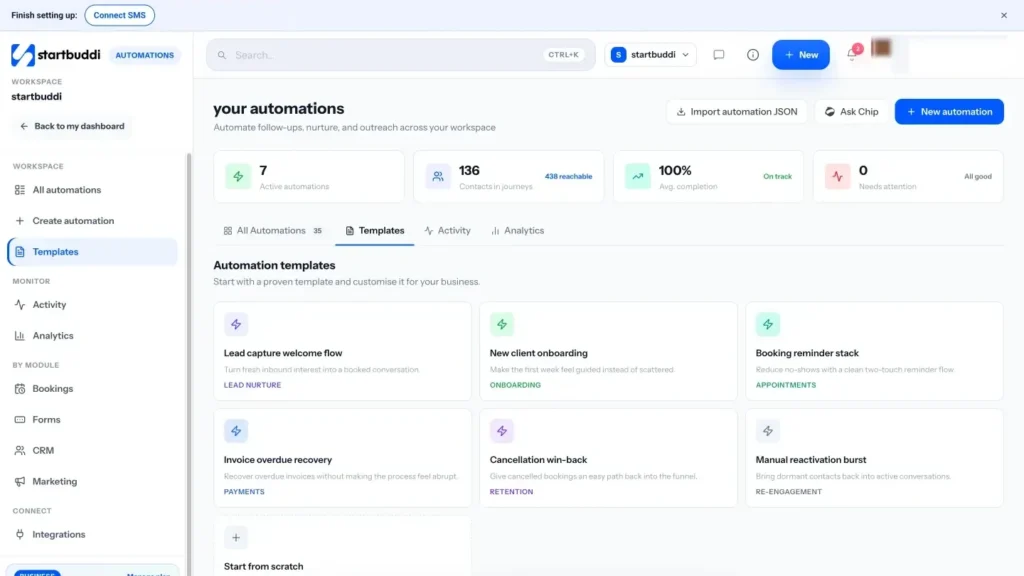
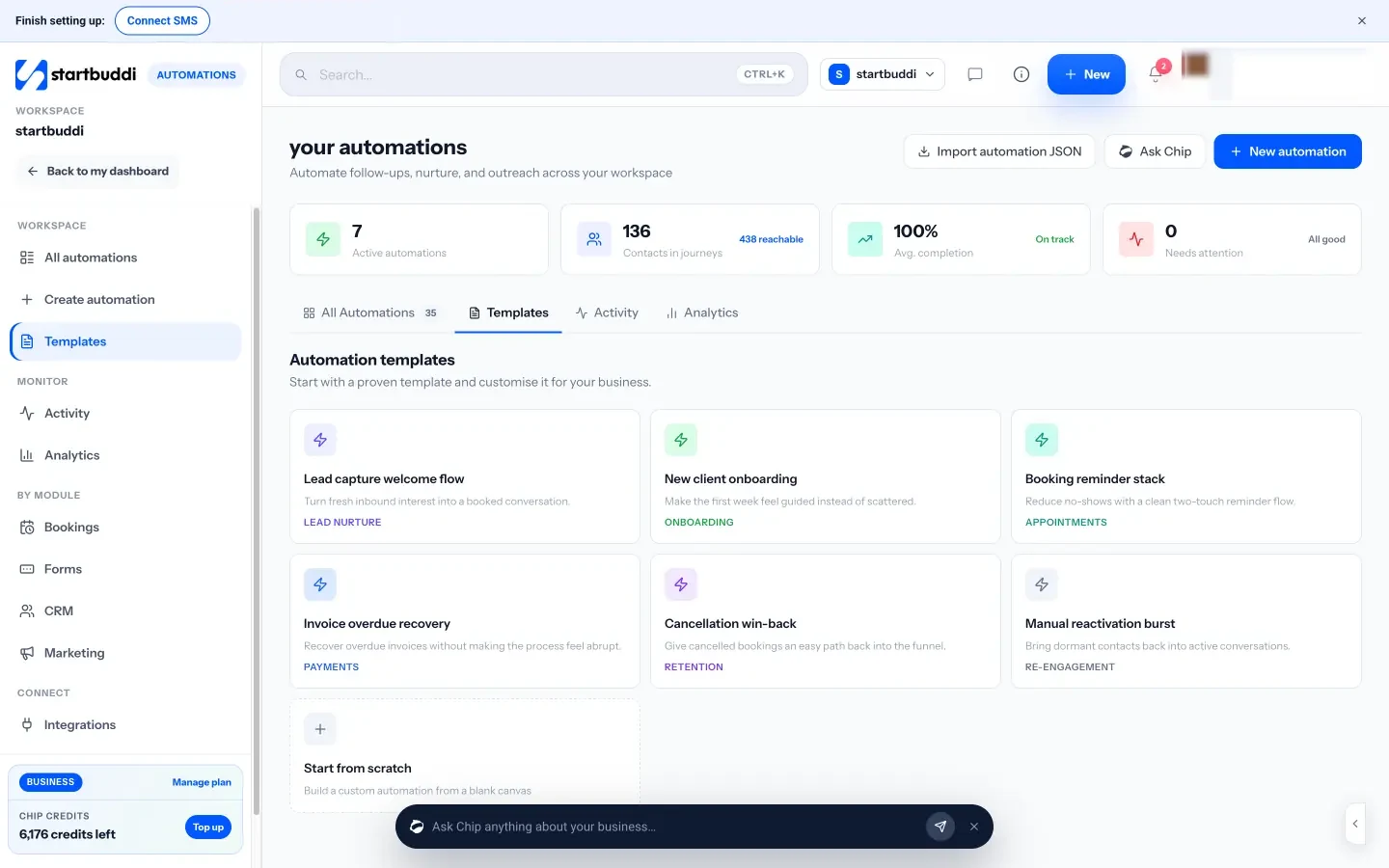
4. Switch on your first automations. Go to Automations and open Templates. The Lead capture welcome flow starts when a form is submitted and is a ready-made welcome series. New client onboarding and Cancellation win-back cover the other two automations above. You can also click Tell Chip what you want and describe it, for example "when someone joins my newsletter form, send a welcome email, wait three days, then send my best tip". Chip plans the steps and writes the messages for you to check before anything goes live.
5. Know your plan limits. The Marketing module, bulk campaigns and your own sending domain are on Starter and above, and Starter raises active automations from 2 to 10. Starter includes 3,000 email sends a month, Growth 10,000 and Scale 25,000 (see pricing). Every paid plan has a 30-day trial. See pricing for the full table.
Your next step
Pick one thing from this guide and do it today: write your welcome email, add a signup form to your page, or verify your sending domain. Then put your first monthly send date in the calendar. If you want your list, your emails, your automations and your customers in one place, start a 30-day trial and send your first campaign from startbuddi Email Marketing.
Olabimpe Salami is the email and outreach specialist at startbuddi. Olabimpe writes about the messages that bring customers in and back: email, WhatsApp and SMS campaigns, follow-ups, and turning enquiries into paying clients.
Runs email and outreach at startbuddi