10 SimplyBook.me Alternatives for Small Businesses in 2026
SimplyBook.me alternatives that don't cap your bookings: 10 tools compared on pricing model, free plan, deposits and reminders, checked on 14 October 2026.



People look for SimplyBook.me alternatives mostly because its plans cap the number of bookings each month, so a good month pushes up the bill. The best three: Setmore, for unlimited appointments free for up to four people; Square Appointments, for deposits on a free plan in Square’s countries; and startbuddi, for deposits through Paystack across Africa.
startbuddi is our product. It’s on this list where it fits, and its limits are written as plainly as everyone else’s. Prices were checked on each vendor’s own site on 14 October 2026.
Key takeaways
- SimplyBook.me prices by bookings: 50 a month on Free, 100 on Basic, 500 on Standard and 2,000 on Premium. Most alternatives price by person, location or calendar instead, with unlimited bookings.
- Taking payments and deposits on SimplyBook.me starts on Basic. Square Appointments and startbuddi take deposits on their free plans.
- If you have many staff but a quiet calendar, SimplyBook.me’s model can be the cheapest. If you have one or two people and a busy diary, a per-person tool usually costs less.
- Moving is mostly a client export and an afternoon of setting up services. Run both for a week while old bookings finish.
What is SimplyBook.me?
SimplyBook.me is online booking software for service businesses: salons, clinics, tutors, driving schools, fitness classes and public services. It gives you a booking website, a widget for your own site, admin and client apps, and a long list of optional “custom features” such as payments, memberships and point of sale. You choose a plan by how many bookings you take each month and how many staff (“providers”) you have.
Why look for a SimplyBook.me alternative?
SimplyBook.me does a lot, and it serves a very wide range of businesses. The reasons people move on come straight from its pricing page (checked on 14 October 2026).
Your bill grows with your bookings
| Plan | Price billed annually | Price billed monthly | Bookings included | Providers |
|---|---|---|---|---|
| Free | €0 | €0 | 50 | 1 |
| Basic | €11.9/month | €13.9/month | 100 | 5 |
| Standard | €24.9/month | €29.9/month | 500 | 15 |
| Premium | €49.9/month | €59.9/month | 2,000 | 30 |
A solo barber doing 15 cuts a day, five days a week, takes about 300 bookings a month. On SimplyBook.me that’s Standard at €24.9 a month billed annually, even with one provider. On a per-person tool such as Setmore Pro, the same barber pays $5 a month billed yearly for unlimited appointments. (Illustrative: 15 × 5 × 4 = 300.)
Payments and deposits start on Basic
The Free plan lists the booking website, widget, admin app and WordPress widget. Payments, deposits and tips and point of sale are “available options” from Basic. Refunds, payment links and saved cards (Payments PRO) and removing SimplyBook.me from the page footer start on Premium.
Custom features are rationed
Each plan includes a set number of “custom features”: 1 on Free, 3 on Basic, 8 on Standard and unlimited on Premium. If you need payments, intake forms and a membership option together, you may need a higher plan for the feature count rather than the bookings.
Messages cost extra
SMS reminders and WhatsApp messages are bought as credits: 100 SMS credits for $8 and 100 WhatsApp credits for $8, according to the same page.
Euro pricing
Plans are shown in euros. That’s fine in Dublin or Berlin, and an extra currency conversion on every renewal in Lagos, Nairobi or Toronto.
None of this makes SimplyBook.me a bad choice. It’s still a strong fit in three cases:
- Many providers, modest volume. A clinic with 12 part-time practitioners taking 400 bookings a month fits Standard (15 providers, 500 bookings) at €24.9 billed annually. Per-user tools would charge for all 12.
- Recurring appointments and events on any plan. SimplyBook.me lists both on every plan, including Free.
- Wide feature range. Its custom features cover memberships, point of sale, HIPAA (from Standard) and SAML SSO, so one tool can grow a long way.
The list below is for when the booking cap or the payment rules bite.
SimplyBook.me alternatives compared
| Tool | How it charges | Starting price (checked 14 Oct 2026) | Free plan | Best for |
|---|---|---|---|---|
| startbuddi | By plan | See pricing | Yes | Deposits through Paystack across Africa |
| Setmore | Per user | $5/user/month billed yearly | Yes (up to 4 users) | Small teams with busy diaries |
| Square Appointments | Per location | $0; Plus $49/month per location | Yes | Salons and barbers in Square’s countries |
| Acuity Scheduling | Per number of calendars | $16/month billed yearly | No (7-day trial) | Coaches and therapists with packages |
| Zoho Bookings | Per user | US$6/user/month billed yearly | Yes (1 user) | Teams already on Zoho |
| Picktime | Per user | $3/user/month billed annually | Yes (3 users) | Classes, rooms and locations on a budget |
| Fresha | Per bookable person | NGN 6,800/month shown in Nigeria | No (7-day trial) | Salons wanting a marketplace |
| Cal.com | Per user | $12/user/month billed yearly | Yes (1 user) | Solo professionals |
| TidyCal | Flat or lifetime | $12/month or $29 lifetime | Yes | Freelancers who hate subscriptions |
| Microsoft Bookings | Included in Microsoft 365 | Part of eligible Microsoft 365 plans | No | Teams already paying for Microsoft 365 |
Prices are in each vendor’s currency, before tax and card processing. Some show different prices by country.
How we chose
We looked for tools a small service business could set up in an afternoon that remove at least one SimplyBook.me pain point: the booking cap, the payment rules or the price. Every price and limit comes from the vendor’s own pricing or help pages, checked on 14 October 2026. We didn’t run trials, and we don’t quote review scores.
1. startbuddi
startbuddi is an all-in-one workspace for service businesses. Bookings sits next to a client list, an inbox for WhatsApp, Instagram and email, and invoices.
Best for: service businesses in Nigeria and across Africa that take deposits and want client records and payments in one place.
Key features
- Unlimited bookings received on every plan, including Free.
- Require payment to book: the full price or a deposit before the booking is confirmed, through Paystack (card, bank transfer, USSD or mobile money) or Stripe (card). The slot is held for 30 minutes while the client pays.
- Prices in NGN, USD, GBP, EUR, KES, ZAR or GHS.
- One automatic reminder per booking at the lead time you pick, and “after a no-show” follow-up emails.
- Round robin across staff on paid plans, with a personal booking page per team member.
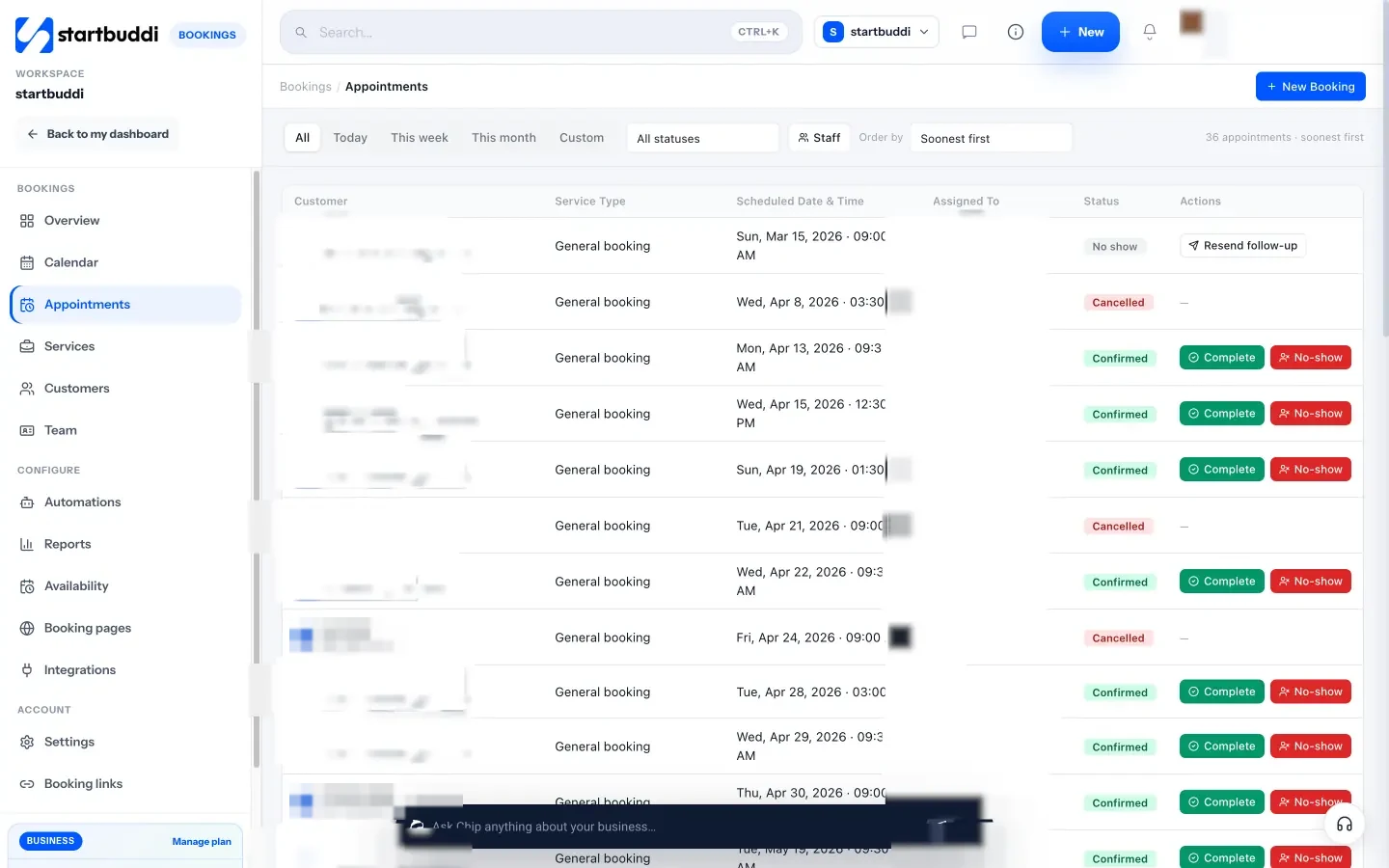
Pricing: a free plan is available, with one live service and one seat; see pricing. Embedding the booking page on your website needs a paid plan.
Pros
- No cap on bookings, so a busy month doesn’t change the bill.
- Deposits in local currency on Free.
- Bookings feed contacts, invoices and the inbox.
Cons
- No recurring bookings, classes, memberships or point of sale.
- Calendar sync pushes bookings to Google Calendar but doesn’t read busy times.
- The free plan’s single live service suits a one-service business; a full menu needs a paid plan.
- Managing the calendar is done on a computer or tablet.
Skip it if you run group classes or sell memberships.
2. Setmore
Setmore is appointment software priced per user.
Best for: small teams with busy diaries.
Key features
- Free for up to 4 users with unlimited appointments.
- Payments through Square, Stripe or PayPal on Free; deposits, SMS reminders and two-way sync on Pro.
- Group classes on both plans.
Pricing: Setmore’s pricing page lists Pro at $5 a user a month billed yearly or $12 monthly.
Pros: unlimited appointments on Free; very low per-user price on Pro.
Cons: deposits and SMS need Pro; one email reminder on Free.
Skip it if you have a large team and few bookings, where SimplyBook.me’s model may be cheaper. Our Setmore alternatives covers its other limits.
3. Square Appointments
Square Appointments is Square’s booking software, priced per location with unlimited staff.
Best for: salons, barbers and spas in Square’s eight countries.
Key features
- Free plan with online booking, unlimited staff calendars, deposits, prepayments, automatic contracts, and text and email reminders.
- No-show fees, waitlist, classes and packages, and Google Calendar sync on Plus.
- Square point of sale and card readers.
Pricing: Square’s US pricing page lists Free, Plus at $49 a month per location and Premium at $149. Payments are charged per transaction.
Pros: deposits and text reminders free, with no booking cap.
Cons: payments only through Square, which processes cards in only eight countries.
Skip it if you’re outside the US, UK, Canada, Australia, Ireland, France, Spain or Japan.
4. Acuity Scheduling
Acuity Scheduling, part of Squarespace, prices by the number of calendars.
Best for: coaches, therapists and tutors who sell packages and memberships.
Key features
- Unlimited services and appointments on every plan.
- Intake forms and deposits through Stripe, Square, PayPal or Venmo on every plan.
- Text reminders, waitlist, packages, memberships and gift certificates from Standard.
Pricing: Acuity’s pricing page lists Starter at $16 a month billed yearly for 1 calendar, Standard at $27 for up to 6 and Premium at $49 for up to 36, with a 7-day trial.
Pros: no booking cap; mature forms and packages.
Cons: no free plan; SMS from Standard.
Skip it if you want a free plan. See our Acuity Scheduling alternatives and Acuity vs Square Appointments.
5. Zoho Bookings
Zoho Bookings is Zoho’s scheduling app, priced per user.
Best for: teams already on Zoho CRM, or a solo owner who needs two-way calendar sync for free.
Key features
- Free for one user, with email reminders and two-way sync with Zoho, Google and Microsoft calendars.
- Round robin, group and recurring bookings.
- SMS and WhatsApp notifications through connected providers.
Pricing: Zoho Bookings pricing lists Basic at US$6 a user a month billed yearly and Premium at US$9; payments are presented on Premium.
Pros: cheap, with no booking cap.
Cons: payments point you to Premium; Free is one user.
Skip it if you need deposits on a low budget.
6. Picktime
Picktime covers appointments, classes and resources, priced per user.
Best for: studios and centres with rooms, classes or two locations.
Key features
- Free for 3 users with unlimited appointments, 3 resources, 2 locations and 2 classes.
- PayPal on Free; Stripe, Square, reminders and two-way sync from Starter.
- Waitlist, round robin and discount coupons on Pro.
Pricing: Picktime’s pricing page lists Starter at $3.00 per user a month and Pro at $2.25 per user a month for 10 users, both billed annually.
Pros: the closest like-for-like for SimplyBook.me’s classes and resources, without a booking cap.
Cons: no automatic reminders on Free; some features marked “coming soon”.
Skip it if you need reminders without paying.
7. Fresha
Fresha is salon and spa software with a booking marketplace, priced per bookable person.
Best for: beauty and wellness businesses that want new clients from a marketplace.
Key features
- Online booking, deposits, no-show protection, point of sale, gift cards and memberships.
- A consumer marketplace.
- Message and email allowances per team member.
Pricing: Fresha’s pricing page showed NGN 6,800 a month for one person and NGN 4,500 per team member from Nigeria, with a 7-day trial and no free plan. New marketplace clients carry a one-time fee, set out on the same page.
Pros: salon-specific features and new client discovery.
Cons: no free plan; marketplace fees on first bookings.
Skip it if your clients already know you.
8. Cal.com
Cal.com is a scheduling platform with a capable free plan for one person.
Best for: solo consultants, coaches and therapists.
Key features
- Free for 1 user with unlimited event types and calendars, email and SMS notifications, and Stripe and PayPal payments.
- Round robin and routing forms on Teams.
Pricing: Cal.com’s pricing page lists Teams at $12 a user a month and Organizations at $28, shown with yearly billing.
Pros: payments and SMS notifications on Free, with no booking cap.
Cons: single user on Free; built for meetings rather than services with staff.
Skip it if you run a shop floor.
9. TidyCal
TidyCal is a simple booking tool with a free plan and a lifetime deal.
Best for: freelancers who want to stop paying monthly.
Key features
- Free plan with unlimited bookings and booking types, paid bookings, and recurring and package bookings.
- One calendar connection on Free.
Pricing: TidyCal’s pricing page lists Pro at $12 a month or $99 a year and an Individual lifetime deal at $29 one-off. Payments on Free carry a platform fee shown on the same page.
Pros: packages and paid bookings without a subscription.
Cons: one calendar; no team features on Free.
Skip it if you have staff.
10. Microsoft Bookings
Microsoft Bookings is Microsoft’s booking app, included in Microsoft 365 rather than sold on its own.
Best for: businesses that already pay for Microsoft 365 Business Basic, Standard or Premium.
Key features
- Personal and shared booking pages for a team.
- Teams meeting links for online appointments.
- Email notifications; SMS depends on your Microsoft plan and region.
Pricing: Microsoft’s Bookings overview lists it in Microsoft 365 Business Basic, Business Standard, Business Premium, Teams Essentials, Teams Premium and several enterprise plans.
Pros: no extra cost if you already have an eligible plan; no booking cap.
Cons: not available on its own; built around Outlook and Teams.
Skip it if you don’t use Microsoft 365.
Free SimplyBook.me alternatives
If you’re after a SimplyBook.me free alternative, here’s how the free plans compare on the limit that usually pushes people off SimplyBook.me Free: 50 bookings a month.
| Free plan | Booking cap | People | Payments or deposits on Free |
|---|---|---|---|
| SimplyBook.me | 50 a month | 1 provider | No |
| startbuddi | None | 1 seat, 1 live service | Deposits |
| Setmore | None | Up to 4 | Payments, no deposits |
| Square Appointments | None | Unlimited staff calendars | Deposits |
| Zoho Bookings | None | 1 | No |
| Picktime | None | 3 | PayPal payments |
| Cal.com | None | 1 | Payments |
| TidyCal | None | 1 | Payments |
Our best free booking app list goes into each free plan in more detail.
How to choose your SimplyBook.me alternative
Start by working out what you’d pay for your real volume, not the advertised entry price.
- Count bookings and people. Many staff and few bookings favour SimplyBook.me. Few staff and many bookings favour per-user tools such as Setmore, Zoho Bookings or Cal.com.
- Decide how clients will pay. Card in Square’s countries: Square Appointments. Transfer, USSD or mobile money: startbuddi. Stripe or PayPal: Acuity, Cal.com or TidyCal.
- List the features you can’t lose. Classes and rooms point to Picktime or Square Plus; packages and memberships to Acuity; a salon marketplace to Fresha.
Here’s an illustrative month for a two-therapist massage studio taking 240 bookings:
| Option | Monthly cost | Notes |
|---|---|---|
| SimplyBook.me Standard, billed annually | €24.9 | Needed for more than 100 bookings |
| Setmore Pro, billed yearly | 2 × $5 = $10 | Unlimited appointments, deposits, SMS credits |
| Acuity Standard, billed yearly | $27 | Up to 6 calendars, SMS reminders, unlimited appointments |
The figures are illustrative and exclude card processing and SMS bundles. For a deeper look at the category, see what booking software does, our best booking software list, or how startbuddi handles appointment scheduling. The startbuddi vs Acuity and startbuddi vs Square Appointments comparisons go feature by feature.
Moving from SimplyBook.me
- Export your client data. SimplyBook.me’s booking reports include a client report, and bookings can be exported to Excel or CSV. Tidy the file so each client has one row with a name, email and phone.
- Write down every service with its length, price, buffer time and which providers do it.
- Set up the new tool: services, working hours, staff and payments.
- Import your clients. In startbuddi, go to Customers, then Contacts, then Import: up to 10,000 contacts at a time.
- Leave existing bookings to run in SimplyBook.me, and send all new bookings to the new link.
- Update your links on Google, Instagram, Facebook and your website, and the widget if you embedded one.
- Cancel SimplyBook.me once the last old booking has passed.
Try startbuddi Bookings
If a busy month keeps pushing up your booking bill and your clients pay by transfer or mobile money, set up a service with a deposit and share the link. Start free with startbuddi, no card needed, and see the Bookings features.
Frequently asked questions
What is SimplyBook.me?
SimplyBook.me is online booking software for service businesses, with a booking website, a widget for your own site and admin and client apps. Its plans are priced by bookings per month and number of providers, from a Free plan with 50 bookings to Premium with 2,000.
What is the best SimplyBook.me alternative?
For small teams with busy diaries, Setmore, because it has no booking cap and is free for up to four users. For salons in Square's countries, Square Appointments, because its free plan takes deposits. For service businesses in Africa taking deposits by transfer or mobile money, startbuddi.
Is there a free alternative to SimplyBook.me?
Yes. startbuddi, Setmore, Square Appointments, Zoho Bookings, Picktime, Cal.com and TidyCal all have free plans with no monthly booking cap. Each limits something else, such as users, services or reminders.
Is SimplyBook.me free?
Yes, with limits. SimplyBook.me Free allows 50 bookings a month for one provider, with the booking website, widget and admin app. Payments and deposits start on Basic, at €11.9 a month billed annually or €13.9 monthly.
Why is SimplyBook.me expensive for busy businesses?
Because its plans are capped by bookings per month. A solo provider taking 300 bookings a month needs Standard, at €24.9 a month billed annually, while per-user tools charge the same person a flat rate with unlimited appointments.
Can I move my clients from SimplyBook.me?
Yes. Export your client data from SimplyBook.me's reports as a CSV file and import it into the new tool. In startbuddi you can import up to 10,000 contacts at a time; services, staff and settings need to be set up again.
Omolola Akiyode is the operations and project manager at startbuddi, leading cross-functional projects and the content that helps founders get set up. Omolola writes about projects, websites and getting found online, and turns complex ideas into clear, practical steps.
Runs operations and projects at startbuddi