10 Setmore Alternatives for Small Businesses in 2026
Setmore alternatives compared: 10 booking tools with free plans, deposits, SMS reminders and team pricing, checked on vendor sites on 14 October 2026.


Photo: Random Institute / Unsplash
The best Setmore alternatives depend on why you’re leaving. Square Appointments keeps a free plan and adds deposits at no monthly cost in Square’s countries. Acuity Scheduling suits consultants who want intake forms and packages. startbuddi suits service businesses in Africa that want deposits through Paystack, plus client records and invoices in the same place.
startbuddi is our product. It’s on this list where it fits, and its limits are written as plainly as everyone else’s. Every price below was checked on the vendor’s own site on 14 October 2026.
Key takeaways
- Setmore is free for up to 4 users with unlimited appointments, so “free” is rarely the reason to leave. The usual reasons are deposits, SMS reminders and two-way calendar sync, which all need Pro.
- Pro is $5 a user a month billed yearly or $12 billed monthly, and Setmore counts every staff calendar as a user.
- If deposits are the reason, Square Appointments and startbuddi both take them on their free plans. Square only works in eight countries; startbuddi takes payments through Paystack or Stripe.
- If you mostly book meetings rather than services, Calendly or Cal.com is a closer fit than a salon-style tool.
Why look for a Setmore alternative?
Setmore is appointment scheduling software with a booking page, staff calendars, reminders and payments through Square, Stripe or PayPal. Its free plan is generous. The reasons people move on are specific, and each one is visible on Setmore’s pricing page (checked on 14 October 2026).
Deposits need Pro
The plan comparison marks Deposits as Pro only. On Free you can take online payments, but you can’t ask for part of the price up front to hold the slot. For a salon or a photographer losing money to no-shows, that’s the feature that matters most. If you’re still deciding how much to ask for, our guide on how much deposit to charge clients walks through it.
One email reminder on Free
The plan comparison says Free sends 1 reminder and Pro sends 2. SMS reminders are Pro only too, with 500 SMS credits a month per Pro team member, and the page notes availability “varies by country”.
Calendar sync is one way on Free
2-way calendar sync is a Pro feature. On Free, a personal appointment in your Google Calendar won’t automatically block the slot on your Setmore booking page, so a busy owner can get double-booked.
Per-user pricing adds up
Setmore’s FAQ says “Each staff calendar counts as a user even if the owner/assignee does not have login permission.” A five-chair barbershop on Pro pays for five users: $25 a month billed yearly, or $60 billed monthly.
Multiple locations are early release
Setmore’s help article on managing multiple locations says it’s a Pro feature “currently in early release”, that you contact support to link accounts, and that each location keeps its own staff, customers and billing. That works, but it isn’t a single multi-location dashboard.
It’s a booking tool, not the whole business
Setmore books, reminds and takes payments. Quotes, invoices for project work, WhatsApp conversations and client history beyond appointments live in other tools.
None of this makes Setmore a poor choice: for a small team taking card payments at the appointment, its free plan is hard to beat.
Setmore alternatives compared
| Tool | Best for | Starting price (checked 14 Oct 2026) | Free plan | Standout feature |
|---|---|---|---|---|
| startbuddi | Service businesses in Africa taking deposits | See pricing | Yes | Deposits by card, transfer, USSD or mobile money through Paystack |
| Square Appointments | Salons and solo pros in Square’s countries | $0; Plus $49/month per location | Yes | Deposits and reminders on the free plan |
| Acuity Scheduling | Consultants, coaches and therapists | $16/month billed yearly ($20 monthly) | No (7-day trial) | Intake forms, packages and gift certificates |
| SimplyBook.me | Businesses with low or seasonal volume | €0 (50 bookings a month) | Yes | Plans priced by bookings, not by seat |
| Zoho Bookings | Teams already using Zoho | US$6 per user/month billed yearly | Yes (1 user) | Two-way calendar sync on Free |
| Picktime | Small teams on a tight budget | $3 per user/month billed annually | Yes (3 users) | Classes, resources and locations on Free |
| Calendly | Consultants who book meetings | $10 per seat/month billed yearly | Yes | Routing and round robin on Teams |
| Cal.com | Solo pros who want lots on Free | $12 per user/month billed yearly (Teams) | Yes (1 user) | Unlimited event types and calendars on Free |
| YouCanBookMe | Occasional bookers who want a tidy page | $9/month (Individual, billed monthly) | Yes | Stripe payments on the free plan |
| Fresha | Salons and spas wanting a marketplace | Varies by country (NGN 6,800/month shown in Nigeria) | No (7-day trial) | Consumer booking marketplace |
Prices are in each vendor’s own currency, before tax and before any card processing charges. Some vendors show different prices by country, so open the page from where you trade.
How we chose
We picked tools a small service business could set up without a developer, and judged them on:
- Booking by service: clients pick a service and a time from real availability.
- No-show protection: deposits, reminders and a cancellation policy.
- True cost for a team: how the price grows with staff, bookings or locations.
- Where it works: which countries and payment methods are supported.
Every price and limit comes from the vendor’s own pricing or help pages, checked on 14 October 2026. We didn’t run paid trials or hands-on tests. Read the pricing page again before you buy; plans change.
1. startbuddi
startbuddi is an all-in-one workspace for service businesses. Bookings sits next to a client list, an inbox for WhatsApp, Instagram and email, and invoices and payments, so a client’s bookings, messages and payments are on one record.
Best for: salons, consultants, tutors and clinics in Nigeria and across Africa that want deposits in local currency and their client admin in one place.
Key features
- Booking pages with services priced in NGN, USD, GBP, EUR, KES, ZAR or GHS.
- Require payment to book: the full price or a deposit before the booking is confirmed. Through Paystack, clients pay by card, bank transfer, USSD or mobile money; through Stripe, by card. The slot is held for 30 minutes while they pay.
- One automatic reminder per booking, at the lead time you choose, plus “after a no-show” and “after a completed booking” follow-up emails.
- Round robin across your team, a personal booking page for each member, and Block time for lunch or holidays.
- Every booking creates or updates the client’s contact, and you can generate an invoice from a booking.
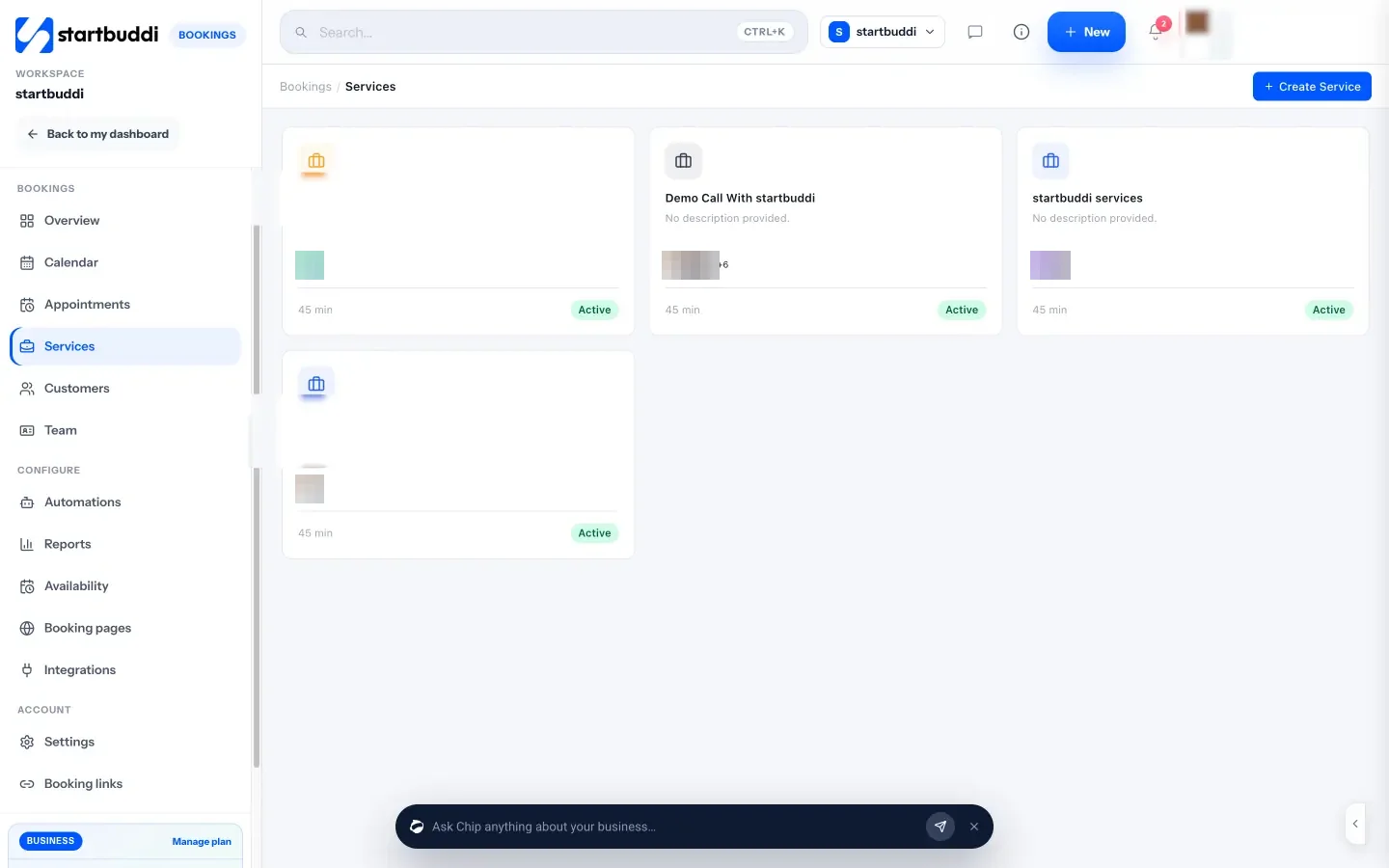
Pricing: a free plan is available; see pricing. Free allows one live service and one seat, with unlimited bookings. Embedding the booking page on your own website, and the booking QR code, need a paid plan.
Pros
- Deposits on the free plan, with payment methods Nigerian, Ghanaian and Kenyan clients actually use.
- Bookings, client history, WhatsApp conversations and invoices in one workspace.
- No marketplace, so no commission on new clients.
Cons
- Calendar sync pushes bookings to Google Calendar but doesn’t read your busy times, so personal events don’t block slots.
- No recurring bookings, class packages or gift cards.
- No till, card terminal or retail stock.
- Managing the calendar and services is done on a computer or tablet; on a phone you get the overview and your booking links.
- Reminders on Free go by email. WhatsApp and SMS reminders need a paid plan and a connected number or SMS provider.
Skip it if you need two-way calendar sync, class passes or a front-desk app on your phone. The startbuddi vs Calendly comparison shows where a pure scheduler is stronger.
2. Square Appointments
Square Appointments is Square’s booking software, tied to its card readers and point of sale.
Best for: salons, barbers and therapists in the US, UK, Canada, Australia, Ireland, France, Spain or Japan who take card payments.
Key features
- Online booking, unlimited staff calendars, deposits and prepayments, and text and email reminders, all on the free plan.
- Cancellation policies with no-show fees, a waitlist, classes and packages, and Google Calendar sync from Plus.
- Card readers, tap to pay and point of sale from the same company.
Pricing: Square’s US pricing page lists Free at $0, Plus at $49 a month per location and Premium at $149 a month per location, with a 30-day trial of the paid plans. In the UK, Plus is £29 and Premium £69. Payments are charged per transaction; the page lists the rates.
Pros
- The free plan takes deposits, which Setmore Free doesn’t.
- Reminders by text as well as email without paying for a plan.
Cons
- No-show fees, the waitlist and Google Calendar sync need Plus.
- Square’s developer documentation lists eight countries for card processing. Elsewhere, Square isn’t an option.
- Payments only go through Square.
Skip it if you trade outside Square’s eight countries. Our startbuddi vs Square Appointments comparison goes feature by feature.
3. Acuity Scheduling
Acuity Scheduling is booking software from Squarespace for appointment-based businesses: coaches, therapists, tutors and consultants.
Best for: professionals who need intake forms, packages, memberships or HIPAA support.
Key features
- Custom intake forms and automatic time zone conversion on every plan.
- Text reminders, a waitlist, packages, memberships and gift certificates from Standard.
- Payments and deposits through Stripe, Square, PayPal or Venmo.
Pricing: Acuity’s pricing page lists Starter at $16 a month billed yearly ($20 monthly) for 1 calendar, Standard at $27 ($34) for up to 6 calendars, and Premium at $49 ($61) for up to 36. There’s a 7-day trial and no free plan.
Pros
- Mature intake forms and packages.
- Deposits on every plan.
- A signed BAA for HIPAA on Premium.
Cons
- No free plan.
- SMS reminders start on Standard.
- Price jumps when you add a seventh calendar.
Skip it if you want a free plan or a cheap per-person team price. The startbuddi vs Acuity comparison covers the differences.
4. SimplyBook.me
SimplyBook.me is general booking software with plans priced by the number of bookings you take each month.
Best for: businesses with low or seasonal volume, such as a driving instructor or a tutor.
Key features
- Booking website, booking widget and admin app on every plan.
- Recurring appointments and event bookings on all plans.
- Payments, deposits, tips and point of sale from Basic.
Pricing: SimplyBook.me’s pricing page lists Free at €0 for 50 bookings a month and 1 provider, Basic at €11.9 a month billed annually (€13.9 monthly) for 100 bookings and 5 providers, and Standard at €24.9 (€29.9) for 500 bookings and 15 providers. SMS is sold in packs, 100 credits for $8.
Pros
- A real free plan for very low volume.
- You pay for bookings, not people, which suits a big team with a quiet calendar.
Cons
- Deposits need Basic.
- A busy month can push you up a plan.
Skip it if you take more than a couple of hundred bookings a month on a small budget.
5. Zoho Bookings
Zoho Bookings is Zoho’s scheduling app, linked to Zoho CRM and the rest of Zoho.
Best for: small teams already on Zoho, or solo owners who want two-way sync on a free plan.
Key features
- Free plan with one user, online meetings, email notifications and reminders, and two-way sync with Zoho, Google and Microsoft calendars.
- Round robin with four distribution methods, group and recurring bookings.
- SMS and WhatsApp notifications through connected providers.
Pricing: Zoho Bookings pricing lists Basic at US$6 per user a month billed yearly (US$8 monthly) and Premium at US$9 (US$12), described as for organisations “that need online payments and integrations”. Prices vary by region.
Pros
- Two-way calendar sync on the free plan, which Setmore keeps for Pro.
- Cheap per-user price.
Cons
- The free plan is one user.
- Taking payments points you to Premium.
Skip it if you need deposits without paying for the top plan.
6. Picktime
Picktime is booking software for appointments, classes and rooms, with a free plan for small teams.
Best for: small teams that book classes or resources, such as a studio with two rooms.
Key features
- Free plan with 3 team members, 3 resources, 2 locations, 2 classes and unlimited appointments.
- Payments with PayPal on Free; PayPal, Stripe and Square from Starter.
- Two-way calendar sync, recurring bookings and SMS reminders from Starter.
Pricing: Picktime’s pricing page lists Starter at $3.00 per user a month billed annually and Pro at $2.25 per user a month billed annually for 10 users.
Pros
- Locations and resources on the free plan.
- Very low paid prices.
Cons
- Email reminders aren’t included on Free, only email notifications.
- Calendar sync is one way on Free.
- Some listed features, such as class packs, are marked “coming soon”.
Skip it if automatic reminders on the free plan matter to you.
7. Calendly
Calendly is the best-known meeting scheduler, built for booking calls and meetings rather than services.
Best for: consultants, coaches and sales teams who book meetings with a video link.
Key features
- Unlimited one-on-one meetings on every plan.
- Reminders, workflows and payments through Stripe or PayPal from Standard.
- Round robin and routing forms on Teams.
Pricing: Calendly’s pricing page lists Free with one event type and one calendar connection, Standard at $10 a seat a month billed yearly ($12 monthly) and Teams at $16 ($20).
Pros
- Polished, familiar booking experience with strong sales integrations.
Cons
- The free plan has one event type and no automated reminders.
- No staff-and-services view of the day like a salon tool.
Skip it if you run a counter-style business with many services and staff. Our Calendly alternatives page covers that route.
8. Cal.com
Cal.com is a scheduling platform that puts a lot into its free plan for one person.
Best for: solo professionals who want several event types and payments without paying.
Key features
- Free for 1 user with unlimited event types and calendars, email and SMS notifications, and Stripe and PayPal payments.
- Round robin, recurring events and routing forms on Teams.
- One-click import of Calendly event types.
Pricing: Cal.com’s pricing page lists Free for individuals, Teams at $12 per user a month and Organizations at $28, both shown with yearly billing, with a 14-day trial.
Pros
- The most generous free plan here for a single person.
- Payments on Free.
Cons
- Team features need a paid plan.
- Built around meetings, so there’s no point of sale or staff-and-services day view.
Skip it if more than one person takes bookings and you want to stay free.
9. YouCanBookMe
YouCanBookMe is a booking page tool that sits on top of your existing calendar.
Best for: people who take bookings occasionally and want a clean page connected to their calendar.
Key features
- Free plan with 1 calendar connection and 1 booking page.
- Stripe payments on the free plan.
- Custom booking form questions and Zoom, Teams or Meet links.
Pricing: YouCanBookMe’s pricing page lists Individual at $9 a month, Professional at $13 and Team at $18 per member, billed monthly, with 10% off yearly.
Pros
- Flexible page design.
- Payments without a paid plan.
Cons
- The free plan shows YouCanBookMe’s “Powered for free” button.
- SMS is an extra charge.
Skip it if you need staff calendars for a shop floor.
10. Fresha
Fresha is booking and payment software for salons, spas and barbers, with a consumer marketplace.
Best for: beauty and wellness businesses that want new clients from a marketplace.
Key features
- Online booking, deposits, no-show protection and point of sale.
- Gift cards, memberships and retail stock.
- A marketplace where clients find local businesses.
Pricing: Fresha’s pricing page showed, from Nigeria, NGN 6,800 a month for one bookable person and NGN 4,500 per team member a month, with a 7-day trial and no free plan. New clients from the marketplace carry a one-time fee, set out on the same page.
Pros
- Built for salons, down to retail and gift cards.
- Brings new clients.
Cons
- No free plan any more.
- Marketplace fees on a client’s first booking.
Skip it if your clients already know you. We cover the trade-offs in Fresha alternatives.
Free Setmore alternatives
If you’re looking for Setmore alternatives that are free, here’s what each free plan actually limits, from the pages above.
| Free plan | Users | Deposits on Free | Reminders on Free | Main limit |
|---|---|---|---|---|
| Setmore | Up to 4 | No | 1 email reminder | No SMS, one-way sync |
| startbuddi | 1 | Yes | 1 automatic email reminder | One live service |
| Square Appointments | Unlimited calendars | Yes | Text and email | Square’s 8 countries only |
| SimplyBook.me | 1 provider | No | 50 bookings a month | |
| Zoho Bookings | 1 | No | One user | |
| Picktime | 3 | No (PayPal payments only) | No reminders | One-way sync |
| Calendly | 1 | No | No | One event type |
| Cal.com | 1 | Payments yes | Email and SMS notifications | One user |
| YouCanBookMe | 1 | Payments yes | Confirmation emails | One booking page |
How to choose your Setmore alternative
Work out which Setmore limit pushed you to look, then pick the tool that removes it.
| If you’re leaving Setmore because… | Look at |
|---|---|
| You need deposits without paying | Square Appointments (in its countries), startbuddi |
| Clients pay by transfer or mobile money | startbuddi |
| You need two-way calendar sync for free | Zoho Bookings, Cal.com |
| You sell packages, memberships or classes | Acuity, Square Plus, Picktime |
| You want new clients from a marketplace | Fresha |
| You mostly book calls, not services | Calendly, Cal.com |
Here’s an illustrative monthly cost for a three-stylist salon in London that wants deposits and text reminders:
| Option | Monthly cost | What you get |
|---|---|---|
| Setmore Pro, billed monthly | 3 × $12 = $36 | Deposits, SMS, two-way sync |
| Setmore Pro, billed yearly | 3 × $5 = $15 | The same, paid a year up front |
| Square Appointments Free | £0 | Deposits and text reminders; no no-show fees or waitlist |
| Square Appointments Plus | £29 | Adds no-show fees, waitlist and calendar sync |
The figures are illustrative and exclude card processing, which every option charges separately. Look at the whole bill, and at whether a no-show costs you more than the plan.
If you’re new to the category, start with what booking software does. Our full best booking software list covers more tools, and the appointment scheduling software page shows how startbuddi handles it.
Moving from Setmore
- Export your customers. Setmore’s plan comparison lists “Import and export contacts” on both Free and Pro.
- List your services, with length, price and which staff do each one.
- Set up the new tool with services, working hours and staff, and switch on deposits and reminders.
- Import customers. In startbuddi, go to Customers, then Contacts, then Import: up to 10,000 contacts at a time from a CSV file.
- Move future appointments by hand, or let them run out in Setmore while new bookings go to the new page.
- Swap your links on Instagram, Google and your website.
- Cancel Setmore once nothing new arrives there. If you’d only just started Pro, Setmore’s FAQ says you can try it risk-free for 30 days and ask for a refund.
Try startbuddi Bookings
If deposits are the reason you’re leaving Setmore and your clients pay by transfer, USSD or mobile money, set up one service with a deposit and share the link on WhatsApp. Start free with startbuddi, no card needed, and see the Bookings features.
Frequently asked questions
What is the best alternative to Setmore?
For a salon or barber in Square's countries, Square Appointments, because its free plan takes deposits. For consultants who need intake forms and packages, Acuity Scheduling. For service businesses in Africa that take deposits by transfer or mobile money, startbuddi.
Is Setmore free?
Yes. Setmore's Free plan covers up to 4 users with unlimited appointments, online payments, email confirmations and one email reminder per appointment. Deposits, SMS reminders, two-way calendar sync and removing Setmore branding need Pro, at $5 a user a month billed yearly or $12 monthly.
Are there free Setmore alternatives?
Yes. Square Appointments, startbuddi, SimplyBook.me, Zoho Bookings, Picktime, Calendly, Cal.com and YouCanBookMe all have free plans. Each limits something different: users, bookings, event types or reminders.
Does Setmore support multiple locations?
Yes, on Pro, but Setmore's help centre calls it early release. Each location is its own account, linked by support, with separate staff, customers and billing. Square Appointments Plus and Picktime list multiple locations as standard features.
Which Setmore alternative takes deposits on a free plan?
Square Appointments takes deposits on its free plan in the eight countries Square serves. startbuddi takes deposits on its free plan through Paystack or Stripe. Setmore keeps deposits for Pro.
Can I move my clients from Setmore to another booking app?
Yes. Export your contacts from Setmore and import the CSV file into the new tool. Future appointments usually need to be re-entered or left to finish in Setmore.
Omolola Akiyode is the operations and project manager at startbuddi, leading cross-functional projects and the content that helps founders get set up. Omolola writes about projects, websites and getting found online, and turns complex ideas into clear, practical steps.
Runs operations and projects at startbuddi