Remote Employee Onboarding Checklist: Step-by-Step List + Free Template
A remote employee onboarding checklist for small teams: paperwork, kit, security, day one, week one and the first 90 days. Copy it or turn it into tasks.



A remote employee onboarding checklist lists everything a new hire who works away from your office needs, in order: signed terms and right to work checks, equipment delivered, accounts and security set up before day one, a planned video welcome, a buddy, written guides, and check-ins at 30, 60 and 90 days. Every item gets an owner and a date.
Key takeaways
- Remote onboarding starts two weeks before day one, because shipping a laptop and setting up accounts take longer than you think.
- Write everything down. A remote hire can’t lean over and ask where the client files live.
- Give each step one owner: the new hire, their manager, an admin or the founder.
- Plan human contact on purpose: a video welcome, a buddy and short calls with each teammate in week one.
- Check in at 30, 60 and 90 days, and ask the new hire what was confusing.
Why remote onboarding needs its own checklist
In an office, half of onboarding happens by accident. The new person overhears how a client call goes, sees who to ask about invoices and picks up the unwritten rules at lunch. Remotely, none of that happens unless you plan it.
It’s an area most employers get wrong even in person. Gallup reports that only 12% of employees (checked on 1 October 2026) strongly agree their organisation does a great job of onboarding new people. For a small remote team, a weak start is expensive: the new hire sits idle waiting for logins, nobody notices for a day, and the first impression is “they weren’t ready for me”.
This checklist covers only what’s different or harder for remote hires. For the general plan, including the 30/60/90-day structure, see our guide on how to onboard a new employee, and for running the team afterwards, how to manage a remote team.
The remote employee onboarding checklist
Copy this list into your own tools. The person in brackets is the usual owner in a small team; change it to fit yours.
1. Two weeks before day one: paperwork and plans
2. Ten days before: equipment and home set-up
3. Five days before: accounts and security
4. Day one: welcome and logins
5. Week one: connection and a first real task
6. First 90 days: goals, feedback and settling in
How to use this checklist in a small team
Don’t treat the list as a script. Its job is to make sure nothing is missed, and it works best when every line has an owner and a date. Start it as soon as the offer is accepted, not on the Friday before the person starts.
Hiring across borders
Remote hiring often means a different country. Employment law, tax and social security usually follow where the person lives and works, not where your business is registered. A founder in Lagos hiring a developer in Nairobi, or a London agency hiring a designer in Accra, needs to check the rules in the hire’s country and decide whether they are an employee or an independent contractor. If in doubt, get local advice before you send the contract.
Right to work checks
Some countries require you to confirm someone’s right to work before they start. In the UK, for example, employers must check before employing someone, and gov.uk explains that you can check right to work online (checked on 1 October 2026) if the applicant gives you a share code, or use an approved identity service provider. Check what applies where your hire lives.
Security from day one
A remote laptop is outside your office, on home Wi-Fi, sometimes in a café. The UK’s National Cyber Security Centre’s small organisations guide (checked on 1 October 2026) covers backups, protecting devices and accounts, and spotting scams in plain language. Our small business cybersecurity checklist turns that into steps.
Power and connectivity
In Lagos, Accra or Kano, a remote hire may lose power or data for hours. Agree up front how you’ll handle it: a data or power allowance, a co-working day pass, and a simple rule such as “post in the team chat if you go offline for more than an hour”. It saves awkward conversations later.
Worked example: a remote hire’s first two weeks
This example is illustrative. A five-person bookkeeping firm in Toronto hires its first remote assistant, Ngozi, who lives in Ibadan. She starts on Monday 1 December.
| When | What happens | Owner |
|---|---|---|
| 17 November | Contract signed; contractor status confirmed with an adviser | Founder |
| 18 November | Laptop ordered and shipped with tracking; data allowance agreed | Admin |
| 24 November | Email, password manager and two-step verification set up | Admin |
| 26 November | Welcome message with schedule and video links sent | Manager |
| 1 December, 14:00 WAT (08:00 Toronto) | Video welcome, logins tested, tour of files and tasks | Manager |
| 1 to 5 December | Daily 15-minute check-in with the buddy; calls with all four teammates | Buddy |
| 5 December | First task done (reconciling one client’s receipts); 30-day goals agreed | Manager |
The six-hour time difference is planned in from the start: the team agrees a three-hour overlap, from 14:00 to 17:00 in Ibadan (08:00 to 11:00 in Toronto), for calls and quick questions.
Common remote onboarding mistakes
- Shipping the laptop late. A new hire with no machine on day one spends it watching videos on a phone.
- Sending passwords in chat. Use a password manager from day one.
- Too many video calls. Back-to-back calls are tiring. Mix calls with written guides and real work.
- No buddy. Without one, small questions go unasked and the new hire guesses.
- Forgetting the time zone. Booking a “quick 9 am call” that’s 4 am for the new hire.
- Stopping after week one. Most of the learning happens in months two and three.
How to run this remote onboarding checklist in startbuddi
startbuddi’s People module runs onboarding as a shared checklist, so steps don’t live in one person’s head.
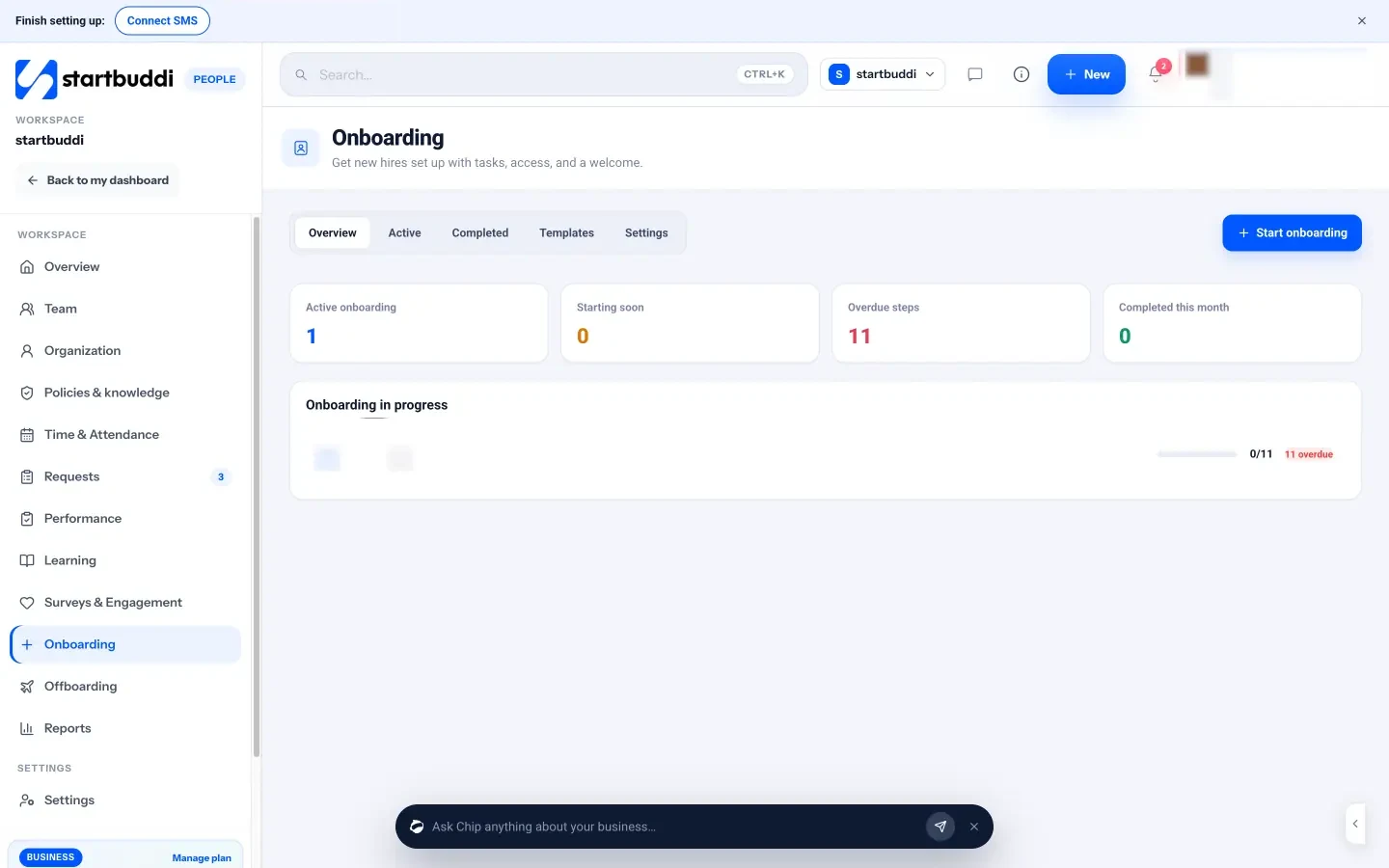
- Build the checklist once as a template. In People, open Onboarding, then Templates, and add the steps above, grouped by phase. Add equipment and access requests, such as “Prepare laptop”, which are raised for the owner or an admin to approve. Nothing is granted automatically.
- Start onboarding for the new hire. Click Start onboarding. The wizard asks who is joining (a brand-new hire gets an email invite), their job title, manager, start date and location, then which checklist to use. Due dates count from the start date.
- Let each owner see their steps. Steps are assigned to the new hire, the manager, HR or IT and admin, and everyone is notified when a step is assigned to them. Overdue steps show in red, and you can send a reminder in one click.
- Automate the extras. Onboarding settings can assign required learning, ask for policy acknowledgements, send a welcome memo and notify the manager when someone joins.
- Hold the video calls in startbuddi Live. Schedule the welcome call and week-one introductions as Live meetings, or set up a recurring one-to-one.
- Ask how it went. In Surveys & Engagement, send the New joiner check-in survey after the first few weeks.
Chip HR can also draft a 30/60/90-day plan for the new hire and save it in Documents, showing you a preview first. Inviting a new hire needs a paid plan with seats; see pricing. Startups building their first team can see the whole People module on startbuddi for startups, and employee onboarding explains the stages in plain terms.
Give your next remote hire a proper start
Copy the checklist, give every step an owner, and start it the day the offer is signed. Start free with startbuddi to run onboarding as a shared checklist your whole team can see.
Frequently asked questions
What should a remote employee onboarding checklist include?
It should cover paperwork and right to work checks, equipment delivery, account and security set-up, a day-one video welcome, a buddy, week-one introductions and a first task, and check-ins at 30, 60 and 90 days. Each step needs an owner and a due date. Remote checklists also cover time zones, internet and power, and home working rules.
How do you onboard a remote employee?
Start two weeks before day one: send the contract, ship the equipment and set up accounts in advance. On day one, open with a video welcome and test every login together. In week one, arrange calls with each teammate, assign a buddy and set a small real task, then check in regularly for the first 90 days.
How long should remote onboarding take?
Plan for about 90 days. The first week covers set-up and introductions, the first month builds confidence with real work, and months two and three bring the person up to full speed. Preparation should start around two weeks before the start date.
What equipment should you give a remote employee?
At minimum, a work laptop with security settings in place, and a headset for calls. Many small businesses also cover internet data, and in places with unreliable power, a backup power source or a co-working allowance. Record what you send so it can be returned if the person leaves.
How do you make a remote new hire feel part of the team?
Plan connection on purpose. Assign a buddy, book short one-to-one calls with each teammate in the first week, invite them to team meetings and keep a chat space where no question is too small. If budget allows, meet in person within the first few months.
What is the difference between remote and in-person onboarding?
The goals are the same, but remote onboarding needs more preparation and more writing. Equipment must be shipped, accounts set up before day one, and the informal learning of an office replaced with written guides, planned calls and a buddy. Time zones and home working conditions also need agreeing.
Chinedu Kalu is the co-founder and chief operating officer of startbuddi, responsible for how the company runs day to day. Chinedu writes about the operational side of a small business: registering and running the company, money, hiring and the routines that keep a team on track.
Co-founded startbuddi and runs its operations