Small Business Cybersecurity Checklist: Step-by-Step List + Free Template
A small business cybersecurity checklist from NCSC, FTC and Nigerian guidance: accounts, devices, Wi-Fi, backups, phishing and what to do after an attack.


A small business cybersecurity checklist is a list of the basic protections every small firm should have: secure email and important accounts, locked and updated devices, a protected Wi-Fi network, regular backups, staff who can spot scams, and a plan for when something goes wrong. Most items take minutes and cost nothing.
Key takeaways
- Secure your email first. Whoever controls your inbox can reset the password on almost everything else.
- Use passkeys or 2-step verification on every account that holds money or customer data.
- Keep two backups, one of them offline, and test that you can restore them.
- Most attacks start with a message, so teach everyone to check payment and password requests on a second channel.
- Write down who does what if you’re hacked before you need it.
Why small businesses need a cybersecurity checklist
Small firms aren’t too small to be targets; they’re often easier ones. The UK’s National Cyber Security Centre says in its small organisations guide to cyber security that 1 in 2 small businesses suffer a cyber incident every year, and that 85% of cyber attacks against businesses start with a scam email (checked on 1 October 2026).
For a service business, the damage is practical. A hijacked WhatsApp Business number messages your clients asking for “urgent payment”. A fake invoice with changed bank details lands in a client’s inbox from your real email address. A stolen laptop holds a year of customer records. The checklist below is built on the NCSC guide, the US Federal Trade Commission’s cybersecurity advice for small businesses (checked on 1 October 2026) and Nigerian rules, written for a team of one to twenty people without an IT department.
The small business cybersecurity checklist
Copy this list into a document or task list and work through it in order. Each phase builds on the one before.
1. Know what you’re protecting
2. Secure your email
3. Secure your other important accounts
4. Protect your devices
5. Protect your Wi-Fi network
6. Back up your data
7. Train your team to spot scams
8. Handle payments and customer data carefully
9. Plan for an attack
What to do if you’re hacked
Act in this order: contain, recover, report.
- Contain. Change the password and sign out all sessions on the affected account, starting with email. Disconnect an infected device from the network.
- Protect money. Call your bank and payment provider if payments or banking details could be affected.
- Warn people. Tell staff, and tell customers if scam messages may have been sent in your name.
- Recover. Restore from a clean backup and check that 2SV is on everywhere.
- Report. In the UK, the NCSC’s guide links to its response and recovery advice. In Nigeria, the NCC-CSIRT publishes security advisories and has an incident report form (checked on 1 October 2026).
If personal data is involved in Nigeria, the Nigeria Data Protection Commission’s General Application and Implementation Directive says data controllers must notify the Commission within 72 hours of becoming aware of a personal data breach, and tell affected people immediately where the breach poses a high risk to them (checked on 1 October 2026). In the UK and EU, GDPR sets a similar 72-hour rule for reportable breaches. This isn’t legal advice; check what applies to you.
How to work through the checklist in one week
You don’t need to do it all at once. Here’s a realistic plan for a five-person consultancy in Lagos or a salon in London, spending under an hour a day.
| Day | Task | Time |
|---|---|---|
| Monday | Lists of devices, accounts and data (phase 1) | 45 minutes |
| Tuesday | Email: passkeys or 2SV, new passwords, password manager (phase 2) | 45 minutes |
| Wednesday | Bank, payment, social and domain accounts; remove old users (phase 3) | 60 minutes |
| Thursday | Device locks and updates; router settings (phases 4 and 5) | 60 minutes |
| Friday | Set up both backups and test a restore (phase 6) | 45 minutes |
| Next team meeting | Scam rules and incident plan (phases 7 and 9) | 30 minutes |
After that, the checklist becomes a monthly habit: check for leavers, updates and backups, and a quarterly refresher for the team.
Common cybersecurity mistakes small businesses make
- One shared login for the business email or Instagram account, so nobody knows who did what and leavers keep access.
- Running the business WhatsApp on one person’s personal phone with no two-step PIN.
- Backups that sit on a drive that’s always plugged in, where ransomware can encrypt them too.
- Paying a “new account” invoice because the email looked right.
- Never removing access after an employee offboarding or a freelancer’s project ends.
How to run this checklist in startbuddi
startbuddi isn’t security software, but it can hold the checklist and covers several items for the business data you keep in it.
- Turn the checklist into tasks. In Work, open My work, click Add task and name it “Monthly security check”. Add each item you repeat as a subtask, and set Repeats to Monthly.
- Give each person their own login and the right role. In Settings, Team & Staff, invite each person with a role (Owner, Admin, Manager, Member or View only) and restrict them to the modules they need.
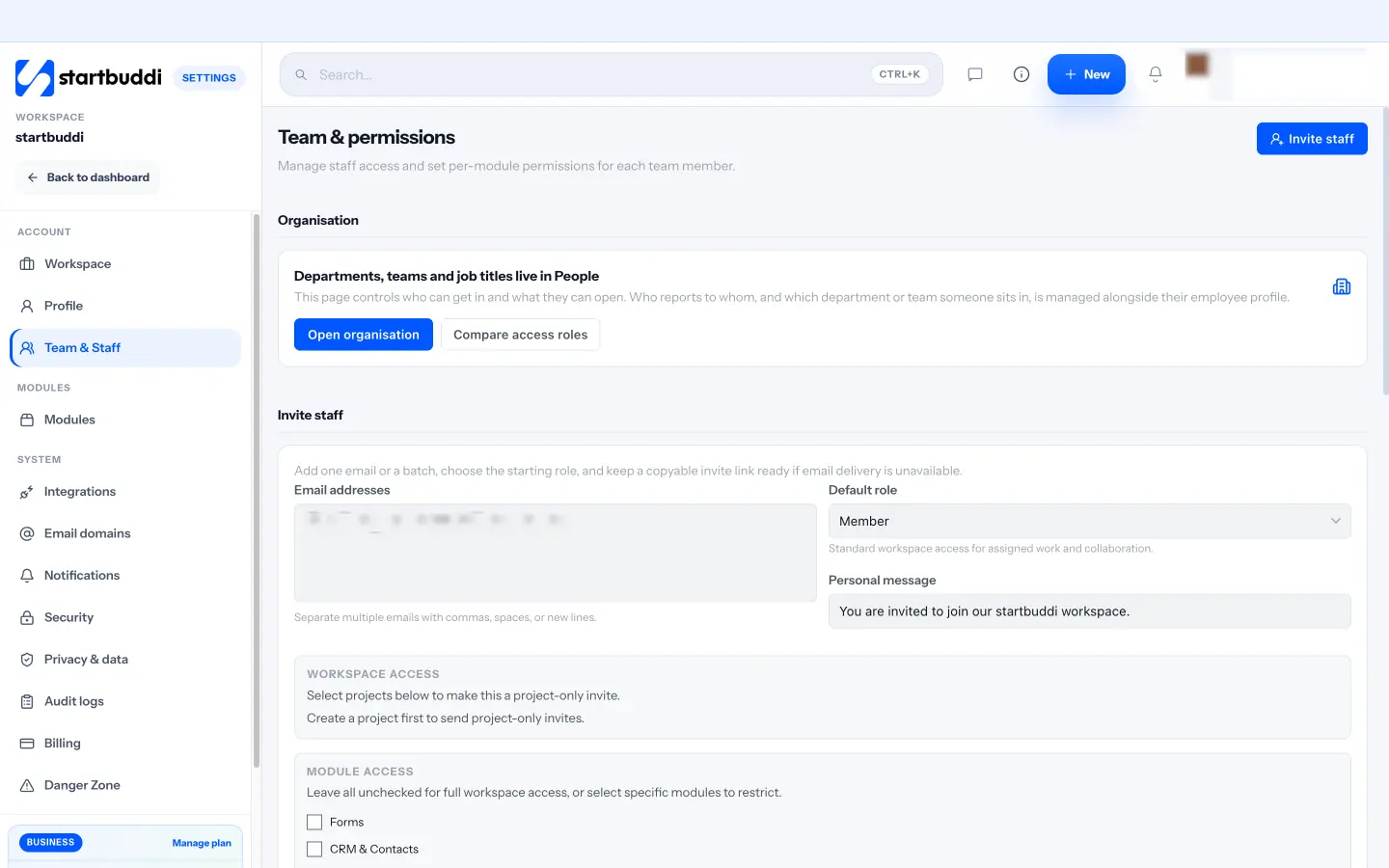
- Remove leavers the same day. Take people out of the workspace from Settings, Team & Staff when they leave.
- Check the audit log. Owners and admins can see sensitive actions, such as data exports and changes to security settings, under Settings, Audit logs.
- Keep your own copy. The owner can export workspace data from Settings, Danger Zone, and keep it with your other backups.
Card payments taken through startbuddi go to Stripe or Paystack, so card details aren’t stored in your workspace, and sign-in locks after repeated wrong passwords. Our security page explains the rest. For choosing the rest of your tools with security in mind, see our small business tool stack guide, or how startbuddi works as a CRM for service businesses. A free plan is available; see pricing for what each plan includes.
Make the checklist a habit
Copy the checklist, block an hour a day this week, and set the monthly check as a repeating task. Start startbuddi free to keep the checklist, your team’s access and your customer records in one place.
Frequently asked questions
What should be on a small business cybersecurity checklist?
A small business cybersecurity checklist should cover securing email and important accounts, protecting devices, securing Wi-Fi, backing up data, training staff to spot scams, handling payments and customer data carefully, and planning for an attack. Start with email, because it controls password resets for everything else.
What is the cheapest way to improve cybersecurity for a small business?
Turning on passkeys or 2-step verification, using unique passwords with a password manager, and switching on automatic updates cost nothing and stop many common attacks. Add a cloud backup and a free external-drive backup. Most of the checklist needs time, not money.
How often should a small business review its cybersecurity?
Check accounts, leavers, updates and backups every month, and run a short scam refresher with staff every few months. Review the whole checklist once a year, and straight away after any incident or near miss.
Do small businesses in Nigeria have to report data breaches?
Yes, in many cases. The Nigeria Data Protection Commission's directive under the Nigeria Data Protection Act requires data controllers to notify the Commission within 72 hours of becoming aware of a personal data breach, and to tell affected people immediately where the risk to them is high. Check the directive or take advice for your situation.
What should I do first if my business email is hacked?
Reset the password from a clean device, sign out all other sessions and turn on 2-step verification or a passkey. Then check forwarding rules and recovery details the attacker may have changed, warn your contacts, and call your bank if payment details could be affected.
Omolola Akiyode is the operations and project manager at startbuddi, leading cross-functional projects and the content that helps founders get set up. Omolola writes about projects, websites and getting found online, and turns complex ideas into clear, practical steps.
Runs operations and projects at startbuddi