HubSpot vs Pipedrive: Honest Comparison for Small Teams
HubSpot vs Pipedrive for small teams: free plan vs free trial, per-seat prices checked 1 October 2026, automation limits, WhatsApp and a 3-person cost sum.


Photo: Vitaly Gariev / Unsplash
In the HubSpot vs Pipedrive choice, Pipedrive suits a small team whose work is closing deals: every plan has unlimited pipelines, and paid plans start at $14 per seat per month billed yearly. HubSpot suits teams that want a free CRM for one or two people today and may add marketing and service tools from the same vendor later.
Every price and limit below comes from the vendors’ own pages, checked on 1 October 2026. Both sites can show different prices or currencies depending on where you browse from.
Key takeaways
- Free plan vs free trial: HubSpot has free tools with no time limit for up to 2 users and 1,000 contacts. Pipedrive has no free plan, but gives a 14-day free trial with no card.
- Entry price: Pipedrive Lite is $14 per seat per month billed yearly. HubSpot’s Sales Hub Starter “Starts at $7/mo/seat” paid annually, a limited-time offer for new customers, or $20 per seat paid monthly.
- The middle tier is the big gap: HubSpot Sales Hub Professional starts at $90 per seat plus a required $1,500 onboarding fee. Pipedrive’s Growth plan is $39 per seat yearly, and its Premium plan $59.
- Automation: Pipedrive’s automations start on Growth (50 per company). HubSpot Starter includes up to 50 workflows with restricted triggers and actions.
- WhatsApp: Pipedrive includes a WhatsApp integration from Growth. HubSpot’s WhatsApp inbox needs Marketing Hub or Service Hub at Professional level or above.
HubSpot vs Pipedrive at a glance
| HubSpot (Smart CRM and Sales Hub) | Pipedrive | |
|---|---|---|
| Free plan | Yes: up to 2 users, 1,000 contacts, no time limit | No |
| Free trial | Not offered on the pricing page; the free tools are the start | 14 days, no card |
| Cheapest paid plan | Sales Hub Starter: “Starts at $7/mo/seat” paid annually (new-customer offer, limited time); $20 per seat paid monthly | Lite: $14 per seat per month billed yearly |
| Mid-tier plan | Professional: from $90 per seat per month, plus $1,500 one-time onboarding | Growth: $39 per seat billed yearly. Premium: $59 |
| Top plan | Enterprise: from $150 per seat per month, plus $3,500 one-time onboarding | Ultimate: $79 per seat billed yearly |
| Pipelines | Starter up to 15 per account; Professional 100; Enterprise 350 | Unlimited on every plan |
| Automation | Starter up to 50 workflows (restricted); Professional 300; Enterprise 1,000 | None on Lite; 50 on Growth, 150 on Premium, 250 on Ultimate |
| Forecasting | Professional and Enterprise | Forecast view from Growth |
| Marketing or Service Hub Professional and up | From Growth | |
| Mobile apps | Free HubSpot mobile app | Native iOS and Android apps on every plan |
| App marketplace | “Over 2,000” apps | “500+ integrations” |
| Support | Email on Starter; email and phone on Professional and Enterprise | 24/7 live chat on every plan; phone from Premium |
| Best for | A gentle free start, and teams that may add HubSpot’s marketing tools | Sales-led teams that live in their deal board |
Sources: HubSpot Sales Hub pricing, HubSpot free tools and Pipedrive pricing, all checked on 1 October 2026. Pipedrive’s prices are shown excluding VAT.
What are HubSpot and Pipedrive?
A CRM is where you keep every customer, every conversation and every open deal, so nothing depends on one person’s memory or WhatsApp history.
HubSpot is a family of “hubs” (Marketing, Sales, Service, Content and more) on one shared database it calls Smart CRM. You can start with the free tools and add paid hubs per seat as you grow.
Pipedrive is a sales CRM built around the deal board. You see every deal as a card in a column, drag it forward as it progresses, and the plans add automation, email sync and reporting as you go up. Extra products such as Campaigns and Projects are sold as add-ons.
For a small service business, say an interior design studio in Lagos, a solar installer in Nairobi or a three-person IT support firm in Manchester, the questions are practical. Will the team actually update it? And what will it cost once you’re past the free plan or trial?
Pricing: which is cheaper, HubSpot or Pipedrive?
At the bottom, it depends on which HubSpot option you pick. In the middle, Pipedrive is much cheaper.
Pipedrive lists four plans, billed yearly: Lite at $14 per seat per month (one payment of $168 per seat a year), Growth at $39 ($468), Premium at $59 ($708) and Ultimate at $79 ($948). Paying monthly costs more; Pipedrive says yearly billing saves up to 42%, so check the monthly price on its page if you’d rather not commit for a year.
HubSpot’s Sales Hub Starter “Starts at $7/mo/seat” when you pay annually, or $20 per seat per month when you pay monthly, with 500 HubSpot Credits for AI features. HubSpot presents the lower price as “Save up to 65% on Starter”, for new customers only and for a limited time, so check what you’ll pay at renewal. Sales Hub Professional starts at $90 per seat per month and carries a required one-time Professional Onboarding fee of $1,500. Enterprise starts at $150 per seat, plus $3,500 onboarding.
Verdict: Pipedrive, clearly, once you need automation, forecasting or more than basic reporting.
Worked example: a 3-person team for one year
These are illustrative sums using list prices before tax. Offers, currency and seat counts will change your numbers.
| Option | Sum | Cost for 12 months |
|---|---|---|
| HubSpot free tools | Only 2 users fit, so one person can’t log in | $0, but one person short |
| HubSpot Sales Hub Starter, new-customer offer paid annually | 3 × $7 × 12 | $252 |
| HubSpot Sales Hub Starter, paid monthly | 3 × $20 × 12 | $720 |
| Pipedrive Lite, yearly | 3 × $168 | $504 |
| Pipedrive Growth, yearly | 3 × $468 | $1,404 |
| Pipedrive Premium, yearly | 3 × $708 | $2,124 |
| HubSpot Sales Hub Professional | (3 × $90 × 12) + $1,500 onboarding | $4,740 |
The bottom of the table is where the decision usually sits. A team that wants automation and forecasting pays $1,404 for Pipedrive Growth against $4,740 for HubSpot Professional in this example. A team that only needs contacts, deals and email may be happy on HubSpot’s free tools or Starter for a long time.
Free plan or free trial
HubSpot’s free tools let you add up to 2 users and 1,000 contacts, with no time limit and no card. Free users get help from the community, HubSpot Academy and the knowledge base rather than direct support.
Pipedrive has no free plan. Its 14-day trial needs no card, and you pick a paid plan when it ends.
Verdict: HubSpot for a solo owner or a pair who want to stay free. Pipedrive if you’re ready to pay and want two weeks to test it with real deals.
Sales pipeline and deal management
This is Pipedrive’s home ground. Every plan has “unlimited, customizable pipelines in kanban view”, and the deal board is the first thing you see. Plans set how many leads and deals you can hold: 2,500 per seat on Lite, 5,000 on Growth, 15,000 on Premium and 20,000 on Ultimate. Custom fields go from 30 on Lite to 500 on Ultimate.
HubSpot’s paid Sales Hub tiers cap pipelines per account: up to 15 on Starter, 100 on Professional and 350 on Enterprise. That’s plenty for most small teams. HubSpot’s deal views are capable, but the product is broader, so there are more menus between you and the board.
If you’re new to the idea, our definition of a sales pipeline explains the stages in plain terms.
Verdict: Pipedrive, for teams whose day revolves around moving deals forward.
Automation and follow-up
Pipedrive’s Lite plan has no automations. Growth adds 50 automations per company, 5 sequences and two-way email sync for one mailbox per seat. Premium raises that to 150 automations and 25 sequences, and Ultimate to 250 and 50.
HubSpot Starter includes up to 50 workflows “with restricted triggers and actions”. Professional allows up to 300 and adds sequences and forecasting. Enterprise allows up to 1,000.
Verdict: Pipedrive Growth gives the most automation per dollar for a small team. HubSpot Starter is fine for simple rules; serious automation means the Professional price step.
Ease of use and setup
HubSpot’s free CRM is quick to start: sign up, connect Gmail or Outlook, add contacts. Because HubSpot does so much, the menus get longer as you add hubs. Our HubSpot onboarding checklist lists the first setup steps in order.
Pipedrive is narrower, which makes it easier to learn for a sales-only team. Setting up stages, fields and a few automations is usually an afternoon’s work. The trade-off is that marketing, projects and documents are separate add-ons.
Verdict: a draw. HubSpot is easier to start free; Pipedrive is easier to live in if selling is the whole job.
WhatsApp and messaging
Pipedrive’s pricing page lists a WhatsApp integration from Growth: “Bring your WhatsApp sales conversations into Pipedrive.” Premium adds a team inbox.
HubSpot’s WhatsApp connection to its inbox needs Marketing Hub or Service Hub at Professional or Enterprise level, according to its WhatsApp knowledge base article. It also notes a shared limit of 1,000 template messages a month across connected WhatsApp accounts.
Verdict: Pipedrive, by a distance, if your customers message you on WhatsApp and you don’t want a Professional hub.
AI features
HubSpot meters AI with HubSpot Credits: 500 a month on Starter, 3,000 on Professional and 5,000 on Enterprise. Extra credits are $0.010 each, and unused credits don’t roll over.
Pipedrive lists call recording with summaries and transcripts and AI report creation from Lite, and AI email writing and summaries from Premium.
Verdict: a draw. Test the AI on your own data during the free plan or trial rather than choosing on it.
Add-ons and the real monthly bill
Pipedrive keeps its core plans simple and sells extras on any plan: LeadBooster, Projects, Campaigns, Web Visitors and Smart Docs with e-signatures are each priced separately on its pricing page. Check the price and billing period for each before adding them to your budget.
HubSpot’s extras come as other hubs, each sold per seat, so marketing email or a service desk means a second subscription.
Verdict: both can grow well past their headline price. Price the exact plan plus the add-ons or hubs you’ll need in year two.
Integrations, mobile and support
HubSpot says it has “over 2,000” apps and web services in its marketplace. Pipedrive lists “500+ integrations”. Both have mobile apps: HubSpot’s is included from the free tools, and Pipedrive has native iOS and Android apps on every plan.
For support, HubSpot gives Starter customers email support, and Professional and Enterprise customers email and phone. Pipedrive offers 24/7 live chat on every plan, phone support from Premium and extended phone hours on Ultimate.
Verdict: HubSpot has the bigger ecosystem. Pipedrive gives smaller teams faster human help at a lower price.
Choose HubSpot if…
- One or two people need a CRM and you’d like to stay free.
- You expect to add email marketing, landing pages or a help desk from the same vendor.
- You want a large app marketplace and lots of free training material.
- You’re comfortable with the Professional price step, including onboarding, when you grow.
Choose Pipedrive if…
- Your team’s work is mostly finding and closing deals.
- You want automation, forecasting and WhatsApp without paying for a Professional hub.
- You’d rather pay a modest per-seat fee from day one than manage free-plan limits.
- You like a narrow tool and are happy to add extras only when you need them.
A third option: startbuddi
startbuddi is our product. If neither fits because your business runs as much on bookings, invoices and customer chats as on a sales team, it may be worth a look.
startbuddi puts contacts, companies, a deal pipeline and a shared inbox (email, WhatsApp, Instagram, Messenger, SMS and website chat) in one workspace with bookings, invoices paid through Paystack or Stripe, and Chip, the AI assistant. There’s a free plan.
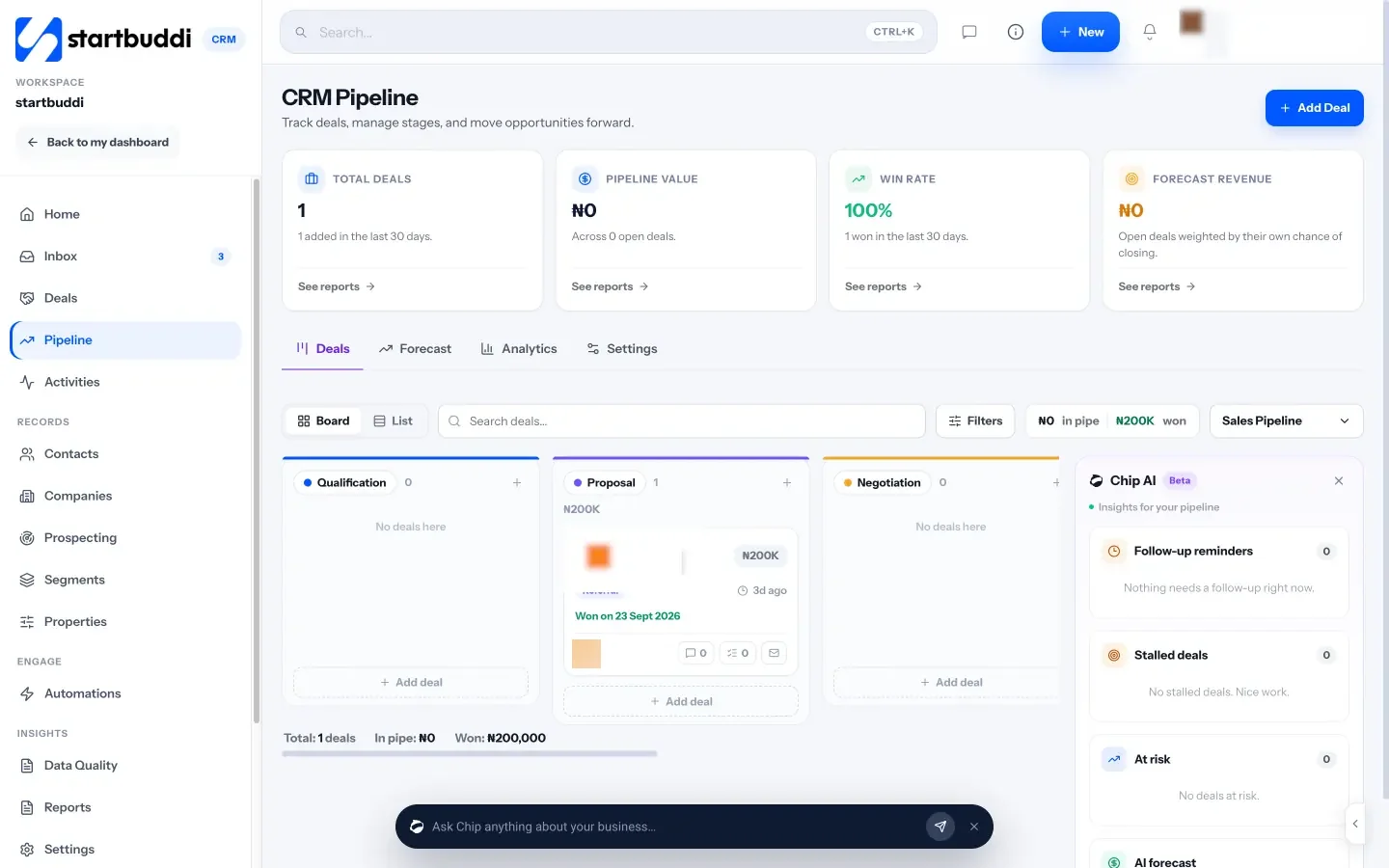
Its limits are real. There’s no public API yet and no direct connection to HubSpot or Pipedrive. You move contacts by CSV: export them, then in startbuddi go to Customers → Contacts → Import and bring in up to 10,000 contacts at a time. Deals don’t come across, so open deals are recreated by hand.
For fuller side-by-sides, read startbuddi vs Pipedrive and startbuddi vs HubSpot. Weighing more tools? See HubSpot vs Zoho CRM, Pipedrive alternatives, HubSpot alternatives, our best CRM software list, or how a CRM for service businesses works day to day.
Switching between HubSpot and Pipedrive
Both vendors describe moving data by file. HubSpot’s import guide covers uploading a file and its self-service transfer tool for data from another CRM. Pipedrive’s HubSpot migration guide describes exporting CSVs from HubSpot and importing them in order: organisations, people, deals, leads, activities and notes, after creating matching custom fields.
Whichever way you move, clean the data first. Delete duplicates and dead leads, agree your deal stages, and import 20 real records as a test before you bring in everything.
How to decide in one afternoon
- Count your users. Two or fewer and happy with basics: HubSpot’s free tools. Three or more: price both paid options.
- List your must-haves. Automation, forecasting, WhatsApp, phone support. Find the cheapest plan in each tool that has all of them.
- Price that plan for 12 and 24 months, including onboarding fees and any add-ons.
- Run five real deals through each during the free plan or trial.
- Pick the one your team opened without being reminded.
For the habits that make any CRM work (what to record, when to follow up, how to keep it clean), read our guide to client management for small businesses.
Pick the CRM your team will use
Price both for the next two years, test them with real deals, and choose the one people open without being asked. If your business runs on bookings, invoices and customer chats too, start free with startbuddi and compare it alongside them.
Frequently asked questions
Is HubSpot or Pipedrive better for a small business?
Pipedrive is usually better for a small team focused on sales, because its paid plans are cheaper and include unlimited pipelines, with automation and WhatsApp from Growth. HubSpot is better if one or two people want a free CRM, or if you plan to add HubSpot's marketing or service tools. Run real deals through both before deciding.
Does Pipedrive have a free plan?
No. Pipedrive's pricing page lists four paid plans and a 14-day free trial with no credit card required, as checked on 1 October 2026. HubSpot is the one of the two with a free plan, for up to 2 users and 1,000 contacts.
Which is cheaper, HubSpot or Pipedrive?
At entry level it's close and depends on the billing option you choose. In the middle tier Pipedrive is far cheaper: Growth is $39 per seat per month billed yearly, while HubSpot Sales Hub Professional starts at $90 per seat plus a $1,500 one-time onboarding fee. For three people over a year, that's $1,404 against $4,740 at list prices.
Can I move from HubSpot to Pipedrive?
Yes. Pipedrive's own guide describes exporting CSV files from HubSpot and importing organisations, people, deals, leads, activities and notes in that order, after creating matching custom fields. Pipedrive's help centre also describes a third-party migration service, Import2, for larger moves.
Does Pipedrive work with WhatsApp?
Yes. Pipedrive's pricing page includes a WhatsApp integration on the Growth plan and above, bringing WhatsApp sales chats into its Sales Inbox. HubSpot's WhatsApp inbox needs Marketing Hub or Service Hub at Professional level or above.
Is HubSpot really free?
HubSpot's free tools are free with no time limit for up to 2 users and 1,000 contacts, and no card is needed. You pay when you need more users, contacts or features such as larger automation limits, forecasting and phone support. Those come with paid Sales Hub seats.
Tiwalade Joanna Okedara-Kalu is the founder, CEO and CTO of startbuddi, the business system that brings clients, bookings, invoices, projects, marketing and the Chip AI assistant into one place. Tiwalade builds software around how service businesses really work day to day, and writes about client management, getting paid on time and why small businesses outgrow the tools they start with.
Founded startbuddi and leads its product and engineering