Best Marketing Tools for Restaurants in 2026: Options Compared
The best marketing tools for restaurants, free and paid: Google Business Profile, WhatsApp Business, startbuddi, Mailchimp, Toast and more, prices checked.


Photo: Tamara Harhai / Unsplash
The best marketing tools for restaurants are Google Business Profile, free and showing your menu, hours and reviews on Search and Maps; the WhatsApp Business app, for taking orders and sending updates where customers already chat; and startbuddi, for small restaurants and caterers that want email, SMS, WhatsApp campaigns, social posts and bookings in one place.
startbuddi is our product.
Key takeaways
- Start with the free tools: Google Business Profile, the WhatsApp Business app, Meta’s tools for Facebook and Instagram, and Canva’s free plan cover most of what a new restaurant needs.
- Pay for a tool when it saves hours every week or brings back customers you’d otherwise lose, such as automated email or SMS to regulars.
- If you already use a restaurant POS such as Square or Toast, check its marketing add-on first: it knows who ordered what.
- Full restaurant platforms (SevenRooms, Owner.com) suit busy venues with online ordering or reservations at volume; they’re more than a small café needs.
- Whatever you choose, own your customer list. Delivery apps and social platforms can change the rules overnight.
The best marketing tools for restaurants at a glance
Prices are each company’s own published prices, checked on 1 October 2026. Many vary by country and currency, so check the vendor’s page for yours.
| Tool | Best for | Starting price (published) | Free plan | Standout feature |
|---|---|---|---|---|
| Google Business Profile | Every restaurant | Free to create | Yes | Menu, hours, posts and reviews on Search and Maps |
| WhatsApp Business app | Chat-first customers, orders by message | Free to download | Yes | Catalogue, greeting and away messages on your phone |
| Meta Business Suite | Facebook and Instagram posting | No subscription listed; ads paid separately | Yes | Schedule posts and answer messages for both apps |
| Canva | Menus, flyers and social graphics | Price varies by country | Yes | Templates for menus and posts |
| startbuddi | Small restaurants and caterers wanting one system | See pricing | Yes (marketing on paid plans) | Email, SMS, WhatsApp campaigns, social and bookings together |
| Mailchimp | Email newsletters to regulars | Free; Essentials from $13/month (intro offer) | Yes, 250 contacts | Mature email templates and automations |
| Buffer | Scheduling social posts on a budget | $5 per channel per month | Yes, 3 channels | Simple queue across many platforms |
| Square Marketing | Restaurants on Square POS | Needs Square Plus or Premium | No | Campaigns built from POS customer data |
| Toast Marketing | Restaurants on Toast POS | Via Toast’s Marketing Essentials suite | No | Email and SMS tied to Toast orders |
| SevenRooms | Busy venues with reservations | Quote on request | No | Guest CRM with reservations and marketing |
| Owner.com | Restaurants pushing direct online orders | $249/month + 5% per order, or $499/month | No | Website, ordering app and automated campaigns |
How we chose these restaurant marketing tools
We looked at the tools small restaurants, cafés, food vendors and caterers most often use or ask about, from a buka in Surulere to a café in Manchester. We judged each on five things:
- Does it bring customers back? Repeat visits are where most restaurant profit comes from, so tools that reach past customers scored higher.
- Can a busy owner run it? Ten minutes a day, from a phone, without a marketing team.
- What does it cost a small venue? Free plans and per-location pricing matter more than enterprise features.
- Where does it work? A tool that needs a US-only POS isn’t much use in Accra.
- Who owns the customer data? Tools that build your own list beat ones that rent you an audience.
We haven’t tested every product hands-on. Everything here comes from each company’s own pricing, product and help pages, checked on 1 October 2026.
1. Google Business Profile
Google Business Profile is the free listing that shows your restaurant on Google Search and Maps. For many people searching “restaurants near me”, it’s the first and only thing they see.
Best for: every restaurant, café and food business with a place customers can visit or order from.
Key features:
- A menu editor with sections, dishes, descriptions and prices, according to Google’s Business Profile guide for restaurants.
- Posts for offers, updates and events, shown on Search and Maps.
- Replies to reviews, plus links for bookings, waitlists and online orders through Google’s partners.
Pricing: free to create and manage, as Google’s Business Profile page states (checked on 1 October 2026).
Pros:
- Free, and where hungry people actually look.
- Reviews and photos build trust before anyone visits.
- Menu changes show on Maps without a website.
Cons:
- You don’t control the layout, and anyone can suggest edits.
- Some features, such as ordering links, depend on partners in your country.
- It doesn’t help you reach past customers again.
Who should skip it: nobody. Even a home kitchen that delivers can set one up as a service-area business. Our guide to local SEO for small businesses covers how to make the most of it.
2. WhatsApp Business app
The WhatsApp Business app is a separate app from personal WhatsApp, built for small businesses. In Nigeria, Ghana and Kenya, a lot of restaurant ordering already happens in WhatsApp chats.
Best for: restaurants and food vendors whose customers order, ask about the menu or confirm deliveries by chat.
Key features:
- A business profile with hours, address and a link to your menu.
- A catalogue to show dishes and prices.
- Greeting and away messages, so customers get a reply even when you’re busy in the kitchen.
Pricing: WhatsApp describes it as a free-to-download app for small businesses (checked on 1 October 2026).
Pros:
- Free, and customers already have WhatsApp.
- Orders and questions arrive in one familiar place.
- Status updates reach people who’ve saved your number.
Cons:
- Built for one phone, so it gets busy fast with more than one person answering.
- Broadcasts only reach people who’ve saved your number.
- No real reporting on what brought orders in.
Who should skip it: venues whose customers mostly book or order through other channels, or teams that need several people answering at once. For larger WhatsApp campaigns, see our list of the best WhatsApp marketing tools and our WhatsApp marketing definition.
3. Meta Business Suite
Meta Business Suite is Meta’s dashboard for running a Facebook Page and an Instagram business account together.
Best for: restaurants that post food photos and reels and answer DMs on Instagram and Facebook.
Key features:
- Create or schedule posts, stories and ads for both apps, according to Meta’s Business Suite page.
- One place to reply to messages.
- Insights on what people engaged with.
Pricing: Meta’s page lists no subscription price; you pay only for ads you choose to run (checked on 1 October 2026).
Pros:
- Made by the platform, so new formats arrive there first.
- Handles posting and messages for both apps.
- Ads can target people near your restaurant.
Cons:
- Only covers Meta’s apps.
- Organic reach is unpredictable.
- Reporting is about likes and reach, not covers or orders.
Who should skip it: venues that don’t use Facebook or Instagram at all, which is rare.
4. Canva
Canva is a design tool with templates for menus, flyers, posters and social posts.
Best for: owners who design their own menus, specials boards and Instagram posts.
Key features:
- Menu, flyer and social templates you can edit in a browser or on a phone.
- Brand colours and fonts saved for reuse.
- Print and download options for menus and posters.
Pricing: there’s a free plan; paid plans are priced per person and vary by country, so see Canva’s pricing page for your local price.
Pros:
- The free plan covers most restaurant needs.
- Templates make a new specials post a five-minute job.
- Works on a phone.
Cons:
- Templates are popular, so your menu can look like the café down the road.
- It makes content but doesn’t send or schedule campaigns to your customer list.
- The best templates and brand tools are on paid plans.
Who should skip it: restaurants with a designer or agency already producing their materials.
5. startbuddi
startbuddi is an all-in-one workspace for small businesses: customers, messages, bookings, marketing and payments in one place, with an AI assistant called Chip. It isn’t a restaurant POS, so it’s best for small restaurants, caterers and food businesses that sell through messages, events and bookings rather than a busy till.
Best for: small restaurants and caterers that want campaigns, social posts, enquiries and bookings for events or private dining in one system.
Key features:
- Marketing for email campaigns, SMS and WhatsApp campaigns, with audiences you can split by tags and behaviour. WhatsApp messages need a template approved by Meta first.
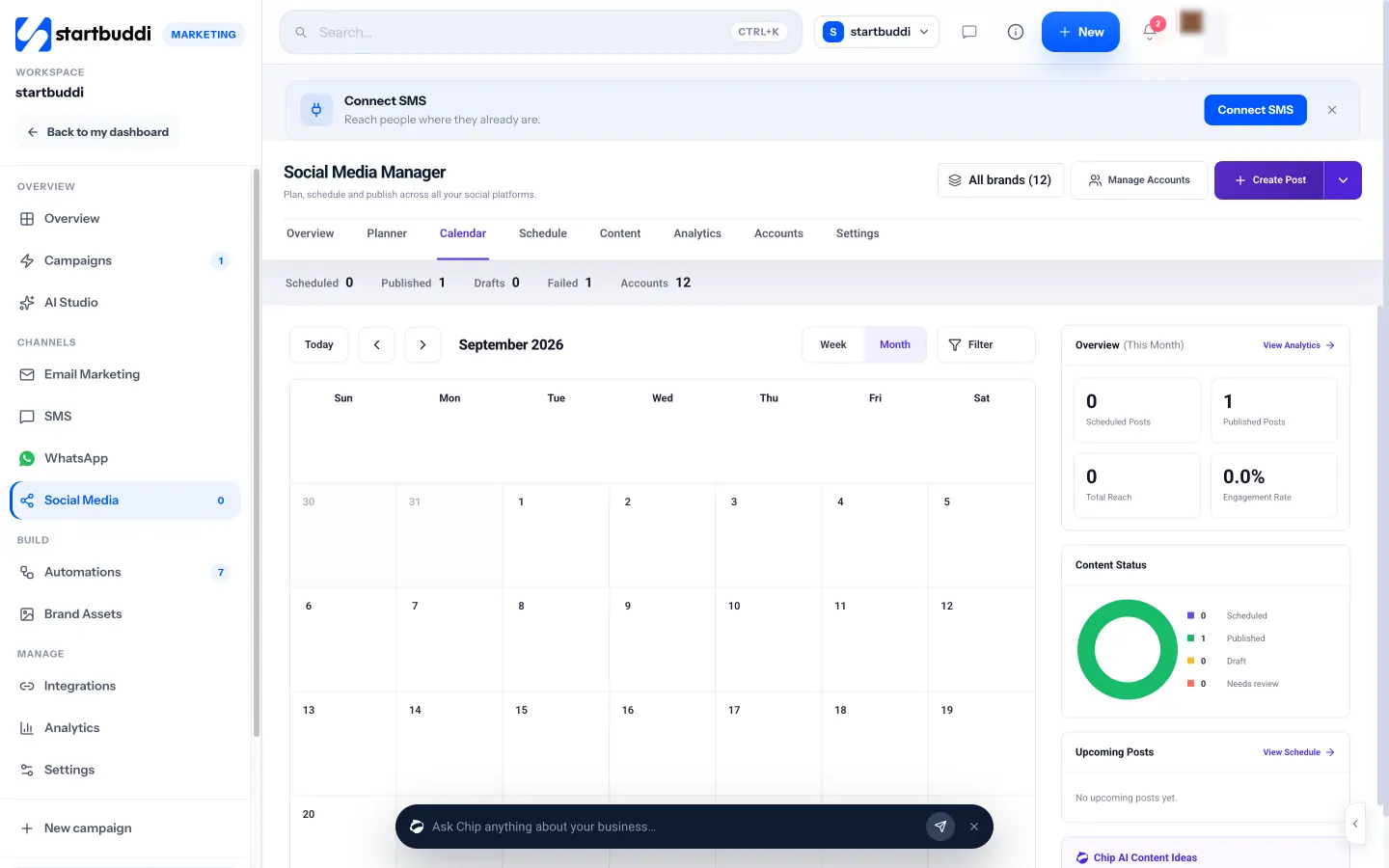
- Social Media Manager to plan and schedule posts to Facebook, Instagram, LinkedIn, X, YouTube and Pinterest, with Chip drafting captions.
- One inbox for WhatsApp, Instagram, Messenger, email and website chat.
- Bookings with deposits for private dining, tastings or catering consultations, paid through Paystack or Stripe.
- A free restaurant menu page with a WhatsApp order button, table bookings, hours and location.
Pricing: a free plan is available; email, SMS and WhatsApp campaigns and Automations are on paid plans from Starter. See startbuddi pricing.
Pros:
- Campaigns, social, messages and bookings share one customer list.
- Paystack payments by card, bank transfer, USSD or mobile money, as well as Stripe card payments.
- Chip drafts posts and campaigns, which saves time on busy weeks.
Cons:
- No POS, till or card terminal, so it can’t build a list from in-person sales by itself.
- No table plan or floor management, and no loyalty points programme.
- The online store has no delivery zones or discount codes, so it isn’t a replacement for a dedicated ordering platform.
- Marketing features aren’t on the free plan.
Who should skip it: high-volume restaurants that need marketing tied to every POS order, or venues that live on reservations and table turns.
6. Mailchimp
Mailchimp is one of the best-known email marketing tools, used by restaurants for newsletters, offers and birthday emails.
Best for: restaurants that collect emails (from Wi-Fi sign-ups, receipts or a website form) and want a regular newsletter.
Key features:
- Drag-and-drop email templates.
- Automations such as a welcome email for new subscribers.
- Audience tags and segments, so you can send different offers to different groups.
Pricing: Mailchimp’s pricing page lists a Free plan for up to 250 contacts and 500 emails a month, with Essentials from $13 a month and Standard from $20 a month for the first 12 months on an introductory discount; prices rise with contacts (checked on 1 October 2026).
Pros:
- Polished templates and a long track record.
- Good automations on paid plans.
- Plenty of tutorials and integrations.
Cons:
- The free plan’s 250 contacts fills up quickly.
- Prices climb as your list grows, and the intro discount ends after a year.
- Email only at the core; SMS and WhatsApp aren’t its focus.
Who should skip it: restaurants whose customers rarely read email and respond better to WhatsApp or SMS.
7. Buffer
Buffer is a social media scheduler that lets you queue posts across several platforms.
Best for: owners who want to batch a week of posts on Sunday night and forget about them.
Key features:
- A posting queue and calendar across several social platforms.
- Simple analytics on what performed.
Pricing: Buffer’s pricing page lists a free plan for up to 3 channels with 10 scheduled posts per channel, then Essentials at $5 and Team at $10 per channel per month (checked on 1 October 2026).
Pros:
- Cheap and easy to learn.
- Free plan is enough for one restaurant on two or three platforms.
- Pricing per channel keeps costs predictable.
Cons:
- Social only: no email, SMS or customer list.
- Costs add up across many channels or locations.
- Doesn’t handle DMs and orders.
Who should skip it: restaurants that only post to Instagram and Facebook, where Meta Business Suite does the job for free.
8. Square Marketing
Square Marketing is the email and text campaign tool inside Square’s point-of-sale system.
Best for: restaurants that already take payments on Square.
Key features:
- Email and text campaigns, coupons and automated messages for birthdays, welcomes and lapsed customers.
- Square Customer Directory, which builds an opt-in list from sales.
- Automatic campaigns that ask for Google reviews after a sale.
Pricing: according to Square’s marketing page, email and text marketing need a Square Plus or Square Premium subscription; Plus includes unlimited email sends and 500 texts a month, and Premium 2,500 texts a month (checked on 1 October 2026).
Pros:
- Uses real purchase data, so offers can target regulars.
- Coupons are tracked back to sales.
- No separate tool to connect.
Cons:
- Only makes sense if you use Square POS.
- Square isn’t available in every country, including Nigeria.
- Requires a paid Square subscription.
Who should skip it: restaurants not on Square.
9. Toast Marketing
Toast is a restaurant POS, and its marketing tools send email and SMS campaigns from Toast’s guest data.
Best for: restaurants already running on Toast.
Key features:
- Email marketing tied to online ordering, loyalty, gift cards and digital receipts, according to Toast’s email marketing FAQ.
- SMS marketing for offers and announcements.
- Guest lists built from orders.
Pricing: email marketing is added through Toast’s Marketing Essentials suite in Toast Shop; Toast’s help pages don’t publish a single price, so check with Toast (checked on 1 October 2026).
Pros:
- Campaigns use real order history.
- Designed for restaurants from the start.
- Fits with Toast’s ordering and loyalty products.
Cons:
- Only for Toast customers.
- Pricing isn’t published as one simple figure.
- Toast is only available in some countries.
Who should skip it: restaurants not on Toast.
10. SevenRooms
SevenRooms is a guest experience platform for restaurants and hospitality groups, built around reservations and guest profiles.
Best for: busy full-service restaurants and groups that take a lot of reservations.
Key features:
- Guest CRM and profiles, branded reservations, waitlist and table management, according to SevenRooms’ pricing page.
- Basic marketing automations, with email and text or WhatsApp marketing as add-ons.
- Event management for private dining.
Pricing: Starter, Growth and Premium plans, priced by quote (checked on 1 October 2026).
Pros:
- Rich guest profiles from every booking.
- Reservations and marketing in one system.
- Built for hospitality.
Cons:
- No published prices.
- Much more than a small café or takeaway needs.
- Marketing channels are add-ons.
Who should skip it: small venues without a reservations book.
11. Owner.com
Owner.com gives restaurants a website, online ordering, a branded app and automated marketing in one package.
Best for: restaurants that want to move customers from delivery apps to direct online orders.
Key features:
- A website with online ordering and a branded mobile app.
- Loyalty and rewards.
- Automated email and text campaigns.
Pricing: Owner.com’s pricing page lists Flex at $249 a month plus a 5% restaurant fee per order, or Flat at $499 a month with no restaurant fee; guests also pay a 5% order support fee on both plans (checked on 1 October 2026).
Pros:
- Ordering, app, loyalty and marketing in one place.
- Helps build your own customer list instead of a delivery app’s.
- No long-term contract, according to Owner.com.
Cons:
- A large monthly cost for a small venue.
- Per-order fees on Flex, and a guest fee on both plans.
- Owner.com says you give up some control over how your online presence looks.
Who should skip it: venues with little online ordering, or those outside the countries Owner.com serves.
A worked example: a free stack vs a paid one
These figures are illustrative.
Ifeoma runs a 40-seat restaurant in Lekki with a catering side. She wants regulars to come back on quiet weeknights.
Free stack: Google Business Profile, the WhatsApp Business app, Meta Business Suite and Canva’s free plan. Cost: ₦0 a month, plus her time. She posts specials daily and answers orders on WhatsApp, but can’t easily message the 600 customers who’ve ordered before.
Paid addition: she adds a marketing tool with SMS and WhatsApp campaigns and sends a Tuesday offer to past customers twice a month. If 600 messages bring 15 extra tables a month at an average bill of ₦25,000, that’s 15 × ₦25,000 = ₦375,000 in extra sales. Her tool and message costs need to come well under her profit on that, not her sales: at a 30% margin that’s ₦112,500.
The point is to compare a tool’s monthly cost with the profit from the customers it brings back, not with zero.
How to choose the right marketing tools for your restaurant
- Claim your Google Business Profile first. It’s free and it’s where hungry people look.
- Pick one place to build your customer list. A POS, a CRM or an email tool, but one.
- Match the channel to your customers. WhatsApp and SMS in Lagos and Nairobi; email often does better for a London café’s regulars. Our guide to how to market a small business helps you choose channels.
- Check your POS before buying anything else. If you use Square or Toast, their marketing add-ons already know your customers.
- Add a scheduler only if posting is eating your evenings.
- Review monthly. Drop any tool that hasn’t brought back customers in three months.
Caterers have different needs from a dining room: quotes, deposits and event dates. Our guide on how to start a catering business covers that side, and if social posting is your main job, see social media management for small business.
Bring your regulars back
Send campaigns, schedule posts, answer every message and take bookings with deposits from one place. Start free with startbuddi, no card needed, and unlock marketing on a paid plan when you’re ready.
Frequently asked questions
What are the best free marketing tools for restaurants?
The best free marketing tools for restaurants are Google Business Profile, the WhatsApp Business app, Meta Business Suite for Facebook and Instagram, and Canva's free plan. Together they cover your listing on Google, ordering by chat, social posting and design. Mailchimp's and Buffer's free plans add basic email and scheduling.
Which marketing channel works best for restaurants?
It depends on where your customers are. In Nigeria and much of Africa, WhatsApp and Instagram usually reach people fastest, while email and SMS work well for loyalty offers in the UK and US. Google Business Profile matters everywhere, because it's where people search for somewhere to eat.
How much should a small restaurant spend on marketing tools?
Start with free tools and add a paid one only when it clearly brings back more profit than it costs. Compare a tool's monthly cost with the profit from the extra visits it brings, not the sales. A small venue can run well on free tools plus one paid campaign tool.
Do I need a POS with marketing built in?
Not necessarily. A POS with marketing helps because it knows who ordered what, but many small restaurants build their list through WhatsApp, a booking page or a sign-up form instead. If you already use Square or Toast, try their marketing add-ons before buying another tool.
Can startbuddi replace my restaurant POS?
No. startbuddi doesn't include a POS, till or card terminal. It handles marketing campaigns, social posts, messages, bookings with deposits and payment links, and works alongside the system you use to take orders at the counter.
Olabimpe Salami is the email and outreach specialist at startbuddi. Olabimpe writes about the messages that bring customers in and back: email, WhatsApp and SMS campaigns, follow-ups, and turning enquiries into paying clients.
Runs email and outreach at startbuddi