11 Best Free CRM Software for Small Businesses in 2026
The best free CRM depends on where the free plan runs out. 11 genuinely free plans compared on users, contacts, limits and paid price, checked Oct 2026.


Photo: Joshua Rodriguez / Unsplash
The best free CRM for most small businesses is HubSpot, because its free plan holds 1,000 contacts and never expires. Zoho CRM is the best free pick for a team of up to three. startbuddi suits a solo service business that wants contacts, an inbox, bookings and invoices together on one free plan. Every plan here is genuinely free, not a trial.
startbuddi is our product. It’s on this list because it has a real free plan, and its limits are listed as plainly as everyone else’s. Every free plan and price below was checked on the vendor’s own site on 14 October 2026.
Key takeaways
- “Free CRM” means very different things. Some plans cap users (Bigin allows one), some cap contacts (Capsule and EngageBay stop at 250), and some are free only if you host the software yourself.
- The cost that matters is the first paid step. A free plan that jumps to a high per-user price when you add a second person can cost more in year two than a cheap paid plan would have from day one.
- Branding, a single pipeline and no automation are the usual catches. Check which of the three you can live with.
- If you run on WhatsApp and want invoices and bookings in the same place, a free CRM-only plan will leave gaps you fill with other apps.
The 11 best free CRMs compared
| Tool | Best for | Free plan limit that bites first | First paid plan (checked 14 Oct 2026) | Standout free feature |
|---|---|---|---|---|
| HubSpot | Most small businesses | 1,000 contacts; HubSpot branding | Smart CRM Starter from $20 per seat/month | Free CRM plus 2,000 marketing emails a month |
| Zoho CRM | Teams of 2 or 3 | 3 users | Standard $14 per user/month billed yearly ($20 monthly) | Workflow rules and a mobile app on Free |
| startbuddi | Solo service businesses | 1 user, 250 contacts | See pricing | Inbox, bookings and invoices on the same free plan |
| Zoho Bigin | Very simple pipeline for one person | 1 user, 500 records | Express $7 per user/month billed yearly | 3 automations on Free |
| Capsule | Two-person firms with few contacts | 250 contacts, 2 users | Starter (priced per user on Capsule’s page) | Projects board as well as a pipeline |
| EngageBay | Small teams wanting marketing too | 250 contacts | Basic $14.99 per user/month | Free for up to 15 members |
| Bitrix24 | Teams that also need tasks and chat | 1 to 2 users, 5 GB | Basic $49 per organisation/month billed yearly (5 users) | CRM, tasks and video calls in one |
| Attio | Startups and relationship-led sales | 3 seats, 3 reports | Plus $35 per user/month billed yearly ($44 monthly) | 50,000 records and data enrichment |
| Odoo | Businesses that may add accounting or stock later | One app only | Standard $7.25 per user/month first year, billed yearly | Unlimited users on the one free app |
| Twenty | Technical teams that can self-host | Free only when self-hosted | Cloud Pro $9 per user/month | Open source, own your data |
| SuiteCRM | Firms with an IT person and a server | Free only when self-hosted | Hosted plans on request | Full open-source CRM, no user limit |
Prices are in US dollars as each vendor shows them, before tax. Some vendors show different prices by country, so check the page for yours.
How we chose
We included a tool only if it has a free plan with no end date, confirmed on its own pricing page. That ruled out several well-known CRMs that offer trials only, such as Pipedrive, Less Annoying CRM, Insightly and Nimble, and Streak, whose free plan covers Gmail email tools but, in Streak’s own words, “does not include CRM pipelines”. We left out Agile CRM because its pricing page refused our request, so we couldn’t confirm its free plan today.
We then judged each free plan on:
- Users and contacts: how many people and records you get before you pay.
- The job a small service business needs done: a contact list, a sales pipeline, reminders, email from the record.
- What’s missing: automation, branding, reports, mobile access.
- The first paid step: what you’ll pay when you outgrow the free plan.
We didn’t run hands-on tests, and we don’t quote review scores. Everything here comes from vendor pricing and help pages, checked on 14 October 2026.
Where free CRM plans run out
This is the table to read before you sign up anywhere. It shows the limit you’ll hit first on each plan.
| Tool | Users on Free | Contacts or records on Free | Automation on Free | Branding or other catch |
|---|---|---|---|---|
| HubSpot | Not stated on the catalogue page | 1,000 contacts | Not on Free | HubSpot branding on forms, emails, meeting link and chat |
| Zoho CRM | 3 | Not stated | Workflow rules | Data export limited to 10 times |
| startbuddi | 1 | 250 contacts | 2 active automations | No bulk email campaigns, SMS or WhatsApp; site carries startbuddi branding |
| Zoho Bigin | 1 | 500 records | 3 automations | 1 pipeline |
| Capsule | 2 | 250 contacts | Not on Free | 5 custom fields, 1 pipeline |
| EngageBay | Up to 15 | 250 contacts | Not listed on Free | Marketing automation from Growth |
| Bitrix24 | 1 to 2 | Not stated | Not listed on Free | 5 GB storage; “basic CRM (deals, contacts)” |
| Attio | 3 | 50,000 records | Not listed on Free | 3 objects, 3 reports |
| Odoo | Unlimited | Not stated | Within the one app | Adding a second app moves you to a paid plan |
| Twenty | Your server’s limit | Your server’s limit | Yes (self-hosted) | You run, update and back it up |
| SuiteCRM | Your server’s limit | Your server’s limit | Yes (self-hosted) | You run, update and back it up |
A worked example: when will you outgrow it?
Here’s an illustrative case. Adaeze runs a cleaning company in Lagos with one office manager. She has 420 past and current customers in a spreadsheet and adds about 30 new enquiries a month. She wants both of them in the CRM.
- Plans that fail on day one: startbuddi Free and Bigin (one user), and Capsule and EngageBay (420 contacts is above 250).
- Plans that fit today: HubSpot (1,000 contacts), Zoho CRM (3 users), Attio (3 seats) and Odoo (unlimited users on one app).
- How long HubSpot’s free plan lasts: 1,000 minus 420 leaves 580 contacts of headroom. At 30 new contacts a month, that’s 580 ÷ 30 = about 19 months before she hits the cap.
The numbers are illustrative, but the method works for anyone: count your users, count your contacts, divide the headroom by your monthly growth.
1. HubSpot
HubSpot is a CRM platform with free tools and paid hubs for marketing, sales, service and content.
Best for: most small businesses that want a capable free contact list and pipeline, and may want marketing tools later.
Key features
- Contacts, companies, deals and tasks, with email from the record.
- One personal meeting link, forms, live chat and landing pages, all with HubSpot branding.
- Marketing email: HubSpot’s product and services catalogue lists “2,000 email sends per calendar month, with HubSpot branding” on the free tools.
Free plan limits: the catalogue says “up to 1,000 contacts in free accounts”, up to 10 active segments, and HubSpot branding on forms, emails, chat and pages. Automation is a paid feature.
Pricing: Smart CRM Starter “starts at $20/month per seat”, with Professional at $50 and Enterprise at $75 per seat. The pricing page may show lower promotional or regional prices.
Pros
- The most complete free CRM on this list.
- You keep the same account when you pay, so nothing moves.
Cons
- The step from Starter to Professional is steep, and Professional hubs carry onboarding fees.
- Branding stays on everything until you pay.
- No WhatsApp-first inbox or African payment methods built in.
Skip it if you know you’ll need automation soon and don’t want per-seat pricing. Our startbuddi vs HubSpot page and the HubSpot alternatives list go further.
2. Zoho CRM
Zoho CRM is a full sales CRM from Zoho, which also makes accounting, email and helpdesk apps.
Best for: a business with two or three people selling, who want automation without paying.
Key features
- Leads, contacts, deals, tasks, meetings and calls.
- Workflow automation and standard reports on Free.
- Mobile apps, and up to 10 custom email templates.
Free plan limits: Zoho’s pricing page calls the Free Edition “Free forever for 3 users”. Import is free, and export is limited to 10 times.
Pricing: Standard is $14 per user a month billed yearly, or $20 monthly. In Nigeria the page lists ₦10,780 billed yearly.
Pros
- The most generous free user count among the big names.
- A path into the rest of Zoho if you need invoicing or a helpdesk later.
Cons
- More settings than a small team needs, so setup takes longer.
- Features such as AI and CPQ sit on higher tiers.
Skip it if you’re one person who wants the simplest possible pipeline; Bigin is easier. See startbuddi vs Zoho, or our HubSpot vs Zoho CRM comparison if those are your final two.
3. startbuddi
startbuddi is an all-in-one workspace for service businesses: contacts and deals, a shared inbox, bookings, invoices and payments, projects and documents, with an AI assistant, Chip, on every screen.
Best for: a solo service business, such as a consultant, cleaner, tutor or designer, that wants the CRM joined to bookings, invoices and messages from day one.
Key features
- Contacts, companies, custom fields, segments and a deal pipeline, filled from forms, bookings and website chat.
- An inbox for email and website chat; WhatsApp and SMS join it on paid plans.
- One booking page, invoices and payment links by card through Stripe, or by card, bank transfer, USSD or mobile money through Paystack.
- Documents with e-signatures, and Chip to draft replies and follow-ups.
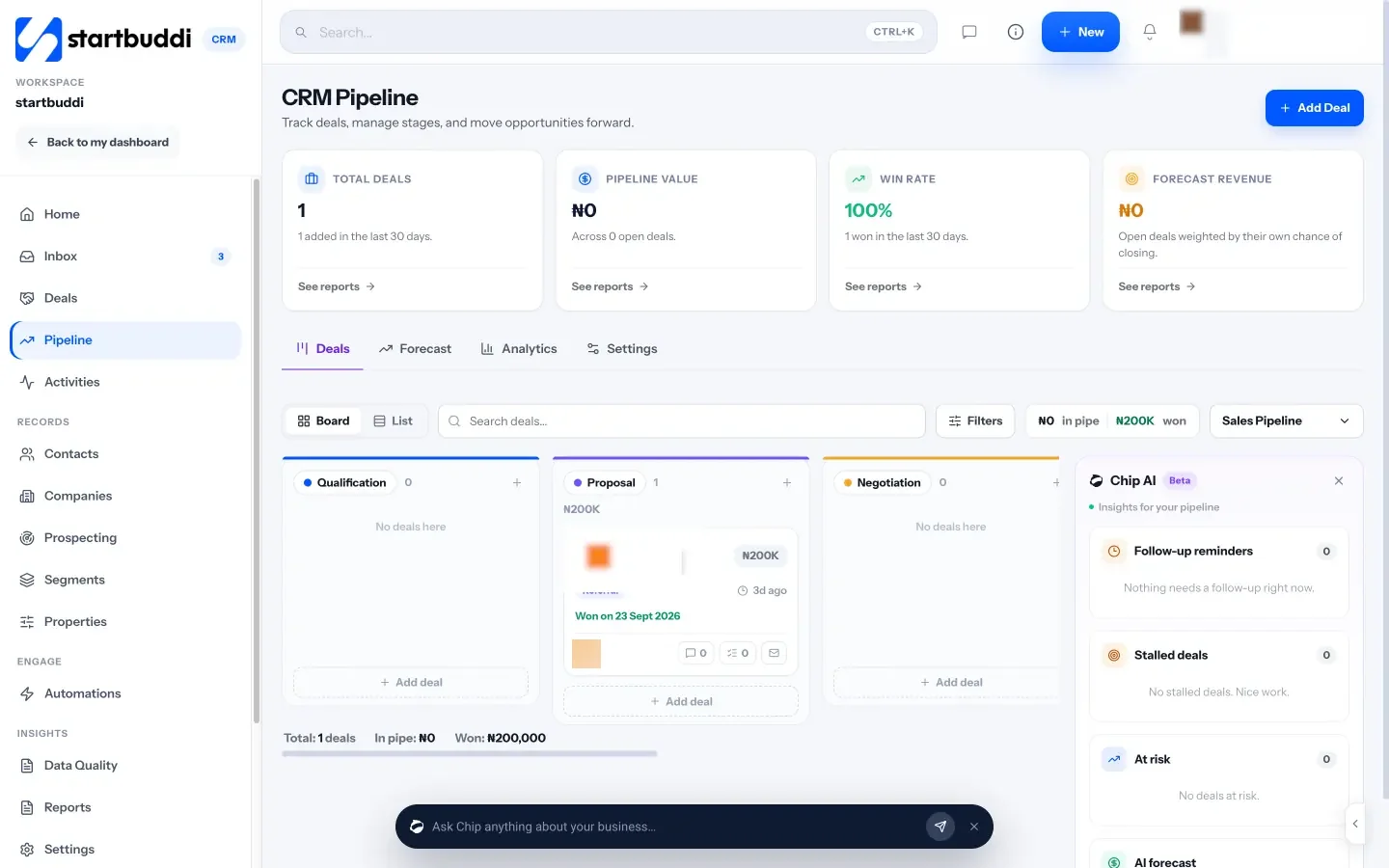
Free plan limits: the pricing page lists 1 user, 250 contacts, 300 emails a month, 50 Chip credits a month, 1 site with startbuddi branding and 2 active automations. Free also includes 1 live form, 5 invoices a month and 1 booking page. Bulk email campaigns, SMS and WhatsApp start on Starter.
Pricing: free plan available, no card needed; paid plans start with a 30-day trial. See pricing.
Pros
- The CRM, bookings, invoices and documents share one record per client.
- Paystack and WhatsApp (on paid plans) suit businesses in Nigeria and across Africa.
Cons
- One user and 250 contacts is tight for anyone with a team or a long customer list.
- A web app with no native mobile app.
- No public API; it connects to other tools through Zapier.
Skip it if two or more people need to log in for free, or you already have more than 250 customers. For a fuller picture, see our page on CRM for service businesses.
4. Zoho Bigin
Bigin is Zoho’s simplified pipeline CRM for very small businesses.
Best for: one person who wants a clean pipeline and nothing else.
Key features
- A single pipeline with stages you name.
- Contacts, companies, tasks and calls.
- A few automations on the free plan.
Free plan limits: Bigin’s pricing page says “The Free plan allows only 1 user” and “up to 500 records”, with a single pipeline and 3 automations.
Pricing: Express is US$7 per user a month billed yearly.
Pros
- Very quick to learn.
- Cheap first paid plan.
Cons
- Records include more than contacts, so 500 goes faster than you’d think.
- One user only on Free.
Skip it if someone else needs to see the pipeline. More in startbuddi vs Bigin.
5. Capsule
Capsule is a UK-built CRM for small businesses, with a sales pipeline and a project board.
Best for: a two-person consultancy or agency with a small, stable client list.
Key features
- Contacts, a sales pipeline and a project board.
- Gmail or Outlook sending on Free.
- Custom milestones and task categories.
Free plan limits: Capsule’s pricing page lists “Maximum 2 users”, “250 Contacts”, “5 custom fields” and “1 Sales Pipeline”.
Pricing: paid plans start with Starter, priced per user per month billed annually, with a 14-day trial; check Capsule’s page for the current figure in your currency. Starter raises the limit to 30,000 contacts.
Pros
- Two users for free, which few others offer.
- Clean, uncluttered screens.
Cons
- 250 contacts is a small ceiling.
- Workflow automation and multiple pipelines start on Growth.
Skip it if you already have a few hundred customers. See startbuddi vs Capsule.
6. EngageBay
EngageBay combines a CRM with email marketing, live chat and a helpdesk.
Best for: small teams that want a free CRM and basic marketing in one login.
Key features
- CRM, email broadcasts, autoresponders and sequences on Free.
- Landing pages, live chat and a helpdesk.
Free plan limits: EngageBay’s pricing page says the Free plan is “free for teams of up to 15 members” with “250 Contacts”.
Pricing: Basic is $14.99 per user a month on monthly billing, with discounts for yearly or two-year terms. Marketing automation starts on Growth at $64.99 per user a month.
Pros
- Generous on users.
- Marketing and CRM in one place.
Cons
- 250 contacts caps you quickly, whatever your team size.
- The jump to marketing automation is large.
Skip it if your list is already above 250.
7. Bitrix24
Bitrix24 is a business suite with CRM, tasks, chat, video calls and a website builder.
Best for: a very small team that wants tasks and chat alongside a basic CRM.
Key features
- “Basic CRM (deals, contacts)” on Free.
- Tasks with Kanban and Gantt views, shared calendars, chat and video calls.
Free plan limits: Bitrix24’s pricing page describes Free as 100% free for one or two users, with 5 GB storage.
Pricing: Basic is US$49 per organisation a month billed annually (US$69 monthly), and includes 5 users.
Pros
- A flat organisation price rather than per seat.
- Lots of non-CRM tools for free.
Cons
- So many modules that the CRM can get lost.
- The free CRM is basic.
Skip it if you want a focused CRM rather than an intranet.
8. Attio
Attio is a flexible, data-driven CRM popular with startups.
Best for: founders and small teams who sell through relationships and want automatic enrichment.
Key features
- Real-time contact syncing from email and calendar.
- Automatic data enrichment.
- Lists, custom attributes and reports.
Free plan limits: Attio’s pricing page lists the Free plan for “up to 3 seats”, with 3 objects, 50,000 records and up to 3 reports.
Pricing: Plus is $35 per user a month billed annually, or $44 monthly.
Pros
- By far the largest record limit on a free hosted plan here.
- Modern, fast interface.
Cons
- Built for B2B sales; less suited to bookings, invoices or WhatsApp.
- Workflows and sequences sit on paid plans.
Skip it if your customers are consumers who book and pay, rather than companies you sell to.
9. Odoo
Odoo is an open-source business suite with apps for CRM, accounting, inventory, website and more.
Best for: a business that likes the idea of adding accounting or stock to the same system later.
Key features
- A CRM app with pipelines and scheduled activities.
- Hosting on Odoo Online included.
Free plan limits: Odoo’s pricing page offers “One App Free” with “unlimited users”. If the app you pick depends on others, those come free too. Installing a second app moves you to a paid plan.
Pricing: Standard is US$7.25 per user a month billed yearly in the first year, then US$8.95.
Pros
- Unlimited users on the free app.
- A route to an all-in-one system later.
Cons
- The moment you want invoicing or a website as well, you pay for every user.
- Implementation help is extra.
Skip it if you need CRM plus invoicing for free.
10. Twenty
Twenty is an open-source CRM you can host yourself or rent as a cloud service.
Best for: a technical founder who wants to own the data and the code.
Key features
- Customisable objects, views and workflows.
- Full source code on GitHub.
Free plan limits: Twenty’s pricing page says you can “self-host to fully own your infrastructure”, which is free apart from your server. The managed cloud starts with a 30-day trial.
Pricing: cloud Pro is $9 per user a month, Organization $19.
Pros
- No user or contact caps when self-hosted.
- Open source, so no lock-in.
Cons
- You install, update, secure and back it up yourself.
- Not a choice for anyone without technical help.
Skip it if “server” isn’t a word you use.
11. SuiteCRM
SuiteCRM is a long-running open-source CRM covering sales, marketing and service.
Best for: a business with an IT person or developer and its own server.
Key features
- Leads, opportunities, quotes, campaigns and cases.
- Full source code, so it can be customised.
Free plan limits: SuiteCRM describes itself as an open source CRM you can download; running it costs whatever your hosting and support cost. A hosted free trial is offered.
Pricing: the software is free to download; hosted and supported plans are on request.
Pros
- No licence fee and no user limit.
- Deep feature set.
Cons
- Older interface and real setup work.
- You’re responsible for security and updates.
Skip it if you want to be working in your CRM this afternoon.
Which free CRM app works on a phone?
If you mainly work from your phone, check the app before the feature list. Zoho CRM lists mobile apps on its free edition. startbuddi is a web app that works in the phone’s browser, with no app to install from a store, which is fine for looking up a client but less handy for offline use. For any of the others, look for the vendor’s own iOS and Android listing before you commit.
Is there a good free CRM for real estate agents?
Partly. A solo agent can track buyers, sellers and viewings in any free CRM here, and HubSpot’s 1,000 contacts or Attio’s 50,000 records go a long way. What none of them do for free is pull listings from your MLS or property portal, or run the drip campaigns real-estate CRMs are known for. If listings and portal leads matter, budget for a real-estate CRM; if you mainly need a tidy list of clients and follow-ups, a free general CRM is enough to start.
How to choose the best free CRM for your small business
Answer four questions, in this order.
- How many people need to log in? One: startbuddi, Bigin or any of the others. Two or three: Zoho CRM, Capsule, Attio, Bitrix24. More: EngageBay, Odoo or a self-hosted tool.
- How many contacts do you have now, and how fast are you adding them? Use the method in the worked example. Above 250, rule out Capsule, EngageBay and startbuddi Free.
- What else do you need joined to the CRM? Marketing emails: HubSpot or EngageBay. Tasks and chat: Bitrix24. Bookings, invoices and a WhatsApp inbox: startbuddi. Accounting later: Odoo.
- What will the first paid step cost? Price your team at the first paid tier for a year, then decide whether the free plan is a ramp or a trap.
Then import a few real customers and use it for a week. If you’re still in a spreadsheet, our page on CRM vs spreadsheet explains when it’s worth switching, and CRM for small business covers what to track. Looking at paid options too? Our full best CRM software list covers 18 tools, and businesses in Nigeria should read the best CRM software in Nigeria for naira billing and local payments.
Try startbuddi free
If you’re a solo service business and want your clients, bookings, invoices and messages in one place, start free with no card, import your contacts from a CSV and set up your pipeline in an afternoon. Freelancers can see how it fits on our CRM for freelancers page, and pricing shows what each plan adds.
Frequently asked questions
What is the best free CRM for a small business?
HubSpot is the best free CRM for most small businesses, because its free plan holds 1,000 contacts with no end date. Zoho CRM is better if three people need to log in. startbuddi suits a one-person service business that wants bookings and invoices on the same free plan.
Is there a completely free CRM with no limits?
No hosted free CRM is unlimited. Every free plan caps users, contacts, features or branding. Open-source CRMs such as Twenty and SuiteCRM have no software limits when you host them yourself, but you pay for the server and do the maintenance.
Which free CRM allows the most users?
EngageBay's free plan allows up to 15 members, and Odoo's one free app allows unlimited users. Both have catches: EngageBay stops at 250 contacts, and Odoo charges for every user once you add a second app. Zoho CRM's three free users is the best balance for most small teams.
What is the best free CRM app for a phone?
Zoho CRM lists mobile apps on its free edition, which makes it a strong choice if you work from your phone. Most other vendors also offer apps, so check the vendor's own store listing. startbuddi runs in the phone's browser rather than as an installed app.
What is the best free CRM for real estate agents?
A general free CRM such as HubSpot or Attio works for a solo agent tracking buyers, sellers and follow-ups. None of them connect to MLS listings or property portals for free. If portal leads and listings are central to your work, a paid real-estate CRM is the better fit.
Do free CRMs stay free forever?
The plans on this list are described by their vendors as free with no end date, unlike a trial. Vendors can change their plans, though, so export your contacts regularly and check how each tool handles exports. Zoho CRM's free edition, for example, limits exports to 10 times.
Tiwalade Joanna Okedara-Kalu is the founder, CEO and CTO of startbuddi, the business system that brings clients, bookings, invoices, projects, marketing and the Chip AI assistant into one place. Tiwalade builds software around how service businesses really work day to day, and writes about client management, getting paid on time and why small businesses outgrow the tools they start with.
Founded startbuddi and leads its product and engineering