Why CRM is important for small business (and how to set one up in a week)
Why a CRM matters for a small business: what it does in plain words, how it fits the client lifecycle, what to track for every client and a one-week setup plan.


- A CRM is one shared record of every client, conversation, deal and follow-up. It matters for a small business because leads go cold within hours, repeat clients are worth far more than new ones, and relationships shouldn't leave when staff do. Start small: import contacts, build a simple pipeline and agree a weekly habit.
A CRM (customer relationship management) system is one shared place where a business keeps every client and lead, every conversation with them, and every deal, project and invoice connected to them. Here is why CRM is important for small business: it replaces the scattered mix of inboxes, WhatsApp chats, spreadsheets and memory with a single record of each client relationship, so replies go out faster, follow-ups stop slipping and past clients come back.
This guide explains what a CRM does in plain words, how it fits the way small businesses win and keep clients, what to track for every client, the signs you need one, and how to set one up in a week without turning it into a second job. The examples lean on service businesses and agencies, but the same ideas work for a salon, a shop or a consultancy.
What is a CRM, in plain words?
Think of a CRM as your business’s shared memory. Instead of each person remembering who said what, the CRM holds it for everyone. At its simplest, a CRM stores four things:
- Contacts and companies. The people you deal with and the businesses they work for, with details such as email, phone, role and website.
- Conversations and activity. Emails, messages, calls, meetings and notes, in date order, attached to the right person.
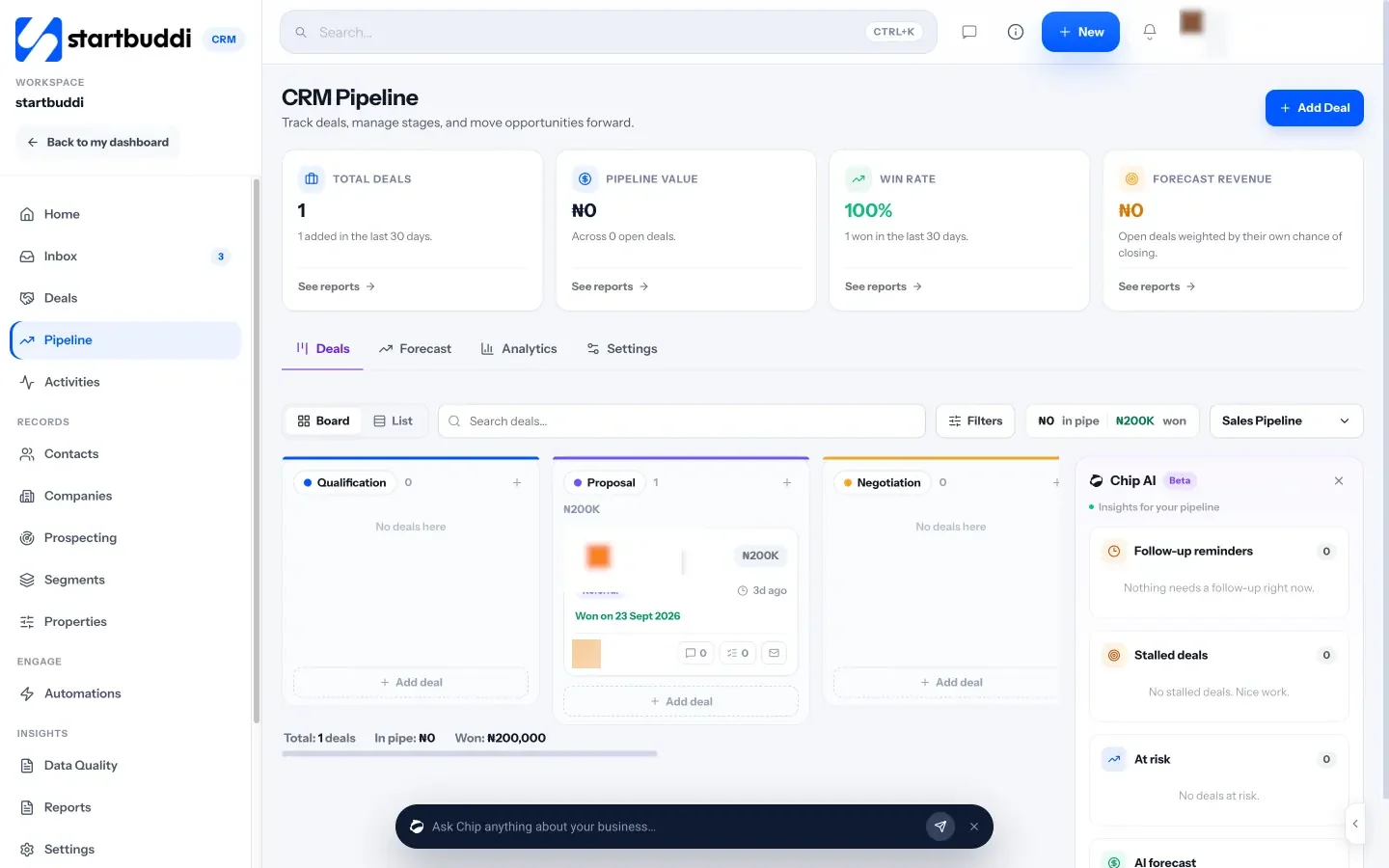
- Deals. Potential work, what it’s worth, and what stage it has reached, usually shown as a sales pipeline.
- Tasks and follow-ups. Who needs to do what, by when, so nothing is forgotten.
Modern CRMs often add more: a shared inbox, email and WhatsApp marketing, automations that send follow-ups for you, reports, and links to invoices and projects. For the full glossary definition, see what is a CRM.
What a CRM isn’t
It helps to be clear about what a CRM doesn’t do. It isn’t accounting software: it can show invoices and payments, but your books, tax and bank reconciliation belong in an accounting tool or with your accountant. It isn’t a project management tool on its own, although many CRMs link to projects. And it isn’t a magic lead machine. A CRM organises the leads you already get and helps you follow up well. It won’t create demand by itself.
Finally, a CRM isn’t only for salespeople. In a small business, the founder, the person who answers enquiries and whoever does the work all benefit from seeing the same history.
Why CRM is important for small business
Small businesses live on relationships. A single client might involve the person who books, a finance contact who pays invoices and an owner who signs off budgets. Work arrives through referrals, social media, walk-ins and repeat business. That creates three problems a spreadsheet can’t solve.
Speed matters when a lead comes in
When someone fills in your contact form, the clock starts. In research published in Harvard Business Review, Oldroyd, McElheran and Elkington audited 2,241 US companies: only 37% responded to a web lead within an hour, and 23% never responded at all. In a separate study of 1.25 million leads, firms that tried to contact a lead within an hour were nearly seven times as likely to qualify it as those that waited even an hour longer. A CRM puts every new enquiry in front of the right person straight away.
Keeping clients is cheaper than finding new ones
Writing in Harvard Business Review, Amy Gallo notes that acquiring a new customer is five to 25 times more expensive than keeping an existing one, and cites Bain & Company research by Frederick Reichheld finding that a 5% increase in retention raises profits by 25% to 95%. Those figures come from studies of large companies, but the principle holds for a five-person business: a client who comes back is worth far more than a pitch you might win. A CRM shows you who’s due for a check-in, a renewal or an upsell.
People leave, relationships shouldn’t
When an account manager leaves, their inbox and WhatsApp history often leave with them. A CRM keeps the history with the client, not the person, so the next account manager can pick up where things were left.
How a CRM fits the client lifecycle
Here’s how a CRM supports each stage of a typical service business relationship.
| Stage | What happens | What the CRM does |
|---|---|---|
| Enquiry | A lead fills in a form, sends a DM or gets referred | Creates the contact, records the source, assigns an owner and reminds them to reply |
| Discovery | A call to understand needs and budget | Books the call, stores the notes and moves the deal to the next stage |
| Proposal | You send a proposal or quote | Logs the proposal, sets a follow-up date and tracks the deal value |
| Won | The client signs | Marks the deal won, starts onboarding and links the first invoice |
| Delivery | Projects and retainers run | Keeps conversations, files, projects and invoices on the client record |
| Renewal and growth | Contract review, upsell, referrals | Reminds you before renewals and shows the full history when you ask for more work |
The stages where small businesses lose the most money are usually the quiet ones: the proposal nobody followed up, and the happy client nobody asked for a referral. A CRM makes those moments visible.
A CRM in action: one lead’s journey
Here’s how a CRM changes a single enquiry at a small branding agency in Cape Town.
Monday, 10:14. A café owner fills in the website form asking about a rebrand. The CRM creates a contact, records the source as “website form”, assigns the lead to Thandi and sends her an alert. She replies at 10:40 with a link to book a call.
Wednesday. The discovery call happens. Thandi’s notes go on the contact record, along with the budget range, R45,000 to R60,000. She creates a deal at the “proposal” stage with a follow-up date of Friday.
Friday. The proposal goes out. A reminder is set for the following Wednesday.
The next Wednesday. No reply. The reminder prompts a short WhatsApp message, which lands in the same record. The café owner replies with one question about timelines, and the deal moves to negotiation.
Two weeks later. The deposit invoice is paid. The deal is marked won, onboarding tasks are created, and the project starts with the full history attached. Six months later, when the café opens a second site, the account manager can see exactly what was delivered and pitch the next job with confidence.
Without a CRM, every one of those steps depends on someone remembering. With one, the system does the remembering and the team does the work.
Five things to track for every client
A CRM is only as useful as what goes into it. You don’t need dozens of fields. Start with five:
| What to track | Why it matters |
|---|---|
| Last contact or booking date | Shows who needs a check-in |
| Total spent | Shows who your most valuable clients are |
| Services bought | Shows what to offer next |
| Payment status | Flags anyone who owes you money |
| Notes from each conversation | Makes every client feel remembered |
A 15-minute weekly CRM habit
A CRM you never open is just clutter. Every Monday, sort clients into three groups: active (in touch in the last 30 days), at risk (30 to 90 days) and lapsed (more than 90 days). Then send a short, personal message to a few people in the at-risk group. Not a newsletter, just a line such as “It’s been a while, how are things going?” Adjust the days to how often your clients normally buy.
Signs your business needs a CRM now
- You’ve found a lead’s message days after they sent it.
- Two people replied to the same client, with different answers.
- You can’t say, without digging, how much work is in your pipeline this month.
- Proposals go out and nobody follows up.
- Client details live in someone’s phone.
- You don’t know which marketing channel brings your best clients.
If two or more sound familiar, it’s time. We go deeper on this in 5 signs your agency needs a CRM today, and if you’re currently running on a sheet, CRM vs spreadsheet compares the two honestly.
What to look for in a CRM for a small business
- Companies with several contacts. If you sell to other businesses, you need a company record with its people underneath.
- A simple pipeline you can rename. Stages that match how you sell, such as enquiry, call booked, proposal sent, negotiation, won and lost.
- Channels your clients use. Email for most, but in many markets WhatsApp is where clients actually reply.
- Automatic capture. Leads from your forms, booking page and website chat should create contacts without copying and pasting.
- Links to delivery and money. Seeing a client’s open projects and unpaid invoices on the same screen as their conversations saves awkward mistakes.
- A price that grows gently. Check how cost rises with seats and contacts, not just the entry price.
Our researched list of CRM software for small business compares several options, and CRM for agencies shows how an agency setup looks in practice.
What a CRM costs
CRM pricing usually depends on two things: the number of users (seats) and the number of contacts. Many tools have a free tier for one or two people, then charge per seat per month. When you compare, cost out where you’ll be in a year, not just today: if you plan to hire two people and double your contact list, check the price at that size. Also count the tools a CRM might replace, such as a separate inbox, email tool or booking app, because an all-in-one option can be cheaper overall even when its headline price is higher.
Client data: the rules still apply
A CRM holds personal data, so data protection law applies. The details vary by country, so this is general information, not legal advice. The UK regulator, the ICO, sets out seven principles under the UK GDPR, including data minimisation, accuracy, storage limitation and security. In Nigeria, the Nigeria Data Protection Commission oversees the Nigeria Data Protection Act 2023. Wherever you are, the practical habits are similar:
- Only store what you need to serve the client.
- Keep records accurate and delete what you no longer need.
- Give each team member their own login, never a shared one.
- Only send marketing to people who’ve agreed to receive it, and honour unsubscribes.
Common CRM mistakes small businesses make
- Importing everything. Ten years of old contacts make the CRM feel cluttered. Import active clients, recent leads and people you’d actually contact.
- Too many pipeline stages. Twelve stages means nobody knows where a deal belongs. Keep it to what you can explain in a sentence.
- Logging in bulk on Friday. Notes written days later lose detail. Log conversations as they happen, or connect channels so they log themselves.
- No owner per deal. A deal owned by “the team” is owned by nobody.
- Forgetting existing clients. The pipeline isn’t only for new business. Add renewals and upsells so they get the same attention.
How to set up a CRM in your first week
- Day 1: import what you have. Export contacts from your email, phone and spreadsheets into one CSV. Clean obvious duplicates, then import.
- Day 2: add companies. Create a company for each client and prospect, and link the right people to it.
- Day 3: build your pipeline. Five or six stages at most. Add every live deal with its value and next step.
- Day 4: connect your channels. Connect email, and WhatsApp if your clients use it, so conversations land on the client record.
- Day 5: connect your forms. Make sure new enquiries from your website create contacts and alert the right person.
- Day 6: set two follow-up rules. For example, a task when a new lead arrives, and a reminder three days after a proposal goes out. Our guide to email sequence CRM guide has more ideas.
- Day 7: agree the habits. Every client conversation gets logged, every deal has a next step, and the pipeline is reviewed in your weekly meeting.
How startbuddi helps small businesses with a CRM
In startbuddi, the CRM is called Customers. It’s part of the same workspace as your projects, invoices, marketing and bookings, so a client record shows the whole relationship.
- Contacts and companies. Add a contact with just a name, email or phone. Import a CSV of up to 10,000 contacts at a time, with column mapping and a choice to update or leave duplicates. Add a company from its website and startbuddi fills in the logo and details.
- One page per client. Each company page shows its contacts, conversations, deals, invoices, projects, bookings and documents.
- A pipeline that keeps itself current. When a contact replies, their deal moves out of the first stage. When an invoice on a deal is paid, the deal is marked won. Every move is written to the deal’s history.
- One inbox. Email, website live chat, WhatsApp, SMS, Facebook and Instagram messages in one place, with assignment to teammates.
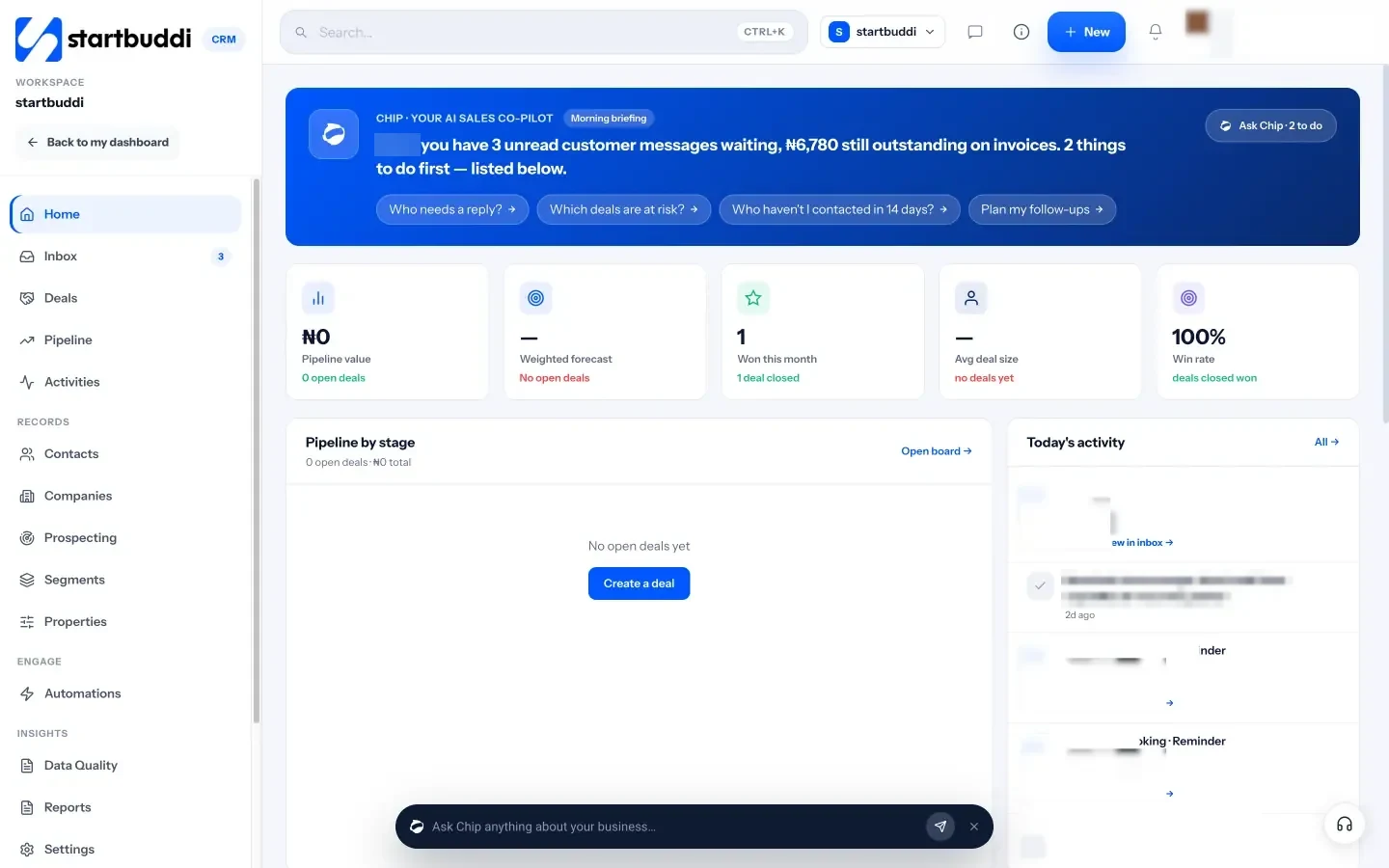
- Chip briefing. Chip, the built-in AI assistant, summarises who’s waiting on you, which deals are at risk and what’s still owed on invoices.
Honest limits: startbuddi’s CRM is built for small teams, not for large sales departments that need complex territory rules or deep customisation. Lead scoring uses a fixed formula rather than AI. A LinkedIn inbox isn’t available. Plans also cap contacts: Free holds 250, Starter 2,500, Growth 15,000 and Scale 75,000. WhatsApp and SMS need Starter or above, and Chip auto-replies need Growth or above.
Your next step
Pick the three clients and five leads you’d least like to lose, and put them in a CRM this week with a next step for each. If you’d like to try startbuddi’s Customers module, you can start free or take a 30-day trial of a paid plan from the pricing page.
Sources
- Harvard Business Review (2011): The short life of online sales leads
- Harvard Business Review (2014): The value of keeping the right customers
- ICO: A guide to the data protection principles
- Nigeria Data Protection Commission
Frequently asked questions
What does CRM stand for?
Customer relationship management. It means both the practice of managing client relationships and the software that helps you do it.
Is a CRM worth it for a two-person business?
Usually, yes. Even two people lose track of follow-ups and client history. A simple, low-cost CRM pays for itself if it saves one lost deal.
Can I use a spreadsheet instead of a CRM?
You can at the start. A spreadsheet stops working when several people update it, when you need reminders, or when conversations need to sit next to the deal.
How long does it take to set up a CRM?
A small business can be up and running in about a week: import contacts, add companies, build a pipeline and connect email and forms.
Tiwalade Joanna Okedara-Kalu is the founder, CEO and CTO of startbuddi, the business system that brings clients, bookings, invoices, projects, marketing and the Chip AI assistant into one place. Tiwalade builds software around how service businesses really work day to day, and writes about client management, getting paid on time and why small businesses outgrow the tools they start with.
Founded startbuddi and leads its product and engineering