Booking System

Fill your calendar without living in your DMs.

Give clients one branded booking link for sessions, deposits, reminders, and self-serve rescheduling — then let startbuddi do the rest.

Go live with your booking page in minutes — no developer needed

Start free — no card
★★★★★ 4,000+ service businesses · free plan available
24/7
self-serve booking — clients book anytime
90%
reduction in no-shows with auto-reminders
1
link to share across every channel
$0
to start — free plan, no credit card
Smart booking page

Your booking link. Clients book, pay, and arrive prepared.

Share one link. Clients choose a slot, complete your intake form, and pay a deposit — all in one flow. Every booking lands in your CRM automatically.

  • Custom services, durations, and pricing per booking type
  • Deposit or full payment collected at checkout — Paystack or Stripe
  • Intake form attached to every booking type
  • Google Calendar two-way sync built in
Start free
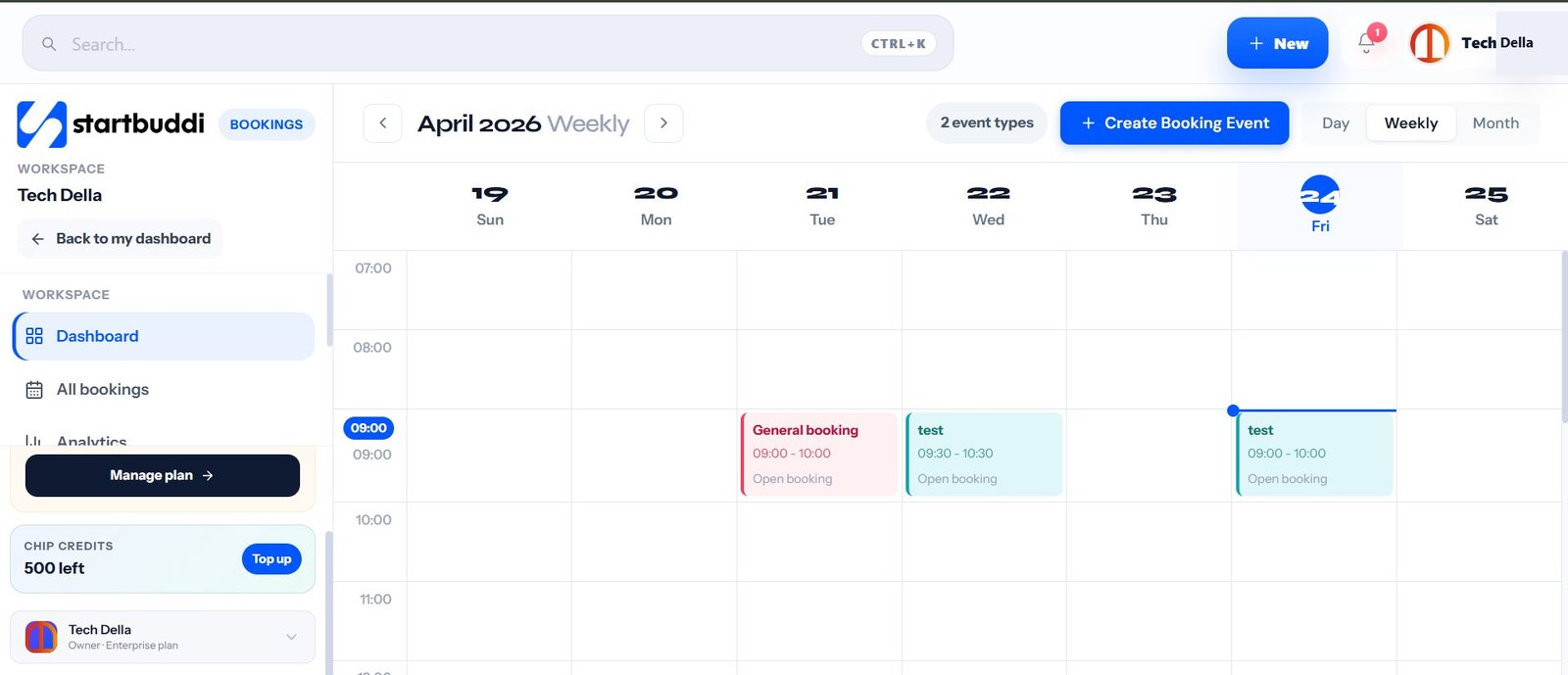
app.startbuddi.com/bookings
startbuddi booking calendar — weekly view with appointments
Automated reminders

No-shows drop 90%. You stop chasing.

Chip sends a confirmation email the moment a booking is made, a 48-hour reminder, and a same-day nudge — all in your brand voice. You never write a reminder again.

  • Customisable schedule — 48h, 24h, 2h before session
  • Email and SMS in your brand voice, not a generic template
  • Rescheduling link included in every reminder
  • Chip flags repeat no-shows and at-risk clients
Start free
CRM auto-populated

Every booking creates a complete client record.

The moment someone books, startbuddi creates their CRM contact — with their name, email, service, intake form, deposit, and session history all attached. Zero manual data entry.

  • CRM contact created automatically from every booking
  • Full session history, intake forms, and invoices on one record
  • Chip flags clients who haven't rebooked in 30+ days
  • Notes, tasks, and invoices all linked to each record
Try CRM free See CRM →
Getting started

Live in under an hour.

No developer, no IT team. Add your services, connect payments, share your link.

01

Add your services

Create booking types — sessions, consultations, packages. Set pricing, duration, deposits, and intake questions.


02

Connect payments

Link Paystack (NGN) or Stripe (USD, GBP, EUR). Set deposits per service. Done in under 2 minutes.

03

Share and let Chip run it

Send your link via WhatsApp, email, or website. Chip handles confirmations, reminders, CRM, and invoices automatically.

Start free today
Everything included

Everything in startbuddi Bookings.

No add-ons. No upsells. It all comes with your workspace.

Shareable booking page

One branded link for your bio, email signature, WhatsApp, or website.

Deposits and upfront payment

Charge what makes sense per service — fixed deposit or full amount.

Automated reminders

Email and SMS reminders at 48h, 24h, and 2h before each session.

Reschedule rules

Let clients manage changes within the notice window you set.

Google Calendar sync

Two-way sync so your calendar and booking page stay in perfect alignment.

Chip AI insights

Chip tracks no-shows, flags at-risk clients, and re-engages them automatically.

Everything connected

Bookings connects to your full workspace.

Not another tool to add — a hub that makes your whole stack run together.

Free plan available. Paid from $5/mo
No credit card for the free plan · Cancel anytime · No setup fees
FAQ

Common questions about Bookings.

Real answers from service businesses that have switched from Calendly, Acuity, or manual scheduling.

Talk to us →
Can clients reschedule on their own?
Yes. You set the notice window — e.g. clients must reschedule at least 24 hours in advance — and startbuddi handles the rest. Clients get a rescheduling link in every reminder email automatically.
Can I take deposits instead of full payment?
Yes. Each booking type has its own payment rule — free, full payment, or a fixed/percentage deposit. The balance can be collected separately after the session.
Does this work for both free discovery calls and paid sessions?
Yes. Create as many booking types as you need — free intro calls, paid strategy sessions, group workshops, recurring appointments. Each has its own link, price, and intake form.
Does startbuddi sync with Google Calendar?
Yes, two-way. When a client books, the session appears on your Google Calendar. When you block time on Google Calendar, that slot becomes unavailable on your booking page.
Which payment providers are supported?
Paystack for NGN payments (cards, bank transfer, USSD) and Stripe for USD, GBP, EUR, and 135+ other currencies. Both run natively — no plugin or third-party bridge needed.
Is there a free plan?
Yes. The free plan includes one booking type, basic CRM, and up to 5 invoices per month. No credit card needed to start. Paid plans from $5/mo unlock unlimited booking types, Chip AI reminders, deposits, and full CRM.
Start today

Your booking page. Live by lunch.

Clients book, pay a deposit, and arrive prepared. Chip handles confirmations, reminders, CRM, and follow-ups — automatically.

Free plan · From $5/mo · Paystack + Stripe · Cancel anytime