Best Customer Attribution Tool for Small Businesses in 2026: 7 Options Compared
The best customer attribution tool for small business depends on how leads reach you. Seven options compared on price, models and setup, checked in 2026.


The best customer attribution tool for small business depends on how customers reach you. Google Analytics 4 is the free starting point for website traffic. CallRail suits businesses whose leads phone in. startbuddi suits service businesses that want the source of every contact and won deal recorded in the same app as their bookings, inbox and invoices.
startbuddi is our product. We’ve included it where it fits and listed its limits as plainly as everyone else’s.
Key takeaways
- Attribution answers one question: which channel brought this customer, and how much did they spend?
- Most small businesses need lead source tracking before they need multi-touch models. Get the source right on every contact first.
- If customers phone you, website analytics alone will miss them. Call tracking fills that gap.
- Google Analytics 4 now offers three attribution models; first click, linear, time decay and position-based were removed in November 2023.
- Prices range from free to £299 a month and more, so match the tool to the size of your ad spend.
What customer attribution means for a small business
Customer attribution links each new customer to the touchpoints that brought them in: an Instagram post, a Google search, a referral, a WhatsApp ad. Add up the revenue by source and you can see which channels pay for themselves, and work out your customer acquisition cost per channel.
For a service business, the hard part is that the customer journey rarely stays on your website. Someone sees a post, sends a WhatsApp message, calls, then books a week later. A tool that only sees website clicks will credit the wrong channel, or none.
Attribution models in plain words
| Model | Who gets the credit | Good for |
|---|---|---|
| First touch | The first channel that found the customer | Seeing what brings new people in |
| Last touch | The last channel before they bought or enquired | Seeing what closes |
| Linear (multi-touch) | Every channel shares the credit equally | A balanced view when journeys are long |
| Data-driven | Credit split by a model trained on your data | Larger accounts with lots of conversions |
Customer attribution tools compared
Prices are the starting list prices on each vendor’s own pricing page, checked on 1 October 2026. They exclude tax and usage charges.
| Tool | Best for | Starting price | Free plan | Standout feature |
|---|---|---|---|---|
| Google Analytics 4 | Website traffic and online conversions | Free | Yes | Data-driven attribution at no cost |
| startbuddi | Service businesses tracking contacts, deals and revenue by source | Free plan, paid plans on the pricing page | Yes | Source of every contact and won deal, next to bookings and invoices |
| CallRail | Businesses whose leads phone in | $50 a month | No (14-day trial) | Call tracking with multi-touch reports on Complete plans |
| WhatConverts | Agencies and businesses tracking calls, forms and chats | $30 a month | No | Every lead in one list with its source |
| Attributer | Sending lead source into the forms and CRM you already use | $29 a month | No (14-day trial) | Hidden form fields filled with source data |
| HubSpot Marketing Hub | Teams already on HubSpot with real ad budgets | Professional from $800 a month | Yes (free tools) | Multi-touch revenue attribution on Professional |
| Ruler Analytics | Businesses spending heavily on ads | £299 a month | No | Seven models, including data-driven |
What makes the best customer attribution tool for small business?
The best tool is the one that sees the channels your customers actually use and connects them to money. Before comparing features, set up three habits that every tool depends on. Without them, even an expensive platform reports guesses.
- One source on every contact. Decide on a short list of sources (Instagram, Google, referral, WhatsApp, walk-in, website form) and use the same words every time. Ten clear sources beat forty messy ones.
- Tagged links everywhere you post. Add UTM tags to links in your bio, ads, emails and WhatsApp broadcasts, so website tools can tell an Instagram visit from a Google one. The free UTM builder makes these in a minute.
- Ask the question. Add “How did you hear about us?” to forms and booking questions, and ask it on every call. People who heard about you from a friend and then searched your name look like Google visitors to software.
Then check that the tool can answer two questions for last month: how many new contacts each source brought, and how much revenue came from each source. If it can only answer the first, it’s lead tracking, not attribution. Both are useful, but only the second tells you where to spend.
How we chose
We looked for tools a business with one to twenty people can set up and afford. Each had to show where leads come from, connect that to sales or revenue, and publish prices or a free plan. We read each vendor’s own pricing and help pages on 1 October 2026. We haven’t run hands-on tests, so the notes below describe what each vendor says it offers.
1. Google Analytics 4
Google Analytics 4 (GA4) is Google’s free website analytics tool. It shows where visitors come from and which channels lead to the actions you mark as key events, such as a form submission or a purchase.
Best for: any business with a website that wants a free, reliable view of online traffic.
Key features: traffic sources, campaign tracking through UTM-tagged links, key events and an attribution section with model comparison. Google’s help centre on attribution models (checked on 1 October 2026) lists three: data-driven, paid and organic last click, and Google paid channels last click. First click, linear, time decay and position-based were removed in November 2023.
Pricing: free.
Pros:
- Costs nothing and works on almost any website.
- Data-driven attribution without a paid plan.
- Pairs with Google Ads.
Cons:
- Sees website visits, not phone calls, WhatsApp chats or walk-ins.
- Doesn’t know which visitor became a paying customer unless you connect it to your sales data.
- Reports take time to learn.
Skip it if: most of your customers never visit your website before they buy.
2. startbuddi
startbuddi is a business app for service businesses that keeps contacts, deals, messages, bookings and invoices in one place, with Chip, an AI assistant, built in. It isn’t a dedicated attribution platform: its strength is that the source is recorded on the same contact who later books and pays.
Best for: small service businesses that get leads from forms, bookings, WhatsApp, social and referrals, and want to see which sources turn into won deals.
Key features:
- Every contact and deal carries a source, shown in plain words: a form, a booking, your pages, link in bio, live chat, WhatsApp, Facebook lead ads, someone referred them, and more. A WhatsApp chat that starts from a click-to-WhatsApp ad is recorded with that ad as its source.
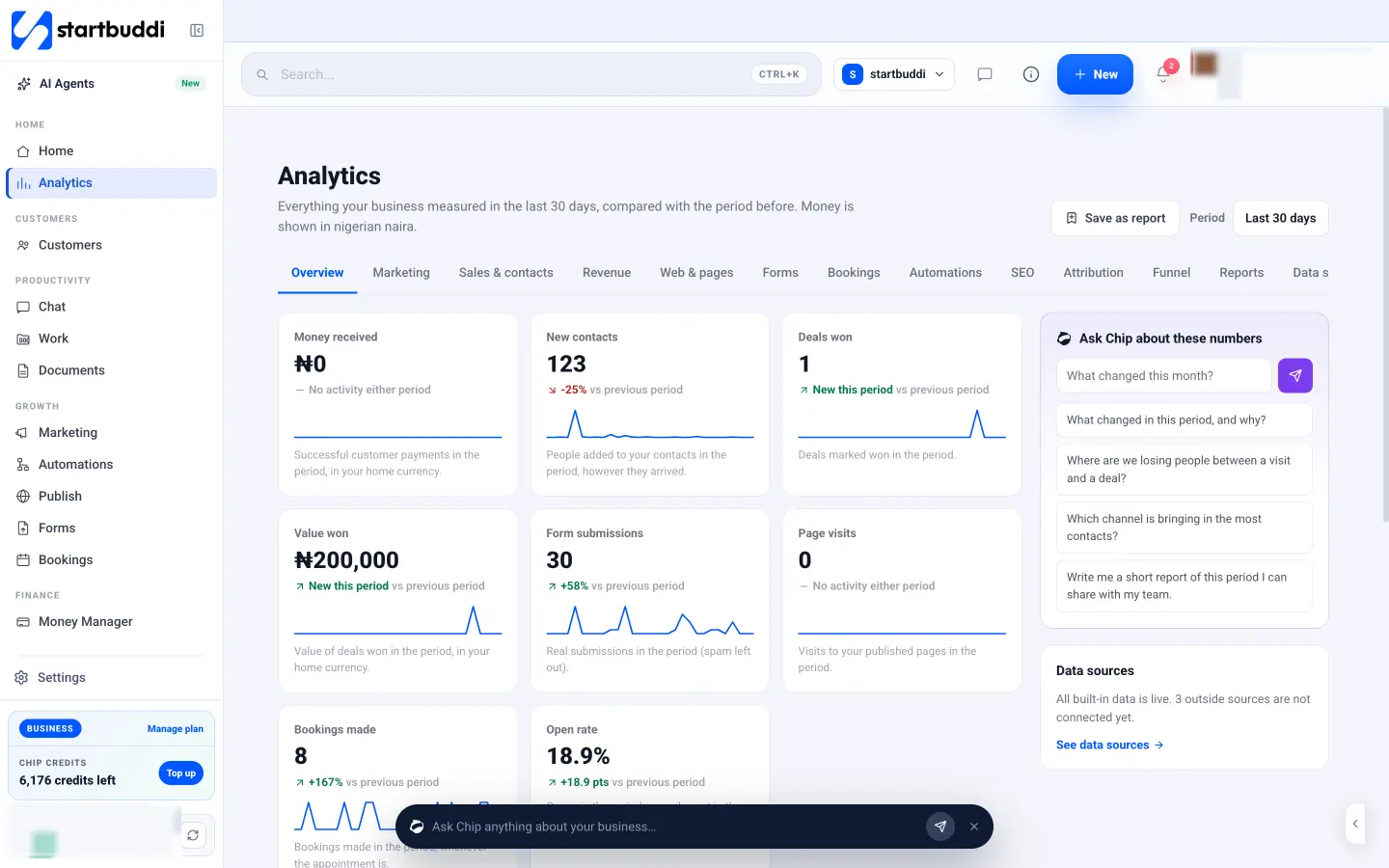
- Analytics has a “Came from” view showing where new contacts and won deals (with their value) came from, and a “Contact to customer” funnel broken down by source. Each period is compared with the one before.
- Marketing campaigns split revenue across channels by first touch, last touch or multi-touch, counted when a contact the campaign reached pays an invoice in startbuddi.
- Connect Google Analytics to see website visits and where visitors came from next to your startbuddi numbers.
- Ask Chip “Which channel is bringing in the most contacts?” and it answers from the numbers on screen.
Pricing: there’s a free plan. Marketing campaigns are on paid plans; see the pricing page.
Pros:
- Source, deal value and payment live on the same contact record, so revenue by source doesn’t need a spreadsheet.
- Covers channels website analytics miss, such as WhatsApp and bookings.
- No separate attribution subscription to manage.
Cons:
- No call tracking numbers, so phone leads need their source added by hand.
- No Google Ads reporting or ad-spend return figures yet.
- Campaign revenue attribution only counts invoices paid in startbuddi.
- Fewer models and less depth than a dedicated tool like Ruler.
Skip it if: you spend heavily on paid ads and need ad-level return on spend, or most leads come by phone.
3. CallRail
CallRail is call tracking and lead attribution software. It gives each marketing source its own phone number, so a call can be traced to the ad, search or listing that prompted it.
Best for: plumbers, clinics, law firms and other businesses where most leads phone in.
Key features: call and text tracking, call recording and transcription, and on the Complete plans, form tracking and multi-touch attribution reporting.
Pricing: CallRail’s pricing page (checked on 1 October 2026) shows Lead Tracking at $50 a month with five local numbers and 250 minutes. Lead Tracking Complete, at $95, adds form tracking (1,000 submissions) and multi-touch attribution reporting. There’s a 14-day trial with no card needed. Extra numbers and minutes cost more.
Pros:
- Attributes phone calls, which website tools miss.
- Call recordings help with training and disputes.
- Clear step up from calls to forms when you need it.
Cons:
- Multi-touch reporting needs a Complete plan.
- Usage charges add up with many numbers or long calls.
- Tracking numbers need to be used consistently across listings.
Skip it if: your customers message rather than call.
4. WhatConverts
WhatConverts tracks calls, forms and chats and puts every lead in one list with the source, campaign and keyword that brought it.
Best for: agencies and businesses that want one lead list with source data across calls and forms.
Key features: phone tracking with dynamic numbers, call recording, and on Plus and above, form and chat tracking with campaign and keyword reports. Elite adds customer journey tracking and multi-click attribution.
Pricing: WhatConverts’ pricing page (checked on 1 October 2026) shows Call Tracking at $30 a month, Plus at $60, Pro at $100 and Elite at $160, each with a $30 monthly usage credit.
Pros:
- Calls, forms and chats in one lead list.
- A cheap starting plan for call-only tracking.
- Agency plans for managing several clients.
Cons:
- Multi-click attribution is on the top plan.
- Usage charges for numbers and minutes.
- Another tool to keep in step with your CRM.
Skip it if: you only need website analytics.
5. Attributer
Attributer is a small tool that captures where each lead came from and writes it into hidden fields on your website forms, so the source reaches your CRM or email tool with the lead.
Best for: businesses happy with their current forms and CRM that just want the source on every lead.
Key features: source, medium, campaign and similar data added to form submissions, sent on to the CRM or email platform you already use.
Pricing: Attributer’s pricing page (checked on 1 October 2026) shows Lite at $29 a month for one site and up to 100 leads, Starter at $49 for 500 leads and Professional at $99 for 1,000 leads. There’s a 14-day trial.
Pros:
- Simple: it does one job.
- Works with the tools you already have.
- Priced for small lead volumes.
Cons:
- Only covers website forms, not calls or messages.
- You still need reports in your CRM to read the data.
- No attribution models of its own.
Skip it if: most leads arrive by phone or WhatsApp.
6. HubSpot Marketing Hub
HubSpot is a CRM and marketing platform used by companies of all sizes. Its paid Marketing Hub tiers include attribution reporting that ties contacts and deals back to marketing interactions.
Best for: growing teams already on HubSpot with a real marketing budget.
Key features: contact records, marketing email, forms and, from Professional, multi-touch revenue attribution.
Pricing: HubSpot’s Marketing Hub pricing (checked on 1 October 2026) shows Professional from $800 a month including three core seats, with a required one-time onboarding fee of $3,000. Multi-touch revenue attribution is listed on Professional and above. HubSpot also offers free tools.
Pros:
- Attribution, CRM and marketing in one system.
- Deep reporting once set up.
- Large library of help content.
Cons:
- Attribution starts at a price most small businesses can’t justify.
- The onboarding fee comes on top.
- Setup takes real time.
Skip it if: your monthly marketing spend is less than the subscription.
7. Ruler Analytics
Ruler Analytics is a dedicated marketing attribution platform that matches website visits, calls and forms to revenue in your CRM.
Best for: businesses spending heavily on ads that need channel-level return on spend.
Key features: first-party data collection, multi-touch attribution and, on Medium and above, data-driven attribution. Ruler’s pricing page (checked on 1 October 2026) lists first click, last click, time decay, linear, position based, data-driven and impression models.
Pricing: Small is £299 a month (or $400) for up to 10,000 monthly visits, Medium £499 and Large £999. Ruler describes these prices as indicative and scaled by traffic.
Pros:
- The widest choice of models here.
- Closes the loop from ad click to revenue.
- Onboarding and a customer success manager included.
Cons:
- The most expensive option on this list.
- More than most small businesses need.
- No free trial mentioned on the pricing page.
Skip it if: you spend less than a few thousand a month on marketing.
How to choose a customer attribution tool
Work through these questions in order.
- How do leads reach you? Website forms point to GA4 or Attributer. Calls point to CallRail or WhatConverts. A mix of WhatsApp, bookings, forms and referrals points to a tool that records source on the contact, such as startbuddi.
- Can you connect source to revenue? Attribution only matters when you can see which sources paid. That means the source must sit with the deal or invoice, not in a separate report.
- How much do you spend on marketing? If you spend little, a free tool and consistent UTM links are enough. Dedicated platforms make sense when ad spend is large.
- Will you keep it tidy? Every tool depends on consistent tagging and on someone asking “how did you hear about us?” when a lead calls.
Our guide to how CRMs handle multi-channel lead tracking explains the setup in more detail, and our list of lead generation tools covers where the leads come from in the first place.
Worked example: revenue by source for a small studio
These figures are illustrative.
An interior design studio in Lagos records the source on every new contact for one quarter, then checks which contacts became paying clients.
| Source | New contacts | Won clients | Revenue | Spend | Cost per won client |
|---|---|---|---|---|---|
| Instagram ads | 60 | 3 | ₦2,400,000 | ₦450,000 | ₦150,000 |
| Google Business Profile | 25 | 4 | ₦3,600,000 | ₦0 | ₦0 |
| Referrals | 12 | 5 | ₦5,500,000 | ₦0 | ₦0 |
| Website form | 18 | 2 | ₦1,400,000 | ₦0 | ₦0 |
| Total | 115 | 14 | ₦12,900,000 | ₦450,000 |
Instagram brought the most contacts but the fewest clients per contact (3 of 60, or 5%). Referrals brought the fewest contacts and the most revenue (5 of 12, about 42%). Without attribution, the studio would probably have spent more on ads. With it, it can spend that money on a referral reward instead.
For more on finding customers, see our guide to lead generation for small business.
See which channels bring paying customers
Record the source on every contact, follow each deal to the invoice, and compare channels in one view. Start free with startbuddi, or see how Analytics and campaigns work, and why it suits a CRM for service businesses.
Frequently asked questions
What is the best free customer attribution tool?
Google Analytics 4 is the best free tool for website attribution, with data-driven attribution included. It doesn't see phone calls or WhatsApp chats, so pair it with a CRM that records the source on each contact. startbuddi's free plan records a source on every contact and deal.
Do small businesses need multi-touch attribution?
Most don't at first. Recording the first source of every lead and checking which sources turn into paying customers answers the main question. Multi-touch models become useful when customer journeys are long and marketing spend is large.
How do I track where my customers come from?
Use tagged UTM links on ads and posts, record a source on every contact, and ask "how did you hear about us?" on forms and calls. Then compare sources against won deals and revenue each month. A CRM that stores source with the deal makes this quick.
What is the difference between first touch and last touch attribution?
First touch gives all the credit to the channel that first brought the customer in. Last touch gives it to the final channel before they bought or enquired. Comparing both shows which channels find new people and which ones close.
Can attribution tools track WhatsApp and phone leads?
Call tracking tools such as CallRail and WhatConverts attribute phone calls using tracking numbers. WhatsApp leads are usually tracked by recording WhatsApp as the source on the contact, which tools like startbuddi do when the conversation starts in their inbox.
How much should a small business spend on attribution software?
As little as possible until your marketing spend justifies more. Free tools cover most small businesses. A paid platform makes sense when it could change how you spend a budget many times its own price.
Olabimpe Salami is the email and outreach specialist at startbuddi. Olabimpe writes about the messages that bring customers in and back: email, WhatsApp and SMS campaigns, follow-ups, and turning enquiries into paying clients.
Runs email and outreach at startbuddi