Best Lead Generation Tools for Small Businesses in 2026: Options Compared
Lead generation tools for small businesses compared: nine options for forms, prospect data, outreach and local search, with prices, free plans and limits.


The best lead generation tools for small businesses depend on where your customers come from. For most service businesses, our top three picks are: startbuddi for forms, booking pages, website chat and prospecting in one place with the CRM; HubSpot for free forms feeding a free CRM; and Google Business Profile for free local enquiries.
startbuddi is our product. We have tried to be fair about where other tools are the better choice, and we list startbuddi’s limits as plainly as everyone else’s.
Key takeaways
- There are four kinds of lead generation tool: capture (forms, pop-ups, booking pages), prospect data (finding people to contact), outreach (sending and following up) and local search.
- Most small service businesses need capture and local search first. Prospect databases mainly pay off for business-to-business sellers.
- Free plans are good enough to start: HubSpot, Typeform, Calendly, Hunter, Apollo, Google Business Profile and startbuddi all have one.
- Leads only become customers if they land in one contact list and someone follows up fast. Pick tools that feed your CRM.
- Prices below were checked on vendors’ own pricing pages on 1 October 2026 and change often.
Lead generation tools for small businesses compared
| Tool | Best for | Starting price (USD) | Free plan | Standout feature |
|---|---|---|---|---|
| startbuddi | Service businesses wanting capture, chat, prospecting and CRM together | See pricing | Yes | Chip finds prospects with reasons and sources |
| HubSpot | Free forms and landing pages feeding a CRM | $20 per seat a month (Starter, list price) | Yes | Large free CRM and marketing toolkit |
| Google Business Profile | Local businesses that meet customers in person | Free | Yes (free) | Shows you on Google Search and Maps |
| Apollo.io | Business-to-business sellers building prospect lists | $49 per user a month (Basic, annual) | Yes | Large B2B contact database with sequences |
| Hunter | Finding and checking work email addresses | $34 a month (Starter, annual) | Yes (50 credits a month) | Email finder and verifier |
| LinkedIn Sales Navigator | Selling to named roles at companies | $119.99 a month (Core, monthly) | No (trial may be offered) | Advanced search over LinkedIn members |
| Typeform | Conversational forms and quizzes | $28 a month (Basic, annual) | Yes | One-question-at-a-time forms |
| OptinMonster | Website pop-ups and email capture | $9 a month (Basic, annual) | No | Exit-intent and targeted pop-ups |
| Calendly | Letting leads book a call straight away | $10 per seat a month (Standard, annual) | Yes | Booking page with routing forms on paid plans |
If you want the strategy before the software, our lead generation guide for small business explains how many leads you need and where to find them. This page is about which tools to buy.
How we chose these lead generation tools
We looked for tools a two-to-twenty person service business can set up without a marketing team. Each tool had to meet at least four of these:
- A free plan or a low entry price. Most of our readers start with no budget for software.
- Gets a real lead into a contact list: a name with a way to reach them, not just a page view.
- Works outside the US. Many readers sell in Nigeria, Kenya, Ghana or the UK, where some US-only tools don’t help.
- Connects to a CRM, either built in or through an integration.
- Can be set up in an afternoon.
We didn’t test these tools hands-on for this article. Features and prices come from each vendor’s own pricing and product pages, checked on 1 October 2026.
1. startbuddi
startbuddi is an all-in-one workspace for service businesses. For lead generation, it puts forms, landing pages, booking pages, website chat and Chip’s prospecting in the same place as the contact list, inbox, pipeline and invoices.
Best for: service businesses (agencies, consultants, cleaners, clinics, IT firms) that want leads to land in the same system they use to follow up and get paid.
Key features:
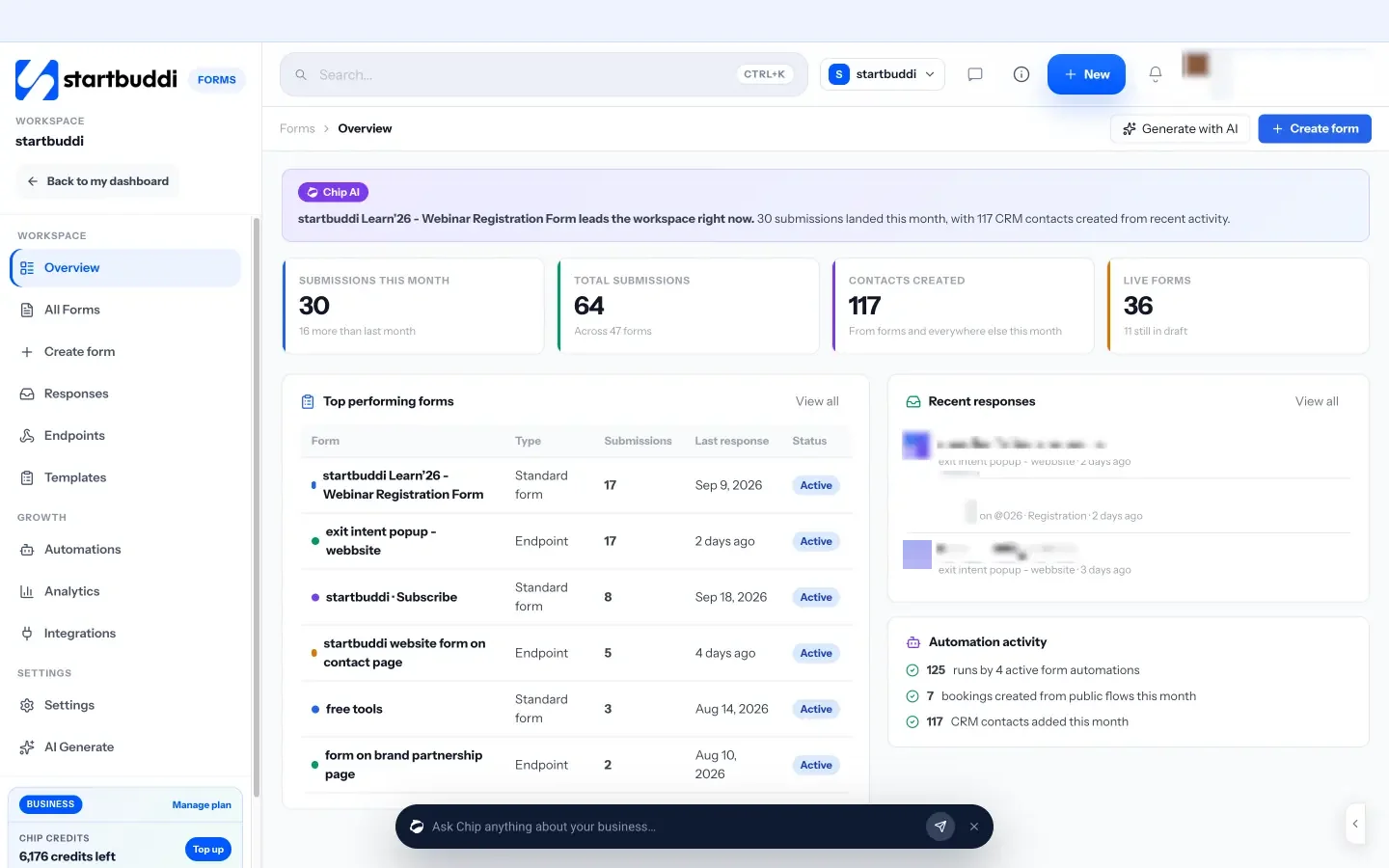
- Forms that create contacts in the CRM, plus landing pages and booking pages built in Publish and Bookings.
- Website chat and an inbox that brings email, WhatsApp, Instagram, Messenger and website chat conversations into one list.
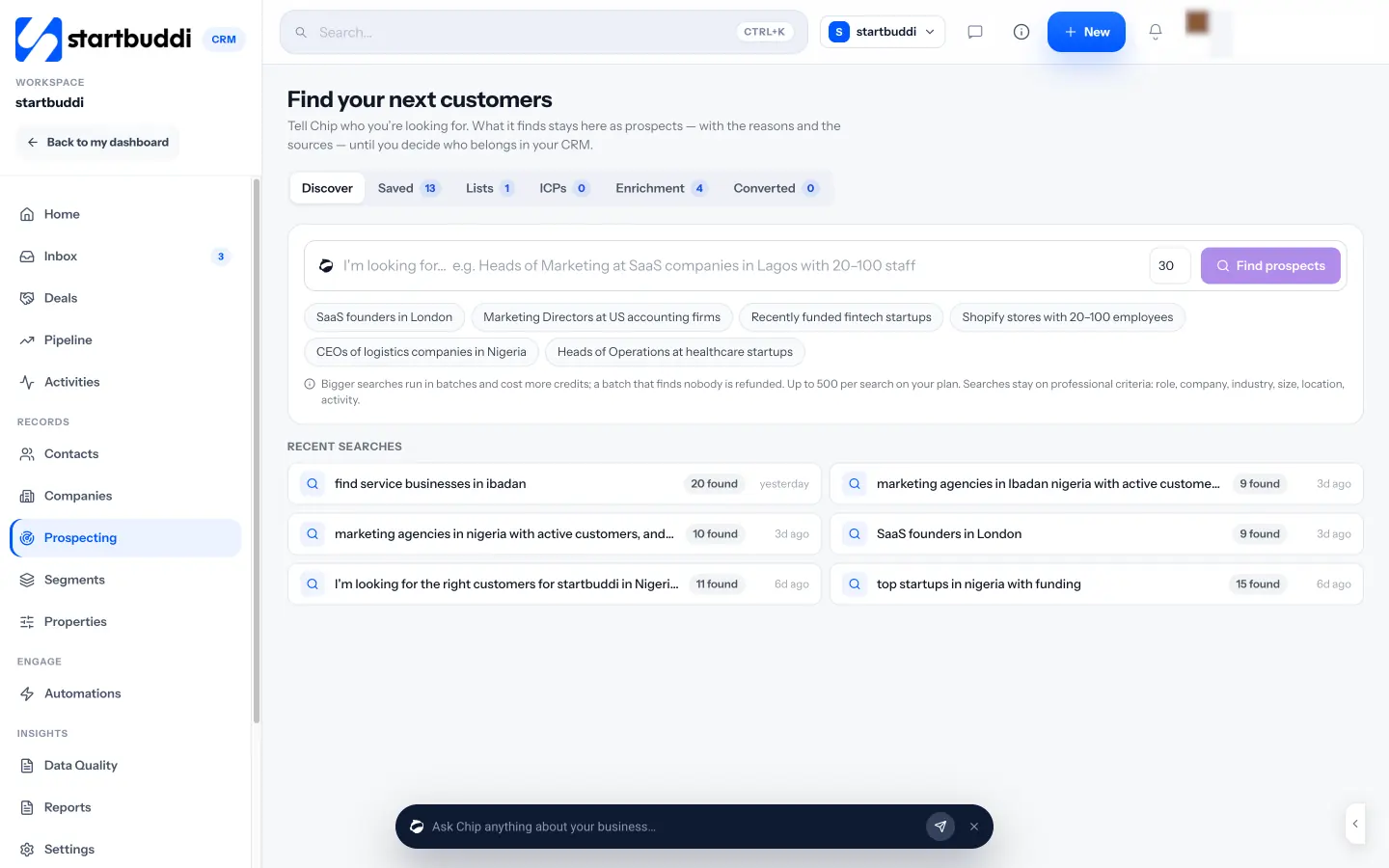
- Prospecting: tell Chip who you’re looking for (for example “marketing agencies in Ibadan”) and it finds companies and people on the web, with the reasons and sources, before you choose who goes into your contacts.
- Pipelines and deal stages to track each lead to a sale.
Pricing: a free plan is available. See pricing for what each plan includes.
Pros:
- Capture, follow-up and payment in one place, so leads don’t get lost between tools.
- Prospecting explains why each prospect was picked and only looks up professional details, never personal emails or phones.
- Takes payments through Paystack (card, bank transfer, USSD, mobile money) and Stripe, which suits Nigerian and international clients.
Cons:
- The Free plan includes one live form, and email campaigns and other Marketing features need a paid plan.
- Prospecting and revealing work emails use Chip credits. It is a search tool, not a database of hundreds of millions of contacts like Apollo.
- Hosted forms always show a small “Powered by startbuddi” line.
- No LinkedIn inbox yet.
Who should skip it: a sales team that does high-volume cold email to thousands of B2B contacts a week. A dedicated database and sequencing tool such as Apollo will suit them better.
2. HubSpot
HubSpot is a CRM and marketing platform with a large free tier. Its free tools include a form builder and landing page builder that feed contacts straight into the free CRM.
Best for: small businesses that want free, well-documented capture tools and expect to grow into a larger marketing platform.
Key features: a free form builder and landing page builder (with HubSpot branding) that feed the free CRM; paid tiers add more marketing contacts, credits and seats.
Pricing: HubSpot’s Marketing Hub pricing page (checked on 1 October 2026) lists a free plan for up to two users, Starter at $20 per seat a month at list price (a discount was showing when we checked), and Professional with three core seats and a one-time $3,000 onboarding fee.
Pros: generous free plan; huge library of guides; strong integrations.
Cons: costs rise steeply from Starter to Professional; marketing contacts are capped by plan; free tools carry HubSpot branding.
Who should skip it: businesses that want bookings, invoices and payments in the same tool. Our startbuddi vs HubSpot comparison goes into the differences.
3. Google Business Profile
Google Business Profile is Google’s free listing for local businesses. It is the profile people see when they search for “plumber near me” or look you up on Maps.
Best for: salons, clinics, trades, cleaners and any business that serves customers in person.
Key features: business hours, phone number, website and location; photos and videos; reviews you can reply to; links to your booking page.
Pricing: Google’s Business Profile help page (checked on 1 October 2026) says you can manage how your business shows on Maps and Search at no charge.
Pros: free; high intent (people searching are often ready to buy); reviews build trust.
Cons: only for businesses with in-person contact with customers, so online-only businesses can’t use it; you don’t control the ranking; leads arrive as calls and clicks, not tidy contact records.
Who should skip it: fully online businesses such as remote agencies or online coaches.
4. Apollo.io
Apollo is a business-to-business sales platform with a large database of companies and contacts, plus email sequences and a dialer on higher plans.
Best for: B2B service firms (IT, consulting, agencies) that sell to named roles and want to build prospect lists quickly.
Key features: search by job title, industry, company size and location; email and phone data; sequences; CRM integrations.
Pricing: Apollo has a free plan. Its own published comparisons (checked on 1 October 2026) give Basic at $49 per user a month and Professional at $79 per user a month, billed annually, with credits that limit how many contacts you can reveal. See Apollo pricing.
Pros: fast list building; strong filters; free plan for light use.
Cons: credit limits run out quickly on the free plan; check how well its data covers your own market before you pay; cold email at volume needs care with deliverability and the law.
Who should skip it: consumer-facing businesses such as salons or tutors, whose customers aren’t in a B2B database.
5. Hunter
Hunter finds and verifies work email addresses for a company domain, and now includes a simple outreach tool.
Best for: small teams doing a modest amount of personal cold outreach to companies they’ve already chosen.
Key features: Domain Search and Email Finder; Email Verifier; sequences from connected email accounts.
Pricing: Hunter’s pricing page (checked on 1 October 2026) lists a free plan with 50 credits a month, and Starter at $49 a month (or $34 a month billed annually) with 2,000 credits a month. One credit finds one email address.
Pros: simple; cheap for low volumes; verification helps protect your sending reputation.
Cons: you still have to decide who to contact; works only where a company has a website domain and public email patterns.
Who should skip it: anyone who doesn’t do outbound emailing at all.
6. LinkedIn Sales Navigator
Sales Navigator is LinkedIn’s paid sales tool. It adds advanced search filters, lead lists and extra messaging to your LinkedIn account.
Best for: consultants and B2B agencies whose buyers are active on LinkedIn.
Key features: advanced lead and account search; saved lists with alerts; InMail messages to people outside your network.
Pricing: LinkedIn’s compare plans page (checked on 1 October 2026) lists Core at US$119.99 a month, or US$1,079.88 a year, and Advanced at US$159.99 a month. Free trials are offered to some members.
Pros: job titles that members keep up to date themselves; good for warm, personal outreach.
Cons: expensive for a small business; you still need somewhere to keep and follow up the leads you find; messages compete with a lot of other sales outreach.
Who should skip it: local businesses selling to consumers.
7. Typeform
Typeform builds forms that show one question at a time. Many people find that friendlier than a long page of fields, which can help more of them finish.
Best for: quote request forms, quizzes and applications where you need several answers before you can call someone back.
Key features: conversational forms; logic that skips irrelevant questions; integrations with CRMs and email tools.
Pricing: Typeform’s pricing page (checked on 1 October 2026) shows a free plan, and Basic at $39 a month or $28 a month billed annually, with 100 responses a month.
Pros: polished, mobile-friendly forms; good for qualifying leads with a few questions.
Cons: response limits are low on the cheaper plans; you need another tool to store and follow up leads.
Who should skip it: businesses that only need a short contact form. Our list of the best form builders covers simpler and cheaper options.
8. OptinMonster
OptinMonster adds pop-ups, slide-ins and banners to your website to collect email addresses, often in exchange for a lead magnet such as a checklist or price guide.
Best for: businesses with steady website traffic that want to turn more visitors into email subscribers.
Key features: exit-intent pop-ups that appear as a visitor is about to leave; targeting by page; integrations with email marketing tools.
Pricing: OptinMonster’s pricing page (checked on 1 October 2026) lists Basic at $9 a month billed annually ($108 a year) for one site and 2,500 monthly impressions. There is no free plan, but there is a 14-day money-back guarantee. The prices shown were a first-year introductory offer.
Pros: effective way to capture visitors who would otherwise leave; many templates.
Cons: only useful if you already have traffic; badly timed pop-ups annoy visitors; renewal prices are higher than the first year.
Who should skip it: businesses with a few hundred website visits a month. Fix your traffic and your contact form first.
9. Calendly
Calendly lets someone pick a time on your calendar from a link, so an interested lead can book a call while they’re still interested.
Best for: consultants, coaches and agencies where the first step is a discovery call.
Key features: a customisable booking page; calendar connection; routing forms on paid plans that ask qualifying questions before someone books.
Pricing: Calendly’s pricing page (checked on 1 October 2026) lists a free plan with one event type and one calendar connection, and Standard at $10 per seat a month billed annually.
Pros: removes the back-and-forth of agreeing a time; very easy for clients.
Cons: the free plan has one event type; it isn’t a CRM, so lead details live in Calendly unless you connect another tool.
Who should skip it: businesses that don’t sell through calls or appointments.
How to choose lead generation tools for your small business
Start from how your best customers found you, then fill the gap. A simple order that works for most service businesses:
- Make sure every lead lands in one place. A CRM or contact list comes before any capture tool. Our best CRM software list compares the options.
- Capture the people already looking. A Google Business Profile if you serve customers in person, and a short contact or quote form on your website.
- Make booking easy. A booking link in your email signature, WhatsApp and Instagram bio.
- Add outbound only if you sell to businesses. Prospect data and outreach tools such as Apollo, Hunter or Sales Navigator.
- Add pop-ups last, once you have traffic worth converting.
Which tools fit which kind of business
The table below is a starting point, not a rule. It matches each type of service business with the tools that usually bring its leads.
| Your business | Where leads usually come from | Tools to start with |
|---|---|---|
| Salon, barber or spa | Local search, Instagram, walk-ins, referrals | Google Business Profile, a booking page, a link in your Instagram bio |
| Cleaning, plumbing or other trades | Local search, word of mouth, quote requests | Google Business Profile, a short quote request form, WhatsApp |
| Consultant or coach | Referrals, LinkedIn, talks and webinars | A booking link for discovery calls, a lead magnet with a sign-up form, Sales Navigator if you sell to companies |
| Agency or IT services firm | Referrals, outbound to companies, partnerships | A CRM with prospecting, Apollo or Hunter for email addresses, a contact form on every service page |
| Clinic or tutor | Local search, parents’ or patients’ referrals | Google Business Profile, a booking page, a simple enquiry form |
Two examples show how this plays out. A cleaning company in Lekki gets most enquiries from people searching on Google and messaging on WhatsApp, so a complete Google Business Profile and a quote form that asks for the number of rooms will do more than any prospect database. An IT support firm in Manchester selling to small offices gets little from search, so it builds a list of nearby firms with 10 to 50 staff and writes to the office manager at each one. Same goal, very different tools.
Watch the total cost as you add tools. Five separate subscriptions at $20 to $50 each add up, and every extra tool is another place a lead can get stuck. If you want capture, follow-up and invoicing in one system, see how startbuddi works as a lead capture form builder, or read more about Chip’s prospecting and forms.
Start collecting leads in one place
Build a form, a booking page and website chat that all feed one contact list, then let Chip help you find new prospects. Start free with startbuddi, no card needed.
Frequently asked questions
What are the best free lead generation tools for small businesses?
Google Business Profile is free and works well for local businesses. HubSpot, Typeform, Calendly, Hunter, Apollo and startbuddi all have free plans with limits on contacts, responses or credits. A free contact form plus a free booking link covers most early needs.
Do small businesses need lead generation software?
Not at the very start. A clear contact form, a booking link and a list of past customers to ask for referrals will bring the first clients. Software helps once leads arrive from several places and you start losing track of who to follow up.
What is the difference between B2B and B2C lead generation tools?
B2B tools such as Apollo, Hunter and LinkedIn Sales Navigator help you find and contact people at companies. B2C tools such as forms, pop-ups, booking pages and local listings help members of the public find you and get in touch. Many service businesses need a little of both.
How much should a small business spend on lead generation tools?
Start with free plans and pay only when you hit a limit that is costing you leads. Many small businesses run well on one or two paid tools. Measure where your paying customers come from, and spend more on that channel rather than adding new tools.
Is cold emailing legal?
It depends on where you and the recipient are. Many countries allow business-to-business cold email with an opt-out, while emailing individual consumers usually needs consent; the UK, the EU and Nigeria all have data protection rules that apply. Check the rules for your market before sending at volume.
Which lead generation tool is best for a service business?
For most service businesses, the best starting point is a tool that captures enquiries and keeps them in the same place you follow up: a form, a booking page and website chat feeding one contact list. Add prospect data only if you sell to other businesses.
Olabimpe Salami is the email and outreach specialist at startbuddi. Olabimpe writes about the messages that bring customers in and back: email, WhatsApp and SMS campaigns, follow-ups, and turning enquiries into paying clients.
Runs email and outreach at startbuddi