Best CRM for Law Firms: 12 Options for Small Firms in 2026
The best CRM for law firms covers intake, conflict checks and trust accounting. 12 legal CRMs and practice tools for small firms, checked October 2026.


Photo: Vitaly Gariev / Unsplash
The best CRM for law firms that want intake and marketing automation is Lawmatics. Small US firms that want CRM, matters and trust accounting in one subscription should look at MyCase or PracticePanther. UK firms should start with LEAP. General CRMs like HubSpot or startbuddi only suit intake and follow-up, not legal practice management. Prices were checked on 14 October 2026.
startbuddi is our product. It’s on this list for one narrow use, and we’re clear below about everything a law firm needs that it doesn’t do.
Key takeaways
- “Legal CRM” usually means client intake: capturing enquiries, booking consultations, sending engagement letters and following up. Practice management covers matters, documents, time, billing and trust accounting. Most small firms need both, and several vendors sell them together.
- Conflict checks and trust accounting are where general CRMs fall down. Don’t run a client account from a tool that wasn’t built for it.
- Price per user is only part of it. Ask about onboarding, data migration and payment processing too.
- Rules differ by country. A tool built for US IOLTA accounts may not fit the SRA Accounts Rules in England and Wales, and vice versa.
Legal CRMs and practice management tools compared
| Tool | Best for | Starting price (checked 14 Oct 2026) | Free plan | Standout feature |
|---|---|---|---|---|
| Lawmatics | Firms focused on intake and marketing | Pricing on request | No | Intake automation with conflict checking |
| MyCase | Small US firms wanting one system | $50 per user/month billed annually ($60 monthly) | No (10-day trial) | Legal CRM and intake on Pro |
| PracticePanther | Solo and small firms wanting low entry price | $49 per user/month billed annually ($59 monthly) | No (free trial) | Trust and operating accounting |
| CosmoLex | Firms wanting legal accounting built in | $49 per user/month (Launch) | No (free trial) | Trust ledgers and general ledger in one |
| Lawcus | Very small firms on a budget | $39 per user/month billed annually (Essential) | No (trial) | Low-cost case management with trust accounting |
| Smokeball | Small firms wanting document automation | Pricing on request | No | Client portal, eSignature and eFiling on Boost |
| Law Ruler | Intake-heavy firms with phone teams | Pricing on request | No | Built-in softphone and click to call |
| LEAP | UK small and mid-size firms | Pricing on request (per user) | No | Built for UK legal practice |
| Actionstep | Midsize firms needing legal accounting | Pricing on request (per user plus implementation) | No | Client intake, conflict check and accounting |
| HubSpot | Firms that win work through content and ads | Free; Starter from $20 per seat/month | Yes | Free CRM and forms |
| Zoho CRM | Budget firms happy to customise | $14 per user/month billed yearly | Yes (3 users) | Custom modules |
| startbuddi | Small firms and legal consultancies in Africa wanting intake on WhatsApp | See pricing | Yes | WhatsApp intake, bookings and e-signatures together |
Prices are in US dollars before tax, as each vendor shows them.
What the best CRM for law firms must do that a normal CRM doesn’t
A sales CRM tracks leads and deals. A law firm also has professional duties that the software has to support.
- Conflict checks. Before you take on a client, you search every party against current and past clients and matters. The SRA’s Code of Conduct for Solicitors says “You do not act if there is an own interest conflict or a significant risk of such a conflict.” A legal tool searches matters and related parties, not just contact names.
- Matter management. Each client can have several matters, each with its own parties, deadlines, documents, time and bills.
- Trust or client account accounting. Client money must be kept separate and reconciled. The SRA’s Accounts Rules “set out our requirements for when firms (including sole practices) authorised by us receive or deal with money belonging to clients”. In the US, state bars set IOLTA trust account rules. You need ledgers per client and per matter, not just invoices.
- Engagement letters and e-signature, so the retainer is signed before work starts.
- Intake forms that ask practice-specific questions: the other party, the court, key dates.
- Confidentiality and access control, so only the right people see a matter.
- Consultation booking, often with a paid first meeting.
If the tool can’t do the first three, it’s an intake or marketing tool, not your system of record.
A good intake flow, step by step
Whatever you buy, map your intake before the demo, so you can watch the vendor run it:
- Enquiry arrives by web form, phone, email or WhatsApp, and lands as a lead with its source.
- Conflict check against existing clients, matters and opposing parties, recorded with who ran it and when.
- Consultation booked, with a fee taken up front if you charge one.
- Engagement letter generated from the intake answers and sent for e-signature.
- Matter opened from the signed letter, without retyping names and dates.
- Money on account recorded in the client ledger, not just as an invoice.
- Lost enquiries tagged with a reason, so you can see which practice areas or referrers convert.
Steps 2, 5 and 6 are the ones general CRMs can’t do.
What it costs a three-lawyer firm
An illustrative year for three users on annual billing, using the published prices below:
| Option | Calculation | Year |
|---|---|---|
| Lawcus Growth | 3 × $59 × 12 | $2,124 |
| PracticePanther Essential | 3 × $69 × 12 | $2,484 |
| MyCase Pro (includes legal CRM) | 3 × $100 × 12 | $3,600 |
The figures exclude payment processing, add-ons, onboarding and tax. A firm that adds a separate intake CRM on top should add that quote to the total.
How we chose
We looked at tools a firm of one to about 20 lawyers could run, and judged them on:
- Intake: forms, lead tracking, consultation booking, follow-up.
- Practice duties: conflict checks, matters, trust accounting.
- Where it works: US, UK and other jurisdictions.
- Published pricing and what each tier includes.
- Honest limits.
Every fact comes from the vendor’s own pricing or product page, checked on 14 October 2026. We didn’t run hands-on tests and don’t quote review scores. Clio, the best-known name in this space, isn’t scored here because its website refused our requests on the day we checked, and we won’t quote old prices. If you’re shortlisting, check Clio directly.
1. Lawmatics
Lawmatics is a legal CRM and intake platform with marketing automation, with optional time and billing.
Best for: firms where winning and converting enquiries is the main problem, such as personal injury, family or estate planning.
Key features
- Intake workflow automation, a client portal and “advanced conflict checking” on higher tiers.
- Email drip campaigns and marketing automation.
- Round-robin scheduling and custom reporting.
- Time and billing as an add-on: “Time tracking, data insights, client management, payment processing, and invoicing. Applicable to any plan.”
Pricing: Lawmatics’ pricing page offers “tailor-made pricing plans”, so pricing is on request.
Pros
- Built specifically for legal intake.
- Conflict checking at the point of intake.
Cons
- No published prices.
- You’ll still need practice management unless you add its time and billing.
Skip it if your work comes from a few referrers and intake isn’t the bottleneck.
2. MyCase
MyCase is practice management software for small firms, with a legal CRM on its Pro tier.
Best for: small US firms that want intake, matters, billing and trust accounting from one vendor.
Key features
- Case and contact management, time entry, invoicing and trust accounting on every plan.
- “Client Intake Forms and Legal CRM” and “2-Way Texting, Chat, and Call Log” on Pro.
- Unlimited e-signature and document generation on Pro.
Pricing: MyCase’s pricing page lists Basic at $50 per user a month billed annually ($60 monthly), Pro at $100 ($120) and Advanced at $130 ($150), with a free trial and no card needed.
Pros
- Trust accounting from the cheapest plan.
- CRM and practice management in one login on Pro.
Cons
- The CRM features need Pro, at twice the Basic price.
- US-focused.
Skip it if you’re outside the US.
3. PracticePanther
PracticePanther is legal practice management software for solo and small firms.
Best for: solo practitioners and small US firms watching costs.
Key features
- Intake forms you can request from clients, plus contacts and matters.
- Trust and operating accounting, and eSignature.
- Internal chat and real-time notifications.
Pricing: PracticePanther’s pricing page lists Solo at $49 per user a month billed annually ($59 monthly), Essential at $69 ($79) and Business at $89 ($99), with a free trial.
Pros
- Low entry price with trust accounting.
- “Create and request unlimited intake forms from your clients for free.”
Cons
- Lighter marketing automation than Lawmatics.
Skip it if you need heavy marketing campaigns.
4. CosmoLex
CosmoLex combines practice management with legal accounting, and adds client intake and marketing.
Best for: firms that want trust accounting and the general ledger in the same system as matters.
Key features
- “Trust accounting & ledgers” with “built-in trust compliance and reconciliation reporting”.
- Logic-based intake forms, drip campaigns and contact management.
- Convert leads to matters.
Pricing: CosmoLex’s pricing page lists Launch at $49, Core at $99 and Pro at $129 per user a month, with $120 a year saved per user on yearly billing and a free trial.
Pros
- Accounting depth few rivals match.
Cons
- Check which tier includes full accounting before you buy.
Skip it if you already use separate accounting software you’re happy with.
5. Lawcus
Lawcus is case management and billing software for small firms.
Best for: very small firms that want trust accounting and case management at a low price.
Key features
- Core case management, billing and invoicing.
- Trust accounting.
Pricing: Lawcus’ pricing page lists Essential at $39 per user a month billed annually ($49 monthly), Growth at $59 and Elite at $79.
Pros
- One of the lowest prices for a legal system.
Cons
- Fewer intake and marketing tools than dedicated legal CRMs.
Skip it if lead conversion is your main need.
6. Smokeball
Smokeball is practice management software with document automation, billing and trust accounting.
Best for: small firms that produce lots of documents and want them automated.
Key features
- Bill plan: invoicing, time and expense tracking, “trust accounting & reporting”.
- Boost plan adds client and matter management, a client portal, eSignature, eFiling and Microsoft 365 integration.
Pricing: Smokeball’s pricing page lists four plans with “Get pricing” buttons. Pricing on request.
Pros
- Onboarding included on every plan, according to its page.
Cons
- No published prices.
Skip it if you want to compare costs before talking to sales.
7. Law Ruler
Law Ruler is a legal CRM focused on intake, marketing and calling.
Best for: intake-heavy firms with a team on the phones.
Key features
- Smart intake forms and document automation that fills forms from intake data.
- A built-in softphone with click to call and local presence dialling.
- Marketing automation and analytics.
Pricing: Law Ruler’s pricing page lists Pro, Premium and Enterprise plans, monthly or annual. Pro and Premium “allow for up to three users”, Enterprise needs at least ten, and “we do not offer a free version”. Prices aren’t shown; pricing on request.
Pros
- Calling built in, which suits volume intake.
Cons
- No published prices; no free version.
Skip it if you rarely take calls from new enquiries.
8. LEAP
LEAP is legal practice management software for small to mid-sized firms, with a UK edition.
Best for: small and mid-size firms in England and Wales.
Key features
- Client and matter management, document automation with legal forms and precedents.
- Time recording, billing and legal accounting.
Pricing: LEAP’s pricing page says it “offers a single monthly subscription cost per user”, depending on user count, migration, implementation and training. It says over 2,600 UK firms use it. Pricing on request.
Pros
- Built for UK practice rather than adapted from US software.
Cons
- No published prices.
Skip it if you want published prices before a demo.
9. Actionstep
Actionstep is practice management and legal accounting software for midsize firms.
Best for: growing firms that need intake, conflict checks and full legal accounting.
Key features
- Client intake, conflict check and CRM.
- Trust accounting, client accounting, general ledger and profit and loss.
Pricing: Actionstep’s pricing page says modules are “priced per user plus implementation fees” and asks you to request pricing.
Pros
- Very complete.
Cons
- Aimed at midsize firms; implementation costs extra.
Skip it if you’re a sole practitioner.
10. HubSpot
HubSpot is a general CRM platform with free tools.
Best for: firms that win clients through their website, content and ads, alongside a practice management system.
Key features
- Free CRM, forms, email and a meeting link.
- Marketing automation on paid hubs.
Pricing: HubSpot’s product catalogue lists free tools for up to 1,000 contacts and Smart CRM Starter from $20 per seat a month.
Pros
- Strong marketing.
Cons
- No conflict checks, matters or trust accounting.
Skip it if you want one system for the practice. See startbuddi vs HubSpot.
11. Zoho CRM
Zoho CRM is a customisable general CRM with a free edition.
Best for: budget-conscious firms that will build intake modules themselves.
Key features
- Custom modules and workflows on paid plans.
- Web forms and email integration.
Pricing: Zoho CRM’s pricing page lists a free edition for 3 users and Standard at $14 per user a month billed yearly.
Pros
- Cheap and flexible.
Cons
- No legal features out of the box.
Skip it if you want something legal-ready. See startbuddi vs Zoho.
12. startbuddi
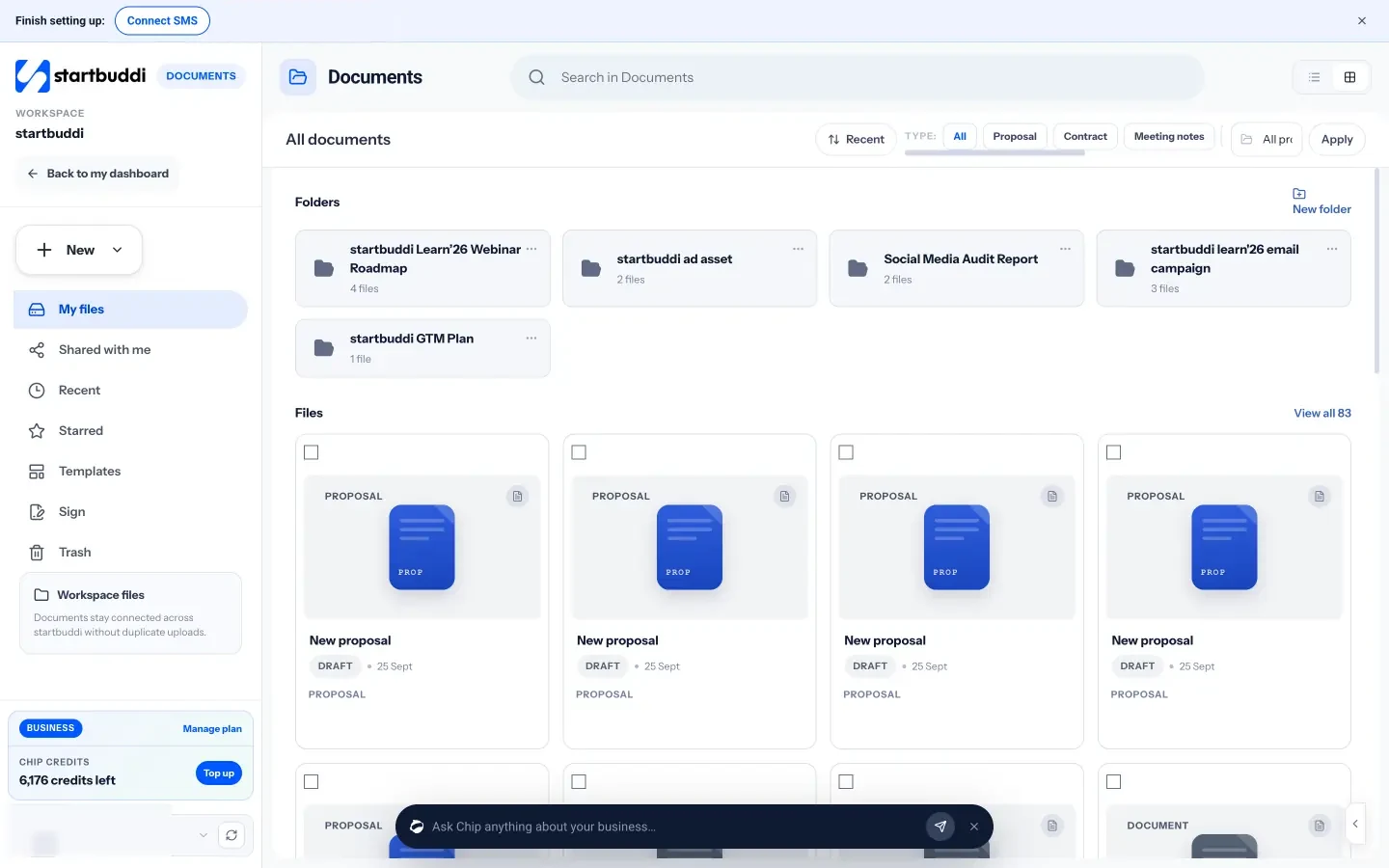
startbuddi is an all-in-one workspace for small service businesses: contacts, a shared inbox with WhatsApp, bookings with deposits, documents with e-signatures, time tracking, invoices and payments, with Chip, an AI assistant.
Best for: a small firm or solo practitioner in Nigeria or elsewhere in Africa who gets enquiries on WhatsApp and wants intake, paid consultations and engagement letters in one place, alongside separate practice management and accounts. It also suits legal-adjacent consultancies, such as compliance or company secretarial services.
Key features
- Enquiries from WhatsApp, email, website chat and forms land in one inbox and on the contact record.
- Booking pages for consultations, with a deposit taken at booking through Paystack or Stripe.
- Engagement letters and contracts sent for e-signature from Documents; time tracking and invoices.
- A client portal from Starter, where clients see only what you share.
Pricing: free plan available; see pricing.
Pros
- Fits firms whose clients message on WhatsApp and pay by transfer.
- Intake to signed engagement letter without switching tools.
Cons
- Not legal practice management. No conflict checks, no matter management with court deadlines, no trust or client account accounting.
- No legal billing formats, and it isn’t accounting software.
Skip it if you hold client money or need conflict searches; use a legal system from this list. Our page on CRM for consultants shows the setup for advisory work, and time tracking for consultants covers billable hours.
How to choose the best CRM for small law firms
| Your firm | Start with |
|---|---|
| Solo or small US firm, one system | MyCase, PracticePanther or Lawcus |
| Intake and marketing are the bottleneck | Lawmatics or Law Ruler, plus practice management |
| Trust accounting matters most | CosmoLex or Actionstep |
| England and Wales | LEAP, and check any tool against the SRA Accounts Rules |
| Content and ads bring your clients | HubSpot alongside practice management |
| Small firm in Africa, WhatsApp enquiries | startbuddi for intake, with separate client account records |
Before you sign, ask each vendor:
- How does the conflict check search past matters and related parties?
- Does trust accounting produce the reconciliations your regulator expects?
- Can intake forms create a matter without retyping?
- What does data migration cost, and who does it?
- Where is the data hosted, and who can see each matter?
For general CRMs beyond law, see the best CRM software and the best free CRM. Firms in Nigeria can compare local options in the best CRM software in Nigeria, and if you’re new to CRMs, start with what a CRM does.
Try startbuddi
If you run a small practice or a legal-adjacent consultancy and want enquiries, consultations, engagement letters and invoices in one place, start free with no card. Keep your client account and conflict records in a legal system. Pricing shows what each plan includes.
Frequently asked questions
What is the best CRM for law firms?
For intake and marketing, Lawmatics is the strongest legal CRM. For a small US firm that wants CRM, matters and trust accounting in one place, MyCase Pro or PracticePanther are good choices. UK firms should look at LEAP, which is built for practice in England and Wales.
What is the best CRM for small law firms?
Small firms usually do best with practice management that includes intake, such as MyCase, PracticePanther or Lawcus, because one system costs less than two. PracticePanther starts at $49 per user a month billed annually and Lawcus at $39. Add a dedicated intake CRM like Lawmatics only if lead conversion is a real problem.
What is the difference between a legal CRM and practice management software?
A legal CRM handles the work before a client signs: enquiries, intake forms, consultations and follow-up. Practice management handles the work after: matters, documents, deadlines, time, billing and trust accounting. Many vendors now sell both, but check which tier includes which.
Can a law firm use a general CRM like HubSpot or Zoho?
Yes, for marketing and intake, but not as the system of record. General CRMs don't run conflict checks against matters or keep trust ledgers. Use them alongside practice management software, or choose a legal tool that does both.
Do legal CRMs include conflict checks?
Some do. Lawmatics lists conflict checking and advanced conflict checking, and Actionstep includes a conflict check with client intake. Ask each vendor how the search works across past matters and related parties, because a name search alone isn't enough.
How much does legal CRM software cost?
Published prices on this list start at $39 per user a month billed annually for Lawcus, $49 for PracticePanther and CosmoLex, and $50 for MyCase Basic. Lawmatics, Smokeball, Law Ruler, LEAP and Actionstep quote on request. Budget for onboarding and data migration on top.
Tiwalade Joanna Okedara-Kalu is the founder, CEO and CTO of startbuddi, the business system that brings clients, bookings, invoices, projects, marketing and the Chip AI assistant into one place. Tiwalade builds software around how service businesses really work day to day, and writes about client management, getting paid on time and why small businesses outgrow the tools they start with.
Founded startbuddi and leads its product and engineering