
Social media marketing for small business: plan, post and win customers
A four-part guide to social media marketing for small business: choose the right platforms, plan content people want, schedule without stress, and turn followers into customers.

This guide explains social media marketing for small business owners who are short on time: how to choose the right platforms, what to post, how to plan and schedule a month of content in an afternoon, and how to turn followers into paying customers. It is for founders, freelancers, shops and service businesses that post when they remember, feel they should be doing more, and want a system that fits into a real working week.
Each chapter starts with the business thinking, with examples, templates and the mistakes to avoid, then shows how to do it in startbuddi. By the end you will have one or two chosen platforms, three to five content themes, a four-week posting plan, a scheduling routine and a short list of numbers that tell you whether it is working.
Social media marketing for small business: goals and platforms
- Start with a goal, not a platform
- Choose platforms where your customers already are
- One platform done well beats five done badly
- Set up your profiles so they sell for you
- Know your customer before you post
- Be realistic about time and money
- Write a one-page social media plan
- Business account, personal brand or both?
- How long before you see results?
- Examples: what social media marketing looks like for real businesses
- Look after your accounts
- Be open about ads and partnerships
- Common mistakes at this stage
- Doing this in startbuddi: connect your accounts and see where you stand
Social media marketing means using platforms such as Instagram, Facebook, LinkedIn, YouTube, X and Pinterest to get your business in front of the right people, build trust with them and give them an easy next step. For a small business it is rarely about going viral. It is about being findable, looking active and credible when someone checks you out, and staying in mind until they are ready to buy.
Here is the short answer to "how do I do social media marketing for a small business?": pick one or two platforms where your customers already spend time, decide what you want social media to achieve, post useful and recognisable content on a rhythm you can keep, reply to everyone, and point people to one clear next step such as booking, messaging or buying. The rest of this guide shows how.
Start with a goal, not a platform
The most common mistake is opening an account on every platform because "we should be there". Before you choose platforms, decide what social media is for in your business. Most small businesses have one main goal:
| Goal | What it looks like | What to measure |
|---|---|---|
| Get enquiries | People message you, book or fill in a form after seeing a post | Messages, bookings and form responses from social |
| Sell products | People tap through to your shop and buy | Link clicks and orders |
| Build trust | Prospects check your profile before hiring you and see recent work and reviews | Profile visits, followers who are real prospects |
| Keep customers coming back | Regulars see new stock, dates and offers | Repeat bookings and orders |
| Recruit or build a reputation | Candidates and partners see what you stand for | Applications, partnership conversations |
Write your goal in one sentence, for example "Get six new wedding enquiries a month from Instagram". Every decision in the next three chapters, from what to post to which numbers to watch, follows from that sentence.
Choose platforms where your customers already are
Social media is enormous. DataReportal's Digital 2026 mid-year update counted 5.79 billion active social media user identities in April 2026, equal to about 70% of the world's population (We Are Social and Meltwater, Digital 2026 mid-year update). But you do not need the whole world. You need the few thousand people near you, or in your niche, who might buy.
Usage differs a lot by platform and by age. In the United States, Pew Research Center found in 2025 that 84% of adults use YouTube, 71% use Facebook and half use Instagram, while eight in ten adults aged 18 to 29 use Instagram compared with 19% of those aged 65 and over (Pew Research Center, Americans' social media use 2025). The mix is different in other countries, so ask your own customers where they spend time.
As a rough guide for small businesses:
- Instagram suits anything visual: food, beauty, fashion, interiors, events, fitness, crafts, photography.
- Facebook is strong for local businesses, community groups and older customers, and many people still check a business's Facebook Page for hours and reviews.
- LinkedIn suits B2B services, consultants, agencies, recruiters and anyone selling to other businesses.
- YouTube suits businesses that can teach: how-to videos, product demos, tutorials. Videos keep being found for years.
- Pinterest suits ideas people plan ahead: weddings, recipes, home décor, gifts, travel.
- X suits businesses whose customers follow news and conversation closely, such as tech and media.
- TikTok suits businesses that can make short, personality-led videos and reach younger audiences.
One platform done well beats five done badly
A small business with limited time should start with one main platform and, at most, one supporting platform. For example, a bakery might run Instagram as its main channel and keep its Facebook Page up to date with the same posts. A consultant might focus on LinkedIn and post the occasional long video on YouTube. Only add a third platform once the first two run on a routine without stress.
Set up your profiles so they sell for you
People check your profile before they follow, message or buy. Treat it like a shop window. Every profile should have:
- A recognisable name and photo: your logo, or your face if you are the brand.
- A bio that says what you do, for whom and where, for example "Wedding and event flowers in Accra. Book a free consultation below."
- One link that goes to the most useful next step: a booking page, a shop, a WhatsApp chat or a link in bio page with a few options.
- Contact details and hours, where the platform allows.
- Recent posts that show your work, your prices or your personality, so the profile looks alive.
Know your customer before you post
Good social media content comes from knowing what your customers care about, worry about and ask about. Spend 30 minutes writing down:
- The five questions customers ask most often before they buy.
- The three things they worry about (price, quality, reliability, time).
- The words they use to describe their problem, not the words you use.
- What they are doing when they scroll: commuting, on a lunch break, relaxing at night.
This list becomes the raw material for chapter 2.
Be realistic about time and money
Social media looks free, but it costs time. A realistic starting budget for a small business is two to three hours a week: one session to plan and create a week or a month of posts, and short daily check-ins to reply to comments and messages. If you pay for help, a freelancer or tool costs money instead of time. Either way, write down what you are spending so you can judge the return later.
Paid advertising is a separate decision. Boosting posts or running ads can speed things up once you know which content works, but it is not required to start. Organic posting first, then small paid tests on your best-performing posts, is a sensible order.
Write a one-page social media plan
You do not need a long strategy document. One page, written once and reviewed every quarter, keeps you focused. Copy this template and fill it in:
Goal: Get six new wedding enquiries a month from Instagram.
Who we are talking to: Couples in Accra planning a wedding in the next 12 months, mostly aged 25 to 35.
Main platform: Instagram. Supporting: Facebook Page (same posts) and Pinterest (finished work).
Content pillars: Teach (planning tips), Show (real weddings), Prove (couples' reviews), People (our team), Offer (packages and dates).
Rhythm: Three posts a week plus Stories on Mondays and Fridays.
Next step in every post: "Send us your date" via the link in bio or a direct message.
Time budget: One batching afternoon a month, 10 minutes a day for replies.
What we measure: Enquiries from Instagram, profile visits and saves.
Pin it next to your desk. When you are unsure whether to post something, check it against the page.
Business account, personal brand or both?
For many small businesses, the owner is the brand. A solo coach, consultant or designer often gets more reach from a personal profile than a business page, especially on LinkedIn, because people follow people. A shop, restaurant or company with staff usually needs a business account so it outlives any one person and can be managed by a team. Many owners do both: the business account for offers, hours and portfolio, and a personal profile for opinions, stories and lessons. If you do, keep the business account's name, photo and link consistent, and make sure more than one trusted person can access it.
How long before you see results?
Be patient. Most small businesses need two to three months of consistent posting before social media starts producing regular enquiries, and longer before it becomes a reliable source of customers. Early signs that it is working are more profile visits, more saves and shares, and people mentioning a post when they contact you. If after three months of steady posting nothing has changed, revisit your platform choice, your content pillars and the next step in your posts before you give up.
Examples: what social media marketing looks like for real businesses
- A nail technician in Leeds posts close-up photos of each week's best sets on Instagram, with the price and the time it took, and a Story each Monday with that week's free slots. Most bookings come from people who saw a set they liked.
- A solar installer in Abuja posts short videos of finished installations on Facebook with the system size and what it powers, and answers the same five questions about batteries in a monthly post. Enquiries arrive as Facebook and WhatsApp messages.
- An HR consultant in Nairobi writes two short LinkedIn posts a week on questions managers ask her, and shares one downloadable template a month. Clients often mention a specific post in their first call.
- A furniture maker in Vancouver pins photos of each finished piece on Pinterest and posts the making process on YouTube. Viewers from both platforms end up on his order form.
Look after your accounts
Your social accounts are business assets, so protect them like one. Turn on two-factor authentication on every account. Make sure at least two trusted people have admin access to business pages, so you are not locked out if one person leaves or loses a phone. Use the platform's own roles to give helpers limited access instead of sharing passwords. Keep the email address on each account one that the business controls, not a former employee's inbox. And write down which accounts you own, in a list you can find in a hurry if one is ever hacked.
Be open about ads and partnerships
If you pay or gift products to someone to post about you, or post on behalf of a client, the audience should be able to tell it is an advert or a partnership. Most countries' advertising rules expect clear labelling, and platforms have their own branded content tools for it. Run competitions with written terms, and follow each platform's promotion rules. This is general information, not legal advice; check the advertising regulator where you trade.
Common mistakes at this stage
- Being everywhere and nowhere: six half-empty profiles look worse than one active one.
- Chasing followers instead of customers: 300 local followers who might hire you beat 10,000 strangers who never will.
- No next step: a beautiful profile with no link, no contact button and no prices wastes attention.
- Personal and business mixed together: keep a separate business account so you can use business features and hand access to a helper later.
Doing this in startbuddi: connect your accounts and see where you stand
Social media in startbuddi lives in the Social Media Manager, under Marketing. The Marketing module is on the Starter plan and above, and every paid plan starts with a 30-day trial.
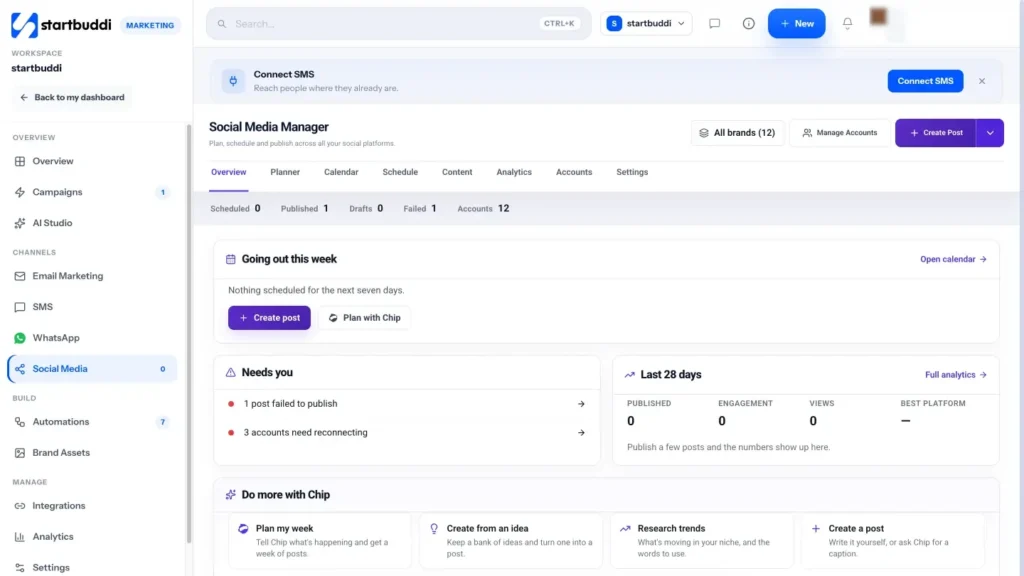
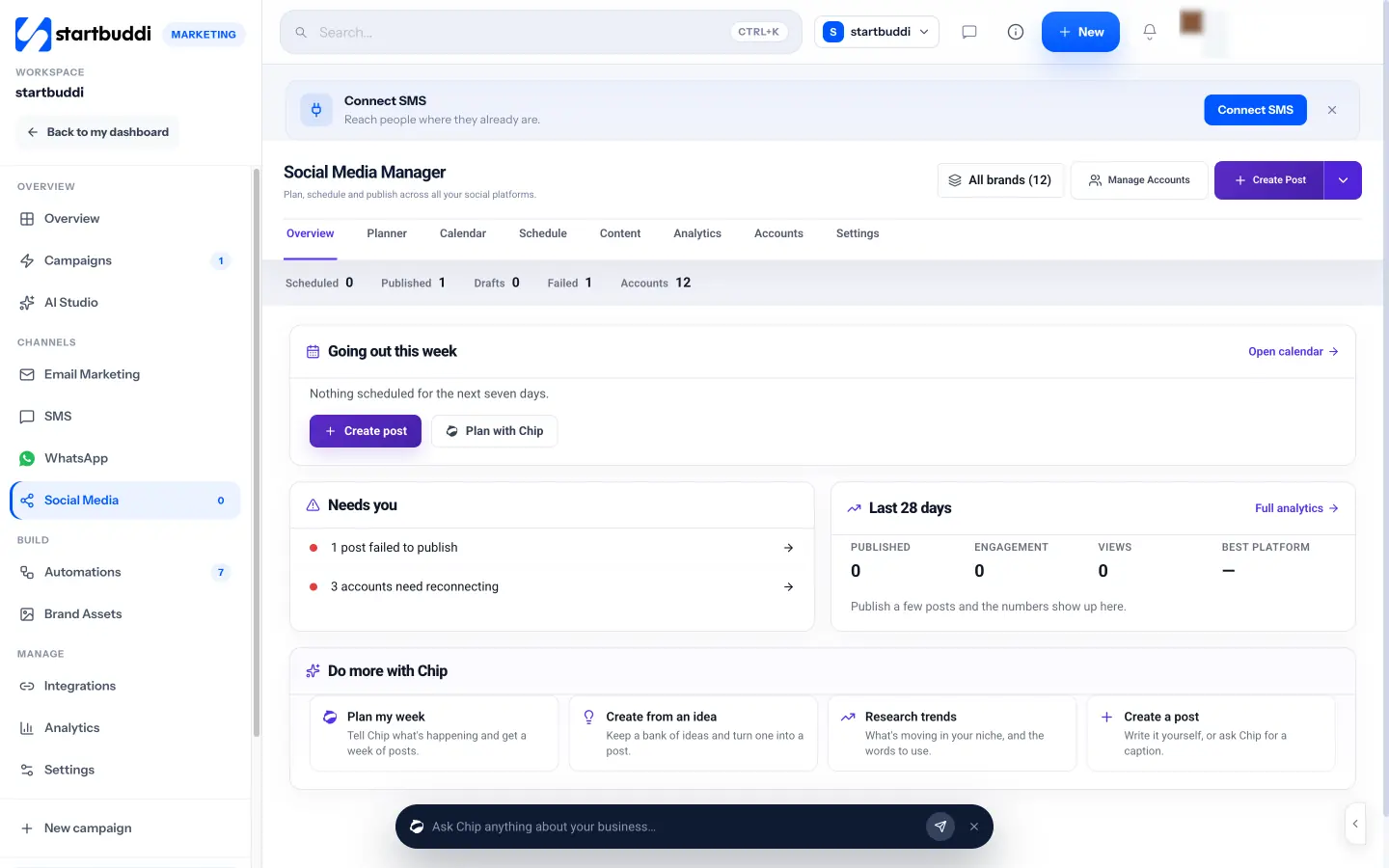
1. Open the Social Media Manager. From the sidebar go to Marketing, then Social Media. The Overview tab shows what is going out this week, anything that needs you (such as a failed post or an account to reconnect), your last 28 days of results and shortcuts to plan with Chip.
2. Connect the platforms you chose. Open the Accounts tab, or click Connect account. You can connect Facebook Pages, Instagram business or creator accounts, LinkedIn (your profile and the company pages you manage), X, YouTube and Pinterest. Facebook and Instagram go through Meta's login and a picker for the Pages and Instagram accounts to add. TikTok shows as coming soon and cannot be connected yet.
3. Check your plan's account limit. Starter allows 5 connected social accounts and 100 posts a month, Growth allows 15 accounts and unlimited posts, and Scale has no account limit. If you manage several brands or clients, go to Settings, then Brands & folders, to group the accounts that belong to each one, so you can post, filter and report on them together.
4. Set up your link in bio. If your profile needs one link with several options, create a link in bio page in Publish. It can hold your booking link, shop, WhatsApp button and latest offer, and it is covered in chapter 4. The social media product page gives a full tour of what the Social Media Manager does.
With your goal written down and your accounts connected, the next chapter is about what to actually post.
Plan content people want: pillars, formats and a calendar
- Content pillars: decide what you talk about
- Formats: match the post to the platform
- How often to post
- Write captions that get a response
- A four-week content plan you can copy
- Batch create to save hours
- Repurpose, do not reinvent
- Twenty post ideas when you are stuck
- Content ideas by type of business
- Good photos and videos on a phone
- Caption templates you can fill in
- Share your customers' content, with permission
- Using AI for content, sensibly
- Use trends carefully
- Make your posts recognisable
- Common content mistakes
- Doing this in startbuddi: plan a week with Chip
"What should I post?" is the question that stops most small business owners. The answer is not to wait for inspiration. It is to decide a handful of themes once, match them to formats that suit your platform, and fill a simple calendar. This chapter shows you how, with a four-week plan you can copy.
Content pillars: decide what you talk about
Content pillars are the three to five themes you post about again and again. They make planning faster and help followers understand what you are about. Good pillars come straight from your customer notes in chapter 1. A typical small business set looks like this:
| Pillar | What it is | Example for a home cleaning company |
|---|---|---|
| Teach | Tips and answers to common questions | "How to get limescale off a shower screen in 5 minutes" |
| Show | Your work, results and process | Before and after of a move-out clean |
| Prove | Reviews, testimonials, numbers | A customer's review with their permission |
| People | The team, the story, behind the scenes | Meet Joy, who has been with us four years |
| Offer | What you sell and how to buy | "Two slots left for Friday deep cleans" |
A healthy mix for most businesses is mostly teach, show and prove, with offers roughly one post in four or five. People follow businesses that are useful or interesting, and they buy from the ones they trust.
Formats: match the post to the platform
Each platform rewards different formats. You do not need to master them all. Pick two or three that suit your business and your skills.
- Short vertical videos (Reels, Shorts, TikTok): quick tips, transformations, a day in the job. Show the result in the first seconds.
- Carousels (several images in one post): step-by-step guides, "5 mistakes" lists, before and after sequences.
- Single photos: finished work, products, team moments. Natural light and a clean background do most of the work.
- Stories: time-sensitive updates such as today's slots, polls and behind-the-scenes clips. They disappear, so they suit casual content.
- Text posts: especially on LinkedIn and X, where a clear opinion or a short story can travel well.
- Longer videos (YouTube): tutorials and explanations people search for.
- Pins: a tall image with a short title linking to a page with more detail.
How often to post
There is no magic number. The right frequency is the highest one you can keep up with good quality for six months. For most small businesses that means three to five posts a week on the main platform, plus Stories when there is something to say. Consistency is what builds momentum: followers start to expect you, and the platforms see a steady account.
Write captions that get a response
The first line of a caption decides whether people read the rest. Some patterns that work:
- Open with a question or a number: "Is your boiler making this noise?" or "3 signs your roof needs checking".
- Say the benefit before the detail: "Save 20 minutes every morning with this wardrobe trick."
- Write like you speak: short sentences, plain words, your real voice.
- End with one action: "Book via the link in bio", "Send us a message with your postcode", or "Save this for later".
On hashtags, fewer and more specific tends to work better than long lists. Use a few that describe the topic and your location, such as #LagosWeddings or #ManchesterPlumber, rather than thirty generic ones.
A four-week content plan you can copy
Here is a simple plan for three posts a week plus Stories. Swap in your own topics.
| Week | Monday (teach) | Wednesday (show or prove) | Friday (people or offer) |
|---|---|---|---|
| 1 | Answer your most asked question | A recent before and after | Introduce yourself and why you started |
| 2 | Three mistakes customers make | A customer review, shared with permission | This month's offer or free slots |
| 3 | A how-to in a carousel or short video | Behind the scenes of a job or order | Meet a team member or a supplier |
| 4 | A seasonal tip | A result with numbers (time saved, money saved) | A clear call to book or buy before month end |
Our free content and social media calendar template gives you a ready-made grid for planning this out.
Batch create to save hours
The biggest time saver in social media is batching: making a week or a month of content in one sitting instead of scrambling every day. A batching session for a small business might look like this:
- 30 minutes: pick the topics for the month from your pillars and question list.
- 60 minutes: take all the photos and short videos you need in one go, or gather them from your camera roll.
- 45 minutes: write every caption.
- 15 minutes: schedule everything (chapter 3).
Two and a half hours once a month, plus a few minutes a day replying, is a sustainable rhythm for most owners.
Repurpose, do not reinvent
One good piece of content can become several posts. A 60-second video tip can be a Reel, a YouTube Short, a LinkedIn post with the transcript, a carousel of the key steps and a line in your next email. A customer review can be a graphic, a Story and a quote on your website. Ask "where else can this go?" every time you make something.
Twenty post ideas when you are stuck
- The question you were asked most this week, answered.
- A before and after.
- Your process in five steps.
- A mistake customers make and how to avoid it.
- A tool or material you swear by, and why.
- Meet the team member behind a job.
- A customer review with a photo of the work.
- What a typical day looks like.
- Your prices explained, and what is included.
- A myth in your industry, busted.
- A seasonal checklist.
- A quick poll in Stories about what to post next.
- A local partner you recommend.
- Your "why": the reason you started the business.
- A milestone: your 100th client, a year in business.
- Something that went wrong and what you learned.
- A frequently asked question in video form.
- A sneak peek of something new.
- A thank-you to your customers.
- A clear offer with a deadline.
Content ideas by type of business
| Business | Posts that tend to work |
|---|---|
| Restaurant or café | Dishes being made, specials of the day, the team, events, reviews |
| Salon or barber | Transformations, styling tips, free slots, product recommendations |
| Trades (plumber, electrician, builder) | Before and after, "what this noise means" explainers, seasonal checklists, safety tips |
| Consultant or coach | Lessons from client work, frameworks, opinions on industry news, client wins |
| Online shop | New arrivals, how to use or style products, customer photos, restocks |
| Fitness or wellness | Short routines, client progress (with permission), class timetables, myths |
| Agency or freelancer | Case studies, process, tools, team culture, industry commentary |
Good photos and videos on a phone
You do not need a professional camera. A recent phone and a few habits get you most of the way:
- Use natural light. Face a window, avoid harsh overhead lights and do not shoot into the sun.
- Clean the lens before every session. It sounds obvious and makes a visible difference.
- Keep backgrounds simple. Clear the counter, use a plain wall or a consistent spot in your workspace.
- Shoot vertically for Reels, Stories and Shorts, and hold the phone steady or rest it on something.
- Show the result early in videos. The first two seconds decide whether people keep watching.
- Add captions to videos, because many people watch with the sound off.
Caption templates you can fill in
- The quick tip: "[Problem] in [time]? Try this: [step 1], [step 2], [step 3]. Save this for next time."
- The before and after: "Before: [situation]. After: [result]. [How long it took or what we did]. Want the same? [Next step]."
- The question: "[Question your customers ask]? Here is the honest answer: [answer in two lines]. Any other questions? Ask below."
- The story: "Last week a customer [situation]. Here is what we did: [short story]. The lesson: [one line]."
- The offer: "[What] for [who], [price or saving], until [date]. [How to book or buy]."
Share your customers' content, with permission
Photos and videos from happy customers are some of the most persuasive content you can post, because they come from someone other than you. Ask customers to tag you, then ask permission before you repost, and credit them. A simple message works: "We love this photo of your new kitchen! Would you be happy for us to share it on our page, with credit to you?" Keep a record of the yes.
Using AI for content, sensibly
AI tools can draft captions, suggest post ideas and turn a long piece into short ones in seconds. Use them to get past the blank page, then edit. Check every fact, price and date, cut generic phrases, and add something only you know: a name, a detail from a real job, your opinion. Followers can tell when every post sounds like it came from the same machine, and it is your personality that makes a small business worth following.
Use trends carefully
Trends can bring attention, but chasing every viral sound or meme can make a business look like it is trying too hard. Join a trend when it fits your pillars and your voice. Seasonal moments are usually safer and more useful for small businesses: holidays, local events, weather changes, back to school, wedding season, tax deadlines.
Make your posts recognisable
Followers scroll fast. A consistent look helps them recognise your posts before they read a word. Choose two or three brand colours, one or two fonts for any text on images, and a consistent style of photo (bright and airy, dark and moody, or clean on white). Use the same layout for recurring posts, such as a "Tip Tuesday" template. Consistency does not mean every post looks the same; it means every post looks like it came from you.
Common content mistakes
- All selling, no helping: if every post is an advert, people scroll past.
- Stock photos everywhere: real photos of your work and team build more trust, even if they are less polished.
- No faces: people connect with people. Show who is behind the business.
- Posting without a caption action: tell people what to do next.
- Copying big brands: they have budgets and goals that do not match yours.
Doing this in startbuddi: plan a week with Chip
The Planner tab in startbuddi helps you move from a blank page to a set of drafts quickly, while you stay in control of what goes out.
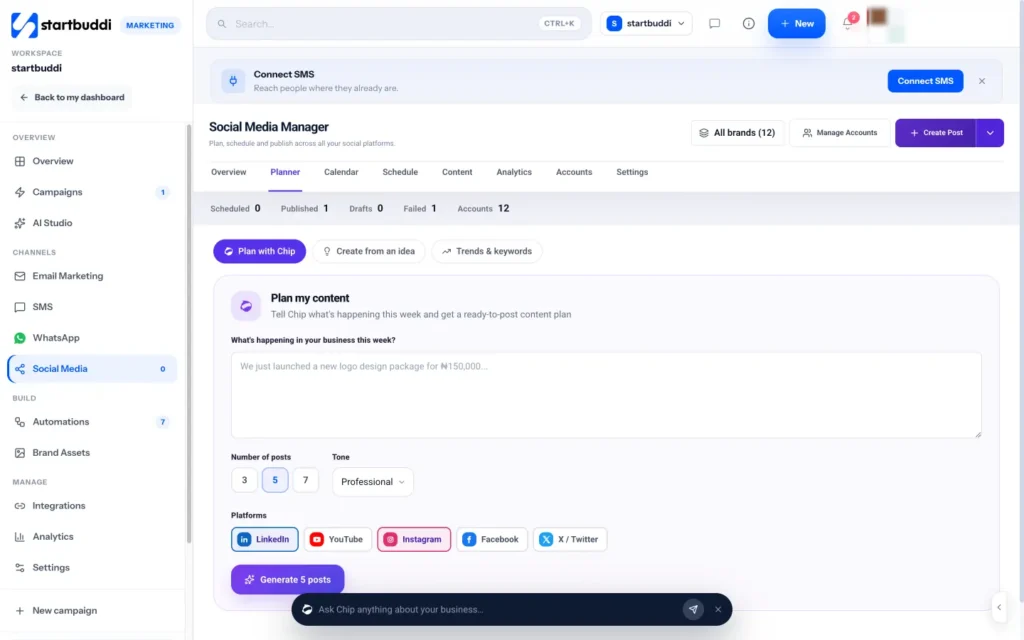
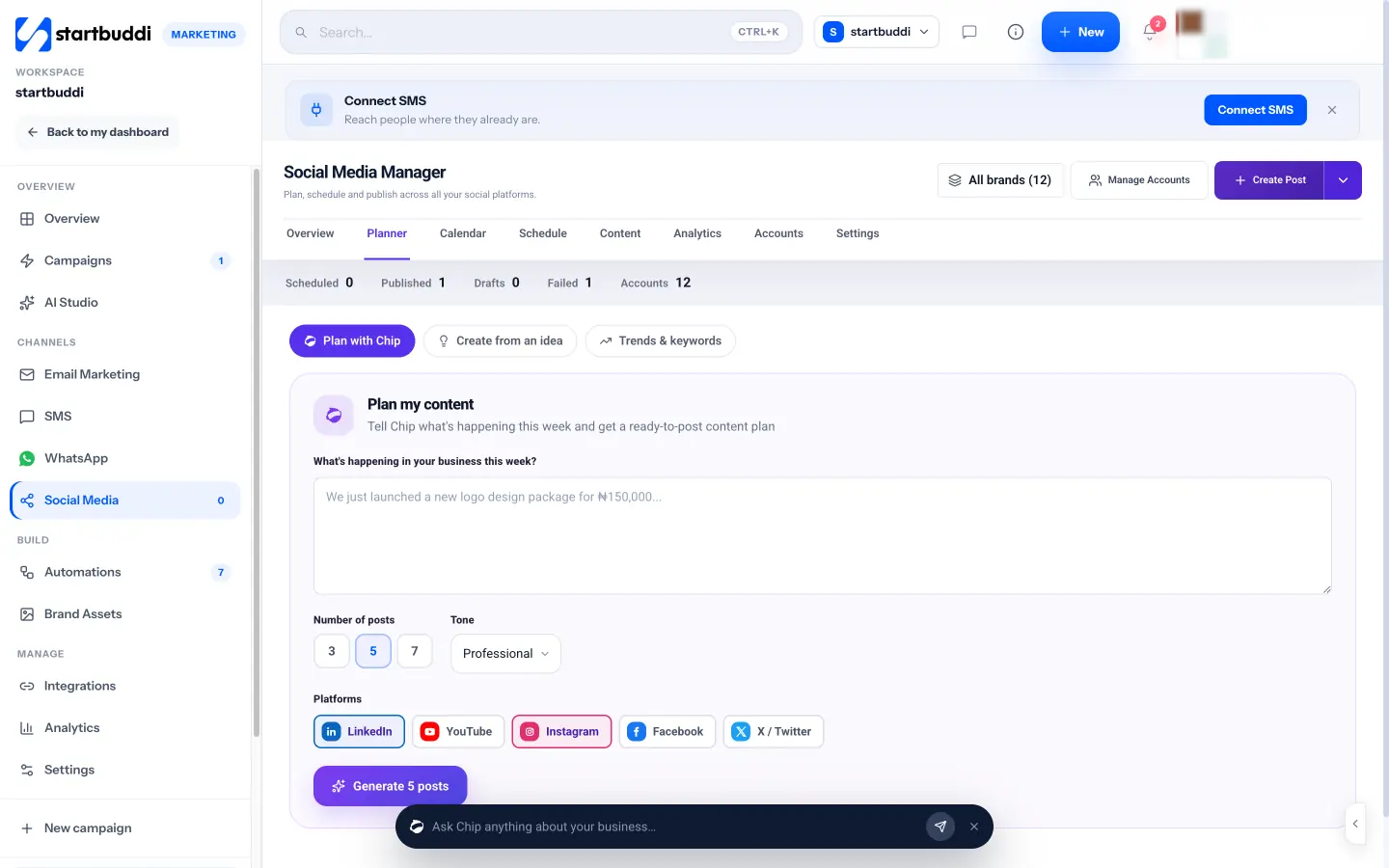
1. Plan your week with Chip. In the Social Media Manager, open Planner, then Plan with Chip. Describe what is happening in your business this week (a launch, an offer, an event), choose Number of posts (3, 5 or 7), a Tone (Professional, Friendly, Casual or Educational) and your Platforms, then click Generate. Each draft is tagged as a Tip, Story, Promo or Question, which maps neatly onto your content pillars.
2. Review and approve. Read each draft, edit it so it sounds like you and adds a real detail only you know, and click Approve on the ones you want. Then Schedule approved puts them on your calendar. Chip drafts use Chip credits, and nothing is posted until you approve and schedule it.
3. Keep an idea bank. Under Create from an idea, capture post ideas as they come (a customer question, a team suggestion, a trend you noticed) with an angle and reference links. View them as a list or a board, and click Turn into post when you are ready. Suggest from performance asks Chip for ideas based on your past results.
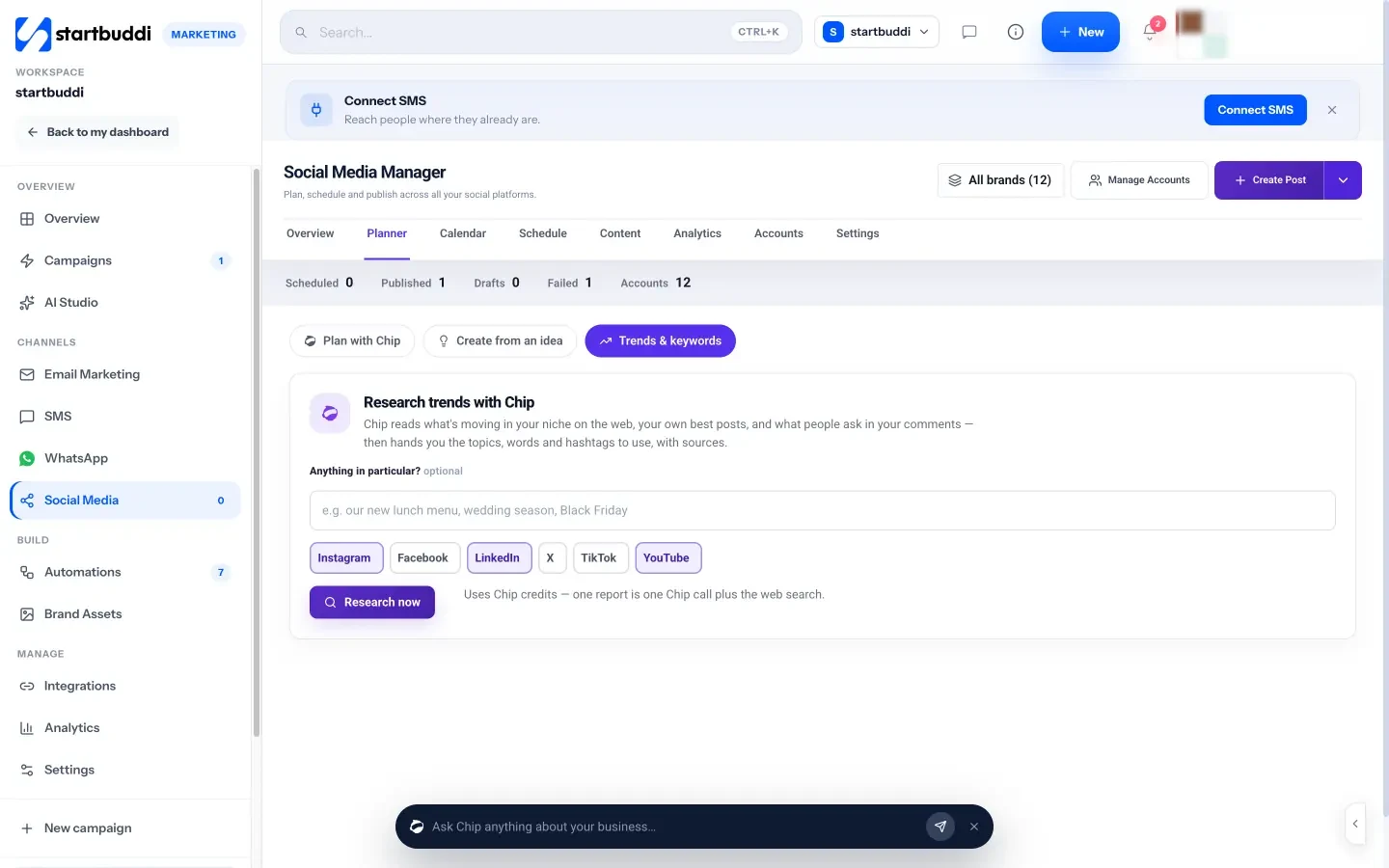
4. Research what is moving in your niche. Under Trends & keywords, add an optional focus (for example "wedding season" or "our new lunch menu"), pick platforms and click Research now. Chip reads what is moving on the web, your own best posts and what people ask in your comments, then gives you topics, words and hashtags to use, post ideas, and the sources it read. Each report uses Chip credits.
If you want a deeper look at planning a whole month, our post on the simple Instagram strategy that books clients shows a pillar-based plan in action. Next, you will schedule it all so it posts without you.
Social media management tools for small business: schedule without stress
- What a social media management tool does
- Do you need a tool at all?
- How to choose social media management tools for small business
- When to schedule posts
- Set up an approval routine
- A weekly scheduling routine
- If you manage social media for clients
- Build a content library
- What a scheduled month looks like: an example
- Make your posts accessible
- Handing social media to a helper
- Scheduling across time zones
- What to do when a post fails
- A quick comparison checklist
- Scheduling a launch
- Common scheduling mistakes
- Doing this in startbuddi: schedule, approve and publish
Once you have a plan, scheduling turns it into a routine. Instead of stopping work every day to post, you load a week or a month of content in one sitting and let it publish on time. This chapter explains what social media management tools for small business actually do, how to choose one, and how to set up a scheduling and approval routine that works for a solo owner or a small team.
What a social media management tool does
Social media tools for small business usually combine some or all of these jobs:
- Scheduling: write posts now, choose a date and time, and let the tool publish them.
- A calendar: see everything going out across platforms in one view, so you spot gaps and clashes.
- Multi-platform posting: write once, adjust per platform, publish to several accounts.
- Approvals: let a teammate or client review posts before they go live.
- Analytics: see reach, engagement and your best posts in one place.
- Engagement: reply to comments and messages without switching apps.
- AI help: caption drafts, hashtag suggestions and content ideas.
Our glossary entries on a social media scheduler and social media management explain the terms if they are new.
Do you need a tool at all?
If you post only to Facebook and Instagram, you can schedule for free with Meta's own tool. Meta Business Suite lets you create, schedule and manage posts for Facebook and Instagram (Meta Business Help Centre, schedule content). Most platforms also let you schedule inside their own apps.
A separate tool starts to earn its place when you post to three or more platforms, when more than one person creates or approves posts, when you manage accounts for several brands or clients, or when you want your social results next to your other marketing and your customer list.
How to choose social media management tools for small business
Ask these questions before you commit:
- Does it support your platforms? Check each platform and each account type (for example Instagram business accounts, LinkedIn company pages). Some tools do not support every platform or format.
- How is it priced? Per user, per connected account (channel), per post, or a flat price. Work out the cost for your real setup.
- What are the limits? Number of accounts, scheduled posts per month and users.
- Does it have approvals? Important if a client, partner or manager signs off posts.
- What happens when a post fails? Platforms sometimes reject posts. Look for clear failure alerts and a retry.
- Does it connect to the rest of your business? Leads from social should end up in your customer list, not a separate spreadsheet.
For a price reference, Buffer's free plan lets you connect up to 3 channels with 10 scheduled posts per channel, and its Essentials plan starts at $5 a month per channel billed yearly (Buffer pricing). Prices change, so check each provider's own pricing page. Our researched list of the best social media management software, the Hootsuite alternatives page and the startbuddi vs Buffer comparison set options side by side.
When to schedule posts
Every "best time to post" chart is an average across millions of accounts, and your audience may be different. A practical approach:
- Start with times that match your customers' routines: before work, lunchtime and early evening on weekdays for most consumer audiences; working hours for B2B.
- Keep your timezone consistent, especially if you schedule from abroad.
- After a month, look at your own analytics for the days and times your posts reached the most people, and adjust.
Leave some room for real-time posts. A scheduled plan is the backbone, but a quick Story about today's news or an unexpected event keeps your account feeling human.
Set up an approval routine
If more than one person touches your social media, agree who does what. A simple setup for a small team:
- Creators draft posts and submit them.
- One approver (usually the owner or marketing lead) checks facts, tone and offers.
- Clients (for agencies and freelancers) sign off anything that goes out under their name, ideally through a review link rather than screenshots in a chat.
Write a one-page brand guide: your tone, words you use and avoid, how you handle prices and offers, and who to ask when unsure. It saves a lot of back and forth.
A weekly scheduling routine
Here is a routine that keeps social media to about an hour a week once your monthly batch is done:
- Monday, 20 minutes: check the week's scheduled posts are still right. Swap anything out of date.
- Daily, 5 to 10 minutes: reply to comments and messages (chapter 4).
- Friday, 15 minutes: look at the week's results and note one thing that worked.
- Last Friday of the month: your batching session for next month (chapter 2).
If you manage social media for clients
Freelancers and agencies have extra needs: separate brands, client approvals and clean reporting per client. Keep each client's accounts grouped, get written approval before anything goes live, and send a short monthly report with three numbers and three insights rather than a wall of charts. Our guide for agencies on scheduling social media posts for multiple clients covers this in detail.
Build a content library
Scheduling gets much faster when your raw material lives in one place. Keep a library of your logo files, brand colours, approved photos, short videos, customer reviews you have permission to share, and captions that performed well. Name files clearly ("2026-03 kitchen before-after.jpg") and delete weak material so the library stays useful. When you sit down to schedule, you pick from the library instead of hunting through your phone.
What a scheduled month looks like: an example
Here is how a hair salon in Nairobi with a two-person team schedules its October:
- Last Friday of September: the owner spends three hours choosing 12 photos and 4 videos from the month's best work, writing captions and scheduling 12 feed posts for Tuesdays, Thursdays and Saturdays at 7pm.
- Every Monday: the receptionist posts a Story with that week's free slots.
- Every day: whoever is on the front desk answers comments and messages at 10am and 4pm.
- Mid-month: one unscheduled post about a new product that arrived, made on the day.
- End of month: a 15-minute look at the results before the next batch.
The whole month takes around six hours of combined time, and nothing depends on remembering to post at 7pm on a busy Saturday.
Make your posts accessible
Accessible posts reach more people. Add alt text to images (most platforms have a field for it) describing what the image shows. Add captions or subtitles to videos. Use camel case in hashtags, such as #NairobiBakery rather than #nairobibakery, so screen readers can read them. Avoid putting important information only inside an image, and keep text on graphics large and high contrast. These habits also help the many people who scroll with the sound off in a noisy place.
Handing social media to a helper
At some point you may bring in a part-time assistant, a freelancer or an agency. A short handover makes the difference between a smooth transition and a month of off-brand posts:
- Your one-page plan from chapter 1 and your content pillars from chapter 2.
- A brand guide: tone, words to use and avoid, logo and colours.
- Access through proper roles or a tool, never your personal password.
- A list of topics that need your approval, such as prices, offers and anything about staff.
- Your saved replies, and when to hand a conversation back to you.
- A monthly check-in to review results together.
Scheduling across time zones
If your customers are spread across countries, or you schedule while travelling, set one timezone for your plan and stick to it. Schedule for the timezone where most of your customers are. If you serve two regions several hours apart, such as the UK and Nigeria (one hour apart) versus the UK and Canada (five or more hours), consider separate posting times or separate accounts for each audience.
What to do when a post fails
Every tool occasionally fails to publish a post. Common reasons are an expired login, an image in the wrong size or format, a video that is too long for the platform, or a caption that breaks a platform rule. When a post fails: check the error message, reconnect the account if asked, fix the media or text, and reschedule. If you see the same failure twice, change your process, for example by saving images in the size each platform expects.
A quick comparison checklist
| Question | Why it matters |
|---|---|
| Which platforms and formats are supported? | Stories, Reels and company pages are not supported everywhere |
| How many accounts and posts are included? | Limits decide the real price |
| Can someone approve posts before they go live? | Protects your brand and your clients |
| Are failures clearly flagged and retried? | Silent failures leave gaps |
| Can you see results by platform and brand? | Tells you where to spend time |
| Do leads from social reach your customer list? | Stops enquiries getting lost |
Scheduling a launch
Launches are where scheduling pays off most. For a new service, product or event, plan a short run of posts in advance: a teaser a week before, an announcement on launch day, a behind-the-scenes post two days later, a customer reaction or first review in the second week, and a last-chance reminder before any deadline. Schedule them all in one sitting so the launch keeps going even when the day itself gets busy, and leave room to reply to the comments each post brings.
Common scheduling mistakes
- Scheduling and disappearing: scheduled posts still attract comments that need replies.
- Identical posts everywhere: a LinkedIn audience expects a different tone and length from Instagram. Adjust each version.
- Not checking before sensitive dates: pause cheerful promotional posts if something serious happens in your community.
- Ignoring failures: a post that failed silently is a gap in your plan. Check your failed posts weekly.
Doing this in startbuddi: schedule, approve and publish
1. Create and schedule a post. Click Create Post. Under Post to, pick one or more connected accounts, or a whole brand at once. Choose the content type (Post, Story, Reel or Thread), write your caption and add media from Brand Assets, an upload, a URL or Create with Chip. The live preview shows how the post looks on each platform. You can add hashtags, a first comment, a location and, for Pinterest, the board, title and link.
2. Let Chip help with the words. In the composer's Chip panel, Write caption drafts a caption from your business context (add a rough idea first and it sharpens it), Hashtags suggests tags that fit the caption and platform, and Generate image creates an image from a description. These use Chip credits.
3. Choose when it goes out. Under When to post, pick Post now, Schedule with a date and time, Send for approval, or Save as draft. Scheduled posts publish on their own in the timezone set under Settings, then Scheduling. If a post fails, it is retried once and then shown under Content, then Failed, with a retry option.
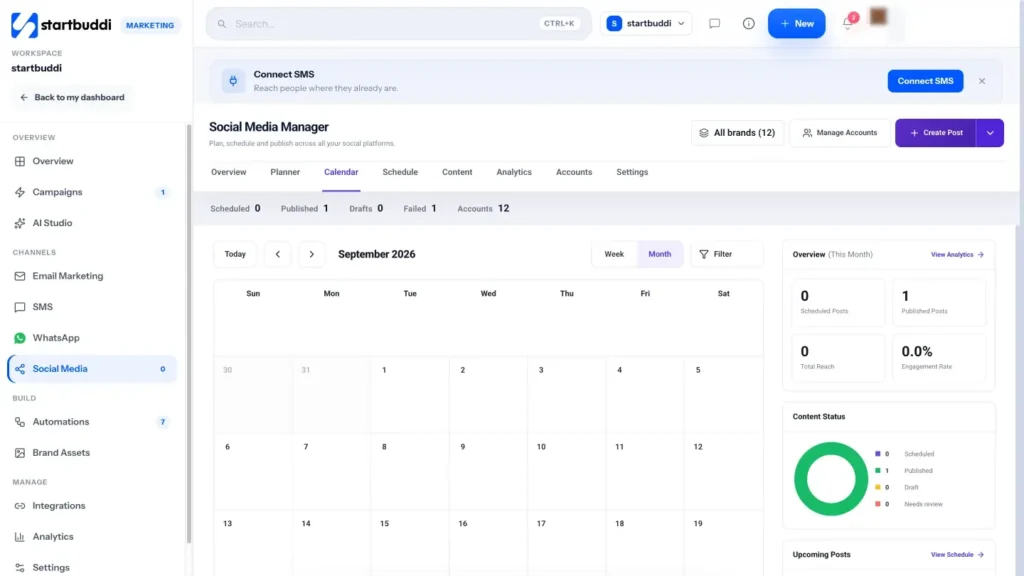
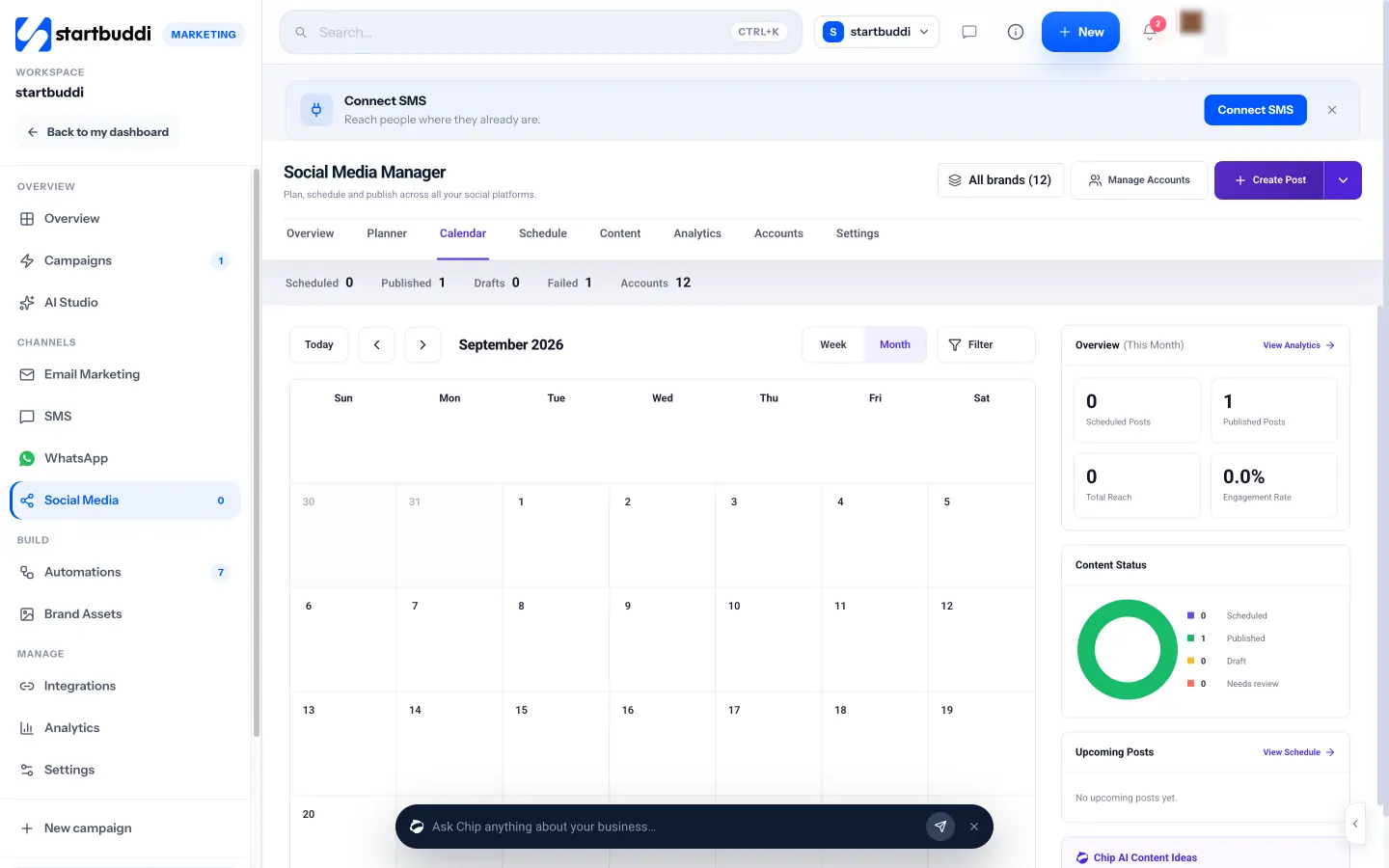
4. See everything on the calendar. The Calendar tab shows every scheduled and published post by week or month, with a side panel showing content status and upcoming posts. The Schedule tab lists what is queued.
5. Set up approvals. In Settings, People in charge shows who can publish and who can only draft. For each brand you can choose an approval route: no approval, one approver, everyone in order, or everyone in any order. For client sign-off, use Generate shareable link on a draft: the client opens a review page and can approve, and the link expires after 14 days.
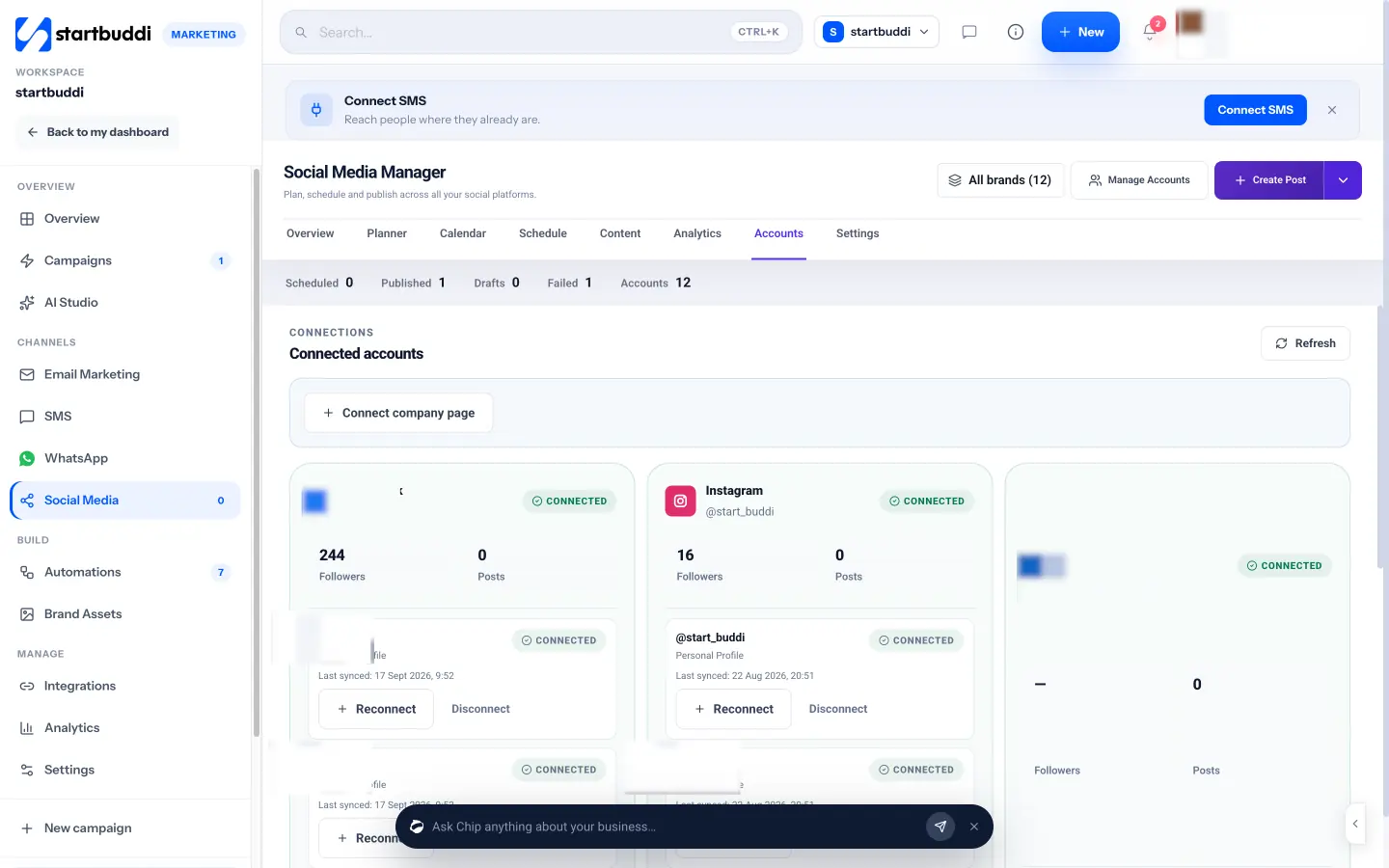
6. Keep your connections healthy. The Accounts tab shows each connected account with followers, post count and when it last synced, plus Reconnect and Disconnect buttons. If a platform asks you to log in again, reconnect here so scheduled posts keep publishing.
Your posts are now going out on time. The final chapter covers the part that turns attention into business: engaging, measuring and converting.
Engage, measure and turn followers into customers
- Reply to everyone, quickly
- Reply templates for common situations
- Engage beyond your own posts
- The metrics that matter
- A worked example of reading your results
- Turn followers into customers
- Know which posts bring customers: tracking links
- Turn reviews and results into posts
- Connect social media to your other channels
- A simple monthly report
- Listen to what people say about you
- If growth stalls
- When paid promotion makes sense
- A monthly review in 30 minutes
- Common mistakes at this stage
- Doing this in startbuddi: measure, reply and convert
- Your next step
Posting is only half of social media marketing for small business. The other half is what happens after the post goes out: replying to people, reading the numbers honestly, and making it easy for interested followers to become customers. This chapter covers engagement, the metrics worth tracking, how to turn followers into enquiries and sales, and when paid promotion makes sense.
Reply to everyone, quickly
Social media is a conversation. When someone comments or sends a message, they have raised their hand. Treat it like a phone call to your shop. People expect speed: the 2025 Sprout Social Index found that about three-quarters of consumers expect a response within 24 hours or sooner, and 73% of social users say they will buy from a competitor if a brand does not respond on social (Sprout Social, social media customer service statistics).
Some simple rules:
- Reply to comments within a day, ideally within a few hours on the day a post goes out.
- Move sales conversations to a direct message or WhatsApp, where you can share prices and details privately.
- Answer complaints publicly once, calmly, then offer to fix it privately. Other people are watching how you handle it.
- Thank people who share or tag you. It encourages more of the same.
- Keep saved replies for common questions (prices, areas you cover, opening hours) so answering takes seconds.
Reply templates for common situations
Saved replies make fast responses easy. Adapt these to your voice:
- Price question in a comment: "Great question! Prices depend on [size or type], so we have sent you a message with the details."
- Booking enquiry in a DM: "Hi [name], thanks for getting in touch. We have openings on [days]. Which suits you best? You can also book directly here: [link]."
- Compliment: "Thank you so much, [name]! It was a pleasure. Tell your friends we said hi."
- Complaint: "We are sorry to hear this, [name]. That is not the experience we want for anyone. We have sent you a message so we can put it right."
- Question you cannot answer yet: "Good question, let me check with the team and get back to you today."
Never delete genuine negative comments just because they are critical, unless they break the platform's rules, contain abuse or share private information. A calm, helpful reply usually does more for your reputation than a spotless comment section.
Engage beyond your own posts
Growth also comes from showing up in other places. Spend ten minutes a few times a week commenting helpfully on posts from local businesses, customers, partners and people in your industry. Join relevant local or niche groups and answer questions without pitching. People check the profile of someone who gave them a useful answer.
The metrics that matter
Platforms show dozens of numbers. Pick the few that connect to your goal from chapter 1.
| Metric | What it means | Why it matters |
|---|---|---|
| Reach | How many different people saw your post | Shows whether you are being seen at all |
| Engagements | Likes, comments, shares, saves and clicks | Shows whether people cared enough to react |
| Engagement rate | Engagements divided by reach (or followers), as a percentage | Lets you compare posts fairly, whatever their reach |
| Link clicks and profile visits | People moving towards your next step | Closer to business results than likes |
| Messages and enquiries | People asking to buy or book | The number most small businesses should care about most |
| Followers | People who chose to follow | Useful over time, but do not chase it for its own sake |
Tools calculate engagement rate in slightly different ways, so compare your posts within the same tool rather than against numbers you read elsewhere.
A worked example of reading your results
A café in Brighton posted 12 times last month. Four posts were short videos of drinks being made, four were photos of cakes and four were posts about events. The videos reached an average of 1,800 people with 90 engagements each (5% engagement rate). The cake photos reached 700 people with 42 engagements each (6%). The event posts reached 500 with 10 engagements each (2%), but two of them led to 14 bookings for a tasting evening at £25 a head, or £350.
What does that tell the owner? Videos are best for reach, so make more of them. Cake photos have a loyal audience that engages, so keep them. Event posts look weak on engagement but produced the most money, so keep them and add a video version to reach more people. Judging only by likes would have led to the wrong decision.
Turn followers into customers
Every post should make the next step obvious. The main ways small businesses convert social attention:
- A link in bio page with your booking link, shop, WhatsApp button and current offer.
- Direct messages that you answer quickly and move towards a booking or quote.
- A form for quotes, waitlists or free downloads, which also adds people to your email list.
- A booking page so people can pick a time without back-and-forth.
- A shop link for products, ideally with prices visible.
Make sure every lead that comes from social ends up in one customer list, with a note of where they came from. Otherwise the enquiry you got from an Instagram DM on Tuesday is forgotten by Friday.
Know which posts bring customers: tracking links
Platform analytics tell you what happened on the platform. To know what happened after someone clicked, add tracking to your links. The simplest method is a UTM tag, a short addition to a web address that tells your website analytics where the visit came from, for example ?utm_source=instagram&utm_medium=social&utm_campaign=october-offer. Google Analytics then shows visits and signups by source. Keep a simple naming pattern so your reports stay tidy. If your customers mostly contact you by message rather than a website, simply ask every new customer "How did you hear about us?" and record the answer.
Turn reviews and results into posts
Social proof works. When a customer leaves a good review, ask if you can share it, then turn it into a simple graphic or a Story with their first name and a photo of the work. Numbers work too: "40 homes cleaned this month", "Our 200th wedding cake". These posts do double duty, showing that people trust you and reminding followers you are busy and good at what you do.
Connect social media to your other channels
Social media works best as the front door, not the whole house. Use it to meet people, then invite them to channels where you can keep in touch reliably: your email list, a WhatsApp chat for bookings, or a form for quotes. A monthly post inviting followers to join your email list for a useful download, or a pinned post that explains how to book, moves people from rented attention to a relationship you own. Our guide to email marketing for beginners covers what to do once they join.
A simple monthly report
Whether it is for you or a client, a one-page report is enough. Include:
- Three numbers: reach, engagement rate and enquiries or clicks, each compared with last month.
- Best post: a screenshot and one sentence on why it worked.
- Weakest post: what you will change.
- Customers from social: names or a count of people who bought after finding you on social.
- Next month: one change you will try.
Listen to what people say about you
Not every mention of your business tags you. Once a week, search each platform for your business name, common misspellings and your main product or service with your town. Check the reviews on your Google Business Profile and Facebook Page. You will find questions to answer, happy customers to thank, and occasionally a complaint you would otherwise have missed. Five minutes of listening a week often produces your best content ideas, because it shows you exactly what people are talking about.
If growth stalls
Every account hits a plateau. If reach and enquiries have been flat for two months, try one change at a time: a new format (short video if you only post photos), a new posting time, a sharper first line on each caption, a new content pillar based on recent customer questions, or collaborating with a local business whose customers overlap with yours. Give each change a month before you judge it.
When paid promotion makes sense
Organic posting builds trust slowly. Paid ads and boosted posts buy reach quickly. For a small business, a sensible approach is to wait until you know which posts perform well organically, then put a small budget behind the best one, aimed at a clear local or interest-based audience, with one next step. Start small, for example the price of one customer's order, and judge it on enquiries and sales, not likes. Each platform has its own ad tools and rules, so read their business guides before spending.
A monthly review in 30 minutes
- Note your three best posts by reach and your three best by enquiries or clicks. What do they have in common?
- Note your weakest posts. Drop or change that type of content.
- Check where new customers came from this month. How many mentioned social media?
- Decide one change for next month, such as "one more video a week" or "a clearer call to action on offers".
Common mistakes at this stage
- Ignoring DMs: unanswered messages are lost sales.
- Buying followers: fake followers never buy, wreck your engagement rate and can break platform rules.
- Measuring too often: daily checking leads to panic. Monthly reviews show real trends.
- No tracking of where customers came from: ask every new customer how they found you and write it down.
Doing this in startbuddi: measure, reply and convert
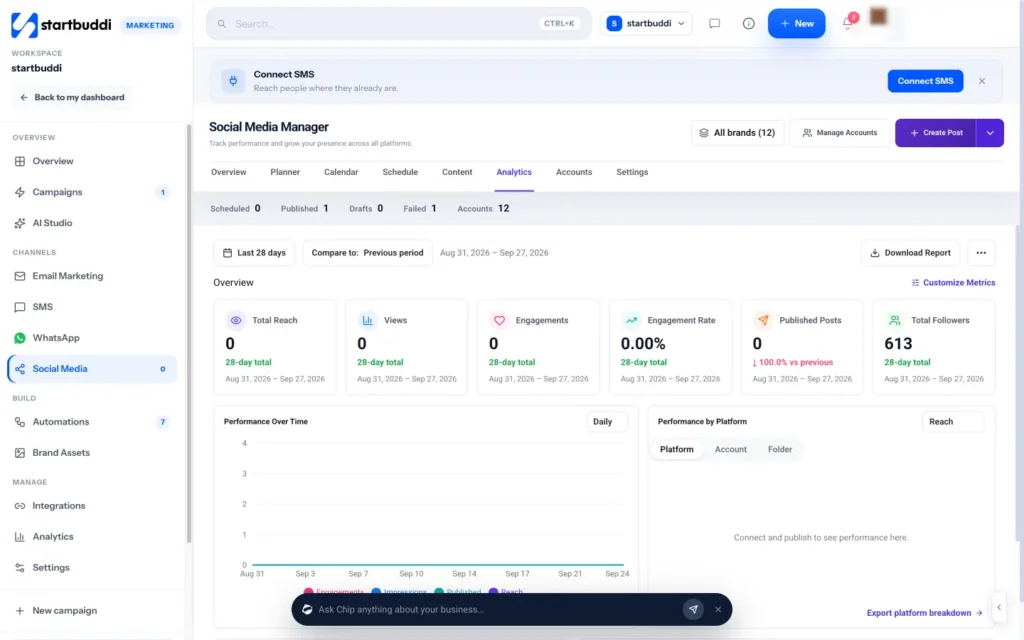
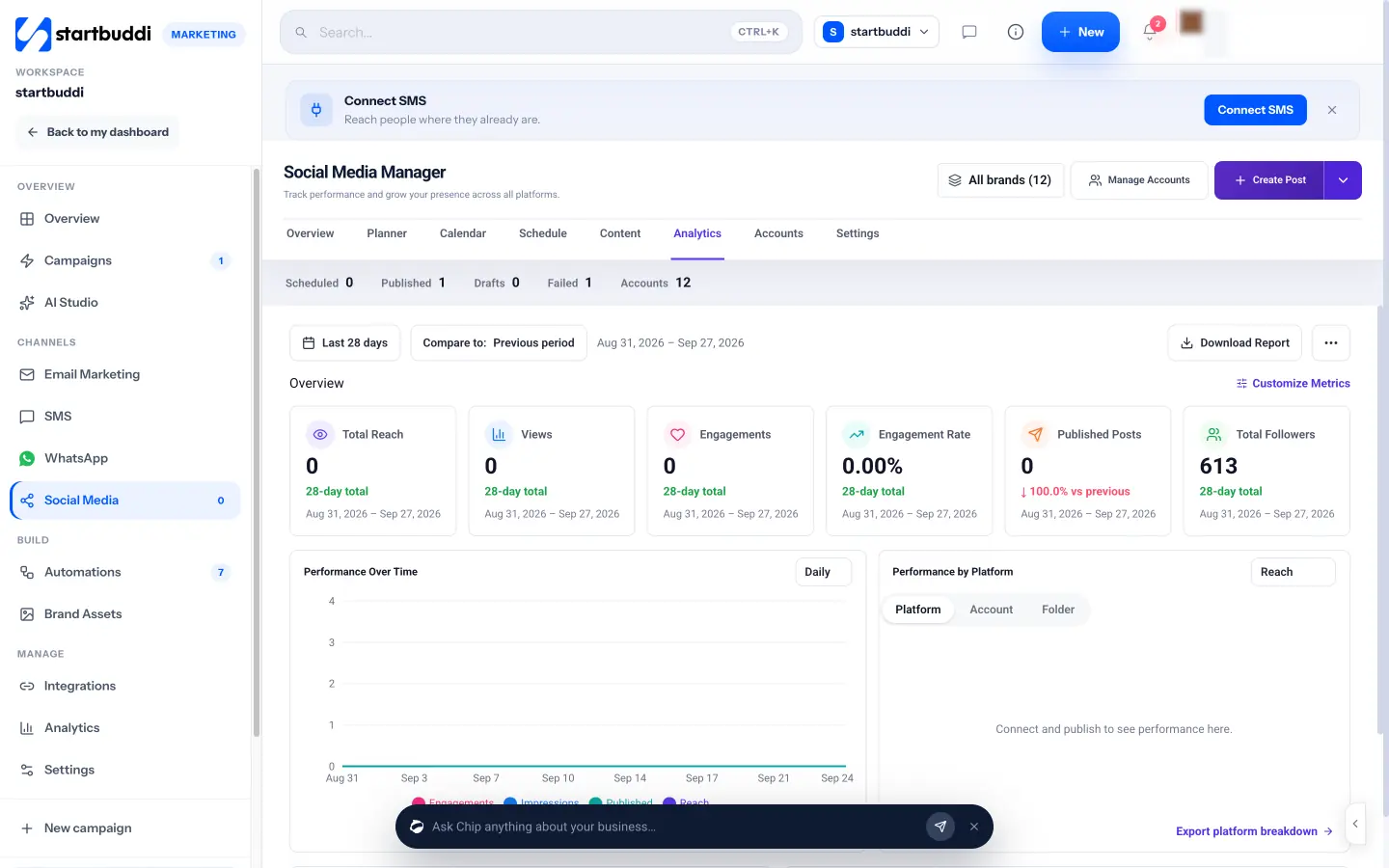
1. Check your analytics. In the Social Media Manager, open Analytics. You can see total followers, total reach, views, engagements, engagement rate and published posts for the last 7, 28 or 90 days, compared with the previous period. Charts show performance over time and a breakdown by platform, account or brand folder, and Top Performing Posts lists your best posts. Download Report gives you a copy for your records or for a client.
2. Reply to messages in one inbox. Instagram direct messages and Facebook Messenger conversations can arrive in the Inbox in Customers, next to email, WhatsApp, SMS and live chat, once messaging is turned on for those accounts. Your team can assign conversations, add internal notes and use quick replies, so no message waits for the one person who has the phone. Learn more on the Inbox page.

3. Give your profile one link that does everything. In Publish, create a Link in bio page with your name, a short line about what you do, your photo, and buttons for booking, your shop, WhatsApp or your latest offer. Put its address in every social profile. See the link in bio page for what it can hold.
4. Keep every lead in one list. People who message you, fill in a form or book through your links become contacts in Customers, with the channel they came from. That means you can follow up, add them to your email list with permission and see which channel brings paying customers, not just followers.
5. Plan the next month. Go back to the Planner, use Suggest from performance to get ideas based on what worked, and batch your next month of posts.
Your next step
Write your one-sentence social media goal, choose your main platform and draft your first four weeks from the plan in chapter 2. If you want the planning, scheduling, approvals, analytics and messages in one place alongside your customers, start a 30-day trial of the Starter plan and connect your accounts in the startbuddi Social Media Manager. If you want to go further on what to post, our guide to content marketing for small business shows how to build content that keeps working for months. Compare plans on the pricing page.
Olabimpe Salami is the email and outreach specialist at startbuddi. Olabimpe writes about the messages that bring customers in and back: email, WhatsApp and SMS campaigns, follow-ups, and turning enquiries into paying clients.
Runs email and outreach at startbuddi