What is a social media scheduler?
Also called: Social media scheduling tool, social media post scheduler, social media planner, post scheduler
A social media scheduler is a tool that lets you write posts in advance and set them to publish automatically on platforms like Facebook, Instagram and LinkedIn at chosen dates and times, usually from one calendar for all your accounts.
A social media scheduler is a tool that lets you write social posts ahead of time and publish them automatically at the date and time you choose. Instead of logging in to Facebook, Instagram and LinkedIn one by one every day, you plan your posts in one place and the scheduler sends them out for you.
Most schedulers show your posts on a calendar, so you can see what is going out this week and spot gaps.
Why a social media scheduler matters for a small business
Posting regularly helps people remember you. But for a busy founder, “post every day” usually turns into “post when I remember”. The problem is rarely writing one post. It is stopping what you are doing, every day, to think of something to say.
A scheduler turns that daily interruption into one planning session. You sit down once a week, write or plan your posts, schedule them, and get on with running the business. It also helps you:
- Stay consistent even during busy weeks.
- Post at good times for your audience, not just when you are free.
- Reuse one idea across platforms, adjusted for each.
- Work as a team, with drafts and approvals before anything goes live.
How a social media scheduler works
- Connect your accounts. You sign in to each platform through the scheduler and give it permission to post for you.
- Write a post. Add text, images or video, then pick which accounts it goes to.
- Choose a time. Post now, schedule for later, or save as a draft.
- The scheduler publishes it through each platform’s official connection at the set time.
- Check the results: reach, engagement and which posts worked best.
Platforms set their own rules for scheduling tools. For example, Meta’s Instagram content publishing works with Instagram professional (business or creator) accounts, and limits each account to 100 posts published through the API in a rolling 24 hours. If a tool can’t post to your personal Instagram profile, this is usually why.
Example: a bakery owner spends 45 minutes on Sunday writing five posts: a new cake, a behind-the-scenes photo, a customer review, an opening-hours reminder and a weekend offer. She schedules them for the week and doesn’t think about social media again until next Sunday.
Key features to look for
| Feature | Why it matters |
|---|---|
| Content calendar | See the whole week or month at a glance |
| Multi-platform posting | Write once, publish to several accounts |
| Platform previews | Check how the post looks before it goes out |
| Drafts and approvals | Let a teammate or client sign off first |
| Failed post alerts | Know when something didn’t publish |
| Analytics | Learn which posts are worth repeating |
Best practices and common mistakes
Plan themes, not just posts. A simple weekly pattern (a tip, a story, an offer, a question) makes planning faster. Our content calendar template can help.
Adapt for each platform. A LinkedIn post and an Instagram caption rarely work word for word. Shorten the text, change the hashtags and crop images to fit each one.
Batch your content. Take a set of photos in one session and write captions in another. Batching is faster than starting from scratch every day.
Don’t schedule and disappear. Scheduling saves time on publishing, not on conversation. Check comments and messages every day.
Watch what is scheduled when news breaks. A cheerful promo can land badly on a difficult day. Pause posts if needed.
A common mistake is filling a month with posts that are all promotions. Mix in useful and personal content so people want to follow you.
Related terms
Social media management is the wider job that scheduling is part of: planning, creating, engaging and measuring. A digital asset management system keeps the images and videos your posts use in one place.
The social media scheduler in startbuddi
The Social Media Manager in startbuddi lets you plan, schedule and publish to Facebook, Instagram, LinkedIn, X, YouTube and Pinterest from one place. TikTok is shown as coming soon.
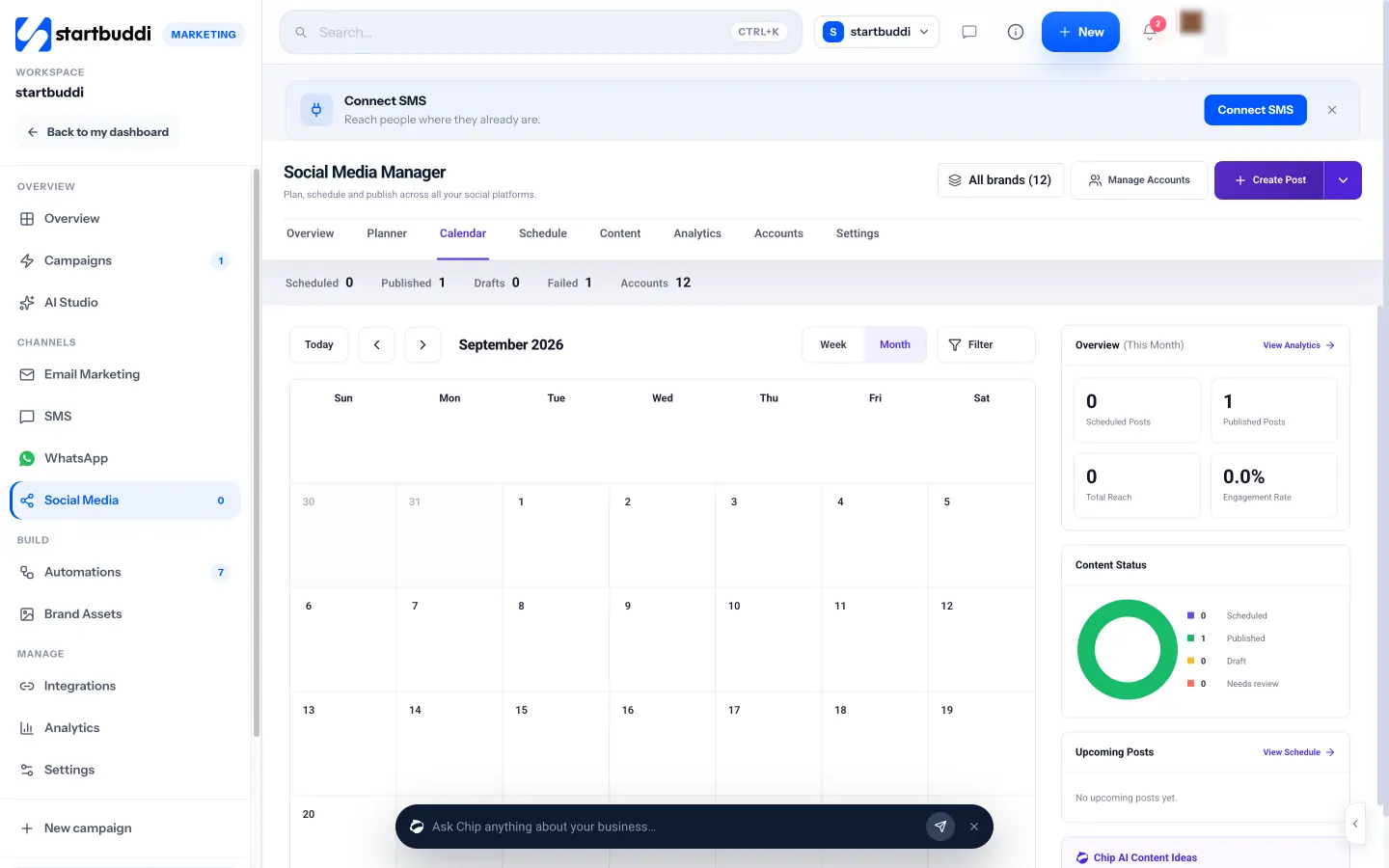
You can write a post yourself or ask Chip to write a caption, suggest hashtags or create an image. With Plan with Chip, you describe what is happening in your business this week, choose three, five or seven posts, a tone and your platforms, and Chip drafts them for you to approve and schedule. Scheduled posts publish on their own. If one fails, it is retried once and then shown under Failed so you can fix it.
For teams and agencies, you can group accounts into brands, set who can publish and who can only draft, and send a shareable review link so a client can approve posts. Social Media is part of Marketing, which is available from the Starter plan. Starter connects up to five accounts and 100 posts a month, and Growth and Scale raise those limits. Agencies can read how to schedule posts for multiple clients.
Your next step: plan next week’s posts in one sitting, then schedule them with the startbuddi social media scheduler.
Related terms
FAQ
Does scheduling posts hurt reach?
Platforms publish scheduled posts through their official connections, and there is no clear sign they are treated differently. What matters more is posting content your audience cares about.
Can I schedule posts to a personal Instagram account?
Usually not. Instagram's publishing tools are built for professional accounts. Switching to a free business or creator account in the Instagram app normally fixes this.
How far ahead should I schedule?
A week is a good start for most small businesses. It is far enough to save time and close enough to stay relevant.
Olabimpe Salami is the email and outreach specialist at startbuddi. Olabimpe writes about the messages that bring customers in and back: email, WhatsApp and SMS campaigns, follow-ups, and turning enquiries into paying clients.
Runs email and outreach at startbuddi