What is digital asset management (DAM)?
Also called: DAM, DAM software, media library, digital asset library
Digital asset management (DAM) is the practice, and the software, used to store, organise, find and share a business's digital files, such as logos, photos, videos and documents, in one central library so everyone uses the right, up-to-date version.
Digital asset management, or DAM, is how a business stores, organises, finds and shares its digital files. Those files, called digital assets, include logos, product photos, videos, brochures, templates and brand guidelines. A DAM system is one central library where they live, so everyone uses the right, current version.
IBM defines DAM as a process for storing, organising, managing, retrieving and distributing digital files. In a large company that means dedicated software with permissions and workflows. In a small business it can be much simpler: one well-organised place instead of files scattered everywhere.
Why digital asset management matters for a small business
Think about where your logo is right now. Probably in an email from your designer, a WhatsApp chat, a laptop download folder and a cloud drive, in several versions. When you need it for a flyer, you pick whichever you find first.
That causes real problems:
- Inconsistent branding: old logos and wrong colours end up in front of customers.
- Wasted time: minutes spent searching for a photo add up every week.
- Lost files: when a phone breaks or a freelancer leaves, assets can disappear.
- Slow teamwork: teammates and contractors keep asking for the same files.
Even a one-person business benefits from a single library. It matters more as you add team members, freelancers or clients who post for you.
How digital asset management works
- Collect: upload your files into one library.
- Organise: sort them into folders or categories, and add names and tags (this descriptive information is called metadata).
- Find: search by name, type or tag instead of scrolling through chats.
- Use: pull assets straight into emails, web pages or social posts, or share a link.
- Maintain: replace outdated files and remove ones you no longer use.
Example: a small skincare brand uploads its logo versions, product photos, ingredient sheets and short videos into one library, tagged by product. When a new retailer asks for images, the owner sends a link in a minute instead of digging through her phone.
What to store in a DAM
| Asset type | Examples |
|---|---|
| Brand identity | Logo versions, icon, colour codes, fonts |
| Images | Product photos, team photos, workspace shots |
| Video | Short clips, testimonials, tutorials |
| Documents | Price lists, brochures, brand guidelines |
| Templates | Social post designs, email headers, flyers |
DAM vs cloud storage
Cloud drives are good at storing and syncing files. A DAM goes further: it is built around finding and using assets, with previews, tags, brand details and links you can drop into your marketing. Many small businesses start with a tidy cloud folder and move to a DAM, or a brand kit inside their marketing tool, when the team grows or they publish often.
Best practices and common mistakes
Use one naming rule. For example “product-colour-size” or “date-event-number”. Consistent names make search work.
Keep only final versions in the main library. Drafts and rejected options belong elsewhere.
Store logos in several formats. Include versions for light and dark backgrounds, plus a small icon.
Tidy up regularly. Remove outdated offers and old photos once a quarter.
Give it an owner. One person decides what goes in and what comes out, even in a team of three. Shared libraries without an owner fill up with duplicates.
A common mistake is buying enterprise DAM software with approval chains and rights tracking you will never use. For most small businesses, a simple library connected to the tools you publish from is enough.
Related terms
A brand asset manager is a type of DAM focused on your brand kit: logos, colours, fonts and voice. Social media management relies on having the right images ready to post.
Digital asset management in startbuddi
In startbuddi, Brand Assets in Marketing combines a brand kit with a media library. It is not an enterprise DAM, and it doesn’t try to be. It is one place for the assets a small business uses every day, connected to where you use them.
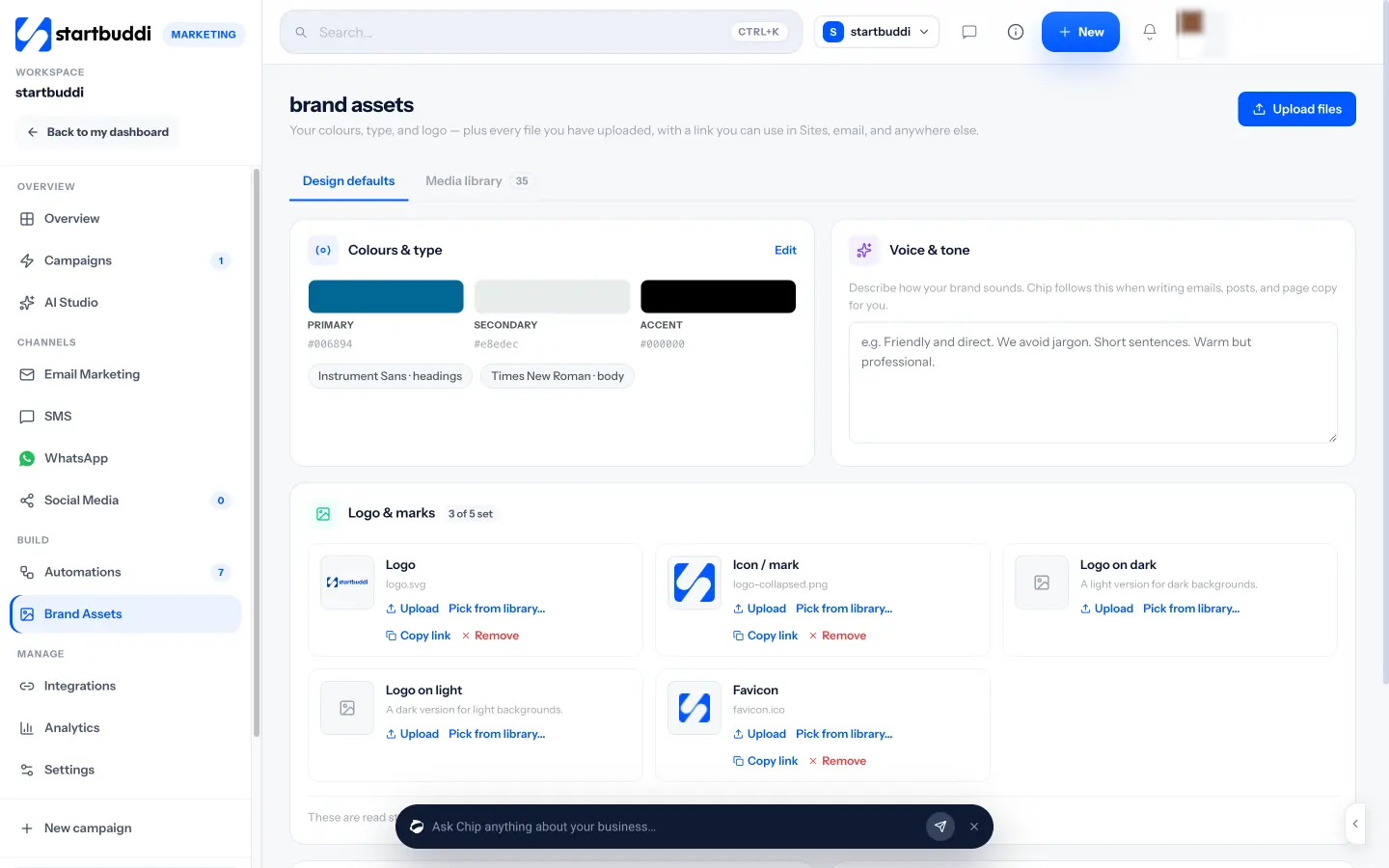
Design defaults hold your logo (including versions for light and dark backgrounds, an icon and a favicon), your primary, secondary and accent colours, your heading and body fonts, and a written voice and tone guide. The media library takes images, video, PDFs and documents up to 50 MB each, with filters and search, and every file gets a link you can use in pages, emails and elsewhere. You can pull media from Brand Assets into social posts, and Chip reads your brand kit and voice when it writes for you.
Brand Assets is part of Marketing, available from the Starter plan with a 30-day trial. Learn more in digital asset management for small businesses or compare tools in our guide to the best brand asset manager.
Your next step: gather your logo, colours and five best photos, and put them in one library with startbuddi Brand Assets.
Related terms
FAQ
What counts as a digital asset?
Any file with value to your business that you reuse: logos, photos, videos, documents, templates and brand guidelines.
Is a cloud drive the same as a DAM?
Not quite. A cloud drive stores files. A DAM adds organisation, search and easy use of those files in the places you publish, like emails and social posts.
Does a small business need DAM software?
It needs the habit more than the software. One organised library, connected to the tools you use, covers most small business needs.
Tiwalade Joanna Okedara-Kalu is the founder, CEO and CTO of startbuddi, the business system that brings clients, bookings, invoices, projects, marketing and the Chip AI assistant into one place. Tiwalade builds software around how service businesses really work day to day, and writes about client management, getting paid on time and why small businesses outgrow the tools they start with.
Founded startbuddi and leads its product and engineering