What is a brand asset manager?
Also called: Brand kit, brand asset library, brand hub, brand asset management
A brand asset manager is a shared home for your logo versions, brand colours, fonts, tone of voice and reusable media files, so everyone (and every tool) uses the same, correct brand every time.
A brand asset manager is one tidy, shared place for everything that makes your business look and sound like itself: your logo in its different versions, your colours, your fonts, your tone of voice, and the photos, videos and files you use again and again. Instead of hunting through WhatsApp chats, email attachments and old laptops for “the right logo”, everyone pulls from the same source.
Put simply, it is a brand kit plus a media library. The kit holds the rules (which colours, which fonts, how you talk). The library holds the files. Together they make sure your invoices, emails, landing pages and social posts all look like they came from the same business.
Why a brand asset manager matters for a small business
Big companies have brand teams and style guides. Small businesses usually have a founder, a freelancer who made the logo two years ago, and a folder called “final final v3”. That works until you start producing more content: a new flyer, a price list, a promo email, a page for a new service. Each time, someone guesses the colour code or grabs a blurry logo from a screenshot.
The cost is quiet but real. Customers notice when your Instagram, your invoice and your website all look slightly different. It makes a young business look less established than it is. A brand asset manager fixes this in an afternoon, and it saves time every week after that, because nobody has to ask “where is the logo?” again.
It also matters more now that AI writes some of your content. If a writing assistant knows your voice (“friendly, direct, no jargon”), its drafts need far less editing.
How a brand asset manager works
You set things up once, then reuse them everywhere. A typical setup looks like this:
- Upload your logo versions. The main logo, a small icon, a version for dark backgrounds, one for light backgrounds, and a favicon for browser tabs.
- Save your colours. Usually a primary, a secondary and an accent colour, stored as hex codes such as #0057FF so they are exact every time.
- Pick your fonts. One for headings, one for body text.
- Write your voice and tone. Two or three sentences on how you sound, plus words you use and words you avoid.
- Fill the media library. Product photos, team shots, short videos and PDFs, each with a link you can reuse.
Example: a cleaning company in Abuja saves its green and white colours, its logo and ten photos of finished jobs. When the owner builds a promo email or a booking page, the logo and colours are already there, and the photos are one click away. The new part-time marketer uses the same files without asking.
Key parts of a brand asset manager
| Part | What it holds | Why it helps |
|---|---|---|
| Logo set | Main logo, icon, light and dark versions, favicon | The right version for every background and size |
| Colour palette | Exact colour codes | No more “almost the same blue” |
| Typography | Heading and body fonts | Pages and emails read the same way |
| Voice and tone | A short written style guide | Consistent wording from people and AI |
| Media library | Photos, videos, documents | One source of truth for files |
Brand asset manager vs digital asset management
The two overlap. Digital asset management (DAM) is the wider idea: storing, tagging and controlling access to large libraries of files, often thousands of them, with version history and approval steps. A brand asset manager is the lighter, brand-focused version. It is built around your identity (logo, colours, fonts, voice) and the files you use in marketing. Most small businesses need the second one first.
Common mistakes and best practices
- Only saving one logo file. A logo that looks great on white often disappears on a dark photo. Keep light and dark versions.
- Using colours “by eye”. Save the exact codes. Screenshots shift colours slightly.
- Skipping the voice section. It feels optional, but it is what keeps emails, captions and AI drafts sounding like you.
- Letting the library become a dump. Delete old versions and name files clearly (“logo-dark-2026”, not “IMG_4432”).
- Keeping it in one person’s head. Give your team and freelancers access so they use the same files.
Related terms
Brand kit is the set of rules (logo, colours, fonts, voice) without the file library. Style guide is a longer document explaining how to use those rules. A landing page builder and email marketing tools are where your brand assets usually end up being used.
Brand assets in startbuddi
In startbuddi, the brand asset manager is called Brand Assets and sits inside Marketing. It has two tabs. Design defaults holds five logo slots (logo, icon, logo on dark, logo on light and favicon), your primary, secondary and accent colours, heading and body fonts, and a Voice & tone box. The Media library takes images, video, PDFs and documents up to 50 MB each, and every file gets a link you can use in pages, emails and elsewhere.
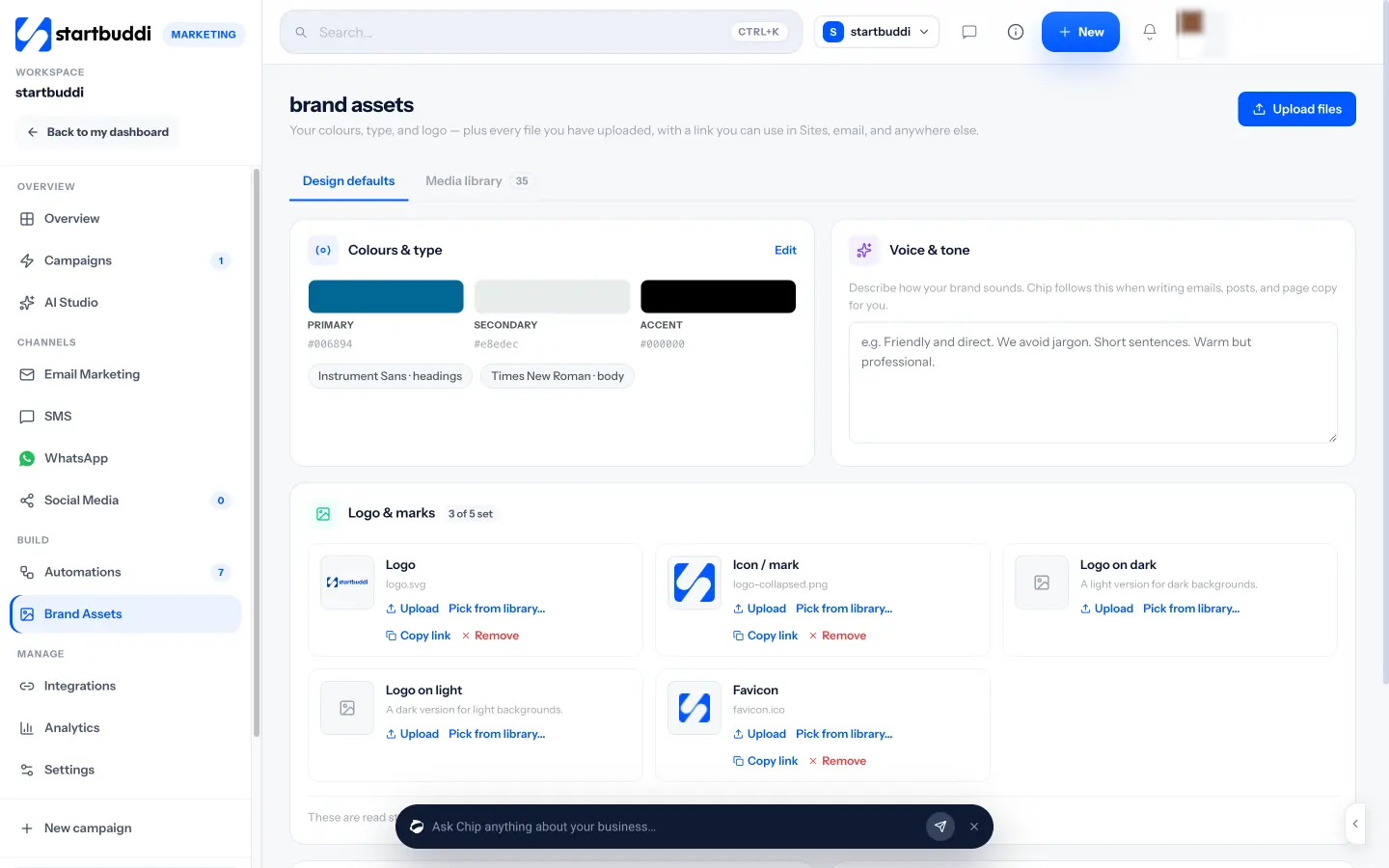
Chip, the built-in AI assistant, reads your voice and brand kit when it writes for you, for example in email drafts and AI Studio. A “What Chip knows” checklist shows what it has to work with, and Get tips gives brand advice based on your colours, type and voice. The email builder can start from a blank email with your brand kit applied. See the brand kit page for the full picture, or follow the help guide on how to upload and organise brand assets.
Brand Assets is part of the Marketing module, which is available on the Starter plan and above. Agencies juggling several clients can also read about brand asset management for agencies.
Next step
Gather your logo files, colour codes and fonts today, write three sentences about how your business sounds, and put them in one place. If you want that place to feed your emails, pages and Chip’s drafts automatically, compare the plans on the pricing page.
Related terms
FAQ
Do I need a brand asset manager if I only have a logo?
Yes, it is worth starting small. Save your logo in light and dark versions, pick two colours and one font, and write a line about your tone. You can add photos and files as you go.
What is the difference between a brand kit and a brand asset manager?
A brand kit is the set of rules: logo, colours, fonts and voice. A brand asset manager usually includes the kit plus a media library for the photos, videos and documents you reuse.
Who should have access to our brand assets?
Anyone who creates content for you: teammates, freelancers and agencies. Shared access is the whole point, because it stops people using old or low-quality files.
Can AI tools use my brand voice?
Many can if you give them a written voice guide. In startbuddi, Chip reads the voice and tone you save in Brand Assets when it drafts content for you.
Tiwalade Joanna Okedara-Kalu is the founder, CEO and CTO of startbuddi, the business system that brings clients, bookings, invoices, projects, marketing and the Chip AI assistant into one place. Tiwalade builds software around how service businesses really work day to day, and writes about client management, getting paid on time and why small businesses outgrow the tools they start with.
Founded startbuddi and leads its product and engineering