How to schedule social media posts for multiple clients (agency guide)
An agency workflow to schedule social media posts for multiple clients: partner access, a space per client, monthly batching, approvals, timing and reporting.


Photo: Laura Chouette / Unsplash
- Give each client their own brand space, get proper partner or admin access, batch a month of content, and make approval a recorded step before anything is scheduled. Schedule in each client's audience time zone, check failures daily and report monthly.
To schedule social media posts for multiple clients without mistakes, set up each client as a separate brand with its own accounts, get proper partner access instead of borrowed passwords, collect content through one intake process, batch-create a month at a time, run every post through a client approval step, and schedule from a single tool that shows each client’s calendar on its own. The scheduling itself takes minutes. The system around it is what stops a post going out on the wrong client’s page.
This agency guide covers the whole workflow, from access and permissions to approvals, posting times, platform limits, disclosure rules and monthly reporting. It is written for small agencies and freelance social media managers handling anywhere from three to thirty client accounts.
What goes wrong when you manage several clients’ social media
Most multi-client problems are workflow problems, not creative ones:
- Posting to the wrong account. The classic nightmare, usually caused by logging in and out of shared passwords all day.
- Approvals lost in chat. The client said “looks good” in a WhatsApp voice note, three weeks ago, about a different version.
- Access that breaks. A client changes a password or leaves the company, and nobody can reach their page.
- Every client on a different schedule and tool. Nobody can see the whole week at a glance.
- Reports built by hand from screenshots at the end of each month.
The fix is the same for every one: one system, repeated for every client.
Step 1: Get proper access to each client’s accounts
Never run a client’s social media on their personal login. Use the platform’s own access tools, so the client stays the owner and you can be removed cleanly when the contract ends.
- Facebook and Instagram: the client adds your agency as a partner in their Meta business portfolio and shares their Page and Instagram account. Meta’s help page on giving a partner access to business assets explains that clients can grant full control or partial access, for example to create content and respond to messages.
- LinkedIn: the client adds you as a Page admin. LinkedIn’s Page admin roles include super admin, content admin and analyst. Content admin is usually enough to post and manage content.
- Other platforms: use each platform’s team or business access where it exists, and a password manager where it doesn’t.
Put the access steps in your client onboarding pack, so it’s done before the first post is due, not the night before.
Step 2: Set up a separate space for each client
In whatever scheduling tool you use, group each client’s accounts into their own brand, workspace or folder. The goal is that when you open “Client A”, you can only see and post to Client A’s accounts.
For each client, keep a one-page brand sheet next to their accounts:
- Tone of voice in three words, with one “we say this, not that” example.
- Logo files, colours, fonts and approved photos.
- Hashtags they always use and topics they never mention.
- Who approves posts, and how fast they usually reply.
- Posting days and times, and the client’s time zone.
Step 3: Plan and batch content a month at a time
Batching is how agencies stay sane. Instead of writing posts the day before, plan and create a month per client in one or two focused sessions.
A monthly content cycle per client
| When | What happens | Who |
|---|---|---|
| Week 1 | Intake: the client shares news, offers, events and photos for next month | Client and account manager |
| Week 2 | Plan the calendar and write the posts | Writer and designer |
| Week 3 | Client reviews and approves, with one round of changes | Client |
| Week 4 | Schedule everything and check the calendar | Social media manager |
A monthly intake message you can copy
Hi Grace, we’re planning November’s posts for the salon. Could you send by the 5th: any offers or price changes, new services or staff, events or closures, and 10 to 15 recent photos of your work? If there’s anything you’d rather we avoid this month, let us know too. We’ll send the full calendar for approval by the 15th.
Send the same message to every client on the same day each month. Clients learn the rhythm, and you stop chasing photos the night before a post is due.
How many posts per client?
Agree a number per platform in the contract, not ad hoc. Buffer’s posting frequency guide suggests ranges such as 3 to 5 posts a week on Instagram and 2 to 5 a week on LinkedIn, drawn from its own and third-party data. Treat those as starting points and adjust to each client’s results and budget. Our content calendar template gives you a ready layout.
Reuse without copying
One idea can become several posts: a LinkedIn text post, an Instagram carousel and a short video. Adapt the length and format for each platform rather than pasting the same caption everywhere.
Step 4: Build an approval workflow clients actually use
Approvals are where multi-client scheduling usually breaks down. Make approving easy for the client and traceable for you.
- Send the whole batch at once, as a preview of how posts will look, not a document of captions.
- Give a deadline: “Please approve by Wednesday 5pm so we can schedule for the 1st.”
- Agree what silence means in the contract. Many agencies state that unapproved posts are held, not published.
- Record every approval in the tool, with who approved and when.
- Allow one round of changes in the monthly fee, and price extra rounds.
Inside the agency, separate who can draft from who can publish. Junior staff and freelancers draft; a senior person or the account lead publishes. It’s a simple rule that prevents most mistakes.
Step 5: Schedule social media posts for multiple clients at the right times
With approved content, scheduling is the easy part. A few habits keep it accurate:
- Schedule in the client’s audience time zone. A Lagos restaurant, a London law firm and a Toronto gym all have different mornings. Check which time zone your tool publishes in before you queue a month of posts.
- Stagger clients. Avoid scheduling every client at 9:00 exactly. It makes a publishing problem harder to spot and fix.
- Check the calendar view weekly. Look across all clients for gaps, duplicates and clashes with holidays or news events.
- Know the platform limits. For example, Meta’s documentation says Instagram accounts are limited to 100 API-published posts in a 24-hour period. You are unlikely to hit that, but every platform has rules on formats, video lengths and link handling.
- Watch for failures. Tokens expire and pages change owners. Check failed posts daily and reconnect accounts quickly.
Step 6: Follow the disclosure rules for sponsored content
If a client pays an influencer, gives free products, or you post on behalf of a brand in a way that looks personal, advertising rules apply. In the US, the FTC’s Disclosures 101 for social media influencers explains when and how to disclose a material connection. In the UK, the ASA and CMA publish an influencers’ guide on labelling ads. Other countries have their own advertising standards bodies, so check where each client’s audience is. This is general information, not legal advice. Build a disclosure check into your approval step for any paid or gifted content.
Step 7: Report to each client every month
Clients renew when they can see what they are getting. Keep reports short and consistent:
- Posts published against the plan.
- Reach, engagement and follower change, compared with last month.
- The top three posts and why they worked.
- One recommendation for next month.
Send the report with the next month’s content plan, so the conversation moves straight from results to what’s next.
What to do when a client post goes out wrong
Even with a good system, a typo, a wrong link or a post on the wrong day will happen eventually. Have a plan ready so nobody panics:
- Pause the rest of that client’s queue while you check what else might be affected.
- Fix or delete the post, depending on how visible the mistake is.
- Tell the client yourself, quickly and plainly, before they notice: what happened, what you have done, and what you will change.
- Add a check to your process so the same mistake can’t repeat.
Clients forgive mistakes handled well. They rarely forgive finding out from their own customers.
How to package and price multi-client social media work
Clear packages make scheduling predictable, because you know exactly how many posts each client gets. A simple structure many agencies use looks like this:
| Package | Typical contents | Good for |
|---|---|---|
| Starter | 2 platforms, 8 to 12 posts a month, monthly report | Local businesses that need a steady presence |
| Standard | 3 platforms, 12 to 20 posts, Stories, monthly report and call | Growing brands with regular offers |
| Full service | Most platforms, 20 or more posts, short video, community replies, ad support | Brands where social is a main sales channel |
Price each package from the hours it really takes, including intake, approvals and reporting, not just writing. Track time per client for the first three months and adjust. Anything outside the package, such as extra approval rounds or last-minute posts, is billed separately and written into the contract.
Choosing a tool to schedule posts for multiple clients
When you compare schedulers for agency work, look for:
- Separate brands or workspaces per client, with filtered views.
- Roles that separate drafting from publishing.
- Client approval without the client needing a paid seat.
- A calendar that shows all clients, or one at a time.
- Reports per client you can share or download.
- Support for the platforms your clients actually use.
- Pricing that still works at 10 or 20 clients, not just two.
Our round-up of social media management software and our older post on social media management tools for agencies compare the main options. For head-to-head notes, see startbuddi vs Buffer.
How startbuddi helps agencies schedule for multiple clients
The Social Media Manager in startbuddi sits in the Marketing module, next to email, WhatsApp and your client records. Marketing is available on Starter and above, not on Free (see pricing).
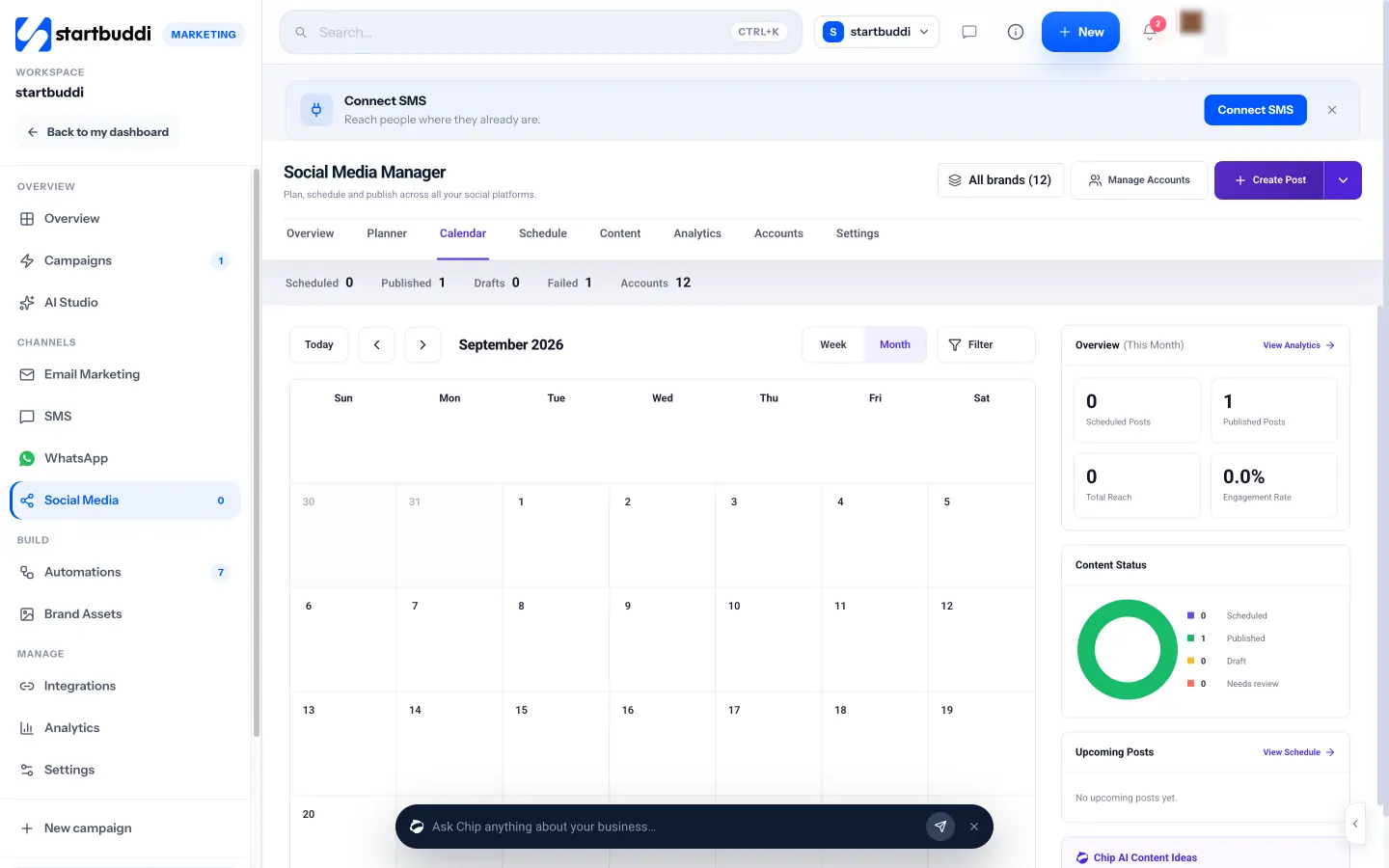
- Brands and folders. Group the accounts that belong to one client, then pick that brand in the header to scope every view: calendar, schedule and analytics.
- Approval routes per brand: no approval, one approver, everyone in order, or everyone in any order. Team members show as Can publish or Draft only.
- Client review links. Generate a shareable link for a post, valid for 14 days, which the client can open and approve without an account.
- Platforms: Facebook Pages, Instagram (feed, Reels and Stories), LinkedIn profiles and company pages, X, YouTube and Pinterest. TikTok is marked “Soon” and can’t be connected yet. Threads and Google Business posting aren’t available.
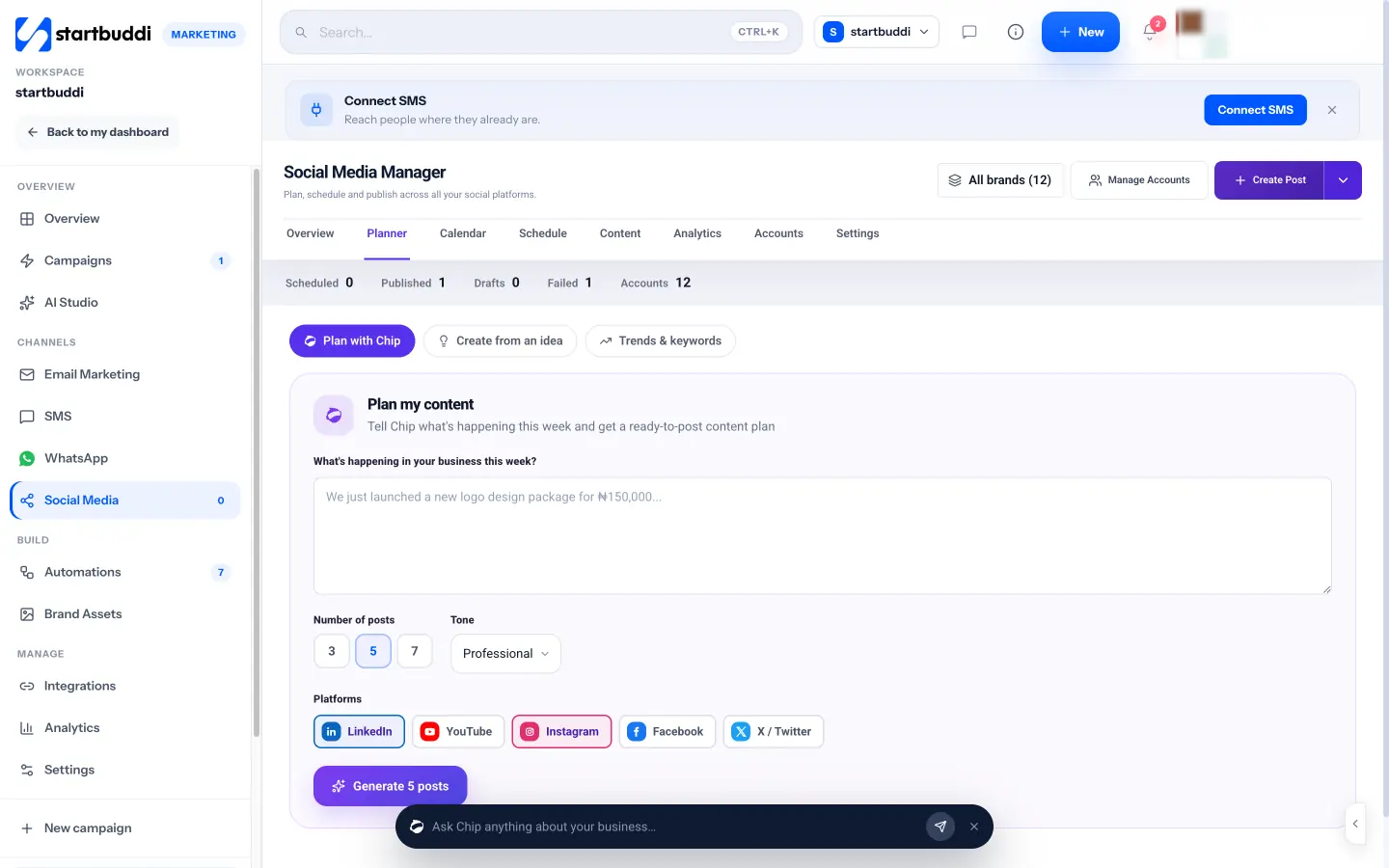
- Plan with Chip: describe a client’s week and Chip, the AI assistant, drafts 3, 5 or 7 posts in the tone you choose. You approve each one, then schedule them together. This uses Chip credits.
- Analytics by platform or by brand folder, with a downloadable report you can share.
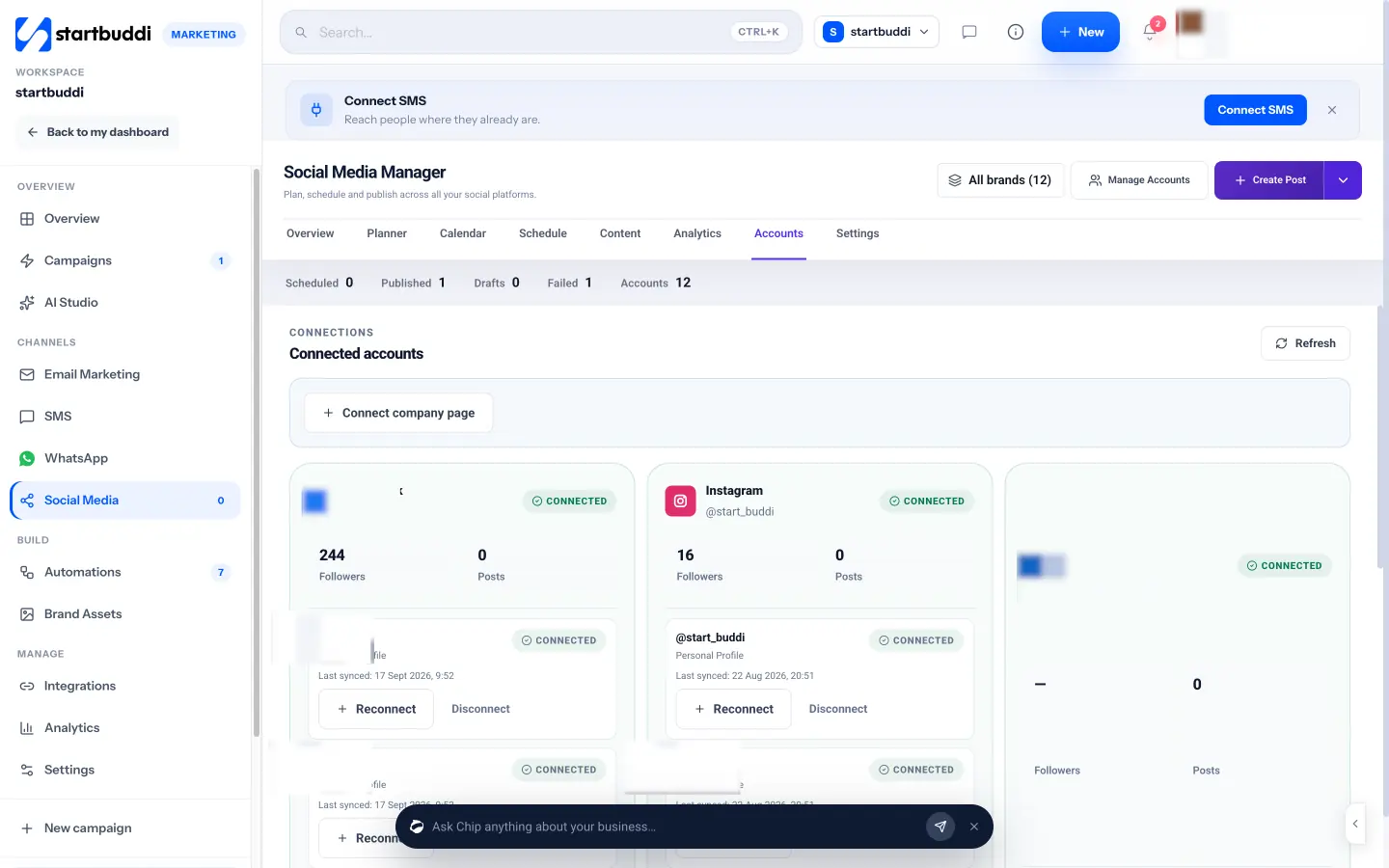
Know the limits before you move clients over. The publishing time zone is set once for the workspace, so plan clients in other zones with that in mind. Recurring posts and bulk CSV import aren’t available in the app. Starter connects up to 5 social accounts and 100 posts a month, Growth 15 accounts with unlimited posts, and Scale unlimited accounts. A post that fails is retried once, then listed under Content, Failed, so check that view daily. More on agency set-ups is on our social media management for agencies page.
Your next step
Pick your two busiest clients and move them onto the system this month: proper partner access, a brand sheet, a monthly intake and a written approval step. When you’re ready to run them from one calendar, compare plans on our pricing page and start the 30-day trial.
Sources
- Meta Business Help Center: Give a partner access to business assets
- LinkedIn Help: LinkedIn Page admin roles
- Meta for Developers: Instagram content publishing
- Buffer: How often to post on social media
- FTC: Disclosures 101 for social media influencers
- ASA and CMA: Influencers’ guide to making clear that ads are ads
Frequently asked questions
Should clients give my agency their social media passwords?
No. Use partner access in Meta's business portfolio and Page admin roles on LinkedIn, so the client stays the owner and can remove you cleanly.
How far ahead should an agency schedule client posts?
A month ahead suits most clients, with room to add timely posts during the month.
What if a client doesn't approve posts in time?
Agree in the contract what happens. Many agencies hold unapproved posts rather than publishing them.
How many clients can one social media manager handle?
It depends on posts per client and how many platforms. Batching and a clear approval process let one person handle far more than working day to day.
Olabimpe Salami is the email and outreach specialist at startbuddi. Olabimpe writes about the messages that bring customers in and back: email, WhatsApp and SMS campaigns, follow-ups, and turning enquiries into paying clients.
Runs email and outreach at startbuddi