Project management for beginners: plan, run and finish your first project
A plain-English guide to project management for beginners: define the project, plan tasks and dates, run it week by week, then close it and choose the right tools.

This is a guide to project management for beginners: people who have never run a formal project but suddenly need to deliver one, such as a website launch, a shop refit, a first client engagement or a product release. You do not need a certificate or special software to follow it. You need a notebook or a simple tool, an hour to plan, and ten minutes a week to keep things on track.
The short answer to “how do I manage a project?” is this: write down what done looks like, break the work into small tasks with one owner and a date each, check progress every week, and close the project properly when it ends. The four chapters below walk through each of those steps with examples, templates and the mistakes most beginners make. Each chapter ends with how to do the same thing in startbuddi, if you want one place for projects, tasks, time and the team.
By the end you will have a one-page project brief, a task list with owners and dates, a weekly routine for running the work, and a clear idea of which project management tools a small business actually needs.
Project management for beginners: what a project is and how to think about it
- Projects versus routine work
- 1. Start: agree what and why
- 2. Plan: break it down
- 3. Do: run the work
- 4. Check: track progress and adjust
- 5. Close: hand over and learn
Project management sounds like something for construction firms and software companies with large teams and larger budgets. In practice, every business runs projects, whether or not anyone calls them that. A bakery launching a delivery service, a consultant onboarding a new client, a salon moving to a bigger shop and a startup shipping its first app are all running projects. The only question is whether they run them on purpose or by accident.
This chapter explains what project management is, how it differs from your day-to-day work, the few ideas that matter most for beginners, and the common ways of organising a project. You will finish it knowing which of your current jobs are projects and how to think about them.
Project management for beginners: what a project actually is
The Project Management Institute, the largest professional body in the field, describes a project as a temporary piece of work undertaken to create a unique product, service or result (PMI, basic project definitions). Two words in that definition do most of the work.
- Temporary. A project has a start and an end. "Answer customer emails" never ends, so it is not a project. "Set up a shared inbox and reply templates by 30 November" does end, so it is.
- Unique. A project produces something that did not exist before: a new website, a new service, a finished client job. If you are repeating exactly the same steps every week, you are running a process, and processes are better handled with checklists and standard operating procedures.
Project management is simply the habit of planning, organising and tracking that temporary work so it finishes on time, within budget and to the standard you agreed. For a small business, it is less about charts and more about three questions you can answer at any moment: what are we trying to finish, who is doing what by when, and are we on track?
Projects versus routine work
Beginners often try to manage everything as a project, or nothing. A simple way to sort your work:
| Type of work | Example | Best way to manage it |
|---|---|---|
| Project | Launch an online booking page by 1 March | A project with tasks, owners, milestones and a deadline |
| Recurring task | Send the monthly newsletter | A repeating task with a checklist |
| Process | Onboard a new client | A standard operating procedure and a project template |
| One-off task | Renew the domain name | A single task with a due date |
Notice that client work sits in two rows. Onboarding every client is a process you repeat, but each client engagement is also a project with its own deadline and deliverables. The trick is to write the repeatable part once as a template, then start each new client project from it.
The three limits every project has
Every project balances three things: scope (what you will deliver), time (when it will be done) and cost (the money and hours it will use). Project managers call this the triple constraint, or the iron triangle. The idea is simple: if you change one side, at least one of the others has to move.
Here is how that plays out in a real small business. Imagine a freelance designer agrees to build a five-page website for a café for $2,400 in four weeks. Halfway through, the café owner asks for an online menu with ordering. That is extra scope. The designer now has three honest options:
- Add the scope and extend the time (deliver in six weeks instead of four).
- Add the scope and increase the cost (charge an extra $600 and bring in help to keep the date).
- Keep time and cost fixed and trade scope (drop the blog page to make room for the menu).
The fourth option, quietly absorbing the extra work at the same price and date, is how most small projects go wrong. Quality slips, the owner works late, and the profit disappears. Knowing the triangle helps you say, calmly, "Happy to add that. It moves the date by two weeks or adds $600. Which do you prefer?"
The five stages of a project
Most project methods describe the same life cycle, even if they use different names. You will use these stages whether your project lasts a week or a year.
1. Start: agree what and why
Write down the goal, who the project is for, what done looks like and the rough budget and deadline. For client work, this is where you agree scope before any work starts. Chapter 2 gives you a one-page template.
2. Plan: break it down
Turn the goal into milestones (big checkpoints) and tasks (small jobs one person can finish in a day or two). Add owners, dates and the order things must happen in.
3. Do: run the work
People work through their tasks. Your job as the project manager is to clear blockers, answer questions and keep everyone looking at the same list.
4. Check: track progress and adjust
Once a week, compare where you are with where the plan said you would be. Move dates, reassign tasks or cut scope early, while changes are still cheap.
5. Close: hand over and learn
Deliver the result, get sign-off, send the final invoice, archive the files and write down what you would do differently. Chapter 4 covers this in detail, because it is the stage beginners skip most often.
Ways of running a project: waterfall, kanban and agile in plain words
You will hear a lot of jargon about project methods. For a small business, three approaches cover nearly everything, and you can mix them.
| Approach | How it works | Good for | Watch out for |
|---|---|---|---|
| Waterfall (plan first) | Plan every stage up front, then do them in order | Events, office moves, fixed-price client work, anything with a hard deadline | Changes late in the project are expensive |
| Kanban (visual flow) | Tasks move across columns such as To do, In progress and Done | Ongoing work, content production, small teams who want to see everything at a glance | Without dates, work can drift |
| Agile (short cycles) | Work in one- or two-week cycles, deliver something usable, review and adjust | Software, new products, anything where you learn as you go | Needs regular reviews to work |
Most small businesses end up with a hybrid: a simple plan with milestones and a deadline (waterfall), a board to see the day-to-day tasks (kanban), and a weekly review (borrowed from agile). If you want to go deeper on the agile side, read our practical guide to agile project management for small teams or the short definition of agile project management.
Who does what on a small project
Large organisations have project sponsors, project managers, team leads and steering committees. On a small project, the same person often wears several hats, but the roles still exist and it helps to name them.
- Owner or sponsor: the person who wants the result and can make decisions about scope and budget. For client work, this is the client. For internal work, it is usually the founder.
- Project manager: the person who keeps the plan, runs the weekly check and chases blockers. In a small team, this is often the founder too, but it does not have to be.
- Doers: the people who complete tasks. Each task has exactly one owner, even if several people help.
- Reviewers: anyone who must approve something before it moves on, such as a client signing off a design.
Writing these names down at the start avoids the most common small-team problem: everyone assumes someone else is handling it.
Signs your business needs project management
You do not need a formal method for everything, but a few warning signs suggest your projects would benefit from more structure:
- Deadlines are regularly missed, and nobody is quite sure why.
- You often discover that two people did the same job, or that nobody did it.
- Clients ask "where are we?" and you have to check with three people before you can answer.
- You finish projects and cannot say whether they made money.
- Everything depends on you remembering, and you are the bottleneck for every decision.
- New team members take weeks to understand what is going on.
If two or more of these sound familiar, the steps in this guide will help. If none of them do, keep your current approach and come back when the business grows.
A short glossary of project words
You will meet these words in every tool and article about projects. Here they are in plain English.
- Deliverable: something you hand over, such as a logo, a report or a finished page.
- Milestone: a checkpoint in time, such as "design approved". It has a date but no work of its own.
- Dependency: a task that has to wait for another task to finish first.
- Stakeholder: anyone affected by the project or with a say in it, such as a client, a partner or a supplier.
- Scope creep: the slow growth of a project through small extra requests that nobody prices or plans.
- Buffer: spare time you add before a deadline to absorb delays.
- Backlog: a list of work you plan to do but have not scheduled yet.
Common beginner mistakes (and what to do instead)
- Starting without a written goal. "Improve the website" cannot be finished. "Publish a new homepage and booking page by 15 April" can.
- Tasks that are too big. "Build website" sits on a list for weeks. "Write homepage headline and three service descriptions" gets done on Tuesday.
- Nobody owns the task. A task assigned to "the team" is assigned to nobody.
- No dates. Without a due date, urgent work always pushes project work aside.
- Planning once, never checking. A plan is a guess. It only becomes useful when you compare it with reality every week.
- Too many tools. Tasks in one app, files in another, messages in WhatsApp and dates in a spreadsheet means nobody sees the whole picture. We come back to this in Chapter 4.
Seeing your projects in startbuddi
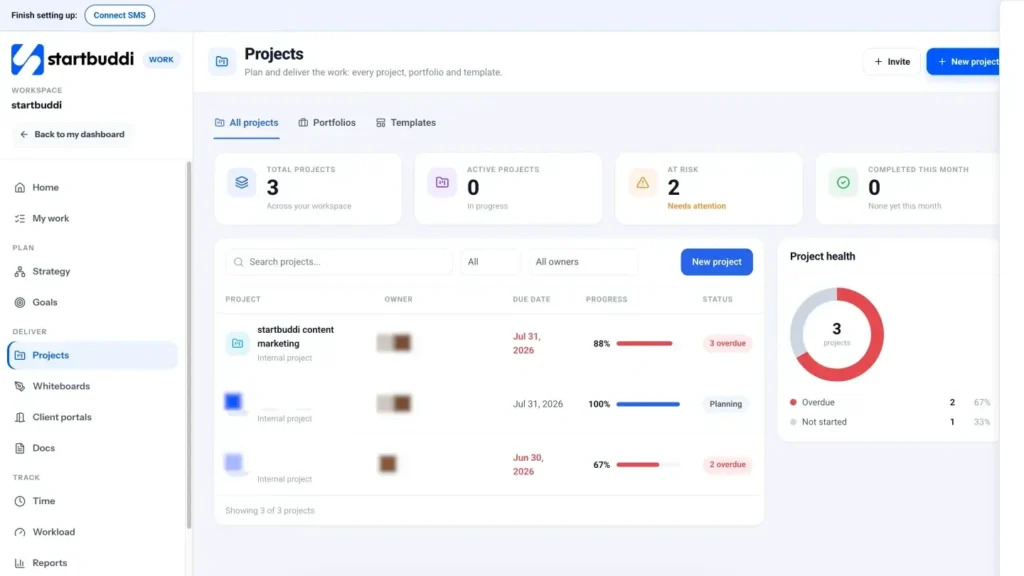
If you want to try these ideas in software, startbuddi puts projects, tasks, goals and time in one module called Work. Its left-hand menu follows the same life cycle as this chapter: Plan (Strategy and Goals), Deliver (Projects, Whiteboards, Client portals and Docs) and Track (Time, Workload, Reports and Dashboards). At the top are Home, a summary of what needs attention today, and My work, every task assigned to you.
The Projects page lists every project with its owner, due date, progress and status, plus cards for total projects, active projects, projects at risk and projects completed this month. Each project gets a health label (On track, At risk, Overdue, Complete or Not started), so a quick look tells you where to spend your attention. You can filter to see only your projects, only active ones or only those at risk.
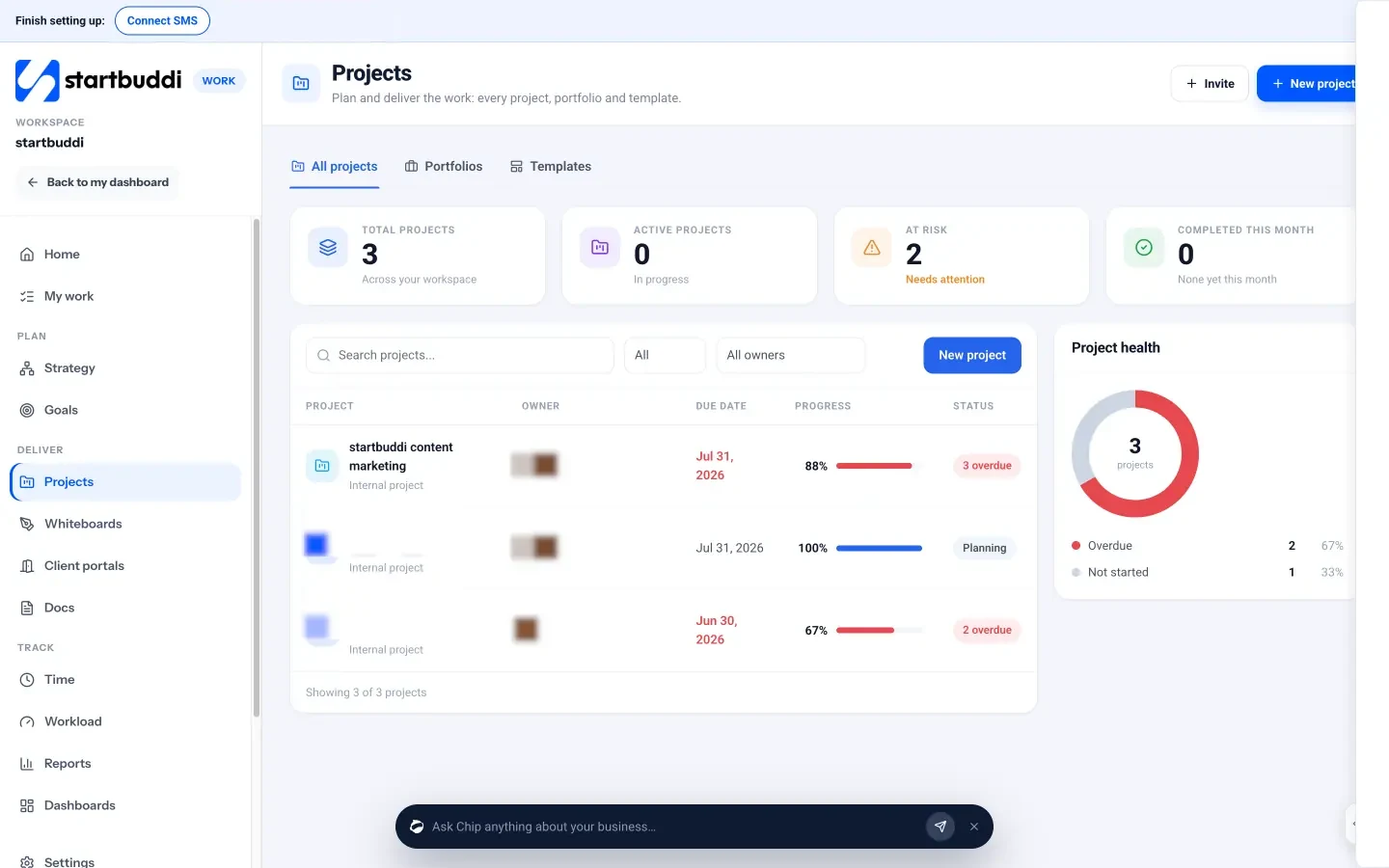
You do not need to set anything up in advance. Starting a project only needs a name: the new project form says "Only the name is needed. Everything else can change later." You can then add tasks, milestones and people as you go. The Work Home page adds a summary on top: your open tasks, active projects, anything that needs attention because it is overdue or its health is slipping, and your active goals, with quick buttons to add a task, start a project or set a goal. It is a good page to open first thing in the morning. Chapter 2 shows how to build the plan, and the Projects page explains the features in more detail.
Your task for this chapter: list the three pieces of work in your business that are really projects, and for each one write a single sentence that says what done looks like and by when.
Plan your project: brief, tasks, estimates and realistic dates
- Milestones: the checkpoints that keep you honest
- Worked example: does the budget add up?
- Timelines and Gantt charts
Planning is where beginners either spend too little time ("we will figure it out as we go") or far too much ("let me perfect this 40-row spreadsheet first"). The right amount for a small project is usually one to two hours. That is enough to agree the goal, list the work, spot what depends on what and choose realistic dates. This chapter gives you a one-page brief, a way to break work down, a simple estimating method and a worked example you can copy.
Start with a one-page project brief
A project brief is a short document that everyone involved can read in two minutes. It stops the most expensive problem in any project: people working hard towards different ideas of what done means. Copy this template into a document and fill it in before you create a single task.
| Section | What to write | Example (café website) |
|---|---|---|
| Goal | One sentence, with a date | Launch a five-page website with online table booking by 31 March. |
| Why it matters | The business reason | Half of bookings come by phone during the lunch rush and many are missed. |
| Deliverables | The things you will hand over | Home, Menu, About, Contact and Book pages; booking form; photos. |
| Out of scope | What you will not do | Online ordering, a blog, a loyalty scheme. |
| Owner and team | Who decides, who does | Owner: Ada (café). Project manager and designer: Sam. Photos: Jo. |
| Budget | Money and hours | $2,400 fixed fee; about 40 hours of design and build. |
| Milestones | Three to six checkpoints | Content agreed (7 Mar), design approved (14 Mar), site built (24 Mar), live (31 Mar). |
| Risks | What could go wrong | Photos late; owner slow to approve; menu prices change. |
The "out of scope" line is the one beginners leave empty and later regret. Writing down what you will not do is the cheapest protection against scope creep you will ever have. If you want a ready-made layout, our free project plan template covers the same sections.
Break the work down into tasks
Once the goal is clear, break it into pieces. Project managers call this a work breakdown structure, but the method is simple: start with each milestone and ask "what has to happen for this to be true?" Keep going until each item is a task one person can finish in a day or two.
For the café website, the milestone "Content agreed" breaks down like this:
- Collect current menu and prices from Ada
- Write homepage headline and introduction
- Write About page (founder story, opening hours)
- Draft Contact page (address, map, phone)
- Send all copy to Ada for review
- Make Ada's changes and get sign-off
Good tasks share four features. They start with a verb ("write", "send", "book"). They are small enough to finish in one sitting or a day. They have one owner. And they have a clear finish line, so nobody has to ask "is this done?"
Milestones: the checkpoints that keep you honest
A milestone is a moment, not a job. "Design approved" is a milestone; "design the homepage" is a task. Milestones are useful because they are easy to check: either the design is approved on 14 March or it is not. Three to six milestones are plenty for a project of a few weeks. For client work, milestones are also natural points to ask for approval and, if you agreed staged payments, to send an invoice.
Estimate time without guessing wildly
Estimating is hard for everyone, and beginners tend to be optimistic. Two simple habits make estimates far more reliable.
Estimate small tasks, not big ones. "Build the website" is impossible to estimate well. "Write three service descriptions" is easy: about two hours. Add up the small estimates to get the total.
Use three numbers for anything uncertain. For each risky task, write a best case, a likely case and a worst case. A common rule of thumb is to add the best case, four times the likely case and the worst case, then divide by six. For photo editing that might take 3, 5 or 10 hours: (3 + 20 + 10) / 6 = 5.5 hours. It is not magic, but it pulls your estimate towards reality.
Worked example: does the budget add up?
Here is the café project costed out. Sam charges clients a fixed fee but tracks hours to check the project is worth doing.
| Milestone | Estimated hours |
|---|---|
| Content agreed | 8 |
| Design approved | 12 |
| Site built | 14 |
| Testing and launch | 6 |
| Total | 40 |
At a $2,400 fee, 40 hours works out at $60 an hour. If Sam's target rate is $60 an hour, there is no room for surprises. So Sam adds a buffer of 15 percent (six hours) for revisions and delays, and agrees two rounds of changes in the brief. If the project runs to 46 hours, the effective rate drops to about $52. That is still acceptable, but anything beyond it means the fee was too low. The same maths works in any currency: a ₦1,800,000 project at 40 hours is ₦45,000 an hour, and a £1,900 project is £47.50 an hour. Work out your target hourly rate before you quote, so you know what a good project looks like.
Put the tasks in order: dependencies and the critical path
Some tasks can happen at any time. Others must wait for something else. You cannot build the menu page until you have the menu, and you cannot launch until the owner approves the design. These links are called dependencies.
Once you know the dependencies, you can find the critical path: the longest chain of tasks that must happen one after another. Any delay on that chain delays the whole project. Delays elsewhere may not matter at all. For the café, the critical path runs through collecting the menu, writing content, getting approval, designing, building and testing. The photos can happen in parallel, so a day's delay there does not move the launch date, unless it grows into a week.
Knowing your critical path tells you where to focus. If you only have time to chase one thing today, chase the task on the critical path.
Timelines and Gantt charts
A Gantt chart shows tasks as horizontal bars against a calendar, with arrows for dependencies. It is named after Henry Gantt, an American engineer who popularised the chart in the 1910s, although a similar chart was developed earlier by the Polish engineer Karol Adamiecki (Association for Project Management, a brief history of Gantt charts). A century later, it is still the clearest way to see whether your dates are realistic. If three bars overlap for one person in the same week, you can see the problem before it happens.
Set dates you can actually hit
- Work backwards from the deadline. Put the launch date at the end, then place each milestone before it with enough time for the tasks in between.
- Count real working hours. A person with 40 hours a week rarely has more than 25 available for project work once meetings, email and admin are counted.
- Allow time for other people. Approvals, deliveries and replies from clients usually take longer than the work itself. Give each approval at least two working days.
- Add a buffer before the deadline, not scattered through the plan. A week of slack at the end is easier to protect than an hour hidden in every task.
Your first planning session: a 60-minute agenda
If planning feels overwhelming, book an hour in your calendar and follow this agenda. It works alone or with two or three people around a table.
- Minutes 0 to 10: read the brief aloud. Check everyone agrees on the goal, the deadline and what is out of scope. Change the brief now if anything is unclear.
- Minutes 10 to 20: set the milestones. Write three to six checkpoints on sticky notes or a whiteboard and put them in date order.
- Minutes 20 to 40: list the tasks. For each milestone, brainstorm every task needed to reach it. Do not worry about order yet. Then remove duplicates and split anything bigger than two days.
- Minutes 40 to 50: owners, estimates and order. Give each task one owner and an estimate. Draw arrows between tasks that depend on each other.
- Minutes 50 to 60: check the dates. Place tasks on a calendar, count the hours each person has, and move milestones if the maths does not work.
At the end, copy everything into whatever tool you will use to run the project, and share it. The plan does not need to be perfect. It needs to be good enough to start, and honest enough to change.
How much planning does your project need?
Not every project deserves the same effort. Match the planning to the size and risk of the work.
| Project size | Example | Planning that is enough |
|---|---|---|
| Small (under two weeks, one or two people) | Refresh your price list and booking page | A goal with a date and a task list with owners |
| Medium (two to eight weeks, a few people) | Launch a new service or a client website | A one-page brief, milestones, tasks with estimates and a simple timeline |
| Large (two months or more, several people or suppliers) | Open a second location or build an app | All of the above, plus a budget, a risk list, a change process and a fortnightly review with the owner |
If you are unsure, start with the medium level. It takes an hour or two and is rarely wasted.
Planning mistakes to avoid
- Planning in so much detail that the plan is out of date by Wednesday. Plan the next two weeks in detail and the rest in milestones.
- Forgetting the client's tasks. If the client must send content or approve a design, those are tasks with dates too.
- Assuming everyone is available full time. Check holidays and other projects first.
- Not writing down assumptions. "Assumes photos are supplied by 5 March" turns a surprise into a known risk.
Planning a project in startbuddi
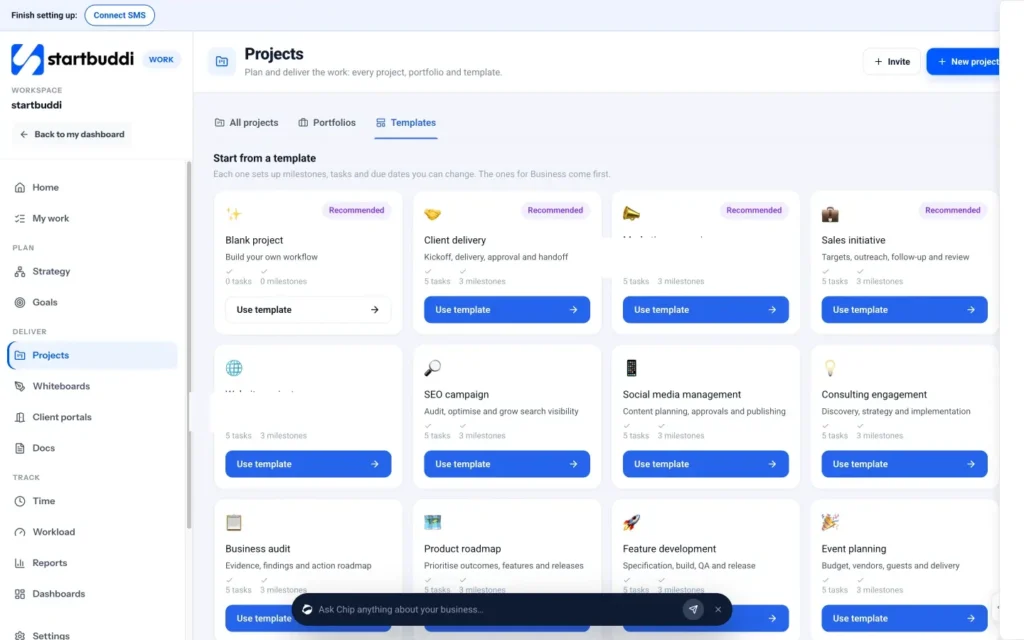
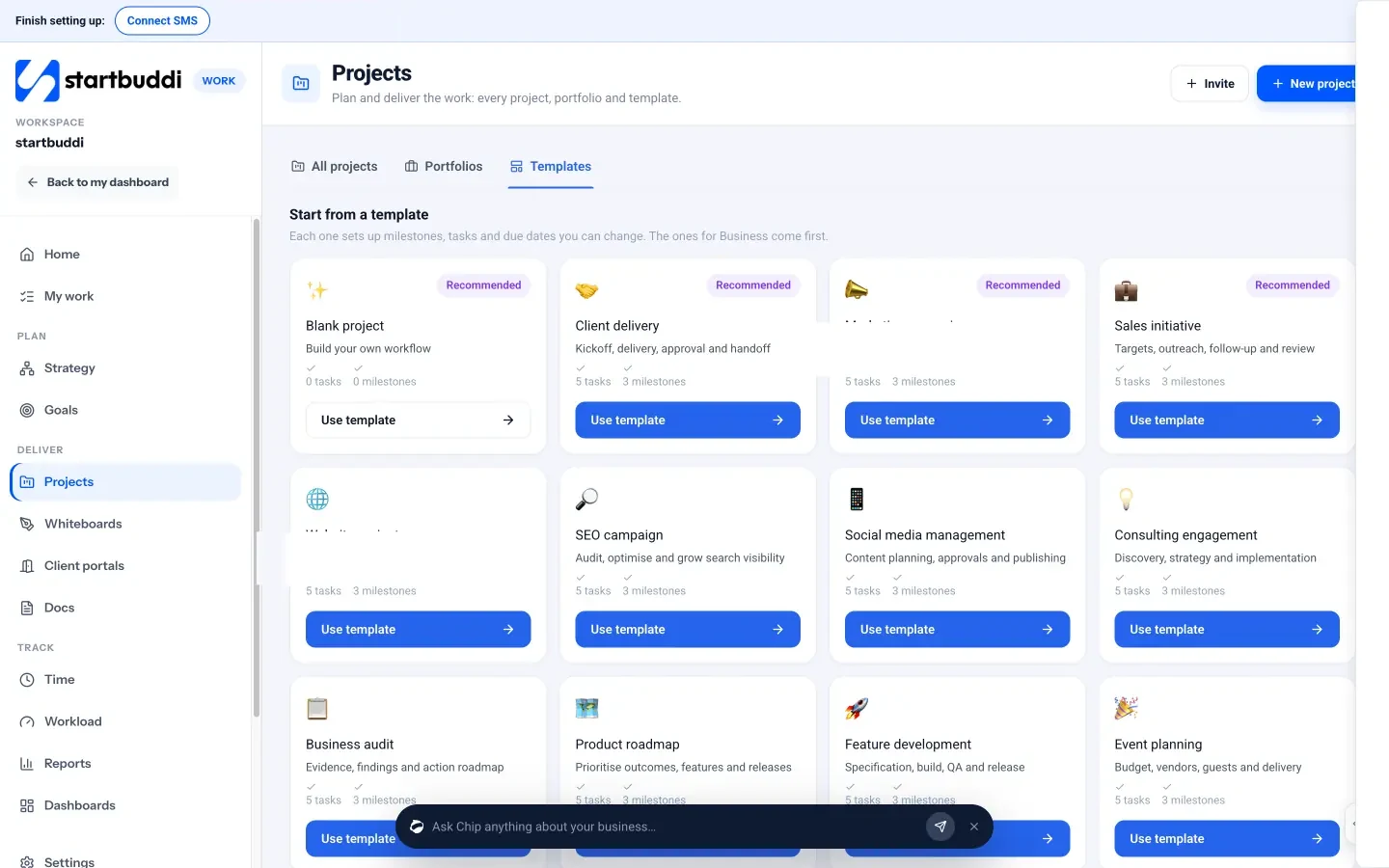
In startbuddi, open Work, then Projects. You have two ways to start. Click New project for a blank project, give it a name, an optional description and colour, and link it to a customer or mark it as an internal project. Or open the Templates tab and choose a template: each one sets up milestones, tasks and due dates you can change, and the templates that match your type of business are marked as recommended. There are templates for client delivery, marketing campaigns, website projects, SEO and social media work, consulting engagements, event planning, new service launches and more.
Inside a project, the tabs follow the planning steps in this chapter:
- Milestones: add each checkpoint with a name (for example "Design approved"), due date, owner and health (On track, At risk or Blocked), and link the tasks that feed into it.
- Tasks: add tasks with a title, assignee, priority, due date and, inside the task, an estimate in hours and subtasks. You can also set what a task is blocked by, with a lag in working days.
- Timeline: a Gantt chart built from your dates, with dependency arrows, milestones shown as diamonds, a line for today and a highlight for the critical path. Drag a bar to move it, drag its ends to change dates, or drag from one task onto another to make it wait. If you move a task that others depend on, startbuddi asks whether to move them too.
- Budget: set a money budget and an hours budget, then see time logged and the cost to complete as work progresses.
Keep the project brief itself in Documents and link it to the project from the References tab, so the plan and the "why" live together. For a click-by-click walkthrough, see the help article on creating your first project in startbuddi.
Your task for this chapter: write a one-page brief for one real project, break the first milestone into tasks, estimate them and mark the critical path.
Run the project week by week: task management, boards and updates
- Priorities that mean something
- Status updates people actually read
A plan is only a prediction. The real work of project management happens in the weeks between kickoff and delivery, when tasks slip, clients change their minds and something urgent lands on Tuesday afternoon. This chapter shows you a simple weekly routine for running a project, how to use a task list and a board, how to keep people informed without endless meetings, and how to deal with the changes and risks that every project meets.
Kick off properly
Before work starts, get everyone involved together for 30 to 45 minutes, in person or on a call. Walk through the brief, the milestones and who owns what, and agree how you will communicate. The goal is that everyone leaves knowing what they are doing this week and who to ask when they are stuck. We cover the agenda in detail in how to run a project kickoff meeting.
Three decisions from the kickoff save a lot of trouble later:
- Where tasks live. One list, one tool. If a task is not on the list, it is not happening.
- Where conversations happen. A project chat room or a single email thread, not five WhatsApp groups.
- When you check in. A fixed weekly slot, such as Monday at 10:00, that people protect.
Task management for small teams: one list, clear owners
The most useful tool in project management is a shared task list that everyone trusts. It sounds basic, and it is. But most small teams do not have one: tasks live in people's heads, in email threads and in chat messages that scroll out of sight. We wrote about this problem in how to stop losing tasks in Slack and email threads.
A task list becomes trustworthy when it follows a few rules:
- Every task has one owner. Others can help, but one person is responsible for finishing it.
- Every important task has a due date. Undated tasks are wishes.
- Status is updated where the work is tracked, not in a separate message. "I finished the menu page" should mean the task is ticked, not that someone sent a chat.
- New work goes on the list first. When a client asks for something on a call, the first step is to add it as a task, even before deciding whether to do it.
If you want the theory behind this, read our explanation of a task management system. In practice, the difference between teams that deliver on time and teams that do not is rarely talent. It is whether they keep one honest list.
Priorities that mean something
Most task tools let you mark priority as urgent, high, medium or low. The trap is marking everything high. A useful rule: only tasks on the critical path, or tasks that block someone else, get high priority. Everything else is medium until proven otherwise. If more than a quarter of your tasks are high priority, the label has stopped meaning anything.
Boards: see the work move
A kanban board shows tasks as cards in columns, usually To do, In progress, Review and Done. Moving a card from one column to the next is a small, satisfying signal that work is happening, and a glance at the board shows where things are stuck. If the Review column has eight cards and Done has none, your bottleneck is approvals, not effort.
Two habits make boards far more useful:
- Limit work in progress. Ask each person to have no more than two or three cards in progress at once. Finishing one thing is worth more than starting three.
- Make blocked work visible. If a task is waiting on someone else, say so on the card, with who and since when. Hidden waiting is the silent killer of small projects.
The weekly project check: 20 minutes that keep projects on track
If you only adopt one habit from this guide, make it this. Once a week, at the same time, spend 20 minutes on each active project. Solo founders can do it alone; small teams can do it together. Use the same four questions every time.
- What got done since last week? Tick off finished tasks and celebrate the milestones reached.
- What is late or at risk? Look at overdue tasks and anything on the critical path that is behind.
- What is blocked? Who or what are we waiting for, and who will chase it today?
- What is the plan for the next week? Make sure each person knows their top three tasks.
At the end, decide whether the project is on track, at risk or off track, and write one or two sentences about why. That short note becomes your status update. If you run several projects, go through them in order of risk, starting with any that are behind.
Status updates people actually read
A client or a business partner does not want a list of 40 tasks. They want to know three things: are we on track, what happened, and what do you need from me? A simple format works for almost every project:
Status: On track for launch on 31 March.
Done this week: Homepage and menu design approved.
Next week: Build all five pages; booking form testing on Friday.
Needed from you: Final opening hours by Wednesday.
Send it on the same day every week. Regular, short updates build far more trust than long, occasional ones, and they surface problems while there is still time to fix them.
Handling change without losing control
Every project changes. The client wants an extra page, a supplier is late, a team member falls ill. Change is not the problem; unmanaged change is. Use a simple change process, even on small projects:
- Write the request down as a task or a note, with who asked and when.
- Work out the impact on scope, time and cost (the triangle from Chapter 1).
- Tell the owner the options and get a decision in writing.
- Update the plan: tasks, dates and, if needed, the budget.
This takes five minutes and turns an awkward conversation into a business decision. Most clients respect it, because it shows you are in control.
Running a project when you are a team of one
Solo founders and freelancers face a particular problem: there is nobody to hold them to the plan. Client work always feels more urgent than your own projects, so the new website or the product launch keeps slipping. A few habits help.
- Treat your own project like a client project. Give it a deadline, a brief and a weekly check, and put its tasks in the same list as your client work.
- Book time for it. Block two or three sessions a week in your calendar and protect them as you would a client meeting.
- Find an accountability partner. A friend, mentor or peer who asks "did you do what you said?" every Friday is surprisingly effective.
- Make the next task tiny. When motivation is low, a 20-minute task ("draft the About page headline") is easier to start than a vague one.
Working with clients and suppliers inside the project
Many small projects depend on people outside your business: a client who must approve work, a printer, a developer, a venue. Their tasks are just as real as yours, so put them on the plan with names and dates. "Client sends logo files (Ada, by 5 March)" is a task. When it is on the list, it shows up in your weekly check, and you can chase it politely before it becomes a delay.
Agree up front how outside people will receive work and give feedback. Endless email chains with attachments called "final-v3-really-final" are a classic source of confusion. One shared place for files and approvals, with a clear date for each round of feedback, keeps everyone working on the latest version.
Keep files and decisions next to the work
Half the time lost on small projects is spent looking for things: the latest version of a document, the message where the client approved the colour, the password to the hosting account. A simple rule helps: every file and every decision is linked to the task or project it belongs to. If the brief lives in a documents folder, link it from the project. If a decision is made in chat, add a one-line note to the task. Future you, and anyone who joins the project later, will be grateful.
Fewer, shorter meetings
Meetings are where a lot of project time disappears. For most small projects, you need only three kinds: the kickoff at the start, the weekly check, and a review at the end. Everything else can be a message, a comment on a task or a short call booked when a real decision is needed. When you do meet, write the decisions and new tasks down before everyone leaves, and add them to the task list straight away. A decision that lives only in someone's memory will be remembered differently by each person within a week.
Keep a short risk list
A risk is something that has not happened yet but could hurt the project. Keep a list of the top five, each with an owner and a plan. For the café website:
| Risk | Likelihood | Impact | Plan |
|---|---|---|---|
| Photos arrive late | Medium | Medium | Use placeholder images; swap in real ones after launch. |
| Owner slow to approve design | High | High | Book a 20-minute review call instead of waiting for email. |
| Booking tool setup takes longer | Low | High | Set it up in week one, not week four. |
Review the list in your weekly check. Most risks never happen, but the ones that do are far less painful when you saw them coming.
When a project goes off track
Sooner or later, a weekly check will show a project that is clearly behind. Do not wait for it to fix itself. Work through these options in order, from the cheapest to the most painful:
- Remove blockers. Is something waiting on a decision or a reply? Chase it today, by phone if needed.
- Reorder the work. Move effort onto the critical path and pause anything that does not affect the deadline.
- Add help. Can a teammate or a freelancer take a few tasks for a week?
- Cut scope. Agree with the owner what can move to a second phase after launch.
- Move the date. If none of the above works, tell the owner early, explain why and give a new, realistic date.
Owners and clients rarely mind a moved date as much as they mind finding out on the day. Early, honest news keeps their trust.
Running projects day to day in startbuddi
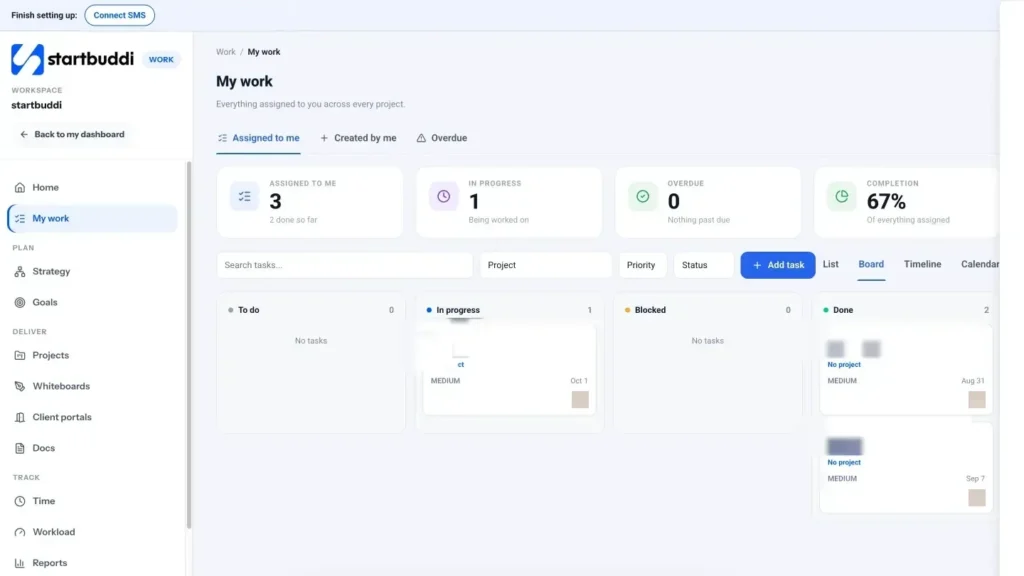
In startbuddi, each person's tasks from every project come together in Work, then My work. The page shows cards for tasks assigned to you, in progress, overdue and your completion rate, and tabs for tasks assigned to you, tasks you created and overdue tasks. An Upcoming deadlines panel shows what is due soon, and you can filter by status, priority and project.
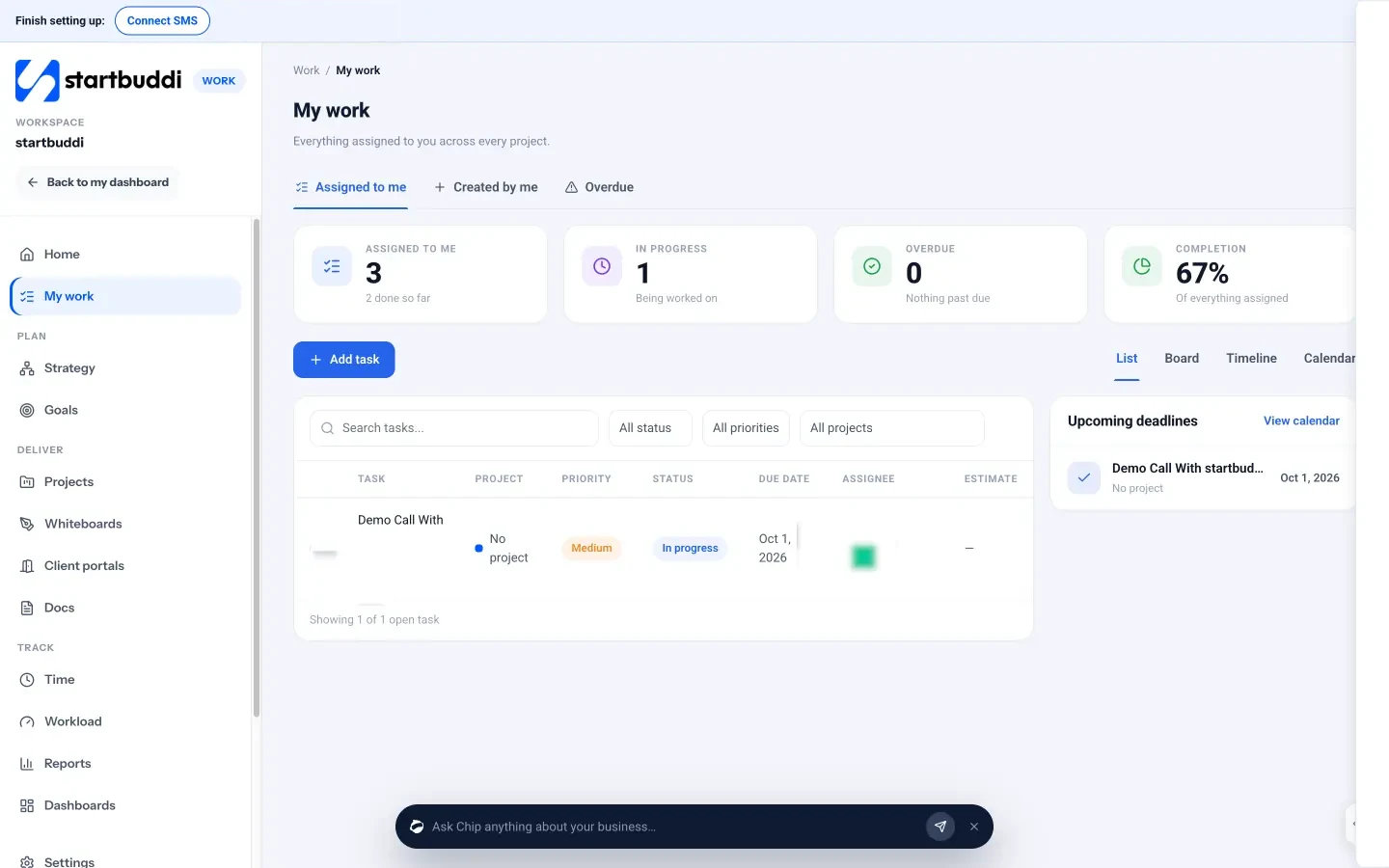
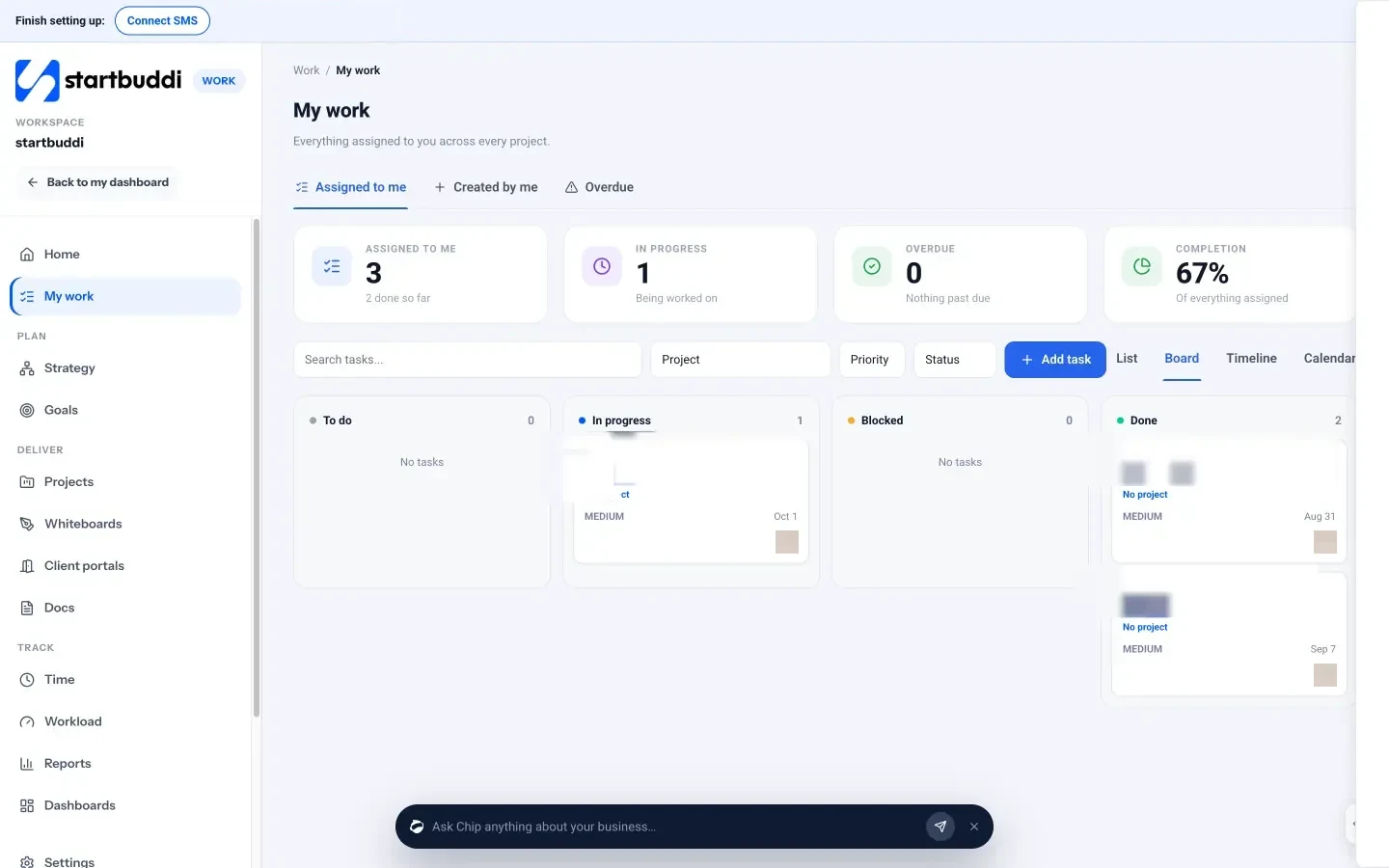
Switch between four views depending on the job: List for a sortable table, Board for a kanban view you can drag cards across, Timeline for dated bars and Calendar to see your month. Clicking any task opens a panel where you can change its status and priority, add subtasks, log time, set dependencies, attach files, link a document and comment. Type @ in a comment to mention a teammate, or @chip to ask Chip, the built-in AI assistant, for help with that task.
Tasks can also repeat daily, weekly or monthly, which is handy for recurring jobs like a weekly status update. Every project also gets its own discussion room in startbuddi Chat, where you can type @ to link a teammate, a task or a document into a message, so conversations stay next to the work. Inside a project, the Overview tab shows progress, open and overdue tasks, milestones and a "Needs attention" list, which is a ready-made agenda for your weekly check. Read more on the My work page.
Your task for this chapter: put every task for one project in a single list with owners and dates, book a recurring 20-minute weekly check, and send your first four-line status update.
Close the project well and choose project management tools for small business
- Worked example: what the numbers tell you
- The five jobs a project tool must do
- Nice to have, depending on your business
- Spreadsheet, dedicated app or all-in-one?
- Questions to ask before you choose
The last stage of a project is the one beginners skip most often. The work is delivered, everyone is tired, and the next project is already waiting. But ten minutes spent closing a project properly will make every future project faster, cheaper and less stressful. This chapter covers how to finish and hand over a project, how to learn from it, and how to choose project management tools for a small business without drowning in apps.
Closing a project: the checklist
A project is not finished when the work is done. It is finished when the owner has accepted it, the money is in and you have captured what you learned. Use this checklist at the end of every project.
- Confirm every deliverable in the brief is complete. Go back to the one-page brief from Chapter 2 and tick each deliverable off. Anything outstanding either gets done or is agreed in writing as out of scope.
- Get sign-off. Ask the owner to confirm, in writing, that the project is complete. For client work, this is the moment that protects you from "one more small thing" three months later.
- Hand over. Share final files, logins, instructions and anything the owner needs to keep the result running. A short handover document saves dozens of support messages.
- Send the final invoice. For client projects, invoice on the day of sign-off, while the value of your work is fresh. Our guide on sending your first invoice and getting paid on time covers terms and follow-ups.
- Archive the project. Move files to a clear folder, close or archive the project in your tool, and remove it from your active list.
- Hold a short review. See the next section.
- Update your templates. If you learned something that applies to every project of this type, change the template now.
The project review: what went well, what to change
A project review, sometimes called a retrospective or post-mortem, is a 30-minute conversation (or a quiet 15 minutes alone) about how the project went. Keep it blame-free and practical. Three questions are enough:
- What went well that we should repeat?
- What went badly that we should change?
- What surprised us?
Then compare the plan with what happened. How long did the project take compared with the estimate? How many hours were logged compared with the budget? How many change requests came in? These numbers are the most valuable data a small business has for pricing and planning future work.
Worked example: what the numbers tell you
Back to the café website. Sam planned 40 hours plus a six-hour buffer at a fixed fee of $2,400. The project actually took 52 hours, finished five days late and had three change requests, one of which (a gallery page) was absorbed without extra charge.
| Measure | Plan | Actual | Lesson |
|---|---|---|---|
| Hours | 40 (+6 buffer) | 52 | Design revisions took twice as long as estimated. |
| Effective hourly rate | $60 | $46 | The fee was too low for this scope. |
| Launch date | 31 March | 5 April | Owner approvals took four days each, not two. |
| Change requests | 0 planned | 3 | One was absorbed for free; charge for all of them next time. |
From one short review, Sam now knows to quote design revisions at double the time, book approval calls instead of waiting on email, and price similar projects at around $2,900 instead of $2,400. That single change is worth more than any productivity trick.
Project management tools for small business: what you actually need
Once you have run a project or two on paper or in a spreadsheet, you will probably want a tool. The market is crowded, and it is easy to spend more time setting up software than running projects. Start by asking what jobs the tool has to do, not which brand is popular.
The five jobs a project tool must do
- Hold one task list per project, with owners, dates and status.
- Show each person their own work across every project, so nobody has to check five lists.
- Show time: a calendar or timeline so you can see whether dates are realistic.
- Keep files and conversations next to the tasks, so context is not lost in email.
- Give you a quick view of progress across all projects, so you know where to spend attention.
Nice to have, depending on your business
- Time tracking, if you bill by the hour or want to check whether fixed fees are profitable.
- A client view, if clients need to see progress, approve work or share files. A client portal does this without adding them to your whole workspace.
- Templates, if you run similar projects repeatedly.
- Workload views, once you have three or more people.
- Links to your customer list and invoices, if most of your projects are client work.
Spreadsheet, dedicated app or all-in-one?
| Option | Works well when | Starts to hurt when |
|---|---|---|
| Spreadsheet or notebook | You are solo with one or two projects | More than one person edits it, or you need reminders and history |
| Dedicated task or project app | Projects are the main thing you manage and other tools already work | Clients, invoices, files and chat live elsewhere and you copy information between tools |
| All-in-one business app | You want projects connected to customers, documents, time and money in one login | You need very specialised features, such as construction scheduling or engineering workflows |
There is no single right answer. What matters is that the tool matches the size of your team and the kind of work you do. If you are comparing specific products, our researched list of the best project management software and side-by-side pages such as startbuddi vs Trello and startbuddi vs Asana set out the facts. For background on the category, read what project management software is.
Questions to ask before you choose
- Can everyone on the team learn it in an afternoon?
- Does it have a free plan or trial so you can run one real project before paying?
- What does it cost per person as the team grows, including clients or freelancers who need access?
- Can you export your data if you leave?
- Does it work well on a phone, for the days you are away from a desk?
Build a small library of project templates
After two or three projects of the same kind, you will notice that most of the tasks repeat. That is your cue to create a template: a saved project with the usual milestones, tasks, owners and typical durations, ready to copy. Templates are one of the biggest time savers in project management, because the thinking is done once and reused many times.
Good candidates for templates in a small business include:
- New client onboarding: welcome email, contract, intake form, kickoff call, access to files.
- Standard client delivery: the usual stages of your main service, from brief to handover.
- Marketing campaign: plan, create content, schedule, launch, measure.
- Event: venue, speakers or suppliers, invitations, reminders, day-of checklist, follow-up.
- New hire: equipment, accounts, first-week plan, 30-day check-in.
Keep templates short and update them after every project review. A template that nobody maintains slowly fills with tasks that no longer apply, and people start ignoring it.
Write a one-page handover document
A handover document is what the owner keeps after you have gone. It turns "can you remind me how to..." messages into a page they can look up themselves. Keep it to one page where possible, with these sections:
- What was delivered: a list of each deliverable, with where to find it.
- How to use it: the three or four things the owner will need to do regularly, in simple steps.
- Accounts and access: which services are involved and who holds the login. Share passwords through a password manager, never in the document itself.
- What happens next: any renewals, warranties, support period or follow-up work you agreed.
- Who to contact: your details and how you prefer to be reached.
For internal projects, the same page helps the teammate who will look after the result once the project team moves on.
How to tell if a project was a success
Finishing on time and on budget is only part of the story. A project can hit both and still fail if the result does not do what it was for. Go back to the "why it matters" line in your brief and check it a month or two after launch. Did the café get more bookings once the online form went live? Did the new onboarding process cut the questions new clients ask? Write the answer in your project notes. Over time, this is how you learn which projects are worth doing at all.
Think about the real cost of a tool
When comparing tools, look past the headline price. Many project apps charge per person per month, so a tool that looks cheap for one founder can cost several times as much once you add a team, a freelancer and a client who needs to see progress. Add up what you would pay for everything you need around your projects too: file storage, chat, time tracking, a client view, invoicing. Sometimes two or three separate subscriptions cost more, and take more time to keep in sync, than one tool that covers the lot. Sometimes the reverse is true. Write the numbers down for your own team size before you decide.
Mistakes to avoid when adopting a tool
- Moving everything at once. Start with one project, run it end to end, then move the rest.
- Building complex setups before using them. Custom fields, automations and elaborate statuses can wait until you know you need them.
- Keeping the old system running in parallel. Pick a switch-over date and stop updating the spreadsheet.
- Not agreeing the rules. Tools do not create habits. The rules from Chapter 3 (one list, one owner, dates, weekly check) still apply.
Tracking progress and closing projects in startbuddi
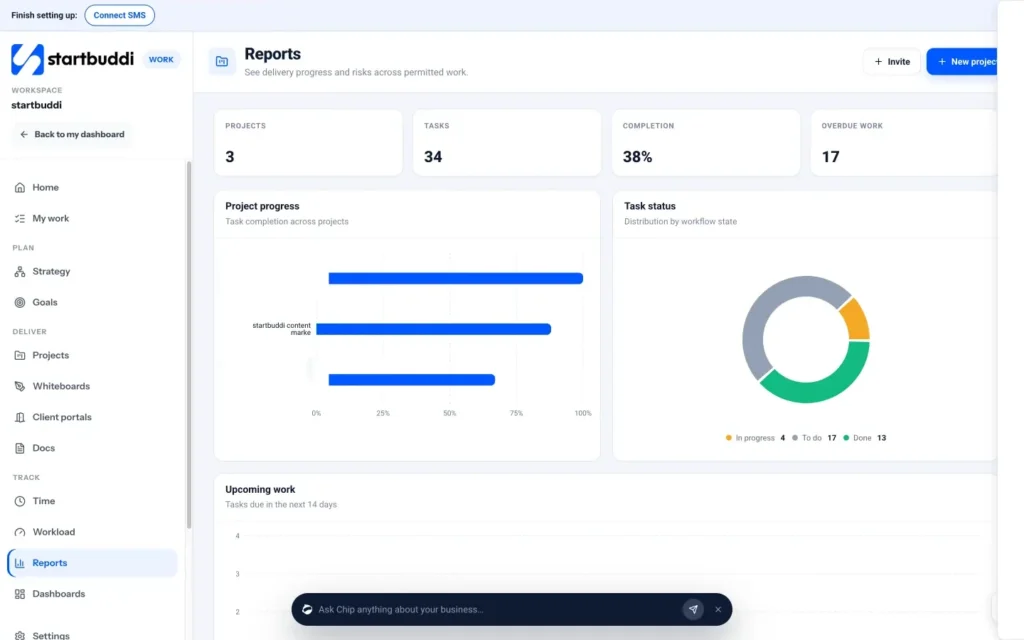
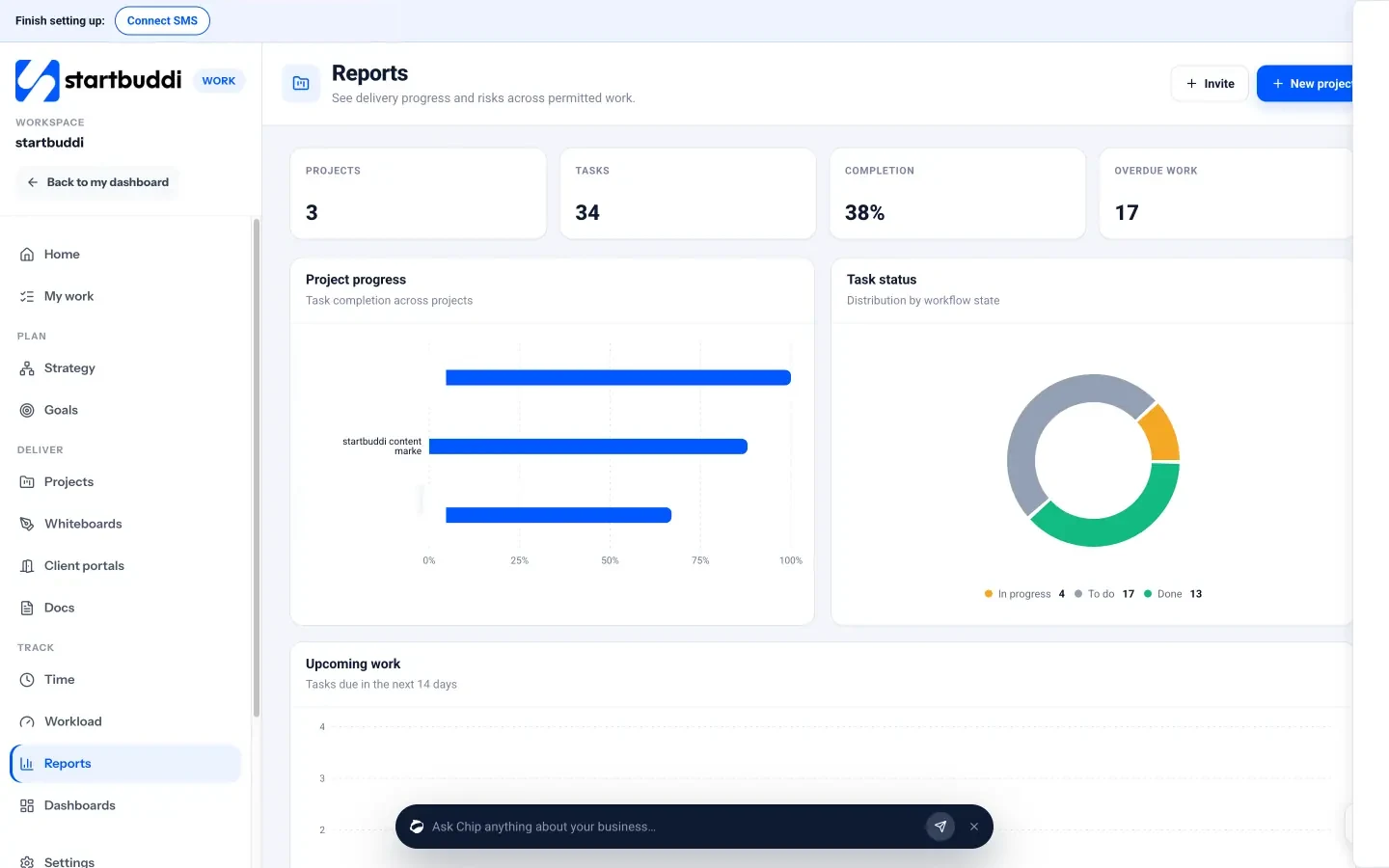
In startbuddi, Work, then Reports, gives you a quick read on delivery across every project you can see: cards for projects, tasks, completion and overdue work, plus charts of project progress, task status, work due in the next 14 days, overdue work by project and team workload. You can filter it to one project for a single project report, which is useful for your review.
For the numbers in your project review, Time lets people start a timer on a task or log time by hand, marking what is billable. Each project's Budget tab turns logged time into time logged, spent so far and cost to complete, with an hours burn-down chart. That gives you the planned-versus-actual comparison from this chapter without a separate spreadsheet. Read more on the time tracking page.
For client work, a client portal gives each client a private page where they sign in with an email link (no password and no paid seat) to follow progress, approve deliverables, message you and see invoices you share. With approvals switched on, a shared deliverable cannot be marked done until the client approves it, which is a tidy way to handle sign-off. Client portals can be built and previewed on the Free plan; inviting clients needs a paid plan.
When the project is finished, archive it from its settings, and if you have learned something that applies to every similar project, start the next one from the updated template. For a deeper look at client projects specifically, read our guide to running client projects from scope to sign-off.
Your next step
Pick one real project, write the one-page brief, break it into owned and dated tasks, and run the 20-minute weekly check until it is done. Then close it with the checklist and a short review. If you want projects, tasks, time, documents and clients in one place, you can start with startbuddi Work on the Free plan, and every paid plan comes with a 30-day trial. See plans and pricing for what each plan includes.
Tiwalade Joanna Okedara-Kalu is the founder, CEO and CTO of startbuddi, the business system that brings clients, bookings, invoices, projects, marketing and the Chip AI assistant into one place. Tiwalade builds software around how service businesses really work day to day, and writes about client management, getting paid on time and why small businesses outgrow the tools they start with.
Founded startbuddi and leads its product and engineering