QR Code to Payment: A Practical Guide for Small Businesses
QR code to payment, explained: how payment QR codes work, static vs dynamic codes, how to spot fake codes and how to set one up at your counter this week.



A QR code to payment setup lets a customer scan your printed or on-screen code and pay on their own phone. The code opens either a payment page, where they pay by card, bank transfer, USSD or mobile money, or their banking app in a national QR scheme. You need a code and a payment account, not a card machine.
Key takeaways
- QR code payment means the customer pays on their own phone, so you don’t need a card terminal.
- There are two main kinds: a QR code that opens a payment link or page, and a QR code inside a bank or scheme network, such as Nigeria’s NQR.
- A static code can be printed once and reused. A dynamic code is made for one sale and one amount.
- The fees are those of the payment provider behind the code. The QR code itself is free.
- The biggest risk is a fake code stuck over yours. Check your codes daily and print your business name next to them.
What is a QR code payment?
A QR code payment is a payment that starts with a scan. The customer points their phone camera at a QR code, the code opens a payment screen with your business details, and the customer confirms the payment on their phone. The money moves through a payment provider or bank, and you get a notification that it’s arrived.
EMVCo, the body that manages the EMV payment standards, describes the two ways this can work in its QR code specifications:
- Merchant-presented: the business shows the code and the customer scans it. This is what most small businesses use.
- Consumer-presented: the customer shows a code on their phone and the business scans it, like a loyalty card or some wallet apps.
The rest of this guide is about merchant-presented codes, because that’s the setup a salon, food vendor, consultant or market stall can start this week.
Why QR code payments matter for a small business
- No hardware. You don’t rent or buy a card terminal, and a printed code doesn’t run out of battery.
- Fewer transfer mistakes. When customers copy your account number by hand, digits get mixed up. A code carries your details for them.
- It works where you sell. At a counter, on an invoice, on a flyer, on a delivery rider’s card or on your screen during a video call.
- The payment is matched. If the code points at a specific link or invoice, you know what each payment was for without asking for a screenshot of the receipt.
For a business that already takes contactless payments by card, a QR code adds a way to pay for customers who’d rather use transfer, USSD or a banking app.
How a QR code to payment works
Here’s the flow with a payment-page code, step by step:
- You create a payment link or payment page with your payment provider, or with a tool that connects to one.
- You turn that link into a QR code and print it or show it on a screen.
- The customer scans it with their phone camera, which opens the payment page in their browser.
- They enter or confirm the amount and choose how to pay: card, bank transfer, USSD or mobile money, depending on the provider and country.
- The provider confirms the payment, sends a receipt, and pays the money out to your bank.
A national scheme code works a little differently. Nigeria’s NQR, run by NIBSS, is based on the EMV QR specification. On its NQR page, NIBSS describes the flow: the merchant presents the code, the customer scans it with their mobile banking app, checks the merchant details, enters the amount if needed and authenticates the payment, and the merchant gets a credit notification. NIBSS says businesses get onboarded through their bank.
Static and dynamic payment QR codes
| Static code | Dynamic code | |
|---|---|---|
| What it holds | The same link or account every time | One sale, often with a fixed amount |
| Amount | Customer types it, or picks from a page | Set by you before showing the code |
| Best for | A counter, a stall, an invoice footer, a flyer | A one-off sale, a deposit, a specific invoice |
| Risk | Customer enters the wrong amount | Has to be made fresh for each sale |
| Matching payments | By amount and time | Automatic, because the code is tied to the sale |
Many businesses use both: a static code on the counter for walk-ins and a dynamic one for each invoice or deposit.
What QR code payments cost
The QR code costs nothing. You pay the fee of the provider that processes the payment, usually charged on each successful payment. Rates differ by country and card type, so check your provider’s own page, such as Paystack’s pricing page or Stripe’s pricing page, before you print your first code.
When you compare, weigh that against what a card terminal costs you each month, and against the time you spend checking bank transfers by hand.
How to set up a QR code for business payments
- Pick your payment provider. Choose one that supports the ways your customers like to pay. In Nigeria that often means transfer and USSD as well as cards. Our comparison of the best online payment solutions covers the main options.
- Create the link or page the code will open. One page for your counter, plus separate payment links for specific sales or deposits. If you’re new to this, here’s how to create a payment link for your business in Nigeria.
- Make the QR code. Your payment tool may make it for you. If not, a free QR code generator turns any link into a code.
- Print it properly. At least the size of a business card at the counter, on matte paper so it doesn’t glare under lights, with your business name and “Scan to pay” printed next to it.
- Test it. Scan it with two different phones and make a small real payment before you put it out.
- Tell staff how to confirm a payment. They should check the payment notification in your account, not a screenshot on the customer’s phone.
- Check it every day. Look for stickers placed over your code and reprint if the code gets scratched or faded.
Common mistakes with payment QR codes
- Trusting the customer’s screen. A screenshot of a “successful” payment can be faked or show a different account. Confirm it on your side.
- Leaving codes unchecked. A fraudster’s sticker over your code sends the money elsewhere. Laminate codes, put them behind the counter glass where you can, and look at them each morning.
- One static code for everything. Fine for a stall, but for invoices and deposits a code tied to that sale makes matching much easier.
- Tiny or glossy prints. If a phone can’t focus on it in two seconds, customers ask for your account number instead.
- No plan for a failed scan. Keep your payment link ready to send on WhatsApp for customers whose camera won’t read the code.
How to take QR code payments in startbuddi
startbuddi isn’t a payment processor or a card terminal. You connect your own Paystack account (card, bank transfer, USSD or mobile money) or Stripe account (card), and startbuddi gives you the codes and links that ask for the money. Money goes from the provider to your bank.
- Connect a provider. In Money Manager, connect and verify Paystack or Stripe.
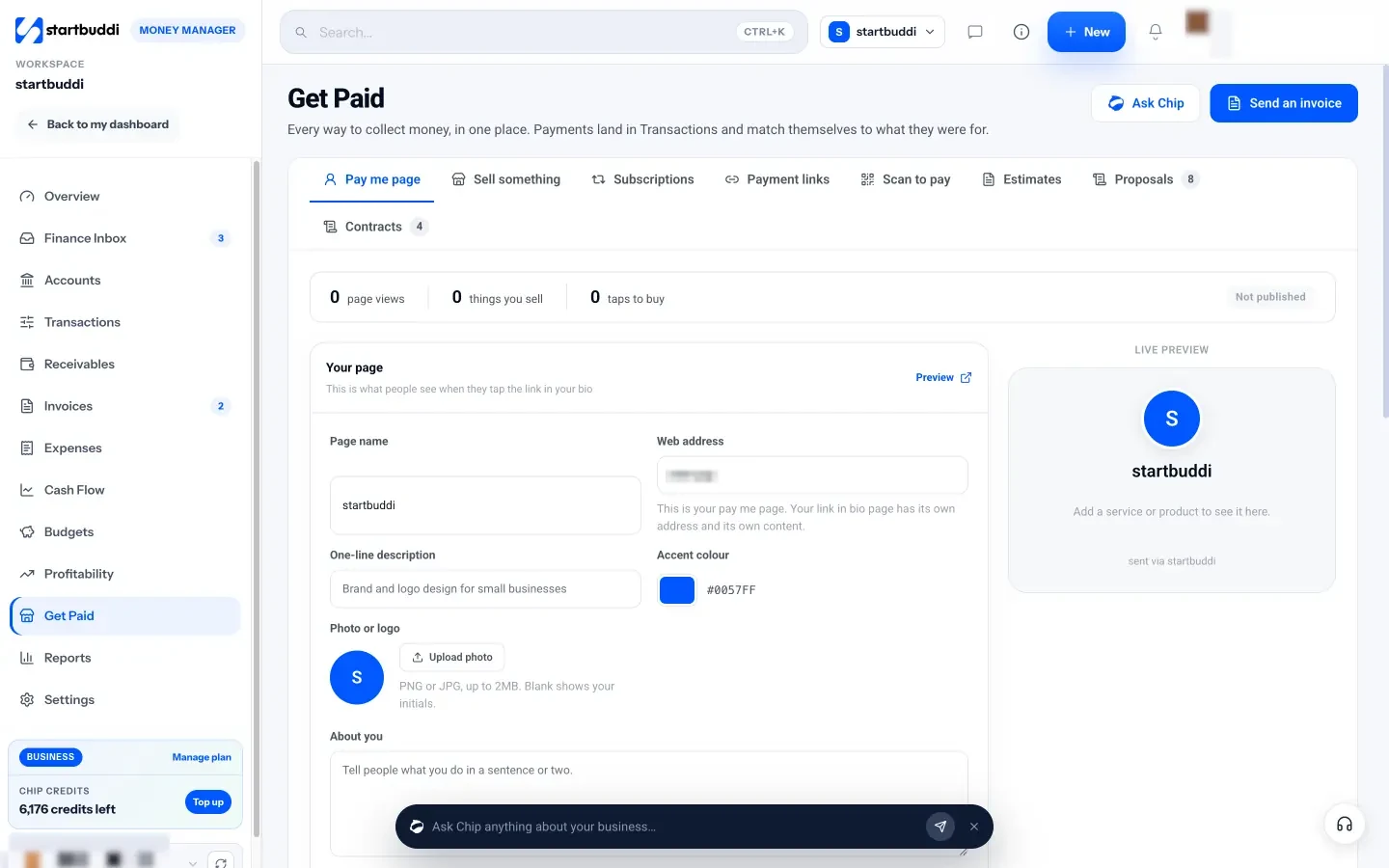
- Set up a pay me page. Under Get Paid, the Pay me page tab has your page name, web address, photo and the services or products you sell. Publish it.
- Create payment links for specific sales. The Payment links tab creates a one-off link with an amount and title. Sell something makes a link from a product or a custom amount.
- Print your codes. The Scan to pay tab has a QR code for your whole pay me page, for each item on it and for each active payment link, with Copy link, Print and PNG download.
- Watch payments arrive. Payments land in Transactions and match themselves to the link, sale or invoice they were for.
See Get Paid in startbuddi for the full feature list, or how payment links for freelancers work when you sell services rather than products. For the bigger picture of keeping money organised, read our guide to managing small business finances.
Start taking QR code payments
Print one code for your counter and make one link for your next deposit, then see how many customers stop asking for your account number. Start startbuddi free and find your codes under Get Paid, or check plans on the pricing page. The payment gateway glossary entry explains what happens behind the scan.
Frequently asked questions
Can I accept QR code payments without a card machine?
Yes. A payment QR code opens a payment page or banking app on the customer's own phone, so you only need a printed or on-screen code and a payment account. The provider behind the code processes the payment and pays it out to your bank.
Is a QR code payment safe?
It's as safe as the payment page or banking app it opens, and customers confirm the business name before paying. The main risk is a fake code stuck over yours, so check your codes daily, print your business name beside them and always confirm payments in your own account, not on the customer's screen.
What is the difference between a static and a dynamic payment QR code?
A static code always points to the same page or account, so you can print it once and reuse it, and the customer usually enters the amount. A dynamic code is created for one sale, often with a fixed amount, which makes it easier to match the payment to the sale.
Do I need a QR code payment app?
Not necessarily. Customers scan a payment-page code with their normal phone camera, and pay in the browser. Scheme codes, such as Nigeria's NQR, are scanned from the customer's banking app. On your side, you need a payment provider or a tool that creates the codes and shows you when payments arrive.
Does a payment QR code cost anything?
The code itself is free. Payments made through it are charged by your payment provider in the usual way, so check the provider's own pricing page for your country before you start.
Can I put a payment QR code on an invoice?
Yes. Put a code that opens the payment link for that invoice, so the payment is matched automatically. Add the link in text as well, for clients who open the invoice on the same phone they'd pay with.
Tiwalade Joanna Okedara-Kalu is the founder, CEO and CTO of startbuddi, the business system that brings clients, bookings, invoices, projects, marketing and the Chip AI assistant into one place. Tiwalade builds software around how service businesses really work day to day, and writes about client management, getting paid on time and why small businesses outgrow the tools they start with.
Founded startbuddi and leads its product and engineering