Best Credit Card Payment App for Small Businesses in 2026: Options Compared
The best credit card payment app for small business in the US, UK and Nigeria: readers, Tap to Pay and payout speed for each provider, checked October 2026

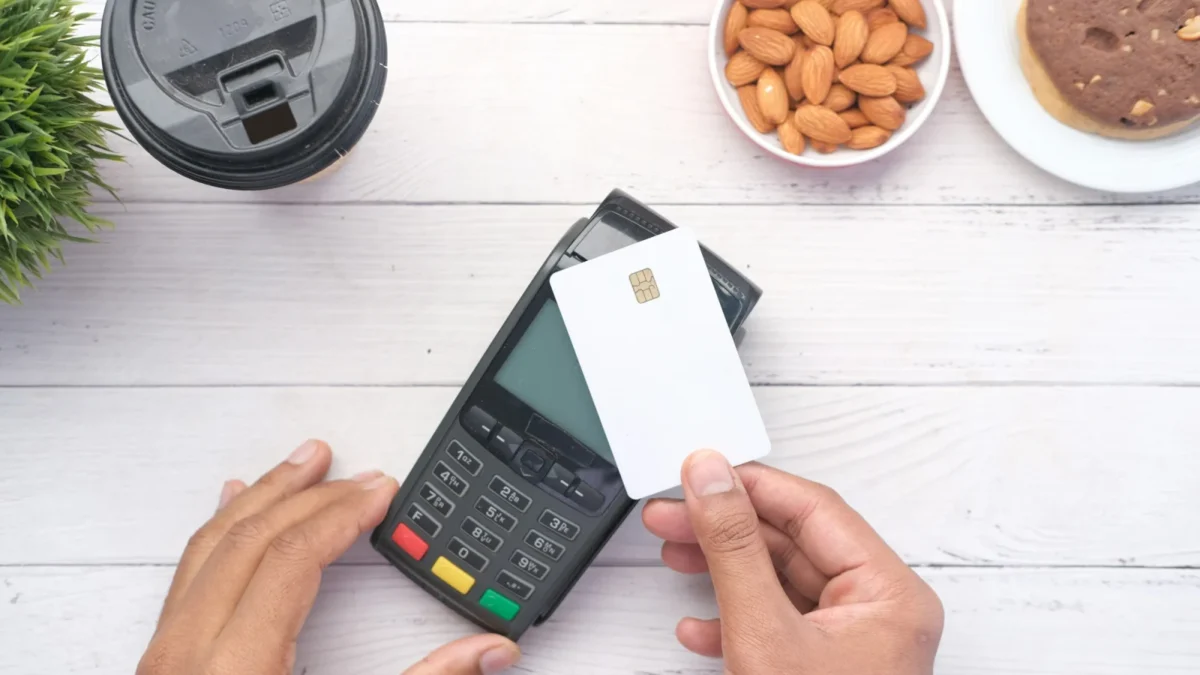
Photo: Towfiqu barbhuiya / Unsplash
The best credit card payment app for small business depends on where you trade. In the US and UK, Square is the best all-rounder: a free plan, cheap readers and Tap to Pay on your phone. SumUp lets UK sole traders start on a phone with no reader at all. In Nigeria, Paystack covers cards, bank transfers and USSD through payment links.
startbuddi is our product, and it’s in this list. It isn’t a card terminal or a card reader app: it sends payment links, invoices and QR codes that customers pay through Paystack or Stripe. We’ve placed it where it honestly fits.
Key takeaways
- Card fees differ by provider, country and how the card is taken (tapped, typed in or online), so check each provider’s own pricing page before you sign up.
- Tap to Pay lets you take contactless cards on your phone with no reader, but the provider must support it in your country.
- Tapped cards are quicker and safer than typed-in (keyed) ones, so avoid reading card numbers over the phone where you can.
- In Nigeria, the choice is usually a POS terminal for walk-in customers and payment links for everyone else.
- Check the payout speed and where money lands. Some apps pay into their own account first.
The best credit card payment apps at a glance
| App | Best for | How you take the card | Free plan or no monthly fee | Standout |
|---|---|---|---|---|
| Square | Most small businesses in the US and UK | Tap to Pay or a reader (US $59, UK £19 + VAT) | Yes | Free plan, cheap reader, invoices included |
| SumUp | Sole traders in the UK starting out | Tap to Pay (£0) or a reader from £25 | Yes (pay as you go) | Tap to Pay with no reader; next-day payouts in the UK |
| Stripe | Businesses with a developer or an app | Reader M2 ($59), or Tap to Pay after an integration | Yes | Same account for online and in-person |
| PayPal POS / Zettle | Businesses whose customers use PayPal or Venmo | A reader (first US reader $29) or PayPal QR codes | Yes | PayPal QR codes and Venmo |
| Helcim | Busier US and Canadian businesses | A reader ($199), smart terminal ($349) or Tap to Pay | Yes | Interchange-plus pricing |
| Paystack | Service businesses in Nigeria | Payment links, or the Paystack Terminal | Yes | Card, transfer and USSD in one link |
| Moniepoint | Walk-in shops in Nigeria | A POS terminal, from ₦21,500 to get | Setup cost, no monthly fee stated | Instant settlement to your account |
| startbuddi | Service businesses that invoice and book | No reader: links, invoices and QR codes | Free plan available | Payment links, invoices and QR codes tied to customer records |
Hardware prices and plans come from each provider’s own pages, checked on 1 October 2026. Card rates differ by country, card type and plan and change often, so check each provider’s own pricing page before you sign up.
How we chose
We looked at apps a small service business can sign up for without a sales call, and judged each on:
- Published pricing: whether each provider shows its card rates clearly for your country.
- Upfront cost: reader price, or whether a phone alone will do.
- Monthly fees and what the free option leaves out.
- Payout speed and where the money lands.
- Where it works: the US, UK and Nigeria, since that’s where most of our readers trade.
- Fit for service businesses: invoices, payment links and deposits, not just a counter.
We didn’t test hardware hands-on. Everything here comes from the providers’ public pricing and help pages, checked on 1 October 2026.
1. Square
What it is: a point-of-sale app with card readers, a free plan and Tap to Pay on phones, popular with salons, cafés and trades.
Best for: most small businesses in the US and UK that want one app for the counter, invoices and online payments.
Pricing: no setup or monthly fee on the free plan. Square charges per payment, with separate rates for tapped, typed-in and online payments; check its US fees page or UK pricing page for current rates. The US contactless and chip reader is $59, and the UK reader is listed at £19 + VAT. UK transfers to your bank take one to two working days, or can be instant.
Pros:
- Genuinely free plan with invoices and online payments included.
- Cheap readers, and Tap to Pay if you’d rather use your phone.
- Invoices, online payments and appointments in the same app.
Cons:
- Not available in Nigeria and much of Africa.
- Standard UK payouts take one to two working days.
- Paid plans add up if you need advanced features.
Skip it if: you trade in a country Square doesn’t serve, or you’d rather have interchange-plus pricing.
2. SumUp
What it is: card readers and a phone app for sole traders and small shops, with Tap to Pay so you can start without hardware.
Best for: UK sole traders and mobile businesses, such as a mobile hairdresser or a market stall, that want to start cheaply.
Pricing: no monthly fee on pay as you go, or £19 a month for the Payments Plus plan. SumUp charges per card payment; check its UK pricing page or US pricing page for current rates. UK reader prices are £0 for Tap to Pay, £25 for Solo Lite, £79 for Solo and £135 for the Terminal. In the UK, payouts land in a free SumUp business account by 7am the next day, including weekends.
Pros:
- Start on your phone for £0 with Tap to Pay.
- Pay as you go with no monthly fee.
- An optional monthly plan, Payments Plus, for busier businesses.
Cons:
- The fastest payouts go to SumUp’s own business account.
- Fewer service-business tools, such as booking deposits, than an all-in-one app.
Skip it if: you need invoices, bookings and customer records in the same place, or you trade outside SumUp’s countries.
3. Stripe
What it is: an online payments platform. Its in-person product is Stripe Terminal, with readers and Tap to Pay.
Best for: businesses that already take online payments through Stripe, or that have a developer or app that can add in-person payments.
Pricing: no monthly fee. Stripe lists its online and in-person card rates for each country on its pricing page; check it for current rates. Stripe’s Terminal page lists the Reader M2 at $59. Its Tap to Pay page says Tap to Pay on iPhone is available in 39 countries or regions and on Android in about 34, but that you must first integrate Stripe Terminal.
Pros:
- One account and one balance for online and in-person payments.
- Published pricing for each country and no monthly fee.
- Works in many countries.
Cons:
- Tap to Pay and Terminal need a developer integration or an app built on Stripe. It isn’t a download-and-go card app.
- Card payments for Nigerian businesses go through Paystack, which Stripe owns, rather than Stripe directly.
Skip it if: you want an app you can install this afternoon and take a card with.
4. PayPal POS (US) and PayPal Zettle (UK)
What it is: PayPal’s point-of-sale app and card readers, sold as PayPal POS in the US and Zettle in the UK.
Best for: businesses whose customers already pay with PayPal or, in the US, Venmo.
Pricing: no monthly or setup fees. PayPal charges per payment; check its US POS pricing or Zettle’s UK pricing for current rates. The first US card reader is $29 and additional readers are $79. In the UK, Zettle takes major cards including American Express, PayPal QR codes and Zettle invoices.
Pros:
- Customers can pay with PayPal, and in the US with Venmo.
- A low-cost first reader in the US.
- No monthly fee.
Cons:
- Money arrives in your PayPal balance first.
- Fewer features for appointment-based businesses.
Skip it if: your customers rarely use PayPal and you want money straight in your bank.
5. Helcim
What it is: a US and Canadian payments company that charges interchange-plus: the card network’s cost, plus a margin that falls as your volume grows.
Best for: busier US or Canadian service businesses with larger average payments, such as clinics or contractors.
Pricing: no monthly, minimum, software or statement fees. Helcim lists its interchange-plus rates for in-person, keyed and online payments on its pricing page. The card reader is $199 and the smart terminal $349, or $32 a month for a year. Tap to Pay on iPhone is also available, and deposits arrive the next business morning.
Pros:
- Rates drop automatically as you take more.
- No monthly fee.
- Next-business-morning deposits.
Cons:
- Interchange-plus means each payment’s cost isn’t a fixed figure you can quote in advance.
- Higher hardware prices than Square or SumUp.
- US and Canada only.
Skip it if: you take a few small payments a week and prefer simple pricing.
6. Paystack
What it is: a payments company for African businesses (owned by Stripe) that takes cards, bank transfers and USSD through checkouts and payment links. It also offers a physical Terminal for in-person payments in Nigeria.
Best for: service businesses in Nigeria, such as a Lekki cleaning company or an Ikeja tutor, that collect most payments remotely.
Pricing: no monthly fee. Paystack lists its rates for card, bank transfer and USSD payments, and for its Terminal, on its Nigeria pricing page; check it for current rates.
Pros:
- One link takes card, bank transfer and USSD.
- Settles to your bank, usually the next working day.
- Works in Nigeria, Ghana, Kenya and South Africa.
Cons:
- Payment links mean the customer pays on their own phone, which suits remote sales better than a busy counter.
- The terminal is a bigger upfront cost than a phone app.
Skip it if: you mainly sell over a counter and want the cheapest machine to get started.
7. Moniepoint
What it is: a Nigerian business banking app and POS terminal provider, common in shops, pharmacies and supermarkets.
Best for: Nigerian businesses with lots of walk-in customers paying by card or transfer at a counter.
Pricing: Moniepoint’s POS terminal page says getting a terminal costs a minimum of ₦21,500, made up of a ₦10,000 caution fee, a ₦10,000 logistics fee and ₦1,500 insurance for a year. It promises instant settlement into your account and lets customers pay by transfer on the terminal. Ask Moniepoint about its card charges before you sign up.
Pros:
- Low upfront cost for a physical terminal.
- Instant settlement.
- Takes transfers as well as cards at the counter.
Cons:
- Card charges aren’t listed on the product page, so you have to ask.
- A terminal suits a counter, not sending a link to a client in Abuja.
Skip it if: your clients book and pay remotely.
8. startbuddi
What it is: an all-in-one workspace for service businesses, covering customers, bookings, invoices and payments, with Chip, the AI assistant. It isn’t a card terminal, card reader app or till system, and it doesn’t support Apple Pay or Google Pay.
Best for: service businesses that get paid after a booking or a job, such as consultants, cleaners, photographers or salons taking deposits, rather than at a counter.
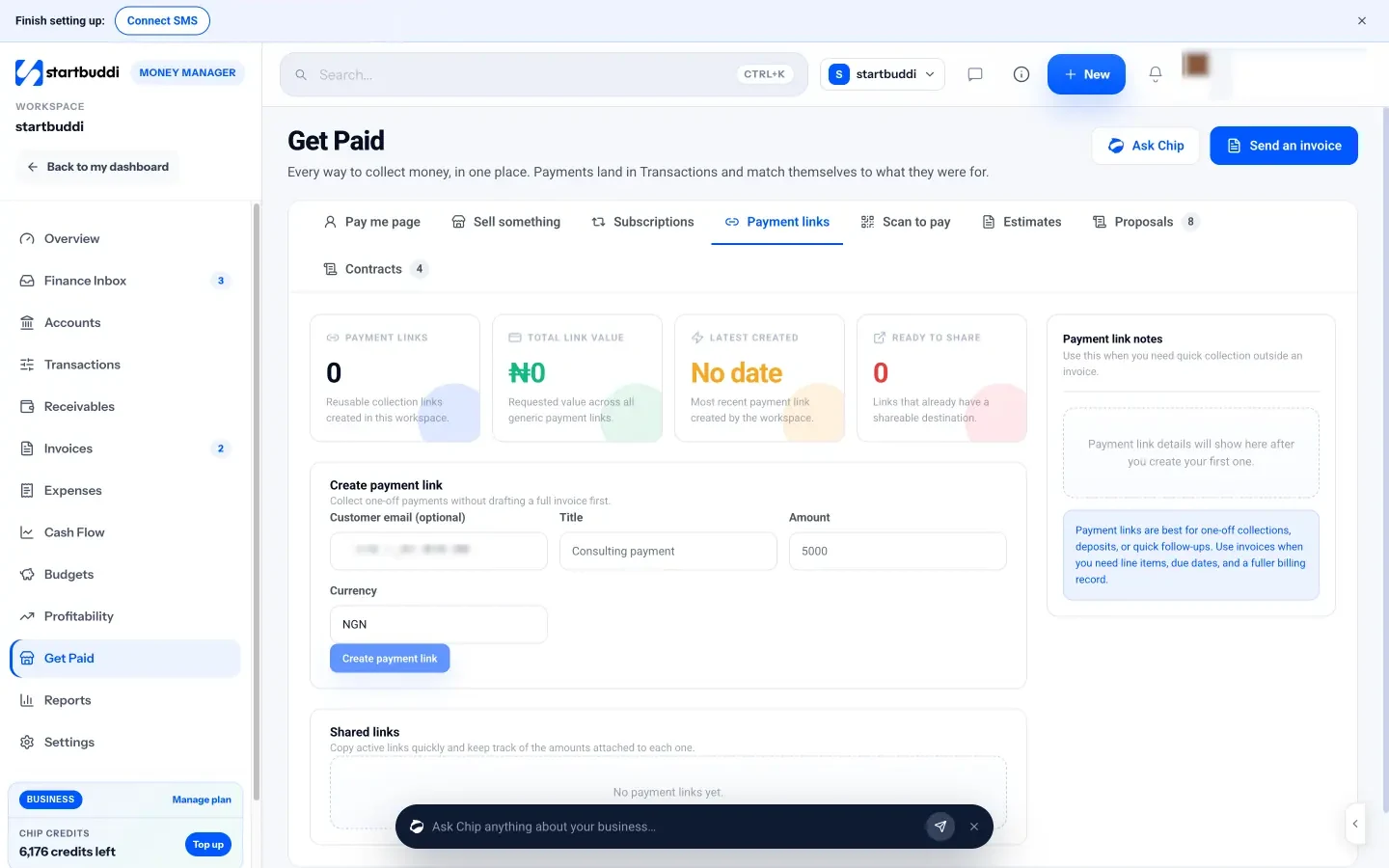
How card payments work: you connect your own Paystack or Stripe account. In Money Manager’s Get Paid hub you create a payment link, send an invoice, use a pay me page, or print a Scan to pay QR code. The customer opens it on their own phone and pays by card through Stripe, or by card, bank transfer, USSD or mobile money through Paystack. Bookings can ask for a deposit at the time of booking. See pricing for startbuddi’s plans, which include a free plan.
Pros:
- Every payment sits on the customer’s record with their bookings, messages and invoices.
- One link takes card, transfer and USSD in Nigeria through Paystack.
- Invoices mark themselves paid when the customer pays online.
Cons:
- No card reader and no Tap to Pay: the customer pays on their own phone.
- No Apple Pay or Google Pay.
- Not accounting software: no ledger or tax filing.
Skip it if: most of your sales happen at a counter and you need a till.
How to choose the best credit card payment app for small business
| If you… | Look at |
|---|---|
| Take most payments at a counter in the US or UK | Square or SumUp |
| Are a UK sole trader just starting | SumUp with Tap to Pay |
| Already sell online with Stripe and have a developer | Stripe Terminal |
| Serve customers who like PayPal or Venmo | PayPal POS or Zettle |
| Take large or frequent payments in the US or Canada | Helcim |
| Trade in Nigeria and get paid remotely | Paystack payment links, or startbuddi on top of Paystack |
| Run a busy walk-in shop in Nigeria | A POS terminal such as Moniepoint or Paystack Terminal |
| Need bookings, invoices and payments in one place | startbuddi with Paystack or Stripe |
A few rules hold whatever you choose:
- Tap, don’t type. Keyed card payments carry more risk of a chargeback.
- Check payout timing. “Next day” sometimes means next business day, and some apps pay into their own account first.
- Match the app to how you sell. A counter needs a reader or Tap to Pay. A client who pays after a job needs a link or an invoice.
If you want the bigger picture on gateways and wallets, read our guides to the best online payment solutions and online payment methods, or how a payment gateway works. For QR-based payments, see QR code to payment.
How to take card payments in startbuddi
- In Money Manager, open Get Paid and connect Stripe or Paystack.
- For a one-off amount, go to Payment links, add a title, amount and currency, and click Create payment link. Paste it into WhatsApp or email.
- For a job with line items, create an invoice. The customer clicks Pay on the invoice page, and it’s marked paid when the payment goes through.
- For a counter or a market stand, print a QR code from Scan to pay. Customers scan it and pay on their phone.
- For bookings, turn on a deposit in the booking service so clients pay when they book.
Read more about Get Paid, compare payment links software, or see how it works for freelancers taking payment links. For the money side as a whole, our guide to managing small business finances covers cash flow, expenses and records.
Get paid the way your clients pay
Pick a reader or Tap to Pay app for the counter, and a link or invoice for clients who pay after the job. If most of your money comes from bookings and invoices, start free with startbuddi and connect Paystack or Stripe.
Frequently asked questions
What is the best credit card payment app for a small business?
For most small businesses in the US and UK, Square is the best all-rounder because it has a free plan, cheap readers, invoices and online payments in one app. SumUp is a simple way to start in the UK, with Tap to Pay for £0. In Nigeria, Paystack payment links take cards, bank transfers and USSD in one place.
Can I accept credit cards on my phone without a card reader?
Yes, in many countries. Square, SumUp, Stripe, PayPal and Helcim all offer Tap to Pay, which turns a compatible iPhone or Android phone into a contactless reader. Availability depends on your country, and Stripe's version needs a developer integration first.
How do I compare what card payment apps cost?
Open each provider's own pricing page for your country and look at the rate for tapped, typed-in and online payments, any monthly fee and the price of a reader. A pay-as-you-go plan with no monthly fee suits a business that is just starting. Rates change, so check again before you sign up.
How do small businesses in Nigeria accept card payments?
Most use a POS terminal for walk-in customers and payment links for everyone else. Paystack payment links take cards, bank transfers and USSD in one place. Moniepoint's terminal costs a minimum of ₦21,500 to get, with instant settlement.
How fast do card payment apps pay out?
It varies. Square UK sends money to your bank in one to two working days for free, SumUp UK pays into its own business account by 7am the next day, Helcim deposits the next business morning, and Paystack settles to your bank, usually the next working day. Most offer instant payouts for an extra fee.
Is startbuddi a card payment app?
Not in the card-reader sense. startbuddi doesn't turn your phone into a terminal and has no Apple Pay or Google Pay. It sends payment links, invoices and QR codes that customers pay by card through Stripe, or by card, bank transfer, USSD or mobile money through Paystack, and records each payment against the customer.
Tiwalade Joanna Okedara-Kalu is the founder, CEO and CTO of startbuddi, the business system that brings clients, bookings, invoices, projects, marketing and the Chip AI assistant into one place. Tiwalade builds software around how service businesses really work day to day, and writes about client management, getting paid on time and why small businesses outgrow the tools they start with.
Founded startbuddi and leads its product and engineering