Best Online Payment Solutions in 2026: Options Compared
The best online payment solutions for small businesses, compared on payment methods, countries and payouts: Paystack, Stripe, Flutterwave, PayPal and more.

The best online payment solutions for most small businesses are Paystack if your customers are in Nigeria, Ghana, Kenya or South Africa, Stripe if you sell mainly by card to customers in Europe, North America or other supported countries, and startbuddi if you want payments tied to your invoices, bookings and customer records, using Paystack or Stripe underneath.
startbuddi is our product.
Key takeaways
- A payment solution is two things: the processor that moves the money, and the place where you ask for it (an invoice, a link, a checkout or a booking page).
- Where your customers live decides more than anything else. A Lagos customer wants transfer or USSD; a London customer wants a card or Apple Pay.
- Check each provider’s own pricing page for your country before you choose. Rates differ by country, card type and the size of the sale, and they change.
- Payout speed matters too. Paystack settles to Nigerian bank accounts the next working day.
- You don’t have to pick one. Many businesses run a local processor for home customers and a global one for clients abroad.
The best online payment solutions at a glance
Everything below comes from each company’s own pages, checked on 1 October 2026. Transaction rates differ by country and change often, so check each provider’s pricing page for current rates.
| Solution | Best for | Where it works | Monthly fee | Standout feature |
|---|---|---|---|---|
| Paystack | Businesses selling to customers in Nigeria, Ghana, Kenya and South Africa | Nigeria, Ghana, Kenya, South Africa and more | None | Card, bank transfer, USSD and mobile money in one checkout |
| Stripe | Card payments in Stripe-supported countries | Stripe-supported countries; not Nigeria directly | None | Payment Links, invoicing and subscriptions on one account |
| startbuddi | Service businesses that want payments next to invoices and bookings | Wherever you can use Paystack or Stripe | Free plan; see pricing | Payments land on the customer’s record |
| Flutterwave | African businesses that also want POS and M-Pesa | Nigeria and other African countries | None stated | Wide range of local methods |
| PayPal | Selling to buyers who already have PayPal | Many countries | None on a standard account | Buyers pay with their PayPal balance |
| Square | Businesses that sell in person and online in Square countries | US, Canada, UK and a few more | None on Square Free | Card reader, online store and invoices together |
| Mollie | Small businesses in the UK and Europe | UK and Europe | None on pay as you go | Pay only for successful payments |
| GoCardless | Recurring and business-to-business bank payments | UK and Europe | None on Standard | Payment straight from the customer’s bank account |
How we chose these online payment solutions
We looked at the payment solutions small service businesses actually ask us about, then judged each one on five things:
- Where it works. A tool you can’t sign up for in your country is no use, however good it is.
- How your customers can pay. Cards are universal online, but bank transfer, USSD and mobile money matter a great deal in Africa.
- What it costs. Monthly fees, and whether each company publishes its rates clearly for your country.
- How money is requested. Invoices, payment links, checkout pages and recurring payments.
- What it takes to start. No monthly fee, no developer needed, a dashboard you can run yourself.
We haven’t run test transactions through every product. Everything here comes from each company’s own pricing and product pages, checked on 1 October 2026. If you mainly share payment links over WhatsApp or Instagram, our list of the best payment link software goes deeper on that one job.
1. Paystack
Paystack is a payments company founded in Nigeria and owned by Stripe. It has country sites for Nigeria, Ghana, Kenya, South Africa, Côte d’Ivoire, Egypt and Rwanda. It is the processor most Nigerian small businesses meet first, and for good reason. (Our glossary has a short Paystack definition if you’re new to it.)
Best for: businesses whose customers are mostly in the countries Paystack serves.
Key features:
- One checkout that takes cards, bank account payments, bank transfer, USSD, Visa QR and mobile money, depending on the country.
- Payment pages, invoices and subscriptions from the dashboard, with no code.
- Next-working-day settlement to your bank account in Nigeria.
Pricing: no setup or monthly fee. Paystack charges per successful payment, with rates that differ by country and payment method; check Paystack’s pricing page for current rates.
Pros:
- No setup or monthly fee.
- Customers can pay the way they already pay, including transfer and USSD.
- Money settles the next working day.
Cons:
- Fewer international payment methods than a global processor.
- Rates and methods differ by country, so check your country’s page.
- Customers outside Paystack’s countries are better served by a global processor.
Who should skip it: a business whose customers are almost all in Europe or North America.
2. Stripe
Stripe is a global payments platform used by businesses of every size, from one-person shops to large companies. It offers checkout, Payment Links, invoicing, subscriptions and an API for developers.
Best for: businesses registered in a Stripe-supported country that sell mainly by card, especially to international customers.
Key features:
- Payment Links and invoices you can send without a website.
- Recurring billing for memberships and retainers.
- Stripe says it supports over 100 payment methods worldwide, including Apple Pay and Google Pay.
Pricing: no setup or monthly fee. Stripe charges per successful payment and lists its rates by country; check Stripe’s pricing page for current rates in yours.
Pros:
- Very wide range of countries, currencies and payment methods.
- Payment Links need no code.
- Good tools if you later build your own checkout.
Cons:
- Stripe’s own global availability page lists Nigeria, Kenya, Ghana and South Africa as “extended network” countries served through Paystack, not as places to open a Stripe account directly.
- Some extras, such as Stripe Invoicing, are charged separately.
- The dashboard has a lot in it if all you want is to get paid.
Who should skip it: a business in Nigeria, Ghana or Kenya selling mostly to local customers. Paystack fits better there.
3. startbuddi
startbuddi is an all-in-one workspace for service businesses: customers, messages, bookings, projects and money in one place. It isn’t a payment processor. You connect your own Paystack or Stripe account, and startbuddi gives you the places to ask for money.
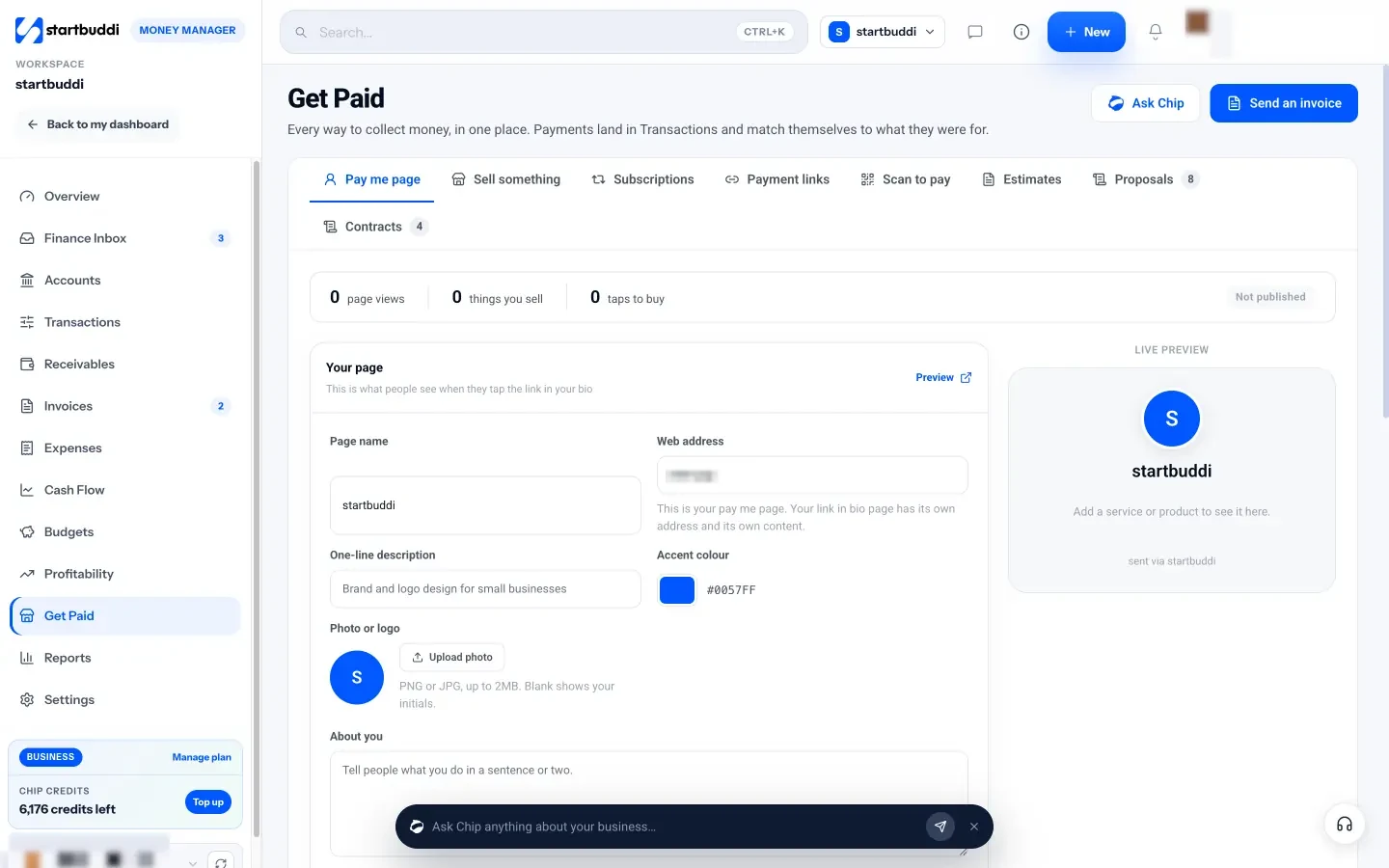
Best for: small service businesses that want invoices, payment links and booking deposits connected to the customer record, without stitching tools together.
Key features:
- Invoices, payment links, a pay me page, printable scan-to-pay QR codes and subscriptions, all in Money Manager’s Get Paid hub.
- Deposits or full payment when a client books a service in Bookings.
- Payments by card through Stripe, and by card, bank transfer, USSD or mobile money through Paystack. Payments land in Transactions and match themselves to what they were for.
Pricing: a free plan is available; see startbuddi pricing.
Pros:
- One place to see who paid, who owes you and what for.
- Money settles to your own Paystack or Stripe account.
- No code or website needed to take a payment.
Cons:
- Not a processor, so you still need a Paystack or Stripe account.
- No Flutterwave or PayPal checkout, and no Apple Pay or Google Pay.
- Not accounting software: no ledger, no bank feeds and no tax filing.
Who should skip it: a business that only needs a checkout on an existing online store, or one that needs a card terminal at a till.
4. Flutterwave
Flutterwave is an African payments company that serves businesses across the continent and beyond, with online payments, payment links and POS.
Best for: African businesses that want a long list of local payment methods, including M-Pesa and POS.
Key features:
- Cards, bank account, bank transfer, USSD, mobile money, M-Pesa, Visa QR and POS.
- Payment links you can share without a website.
- Payouts and transfers from the same account.
Pricing: no monthly fee is stated. Flutterwave charges per transaction, with rates that differ by country and payment method; check Flutterwave’s pricing page for current rates.
Pros:
- Very wide range of local methods.
- Works for both online and in-person payments.
- Pricing is published by country.
Cons:
- Pricing and methods differ by country, so check your own country’s page.
- The dashboard has more in it than a business that only sends invoices needs.
- Customers outside Africa are often better served by a global processor.
Who should skip it: a business selling mainly to customers outside Africa.
5. PayPal
PayPal is the online wallet many international buyers already have. Businesses can take PayPal, Venmo (in the US) and card payments through checkout buttons, payment links and invoices.
Best for: selling to customers abroad who prefer to pay with a PayPal account.
Key features:
- Buyers pay from their PayPal balance, bank or card.
- Invoices and payment links without a website.
- Payments in many currencies.
Pricing: no monthly fee for a standard account. PayPal charges per transaction, with different rates for PayPal checkout, cards, international payments and currency conversion; check PayPal’s merchant fees page for your country.
Pros:
- Trusted by buyers who don’t want to type card details.
- Simple to start.
- Works in many countries.
Cons:
- Customers who don’t use PayPal may prefer to pay by card or transfer elsewhere.
- Currency conversion is handled by PayPal, so check how it works before you price in another currency.
- Fees and features vary a lot by country, so check your own country’s page.
Who should skip it: a business selling mainly to local customers in Africa, where transfer and USSD are what people use.
6. Square
Square is a payments and point-of-sale company. Its free plan covers a card reader, an online store, invoices and appointment booking.
Best for: businesses in Square’s countries that sell both in person and online.
Key features:
- Card readers and a free point-of-sale app.
- Online store, invoices and payment links.
- Appointments for service businesses.
Pricing: no monthly fee on Square Free, with paid plans for more features. Square charges per payment, with different rates in person, online and for typed-in cards; check Square’s fees page for your country.
Pros:
- In-person and online sales in one account.
- No monthly fee on the free plan.
- Hardware and software from one company.
Cons:
- Only available in a few countries (Square’s help centre lists the US, Canada, the UK, Australia, Japan, Ireland, France and Spain).
- Some features need a paid plan.
- Not available in Nigeria, Ghana or Kenya.
Who should skip it: anyone outside Square’s countries.
7. Mollie
Mollie is a European payments company aimed at small and mid-sized businesses, with online checkout, payment links and in-person payments.
Best for: small businesses in the UK and Europe that want card payments and no monthly bill.
Key features:
- Online card checkout, with Apple Pay and Google Pay.
- American Express accepted alongside Mastercard and Visa.
- In-person card payments on pay-as-you-go, or a £20 a month Pro plan.
Pricing: no monthly fee on pay as you go. Mollie charges per successful payment, with rates by card type; check Mollie’s UK pricing for current rates. It says there are no lock-in contracts.
Pros:
- Cards, wallets and European bank methods in one checkout.
- You pay only for successful payments.
- Clear, published pricing for each card type.
Cons:
- Built for the UK and Europe, not Africa or North America.
- In-person payments are a smaller part of the product than online checkout.
- Fewer extras than an all-in-one platform.
Who should skip it: businesses outside the UK and Europe.
8. GoCardless
GoCardless takes payments directly from a customer’s bank account by Direct Debit, rather than by card. It suits regular bills and invoices between businesses.
Best for: recurring payments and business to business payment solutions in the UK and Europe, such as monthly retainers.
Key features:
- Customers authorise you once, then you collect each payment on the agreed date.
- Works for variable amounts, such as monthly usage bills.
- Three plans (Standard, Advanced and Pro).
Pricing: no monthly fee on Standard. GoCardless charges per transaction; check GoCardless’s pricing page for current rates.
Pros:
- Customers pay straight from their bank account, with no card to expire.
- Payments are collected on the agreed date without a reminder.
- Good fit for retainers and memberships.
Cons:
- Bank debits aren’t instant like a card payment.
- Not suited to one-off sales from new customers.
- Not built for African markets.
Who should skip it: a business taking one-off payments from walk-in customers.
How to choose the best payment solution for your business
Work through these questions in order. Most businesses have their answer by question three.
- Where are your customers? Mostly in Nigeria, Ghana, Kenya or South Africa: start with Paystack or Flutterwave. Mostly in Europe or North America: Stripe, Mollie or Square.
- How do they like to pay? If customers ask for an account number to transfer to, pick a solution that takes bank transfer at checkout so the payment is matched for you.
- How big is a typical sale? Open each provider’s pricing page and work out what your usual sale would cost, including any fixed fee per payment and any cap on large ones.
- Do you bill the same customers every month? Look for subscriptions or Direct Debit, so you aren’t sending the same invoice twelve times.
- Where will you ask for the money? If you invoice after a job, take deposits on bookings or share links on WhatsApp, the tool that sends the request matters as much as the processor. That’s the gap an all-in-one tool like startbuddi fills.
Whichever you choose, read up on chargebacks before you start taking cards. A clear description of what was paid for, and a receipt, wins most disputes. A payment gateway is only one part of a money system; our guide to managing small business finances covers the rest.
How to take payments in startbuddi
If you’ve chosen Paystack or Stripe, startbuddi gives you the places to ask for money and keeps track of who paid.
- Connect your provider. In Money Manager, open Settings and connect Paystack, Stripe or both. Payments settle to your own account.
- Send an invoice. Click Create invoice, add the customer and line items, and send it. The customer pays online from the invoice. For a walk-through with Paystack, see how to send invoices and get paid via Paystack.
- Share a payment link. In Get Paid, open Payment links, enter an amount and title, and copy the link into WhatsApp, Instagram or email.
- Take deposits on bookings. In Bookings, open a service and turn on “Require payment to book”, with the full amount or a deposit.
- Bill monthly clients. In Get Paid, open Subscriptions, create a plan and send each client a subscribe link. Renewals are charged by your connected provider.
Get paid in one place
Pick the processor that fits your customers, then put every invoice, link and deposit in one place. Start free with startbuddi, no card needed, and compare your options in the table above whenever you need to.
Frequently asked questions
What is the best online payment solution for a small business?
The best online payment solution depends on where your customers are. For customers in Nigeria, Ghana, Kenya or South Africa, Paystack is the strongest all-round choice because it takes cards, transfer and USSD. For card customers in Europe or North America, Stripe is the most flexible. If you want payments tied to invoices and bookings, a workspace like startbuddi can sit on top of either.
How do I compare what payment solutions cost?
Open each provider's own pricing page for your country and work out what a typical sale would cost you. Check for monthly fees, extra charges for international cards and currency conversion, and whether fees are capped on large payments. Rates change, so check again before you sign up.
What are business to business payment solutions?
Business to business payment solutions are tools for collecting larger, often recurring payments from other companies, such as invoices with bank transfer details, Direct Debit and payment links. GoCardless is built for this in the UK and Europe. In Nigeria, invoices paid by bank transfer through Paystack or Flutterwave are common.
Can I accept online payments without a website?
Yes. Paystack, Stripe, Flutterwave, PayPal, Square and startbuddi all let you send an invoice or a payment link that opens a hosted payment page. You share the link by WhatsApp, email or social media, and the customer pays on their phone.
Can I use Stripe in Nigeria?
Stripe's global availability page lists Nigeria as an "extended network" country served through Paystack, which Stripe owns. In practice, Nigerian businesses sign up with Paystack for local payments. Businesses with a company registered in a Stripe-supported country can use Stripe there.
Does startbuddi process payments itself?
No. startbuddi connects to your own Paystack or Stripe account, and the money goes straight to that account. Paystack takes card, bank transfer, USSD and mobile money payments, and Stripe takes card payments. Apple Pay and Google Pay aren't supported in startbuddi.
Tiwalade Joanna Okedara-Kalu is the founder, CEO and CTO of startbuddi, the business system that brings clients, bookings, invoices, projects, marketing and the Chip AI assistant into one place. Tiwalade builds software around how service businesses really work day to day, and writes about client management, getting paid on time and why small businesses outgrow the tools they start with.
Founded startbuddi and leads its product and engineering