Payment Reminder Email Templates (Friendly to Firm)
Six copy-ready payment reminder email templates, from a friendly note before the due date to a final notice, with subject lines, timing and an example.


A good payment reminder email template names the invoice, the amount, the due date and one easy way to pay, and nothing else. Use a sequence that gets firmer over time: a friendly heads-up before the due date, a note on the day, then polite, firm and final emails at roughly 3, 7, 14 and 30 days overdue.
Key takeaways
- Most late payments are forgotten, not refused. The first reminders should assume good faith.
- Every reminder needs the invoice number, amount, due date and a payment link or bank details. Make paying take less effort than replying.
- Get firmer in steps: friendly, then direct, then firm, then a final notice with a clear date and consequence.
- Only mention late fees or interest your contract or the law allows. In the UK, business clients can be charged statutory interest and fixed compensation.
- Change one thing between emails (tone, subject, channel) so the client doesn’t just skim past the same message again.
When to send each payment reminder email
| When | Tone | Goal | |
|---|---|---|---|
| 1. Heads-up | 3 days before the due date | Friendly | Get it on their list |
| 2. Due today | On the due date | Friendly, brief | Prompt payment today |
| 3. First overdue | 3 days late | Polite, direct | Check nothing went wrong |
| 4. Second overdue | 7 days late | Direct | Ask for a payment date |
| 5. Firm | 14 days late | Firm | State what happens next |
| 6. Final notice | 30 days late | Formal | Give a final deadline |
Adjust the gaps to your payment terms. On 7-day terms, compress the schedule; on 30-day terms with a corporate client, add a phone call between emails 4 and 5.
The six payment reminder email templates
Copy each one, then replace the words in square brackets.
1. Friendly reminder before the due date
Subject: Invoice [number] due on [date]
Hi [first name],
Just a quick note that invoice [number] for [amount] is due on [date]. You can pay here: [payment link]. Bank details are also on the invoice if you prefer a transfer.
Thanks again for the work on [project].
[Your name]
2. Payment due today
Subject: Invoice [number] is due today
Hi [first name],
A reminder that invoice [number] for [amount] is due today. Here’s the payment link: [payment link]. If it’s already on its way, thank you, and please ignore this.
[Your name]
3. First overdue reminder (3 days late)
Subject: Invoice [number] is now overdue
Hi [first name],
I can’t see a payment yet for invoice [number] ([amount]), which was due on [date]. Could you check it’s been received and approved on your side? I’ve attached it again, and you can pay online here: [payment link].
If anything on the invoice needs correcting, let me know and I’ll fix it today.
[Your name]
4. Second overdue reminder (7 days late)
Subject: Second reminder: invoice [number], [amount]
Hi [first name],
Invoice [number] for [amount] is now [7] days overdue. Could you reply with the date you expect to pay? If cash flow is tight this month, I’m open to splitting it into two payments; just tell me what works.
Pay here: [payment link]
Put this into practiceEverything in this article works inside startbuddi, free to start.Start free[Your name]
5. Firm reminder (14 days late)
Subject: Action needed: invoice [number], 14 days overdue
Hi [first name],
Invoice [number] for [amount] was due on [date] and is now 14 days overdue. I haven’t had a reply to my earlier emails.
Please pay by [date, 7 days from now]. If payment isn’t received by then, I’ll [pause work on the project / apply the late fee in our agreement, which is [amount or rate]].
Payment link: [payment link]
[Your name]
6. Final notice (30 days late)
Subject: Final notice: invoice [number]
Dear [first name],
This is a final notice for invoice [number], [amount], due on [date] and now 30 days overdue. Despite reminders on [dates], it remains unpaid.
If full payment isn’t received by [date], I will [refer the debt for collection / start a small claim / charge interest as set out in our terms], without further notice.
If there’s a reason you can’t pay, contact me before [date] so we can agree a plan.
[Your name] [Business name, phone]
Want a version tailored to one client? The free payment reminder generator writes friendly, firm or final reminders from your invoice details, and the late payment email writer does the same for overdue invoices.
How to fill in the templates
- Use the client’s own invoice number and amount. Copy them from the invoice, never from memory; one wrong digit gives a slow payer an excuse.
- Put the payment link in every email. A link to card, bank transfer or mobile money gets paid faster than “details on the invoice”.
- Reply in the same thread. Keeping the invoice and every reminder in one email thread makes the history obvious to the client’s accounts team.
- Write to the person who pays. In bigger companies that’s accounts payable, not your project contact. Copy both from email 3 onwards.
- Only threaten what you’ll do. If you won’t pause work or go to court, don’t say you will.
A filled example
These figures are illustrative. A web designer in Accra invoiced a restaurant GHS 6,500 for a website, on 14-day terms, due 30 October. Here’s email 4, filled in:
Subject: Second reminder: invoice INV-0042, GHS 6,500
Hi Ama,
Invoice INV-0042 for GHS 6,500 is now 7 days overdue. Could you reply with the date you expect to pay? If cash flow is tight this month, I’m open to splitting it into two payments of GHS 3,250; just tell me what works.
Run this from one workspaceClients, projects, money and marketing, connected instead of spread across five apps.See how it worksPay here: [payment link]
Kwame
The offer to split the payment is deliberate. It turns “we can’t pay” into “we can pay half on Friday”, which is better than silence.
Late fees, interest and the law
Only add a late payment fee if your contract or invoice terms allow it, or the law gives you the right. In the UK, a business invoicing another business can claim statutory interest of 8% plus the Bank of England base rate and fixed compensation of £40 for debts under £1,000, £70 up to £9,999.99 and £100 for £10,000 or more (GOV.UK, checked on 1 October 2026). These rules don’t cover consumers. Elsewhere, including Nigeria and Ghana, rely on what your signed terms say. The late fee calculator helps you work out a fair figure.
Mistakes to avoid in payment reminder emails
- Sounding angry in email 1. Early reminders that accuse the client damage relationships you want to keep.
- No payment link. Every extra step (finding bank details, logging into a portal) delays payment.
- Vague deadlines. “As soon as possible” has no date. “By Friday 7 November” does.
- Sending the same email four times. Change the subject line and the ask each time.
- Empty threats. Saying you’ll go to collections and then not doing it teaches clients to wait.
If reminders keep failing, read why a client keeps not paying invoices for the next steps, or learn how automated payment reminders take the chasing off your plate.
How to send payment reminders in startbuddi
startbuddi’s Money Manager keeps invoices, payments and reminders together, so you can see who owes what before you write.
- Send invoices with a payment link. Each invoice has a public page where the client can pay by card through Stripe or Paystack, by bank transfer, or with PayPal. Paystack also takes USSD and mobile money.
- See who to chase. Open Receivables to see outstanding and overdue totals, days overdue, and when the last reminder went.
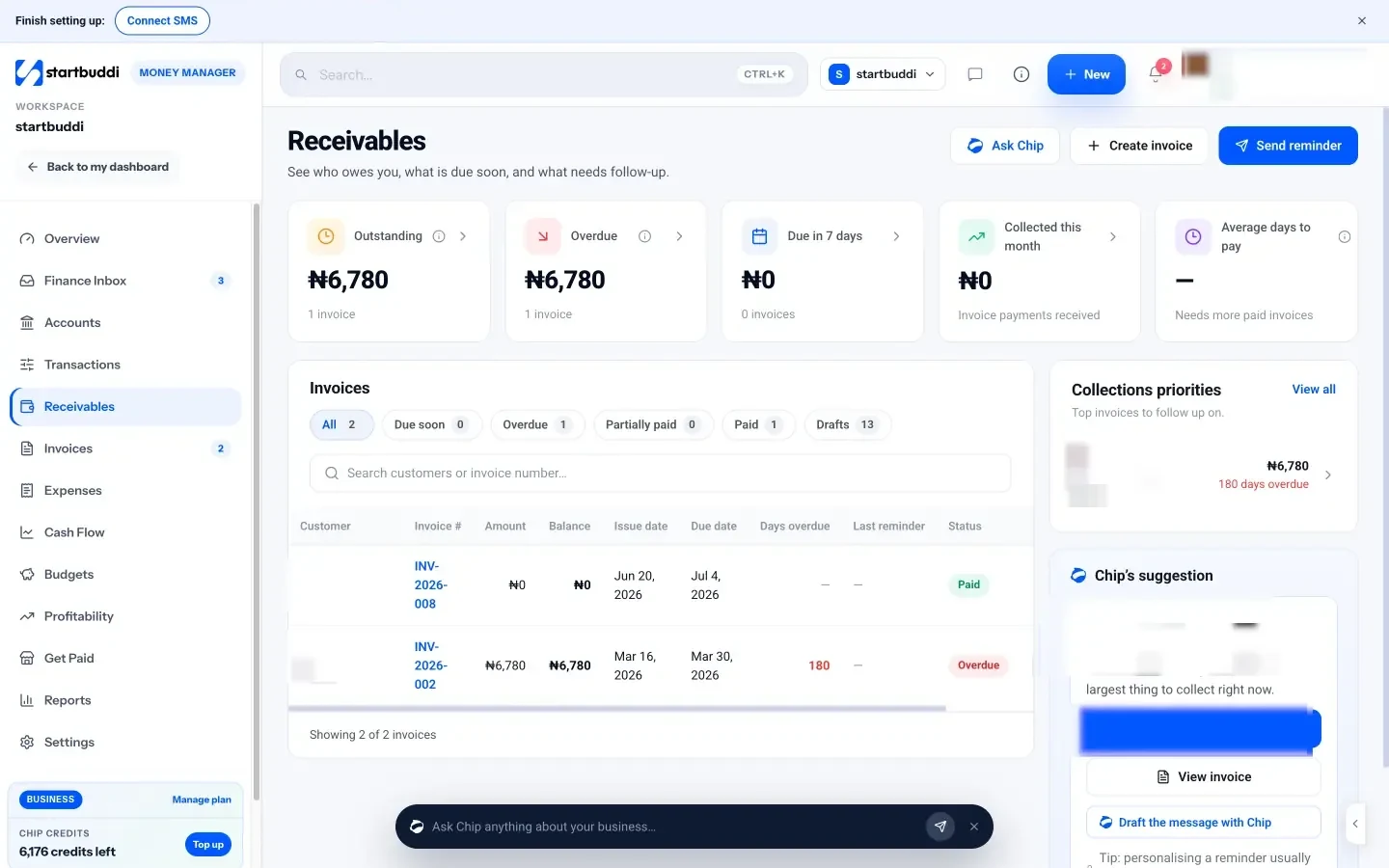
- Send a reminder in one click. Click Send reminder, or Remind on a row. Resending an invoice logs the reminder on the client’s record, so the history is in one place.
- Let Chip draft a personal note. On an overdue invoice, Chip’s “Draft a message” writes a friendly reminder, or a firm-but-friendly one when it’s overdue, for you to edit before sending. Paste in the templates above if you prefer your own words.
Invoicing is on the free plan, with a monthly invoice limit; see pricing for what each plan includes. For the full setup, read our guide on sending your first invoice, or see startbuddi as invoice management software.
Get paid without the awkward chasing
Copy the six templates into your email drafts and use them on your next overdue invoice. Start free with startbuddi to send invoices with payment links and see every overdue balance in one place.
Frequently asked questions
How do I write a polite payment reminder email?
Start with a friendly greeting, then name the invoice number, amount and due date in one sentence. Add a payment link and offer to fix anything wrong with the invoice. Close with thanks, and keep it under 100 words.
When should I send a payment reminder email?
Send the first one a few days before the due date and another on the day itself. After that, send reminders at roughly 3, 7, 14 and 30 days overdue, getting firmer each time. Shorten the gaps for short payment terms.
What should the subject line of a payment reminder say?
Put the invoice number and the status in the subject, such as "Invoice 1042 due on 30 October" or "Final notice: invoice 1042". Clear subject lines are easy to find and forward to an accounts team. Avoid vague subjects like "Quick question".
How many payment reminders should I send before taking action?
Most small businesses send four to six reminders over about 30 days before a final notice. The final notice should give a specific date and say exactly what happens next. After that, follow through with what you said.
Can I charge a late fee in a payment reminder email?
Only if your contract or invoice terms allow it, or the law gives you the right. In the UK, businesses can claim statutory interest and fixed compensation from other businesses. Mention the fee in the firm or final reminder, not the first one.
Should I send payment reminders by email or WhatsApp?
Email is best for the formal record, especially for final notices. A short WhatsApp message alongside it works well for small clients who rarely check email. Keep the invoice number and payment link in both.
Omolola Akiyode is the operations and project manager at startbuddi, leading cross-functional projects and the content that helps founders get set up. Omolola writes about projects, websites and getting found online, and turns complex ideas into clear, practical steps.
Runs operations and projects at startbuddi