What are automated payment reminders?
Also called: Invoice reminders, payment reminder emails, overdue invoice reminders, dunning, accounts receivable reminders

Automated payment reminders are messages sent on a set schedule before, on and after an invoice's due date, reminding the customer what they owe and how to pay, without you having to send each one by hand.
Automated payment reminders are messages that go out on a schedule you set once: a few days before an invoice is due, on the due date and at intervals after it becomes overdue. Each one tells the customer what they owe, when it was due and how to pay, and they stop as soon as the invoice is paid.
Most late payments aren’t deliberate. The invoice got buried, the person who approves payments was away, or the customer simply forgot. A polite, well-timed reminder fixes most of these without an awkward conversation.
Why automated payment reminders matter for a small business
Chasing money is the job most business owners put off. It feels uncomfortable, it takes time, and when you are busy delivering work it slips. Meanwhile, you still have rent, suppliers and salaries to pay.
- Steadier cash flow. Invoices get paid closer to the due date because nobody has to remember to chase.
- Less awkwardness. A scheduled reminder feels like a standard process, not a personal complaint.
- Nothing slips. Every unpaid invoice gets the same follow-up, even in your busiest week.
- Time back. You only step in personally when a reminder hasn’t worked.
How automated payment reminders work
When you send an invoice, it has a due date and a status such as sent, viewed, partly paid, paid or overdue. A reminder system watches those dates and statuses and sends a message on each day in your schedule, as long as the invoice is still unpaid.
A common schedule looks like this:
| When | Purpose | Tone |
|---|---|---|
| 3 to 7 days before due | A friendly heads-up that payment is coming up | Light and helpful |
| On the due date | Payment is due today | Clear and polite |
| 3 days overdue | First overdue reminder | Polite, assumes it was missed |
| 7 days overdue | Second reminder, ask if anything is wrong | Direct but friendly |
| 14 days overdue | Final reminder before you call or pause work | Firm and specific |
After the last automated message, a person takes over: a phone call, a personal email or a conversation about a payment plan.
An example
Ben runs a small IT support company in Manchester and invoices 30 clients each month. He used to spend Friday afternoons checking a spreadsheet and writing chaser emails. Now each invoice has a pay-online link and a reminder schedule: one reminder five days before the due date, one on the day, and follow-ups at 3, 7 and 14 days overdue. Most clients pay after the first or second reminder, and Ben only phones the few who are still unpaid after two weeks.
What a good payment reminder includes
- The invoice number, amount and due date, so there is nothing to look up.
- A direct way to pay, such as a pay-now link, plus bank details for people who prefer a transfer.
- A copy or link to the invoice, in case the original was lost.
- A contact for questions, because some late payments are really disputes about the work.
- Your name and business name, so it doesn’t look like spam.
Short example for a first overdue reminder: “Hi Grace, a quick reminder that invoice INV-042 for $850 was due on 3 March. You can pay online here or by bank transfer using the details on the invoice. If anything’s not right, just reply to this email.” For more wording, try the free payment reminder generator or the late payment email writer.
Best practices and common mistakes
- Stop reminders the moment someone pays. A reminder after payment annoys good customers. Record bank transfers promptly so the system knows.
- Handle part payments properly. Remind people of the balance, not the original total.
- Agree terms upfront. Put the due date and any late payment terms on the quote or contract, not just the invoice.
- Don’t over-send. Three to five messages is plenty. Daily reminders feel like harassment.
- Send to the right person. In larger clients, invoices often need to go to accounts, not your day-to-day contact.
- Check the rules before charging late fees or interest. They vary by country and between business and consumer customers. This is general information, not legal advice.
Related terms
An invoice is the bill the reminders refer to. Recurring invoicing sends regular invoices for retainers and subscriptions, and payment links make it easy to pay straight from a reminder. Invoice management in a CRM keeps invoices, reminders and conversations together on each customer’s record. For the full picture, read how to get invoices paid faster.
Automated payment reminders in startbuddi
In startbuddi Invoices, the Reminder sequences card lets you set the schedule once: how many days before the due date to send a reminder, whether to send one on the due date, and which days after it to follow up (for example 3, 7 and 14). Click Save reminder sequence to switch it on. Every invoice email links to a page where the customer can pay online through Paystack or Stripe, or see your bank transfer details.
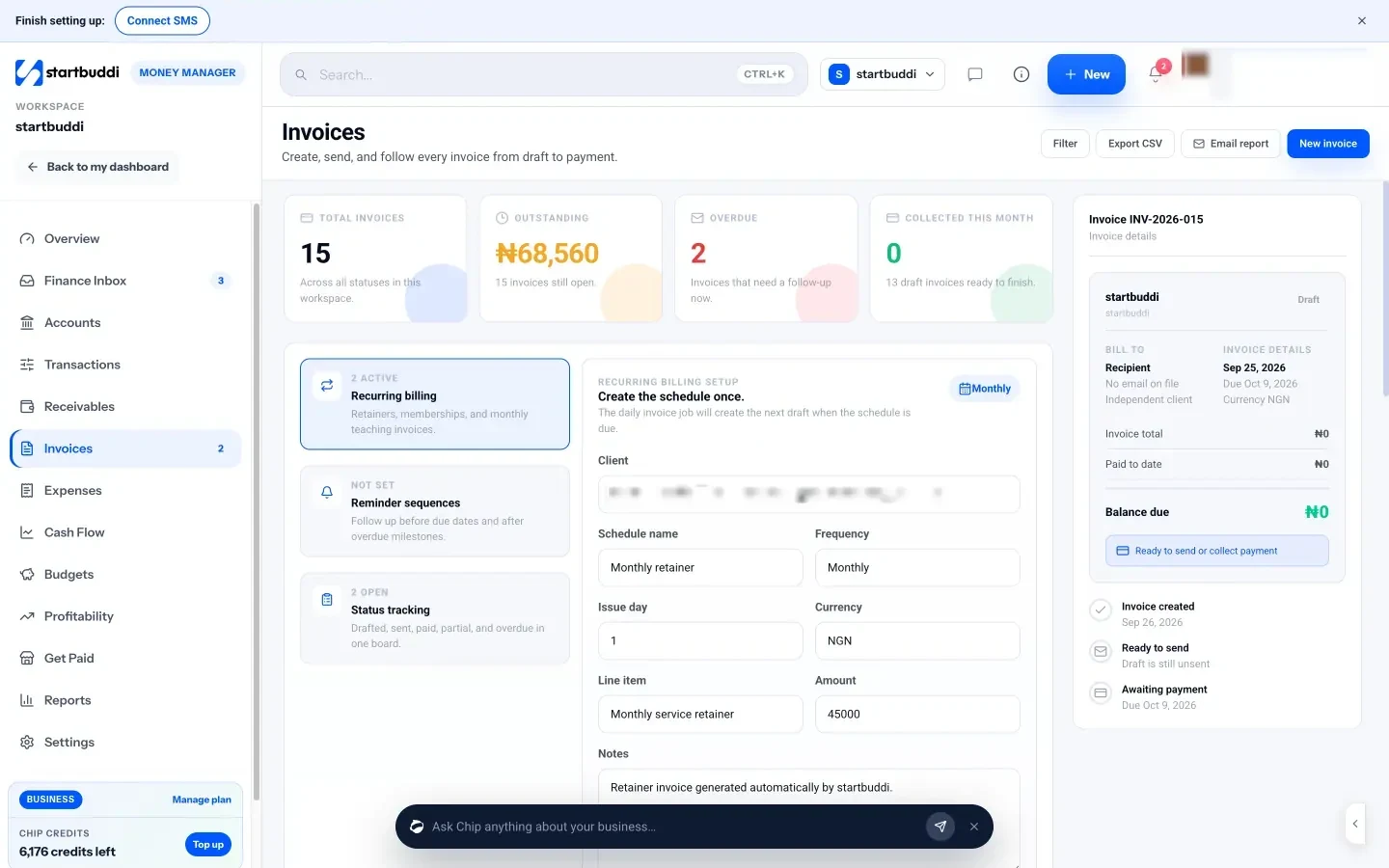
For a one-off nudge, open Receivables and click Remind on any open invoice, or ask Chip to draft a personal message. If you want reminders by WhatsApp or SMS, or extra steps such as creating a task for yourself, the Automations template “Invoice overdue recovery” starts when an invoice becomes overdue. WhatsApp and SMS need the Starter plan or above, and Free includes 2 active automations against 10 on Starter.
Your next step: write your three reminder messages today, then set up your sequence. Compare plans on the pricing page.
Related terms
FAQ
Are automated payment reminders rude?
Not if they are polite and well timed. Most customers see them as a normal part of doing business, and many are glad of the nudge.
How many payment reminders should I send?
Three to five is usually enough: one before the due date, one on the day and two or three after. Then follow up personally.
Can I send payment reminders by SMS or WhatsApp?
Yes, if the customer has agreed to be contacted that way. Short messages with a payment link work well, especially for customers who rarely check email.
What should I do if reminders don't work?
Call the customer, ask if there is a problem with the work, and offer a payment plan if needed. Pause further work until you have an agreement.
Omolola Akiyode is the operations and project manager at startbuddi, leading cross-functional projects and the content that helps founders get set up. Omolola writes about projects, websites and getting found online, and turns complex ideas into clear, practical steps.
Runs operations and projects at startbuddi