What is follow-up automation?
Also called: Automated follow-up, follow-up sequence, automated follow-up emails, drip follow-up
Follow-up automation is setting up messages and reminders that go out on their own after a customer does something, such as filling in a form, booking or going quiet, so every lead gets a timely reply without you remembering each one.
Follow-up automation means setting up the messages that should happen after a customer does something, once, so they go out on their own every time. Someone fills in your enquiry form and gets a reply within a minute. Someone books and gets a confirmation and a reminder. A lead goes quiet for a week and you get a task to call them.
It doesn’t replace talking to people. It makes sure the first reply and the routine nudges happen, so your personal attention goes where it matters.
Why follow-up automation matters for a small business
Most small businesses don’t lose customers because of a bad product. They lose them because nobody replied fast enough, or nobody followed up after the quote. When you are busy doing the work, follow-ups are the first thing to slip.
- Speed. An instant reply catches people while they are still thinking about you.
- Consistency. Every lead gets the same good process, not just the ones who contact you on a quiet day.
- Less mental load. You stop keeping a list of who to chase in your head.
- More repeat business. Check-ins, review requests and rebooking reminders keep past customers coming back.
How follow-up automation works
Every automated follow-up has three parts:
- A trigger: the event that starts it, such as a form submission, a new booking, a missed appointment, an overdue invoice or a tag added to a contact.
- Steps: what happens next, such as send an email, wait two days, send a WhatsApp message or create a task for a team member.
- Exit rules: when to stop, for example when the person replies, books a call or pays.
The exit rule is what separates helpful follow-up from spam. As soon as a real conversation starts, the automation should step aside.
An example follow-up sequence
Maya runs a wedding photography business in Melbourne. Her enquiry form starts this sequence:
- Immediately: an email thanking the couple, with her price guide and a link to book a call.
- Day 2, if no call booked: an email with three recent weddings and what couples usually ask.
- Day 5, if still no call: a task for Maya to send a personal message.
- Day 10: a short, friendly check-in, then the couple moves to her monthly newsletter.
If the couple books a call at any point, the sequence ends and Maya takes over.
Common types of follow-up automation
- New lead replies: instant acknowledgement after a form, chat or ad enquiry.
- Quote follow-ups: a nudge a few days after a proposal goes out.
- Booking follow-ups: confirmations, reminders, no-show messages and “how did it go?” after the appointment.
- Payment follow-ups: reminders before and after an invoice is due.
- Re-engagement: a message or task when a customer hasn’t been in touch for a set time.
- Internal alerts: assigning a new lead to a teammate or notifying the team.
Best practices and common mistakes
- Start with one follow-up. Automate the reply to your main enquiry form first, then add more.
- Write like a person. Use the customer’s name and what they asked about. Avoid corporate filler.
- Don’t over-send. Three to five messages over a couple of weeks is plenty for most leads.
- Always include an exit. Stop the sequence when someone replies, books or buys.
- Respect permission and channel rules. Only send marketing to people who agreed, include an easy opt-out, and follow each channel’s rules. For example, Meta’s WhatsApp rules only allow free-text business messages within a 24-hour customer service window; after that you need an approved template.
- Review what happens. Check replies and bookings each month and cut steps nobody responds to.
Related terms
CRM automation is the wider idea of letting your CRM handle routine work. Lead nurturing is a longer, value-first form of follow-up for people not ready to buy, often delivered as an email drip sequence. Workflow automation covers internal processes too. For message ideas, read how AI can write your follow-up message.
Follow-up automation in startbuddi
Automations in startbuddi run every follow-up on one engine. Start from a template such as the Lead capture welcome flow or the booking reminder stack, build from scratch, or tell Chip what you want in plain words and it drafts the flow for you to review. Triggers include form submitted, new contact, booking made, booking no-show and invoice overdue. Steps can send email, SMS or WhatsApp, wait, wait for a reply, create a task, assign a teammate or exit early when a rule matches. Before a flow goes live, startbuddi checks consent and shows how many contacts it can actually reach, and the Activity view keeps a history of every contact that has been through each automation.
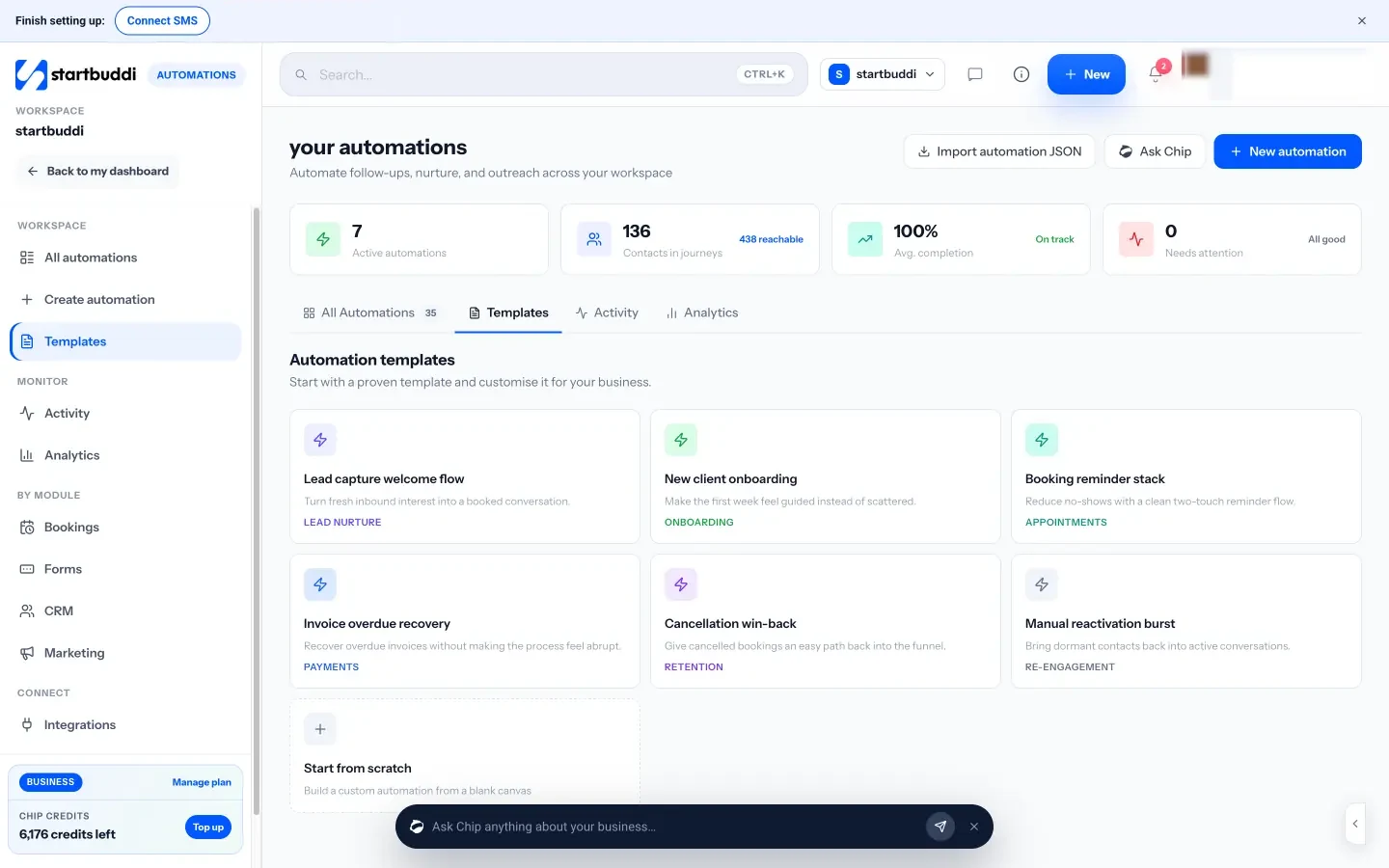
For one contact, Nurture with Chip on their page drafts a short email sequence from their history, which you edit before enrolling them. SMS and WhatsApp need the Starter plan or above, and Free includes 2 active automations against 10 on Starter. Your next step: write the reply you want every new enquiry to get, then turn it into your first automation. See plans on the pricing page.
Related terms
FAQ
What is the difference between follow-up automation and lead nurturing?
Follow-up automation covers any automatic message after an action, including confirmations and reminders. Lead nurturing is a longer series of helpful messages for leads who aren't ready to buy yet.
How soon should an automated follow-up go out?
For a new enquiry, straight away. For quotes, two to three days later is common. For re-engagement, choose a gap that fits how often your customers normally buy.
Will automated follow-ups feel impersonal?
Not if they are short, use the customer's name and details, and stop as soon as the person replies so a real conversation can start.
Which channel is best for follow-ups?
Use the one your customers actually read. Email suits longer messages, while SMS and WhatsApp get quicker attention for reminders, with the customer's permission.
Olabimpe Salami is the email and outreach specialist at startbuddi. Olabimpe writes about the messages that bring customers in and back: email, WhatsApp and SMS campaigns, follow-ups, and turning enquiries into paying clients.
Runs email and outreach at startbuddi