What is invoice management in a CRM?
Also called: CRM invoicing, customer billing management, invoice tracking in CRM, quote-to-cash

Invoice management in a CRM means creating, sending, tracking and following up invoices inside your customer relationship management system, so each invoice is linked to the customer, the deal and the conversation behind it.
Invoice management in a CRM means handling your invoices in the same system where you keep your customers. You create an invoice from the customer’s record, send it, track whether it has been viewed or paid, follow up if it is late, and see the result on the customer’s page and in your sales numbers.
The alternative, which most small businesses start with, is invoices in one app, customers in another and conversations in a third. Invoice management in CRM joins those up so billing is part of the relationship, not a separate chore.
Why invoice management in a CRM matters for a small business
Service businesses live on cash flow. When invoices are disconnected from customer records, it is easy to forget to bill a finished job, lose track of who has paid, or chase a client who paid last week.
- Faster invoicing. The customer’s name, email and company are already there, so an invoice takes a minute.
- Full context. Before a sales call you can see what the customer has bought, what they owe and whether they pay on time.
- Better follow-up. Reminders and payment conversations sit next to the rest of the relationship.
- Accurate sales numbers. Paid invoices can close deals and feed revenue reports, so your pipeline reflects real money.
How invoice management in a CRM works
- A customer is created from an enquiry form, a booking, an import or by hand.
- Work is agreed, often as a deal or quote in the CRM.
- You create the invoice from the customer or deal, with their details filled in.
- The customer receives it by email with a link to view and pay online.
- Status updates automatically as the invoice is viewed, part-paid or paid.
- Late invoices get reminders, and the history is logged on the customer’s timeline.
- Reports show what was invoiced, what was collected and who still owes you.
An example
Kwame is a freelance videographer in Accra. A marketing manager books a discovery call through his booking link, which creates her as a contact. He adds a deal for a product video, sends a quote, and when she agrees, creates a 50% deposit invoice from her contact page. She pays by card from the email. Kwame sees the deposit on her record, starts the shoot and later sends the final invoice. When she pays, the deal is marked won and the revenue appears in his monthly report, with no spreadsheet to update.
Key features to look for
Invoices linked to contacts and companies
Every invoice belongs to a customer record, and every customer record shows their invoices and balance.
Online payment
A pay-now link for card or bank payments, plus clear bank transfer details for those who prefer them. See our payment links entry.
Status tracking
Draft, sent, viewed, partly paid, paid and overdue, visible at a glance.
Reminders
Scheduled reminders before and after the due date. Our entry on automated payment reminders covers schedules and wording.
Recurring invoices
For retainers and memberships, recurring invoicing creates the invoice on a schedule.
Reporting
Collected versus invoiced, overdue totals and which customers pay late.
Best practices and common mistakes
- Invoice as soon as work is done. Every day you wait is a day added to when you get paid.
- Set clear terms. Due date, accepted payment methods and deposit rules should be agreed before work starts.
- Record offline payments. If someone pays by bank transfer or cash, mark it straight away so reminders stop.
- Don’t treat the CRM as your accounts. A CRM tracks invoices and payments; your accountant or bookkeeping software still handles tax returns and the full ledger.
- Keep one customer record. Duplicate contacts split invoice history in two and make balances wrong.
Related terms
An invoice is the bill itself. A CRM is where your customer records live. Automated payment reminders and payment links help invoices get paid, and recurring invoicing handles regular billing. For a step-by-step walkthrough, see the guide on how to send your first invoice.
Invoice management in startbuddi
In startbuddi, invoices live in Money Manager and are linked to your contacts in Customers. From any contact, choose Create an invoice and it opens already addressed to them. The contact’s page shows a money summary (invoiced, paid, outstanding and overdue), and each invoice shows a customer snapshot with a link back to the contact.
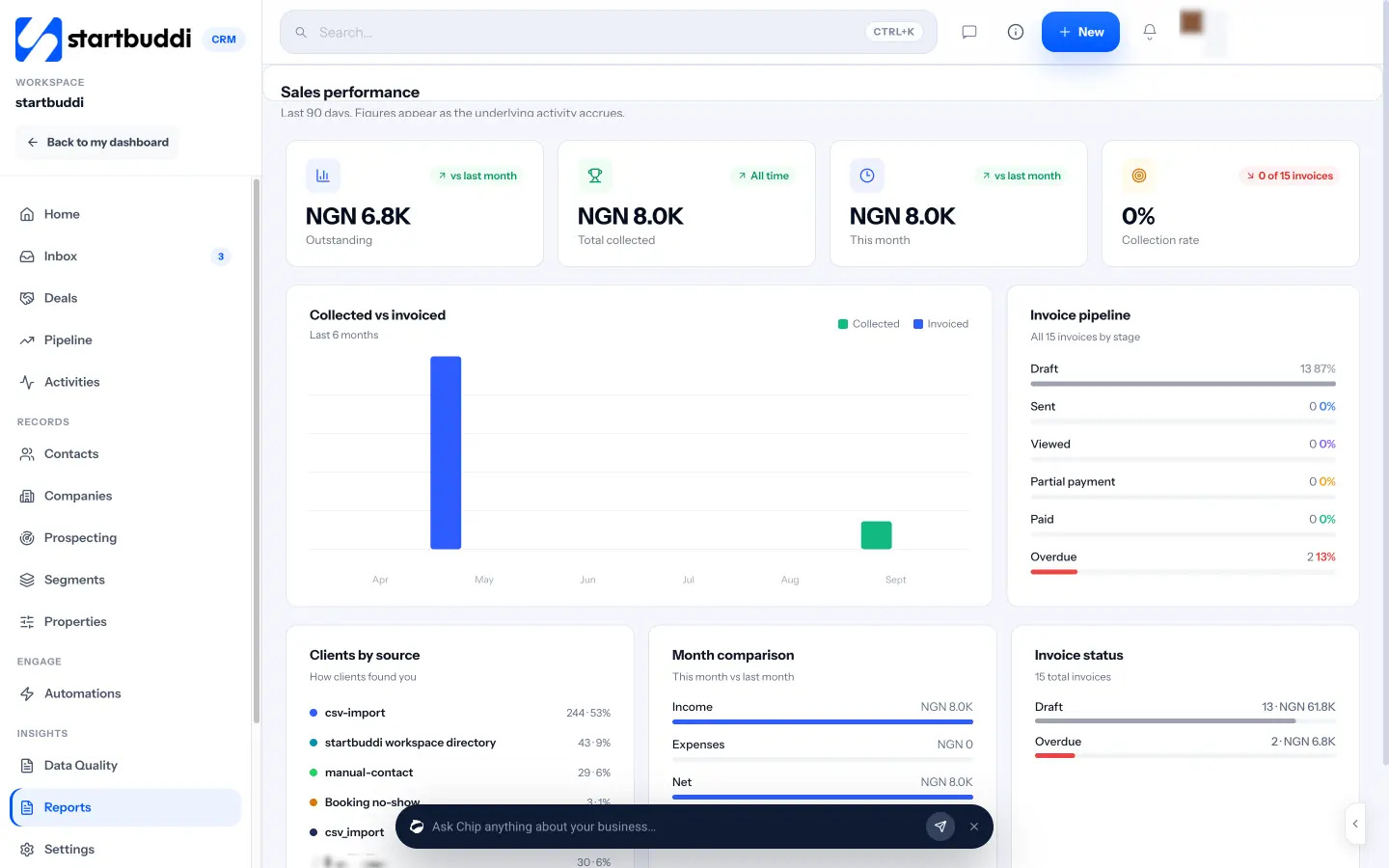
Customers pay from the invoice link by card or bank through Paystack or Stripe, or by bank transfer using the details you add; you record offline payments with Record payment. When an invoice on a deal is paid, the deal can be marked won automatically, and Reports shows collected versus invoiced and your invoice pipeline. You can also set a reminder sequence, set up recurring billing for retainers and create an invoice straight from a booking. The Free plan includes 5 invoices a month, and Starter and above are unlimited.
Your next step: list any finished work you haven’t billed yet and send those invoices today. See what each plan includes on the pricing page.
Related terms
FAQ
Can a CRM replace accounting software?
Not fully. A CRM with invoicing handles billing and payment tracking well, but bookkeeping, tax returns and full accounts usually need accounting software or an accountant.
Why manage invoices in a CRM instead of a separate app?
Because the invoice is linked to the customer and the deal. You invoice faster, see who owes what before every conversation and keep sales numbers accurate.
Can customers pay invoices online?
Most CRM invoicing tools include a pay-now link. Customers can pay by card or bank from the email, and the invoice updates when payment arrives.
What should happen when an invoice is paid?
The status should change to paid, reminders should stop, the customer's balance should update and, where relevant, the related deal should close as won.
Omolola Akiyode is the operations and project manager at startbuddi, leading cross-functional projects and the content that helps founders get set up. Omolola writes about projects, websites and getting found online, and turns complex ideas into clear, practical steps.
Runs operations and projects at startbuddi