How to Follow Up After Sending a Quote: Timing and Templates
How to follow up after sending a quote: a simple 14-day timing plan, copy-ready email and WhatsApp templates, and what to say when a client goes quiet.

Here’s how to follow up after sending a quote: confirm it arrived the same day, check in after two days, add something useful around day five, ask for a decision before the quote expires, then close the loop politely. Keep each message short, refer to the job by name, and always end with one easy next step.
Key takeaways
- Put a follow-up date on every quote before you send it. A quote without one is easy to forget.
- Three or four touches over about two weeks is enough for most service jobs. After that, close the loop and move on.
- Each follow-up should add something: an answer, a photo of similar work, an available date. Never just “checking in”.
- An expiry date on the quote gives you a natural reason to follow up.
- Use the channel the client used to contact you, and on WhatsApp keep to the platform’s messaging rules.
Why quotes go quiet
Most clients who don’t reply haven’t said no. They’re busy, comparing two other quotes, waiting for a partner or a manager, or unsure about one line and too polite to ask. Some never saw your email at all.
That’s why a follow-up isn’t pushy. It’s service. The cleaner in Yaba, the electrician in Leeds and the web designer in Nairobi all lose jobs the same way: they send a good quote, hear nothing, assume the worst and never ask. A short, useful message often turns silence into a booking, or at least into a clear no you can learn from.
If you’re unsure whether you’re sending a quote or an estimate, our glossary entry on estimate vs quote explains the difference.
What you need before you start
- The quote itself, with a reference number, a clear total and an expiry date. Our free quote generator makes one in a few minutes.
- The client’s name, the job and the channel they used to contact you.
- One or two pieces of proof: photos of a similar job, a short review, or a recent example.
- A place to note follow-up dates, so nothing depends on your memory.
How to follow up after sending a quote, step by step
1. Confirm the quote arrived (day 0)
Send a one-line message on the channel the client used, as soon as the quote goes out. Email quotes can land in spam, and a quick note on WhatsApp or by text makes sure they know to look.
2. Check in and offer to answer questions (day 2)
Two working days is usually long enough for the client to read it and not so long that they’ve forgotten you. Ask if anything needs explaining. Mention one specific detail from the job, so the message can’t be mistaken for a mass email.
3. Add something useful (day 5 to 7)
This is the follow-up most people skip. Send a photo of a similar finished job, a short answer to a question clients often ask, or a note on your availability: “I can start on the 21st if you confirm by Friday.” Give the client a reason to reply.
4. Ask for a decision before the quote expires (day 10 to 14)
Remind them of the expiry date and ask a simple question they can answer in one word. If the price is the problem, this is when you’ll hear about it, and you can offer a smaller scope rather than a discount.
5. Close the loop
If there’s still no reply, send a polite last message saying you’ll close the quote and they’re welcome to get in touch any time. Many clients reply to this one. Either way, mark the quote as lost or on hold, note the reason if you know it, and stop chasing.
6. Learn from the replies
Keep a simple record of why quotes are won or lost. If “too expensive” keeps coming up for one service, look at your price or how you explain the value. If clients go quiet after one particular step, that step needs work.
Quote follow-up timing at a glance
| Day | Channel | Purpose | Length |
|---|---|---|---|
| 0 | WhatsApp or text, plus the quote by email | Confirm it arrived | One line |
| 2 | Same channel the client used | Offer to answer questions | Two to three lines |
| 5 to 7 | Email or WhatsApp | Add proof or availability | Short, with a photo or link |
| 10 to 14 | Email or call | Ask for a decision before expiry | Two lines and one question |
| 14 to 21 | Close the loop | Two lines |
Adjust the gaps to the size of the job. A same-week repair quote needs faster follow-ups than a renovation, a wedding or a six-month retainer, where the client may need a few weeks to decide.
Copy-ready quote follow-up templates
Swap the details in braces for your own.
Day 0: confirm it arrived (WhatsApp or text)
Hi {first name}, I’ve just emailed your quote for {job}, reference {number}. If you can’t see it, check your spam folder or let me know and I’ll resend it.
Day 2: check in (email)
Subject: Your quote for {job}
Hi {first name}, I hope you’ve had a chance to look at the quote for {job}. Is there anything you’d like me to explain or change, for example {specific item}? Happy to have a quick call if that’s easier.
Day 5 to 7: add something useful (email or WhatsApp)
Hi {first name}, here are a few photos of a similar {job} we finished last month, in case they help. I can start on {date} if that works for you. Just reply “yes” and I’ll hold the date.
Day 10 to 14: ask for a decision (email)
Subject: Your quote expires on {date}
Hi {first name}, a quick note that your quote for {job} is valid until {date}. Would you like to go ahead, or would it help if I quoted a smaller version of the job?
Last message: close the loop (email)
Subject: Closing your quote for {job}
Hi {first name}, I haven’t heard back, so I’ll close this quote for now. If anything changes, reply to this email and I’ll update it for you. Thanks for considering us.
Worked example: a painting quote in Lagos
The figures here are illustrative.
Ada runs a painting business in Lekki. On Monday she sends a quote for ₦850,000 to repaint a three-bedroom flat, valid for 14 days.
- Monday: she sends a WhatsApp message saying the quote is in the client’s email.
- Wednesday: she emails to ask whether the client has questions about the paint grade she specified.
- The following Monday: she sends photos of a similar flat she finished in Ajah and offers a start date.
- Day 12: the client replies that the price is above budget. Ada offers to drop the ceilings and the store room, which brings it to ₦690,000.
- Day 13: the client accepts.
Without the follow-ups, Ada would have heard nothing and assumed she’d lost the job on price. With them, she won a slightly smaller job, worth ₦160,000 less than her first quote but ₦690,000 more than nothing.
Rules to know for email and WhatsApp follow-ups
Following up on a quote a client asked for is normal business. Adding them to a marketing list afterwards is different. In the UK, the ICO’s guidance on electronic mail marketing (checked on 1 October 2026) explains the “soft opt-in”: you may market similar services to someone who bought or negotiated to buy from you, as long as you gave them a simple way to opt out when you collected their details and in every message.
On WhatsApp, if you use the WhatsApp Business Platform, Meta’s documentation on service messages (checked on 1 October 2026) says a 24-hour customer service window opens when a customer messages you. Once it closes, you can only send pre-approved template messages. So a day-five follow-up on the platform needs an approved template unless the client has written to you since.
Common mistakes when following up on a quote
- Sending “just checking in” with nothing new to say.
- Following up only by email when the client contacted you on WhatsApp.
- Discounting in the first follow-up, before you know what the objection is.
- Chasing for weeks with no expiry date and no final message.
- Keeping follow-up dates in your head, so busy weeks wipe them out.
How to follow up on quotes in startbuddi
startbuddi keeps every quote, follow-up and reply attached to the client, so you can see what’s waiting and what to do next.
- Send the quote as an estimate. In Money Manager, go to Get Paid → Estimates, click New estimate, add the line items and notes such as “Valid for 14 days”, then send it by email. The client replies to accept, decline or ask for changes, and you record the decision with Mark accepted or Mark declined.
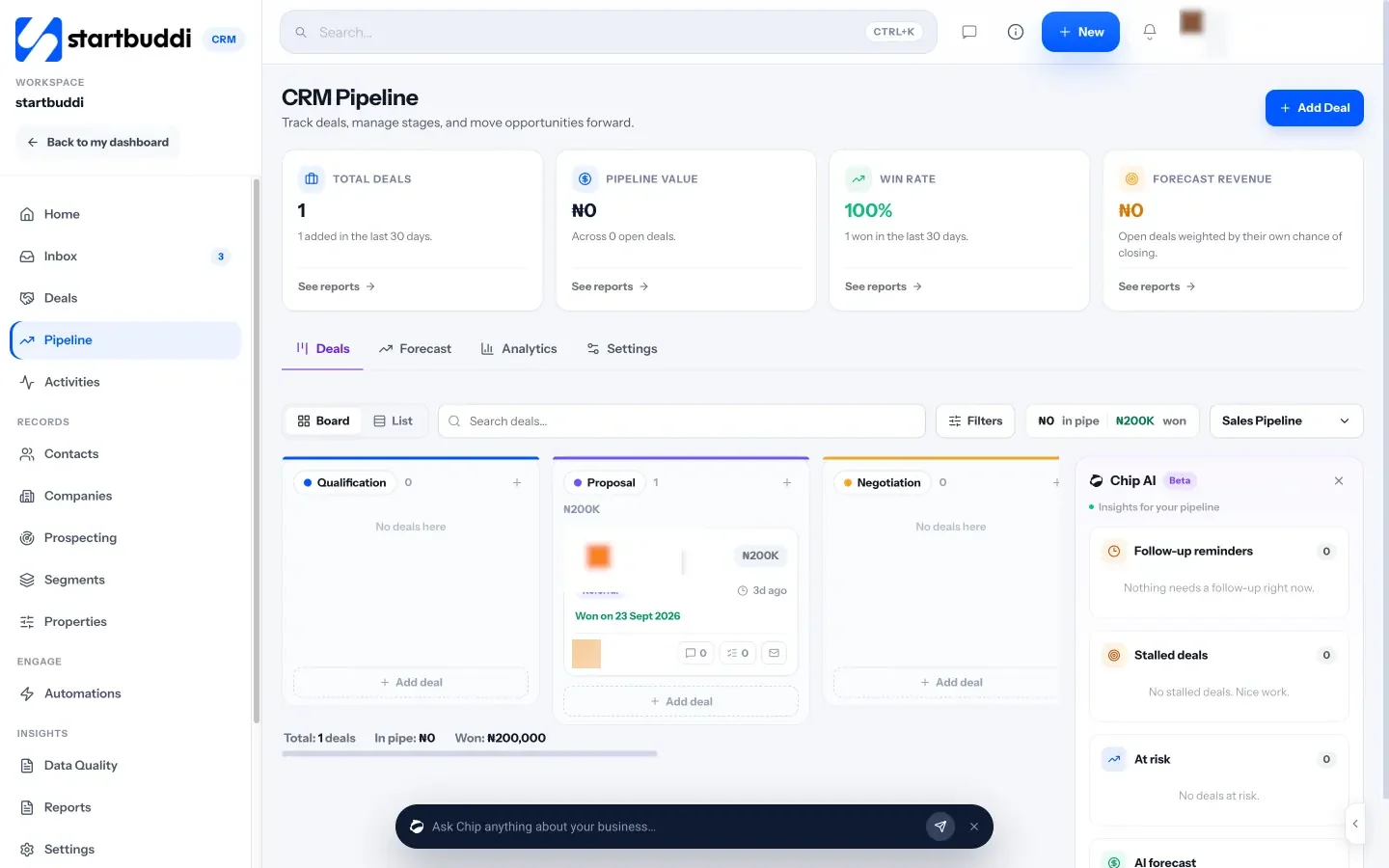
- Track it as a deal. Add a deal in the Pipeline and put it in a stage such as Proposal. The Chip panel on the pipeline shows follow-up reminders and stalled deals.
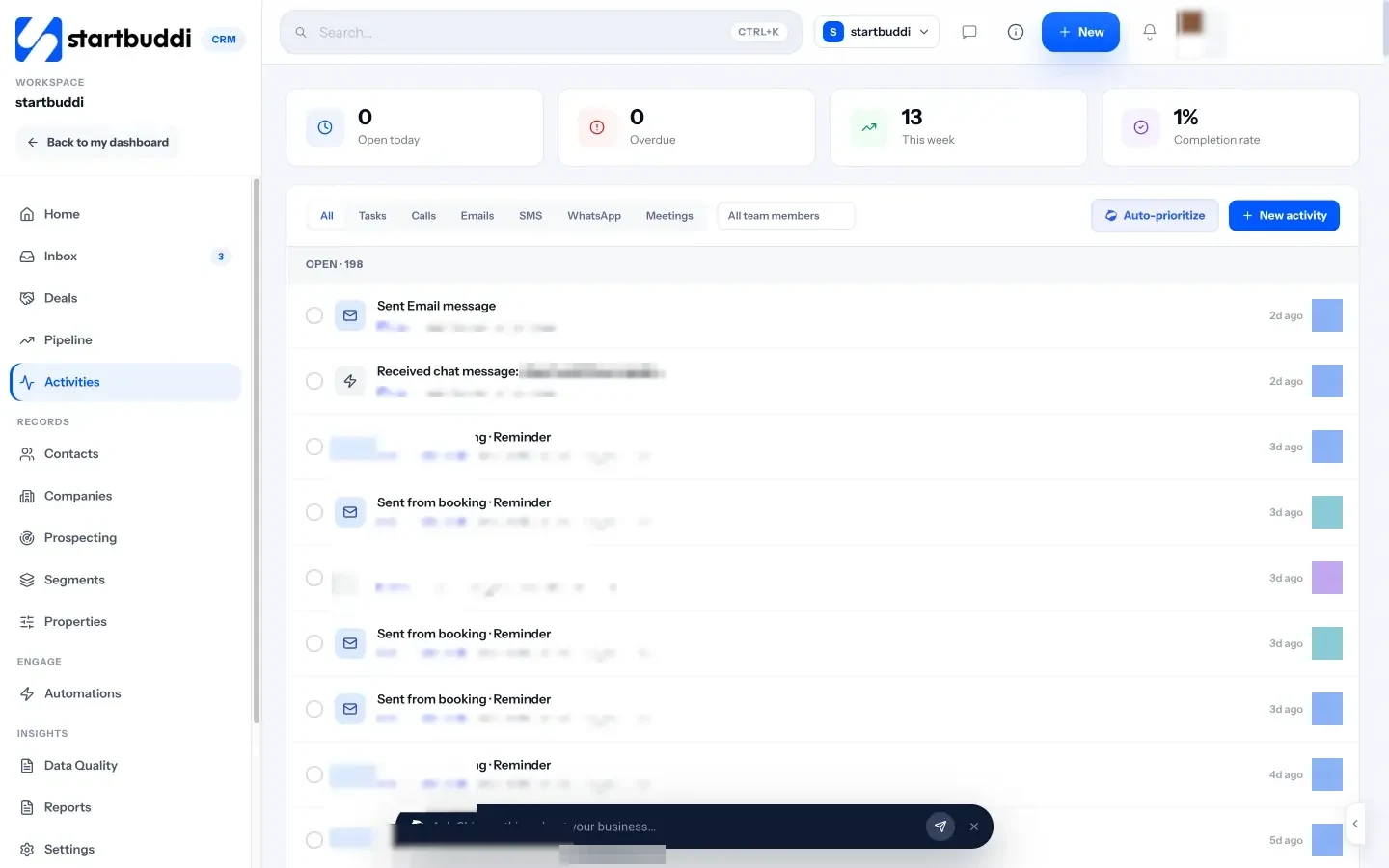
- Schedule each follow-up. In Customers, open Activities, click New activity, choose Note / Follow-up, and add a title such as “Follow up on quote”, the contact and a due date.
- Automate the sequence. In Automations, start a flow when a deal moves stage, add a wait, send an email, then use “Wait for their reply” to pause if the client answers. WhatsApp steps need a template approved by Meta first. Automations are on paid plans.
- Convert without retyping. When the client says yes, convert the accepted estimate to an invoice with the same line items.
A free plan is available. See pricing for what each plan includes.
For follow-ups beyond quotes, from first enquiry to repeat work, read the best ways to follow up with customers. Our sales process guide shows where quoting fits in the bigger picture, and our glossary explains follow-up automation and the sales pipeline. See also how startbuddi works as a CRM for service businesses.
Stop losing quotes to silence
Pick your follow-up dates before you send the next quote, and save the templates above. Start free with startbuddi to send estimates, track them as deals and schedule every follow-up in one place.
Frequently asked questions
How long should I wait to follow up after sending a quote?
Confirm the quote arrived on the same day, then follow up properly after about two working days. That gives the client time to read it without forgetting you. For large jobs that need approval from someone else, allow a few more days between follow-ups.
How many times should I follow up on a quote?
Three or four follow-ups over about two weeks is enough for most service jobs. Make each one add something new, then send a polite final message that closes the quote. After that, stop chasing and keep the client on your list for future contact where the law allows.
What should a quote follow-up email say?
It should name the job, ask one simple question and offer an easy next step, such as a call or a start date. Keep it to two or three lines. Add something useful where you can, like photos of similar work or an answer to a common question.
Is it OK to follow up on a quote on WhatsApp?
Yes, especially if the client contacted you on WhatsApp first. Keep messages short and personal. If you use the WhatsApp Business Platform, you need an approved template to message someone more than 24 hours after they last wrote to you.
What should I do if the client says the quote is too expensive?
Ask which part of the price is the issue before you change anything. Then offer a smaller scope, a cheaper material or a later start rather than a straight discount. That keeps your rate intact and still gives the client a way to say yes.
Should a quote have an expiry date?
Yes. An expiry date protects you from price changes in materials and labour, and it gives you a natural reason to follow up. Fourteen or thirty days is common for small service jobs.
Olabimpe Salami is the email and outreach specialist at startbuddi. Olabimpe writes about the messages that bring customers in and back: email, WhatsApp and SMS campaigns, follow-ups, and turning enquiries into paying clients.
Runs email and outreach at startbuddi