
How to manage small business finances: a practical guide
Separate your money, get paid on time, control spending, forecast cash and build a simple weekly and monthly routine, with the tools that help.

This guide shows you how to manage small business finances in a way that fits into a busy week. It is written for freelancers, founders and small business owners who handle the money themselves, and who want to stop worrying about cash, late payers and surprise tax bills.
The four chapters build on each other. First you set up the foundations: separate accounts, simple records and the six numbers to watch. Then you tackle money in (getting paid on time), money out (spending, budgets, cash flow, reserves and tax), and finally a weekly and monthly routine with the reports and financial management tools that support it. Each chapter ends with how to do it in startbuddi.
How to manage small business finances: the foundations
- Why this matters more than it seems
- Step 1: separate business money from personal money
- Step 2: decide how you will keep records
- Cash basis or accrual basis?
- Step 3: the six numbers every owner should know
- Step 4: set up simple categories
- Step 5: pay yourself on purpose
- What records to keep
- Your business structure affects your finances
- A first-month checklist
- Do you need an accountant from day one?
- Common foundation mistakes
- Your money foundations in startbuddi
Managing small business finances comes down to a handful of habits: keep business money separate, record what comes in and goes out, know a few key numbers, plan ahead for cash and tax, and review it all regularly. None of it needs an accounting degree. It needs a simple system and about an hour a week.
This chapter sets up the foundations: separating your money, choosing how to keep records, and the six numbers every owner should know. Chapter 2 covers getting paid, chapter 3 covers spending, budgets and cash flow, and chapter 4 covers your monthly routine, tax and the financial management tools that help.
Why this matters more than it seems
Plenty of good businesses struggle not because nobody wants what they sell, but because the owner loses track of the money. Invoices go unpaid for months, a tax bill arrives that nobody saved for, or a quiet month empties the account because there was no reserve. These are not bad-luck problems. They are visibility problems, and a simple system solves most of them.
Cash buffers in small businesses are often thin. The JPMorgan Chase Institute, analysing the transactions of 597,000 US small businesses, found that the median business held enough cash to cover just 27 days of its typical outflows without any money coming in (JPMorgan Chase Institute, Cash Flows, Balances, and Buffer Days). With that little room, knowing what is coming in and going out over the next few weeks is not optional.
Step 1: separate business money from personal money
This is the single most useful thing you can do, and it costs almost nothing. Open a separate account for the business and run every business payment in and out of it. Pay yourself from it on a set day, as a transfer, rather than dipping in whenever you need something.
Separation gives you three things at once:
- A clear picture. Your business account balance and statement tell you how the business is doing, without personal shopping mixed in.
- Easier tax. Your accountant (or you) can find business income and expenses without going through every personal transaction.
- Credibility. Clients paying into a business account, and invoices in the business name, look more professional. Many payment providers also require a business account.
If you trade as a registered company, a separate account is usually required anyway, because the company is a separate legal entity from you. If you are a sole trader, you may be allowed to use a personal account, but a second account used only for the business makes life much simpler. In Nigeria, our guide on how to open a business bank account walks through the options and documents.
Step 2: decide how you will keep records
Every business needs records of what it earned and spent, backed by invoices and receipts. Tax authorities expect it. The IRS, for example, says business owners need good records to show income and expenses and to prove the expenses they deduct (IRS, common questions about recordkeeping for small businesses). HMRC, the CRA, SARS and the Nigeria Revenue Service have similar requirements.
You have three broad options, and many businesses move through them as they grow.
| Option | Good for | Watch out for |
|---|---|---|
| Spreadsheet | Very early days, few transactions | Easy to fall behind, no link to invoices or receipts, errors in formulas |
| A money manager app that handles invoices, payments and expenses | Service businesses and small shops that want to see and manage day-to-day money | Not a replacement for full accounting or statutory accounts |
| Accounting software, often with a bookkeeper or accountant | Businesses with employees, stock, VAT or sales tax returns, or company accounts to file | More to learn, and you still need to keep it up to date |
For a plain-language primer on the record-keeping side, read our post on bookkeeping basics for small business.
Cash basis or accrual basis?
You will hear these two terms from accountants. The US Small Business Administration explains the difference simply: the cash method records income and expenses when money actually changes hands, while the accrual method records them when a sale or purchase happens, even if payment comes later (SBA, manage your finances).
- Cash basis is simpler and matches your bank balance. Many small businesses and sole traders use it, and some tax systems allow or encourage it for small businesses.
- Accrual basis gives a truer picture of profit when there is a big gap between doing the work and getting paid, and larger businesses are often required to use it.
Which one you must use for tax depends on where you are and how your business is set up, so ask your accountant or check your tax authority's guidance. For day-to-day management, the important thing is to track both views: what you have earned, and what you have actually been paid.
Step 3: the six numbers every owner should know
You do not need dozens of financial ratios. Know these six, and check them at least monthly.
- Money in (revenue or income): how much customers paid you this month.
- Money out (expenses): how much the business spent this month.
- Profit: money in minus money out. The number that shows whether the business works.
- Cash balance: how much the business has in the bank today.
- Money owed to you (receivables): unpaid invoices, and how many are overdue.
- Money you owe (payables): bills, suppliers and taxes you have not yet paid.
Profit and cash are not the same thing, and confusing them catches out many owners. A business can be profitable on paper and still run out of cash if customers pay slowly. It can also have plenty of cash this week because a big payment arrived, while losing money over the year. That is why numbers 4, 5 and 6 matter as much as 1 to 3.
Step 4: set up simple categories
Group your money in and out into a short list of categories so you can see patterns. Keep it short: ten to fifteen is plenty for most small businesses.
- Income categories: by service or product line, or by type (projects, retainers, product sales).
- Expense categories: for example software and tools, marketing, travel, office and supplies, contractors and freelancers, taxes and fees, bank fees, rent, and other.
Use the same categories every month. Change them only when there is a good reason, because consistent categories are what let you compare this month with last month and this year with last year. If you work with an accountant, ask them which categories they would like, so your records match what they need at year end.
Step 5: pay yourself on purpose
Decide how and when you pay yourself. Taking money out whenever you need it makes it impossible to tell whether the business is really profitable. A fixed amount on a fixed day, reviewed every quarter, is much easier to manage. How you should pay yourself (salary, drawings or dividends) depends on your business structure and country, so check with an accountant.
Include your own pay when you work out your prices and break-even point. Our pricing strategy guide shows how.
What records to keep
Whatever system you use, keep the evidence behind every number. Tax authorities can ask to see it, sometimes years later.
- Sales: copies of every invoice and receipt you issue, and records of cash sales.
- Payments received: bank statements, payment provider reports, and notes of cash received.
- Expenses: receipts and supplier invoices, with what the purchase was for.
- Bills and contracts: leases, loan agreements, subscriptions and supplier terms.
- Tax: returns filed, payments made and correspondence with the tax authority.
- Staff: if you employ people, payroll and employment tax records.
How long you must keep them depends on the country. Our expense tracking guide lists the official periods for several countries.
Your business structure affects your finances
How your business is set up changes how money moves between you and the business. As a sole trader or sole proprietor, the business and you are usually the same person for tax, and the profit is your income. As a limited company or corporation, the business is separate: it pays its own tax, and you take money out as salary, dividends or both, each with its own rules.
You do not need to change structure to follow this guide. But when you first register, and again when profits grow, it is worth asking an accountant which structure suits you. This is general information, not legal or tax advice.
A first-month checklist
- Open a separate business account (or a dedicated second account).
- Choose where you will record income and expenses.
- Set up ten to fifteen categories.
- Decide how much and when you pay yourself.
- Open a separate savings account for tax, and one for your reserve if you can.
- Find an accountant or bookkeeper, even if you only speak to them once a year.
- Book a weekly money hour in your calendar.
Do you need an accountant from day one?
Not always. A sole trader with a handful of clients and simple expenses can often keep their own records and file a simple return, especially with good official guidance. You are more likely to benefit from an accountant early if you register a company, employ people, register for VAT or sales tax, sell in several countries, or hold stock. Even if you do it yourself, one conversation with an accountant in your first year, to check your set-up and categories, usually pays for itself many times over.
Common foundation mistakes
- Mixing personal and business money. The most common and most expensive habit to break later.
- Keeping receipts in a shoebox. Or in a camera roll with 4,000 other photos. Capture them properly as you go.
- Only looking at the bank balance. It hides unpaid invoices, upcoming bills and tax you owe.
- Treating tax money as yours. Sales tax or VAT you collect, and the income tax you will owe, belong to the tax authority. Set it aside.
- Waiting until year end. Catching up on twelve months of records in January is miserable and error-prone. A weekly hour keeps it painless.
Your money foundations in startbuddi
In startbuddi, Money Manager is built for exactly this day-to-day picture. It is not accounting software: it does not do payroll, tax filing, a general ledger or bank reconciliation, and it does not connect to bank feeds. What it does is bring your invoices, payments, expenses, bills and cash forecast into one place, next to your customers and projects.
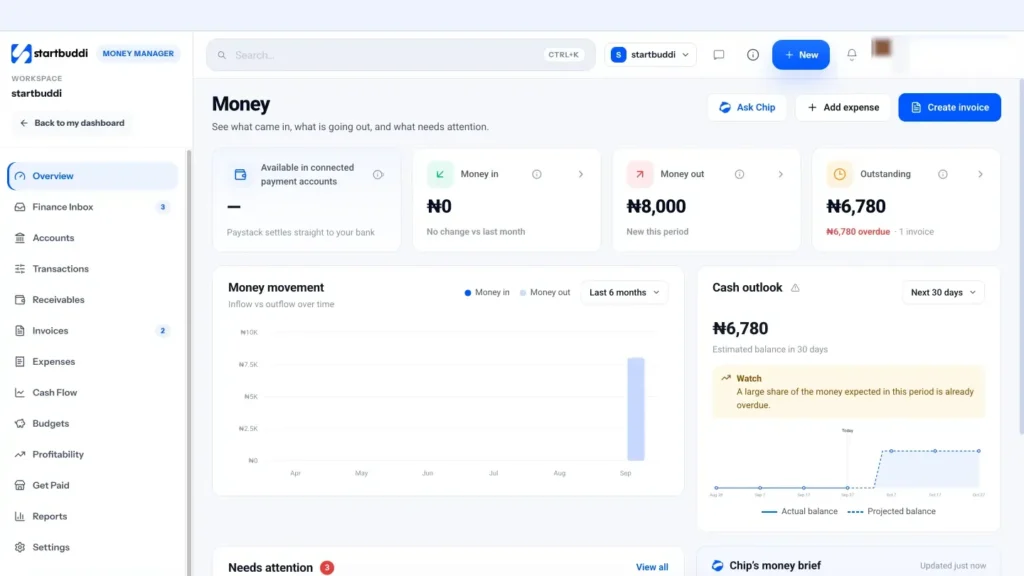
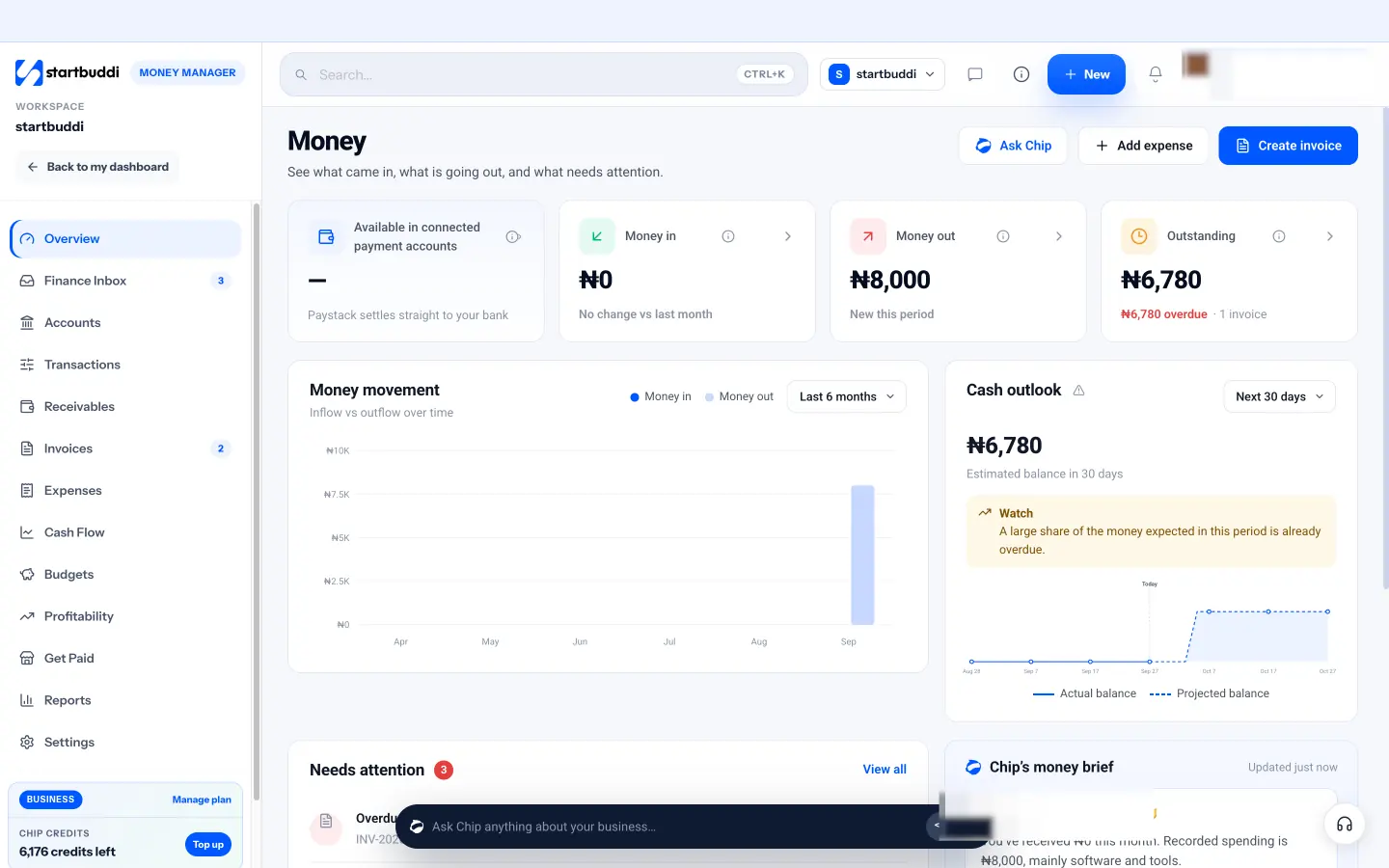
The overview. Open Money Manager and the Money overview shows four stat cards: available in connected payment accounts, money in, money out and outstanding (unpaid invoice balances, with the overdue part in red). Below that is a six-month chart of money in against money out, a 30-day cash outlook, a Needs attention list, and your recent transactions. Those cover four of the six numbers in this chapter at a glance.
Money in, recorded as it happens. Payments from invoices, payment links, bookings, forms, subscriptions and sales land in Transactions automatically when they come through Paystack or Stripe. Payments that arrive by bank transfer or cash are added with Record payment on the invoice.
Money out, with categories. Expenses are logged under Expenses with a fixed set of categories: Software and tools, Marketing, Travel, Office and supplies, Contractor/freelancer, Taxes and fees, Bank fees, Other and Uncategorized. Chapter 3 and our separate guide on how to track business expenses go into this in detail.
Ask Chip for a summary. The Ask Chip button on the overview has a ready prompt to summarise your money this month: what came in, what went out, what is owed to you and what needs your attention.
Money Manager is available on every plan, including Free. The Free plan includes 5 invoices a month, and expenses are included on every plan.
With the foundations in place, the next chapter looks at the part of your finances that most affects cash: getting paid, and getting paid on time.
Money in: get paid on time and keep cash flowing
- The cost of waiting to be paid
- Step 1: agree terms before you start
- Step 2: invoice promptly and correctly
- Step 3: make paying easy
- Step 4: follow up on a schedule, not a feeling
- Step 5: watch your receivables every week
- Other ways to smooth money in
- Getting paid by larger companies
- Your prices are part of money in
- Part payments, disputes and write-offs
- Getting paid in other currencies
- Common money-in mistakes
- Managing money in with startbuddi
For most small businesses, the fastest way to improve their finances is not to cut costs or find new customers. It is to get paid sooner for work they have already done. Every invoice that sits unpaid is money you earned but cannot use: not for rent, not for stock, not for your own pay.
This chapter covers the money-in side of managing small business finances: agreeing terms, invoicing promptly, making it easy to pay, following up, and keeping an eye on what you are owed.
The cost of waiting to be paid
Late payment is normal enough that you should plan for it. Xero, which studies anonymised invoice data from small businesses, reported that US small businesses waited an average of 29.3 days to be paid in the June quarter of 2026, and were paid an average of 8.5 days late (Xero, late payments guide).
Put that into your own numbers. If you invoice $10,000 a month and customers take 30 days on average to pay, you always have around $10,000 tied up in unpaid invoices. If you could bring that down to 15 days, around $5,000 would be released into your bank account, once, without selling anything extra. That is often the difference between a comfortable month and a stressful one.
Step 1: agree terms before you start
Most late payments begin with an unclear agreement. Before any work starts, agree four things in writing: what you are delivering, the price, when payment is due, and how the customer will pay. A message they reply "yes" to counts; a signed estimate or contract is better.
Choose payment terms that suit a small business:
| Situation | Terms that usually work |
|---|---|
| Small job for an individual | Payment before delivery, or due on receipt |
| Regular small business client | Due in 7 or 14 days |
| Larger company with a finance team | Due in 30 days, with a deposit up front |
| Project longer than a month | Deposit, then staged payments at milestones |
| Ongoing monthly work | A retainer or subscription billed at the start of each month |
Deposits deserve special mention. A deposit covers your materials and time if the customer cancels, and it filters out people who are not serious. Our full guide to sending your first invoice and getting paid on time covers terms and deposits in more depth.
Step 2: invoice promptly and correctly
An invoice sent late gets paid late. Send it the day you are entitled to be paid: when the client agrees for a deposit, the day you deliver for a one-off job, or on a fixed day each month for ongoing work.
Make sure every invoice includes:
- Your business name and contact details, and the customer's.
- A unique invoice number and the date.
- A clear description of each item, with quantity and price.
- Tax, if you are registered to charge it, shown separately.
- The total and the due date.
- How to pay: bank details, a payment link or both, and the reference to use.
Small errors cause big delays. A wrong company name, a missing purchase order number or a vague description can send an invoice back to the start of a client's approval process.
Step 3: make paying easy
The easier it is to pay, the sooner people pay. Offer at least two ways, and make one of them a single click or tap.
- Online card or bank payment through a provider such as Stripe or, in several African countries, Paystack. The customer clicks a link and pays in a minute.
- Bank transfer with complete details printed on the invoice, including the reference to use.
- Mobile money where customers prefer it, for example in Kenya or Ghana.
- A payment link you can drop into WhatsApp, email or a text message for small or one-off amounts.
Online payments carry a fee, so include it in your pricing rather than being surprised by it. Stripe's standard US fee for domestic cards, for example, is 2.9% plus 30 cents per successful transaction (Stripe pricing). For most service businesses, getting paid a week or two sooner is worth far more than the fee.
When a payment arrives, send a receipt or a short thank-you straight away. It confirms the account is settled, gives the customer a record for their own books, and leaves a good last impression, which makes the next invoice easier to pay.
Step 4: follow up on a schedule, not a feeling
Most owners chase late invoices when they notice them, or when they feel brave enough. A fixed schedule works far better, because it removes the awkwardness: you are just following your process.
- 3 days before the due date: a friendly reminder that the invoice is due soon.
- On the due date: a short note that payment is due today, with the pay link.
- 3 days overdue: a polite check that they received it and whether anything is holding it up.
- 7 days overdue: a firmer reminder, with the amount, the original due date and how to pay.
- 14 days overdue: a phone call or voice note, then a formal final notice if needed.
Here is a reminder you can adapt:
Hi Grace, just a quick reminder that invoice INV-042 for $1,250 was due on 12 March. You can pay by card here: [link], or by bank transfer using the details on the invoice. If there's anything holding it up, let me know and I'll help sort it out. Thanks!
Most late payers are disorganised, not dishonest. A calm, regular reminder solves most cases. For persistent non-payment, check the options in your country, such as small claims procedures, and consider stopping further work until the account is paid.
Step 5: watch your receivables every week
Receivables are the money customers owe you. Look at them weekly, sorted by how late they are. This is often called an aged receivables view.
| Age | What it means | What to do |
|---|---|---|
| Not yet due | Normal | Nothing, unless it is large and due soon |
| 1 to 14 days overdue | Common, usually admin | Friendly reminder |
| 15 to 30 days overdue | Needs attention | Firm reminder and a phone call |
| Over 30 days overdue | At risk | Final notice, pause further work, consider formal steps |
Two numbers are worth tracking over time: the total you are owed, and the average number of days customers take to pay. If either keeps rising, tighten your terms, ask for deposits, or look at which customers are causing the delay.
Other ways to smooth money in
- Recurring billing for ongoing clients: a retainer or subscription billed on the same day each month turns lumpy income into a predictable flow.
- Staged payments on long projects, so you are never owed more than one stage at a time.
- Packages paid up front, such as a block of ten sessions, which bring cash in before the work.
- Early payment options, such as a small discount for paying annually in advance. Use sparingly and only where your margins allow.
Getting paid by larger companies
Big clients often pay reliably but slowly, and their processes can trip you up. A few habits help.
- Ask about their process before you start: who approves invoices, whether they need a purchase order number, and which email address invoices must go to.
- Complete their supplier set-up early. Many companies need your bank details, tax number and a supplier form before they can pay anyone. Do it in week one, not after your first invoice.
- Find the accounts payable contact. The person who hired you rarely presses the pay button. Copy the finance team on invoices and reminders.
- Know their payment runs. Some companies pay suppliers only once or twice a month. Invoicing a few days before a run can save you weeks.
Your prices are part of money in
The best collection process in the world cannot fix a price that is too low. If you are busy but still short of cash, check that your prices cover your costs, your own pay and a margin for a slow month. Our pricing strategy guide shows how to work out your break-even point and when to raise prices.
Part payments, disputes and write-offs
Not every invoice is paid in full, on time, in one go. Plan for the common cases.
- Part payments: record what arrived, update the balance, and send a short note confirming what is still owed and when.
- Disputes: if a customer questions an invoice, respond quickly and calmly. Separate the disputed part from the rest, and ask them to pay the undisputed amount now.
- Payment plans: for a customer who genuinely cannot pay in one go, agree a written schedule of smaller payments. Something regular is better than nothing.
- Bad debts: if an invoice truly will not be paid, stop chasing, record it as a bad debt with your accountant's advice (it may affect your tax), and learn from it: did you need a deposit or staged payments?
Getting paid in other currencies
If you work with clients abroad, decide up front which currency you invoice in and who carries the exchange rate risk. Invoicing in your client's currency is convenient for them but means your income moves with the exchange rate. Invoicing in your own currency protects you but may put some clients off. Whatever you choose, keep a record of what actually arrived in your account after fees and conversion, because that is your real income.
Common money-in mistakes
- Starting work without agreed terms. The invoice then becomes a negotiation.
- Batching invoices at the end of the month. Every day you wait adds a day to when you are paid.
- Only offering one way to pay. Especially if it is the least convenient one for the customer.
- Not recording payments promptly. You chase someone who has already paid, which is embarrassing and wastes time.
- Letting one big client pay very late. A single large overdue invoice can put your whole business at risk. Ask for deposits and staged payments on big jobs.
Managing money in with startbuddi
Invoices that customers can pay online. In Money Manager, Create invoice opens the builder: pick a client from your contacts or type a one-off recipient, add line items, tax and discount, and choose the currency. Turn on Accept payment via Paystack or Stripe, and your bank transfer or PayPal details can be shown on the invoice too. Your customer gets an email with a link to an invoice page with a pay button. Card and bank payments through Paystack or Stripe mark the invoice as paid automatically; bank transfers and cash are added with Record payment, which also handles part payments. See invoicing.
Reminders on a schedule. On the Invoices page, Reminder sequences let you set reminders a number of days before the due date, on the due date, and at overdue intervals such as 3, 7 and 14 days. Set it once and the sequence follows the schedule described above.
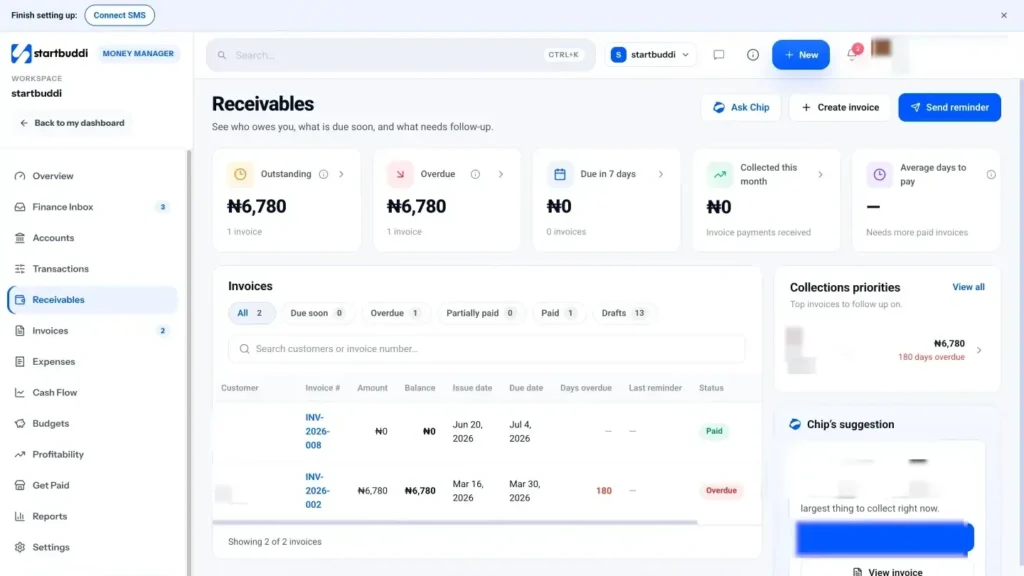
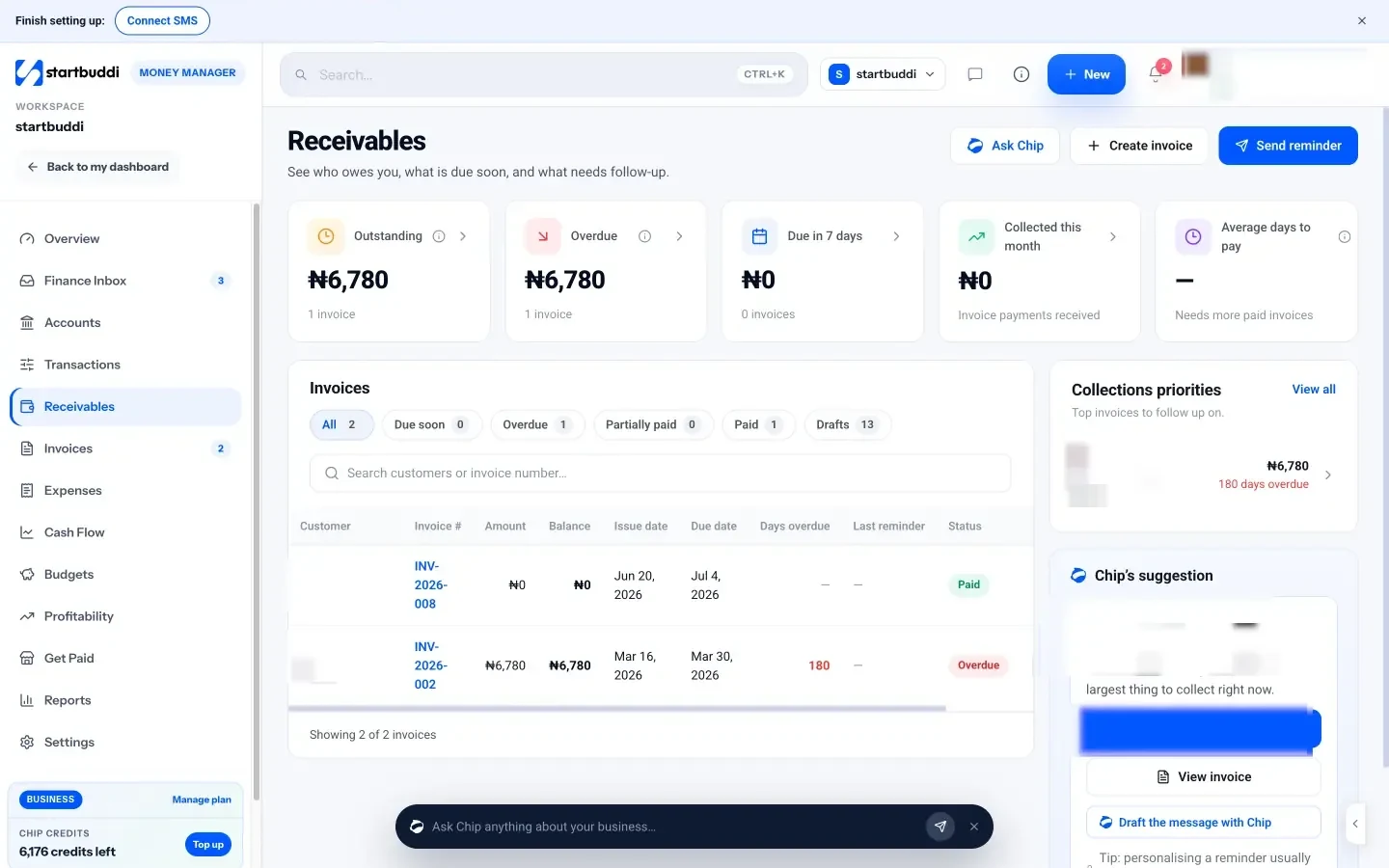
Receivables in one view. The Receivables page shows outstanding, overdue, due in the next 7 days, collected this month and average days to pay, with tabs for due soon, overdue, partially paid and paid. Each open invoice has a one-click Remind button, and Chip suggests which invoice to chase first and can draft a personal reminder.
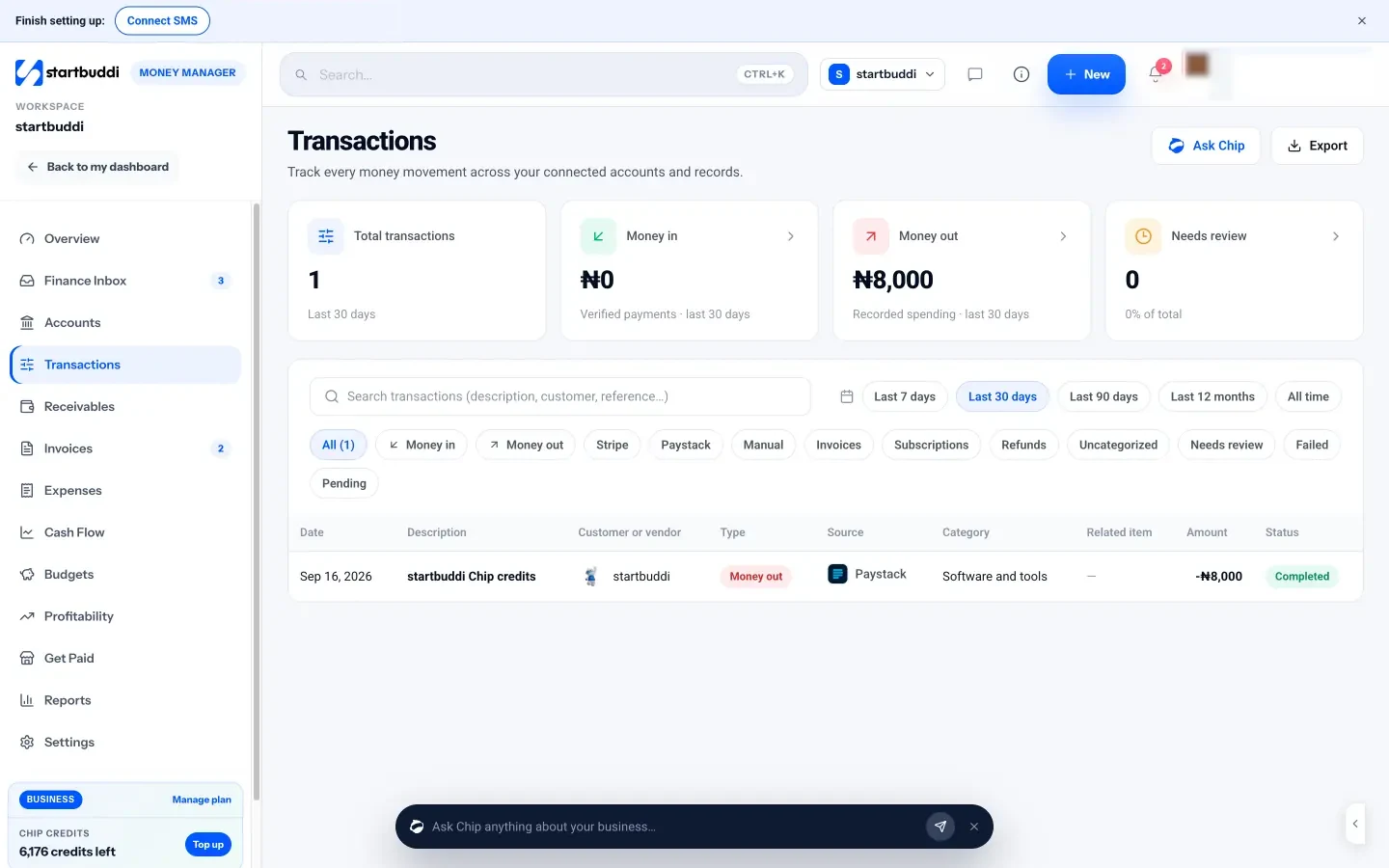
Every payment in one feed. Transactions lists every payment in and every expense out, with filters for money in, money out, provider and more. A payment that arrives through Paystack or Stripe is matched to its invoice; if one needs matching, open it and use Match to invoice.
Other ways to get paid. Get Paid adds payment links for quick one-off amounts, a pay me page, QR codes to print, and subscriptions for recurring plans. Recurring billing on the Invoices page creates a monthly or quarterly draft invoice for retainers. The Free plan includes 5 invoices a month; Starter and above include unlimited invoices.
Getting paid is half of cash flow. The next chapter covers the other half: controlling spending, budgeting and forecasting your cash.
Money out: spending, budgets and cash flow planning
- Know where the money goes
- Fixed, variable and one-off costs
- Build a simple budget
- Budgeting for a seasonal business
- Forecast your cash flow
- A simple weekly forecast example
- Build a cash reserve
- Set money aside for tax
- Cutting costs sensibly when you need to
- Make supplier terms work for you too
- When borrowing makes sense, and when it does not
- Decide in advance where each payment goes
- Common money-out mistakes
- Spending, budgets and cash flow in startbuddi
Getting paid fills the tank. This chapter is about the other side: what you spend, how you plan it, and how you make sure there is always enough cash for the next few weeks. It covers controlling spending, setting a simple budget, forecasting cash flow, building a reserve and setting money aside for tax.
The aim is not to spend as little as possible. It is to spend on purpose, know what is coming, and never be surprised by a bill you could have seen weeks ago.
Know where the money goes
You cannot manage spending you do not see. Record every business expense with its date, amount, supplier, category and a copy of the receipt. Do it as you go, or at least once a week, rather than in a panic at year end.
Once a month, look at spending by category and ask three questions:
- What went up, and why?
- What are we paying for but not using? Unused software subscriptions are the classic example.
- What is paying for itself? Marketing that brings in customers, tools that save hours, contractors who free you up for better-paid work.
Our separate guide on how to track business expenses covers categories, receipts and approvals step by step.
Fixed, variable and one-off costs
Sort your costs into three groups. It makes planning much easier.
- Fixed costs stay about the same each month: rent, salaries, software, insurance, loan repayments. They are predictable, but hard to cut quickly.
- Variable costs rise and fall with sales: materials, stock, subcontractors, delivery, payment fees.
- One-off or irregular costs come round less often: annual insurance, equipment, tax payments, a new website, licence renewals. These are the ones that catch people out.
List your irregular costs for the year with their expected month. Then divide the total by 12 and set that amount aside each month, so the big bills do not land on an empty account.
Build a simple budget
A budget is a plan for the money: how much you expect to earn, and how much you will spend on what. For a small business, a one-page monthly budget is plenty.
| Line | Planned per month | Notes |
|---|---|---|
| Income | $9,000 | Based on average of last 6 months |
| Contractors | $1,800 | Variable, about 20% of income |
| Software and tools | $250 | Fixed |
| Marketing | $600 | Adjust monthly |
| Rent and utilities | $900 | Fixed |
| Insurance, accountant, licences | $250 | Irregular costs averaged |
| Owner's pay | $3,500 | Transferred on the 28th |
| Tax set-aside | $1,000 | Moved to a separate account |
| Reserve | $400 | Until reserve target is reached |
| Left over | $300 | Buffer |
Base the income line on your real average, not your best month. Then compare actual numbers against the plan each month. The comparison, called budget versus actual, is where the value is: it shows you which lines are drifting before they become a problem.
You can also set budgets for specific projects, teams or marketing campaigns. A project budget tells you whether a job is still profitable while you are doing it, not only after it is finished.
Budgeting for a seasonal business
If your income swings through the year, a flat monthly budget will mislead you. A wedding photographer, a tax adviser or a shop that depends on the festive season earns most of its money in a few months. Budget month by month using last year's pattern, and plan in advance how the busy months will fund the quiet ones. The rule is simple: in a good month, set aside enough to cover the fixed costs of the next quiet month before you spend anything else.
Forecast your cash flow
A budget tells you what you plan to earn and spend. A cash flow forecast tells you when the money will actually arrive and leave, and therefore what your bank balance will look like in the coming weeks. For a small business, that second question is often the more urgent one.
A basic 30-day or 90-day forecast has four parts.
- Starting balance: what is in the business account today.
- Expected money in: unpaid invoices by their due dates (be realistic: move late payers back a week or two), subscription renewals, and any confirmed sales.
- Expected money out: fixed costs on their due dates, bills, owner's pay, tax payments, and planned purchases.
- Projected balance: starting balance plus money in minus money out, week by week.
If the projected balance dips close to zero, or below it, you have seen the problem early enough to act: chase a big invoice, delay a purchase, ask a supplier for longer terms, or arrange a short-term facility before you need it. For a deeper look, read our post on cash flow management.
A simple weekly forecast example
Here is a four-week forecast for a small design studio starting with $6,000 in the bank.
| Week 1 | Week 2 | Week 3 | Week 4 | |
|---|---|---|---|---|
| Starting balance | $6,000 | $4,300 | $6,600 | $2,300 |
| Money in | $800 | $3,500 | $0 | $4,200 |
| Money out | $2,500 | $1,200 | $4,300 | $900 |
| Ending balance | $4,300 | $6,600 | $2,300 | $5,600 |
Week 3 is the pinch point: rent, a contractor and the owner's pay fall in the same week that no invoices are due. The month ends fine, but only if the $4,200 invoice in week 4 arrives on time. Seeing this three weeks ahead gives the owner time to send that invoice early, ask for a deposit on a new job, or move a contractor payment by a few days.
Build a cash reserve
A reserve is money set aside for bad months, emergencies and opportunities. The JPMorgan Chase Institute found that the median small business in its US study held a cash buffer of 27 days, meaning it could cover its usual outgoings for less than a month without new money coming in (JPMorgan Chase Institute).
A common aim is to build towards two to three months of fixed costs, and more if your income is seasonal or depends on a few large clients. Start small: even one month of fixed costs changes how you feel about a slow week.
- Keep the reserve in a separate account, so it does not blur into everyday spending.
- Add a fixed amount or a percentage of every payment received until you reach your target.
- Decide in advance what counts as a genuine reason to use it, and how you will refill it.
Set money aside for tax
Tax is the bill that surprises most first-year owners. Two kinds of tax money pass through a small business:
- Tax you collect for the government, such as VAT, GST or sales tax, if you are registered. It is never your money. Move it to a separate account as soon as customers pay.
- Tax on your profit, such as income tax or corporate tax. Set aside a percentage of every payment, based on advice from your accountant or your tax authority's guidance, so the bill is ready when it is due.
Rates, thresholds and deadlines vary widely between countries and business types. This is general information, not tax advice: check the rules with an accountant or your tax authority, such as the IRS in the US, HMRC in the UK, the CRA in Canada, the Nigeria Revenue Service, SARS in South Africa or the KRA in Kenya.
Cutting costs sensibly when you need to
If your forecast shows trouble, cut in this order: things you do not use, then things that do not pay for themselves, and only then things that bring in customers. Cutting marketing first often makes a slow month into a slow quarter.
- Cancel unused subscriptions and memberships.
- Renegotiate or shop around for insurance, phone, internet and suppliers.
- Delay purchases that can wait, especially equipment.
- Ask suppliers for longer payment terms, and customers for deposits.
- Look at which services or customers have the thinnest margins, and either reprice or drop them.
Make supplier terms work for you too
Your customers are not the only ones with payment terms. If suppliers give you 30 days to pay while your customers pay you in 14, cash flows your way. Ask regular suppliers for credit terms once you have a good track record, pay on the due date rather than early (unless there is a discount for paying early), and keep bills in one list with their due dates so nothing is missed or paid twice.
When borrowing makes sense, and when it does not
Sometimes a gap in cash flow is temporary: a large order needs materials before the customer pays, or a seasonal business needs stock before the busy months. Borrowing can bridge that gap. Common options include an overdraft or credit line, a short-term business loan, supplier credit, and in some countries invoice finance, where a provider advances money against unpaid invoices for a fee.
A useful test: borrowing to fund something that will bring money back (stock you will sell, equipment that earns) is very different from borrowing to cover ongoing losses. If the business is losing money every month, a loan only delays the problem. Fix prices or costs first. Always read the full cost, including fees, and take advice before signing. This is general information, not financial advice.
Decide in advance where each payment goes
Some owners find it easier to manage money by splitting every payment the day it arrives. For example, a set percentage to a tax account, a set percentage to the reserve, a set percentage to owner's pay, and the rest to running costs. The exact split depends on your margins and tax, so work it out with your numbers or an accountant. The benefit is that tax and savings happen automatically, rather than depending on what is left at the end of the month.
Common money-out mistakes
- No reserve. One late payment or quiet month becomes a crisis.
- Forgetting irregular costs. Annual bills are predictable. Treat them that way.
- Spending tax money. The most painful mistake of all, because the bill still arrives.
- Budgeting from your best month. Plan with averages; enjoy the good months as a bonus.
- Never comparing actual with plan. A budget you never check is just a wish.
Spending, budgets and cash flow in startbuddi
Expenses, bills and recurring costs. Under Expenses you log each cost with vendor, amount, currency, category, date, how it was paid, the receipt, and optionally a project or customer. Add recurring sets up regular costs such as rent and subscriptions, monthly or quarterly, and you can pause or resume each one. The Bills tab tracks money you owe to vendors, with due dates, approvals and part payments. See expenses, bills and reimbursements.
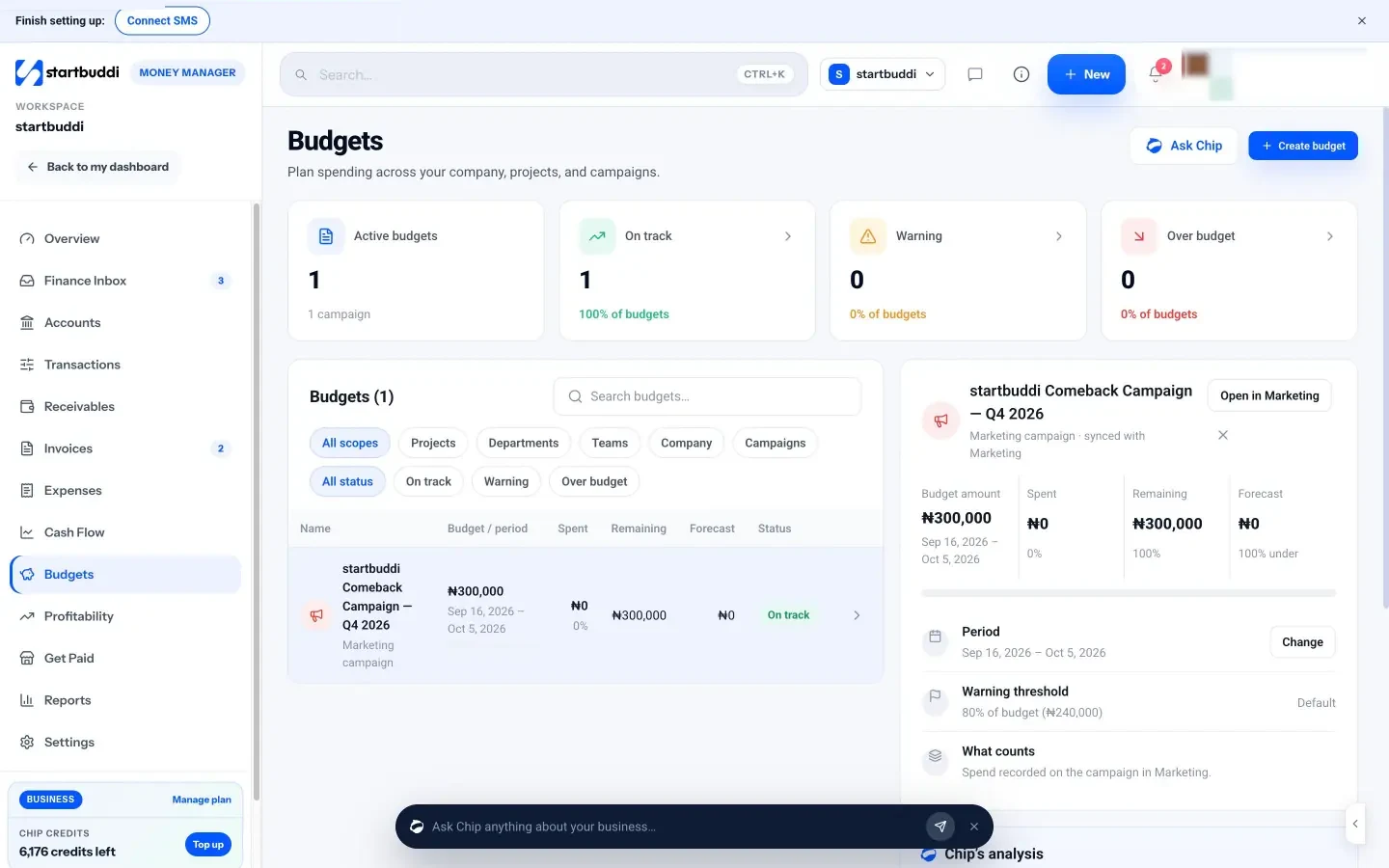
Budgets. The Budgets page lets you set a budget for the whole company, a project, a department, a team or a marketing campaign. Money Manager tracks spending against it, warns you at 80%, and forecasts where the period will land. Each budget shows amount, spent, remaining and forecast, with a budget versus actual chart. Warnings at 80% and 100% also appear in the Finance Inbox.
Cash flow forecast with scenarios. The Cash Flow page shows your current known balance, expected money in and out, and a balance forecast for the next 30, 60 or 90 days. It is built from open invoices by due date (with overdue ones placed a week out), subscription renewals, recurring expenses and bills, and it lists every input so you can see exactly what is included. Run a scenario lets you test what happens if revenue rises or falls by a percentage, if overdue invoices are paid this week, or if marketing spend goes up. Scenarios change the forecast, not your records. See cash flow, budgets and profitability.
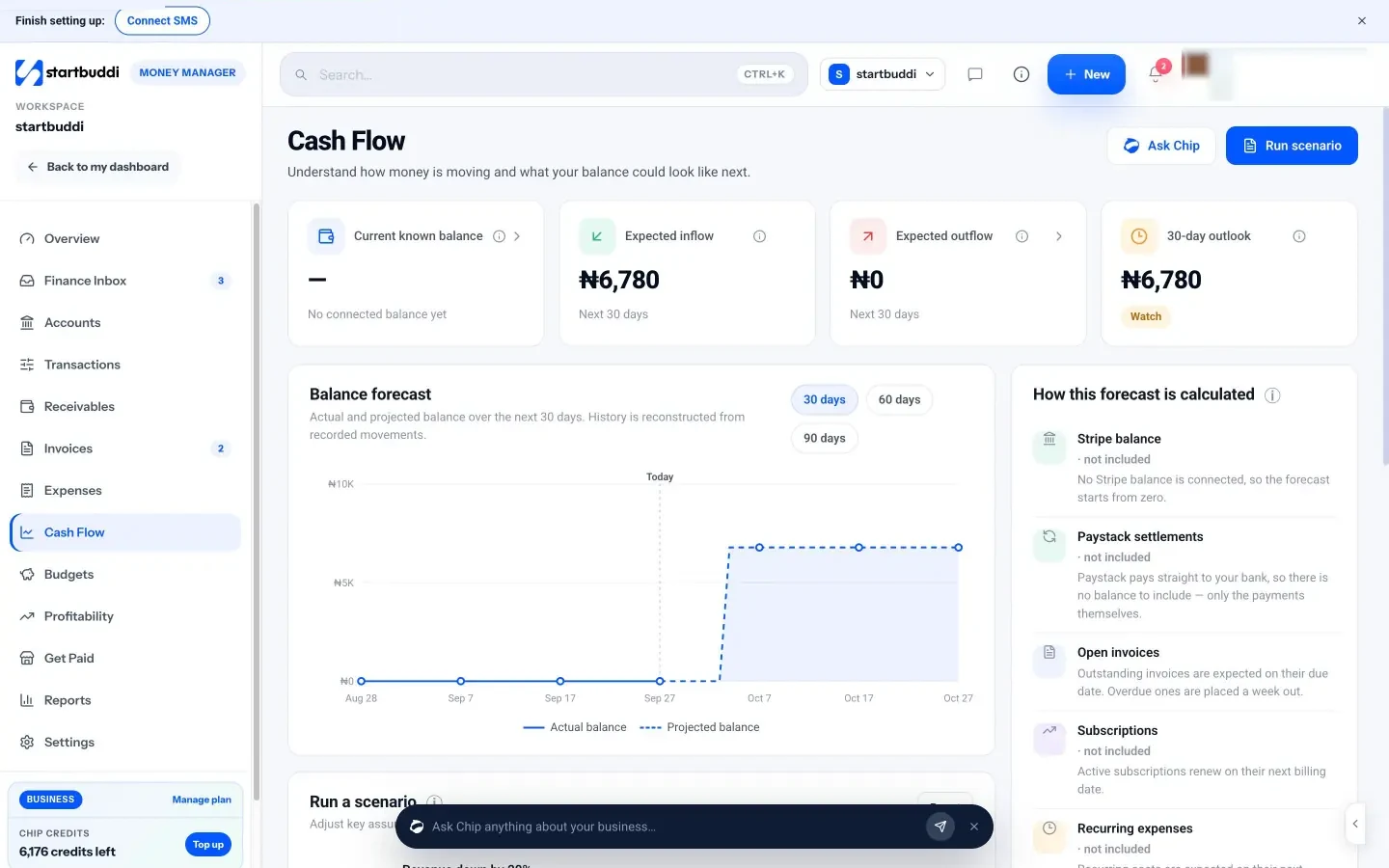
One honest limit: because startbuddi does not connect to bank accounts, the forecast starts from your Stripe balance (if connected) plus your records, not your full bank balance. Keep your own starting figure in mind when you read it. New accounts see "Not enough history for a forecast yet" until there is enough data.
The final chapter pulls it all together into a monthly routine, explains how to work with an accountant, and helps you choose the right financial management tools for your business.
Your money routine, reports and financial management tools
- The weekly money hour
- The monthly review
- The quarterly and yearly jobs
- Reports worth reading, in plain words
- Working with an accountant or bookkeeper
- A few ratios, in plain words
- Warning signs to watch for
- What to hand your accountant at year end
- Choosing financial management tools for a small business
- A one-page money dashboard
- Signs you have outgrown a simple set-up
- Where startbuddi fits, honestly
- Running your money routine in startbuddi
- Your next step
- Sources
Good financial management is less about clever decisions and more about a steady routine. Owners who spend an hour a week and an afternoon a month on their numbers rarely get nasty surprises. This final chapter gives you that routine, explains the reports worth reading, covers working with an accountant, and helps you choose financial management tools for your small business without paying for more than you need.
The weekly money hour
Pick the same slot every week, such as Friday morning, and work through this list. With a decent system it takes 30 to 60 minutes.
- Record new expenses and attach receipts for anything not yet logged.
- Send invoices for any work finished or due this week.
- Check payments received and mark invoices paid, including bank transfers and cash.
- Review receivables: send reminders for anything due or overdue.
- Review bills: pay what is due, and note what is coming next week.
- Glance at your cash forecast for the next 30 days. Anything worrying?
- Move money to your tax and reserve accounts, if you do it weekly.
The monthly review
Once a month, spend an extra hour looking back and looking ahead.
- Profit and loss: money in, money out and profit for the month. Compare with last month and the same month last year.
- Budget versus actual: which lines went over, and why?
- Expenses by category: anything unexpected or unused?
- Receivables: total owed and average days to pay. Is it getting better or worse?
- Profitability: which clients, services or products earned the most and least?
- Cash forecast: update it for the next 90 days and run one "what if".
- Decisions: write down one or two actions, such as raising a price, dropping a subscription or chasing a particular client.
The quarterly and yearly jobs
- Quarterly: review prices against costs, check tax set-aside against what you will owe, review your own pay, and send any tax returns due (such as VAT or sales tax, where you are registered).
- Yearly: prepare for your tax return or company accounts with your accountant, set next year's budget, review insurance and contracts, and archive records you must keep.
Reports worth reading, in plain words
You will hear about three main financial statements. Here is what each one tells you.
- Profit and loss (also called an income statement): income minus expenses over a period. It answers "is the business making money?".
- Balance sheet: what the business owns and owes at a point in time. The SBA calls it the foundation of managing your finances (SBA, manage your finances). It becomes important once you have assets, loans or a company to account for.
- Cash flow statement or forecast: how cash moved, or will move, in and out. It answers "will we have enough cash?".
Alongside those, two operational reports are especially useful for small businesses: aged receivables (who owes you, and how late) and aged payables (who you owe, and when it is due).
Working with an accountant or bookkeeper
You do not have to do everything yourself. Many small businesses keep day-to-day records themselves and use an accountant for tax returns, year-end accounts and advice. Others hire a bookkeeper for a few hours a month to keep records tidy. Either way, you will pay less and get better advice if your records are organised.
- Agree what they need and in what format, such as a CSV export of income and expenses, or access to your accounting software.
- Use their categories so your records line up with what they file.
- Send records monthly or quarterly, not in one big bundle at year end.
- Ask for advice on structure: how to pay yourself, whether to register for VAT or sales tax, and how much to set aside.
Tax rules differ between countries and business types, and change often. This guide is general information, not tax or legal advice. For official guidance, see the IRS, HMRC, the CRA, the Nigeria Revenue Service, SARS or the KRA.
A few ratios, in plain words
You do not need many ratios, but these four are worth knowing and tracking over time.
| Ratio | How to work it out | What it tells you |
|---|---|---|
| Gross margin | (Sales minus direct costs) ÷ sales | How much of each sale is left to pay overheads and you |
| Net margin | Profit ÷ sales | How much of each sale you keep after everything |
| Average days to pay | Average time between invoice and payment | How quickly customers turn work into cash |
| Cash runway | Cash in the bank ÷ monthly outgoings | How many months you could last without new income |
For example, a business with $12,000 in the bank and $4,000 of monthly outgoings has three months of runway. If that number falls month after month, act early.
Warning signs to watch for
- The bank balance at the end of each month keeps falling, even in good months.
- Average days to pay is creeping up, or one customer owes a large share of your receivables.
- You are paying suppliers late, or using the tax account to cover bills.
- Sales are rising but profit is flat or falling, which usually means prices or costs need attention.
- You regularly cannot pay yourself the amount you planned.
None of these is a disaster on its own. Each is a signal to look closer at the numbers, and to talk to your accountant sooner rather than later.
What to hand your accountant at year end
A tidy year-end pack saves your accountant time and saves you fees. Aim to send:
- a list or export of all income for the year, with invoices;
- a list or export of all expenses by category, with receipts available if asked;
- bank and payment provider statements for every business account;
- unpaid invoices and unpaid bills at the year-end date;
- details of any equipment bought, loans taken or repaid, and money you took out of the business;
- any letters from the tax authority during the year.
If you have kept up the weekly hour and monthly review, most of this is already done.
Choosing financial management tools for a small business
There is no single app that does everything well for every business. Most small businesses end up with a small set of tools that each do one job. Choose by the job.
| Job | Type of tool | What to look for |
|---|---|---|
| Hold and move money | Business bank account or banking app | Low fees, easy transfers, sub-accounts or "pots" for tax and reserves |
| Take payments | Payment provider (for example Stripe or Paystack) | The methods your customers use (cards, bank transfer, mobile money), fees, how fast money settles |
| Invoice, get paid and track spending day to day | Small business money management app | Invoices with pay links, reminders, expenses with receipts, cash forecast, link to your customers and projects |
| Keep formal accounts and file returns | Accounting software such as QuickBooks, Xero or Wave | Bank feeds, reconciliation, tax returns in your country, accountant access |
| Pay staff | Payroll software or a payroll service | Support for your country's payroll taxes and filings |
Questions to ask before choosing any of these apps to manage business finances:
- Does it support my country, currency and the payment methods my customers use?
- Does it do the job I need now, without features I will pay for but never use?
- Can I export my data easily, for my accountant or if I switch?
- Will it save me time every week, or add another login to check?
- Does it connect to the tools I already use, such as my contact list and projects?
For a side-by-side look, see our list of the best money manager apps for small business and our startbuddi vs QuickBooks comparison. If you are unsure what a money manager app is, the glossary entry explains it.
A one-page money dashboard
Whatever tools you use, it helps to see the essentials on one page each month. Copy this layout into a document or spreadsheet, or use a tool that shows it for you.
- Money in this month, and the same month last year.
- Money out this month, by top five categories.
- Profit this month and year to date.
- Cash in the bank today, and in the tax and reserve accounts.
- Total owed to you, the overdue part, and average days to pay.
- Bills and other payments due in the next 30 days.
- Projected balance in 30 and 90 days.
- Your one or two actions for next month.
Signs you have outgrown a simple set-up
The routine in this guide suits most small businesses for a long time. You may need more formal accounting software, a bookkeeper or both when you:
- take on employees and need to run payroll;
- register for VAT, GST or sales tax and file regular returns;
- hold stock that you need to value;
- take loans or investment and need proper accounts for lenders or shareholders;
- run a limited company that must file annual accounts;
- spend more than a couple of hours a week on bookkeeping.
At that point, the day-to-day habits you have built still apply. You simply add a tool or a person for the formal side.
Where startbuddi fits, honestly
In short, startbuddi's Money Manager is a small business money management app, not accounting software. It covers invoices, payments, expenses, bills, reimbursements, budgets, a cash forecast, profitability and a cash-basis profit and loss, all connected to your customers, projects and marketing. It does not do payroll, tax filing, a general ledger or bank reconciliation, it has no bank feeds, and it does not sync with QuickBooks or Xero. A sensible set-up is to use it for day-to-day money and send a CSV export to an accountant, or into accounting software, for the formal side.
The advantage of keeping day-to-day money next to your customers and projects is context: an overdue invoice sits beside the client's record and conversation history, and an expense can be linked to the project it was for, so profitability by client or project is worked out for you rather than rebuilt in a spreadsheet each month.
Running your money routine in startbuddi
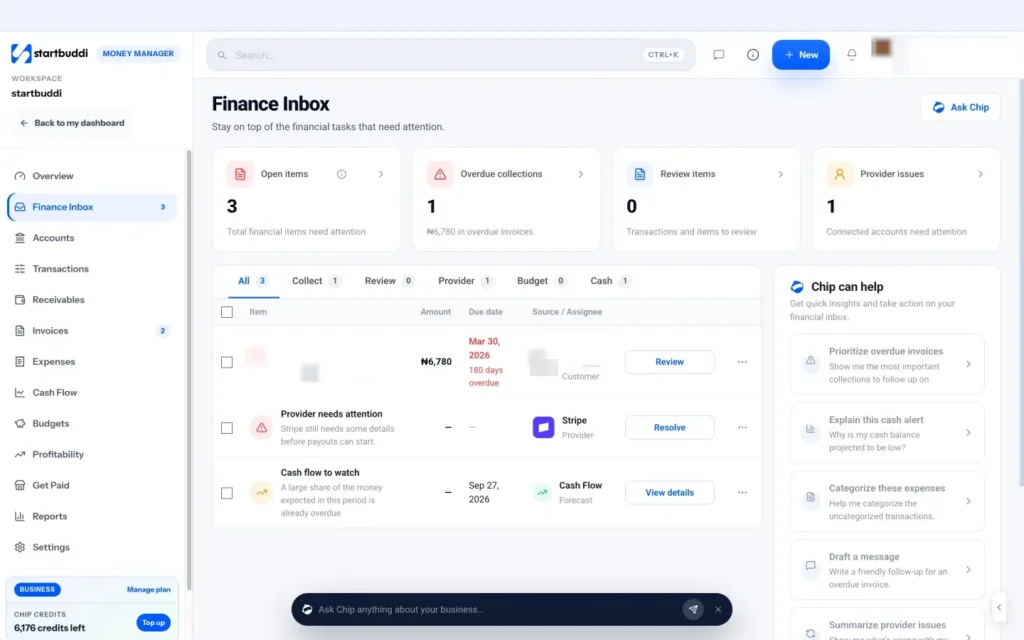
The Finance Inbox: your weekly to-do list. Money Manager's Finance Inbox collects the money tasks that need attention and clears them as they are dealt with: overdue invoices, invoices due soon, failed payments, uncategorized expenses, likely duplicates, payments that need matching, payment provider issues, budget warnings and projected cash shortfalls. Tabs split them into Collect, Review, Provider, Budget and Cash, and each item has a one-click action. It is effectively the weekly money hour, already listed for you. Chip can help from the same page: prioritise overdue invoices, explain a cash alert, categorise expenses or draft a message.
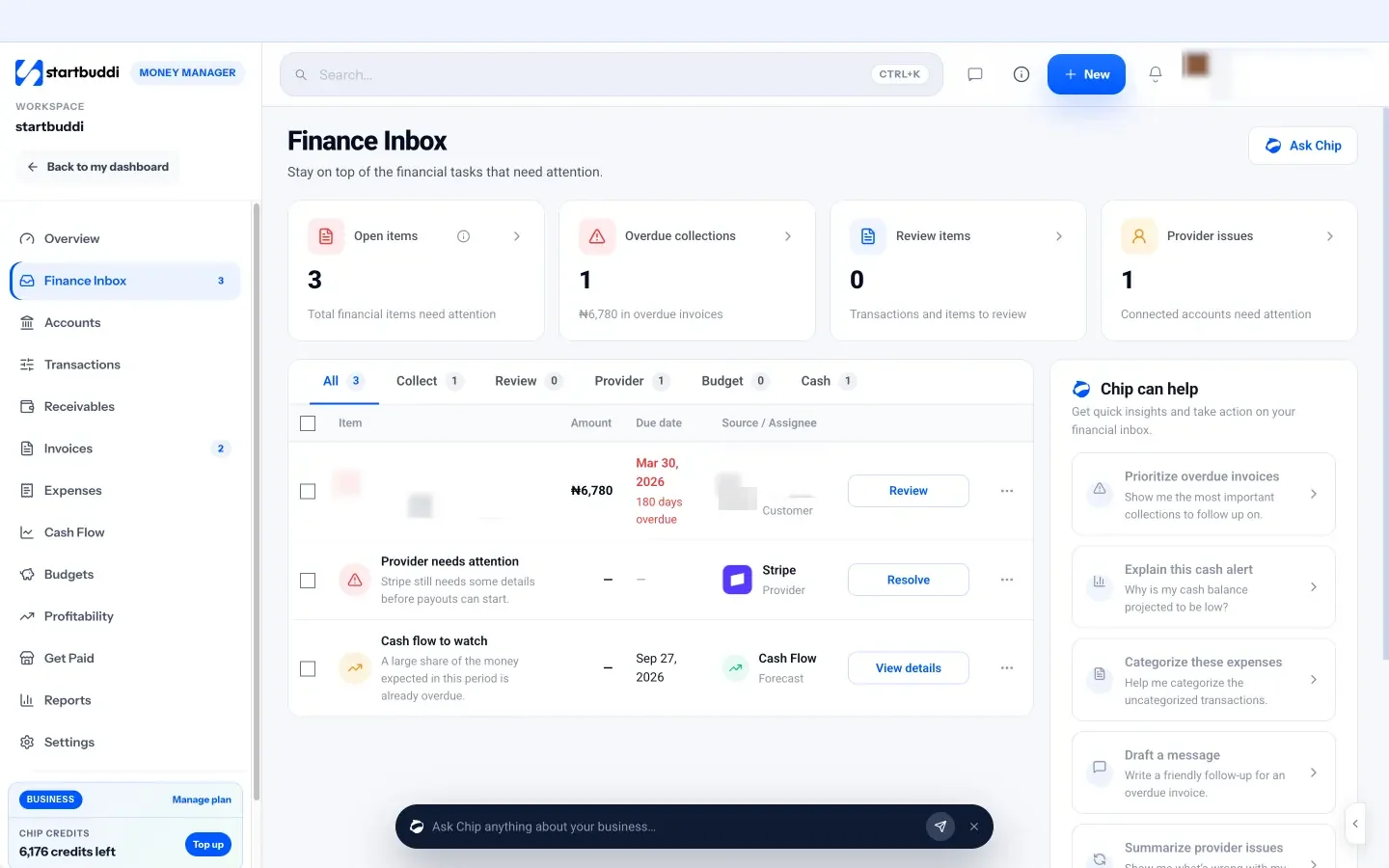
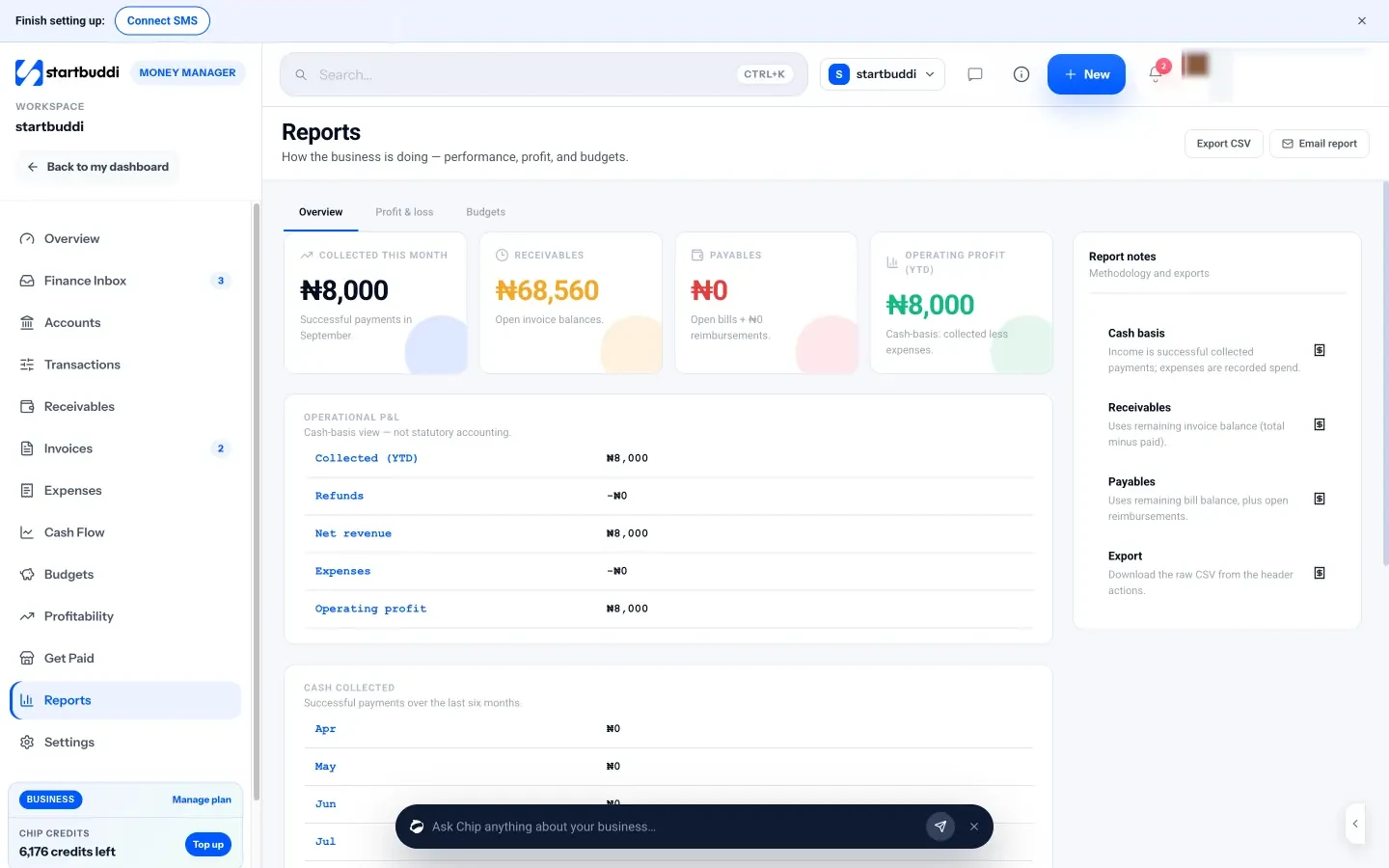
Reports for the monthly review. Reports shows money collected this month, receivables, payables and operating profit for the year so far, with an operational profit and loss, cash collected over six months, receivables and payables ageing, and expenses by category. The Profit & loss tab switches between this month, quarter, year and year to date, shows income by source, and includes a running tax summary of tax added to invoices (a reference figure, not a filing). Export CSV gives your accountant the raw data, and Email report sends a report to your inbox. See money reports.
Profitability for decisions. The Profitability page ranks projects, customers, products or services and campaigns by profit and margin, based on money collected minus linked expenses.
Money Manager is on every plan, including Free (5 invoices a month). Starter and above include unlimited invoices, and every paid plan comes with a 30-day trial.
Your next step
This week, do three things: make sure business and personal money are separate, list your six key numbers from chapter 1, and book your first weekly money hour. If you want invoices, payments, expenses and your cash forecast in one place, you can set up Money Manager on the Free plan in an afternoon, and see the plans and prices when you need more.
Sources
- JPMorgan Chase Institute: Cash Flows, Balances, and Buffer Days
- Xero: late payments guide
- US Small Business Administration: manage your finances
- IRS: common questions about recordkeeping for small businesses
- Stripe: pricing
Chinedu Kalu is the co-founder and chief operating officer of startbuddi, responsible for how the company runs day to day. Chinedu writes about the operational side of a small business: registering and running the company, money, hiring and the routines that keep a team on track.
Co-founded startbuddi and runs its operations