How to track business expenses: a simple system that works
What counts as a business expense, how to set up categories and receipt habits, handle team claims, bills and mileage, and choose an expense tracking app.

This guide shows you how to track business expenses with a simple system you will actually keep up. It is written for freelancers, sole traders and small business owners who currently rely on a bank statement, a shoebox of receipts or a half-finished spreadsheet, and who want to claim what they are entitled to and see where the money goes.
The four chapters cover what counts as a business expense and why tracking it matters, how to set up categories, receipts and a weekly routine, how to handle team spending, reimbursements, bills and mileage, and how to review your spending and choose an expense tracking app. Each chapter ends with how to do it in startbuddi.
Why track business expenses, and what counts as one
- Why tracking expenses is worth the effort
- What counts as a business expense?
- Common categories of business expense
- What typical expenses look like in different businesses
- Costs before you launch
- Everyday costs and bigger purchases
- Mixed-use and grey-area costs
- VAT, GST and sales tax on expenses
- When personal and business money cross over
- What every expense record needs
- Good expense records help beyond tax
- Questions to ask an accountant in your first year
- Common mistakes when starting out
- Tracking expenses in startbuddi
To track business expenses, you record every cost the business pays with its date, amount, supplier, category and a receipt, in one place, as close to the moment you spend as possible. Then you review those records regularly so you can claim what you are entitled to at tax time, spot waste, and see what each job, client or product really costs you.
That is the whole method. The rest of this guide is about making it painless: knowing what counts as a business expense, setting up categories and receipt habits, handling team spending and mileage, and choosing an expense tracking app that suits your business. This first chapter covers why it matters and what counts.
Why tracking expenses is worth the effort
Expense tracking is one of those jobs that feels like admin until you see what it gives you back.
- You pay the right amount of tax. In most countries, allowable business expenses reduce the profit you pay tax on. HMRC's own example is simple: if your turnover is £40,000 and you claim £10,000 in allowable expenses, you only pay income tax on the remaining £30,000 (GOV.UK, expenses if you're self-employed). Every receipt you lose is money you may pay tax on unnecessarily.
- You can prove your claims. Tax authorities can ask for evidence. The IRS notes that good records are what let you prove the expenses you deduct (IRS, recordkeeping for small businesses).
- You see where the money goes. Subscriptions you forgot about, supplier prices that crept up, and marketing that is not working all show up in your expense records.
- You price correctly. You cannot know whether a job is profitable unless you know what it cost. Expenses linked to a job or client show you the real margin.
- You plan cash flow. Regular costs recorded properly are what make a cash forecast and a budget possible.
There is also a quieter benefit: peace of mind. Owners who know their spending is recorded and backed by receipts worry less about tax deadlines and questions from the tax authority, and make spending decisions with more confidence, because they can see the effect.
What counts as a business expense?
The details differ by country, but the principle is similar almost everywhere: a business expense is a cost you pay to run the business, not a personal cost.
- United States: the IRS says a deductible business expense must be both ordinary and necessary. An ordinary expense is one that is common and accepted in your industry; a necessary expense is one that is helpful and appropriate for your business, and it does not have to be indispensable (IRS, ordinary and necessary).
- United Kingdom: for the self-employed, HMRC allows you to claim costs related to running the business, and for items used for both business and personal purposes you can only claim the business part. Its example is a phone bill of £200 with £70 of business use, where only the £70 can be claimed (GOV.UK).
- Canada, Nigeria, South Africa, Kenya and elsewhere: the wording differs, but the test is similar. Check the guidance from your tax authority, such as the CRA, the Nigeria Revenue Service, SARS or the KRA.
This guide is general information, not tax advice. Rules on what you can claim, and how, change and depend on your business structure, so check with an accountant or your tax authority before relying on any claim.
Common categories of business expense
HMRC lists the main groups of allowable costs for the self-employed, including office costs, travel, clothing such as uniforms, staff costs, stock and materials, financial costs such as insurance and bank charges, business premises, advertising and marketing, and training courses (GOV.UK). Most small businesses anywhere will recognise their costs in a list like this:
| Category | Examples |
|---|---|
| Software and tools | Subscriptions, apps, website hosting, domain names |
| Marketing | Ads, printing, sponsored posts, promotional items |
| Travel | Fuel, fares, parking, accommodation for business trips |
| Office and supplies | Stationery, printer ink, small equipment, postage |
| Contractors and freelancers | Subcontractors, designers, virtual assistants |
| Premises | Rent, utilities, co-working desks, repairs |
| Stock and materials | Goods for resale, ingredients, raw materials |
| Taxes, fees and bank charges | Licences, registration fees, payment processing fees, bank fees |
| Insurance and professional fees | Business insurance, accountant, legal advice |
| Training | Courses and books that keep your skills up to date |
What typical expenses look like in different businesses
It helps to picture the expenses a business like yours usually has, so nothing gets missed.
- Freelance designer or consultant: software subscriptions, laptop and equipment, co-working or home office costs, phone and internet, training, professional insurance, accountant fees, travel to clients, payment processing fees.
- Café or small food business: ingredients and stock, packaging, rent, utilities, equipment repairs, staff costs, card machine fees, delivery app commissions, food hygiene training and licences, waste collection.
- Plumber, electrician or other trade: materials and parts, tools, van costs or mileage, fuel, phone, insurance, certifications, protective clothing, subcontractors.
- Online shop: stock, packaging, postage and couriers, marketplace and payment fees, website and app subscriptions, product photography, advertising, returns.
Use the list for your type of business as a checklist when you set up categories and when you do your first monthly review.
Costs before you launch
Many new owners spend money before the business officially starts: a laptop, a website, registration fees, initial stock. Keep the receipts for these too. Depending on your country, some start-up costs may be claimable once you begin trading, or treated in a particular way. Record them with a note that they were pre-launch, and ask your accountant how to treat them.
Everyday costs and bigger purchases
Most expenses are everyday running costs: you pay them, record them, and they count against this year's profit. Bigger items that last several years, such as a laptop, a van, machinery or a coffee machine for a café, are often treated differently for tax. Instead of the whole cost counting in one year, it may be spread over several years or claimed through a special allowance, depending on the country.
Record these purchases as you would any other expense, keep the receipt safely, and mark them clearly so your accountant can treat them correctly. HMRC, for example, covers them under capital allowances (GOV.UK).
Mixed-use and grey-area costs
Some costs are partly business and partly personal. The usual approach is to claim only the business share, and to have a sensible, consistent way of working it out.
- Phone and internet: estimate the business share from a typical month's usage.
- Working from home: many tax systems allow a share of household costs, calculated in a set way. Check your tax authority's method.
- Vehicle: keep a log of business journeys. Chapter 3 covers mileage in detail.
- Meals and entertainment: rules vary widely, and many countries restrict them. Record them, note who was there and why, and let your accountant decide.
- Clothing: generally only uniforms, protective clothing or costumes count, not everyday clothes you could wear anywhere.
VAT, GST and sales tax on expenses
If your business is registered for VAT or GST, the tax you pay on business purchases can often be reclaimed against the tax you charge customers, as long as you hold a valid tax invoice from the supplier. That makes the tax part of each expense worth recording separately. If you are not registered, the full amount including tax is simply your cost.
Sales tax systems, such as those in many US states, work differently, and rules vary by state and product. Whatever system applies to you, record the tax shown on each receipt, keep the invoices, and check with your tax authority or accountant. For Nigerian businesses, our guide to VAT for small businesses in Nigeria explains the basics.
When personal and business money cross over
It happens to everyone: you pay for a business purchase with your personal card, or the business card pays for something personal. Record both honestly. A business cost paid personally is still a business expense; note that you paid it, so the business can pay you back or record it as money you put in. A personal cost paid by the business is not an expense; record it as money you took out. Your accountant will know how to treat each one, but only if they can see it.
What every expense record needs
Whatever system you use, each expense should have:
- Date of the purchase.
- Supplier or vendor name.
- Amount, including any tax, and the currency.
- Category from your list.
- How it was paid: card, bank transfer, cash, or personally (to be reimbursed).
- What it was for: a short note, and the project or client if it relates to one.
- Receipt or invoice attached, as a photo, PDF or email.
Items 6 and 7 are the ones people skip, and they are the ones that matter most when a tax authority or accountant asks questions months later.
Good expense records help beyond tax
Clean expense records pay off in situations owners rarely think about at the start. A bank or lender considering a loan will often ask for accounts or statements that show where money goes. An investor or buyer will want to see that costs are under control and properly recorded. A partner joining the business will want to understand what it costs to run. In each case, a tidy, categorised history with receipts makes you look organised and makes the conversation far easier.
Questions to ask an accountant in your first year
- Which categories should I use so my records match my tax return?
- How should I treat my phone, home office and vehicle costs?
- Which bigger purchases should I flag separately?
- Do I need to register for VAT, GST or sales tax, and when?
- Are digital copies of receipts acceptable, or must I keep originals?
- What should I send you, and how often?
Common mistakes when starting out
- Waiting until tax time. By then, receipts are faded, lost or forgotten, and it takes days to rebuild a year.
- Not tracking small cash purchases. Parking, postage and small supplies add up over a year.
- Mixing personal and business spending on the same card without notes.
- Forgetting payment fees. Card processing and platform fees are real business costs.
- Claiming what you are not sure about. If in doubt, record it with a note and ask your accountant, rather than guessing.
- Too many categories. Fifty categories is a mess; ten to fifteen is plenty.
Tracking expenses in startbuddi
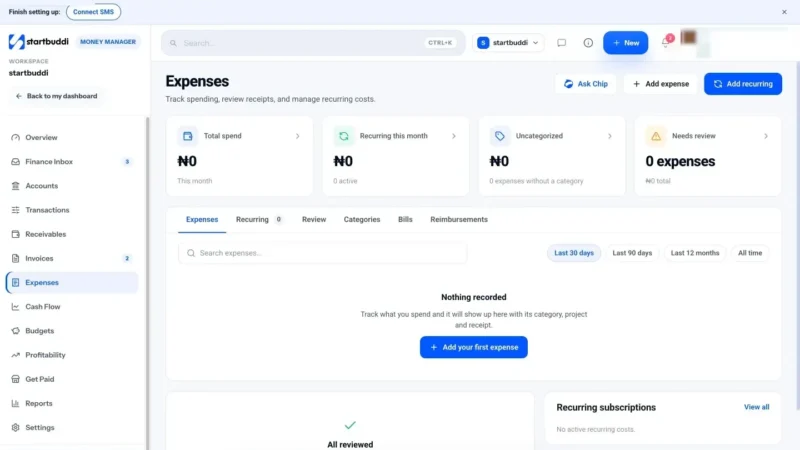
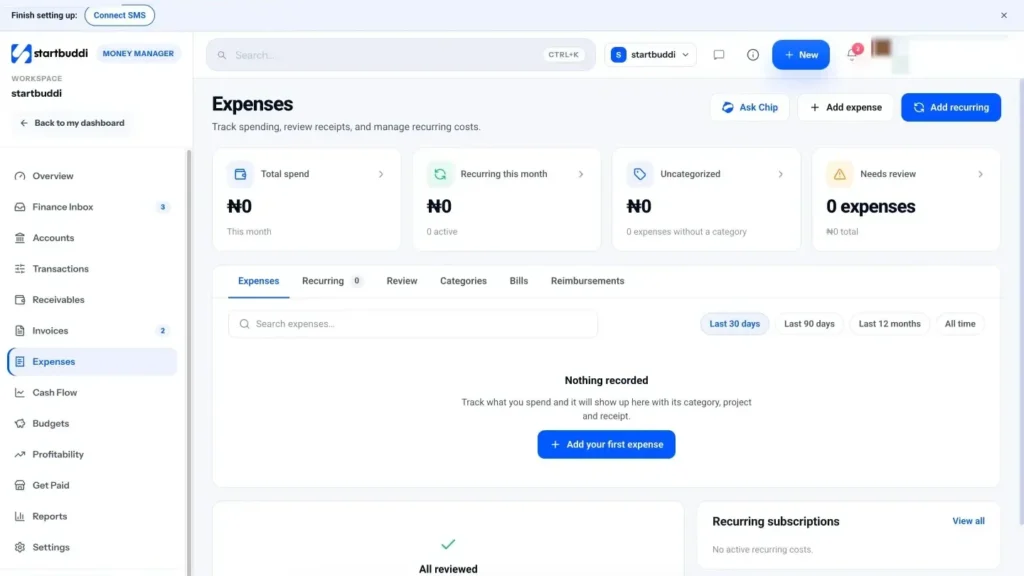
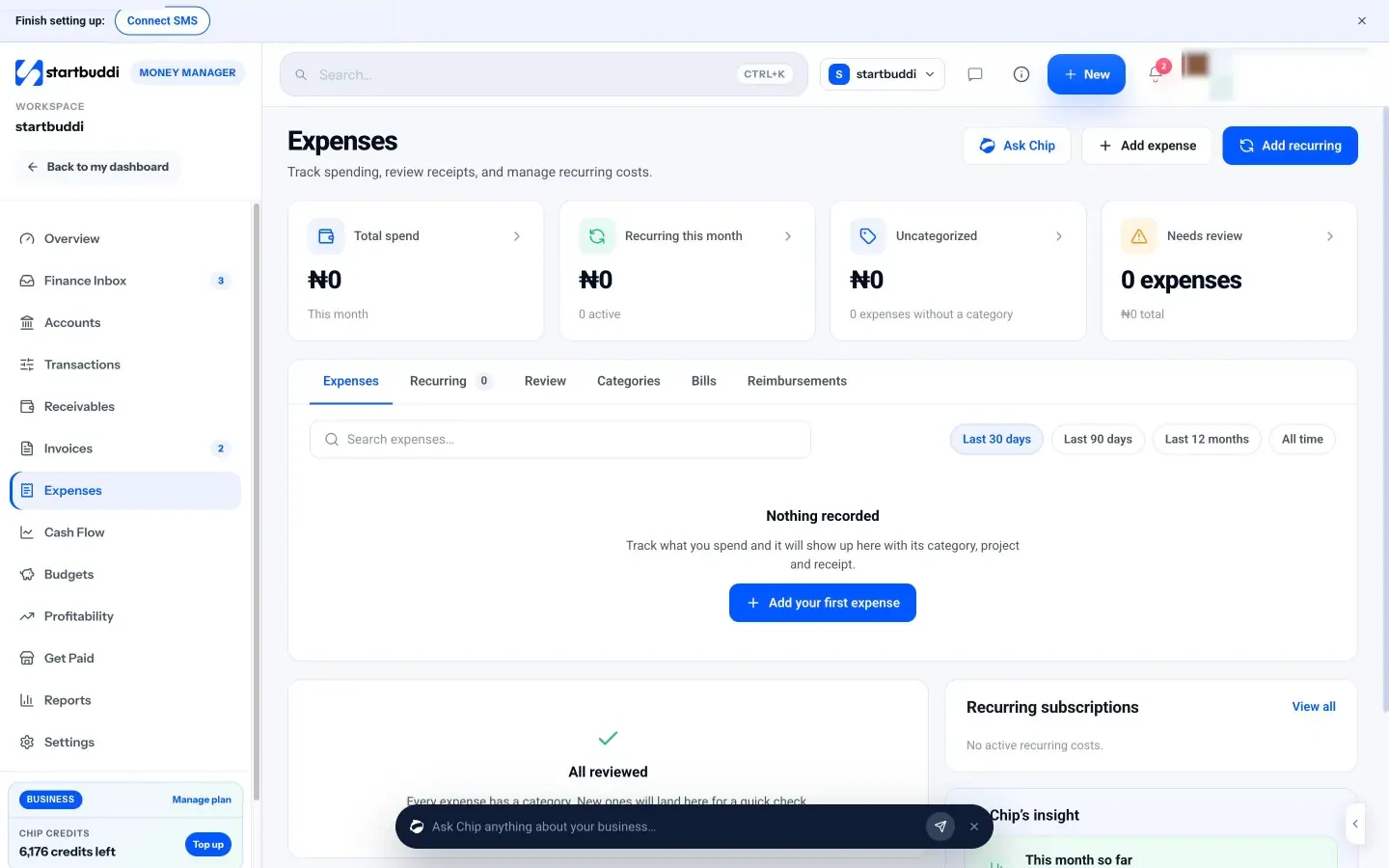
In startbuddi, Money Manager has an Expenses page built for exactly this. It is available on every plan, including Free. See expenses, bills and reimbursements.
Add an expense in seconds. Click Add expense and fill in vendor, amount, currency, category, date and how it was paid (card, bank transfer, cash, Paystack or Stripe). Attach the receipt as an image or PDF, and optionally link the expense to a project or a customer, with a note. If you are not sure of the category, leave it as Uncategorized: it will wait in a review queue for a quick check later.
Categories built in. startbuddi uses a fixed set of categories: Software and tools, Marketing, Travel, Office and supplies, Contractor/freelancer, Taxes and fees, Bank fees, Other and Uncategorized. That covers most small service businesses; if you need more detail, use the notes and project fields, and ask your accountant how to map them.
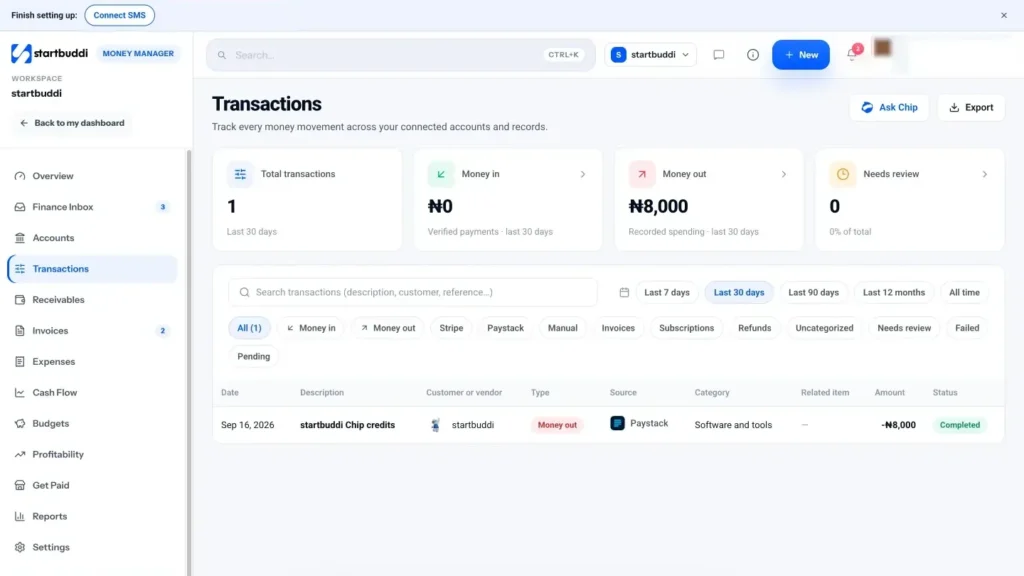
See it in one place. The page shows total spend, recurring costs this month, uncategorized spend and anything needing review, with tabs for Recurring, Review, Categories, Bills and Reimbursements. Every saved expense also appears in Transactions as money out, next to your payments in.
If you prefer a step-by-step walkthrough of the screens, the help article on how to record expenses in startbuddi covers each field.
Next, chapter 2 turns this into a system: categories, receipt habits, how long to keep records and a weekly routine that takes minutes.
Set up an expense tracking system that runs itself
- Choose where expenses will live
- Set up your categories once
- Build a receipt habit
- What a good receipt shows
- Cash purchases and missing receipts
- Expenses in other currencies
- How long to keep expense records
- Organising digital receipts so you can find them
- Who records what in a small team
- Paper or digital?
- Handle recurring costs once
- A weekly expense routine that takes 15 minutes
- Set it all up in one afternoon
- Common system mistakes
- Your expense system in startbuddi
The best expense tracking system is the one you actually keep up. It does not need to be clever. It needs a short list of categories, one place where every receipt goes, a way to handle regular costs automatically, and a few minutes a week to keep it tidy. This chapter walks through each part, including how long you must keep records in several countries.
Choose where expenses will live
Pick one place and stick to it. The three common choices are:
- A spreadsheet with one row per expense and a folder of receipts. Free and flexible, but receipts and rows drift apart, and it relies entirely on your discipline.
- An expense tracking or money management app where each expense and its receipt are stored together, with categories and reports built in.
- Accounting software, usually alongside an accountant, where expenses are part of your full accounts and are often matched to bank feeds.
Whatever you choose, the rule is the same: every expense goes in the same place, with its receipt, every time. Two half-used systems are worse than one simple one.
Set up your categories once
Categories turn a long list of payments into something you can understand. Keep them few and clear.
- Start from a standard list, such as the one in chapter 1, and add only what your business genuinely needs. A café might split "Stock and materials" into "Food" and "Drinks". A consultant might not need "Stock" at all.
- Ask your accountant which categories they use for your tax return, and match them. It saves time and fees later.
- Write a one-line rule for tricky items, so you and anyone else who records expenses treat them the same way every time. For example: "Canva and Google Workspace go under Software and tools, not Marketing."
- Use projects or clients as a second layer, rather than inventing a category for each job. That way you can see both "what kind of cost" and "which job was it for".
Build a receipt habit
Receipts are where most expense tracking falls apart. Paper fades, gets lost in bags and cars, and email receipts scatter across inboxes. Decide on a habit and repeat it until it is automatic.
- Snap it now. Photograph paper receipts before you leave the shop or the taxi, and add the expense straight away if you can.
- Forward email receipts to one folder or label, such as "Receipts 2026", so they are all in one place for the weekly catch-up.
- Ask for proper receipts. Especially where you need a tax invoice showing the supplier's tax number, as many VAT and GST systems require for claims.
- Write on it. A few words on what it was for and who was there saves guessing later.
- Keep the originals safe if your tax authority requires them, and check whether digital copies are acceptable where you are.
What a good receipt shows
Not every scrap of paper is a useful receipt. A good one shows:
- the supplier's name, and their tax number if they are registered for VAT or GST;
- the date of the purchase;
- what was bought, item by item, not only a total;
- the amount, and the tax included, shown separately where it applies;
- how it was paid.
A card terminal slip that shows only the total is weaker evidence than an itemised receipt. When you can, ask for the itemised version or an emailed invoice.
Cash purchases and missing receipts
Some costs never come with a receipt: a market stall, a tip, a small cash payment to a casual helper, a toll. And sometimes a receipt simply goes missing. In both cases, write your own record straight away: date, who you paid, what for, how much, and why there is no receipt. It is not as strong as a real receipt, but it is far better than nothing, and it shows you kept records honestly. If a supplier regularly gives no receipt, ask for one, or pay by card or transfer so there is at least a payment record.
If a receipt for a larger purchase is lost, contact the supplier: many can reissue an invoice. Keep the bank or card statement line as supporting evidence.
Expenses in other currencies
If you buy software, services or stock in another currency, record the amount you were actually charged in your own currency, including any conversion and card fees, and keep the original receipt showing the foreign amount. The amount that left your account is the real cost to the business. Be consistent in how you do this, and ask your accountant whether your tax authority expects a particular exchange rate method.
How long to keep expense records
Every tax authority sets a minimum period for keeping business records. Here are some official examples. Always check the current rules for your situation, because longer periods apply in some cases.
| Country | General rule | Source |
|---|---|---|
| United States | Generally three years from filing, depending on the action, expense and event; at least four years for employment tax records | IRS |
| United Kingdom (self-employed) | At least 5 years after the 31 January submission deadline of the relevant tax year | GOV.UK |
| United Kingdom (limited company) | 6 years from the end of the last company financial year they relate to, longer in some cases | GOV.UK |
| Canada | Generally six years from the end of the last tax year they relate to | CRA |
| South Africa | Five years from the date the return is submitted, longer if an audit or objection is open | SARS |
For Nigeria, Kenya and other countries, check the current guidance from the Nigeria Revenue Service, the KRA or your own tax authority. This is general information, not tax advice.
A simple rule of thumb is to keep everything for at least six or seven years unless told otherwise. Storage is cheap; rebuilding lost records is not.
Organising digital receipts so you can find them
If you keep receipts as files, a consistent naming pattern saves a lot of searching later. A simple format works well: date, supplier, amount. For example, 2026-08-14 Printworks 85.00.pdf. Put them in one folder per year, with a subfolder per month if you have many. If your expense app stores the receipt with the expense, you may not need folders at all, but it is still wise to keep a backup copy of important ones, such as receipts for equipment and large purchases.
Whatever you do, back up. A phone that breaks or a laptop that is stolen should not take a year of receipts with it.
Who records what in a small team
Once two or more people spend money, decide who is responsible for each part of the job, and write it down.
- The person who spends captures the receipt and records the expense, with the purpose, the same day or week.
- One named person (often the owner) checks categories and looks for duplicates in the weekly tidy.
- The approver approves any claims and bills, following your expense policy (chapter 3).
- The accountant or bookkeeper, if you have one, receives the records monthly or quarterly.
The worst outcome is everyone assuming someone else is doing it. One clear owner for the weekly tidy prevents that.
Paper or digital?
Many tax authorities now accept clear digital copies of receipts, and a photo or PDF stored with the expense is far easier to find than a paper slip in a box. But the rules are not the same everywhere, and some documents, or some situations such as certain VAT claims, may still call for originals. Check your tax authority's guidance on electronic records. SARS, for example, requires electronic records to remain intact, accessible and available for inspection (SARS, record keeping). Until you are sure, keep paper originals for larger purchases in a simple folder by month, and rely on digital copies for day-to-day work.
Handle recurring costs once
A large share of most small business spending repeats every month or quarter: rent, software, phone, insurance, loan repayments, retainers you pay to contractors. Recording them by hand every month is tedious and easy to forget.
- List every recurring cost with its amount, how often it repeats and the day it is charged.
- Set them up once in your system so each one is recorded automatically, or at least reminded.
- Review the list every quarter. Cancel what you no longer use, and check for price rises.
A weekly expense routine that takes 15 minutes
- Empty your receipts: the envelope, the photo folder and the email label.
- Add any missing expenses with receipts attached.
- Categorise anything left uncategorized.
- Check for duplicates: the same purchase entered twice, from a photo and an email.
- Link expenses to projects or clients where they relate to a specific job.
- Note anything unusual to ask your accountant about.
Done weekly, this is a quick tidy. Done yearly, it is a lost weekend and a pile of guesswork.
Set it all up in one afternoon
- Choose your one place for expenses (spreadsheet, app or accounting software).
- Create your categories, ten to fifteen, matched to your accountant's where possible.
- List your recurring costs from the last three months of bank statements and set them up.
- Gather this month's receipts from bags, email and your phone, and record them.
- Create your receipt habit: an envelope, an email label and a phone album.
- Book your weekly 15 minutes as a recurring calendar appointment.
- Write down any rules for tricky items, so you apply them the same way every time.
After that afternoon, you are only ever a week behind at most.
Common system mistakes
- Two systems at once. Half the expenses in a spreadsheet, half in an app.
- Categories that change every month, making comparisons meaningless.
- Receipts stored separately from the records, so you cannot match them later.
- No note of purpose, especially for travel, meals and anything that could look personal.
- Relying on the bank statement alone. It shows the amount and the supplier, but not what was bought or why, and it is not a receipt.
Your expense system in startbuddi
Receipts stay with the expense. When you add an expense in Money Manager, you attach the receipt as an image or PDF in the same form, so the record and the evidence never drift apart. You can open the receipt later from the expense or from its transaction.
Recurring costs set up once. Add recurring on the Expenses page takes the vendor, amount, whether it repeats monthly or quarterly, and the day of the month. The Recurring tab lists them all with a pause and resume toggle, and they feed your cash forecast and budgets, so the regular costs in your plans are always current.
A review queue for the weekly tidy. Anything saved as Uncategorized lands in the Review tab, which steps through them one at a time. It suggests the category and project you last used for the same vendor, so for regular suppliers it is usually one click. The Finance Inbox also flags uncategorized expenses and anything that looks like a duplicate.
Everything in one feed. Transactions shows your expenses as money out next to payments in, with filters for money out, uncategorized and needs review, and a date range from the last 7 days to all time. Opening a transaction shows its details, category and receipt.
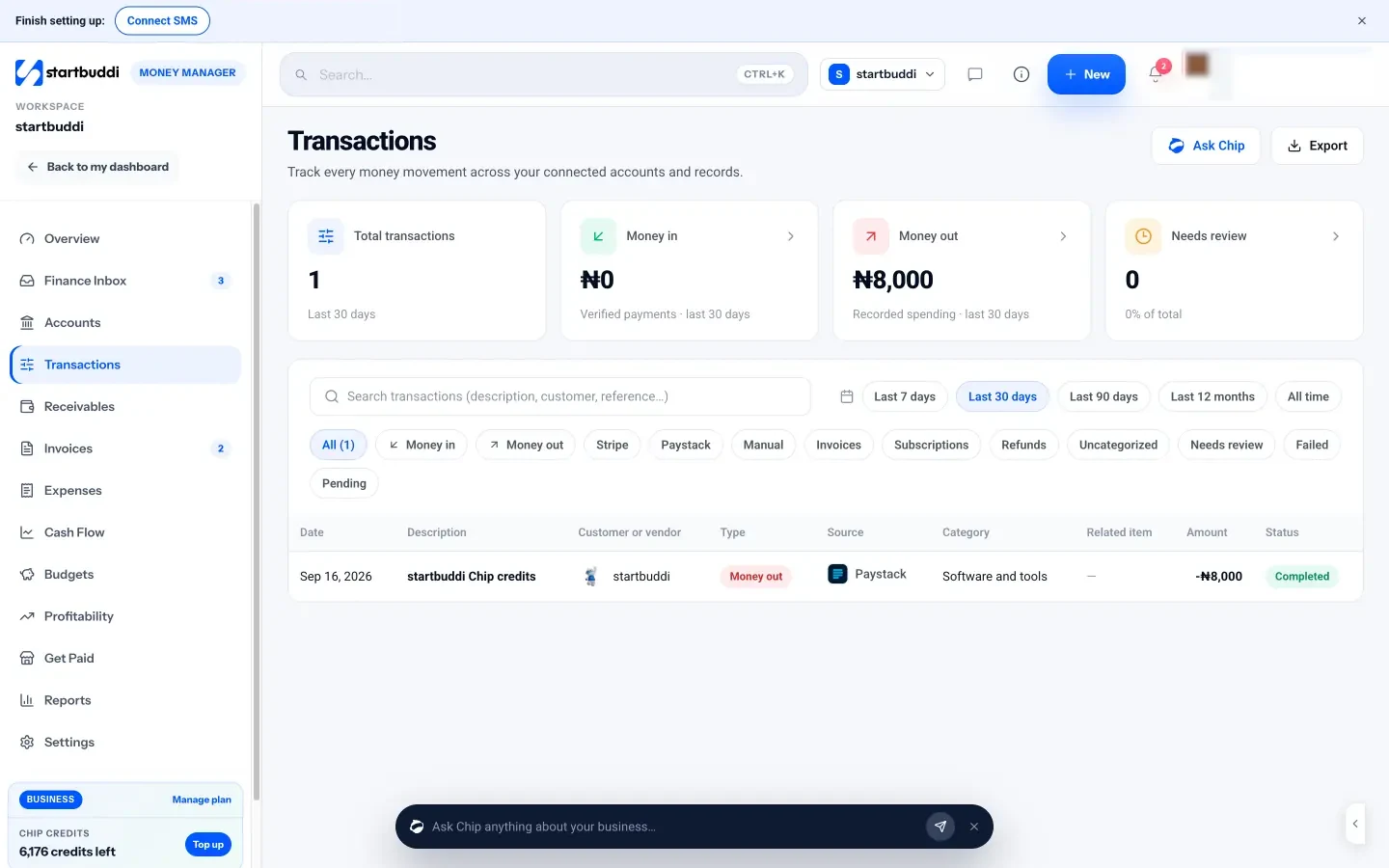
One honest limit: startbuddi does not connect to your bank or read bank statements, so expenses are entered by hand or set up as recurring. For many small businesses with a manageable number of purchases, that is fine, especially with the weekly routine above. If you have hundreds of card transactions a month, you may want accounting software with bank feeds alongside it. Chapter 4 covers how to choose.
Chapter 3 looks at spending by other people on the business's behalf: team expenses, reimbursements, bills and mileage.
Team spending, reimbursements, bills and mileage
- Write a one-page expense policy
- A sample expense policy you can adapt
- Reimbursements: paying people back
- Bills and payables: money you owe
- Mileage and vehicle costs
- Business trips: actual costs or daily allowances
- Subcontractor invoices
- Approvals when the team is tiny
- Refunds and credit notes from suppliers
- Field and remote teams
- At month end: know what you owe the team
- Company cards and petty cash
- Common mistakes with team spending
- Bills and reimbursements in startbuddi
Once more than one person spends money for the business, or you start receiving supplier bills to pay later, expense tracking gets a little more involved. Someone buys supplies with their own card and needs paying back. A supplier sends an invoice due in 30 days. A team member drives to a client site. This chapter covers how to handle each of these without chaos: a simple expense policy, reimbursements, bills and payables, and mileage.
Write a one-page expense policy
As soon as anyone other than you can spend money for the business, write down the rules. It does not need to be long. A clear one-page policy prevents most arguments and surprises.
- What people can spend on without asking, for example supplies up to $50, taxis to client meetings, parking.
- What needs approval first, for example anything over $200, travel with an overnight stay, new software subscriptions.
- What is never covered, for example personal meals, parking or speeding fines, first-class travel.
- How to pay: company card where you have one; personal card only when necessary.
- What evidence to provide: an itemised receipt and a note of what it was for, within a set time (such as seven days).
- How and when reimbursements are paid, for example with the next pay run or within 14 days of approval.
- Who approves: usually the owner or a manager, and never the person who made the claim.
Share the policy with everyone, put it somewhere they can find it, and apply it consistently. Fairness matters more than the exact limits you choose. If you are building a staff handbook, the policy fits naturally inside it.
A sample expense policy you can adapt
Expenses policy. You may spend up to $50 on supplies, parking or local travel for work without asking first. Anything over $200, any overnight travel and any new subscription needs approval from the owner before you buy. Use the company card where you have one. Submit every claim with an itemised receipt and a short note of what it was for within seven days. Approved claims are paid back within 14 days. We do not cover personal meals, fines, alcohol or first-class travel. If you are unsure, ask before you spend.
Adjust the amounts to your business and currency. If you have a staff handbook, add the policy to it; our employee handbook template has a place for it.
Reimbursements: paying people back
A reimbursement is when a team member pays for something for the business with their own money, and the business pays them back. Handled badly, it causes resentment on one side and missing receipts on the other. Handled well, it is a short, predictable process.
- Submit: the team member records the claim with the amount, what it was for, and the receipt.
- Approve: the approver checks it against the policy, and approves or asks a question.
- Pay: the business pays it back on the agreed schedule.
- Record: the payment is recorded, so the claim shows as settled.
Two rules keep it clean. Pay back promptly: nobody should be funding your business with their own money for weeks. And keep reimbursements separate from pay: in many countries, expense reimbursements supported by receipts are treated differently for tax from salary, so do not mix them into wages without checking how your payroll should handle them.
Bills and payables: money you owe
Not every expense is paid on the spot. Suppliers often send an invoice, which to you is a bill: money you owe, due by a certain date. These unpaid bills are your payables, and they need tracking just as carefully as what customers owe you.
- Record every bill when it arrives, with supplier, amount, due date and what it is for.
- Check it against what you ordered or agreed, before approving it.
- Pay on the due date, not early (unless there is a discount for paying early) and not late.
- Record part payments if you pay in stages, so the balance stays accurate.
- Raise disputes quickly if something is wrong, and mark the bill as disputed so it is not paid by mistake.
Keeping bills in one list with their due dates is also what makes your cash flow forecast reliable. You can see exactly what is going out, and when.
Mileage and vehicle costs
If you or your team use a personal vehicle for business journeys, you usually have two options for claiming the cost, depending on the country: record actual vehicle costs and claim the business share, or use a flat rate per mile or kilometre. Flat rates are simpler for most small businesses, because you only need a log of journeys.
Some current official rates:
- United States: the IRS standard mileage rate for business use in 2026 is 72.5 cents per mile from 1 January to 30 June, and 76 cents per mile from 1 July to 31 December (IRS, standard mileage rates).
- United Kingdom: self-employed people using simplified expenses can claim 55p per mile for the first 10,000 business miles in a car or van in the 2026 to 2027 tax year, and 25p per mile after that; motorcycles are 24p per mile (GOV.UK, simplified expenses for vehicles).
- Elsewhere: many tax authorities publish their own rates or rules. Check yours before you claim.
Whatever method you use, keep a mileage log. For each business journey, record the date, start and end points, the purpose, and the distance. A simple example:
| Date | From | To | Purpose | Miles |
|---|---|---|---|---|
| 3 Aug | Home office | Client site, Riverside | Kitchen survey for new client | 18 |
| 3 Aug | Client site, Riverside | Builders' merchant | Collect materials | 6 |
| 3 Aug | Builders' merchant | Home office | Return | 14 |
That day's 38 miles at the US rate for August 2026 (76 cents) would be $28.88. Over a year, regular business driving adds up to a meaningful amount, which is why a log is worth the minute it takes each day. Commuting from home to a regular workplace usually does not count as business travel, so check the rules where you are.
Business trips: actual costs or daily allowances
For overnight business travel, there are two common ways to handle meals and incidentals. You can reimburse actual costs against receipts, or pay a fixed daily allowance (often called a per diem or subsistence rate). Allowances are simpler to administer, but their tax treatment depends heavily on the country and on whether the rates follow official limits. Many tax authorities publish guidance on this, so check yours before setting an allowance, and keep records of the trip's business purpose either way.
Subcontractor invoices
If you pay freelancers or subcontractors, treat their invoices as bills: record them when they arrive, check them against the work agreed, and pay by the due date. Link each one to the project or client it relates to, because subcontractor costs are often the biggest direct cost of a job. Some countries have specific reporting rules for payments to contractors, so ask your accountant what you need to record.
Approvals when the team is tiny
In a two- or three-person business, a formal approval chain can feel excessive. Keep it light but real: agree a limit below which people just spend and record, and above which they send a quick message to the owner first. Even the owner benefits from a rule, for example waiting 24 hours before any unplanned purchase over a certain amount. The point is not bureaucracy; it is making sure every larger cost is a decision, not a habit.
Refunds and credit notes from suppliers
When a supplier refunds you, or sends a credit note for faulty goods or an overcharge, record it against the original expense or bill rather than as income. That keeps your expense totals accurate. Keep the credit note with the original invoice, and check that the refund actually arrives in your account. If a credit is meant to reduce a future bill, note it on the supplier's record so it is not forgotten when the next bill comes in.
Field and remote teams
Team members who work on site, travel between customers or work from home spend money in ways you cannot see. Make it easy for them to do the right thing: a clear list of what they can buy, a simple way to capture receipts on their phone, and a fixed day by which claims must be in. For trades and field teams, agree whether fuel and parking are covered and how journeys are logged. For remote staff, agree up front whether home internet, equipment or co-working costs are covered, and how much. Written answers to these questions prevent most disputes.
At month end: know what you owe the team
Before you close each month, list the claims that are approved but not yet paid, and the bills due in the first weeks of next month. Those are real commitments, even though no money has moved yet. Including them in your view of the month stops you from thinking you have more cash than you really do, and makes sure nobody waits longer than your policy promises.
Company cards and petty cash
- Company cards reduce reimbursements, but each card still needs receipts and categories. Give cards only to people who spend regularly, and set limits.
- Petty cash works for tiny purchases in a shop or office. Keep a fixed float, a log of what was taken and why, and receipts in the tin. Top it up to the same amount, and record the top-up as the expenses it covered.
Common mistakes with team spending
- No written policy, so every claim becomes a negotiation.
- Approving your own claims or letting people approve theirs.
- Paying reimbursements late, which makes people reluctant to spend when they genuinely need to.
- Bills kept in an inbox rather than a list with due dates, so some are paid twice and others not at all.
- Estimating mileage at year end instead of logging it as you go.
Bills and reimbursements in startbuddi
Money Manager's Expenses page has two tabs for exactly this: Bills and Reimbursements. See expenses, bills and reimbursements.
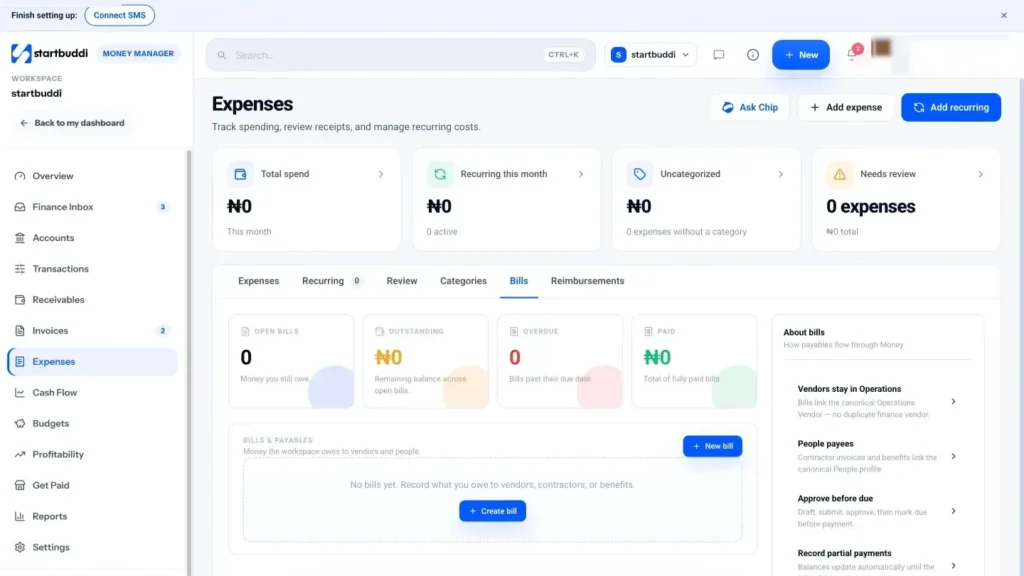
Bills and payables. The Bills tab shows open bills, the amount outstanding, what is overdue and what has been paid. New bill records a bill with the payee, category, currency, amount, due date and notes. Bills move through statuses from draft to submitted, needs approval, approved and due, and can be marked as disputed. You can record part payments, and the balance updates until the bill is paid. Upcoming bills also feed the cash flow forecast, so you can see them coming.
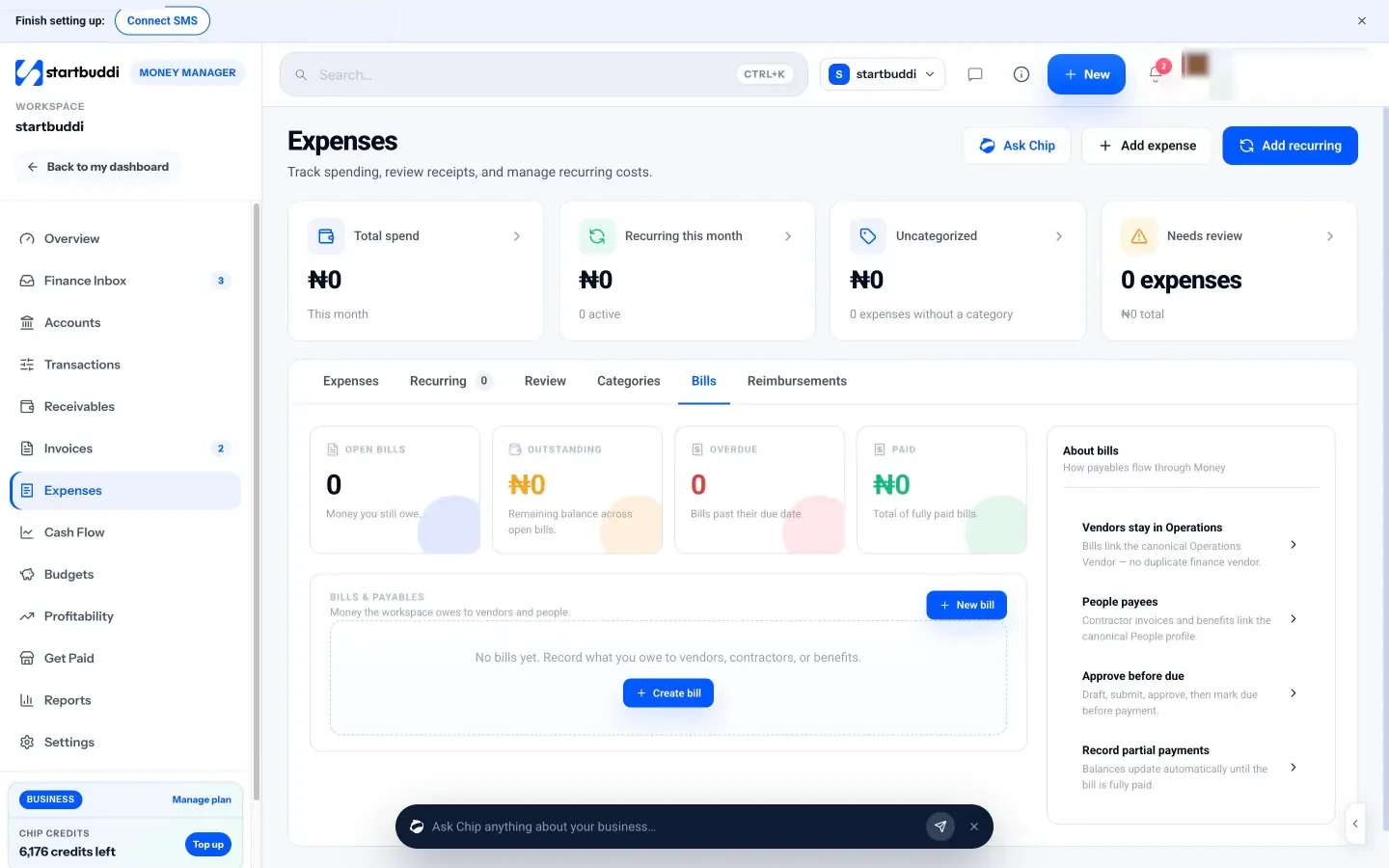
Reimbursements. The Reimbursements tab is for team out-of-pocket claims. You create a claim for a team member from People with the amount and description, then it moves through Submit for approval, approved, Mark ready for payment and Record payment. The tab shows open claims, the amount outstanding, what is ready for payment and what has been paid, so nobody's claim gets forgotten.
Because bills and reimbursements sit in the same place as your expenses, your spending totals and payables include everything the business owes, not just what has already left the bank. That gives you an honest picture at month end, and a single place to answer the question every small team eventually asks: "has this been paid yet?"
Mileage. startbuddi does not have a dedicated mileage tracker. You can record the calculated mileage amount as an expense in the Travel category, with the journey details in the notes, and keep your full log alongside it.
Team access. Paid plans include more seats (Starter includes 2, Growth 5 and Scale 15), so team members can work in the same space. The policy you write stays yours to enforce: startbuddi records and routes claims, but it does not check them against your rules automatically.
The final chapter is about using your expense records: reviewing them to cut waste and improve margins, and choosing the right expense tracking app for your business.
Review your spending and choose an expense tracking app
- The monthly expense review
- How to cut costs without hurting the business
- Use budgets to keep spending on track
- Link expenses to what they were for
- Expense measures worth watching
- A year-end expense checklist
- Keep a renewal calendar
- Choosing an expense tracking app for your small business
- Features to look for in a business expense management app
- When it is time to change tools
- Where startbuddi fits for expense tracking
- Reviewing expenses in startbuddi
- Your next step
- Sources
Recording expenses is only half the value. The other half comes from looking at them: spotting costs that crept up, subscriptions nobody uses, jobs that cost more than they earned, and categories that need a budget. This chapter shows how to review your expenses monthly, how to cut costs without hurting the business, and how to choose the best expense tracking app for your small business, including what to expect from a receipt app and from a full business expense management app.
The monthly expense review
Set aside 30 minutes once a month. Work through these questions with your expense records open.
- Total spend: how does this month compare with last month and the same month last year?
- By category: which categories went up, and is there a good reason?
- Recurring costs: is everything on the list still used and still worth it?
- Biggest single costs: were they planned? Could any have been cheaper?
- By project or client: which jobs had unusually high costs?
- Against budget: which lines are over, and what will you do about it?
- Uncategorized or unclear items: clear them now, while you still remember.
Write down one or two actions each month, such as "cancel the second design tool" or "renegotiate the courier rate". Small, regular actions save more than an occasional panic.
How to cut costs without hurting the business
Not all spending is equal. Before you cut, sort costs into three groups.
| Group | Examples | What to do |
|---|---|---|
| Costs that bring in money | Marketing that produces customers, tools that let you take on more work | Protect, and invest more if the numbers support it |
| Costs that keep the lights on | Rent, insurance, essential software, accountant | Shop around at renewal, negotiate, share where possible |
| Costs that do neither | Unused subscriptions, duplicate tools, habit purchases | Cut first |
Some practical places to look:
- Software: list every subscription and who uses it. Cancel duplicates and move to smaller plans where you do not use the extra features. Annual billing is often cheaper for tools you are sure you will keep.
- Suppliers: get a comparison quote at least once a year for your largest regular purchases.
- Payment and bank fees: compare providers, and check whether you are paying for features you do not use.
- Travel: could some meetings be calls? Could journeys be grouped by area?
- Waste: for product businesses, track spoiled stock and over-ordering, often a hidden cost.
Use budgets to keep spending on track
Once you have a few months of expense records, set a monthly budget for the categories that matter most, such as marketing, contractors and software. Compare actual spending with the budget in your monthly review. A budget turns "we seem to be spending a lot on contractors" into "contractors are 30% over budget for the second month running", which is something you can act on.
Budgets also work for individual projects and campaigns. A project budget tells you whether a job is still profitable while you are doing it, not only when it is finished. For more on budgets and cash flow, see our guide on how to manage small business finances.
Link expenses to what they were for
The most useful expense reports answer "what did this job cost?" as well as "what did we spend?". When you link each expense to a project, client or product, you can see profit by job, not just for the whole business.
Expense measures worth watching
Three simple numbers, tracked monthly, tell you a lot about your spending.
- Expenses as a share of revenue. If you spend $6,000 in a month you earned $10,000, that is 60%. Watch whether it drifts up over time.
- Recurring costs per month. The fixed amount you spend before earning anything. It should grow more slowly than revenue.
- Direct costs per job. For service businesses and trades, the average cost of materials, subcontractors and travel per job, compared with what you charge.
If costs rise and prices do not, your margin shrinks quietly. Sometimes the answer is to cut; often it is to raise prices. Our pricing strategy guide shows how to work out when.
A year-end expense checklist
- Every expense for the year is recorded and categorised.
- Every expense has a receipt or a written note explaining why not.
- Larger purchases that last several years are marked for your accountant.
- Mixed-use costs have a business share worked out, with your method noted.
- Mileage logs are complete and totalled.
- Reimbursements owed to the team are paid and recorded.
- Unpaid bills at the year-end date are listed.
- An export of all expenses goes to your accountant, with any questions.
Keep a renewal calendar
Annual subscriptions, insurance policies, domain names, licences and contracts renew quietly, often at a higher price. List each one with its renewal date and cost, and set a reminder a month before. That month gives you time to decide whether you still need it, compare alternatives, or negotiate. Many of the easiest savings in a small business come from simply not letting something renew on autopilot.
Choosing an expense tracking app for your small business
If you are searching for the best expense tracking app for small business, the honest answer is that it depends on how many expenses you have, who records them, and what else you need the app to do. Start with the job, not the brand.
Three kinds of tool do this job:
- Receipt apps and expense report tools focus on capturing receipts, often reading the details from a photo, and building expense reports for teams. Examples include Expensify and Zoho Expense. They suit businesses where several people spend and claim regularly.
- Accounting software such as QuickBooks, Xero or Wave tracks expenses as part of your full accounts, usually with bank feeds that import transactions automatically. They suit businesses that need formal accounts, tax returns and an accountant working in the same system.
- Business management apps with money built in, such as startbuddi, track expenses next to invoices, payments, customers and projects. They suit small service businesses that want day-to-day spending, getting paid and job profitability in one place, and are happy to hand the formal accounts to an accountant.
Check each tool's own website for current features, plans and prices before deciding, as they change often. If you are weighing up accounting software, our guide to easy accounting software for small business covers what to look for.
Features to look for in a business expense management app
| Feature | Why it matters | Who needs it most |
|---|---|---|
| Receipt attached to each expense | Evidence stays with the record | Everyone |
| Receipt reading from photos | Saves typing on high volumes | Businesses with many paper receipts |
| Bank or card feeds | Imports transactions automatically | Businesses with many card payments a month |
| Categories you can match to your accountant's | Clean year-end records | Everyone |
| Recurring expenses | Regular costs recorded without effort | Everyone |
| Project or client linking | Profit by job | Service businesses, agencies, trades |
| Reimbursement and approval flow | Team claims without spreadsheets | Teams of two or more |
| Bills with due dates | Payables under control | Businesses with suppliers on credit |
| Budgets | Spending against plan | Growing businesses |
| Multi-currency | Costs in more than one currency | Businesses buying abroad |
| Export to CSV | Data for your accountant, and freedom to switch | Everyone |
| Mileage log | Vehicle claims without a separate notebook | Trades, field services, consultants who drive |
Questions to ask before you choose:
- How many expenses do I record in a typical month, and who records them?
- Do I need the app to read receipts or import bank transactions, or is manual entry fine at my volume?
- Does my accountant prefer a particular system?
- Do I want expenses linked to my invoices, customers and projects?
- Does it support my currency and country?
For more options side by side, see our list of the best money manager apps for small business, QuickBooks alternatives, and startbuddi vs Wave.
When it is time to change tools
The right tool today may not be the right tool in two years. Consider changing, or adding a tool, when:
- the weekly tidy regularly takes more than an hour because of volume;
- several people submit claims and approvals are getting lost;
- your accountant spends a long time converting your records each year;
- you register for VAT, GST or sales tax and need returns prepared from your records;
- you want expenses linked to jobs and clients, and your current tool cannot do it.
Whatever you move to, export your full history first, so nothing is lost in the switch.
Where startbuddi fits for expense tracking
To be clear about what it does and does not do: startbuddi's Money Manager tracks expenses, recurring costs, bills and reimbursements, with receipts attached, categories, project and customer links, budgets and profitability. It does not read receipts from photos, it does not connect to bank or card feeds, and it is not accounting software, so it does not produce statutory accounts or file tax returns. Its category suggestions in the review queue come from the category you last used for the same vendor, not from AI reading the receipt.
It suits small businesses with a manageable number of expenses who want spending next to their invoices, customers and projects. If you have hundreds of card transactions a month, accounting software with bank feeds may be a better main tool for expenses.
Reviewing expenses in startbuddi
Spend by category. The Categories tab on the Expenses page shows spending by category for the period, and the page's Chip insight card tells you whether spending is up or down this month, with prompts to view the details or ask "What can I cut?". You can also ask Chip why spending is higher or lower this month, broken down by category, with anything unusual pointed out.
Some questions worth asking Chip from the Expenses page or the Finance Inbox:
- "Why is my spending higher this month? Break it down by category."
- "List my recurring costs and what they add up to over a year."
- "Categorise these uncategorized expenses."
- "What can I cut without affecting how we win customers?"
Chip answers from your own records, and it always shows you a preview before changing anything. Chip uses credits from your plan's monthly allowance.
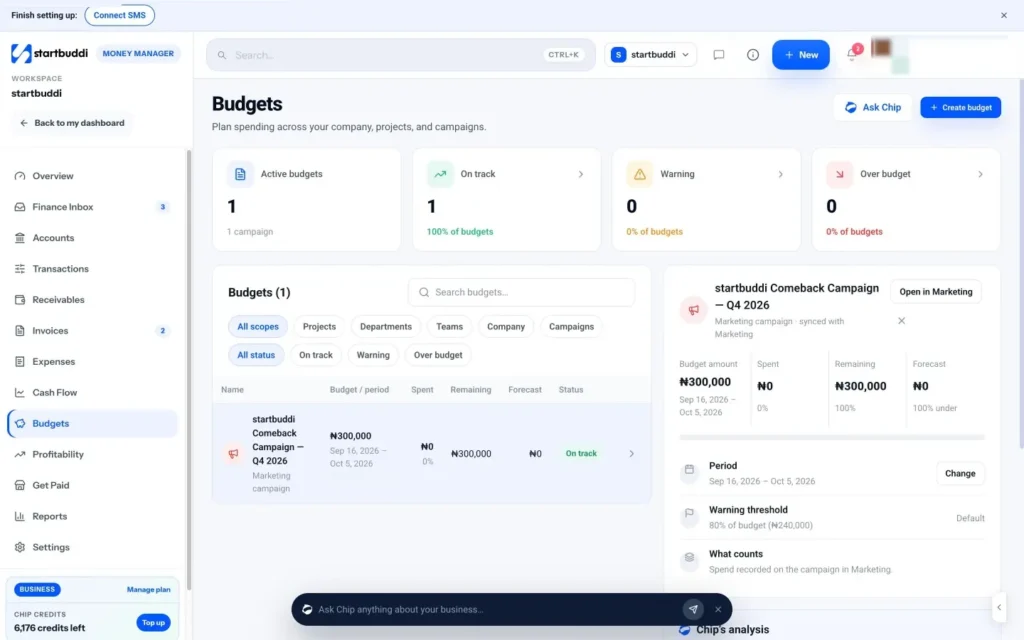
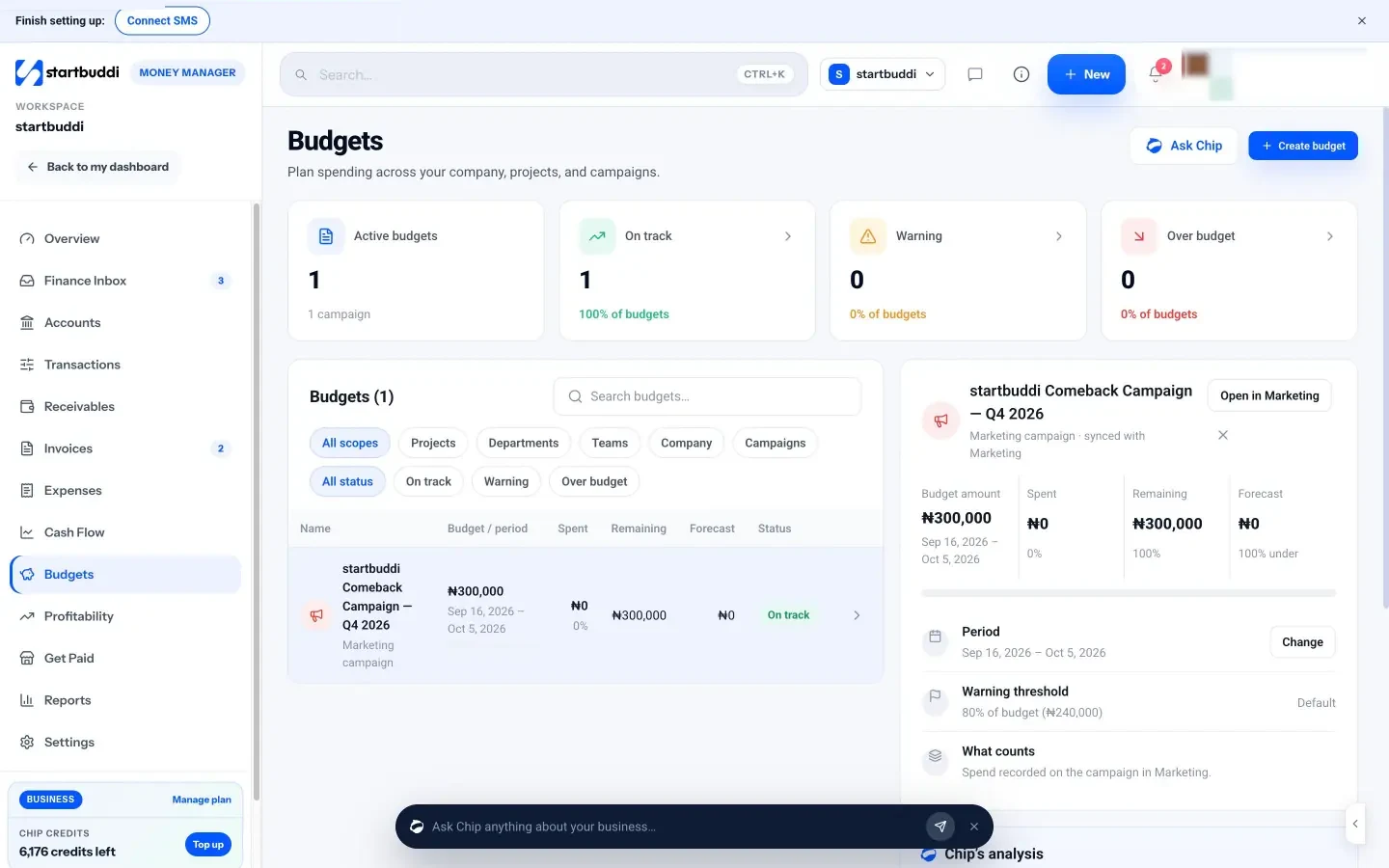
Budgets. The Budgets page lets you set a budget for the company, a project, a department, a team or a marketing campaign. It tracks spending against it, warns you at 80%, and forecasts where the period will land, with a budget versus actual chart for each one. See cash flow, budgets and profitability.
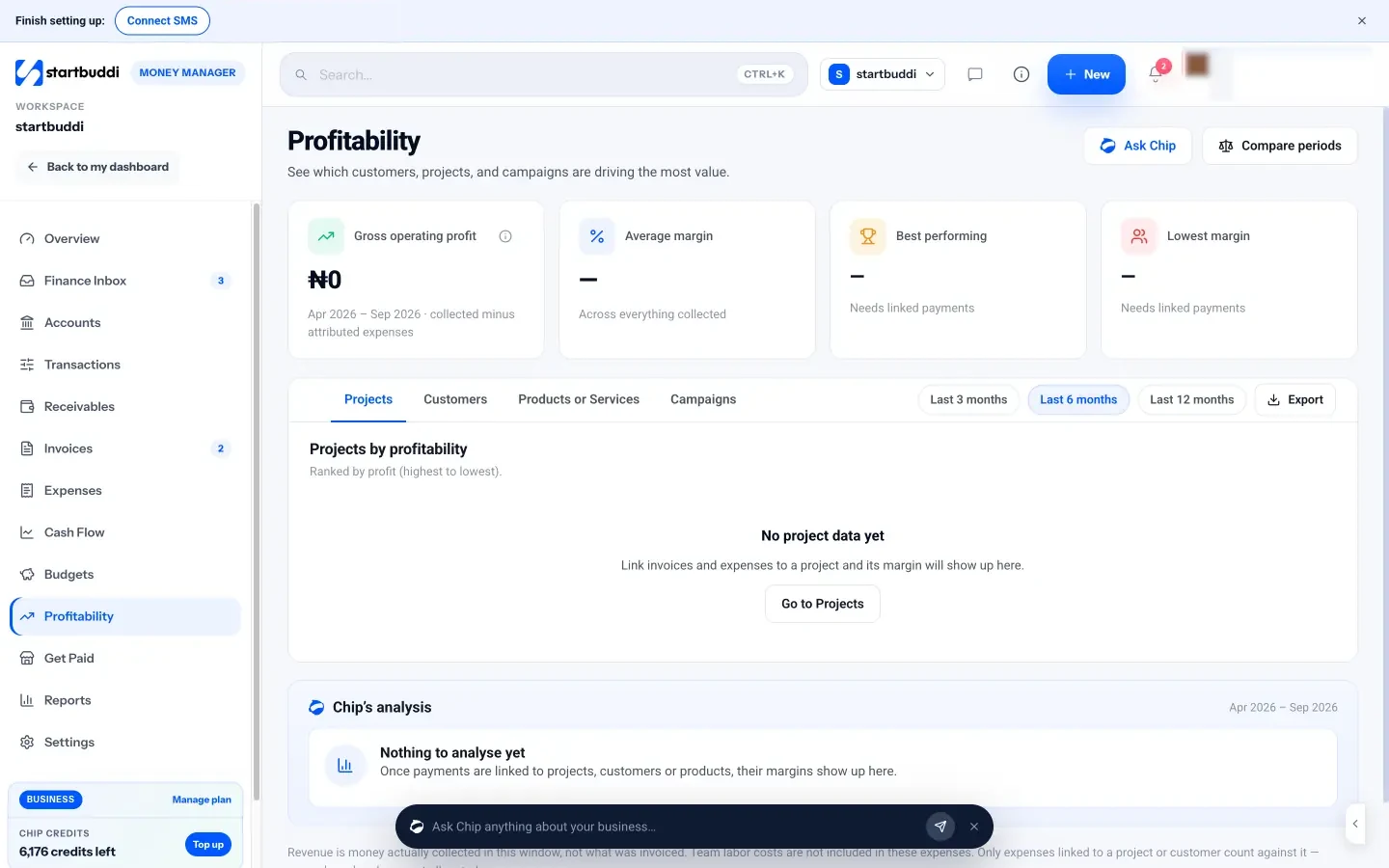
Profitability by job. Because expenses can be linked to projects and customers, the Profitability page shows revenue collected minus attributed expenses for each project, customer, product or service, and campaign, ranked by profit with the margin for each.
Reports for your accountant. Reports shows expenses by category alongside your cash-basis profit and loss, and Export CSV downloads the data for your accountant. See money reports.
Expenses are included on every plan, including Free. If you prefer a printable format for occasional claims, our expense report template is free to download.
Your next step
This week, gather last month's receipts, set up your categories and record every expense in one place. Then book a 15-minute weekly slot to keep it current. If you want expenses next to your invoices, customers and projects, you can start tracking expenses in startbuddi on the Free plan, and see the plans and prices when your team grows.
Sources
- GOV.UK: expenses if you're self-employed
- IRS: ordinary and necessary
- IRS: common questions about recordkeeping for small businesses
- GOV.UK: how long to keep your records (self-employed)
- GOV.UK: company and accounting records
- Canada Revenue Agency: business records
- SARS: how long to keep supporting documents
- IRS: standard mileage rates
- GOV.UK: simplified expenses for vehicles
Chinedu Kalu is the co-founder and chief operating officer of startbuddi, responsible for how the company runs day to day. Chinedu writes about the operational side of a small business: registering and running the company, money, hiring and the routines that keep a team on track.
Co-founded startbuddi and runs its operations