How to create a payment link for your business in Nigeria
Step by step: what you need, how to create a payment link on Paystack or Flutterwave, how to name, price and share it, what it costs and how to confirm payment.


Photo: Library of Congress / Unsplash
- Open a gateway account, pass its identity checks, and create a link with a clear name and a fixed or open amount. Share it on WhatsApp, Instagram or a QR code, and only deliver once the payment shows in your dashboard.
To create a payment link for your business in Nigeria, open an account with a payment gateway such as Paystack or Flutterwave (or a business tool connected to one), complete its identity checks, then create a link with a name, a description and either a fixed amount or an amount the customer enters. Copy the link and share it on WhatsApp, Instagram, email or a QR code. Customers pay by card, bank transfer or USSD, and the money settles into your bank account.
This guide goes step by step: what you need before you start, how to set up a link on the main gateways, how to name and price it so people trust it, how to share it, what it costs, and how to confirm every payment without falling for fake alerts. The steps are written for Nigerian businesses, but the same ideas apply in Ghana, Kenya or South Africa.
What a payment link is and when to use one
A payment link is a web address that opens a secure checkout page. The customer taps it, chooses how to pay, and pays. You don’t need a website, an app or a point-of-sale terminal.
Payment links suit:
- Sales in chats. A customer on WhatsApp or Instagram says “I’ll take it”. You send the link instead of your account number.
- Deposits. A caterer taking 50% to lock a date, a photographer booking a shoot.
- Event tickets, classes and workshops. One link, many buyers.
- Donations or “pay what you want”. The customer enters the amount.
- Quick one-off jobs where a full invoice is more than you need.
When a job has several line items, tax, a due date or needs a formal record for the client’s accounts team, send an invoice instead. Many invoices include a pay button that works like a payment link anyway. Our guide to sending invoices and getting paid via Paystack covers that route.
Why not just send your account number?
Bank transfer to your account number costs you nothing to receive, and many customers are happy with it. But it has three weaknesses a payment link fixes:
- Matching. When ten people send ₦15,000 on the same day, working out who paid for what takes time. A link records the payer, the amount and what it was for.
- Fake alerts. Fraudsters send doctored SMS alerts or screenshots. With a gateway, you check payment in your dashboard, not in a message.
- Choice. Some customers want to pay by card or USSD, or can’t transfer from their bank app right now. A checkout page offers several ways.
Many businesses use both: account details for regular customers, and links for everyone else.
What you need before you create a payment link
Gateways must verify who they are paying out to, under Central Bank of Nigeria know-your-customer rules. Expect to provide:
- Your BVN and a valid ID (national ID, driver’s licence or passport).
- A bank account for settlements. A registered business normally needs a corporate account in the business’s name.
- Business documents if you are registered with the Corporate Affairs Commission (CAC).
- Basic business details: what you sell, your address, a phone number and an email.
You don’t always need to be registered to start. Paystack, for example, offers a Starter Business account for merchants who haven’t registered yet, using a personal bank account and identity checks (Paystack blog). Starter accounts have a collection limit, which Paystack lists as NGN 8,000,000 in Nigeria, and some features are unavailable until you become a Registered Business (Paystack business types). Check the current requirements on your chosen gateway’s help pages, as they change.
How to create a payment link on Paystack
On Paystack, payment links are called Payment Pages. According to Paystack’s support guide, there are three types: one-time payments, subscription payments and product payments. The broad steps:
- Log in to your Paystack dashboard and open Payment Pages.
- Click to create a new page and choose the type (a one-time payment for most sales).
- Give it a clear name and description, and decide the amount: fixed, or left for the customer to enter.
- Optionally set a custom link, a redirect after payment, a success message, or extra fields such as delivery address.
- Create the page, then copy the link and share it.
Payments appear in your dashboard under transactions, and settle to your bank account on Paystack’s settlement schedule.
How to create a payment link on Flutterwave
Flutterwave’s help centre describes a similar flow:
- Log in and go to Payments, then Payment Link.
- Click to create a new link and choose a single charge (one-off) or a subscription.
- Enter a name, description and logo, choose the currency, and set an amount or leave it blank so customers enter their own.
- Choose who gets notified of payments, and optionally customise the link, add a redirect or collect extra customer details.
- Create the link. Flutterwave also gives you a QR code for it.
Other ways to get a payment link
Some banks and business apps offer their own payment links, and many all-in-one business tools connect to a gateway so you can create links next to your invoices and customer list. For a comparison, see our researched list of the best payment links software.
Set up the link so people trust it and pay
A payment link from a small business can look suspicious to a cautious buyer. These details help:
- Use your business name and logo on the checkout page, the same name as your Instagram or WhatsApp profile.
- Name the link after what they are buying: “Ankara two-piece, size 12” or “Wedding cake deposit, 14 June”, not “Payment 1”.
- Put the price and what it includes in the description, including delivery fees.
- Use a custom link where the gateway allows it, such as your business name, so it is recognisable.
- Add a thank-you message or redirect that tells them what happens next: “We’ll confirm on WhatsApp within an hour.”
- Collect a phone number or delivery address if you need it, so you don’t have to ask again.
Fixed amount or customer enters the amount?
Use a fixed amount for products, tickets and deposits, so no one underpays by mistake. Leave the amount open for donations, tips or variable balances, and say in the description what they should enter.
One link per product, or one per customer?
A reusable link (for example, “Saturday baking class, ₦20,000”) works for many buyers. For custom orders, create a link per customer with their name in the title. It makes matching payments easy.
Share your payment link where your customers are
- WhatsApp: send it right after the customer confirms. Add a one-line summary: item, amount, delivery date.
- Instagram and TikTok: add a general link to your bio, or send specific links in DMs.
- Email and invoices: paste it into order confirmations.
- QR code: print it for your shop counter, market stall or event table. Customers scan and pay on their phone.
- Your website or landing page: put it behind a “Pay now” button.
If you market on WhatsApp regularly, our WhatsApp marketing guide covers how to do it without annoying people.
What payment links cost in Nigeria
Creating a link is usually free. You pay a fee on each successful payment. As published by Paystack when we checked, local payments cost 1.5% + ₦100, the ₦100 is waived on payments under ₦2,500, and the fee is capped at ₦2,000 per local transaction; international cards cost 3.9% + ₦100 (Paystack transaction pricing). So:
| Payment | Fee (local) | You receive |
|---|---|---|
| ₦2,000 | ₦30 | ₦1,970 |
| ₦10,000 | ₦250 | ₦9,750 |
| ₦50,000 | ₦850 | ₦49,150 |
| ₦200,000 | ₦2,000 (capped) | ₦198,000 |
Other gateways price differently, so compare their current pricing pages. Most gateways let you choose whether you absorb the fee or pass it to the customer. Absorbing it and pricing accordingly usually feels better to buyers.
Payment link examples by type of business
| Business | Link | Amount | Where it is shared |
|---|---|---|---|
| Cake baker in Lagos | “Custom cake deposit (50%)”, one per order with the customer’s name | Fixed per order | WhatsApp, after the design is agreed |
| Fitness coach in Abuja | “Monthly group training, 12 sessions” | Fixed, reusable | Instagram bio, class WhatsApp group |
| Event planner in Port Harcourt | “Planning retainer: first instalment” | Fixed per client | Email, with the signed agreement |
| Online fashion seller | One link per product and size | Fixed, reusable | DMs, catalogue, QR code on packaging |
| Church, NGO or community group | “Support our outreach” | Customer enters amount | Newsletter, WhatsApp broadcast |
Follow up on links that haven’t been paid
People open a payment link, get interrupted, and forget. A short, friendly message a few hours later recovers many of these sales. Keep it light and specific:
Hi Chioma, just checking you got the link for the Ankara two-piece (size 12, ₦28,000 with delivery). Here it is again: [link]. Once it’s paid, we’ll send it out tomorrow morning. Any questions, just reply here.
If they still don’t pay after a second nudge, let it go politely and keep them on your customer list. They may buy next time. What you shouldn’t do is hold stock for days on a promise: set a clear time, such as 24 hours, after which the item goes back on sale.
Confirm every payment before you deliver
The rule is simple: deliver only when the payment shows in your gateway dashboard or bank account. Never rely on a screenshot, a forwarded SMS or “I’ve paid, check it”. Most gateways also email you for each successful payment. Turn those notifications on, and send the customer a receipt so both of you have a record.
Keep a simple log of each sale: the customer, the item, the link used and the payment reference. At month end it becomes your sales record. It also helps at tax time: the Nigeria Revenue Service (formerly FIRS) sets out what records businesses must keep, and your accountant will ask for exactly this list. This is general information, not tax advice.
Common payment link mistakes
- Old links still live. Deactivate links for sold-out items or past events, or people will keep paying.
- Vague names. “Payment” tells neither you nor the customer what it was for.
- Posting links in public comments. Scammers copy your post and share their own “payment link” in the comments. Send links privately, and tell followers you only share links in DMs from your official account.
- Sending an account number and a link together. Customers get confused and sometimes pay twice. Offer one way, then the other only if asked.
- Staying a Starter account too long. If you are near your gateway’s limit, register your business before it blocks sales.
How to create a payment link in startbuddi
startbuddi puts payment links next to your invoices and customers, using your own connected Paystack or Stripe account. startbuddi takes no cut and never holds your money: Paystack pays your bank account directly. Your gateway’s own fees still apply. Flutterwave is not supported.
- Connect Paystack (or Stripe) once in Money Manager settings.
- Open Get Paid, then the Payment links tab.
- Enter a title (for example “Consulting payment”), the amount, the currency and, optionally, the customer’s email, then click Create payment link.
- Use Copy link to paste it into WhatsApp or Instagram, or send it by email. If you have SMS set up, you can text it too.
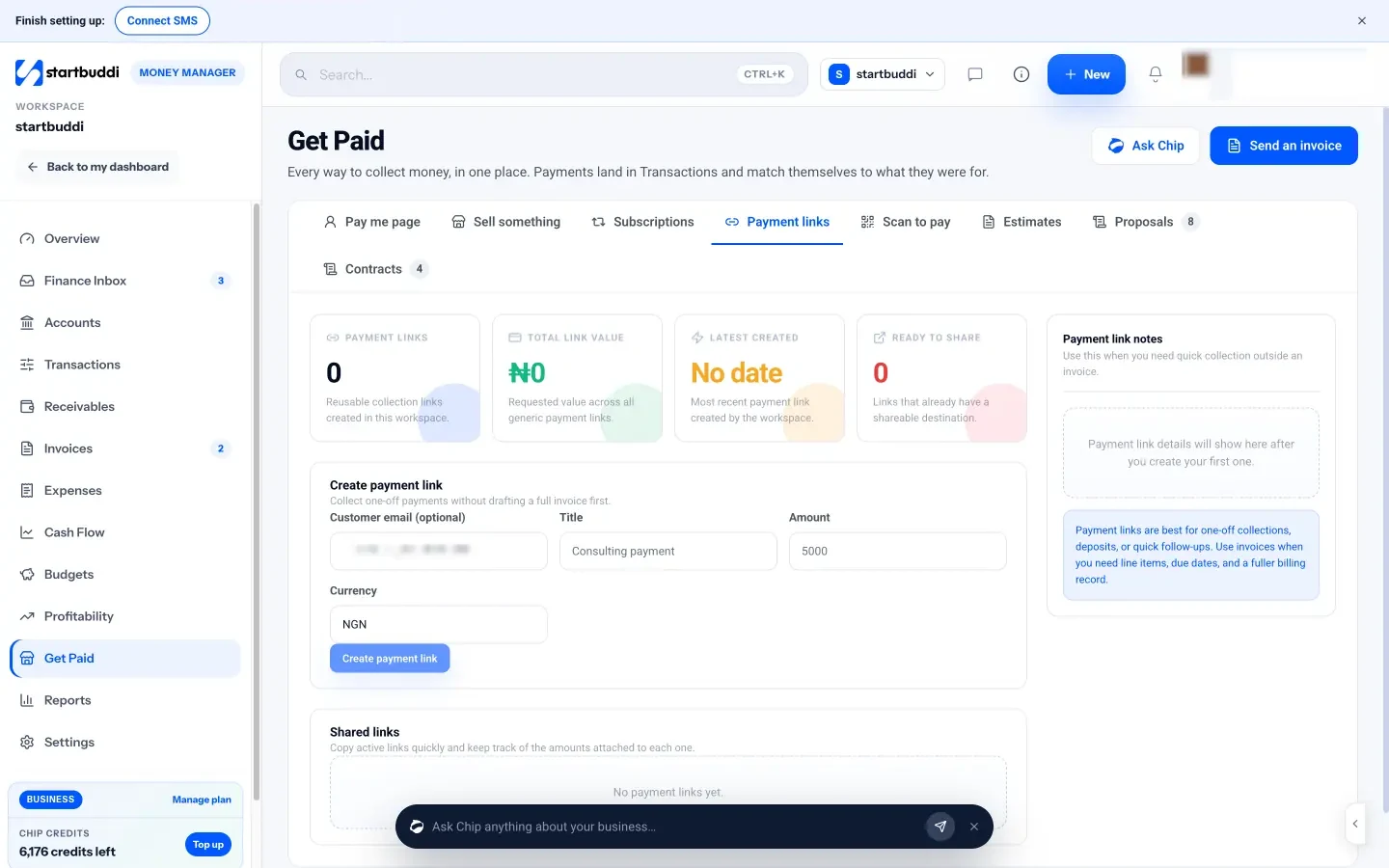
Payments land in Transactions and match themselves to what they were for, so there is nothing to reconcile by hand. You can deactivate a link when you no longer need it. The Scan to pay tab turns active links into printable QR codes, and Sell something creates a link instantly for a product from your store or a custom amount.
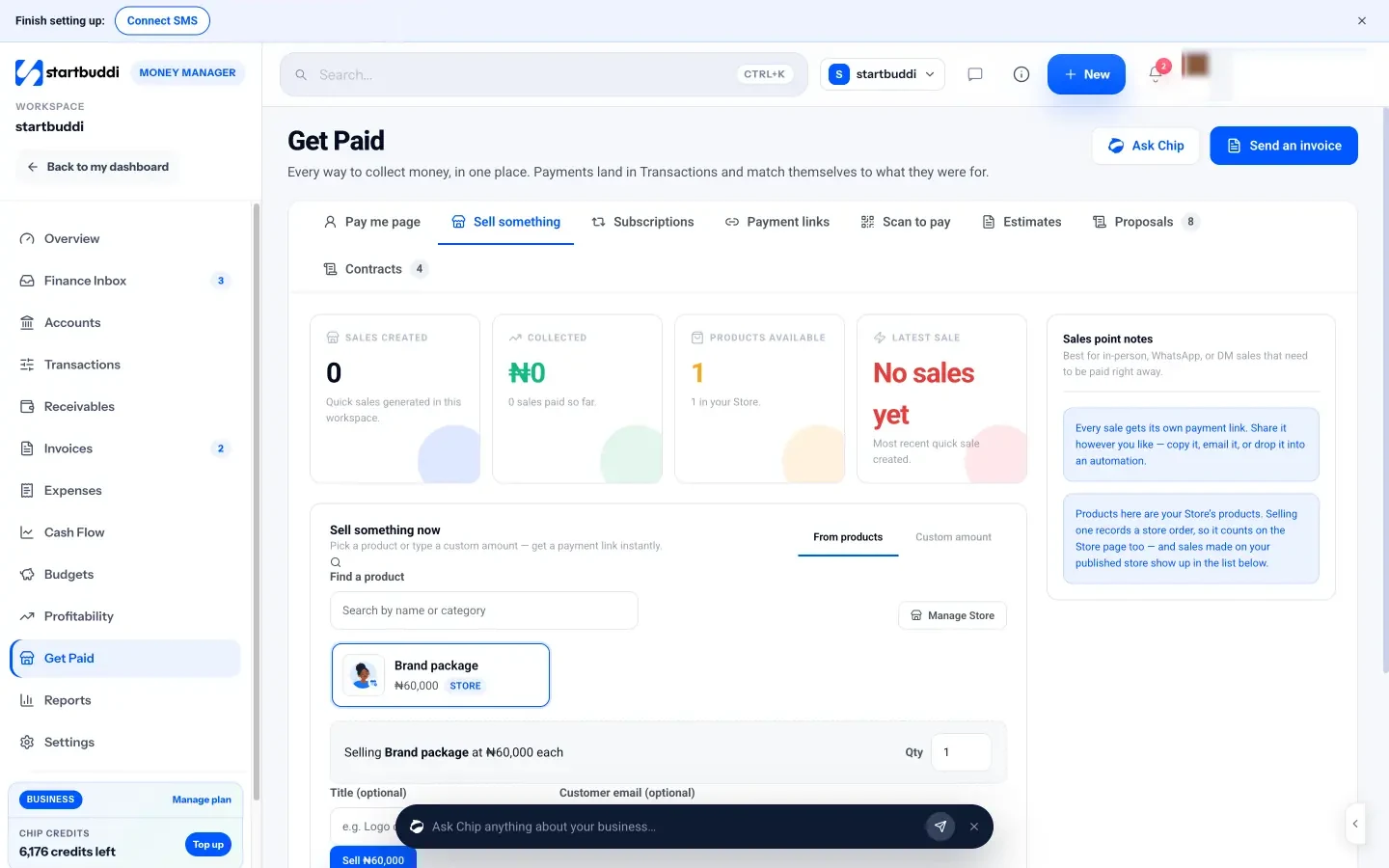
There is no plan limit on payment links; you need a connected, verified payment provider. The help article on creating a payment link in startbuddi has the details, and pricing covers the plans.
Your next step
Pick the one thing you sell most often in chats. Create a fixed-amount link for it today with a clear name and description, and send it to the next customer who asks how to pay. Once it works, add a QR code to your counter or packaging.
Sources
- Paystack: Payment Pages
- Paystack: Business types
- Paystack blog: Introducing Paystack Starter Businesses
- Paystack: Transactions pricing
- Nigeria Revenue Service
- Flutterwave Help Center: How to create a payment link
Frequently asked questions
Can I create a payment link without a registered business in Nigeria?
Often yes. Some gateways offer accounts for unregistered sellers using your BVN, ID and personal bank account, with a collection limit until you register.
How long does it take to receive money from a payment link?
It depends on the gateway's settlement schedule. Many settle to your bank the next working day. Check your gateway's settlement terms.
Can customers pay a payment link by bank transfer or USSD?
With Nigerian gateways such as Paystack and Flutterwave, the checkout usually offers card, bank transfer and USSD, depending on your account settings.
Can I use one payment link for many customers?
Yes. A reusable link works for products, tickets or classes. For custom orders, a link per customer makes it easier to match payments.
Tiwalade Joanna Okedara-Kalu is the founder, CEO and CTO of startbuddi, the business system that brings clients, bookings, invoices, projects, marketing and the Chip AI assistant into one place. Tiwalade builds software around how service businesses really work day to day, and writes about client management, getting paid on time and why small businesses outgrow the tools they start with.
Founded startbuddi and leads its product and engineering