Online ordering for small restaurants: your options compared
Marketplaces, direct ordering systems and chat ordering compared, with published fees, what to look for, and a simple way to decide what to set up first.


- Small restaurants can take orders through delivery marketplaces (commission per order), direct ordering systems (monthly or processing fees) or chat plus payment links. Use marketplaces to be found and direct ordering to keep regulars, and work out the true cost per order before you choose.
Online ordering for small restaurants comes in three main shapes: delivery marketplaces that bring you new customers for a commission on each order, direct ordering on your own website or link for a monthly fee or a small processing charge, and simple chat ordering through WhatsApp or Instagram with a payment link. Most small restaurants end up using two of the three. The right mix depends on your margins, how many orders you take each day, and whether you run your own delivery.
This guide compares the options, shows published fees from well-known providers, and gives you a simple way to decide what to set up first.
The three ways to take orders online
Before comparing brands, it helps to understand the three models, because the fee structure matters more than the logo.
| Model | How you pay | Good for | Watch out for |
|---|---|---|---|
| Delivery marketplace | A percentage of each order | Reaching people who don’t know you yet | Commission eats into margins, and the customer relationship belongs to the app |
| Direct ordering system | Monthly fee, a per-order fee, or card processing only | Regulars and repeat customers | You have to bring the traffic yourself |
| Chat ordering with payment links | Card processing on each payment | Very small kitchens, home cooks, pre-orders | Manual work once you pass a few dozen orders a day |
Delivery marketplaces: reach for a commission
Marketplaces such as Uber Eats, DoorDash, Deliveroo, Just Eat, Glovo, Swiggy, Zomato, Chowdeck and Mr D put your menu in front of hungry people who are already browsing. They usually handle delivery drivers too. In return, they take a share of every order.
Uber Eats is one of the few that publishes its US plans in full. Its merchant pricing page lists a Lite plan at a 20% marketplace fee (starting at 15% in some cities), Plus at 25% and Premium at 30%, a 15% fee if you use your own drivers, and a 7% fee on pickup orders. DoorDash also publishes commission plans for US merchants. In many other markets, rates are harder to find or depend on the deal each restaurant signs, so ask for the full fee breakdown in writing before you agree to anything.
When a marketplace makes sense
- You are new and need people to discover you.
- Your menu has enough margin to absorb a commission of 15% to 30%.
- You don’t have drivers and don’t want to manage delivery.
A useful rule: treat marketplaces as advertising. Use them to win a first order, then give every customer a reason to order direct next time, such as a card in the bag with your own ordering link.
Best online ordering systems for small restaurants: direct options
Direct ordering means customers order from your own website, Google profile or link in bio, and you keep the customer details. The providers below publish their prices on their own sites (checked in September 2026, US dollars unless stated). Fees change, so check the vendor’s page before you buy.
| Tool | What it does | Published price | Free plan |
|---|---|---|---|
| GloriaFood | Online ordering widget for your website and Facebook page | Core ordering free with no commission; online card payments are a paid add-on, see current pricing | Yes |
| Square online ordering | Ordering site and profile ordering linked to Square’s POS | No monthly fee for online ordering; card processing applies | Yes |
| Menufy | Commission-free online ordering | $149 a month on an annual agreement, or $179 month to month | No |
| ChowNow | Commission-free direct ordering and branded app | Launch $249 a month billed monthly ($229 billed annually), plus a setup fee and card processing on each order | No |
| Owner.com | Website, online ordering, app and marketing | $249 a month plus 5% per order, or $499 a month flat, both month to month | No |
| Uber Eats Webshop | Uber’s own direct ordering site for your restaurant | A fee on each order; see Uber’s pricing page | No monthly fee listed |
On top of any ordering fee, you pay card processing if the provider doesn’t include it. Rates differ by provider and country, so check the current figures on the provider’s own page, such as Stripe pricing or, in Nigeria, Paystack pricing. Our guide on accepting payments in Nigeria covers local options in more detail.
Online ordering systems for small restaurants: what to look for
Whatever you choose, test it against these points with your real menu.
Menu that is easy to update
You should be able to mark a dish as sold out from your phone in seconds. If changing a price needs a support ticket, you will stop updating it.
Modifiers and notes
Extra cheese, no onions, spice level, sides. Test whether the system handles the add-ons your kitchen actually offers, and whether the price change is added correctly.
Allergen information
Rules apply to food sold online too. In the UK, when food is sold at a distance, allergen information must be available before the purchase is completed and when the food is delivered (UK government allergen guidance). Other countries have their own rules, so check with your local food authority. This is general information, not legal advice.
Pickup, delivery and time slots
Can customers choose pickup or delivery, set a time, and see your opening hours? Can you pause orders on a busy Friday night?
How orders reach the kitchen
Some systems print tickets, some send to a tablet, some go into your POS. If you already run a till, check it connects. If you are choosing a till too, our guide to POS systems for food trucks covers what to look for in a mobile setup.
Simple sales reports
You should be able to see orders per day, your best sellers and your average order value without exporting a spreadsheet. Those three numbers tell you which dishes to promote, which to drop, and whether a slow Tuesday needs a special offer. If a tool hides reports behind its most expensive plan, count that in the price.
Your own customer list
Direct ordering is only worth it if you get the customer’s name and contact details to invite them back. Check that you can export them.
Google, WhatsApp and Instagram: the free doors
Some of the most useful ordering channels cost nothing to set up.
Your Google Business Profile
Google shows an “Order online” button on some restaurant profiles. According to Google’s help page, ordering providers can be listed automatically, and you can choose preferred providers for pickup and delivery or add your own ordering links. In the US, Order with Google lets people order through supported partners directly from Search and Maps. Our guide to setting up a Google Business Profile walks you through the basics.
WhatsApp and Instagram
The WhatsApp Business app is free to download, and businesses can create a catalogue of products that shows on their profile (About WhatsApp Business, About catalog). For a small kitchen, a catalogue plus a payment link is a real ordering system: the customer picks, you confirm the total, send a link, and start cooking when it’s paid. Our WhatsApp message templates help you reply fast without sounding robotic.
The limit is volume. Once you are handling more than a few dozen chat orders a day, the typing, copying and checking becomes a job in itself, and it’s time for a proper ordering page.
Pricing your menu for online orders
Online ordering changes your costs, so your prices may need to change too. Many restaurants charge a little more on marketplace apps than in the restaurant, to cover commission. Check each platform’s terms before you do, because some have rules about price differences.
Work through these numbers for your five best-selling dishes:
- Food cost. Ingredients for one portion.
- Packaging. Boxes, bags, sauce pots and napkins add up fast, especially for delivery.
- Channel cost. Commission or ordering fee plus card processing for that order.
- What is left. If the dish makes almost nothing on a marketplace, either raise the app price, remove it from the app menu, or offer it only for direct orders.
A shorter online menu is often better. Dishes that travel badly lead to complaints and refunds. Pick the ones that arrive looking and tasting the way you want, and leave the rest for dine-in. Our profit margin calculator helps you check each dish quickly.
Common mistakes with online ordering
- Signing up for everything at once. Each tablet, app and login is more work at the pass. Start with one or two channels and add more only when they are running smoothly.
- Letting the menu drift. A dish that is sold out in the kitchen but still orderable online means a refund and an unhappy customer. Make updating the menu part of opening and closing.
- Ignoring pickup. Pickup orders usually cost less than delivery and many customers are happy to collect. Promote it on your own ordering page.
- Never asking for the direct order. Marketplace customers won’t find your own ordering link unless you tell them. Put it on packaging, receipts and your social profiles.
- Not reading the payout terms. Know when money reaches your bank and what is deducted, so you can plan stock and wages.
How to choose: a simple decision path
- Fewer than 20 orders a day, mostly regulars? Start with WhatsApp, a menu link and payment links. Spend nothing on monthly fees.
- Want new customers and have no drivers? Add one marketplace, and check that your prices on the app cover the commission.
- More than 20 direct orders a day? Move to a direct ordering page so customers order and pay without you typing every order.
- Already on a POS? Look first at the online ordering from your POS provider, so orders land in the same system.
Work out the true cost per order for each option: monthly fee divided by orders, plus per-order fees, plus card processing. On a $25 order, a 30% commission costs $7.50. That is why direct ordering matters for repeat customers.
How startbuddi helps a small restaurant take orders
startbuddi is not a restaurant POS, kitchen display or delivery app, and it doesn’t send drivers. What it gives a small food business is a simple direct ordering page, payment links and a customer list, with money going straight to your own Paystack or Stripe account.
A menu people can order from
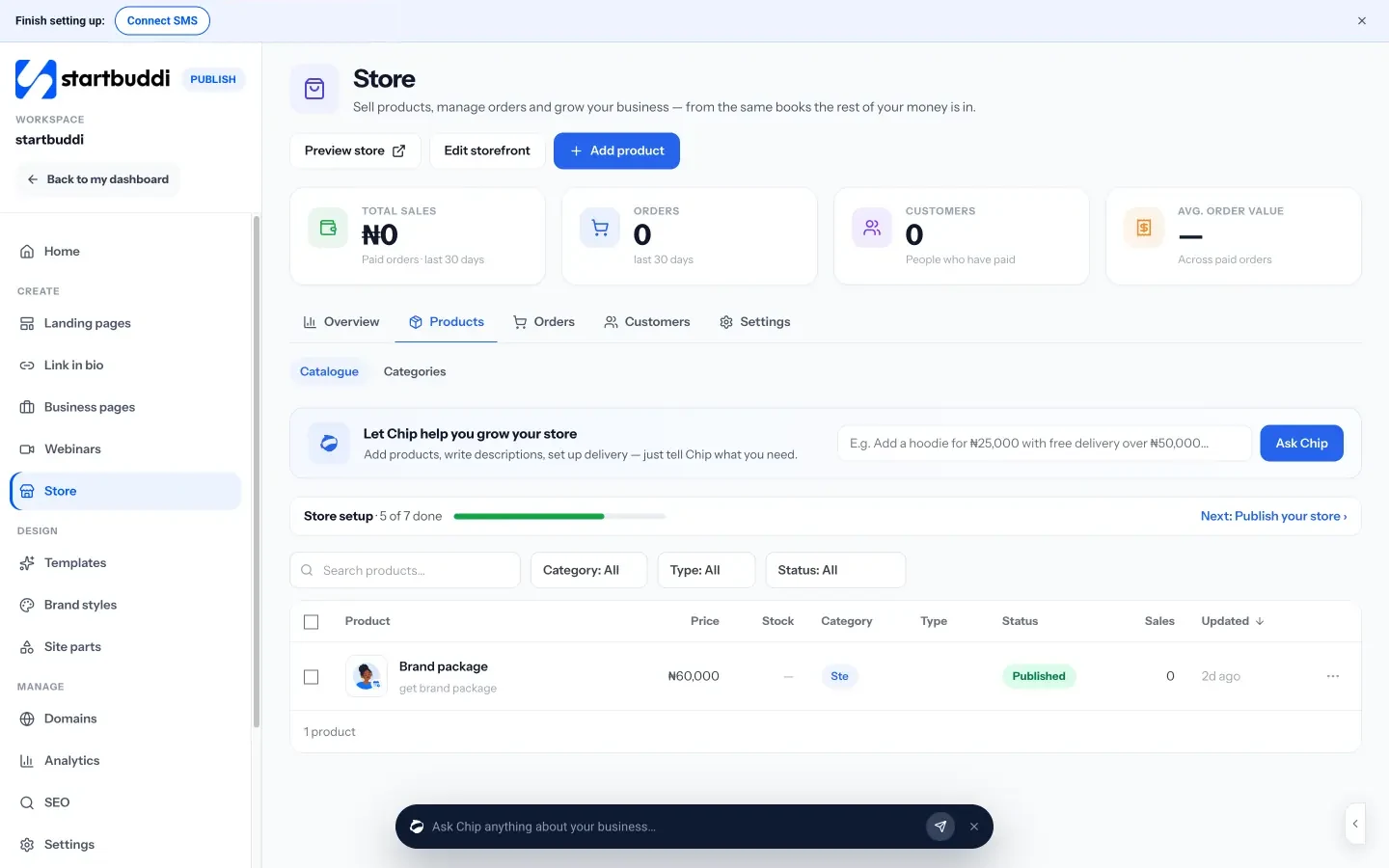
The online store lets you add each dish or bundle as a product with a price, pictures and variations, and build a shop page for you. You can run it as a catalogue with an “Enquire” button that goes to WhatsApp or a form, or switch to a full store with a cart and hosted checkout. Delivery settings include flat rate, free over an amount, pickup only or no delivery. One honest note: checkout currently charges the base price of each item, so price variations and delivery charges are not yet added at checkout, and there are no discount codes yet.
Payment links for chat orders
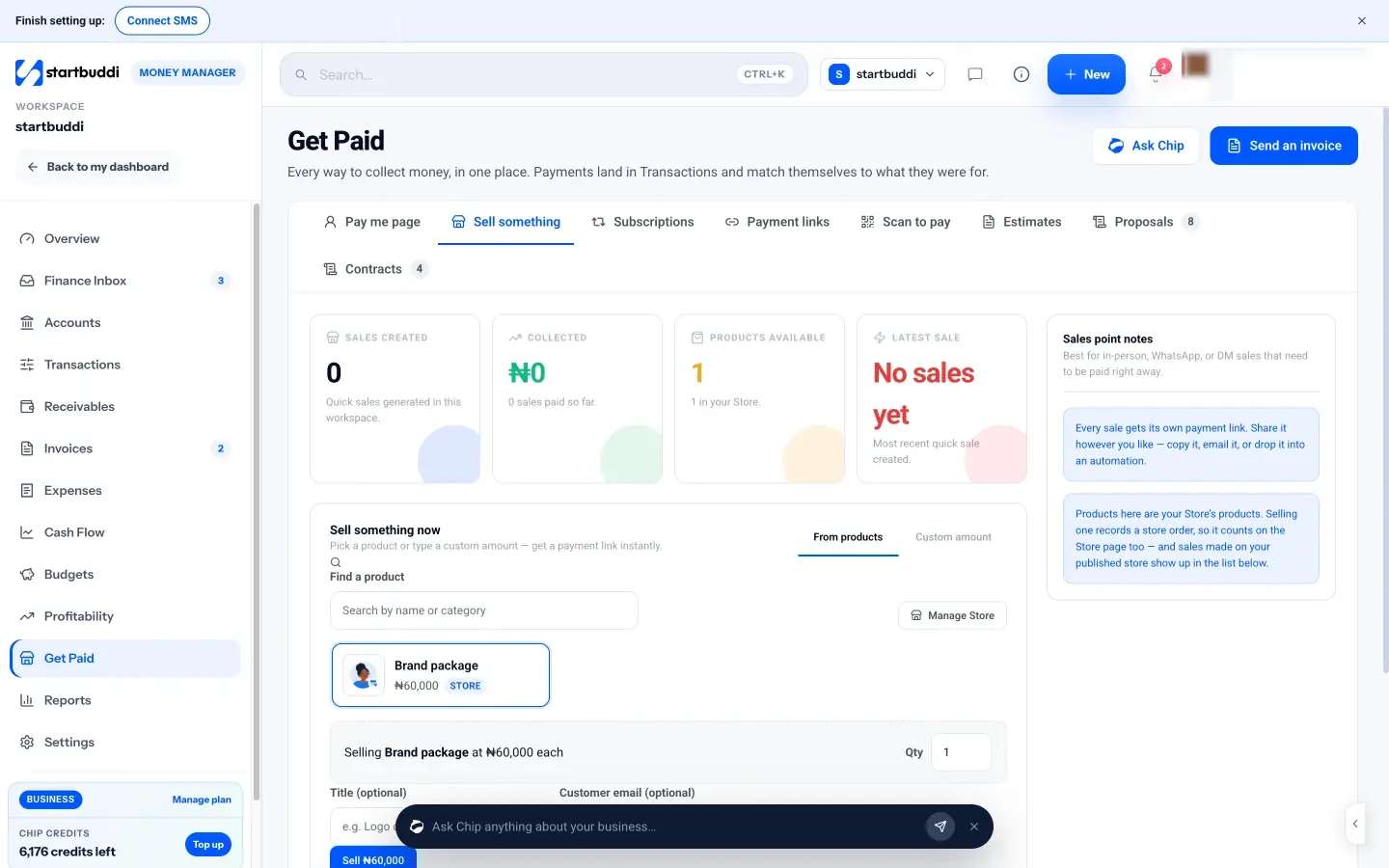
For WhatsApp and Instagram orders, Get Paid has a “Sell something” tab: pick products or type a custom amount and get a payment link instantly. Customers pay by card, bank transfer, USSD or mobile money through Paystack, or by card through Stripe. The same tab gives you printable QR codes for the counter.
Orders and customers in one place
Every paid order appears in Orders with an automatic receipt, and paying customers become contacts, so you can invite them back with a message later. You can also add a product block to your link in bio, which is often where restaurant customers look first. Our post on link in bio for Instagram sellers shows how.
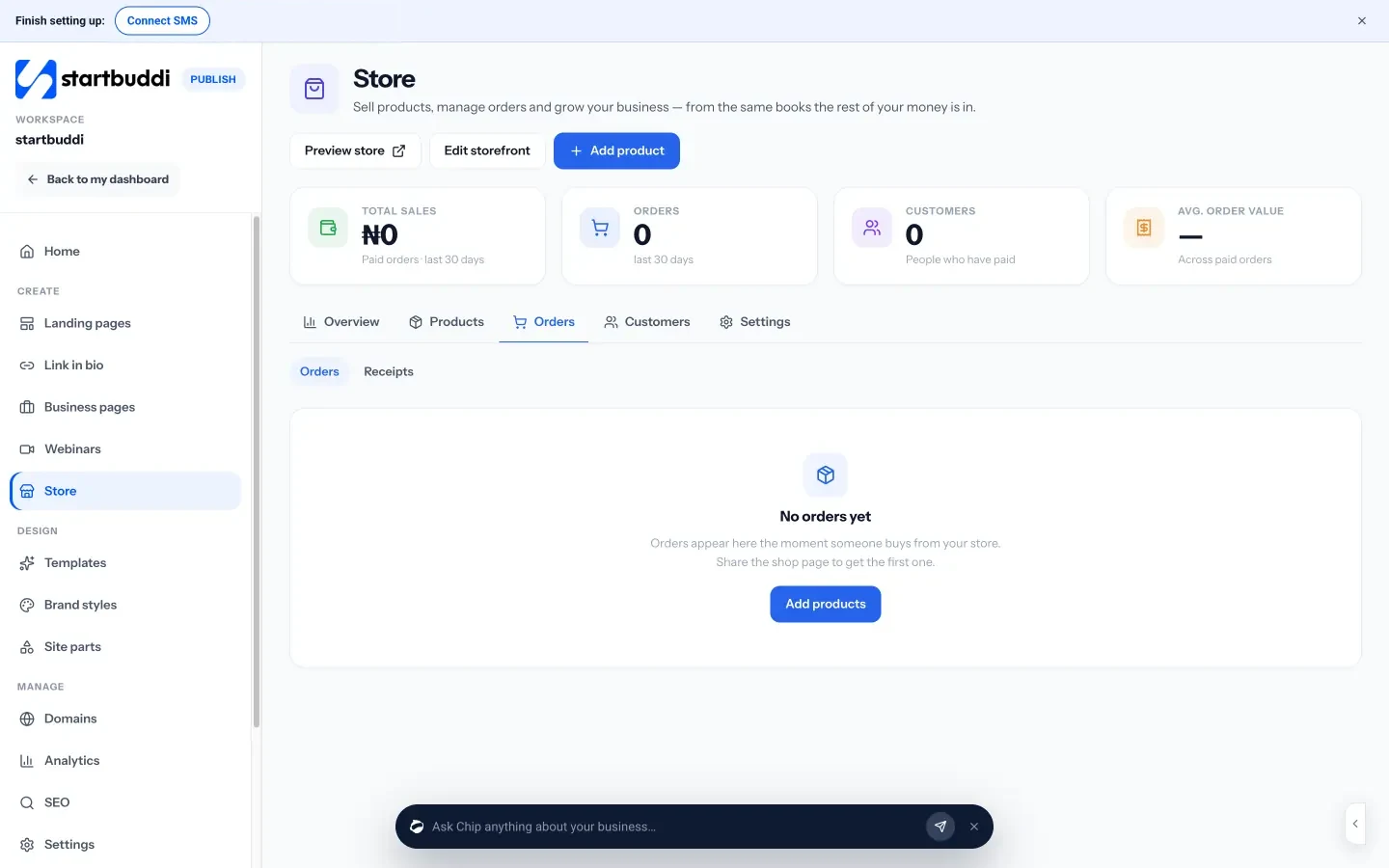
The Store has no plan gate and works on the Free plan. You need a connected Stripe or Paystack account to take card checkout.
Your next step
Take last week’s orders and add up what each channel cost you per order, including commission and card fees. If a marketplace is taking more than your profit on regular customers, set up one direct way to order this week, even if it’s just a menu link and payment links. You can compare plans on the pricing page when you are ready.
Sources
- Uber Eats merchant pricing (US)
- DoorDash merchant pricing (US)
- GloriaFood pricing
- Square online ordering
- Menufy pricing
- ChowNow pricing
- Owner.com pricing
- Stripe pricing (US) and Stripe pricing (UK)
- Paystack: pricing
- GOV.UK: Allergen guidance for food businesses
- Google Business Profile: food ordering
- Google: Order with Google
- WhatsApp Help Center: About WhatsApp Business
- WhatsApp Help Center: About catalog
Frequently asked questions
What are the best online ordering systems for small restaurants?
There is no single best one. Compare the true cost per order, how easy the menu is to update, and whether you keep customer details. Free options like GloriaFood or Square's online ordering are a low-risk start.
Can a small restaurant take online orders without paying commission?
Yes. Direct ordering systems charge a monthly fee or processing fee instead of commission, and chat orders with payment links only cost card processing.
Should I be on delivery apps and have my own ordering page?
Many restaurants do both: apps to reach new customers, and a direct page for regulars so repeat orders don't carry a commission.
Do I need a website for online ordering?
No. A Google Business Profile, a WhatsApp catalogue, or a shop page and link in bio can all take orders without a full website.
Tiwalade Joanna Okedara-Kalu is the founder, CEO and CTO of startbuddi, the business system that brings clients, bookings, invoices, projects, marketing and the Chip AI assistant into one place. Tiwalade builds software around how service businesses really work day to day, and writes about client management, getting paid on time and why small businesses outgrow the tools they start with.
Founded startbuddi and leads its product and engineering