How to choose a POS system for a hair or nail salon
How to choose a salon POS: the features hair, nail and beauty salons need, how to work out the real cost, tips and tax basics, and when you don't need a full POS.



- The best salon POS takes cards where you are at a fair rate, handles tips and split payments, links to appointments and sells retail. Add up subscription, hardware and card fees for a real month before you compare features. Small salons may only need a booking system, a card reader and payment links.
There is no single best POS system for nail salon or hair salon owners everywhere. The right one takes card payments where you are at a rate you can afford, handles tips and split payments, links to your appointments, and sells retail products without a second till. Start with how your clients pay today, add up the real monthly cost including card fees and hardware, and only then compare features.
This guide explains what a salon POS does, the features that matter for hair, nail and beauty salons, how to work out the true cost, what to know about tips, tax and card security, and the questions to ask before you sign. We name a few providers with figures from their own websites. We also say plainly that startbuddi is not a POS system, and show where it can sit alongside one.
What a salon POS system does
POS stands for point of sale: the place and the tools you use to take payment when a service is finished. For a salon it usually has three parts.
- Software on a tablet, phone or computer that builds the bill: services, products, tips and discounts.
- Hardware: a card reader, and sometimes a receipt printer, cash drawer and barcode scanner.
- Payment processing: the company that moves the card money into your bank account for a fee on each payment.
A general shop POS can do this. A salon POS goes further by connecting to the appointment book, so checkout already knows who the client is, which stylist did the work and what was booked. That link is the main reason salons choose a salon-specific system.
What to look for in the best POS system for a hair salon
These are the features that matter most, roughly in order. Treat the first four as must-haves for almost any salon.
Checkout from the appointment
Tap the appointment, see the service and price, add anything extra, take payment. If staff have to retype the service and price, mistakes creep in and checkout slows down at the busiest moment of the day.
Tips
Clients expect to add a tip on the card reader in many countries, and each tip should be recorded against the right stylist or technician. Check how tips are reported so you can pay them out correctly.
Split and mixed payments
Part card, part cash. Two friends splitting one bill. A deposit already paid online. A good salon POS handles all of these without a calculator.
Deposits already paid
If clients pay a deposit when they book, the POS should take it off the final bill automatically. This matters more every year as salons use deposits to cut no-shows.
Retail and stock
Shampoo, oils, cuticle care, lash serum. If you sell products, you want stock counts that go down as you sell, and a warning before you run out.
Commission and staff reports
Many salons pay stylists partly on commission. A POS that records who did each service and sold each product saves hours of spreadsheet work at the end of the month.
Gift cards, packages and memberships
Useful for beauty salons and spas especially. Not every system supports them, and some charge extra.
Offline mode
If the internet drops, can you still take card payments? Ask how the reader behaves offline and what limits apply.
Best POS for salon types: nail, hair and beauty
Best POS system for nail salon owners
Nail salons usually run many smaller tickets a day, several technicians at once and plenty of walk-ins. Speed at checkout and per-technician tips matter most. Look for fast checkout on a phone or small reader, simple walk-in handling, and a card fee structure that suits lots of small payments. A fixed fee per transaction weighs more heavily on a $30 fill than on a $200 colour.
Best POS system for hair salon owners
Hair salons have fewer but larger tickets, more retail sales and more deposits. Retail stock, commission reports and deposit handling come to the front. Check the percentage rate carefully, because on big tickets the percentage is most of your cost.
Best POS system for beauty salon and spa owners
Beauty salons often sell courses of treatments, packages and gift cards, and need consultation forms before first treatments. Look for package tracking and good client records alongside the till.
How to work out what a salon POS really costs
The subscription is only one line. Add up all of these for a typical month:
- Software subscription, including any charge per extra staff member.
- Hardware: the card reader and anything else, bought once or rented monthly.
- Card processing: a percentage of each payment, often plus a small fixed fee.
- Extras: text reminders, marketing add-ons, faster payouts, cellular data for the reader.
Here is where a few providers publish their pricing, with hardware and plan notes at the time of writing. Card rates differ by country and change, so check each provider’s own page for yours.
| Provider | Where | Where to check card rates | Hardware and monthly notes |
|---|---|---|---|
| Square | US | Square fees, by plan | Square Appointments has a free plan for solo professionals |
| Stripe Terminal | US | See Stripe Terminal | Reader M2 $59; S700 and S710 readers $299 |
| GlossGenius | US | GlossGenius pricing | Salon software from $24 a month billed annually |
| Vagaro | US | See its site | Plans from $23.99 a month for six months, with a complimentary card reader (Vagaro pricing) |
| SumUp | UK | SumUp pricing: pay as you go, or Payments Plus at £19 a month | Readers from £15 on sale; Tap to Pay £0 |
| Yoco | South Africa | Yoco fees: Core plan with no monthly fee | Plus and Pro plans at R249 and R499 a month |
In Nigeria, Kenya, India and many other markets, salons often take payment through a bank or fintech card terminal, bank transfer or mobile money rather than a salon-specific POS. That can be the cheapest route, as long as you record every payment against the client and the service somewhere you can find later.
A quick worked example
Take last month’s card takings and the number of card payments. For each provider, using the rates on its own page for your country, multiply your takings by its percentage, add its fixed fee for each payment, then add any monthly fee. Say a nail salon takes $12,000 a month across 400 payments: run that same month through each provider’s published pricing and compare the totals. A lower rate that needs a monthly fee only pays off above a certain level of sales, so run the numbers with your own takings.
Tips, tax and card security
A POS makes these easier, but it does not do your legal homework for you. This section is general information, not legal or tax advice.
- Tips in the US. The IRS says employees must keep a daily tip record and report cash tips to their employer unless they total less than $20 a month, and employers must withhold and pay taxes on reported tips. See the IRS guidance on tip recordkeeping.
- Tips in the UK. Since 1 October 2024, employers must pass on qualifying tips to workers in full and follow a statutory code of practice on fair and transparent distribution of tips.
- Card security. The PCI Data Security Standard applies to anyone who stores, processes or transmits cardholder data. Using a reputable processor’s reader, and never writing card numbers down, keeps most of the burden with them.
- Sales tax or VAT. Your POS should add the right tax to services and products. Check the rules with your tax authority, such as the IRS in the US or HMRC in the UK.
Questions to ask before you buy a salon POS
- Do I own the card reader, or rent it? What happens to it if I leave?
- Am I locked into your payment processing, and can I see the rates in writing?
- Is there a contract, a cancellation fee or a minimum monthly volume?
- How fast do payouts reach my bank, and is faster payout extra?
- Can I export my sales, clients and product data at any time?
- Does the POS connect to the booking system I already use, or do I have to switch that too?
- What support is available on a Saturday?
Do you need a full salon POS at all?
Not always. A solo stylist, a mobile nail tech or a two-chair salon may do perfectly well with three simpler pieces:
- A booking system that takes deposits online.
- A card reader or tap-to-pay app from a payment company, for payment at the chair.
- Payment links and QR codes for bank-transfer-heavy markets, balances after a deposit, or a client who wants to pay later.
The trade-off is that the pieces are not fully joined up, so you need somewhere that ties payments back to clients and bookings. If you sell lots of retail, pay commission or run a team of five or more, a salon POS usually earns its fees back in saved admin.
Common mistakes when choosing a salon POS
- Comparing headline rates only. A low percentage with a monthly fee, a hardware rental and a fee for fast payouts can cost more than a higher flat rate. Always compare a full month.
- Buying hardware before testing software. Readers are cheap to buy and hard to return. Run the software trial first, then order the reader.
- Forgetting the client side. If deposits are paid in one system and the final bill in another, clients get confused and sometimes pay twice. Decide where deposits live before you choose.
- Not training the team. Ten minutes on refunds, split bills and tips before launch day prevents most checkout queues.
- Losing the link to the client. A card payment with no name attached is hard to refund, hard to follow up and invisible when you look at who your best clients are.
How startbuddi fits, and where it does not
To be clear: startbuddi is not a POS system. It has no card reader, no tap-to-pay, no cash drawer or receipt printer support, no commission tracking and no till-style stock control. If you need those, choose a POS from the options above. What startbuddi does is handle the money around the appointment, which works well alongside a card reader or on its own for smaller salons.
Deposits at booking. In Bookings, any service can require the full price or a deposit when the client books, paid through Paystack or Stripe. Money goes to your own account; startbuddi does not hold it.
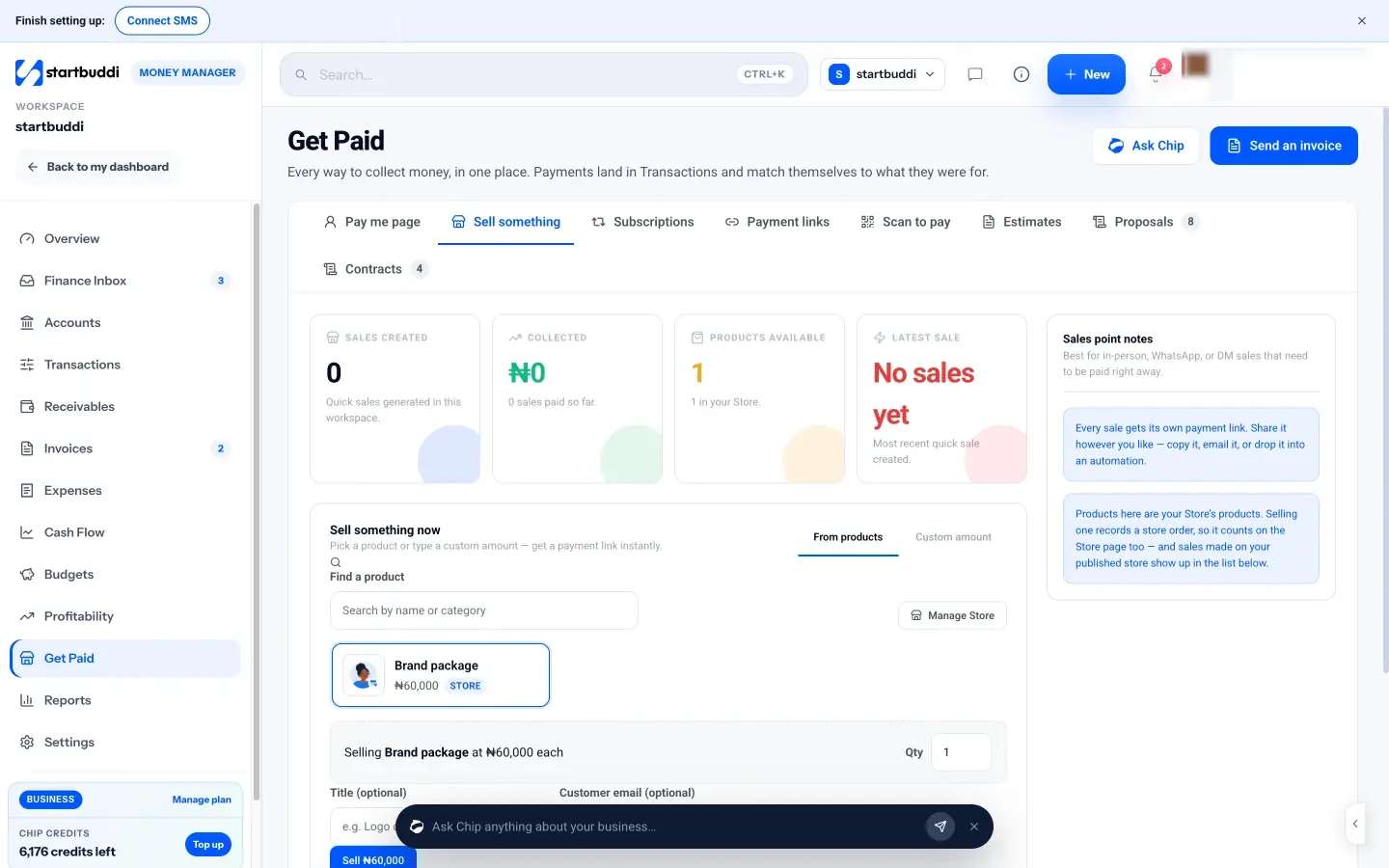
Sell something now. In Money Manager’s Get Paid hub, the Sell something tab lets you pick a product from your store or type a custom amount and get a payment link at once. Show the client the link on your phone, or email it to them.
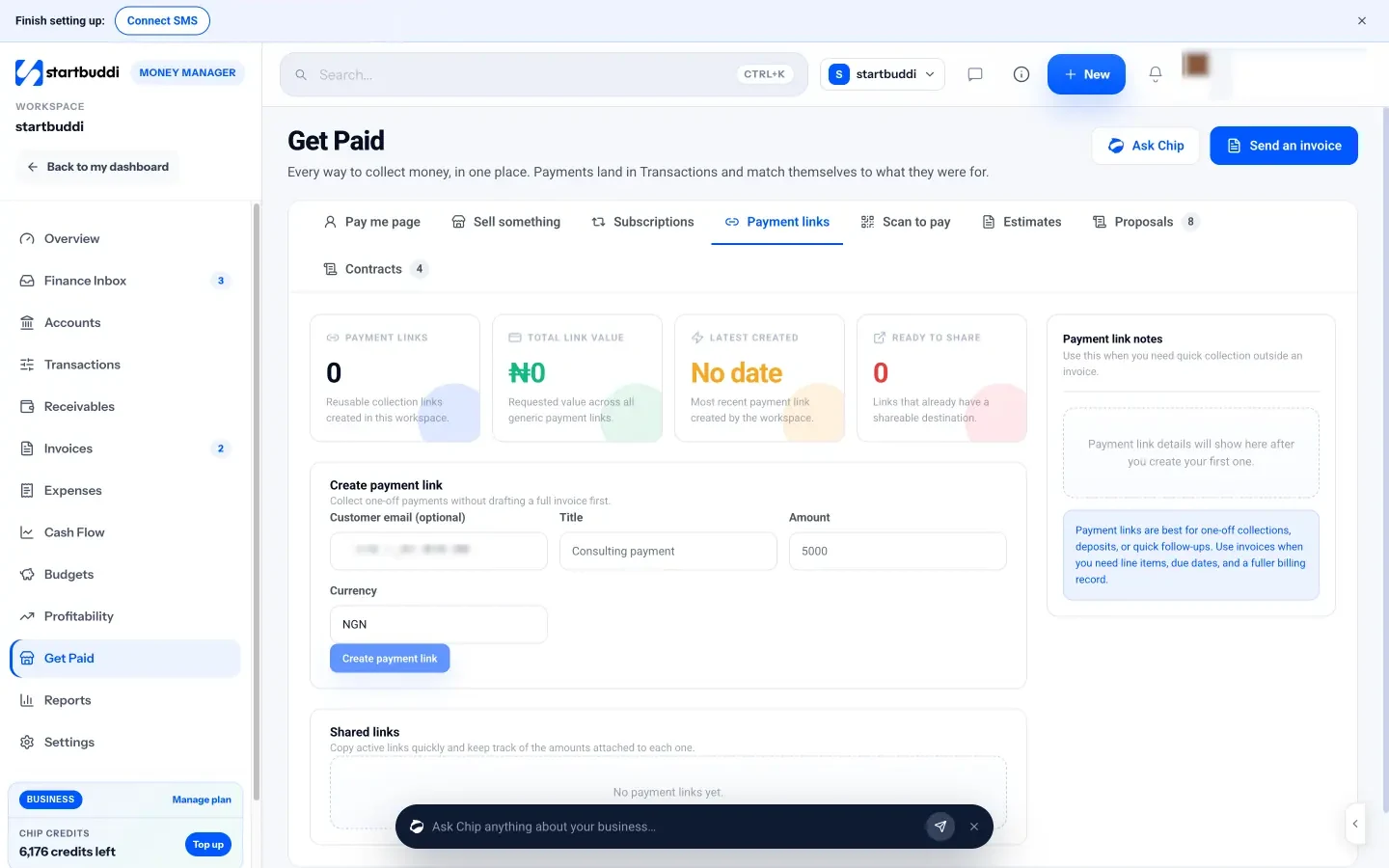
Payment links and QR codes. Create a one-off payment link for a balance or a product and send it by WhatsApp, email or text. The Scan to pay tab gives you printable QR codes for your pay me page and each active link, which suits a front desk sign.
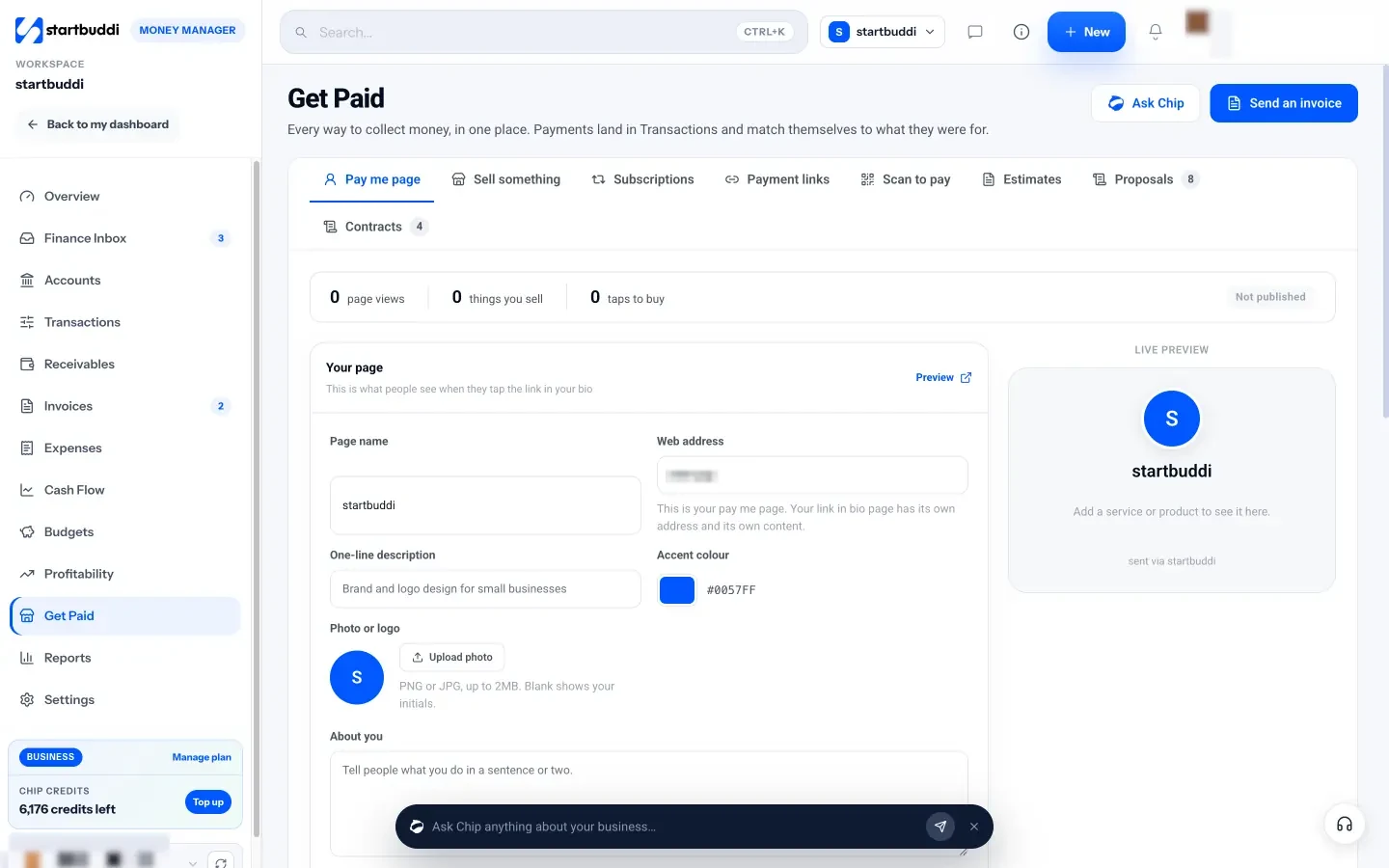
A pay me page. One link that lists your services and products with prices, so clients can pay you from your Instagram bio.
Everything lands in one place. Payments show up in Transactions and match themselves to what they were for. Bank transfers and PayPal are recorded by hand. Invoices, including one generated from a booking, live in Invoicing. Payment links, the pay me page and Sell something have no plan limit; they need a connected, verified Stripe or Paystack account.
If you are comparing all-in-one salon tools, our startbuddi vs Square Appointments page sets out how the two differ.
Your next step
Pull last month’s takings and count how many card payments you took. Put those two numbers into the rates from the table above, add hardware and subscriptions, and you will know within ten minutes which options are affordable. Then book a demo with the two cheapest that meet your must-haves. For payments in a bank-transfer-heavy market, our guide on accepting payments in Nigeria covers transfers, cards and links.
Sources
- Square: what are Square’s fees
- Stripe Terminal
- GlossGenius pricing
- Vagaro pricing
- SumUp UK card readers and fees
- Yoco fees
- IRS: tip recordkeeping and reporting
- GOV.UK: code of practice on fair and transparent distribution of tips
- PCI Security Standards Council: PCI DSS
- HMRC
Frequently asked questions
What is the best POS for a salon that is just starting?
Usually the simplest one with no monthly fee: a free booking app plus a card reader from a payment company. Move to a full salon POS when retail, commission or a bigger team make the admin heavy.
Does a salon POS need to connect to my booking system?
It helps a lot. When the two connect, checkout already knows the client, service and stylist, and deposits come off the bill automatically. Without it, staff retype details and mistakes creep in.
Which fee matters more, the percentage or the fixed fee?
For lots of small payments, such as nail fills, the fixed fee per payment adds up. For big tickets, such as colour, the percentage is most of the cost. Work it out with your own numbers.
Can startbuddi replace my salon POS?
No. It has no card reader, till or commission tracking. It handles deposits at booking, payment links, QR codes and invoices, which can sit alongside a card reader or cover payments for a small salon.
Omolola Akiyode is the operations and project manager at startbuddi, leading cross-functional projects and the content that helps founders get set up. Omolola writes about projects, websites and getting found online, and turns complex ideas into clear, practical steps.
Runs operations and projects at startbuddi