How to accept payments online in Nigeria: cards, transfers and links
Every practical way to accept payments in Nigeria, from bank transfers and payment links to cards, USSD and QR codes, what to check on gateway costs and how to avoid fake alerts.

Photo: EqualStock / Unsplash
- To accept payments in Nigeria, most small businesses combine direct bank transfer with a payment gateway such as Paystack or Flutterwave, which lets customers pay by card, transfer or USSD through a link, invoice or checkout. Compare fees, confirm every payment in your own bank or dashboard, and match each payment to what it was for.
The simplest way to accept payments in Nigeria online is to combine two things: your business bank account details for customers who prefer a direct transfer, and a payment gateway such as Paystack or Flutterwave for everyone else. A gateway lets customers pay by card, bank transfer or USSD through a payment link, an invoice, a checkout page or a QR code, and it settles the money into your bank account, usually the next working day.
Which mix is right depends on how you sell: in WhatsApp chats, through invoices, on a website, or face to face. This guide walks through each method, what it costs, how to protect yourself, and how to keep track of who has paid. Fees and rules here were checked on 28 September 2026; providers change them, so check their pricing pages before you decide.
This is general information, not financial advice.
The main ways to accept payments in Nigeria
| Method | How the customer pays | Best for | Watch out for |
|---|---|---|---|
| Direct bank transfer | Transfers to your account number from their banking app | Repeat clients, larger B2B payments | Fake alerts, payments you can’t match to an invoice |
| Payment link | Taps a link, pays by card, transfer or USSD | WhatsApp, Instagram and DM sales, deposits | Gateway fees on each payment |
| Invoice with a pay button | Opens the invoice and pays online, or transfers | Service businesses, agencies, freelancers | Chasing unpaid invoices |
| Website or store checkout | Pays at checkout on your site | Online shops, digital products, bookings | Setup time |
| POS terminal or QR code | Taps or inserts a card, scans a QR, or transfers at the counter | Shops, salons, events, markets | Device cost, network problems |
| Recurring billing | Card charged automatically each month or year | Memberships, retainers, subscriptions | Failed renewals, cancellations |
Most small businesses end up using two or three of these. A consultant might send invoices with a pay button and accept transfers from corporate clients; a baker might share a payment link on WhatsApp and keep a QR code on the counter.
Bank transfers: free to receive, but check every one
Bank transfer is the most common way Nigerians pay small businesses. It’s familiar, instant for most banks, and costs you nothing to receive. Since 1 January 2026, the ₦50 stamp duty on electronic transfers of ₦10,000 and above has been charged to the sender, not the receiver, as TheCable reported.
The weaknesses are matching and fraud. When ten customers each send ₦25,000 on the same day, working out who paid for what takes time. And fake transfer screenshots and fake SMS alerts are a well-known scam.
How to accept transfers safely
- Confirm in your banking app, not from a screenshot or SMS. Only release goods or start work once the money shows in your account balance.
- Ask customers to use a reference, such as the invoice number or their name, in the transfer narration.
- Put your account details on your invoices in the registered business name, so customers can check they’re paying the right account.
- Record each payment against its invoice the same day, so your list of who owes you stays accurate.
If you don’t have a separate business account yet, read how to open a business bank account in Nigeria first.
Payment gateways: cards, transfers and USSD in one place
A payment gateway handles the payment for you. The customer chooses how to pay, the gateway confirms it, and the money is settled to your bank. The two best-known in Nigeria are Paystack and Flutterwave. Paystack has been part of Stripe since 2020, and Flutterwave is a Nigerian-founded company; both serve businesses across several African countries.
How the main gateways compare
| Paystack (Nigeria) | Flutterwave (Nigeria) | |
|---|---|---|
| How customers pay | Card, bank transfer and USSD | Card, bank transfer, USSD and more |
| Settlement | Next working day (T+1) | See provider |
| Current rates | Paystack pricing | Flutterwave pricing |
Both providers charge on each successful payment, with separate rates for local payments and international cards, and both list separate charges for transfers out, virtual accounts and terminals. Rates change, so check each pricing page before you decide, and work out what your typical sale would cost.
Should you pass the fee to the customer?
Some businesses add the gateway fee to the price, others absorb it as a cost of selling. Absorbing it is simpler and friendlier, and you can build it into your prices. If you do pass it on, say so clearly before the customer pays, never as a surprise at checkout.
A practical middle way: set prices that already include a typical fee, and offer a small discount for direct transfer on large invoices if you want to encourage it. Work out what your typical invoice would cost at your gateway’s current rates, so you decide calmly instead of guessing.
Payment links: the quickest way to get paid in a chat
A payment link is a web address that opens a secure checkout for a fixed amount. You create it in seconds, paste it into WhatsApp, Instagram or an email, and the customer pays by card, transfer or USSD. It’s ideal for deposits, one-off services and social media sales, because you don’t need a website.
- Give each link a clear title (“Deposit: bridal makeup, 14 December”) so both of you know what it’s for.
- Create a fresh link per order for one-off sales, so each payment is easy to trace.
- Use an invoice instead when you need line items, due dates or a formal record.
Our step-by-step guide on creating a payment link for your business in Nigeria goes deeper, and how much deposit to charge clients helps you set the amount.
Taking payments in person
If customers come to you, at a shop, salon, stall or event, you have three options besides cash.
- Transfer to your account. Display your business account details clearly, and check your banking app before the customer leaves. Busy counters are where fake alerts do the most damage, so make “we confirm every transfer” part of your routine.
- A QR code. Print a QR code that opens your payment page, so customers scan it with their phone camera and pay by card, transfer or USSD. It costs nothing to print, and there’s no device to charge or repair.
- A POS terminal. Best when many customers want to tap or insert a card. Paystack, for example, sells its own terminal and publishes the device price and card fees on its pricing page. Compare the device cost with how many card sales you actually make each month before buying one.
Recurring payments for memberships and retainers
If customers pay you the same amount every month, such as a gym membership, a class subscription or a monthly retainer, chasing each payment by hand wastes hours. Gateways can save a customer’s card and charge it automatically on each renewal date, and they notify you when a renewal fails.
A few habits make recurring billing smoother. Tell customers the amount and renewal date before they sign up. Send a reminder a few days before an annual renewal. Make cancelling easy, because people who feel trapped dispute the charge instead. And have a plan for failed payments: a friendly message with a link to update the card usually fixes it.
Getting paid by clients abroad
If you work with clients outside Nigeria, card payments through a gateway are usually the easiest route. Paystack accepts international cards at its international rate, settles in naira by default, and runs a USD settlement option, according to its pricing page. Stripe, often suggested for international payments, is not available for direct sign-up by Nigerian businesses: its global availability page lists Nigeria under its “extended network” through Paystack.
For large international invoices, a domiciliary account at your bank can be simpler than card payments. Ask your bank what documents it needs and what it charges to receive foreign transfers.
Choosing the right mix for your business
| If you mainly… | Start with | Add later |
|---|---|---|
| Sell through WhatsApp or Instagram | Payment links and transfers | A simple pay page with your products |
| Deliver services to clients | Invoices with a pay button, plus transfer details | Deposits by payment link, retainers |
| Sell at a counter or events | QR code linked to a pay page, and transfers | A POS terminal if card volume is high |
| Sell memberships or classes | Recurring billing through a gateway | Payment links for one-off extras |
| Work with clients abroad | Invoices payable by international card | A domiciliary account for large transfers |
Getting set up with a gateway
- Register the business with CAC if you haven’t already. Gateways verify who you are before they settle money, and a registered business makes that easier. Our guide to registering a business name in Nigeria explains how.
- Open a business bank account in the registered name, so settlements land in the right place.
- Sign up with the gateway and complete its verification. Each provider lists what it needs during sign-up.
- Test a small payment end to end: pay yourself ₦500, check it appears in the dashboard, and check it arrives in your bank.
- Write down your refund process before your first dispute: who approves refunds, how fast, and how you’ll tell the customer.
Keeping track: match every payment to a sale
Accepting money is only half the job. The other half is knowing, at any moment, who has paid, who hasn’t, and what each payment was for. Without that, you end up sending a reminder to a customer who paid last week, or forgetting one who didn’t.
Keep one list of everything you’re owed: invoices, deposits and orders. Each time money arrives, by transfer, link or card, mark the matching item as paid, with the date and reference. Once a week, compare that list with your bank statement and gateway dashboard. Anything in the bank that isn’t on your list needs a name; anything on your list that isn’t in the bank needs a polite reminder. Our guide to cash flow for small businesses shows how this weekly check keeps you from running short.
Protecting yourself and your customers
- Never ask customers to send card details by WhatsApp, SMS or email. Send them a link to a proper checkout instead.
- Send a receipt for every payment, including transfers (the free receipt generator makes one in a minute). It builds trust and cuts “did you get my money?” messages.
- Keep evidence of delivery for services and goods, in case a card payment is disputed.
- Check your gateway dashboard and bank statement weekly and match them to your sales.
- Use two-factor sign-in on your gateway and banking apps, and don’t share logins between staff.
How startbuddi helps
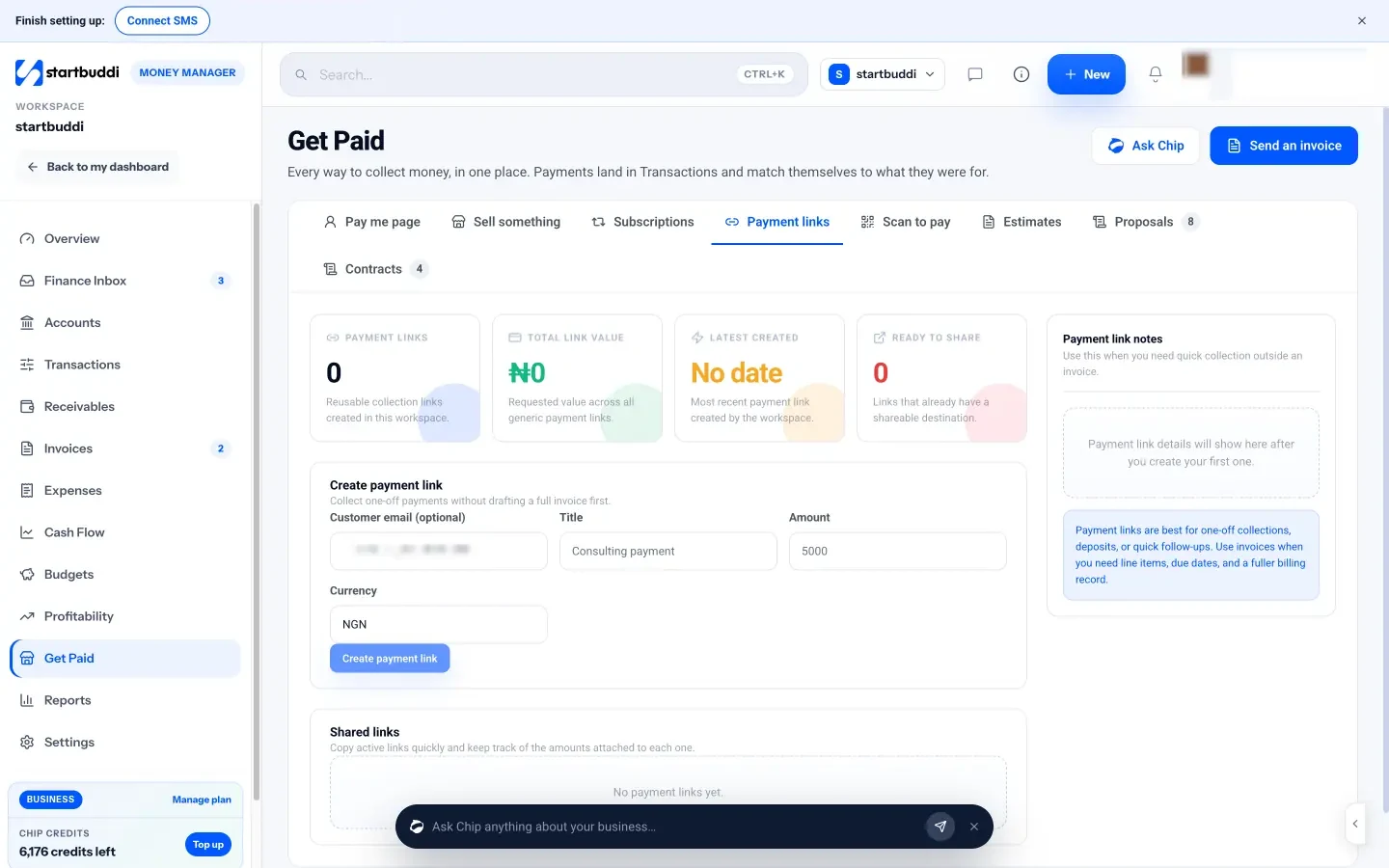
In startbuddi, Get Paid puts every way to collect money in one place inside Money Manager: a pay me page for your bio, “Sell something” for quick sales, subscriptions, payment links and printable scan-to-pay QR codes. Payments land in Transactions and match themselves to what they were for.
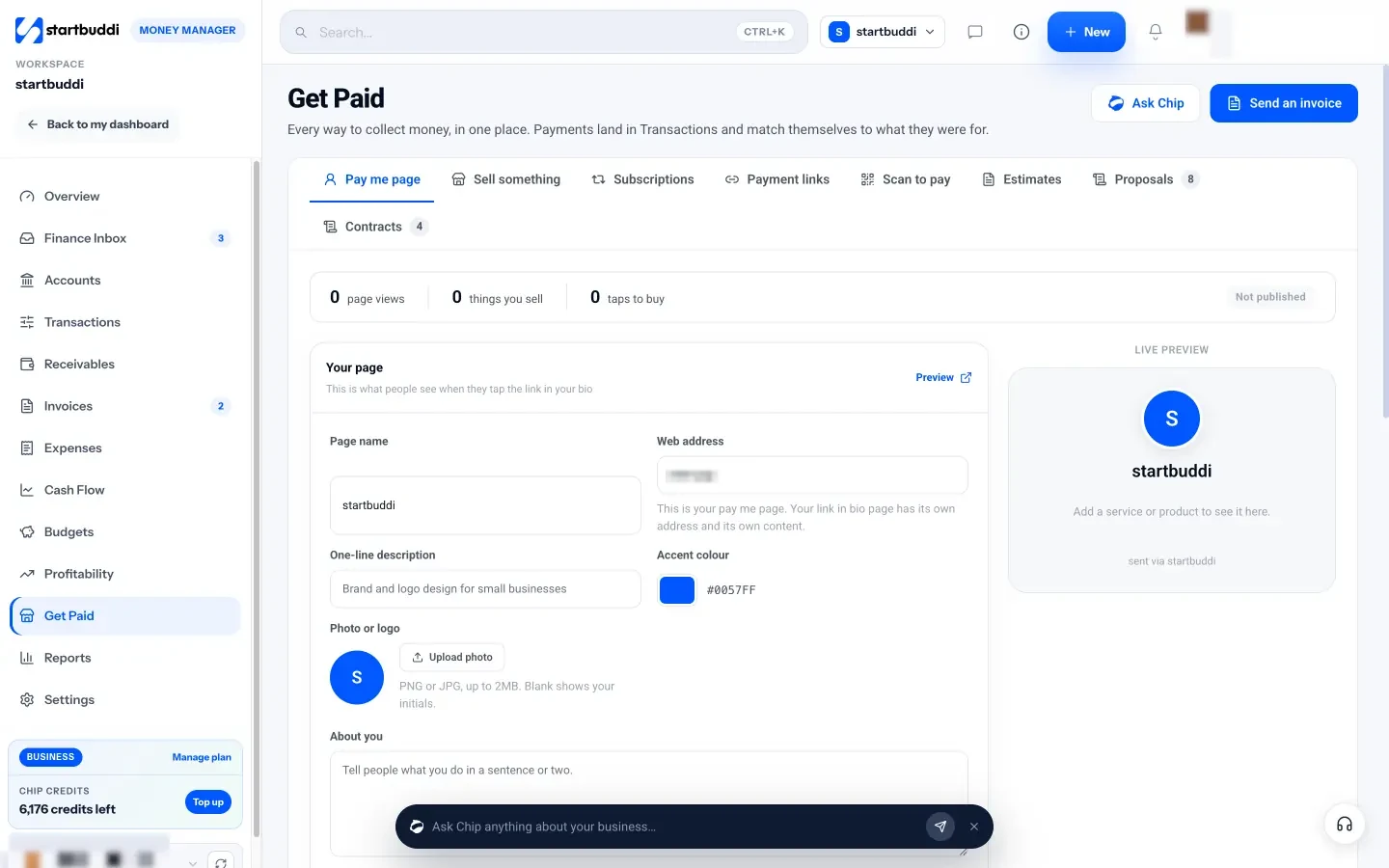
You connect Paystack in Money Manager’s settings with your business name, bank and account number. Customers can then pay by card, bank transfer, USSD or mobile money, and the money settles straight to your bank account; startbuddi never holds your money. If you also work with clients abroad and have a Stripe account in a supported country, you can connect that too. Payment links, the pay me page and subscriptions need a connected, verified Paystack or Stripe account.
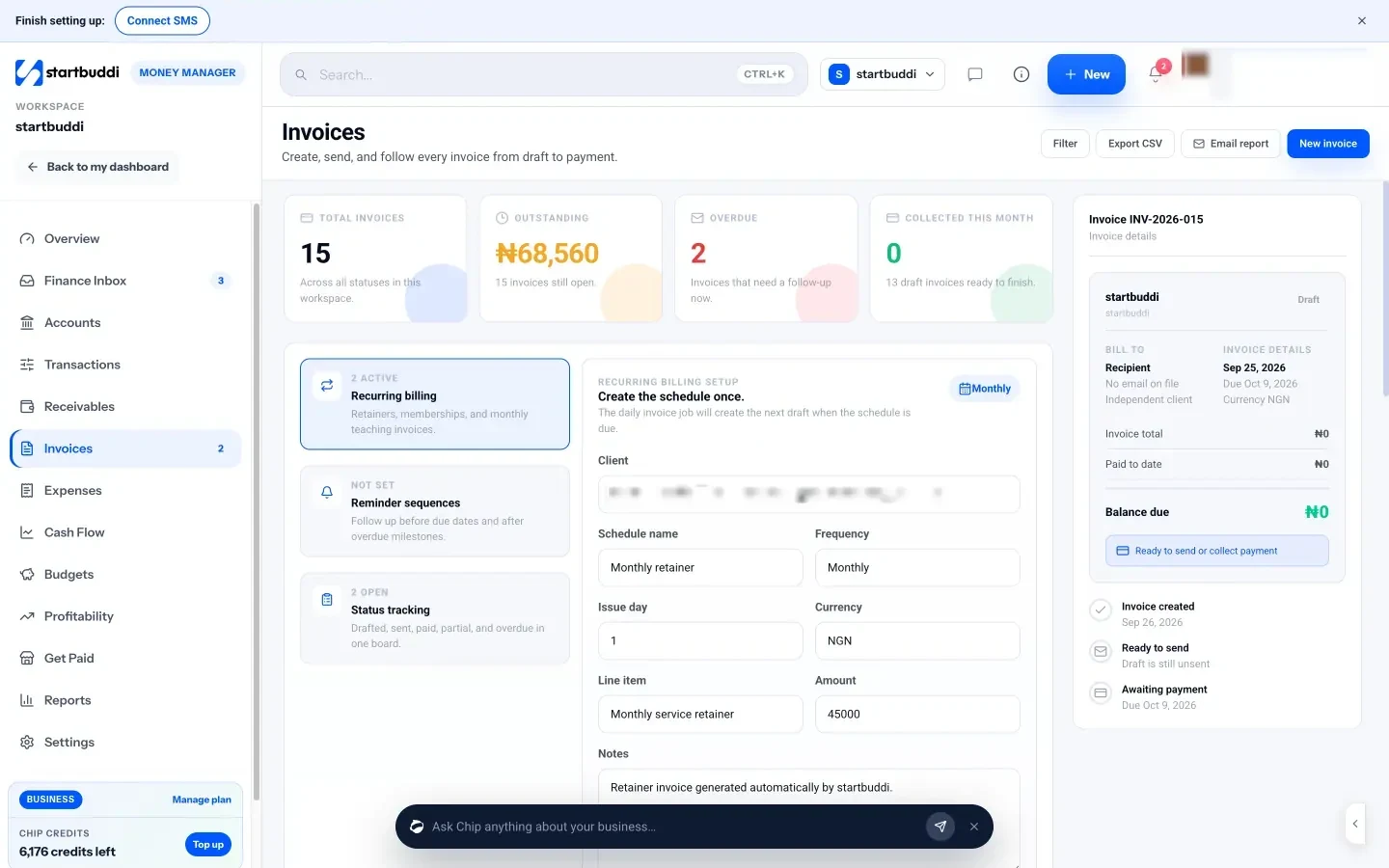
For service work, send an invoice from Invoicing. Your customer gets a link to an invoice page with a Pay button and, if you add them, your bank transfer details. Online payments mark the invoice as paid automatically; for a transfer, you record the payment with its reference and the balance updates. The Free plan includes five invoices a month, and paid plans have no invoice limit.
The help article on creating a payment link in startbuddi walks you through your first one.
Your next step
List how your last 20 customers paid you: transfer, card, cash or something else. That tells you which methods to set up first. Then open one payment link or invoice with a pay button and test it by paying yourself a small amount. When you’re ready to bring it all into one place, start with startbuddi free.
Sources
- Paystack: pricing for Nigeria (checked 28 September 2026)
- Flutterwave: pricing for Nigeria (checked 28 September 2026)
- Stripe: global availability
- TheCable: senders to pay ₦50 stamp duty on transfers from January 2026
Frequently asked questions
Do I need a registered business to accept online payments in Nigeria?
Gateways verify your identity and business before settling money, and registration makes that easier. Check each provider's sign-up requirements for your situation.
What is the cheapest way to accept payments in Nigeria?
Direct bank transfer costs you nothing to receive, but takes more checking. Gateways charge on each payment; check their pricing pages for current rates.
How quickly do I get my money from a payment gateway?
Paystack settles to your bank account the next working day (T+1). Other providers publish their own settlement times.
Can I use Stripe in Nigeria?
Nigerian businesses can't sign up to Stripe directly. Stripe lists Nigeria in its extended network through Paystack, which it owns.
Chinedu Kalu is the co-founder and chief operating officer of startbuddi, responsible for how the company runs day to day. Chinedu writes about the operational side of a small business: registering and running the company, money, hiring and the routines that keep a team on track.
Co-founded startbuddi and runs its operations