Payment Provider: A Practical Guide for Small Businesses
What a payment provider does, how it differs from a gateway or a bank, what to check before you sign up, and how to choose one for your small business.


A payment provider is a company that lets your business accept electronic payments, such as cards, bank transfers and mobile money, and moves the money into your bank account, minus a fee. Stripe and Paystack are examples. For a small business, the right payment provider is the one your customers can actually pay with, at a fee you can price in.
Key takeaways
- A payment provider bundles the gateway, the processing and the payout, so a small business doesn’t need its own merchant account with a bank.
- Choose by your customers first: which country they’re in and how they like to pay (card, transfer, USSD, mobile money).
- Fees are charged on each payment and differ by country and card type. Check the provider’s own pricing page against your typical invoice.
- Check the provider is licensed where you operate, and read how long settlement takes.
- Your invoicing or booking software should connect to the provider, so a payment marks the invoice paid without you checking the bank app.
What is a payment provider?
A payment provider (also called a payment service provider or PSP) is the business between your customer’s money and your bank account. When a customer pays you online or by card, the provider:
- shows the customer a secure way to pay (a checkout page, payment link or form);
- sends the payment request through the card network or bank and gets an approval or a decline;
- collects the money from the customer’s bank;
- pays it into your bank account, minus its fee, on a settlement schedule.
The secure checkout part is the payment gateway. Most small businesses never deal with the parts separately, because providers such as Stripe and Paystack sell them as one service.
Payment provider vs gateway vs processor vs bank
These words get used loosely. Here’s how they fit together.
| Term | What it does | Example |
|---|---|---|
| Payment provider (PSP) | The whole service: checkout, processing, payouts, disputes | Stripe, Paystack |
| Payment gateway | The secure checkout that captures payment details | The payment page Stripe or Paystack shows your customer |
| Payment processor | Moves the transaction between banks and card networks | Often the same company as the provider |
| Acquiring bank | The bank that holds a merchant account for card payments | Usually behind the provider, out of sight |
| Card network | Sets the rules for card payments | Visa, Mastercard, Verve |
The practical difference for you: with a payment provider you can usually sign up online, upload ID and business documents, and take a first payment within days, without negotiating a merchant account.
Why the choice of payment provider matters
It decides who can pay you. A Lagos customer may prefer to pay by bank transfer or USSD. A client in Toronto expects to pay by card. If your provider doesn’t offer the method your customer uses, the payment simply doesn’t happen, or it happens late by bank transfer and you have to chase it.
It decides how much you keep. Providers charge on each payment, and rates differ by country, card type and payment size. Check the provider’s own pricing page against your typical invoice, not a round number.
It decides when you’re paid. Settlement to your bank can be next working day or several days later, and some providers can hold funds for new accounts while they check them. That gap shows up in your cash flow.
It decides what happens when something goes wrong. Refunds, failed payments and chargebacks all run through the provider’s rules and dashboard.
Online and in-person payment providers
Some payment providers only take online payments: checkout pages, payment links and invoices that customers pay from their phone. Others also sell card terminals for a shop counter or a van. Service businesses that invoice after the job, or take deposits when a customer books, often need only the online side, because the customer pays from a link wherever they are. If you take payments face to face every day, check whether the provider offers a terminal in your country and what it costs, because terminal fees and online fees are often priced differently.
How payment provider fees work
Most providers charge on each successful payment, often a percentage plus a fixed amount, with more for international cards or currency conversion. Some cap the fee on large local payments, and some waive the fixed part on small ones. Rates change and differ by country, so always use the provider’s own page: Paystack’s pricing page and Stripe’s pricing page list current rates for each country they serve.
To compare providers, take your average invoice and your smallest regular sale and work out what each would cost at the provider’s current rates. If many clients pay from abroad, do the same for an international card, then either price that in or offer them another way to pay.
How to choose a payment provider
Work through these questions in order.
- Where are your customers, and how do they pay? List the methods they actually use. In Nigeria that often means card, bank transfer and USSD. In Kenya, mobile money. In the UK and US, cards and wallets.
- Does the provider support your country as a business? Many providers only onboard businesses registered in certain countries, whatever your customers do.
- What does it cost on your typical payment? Work it out on your average invoice and your smallest regular sale, using the provider’s current pricing page.
- When does money reach your account, and in which currency? Check settlement times and whether foreign payments are converted.
- Is it licensed where you operate? In Nigeria, the Central Bank publishes its list of licensed payment service providers (Paystack Payment Limited appears under Switching and Processing, checked on 1 October 2026). In the UK, check the FCA’s Financial Services Register.
- Does it connect to the tools you already use? Your invoices, booking page and online store should mark payments automatically.
- How are disputes and refunds handled? Read the fees and the evidence the provider asks for before you need it.
For a side-by-side comparison of named providers, see our guide to the best online payment solutions, or compare payment link tools if you mostly send links over WhatsApp.
Common mistakes when choosing a payment provider
- Picking the cheapest headline rate without checking whether your customers can pay that way.
- Ignoring international card fees when a third of your clients are abroad.
- Not planning for settlement time. If payouts take days, don’t promise suppliers money on the day a customer pays.
- Using a personal account for business payments. It muddles your records and can break the provider’s terms.
- Leaving payments unlinked to invoices. If you reconcile by scrolling through the bank app, you’ll miss part-payments and duplicates.
How to start taking payments
- Decide on one main provider based on your customers, and a backup method (such as bank transfer details on the invoice).
- Register with your business details, bank account and ID. Have your registration documents ready if you’re a company.
- Send yourself a small test payment and check it settles to the right account.
- Add the payment option to your invoices, booking page and payment links.
- Tell customers how to pay in the same message as the invoice, not in a follow-up.
Our guide to sending your first invoice covers what to put on the invoice itself.
Using a payment provider with startbuddi
startbuddi isn’t a payment provider itself. It connects to two, so your invoices, payment links and bookings can take payment and mark themselves paid. In Money Manager, open Settings, then How you get paid:
- Stripe: complete Stripe Connect onboarding and customers can pay by card, with money going to your own Stripe account.
- Paystack: enter your business name, bank and account number to create a Paystack subaccount. Customers can pay by card, bank transfer, USSD or mobile money, depending on the country, and payments settle to your bank account.
- Bank transfer: add your account details and they’re shown on your invoices; use Record payment when the money lands.
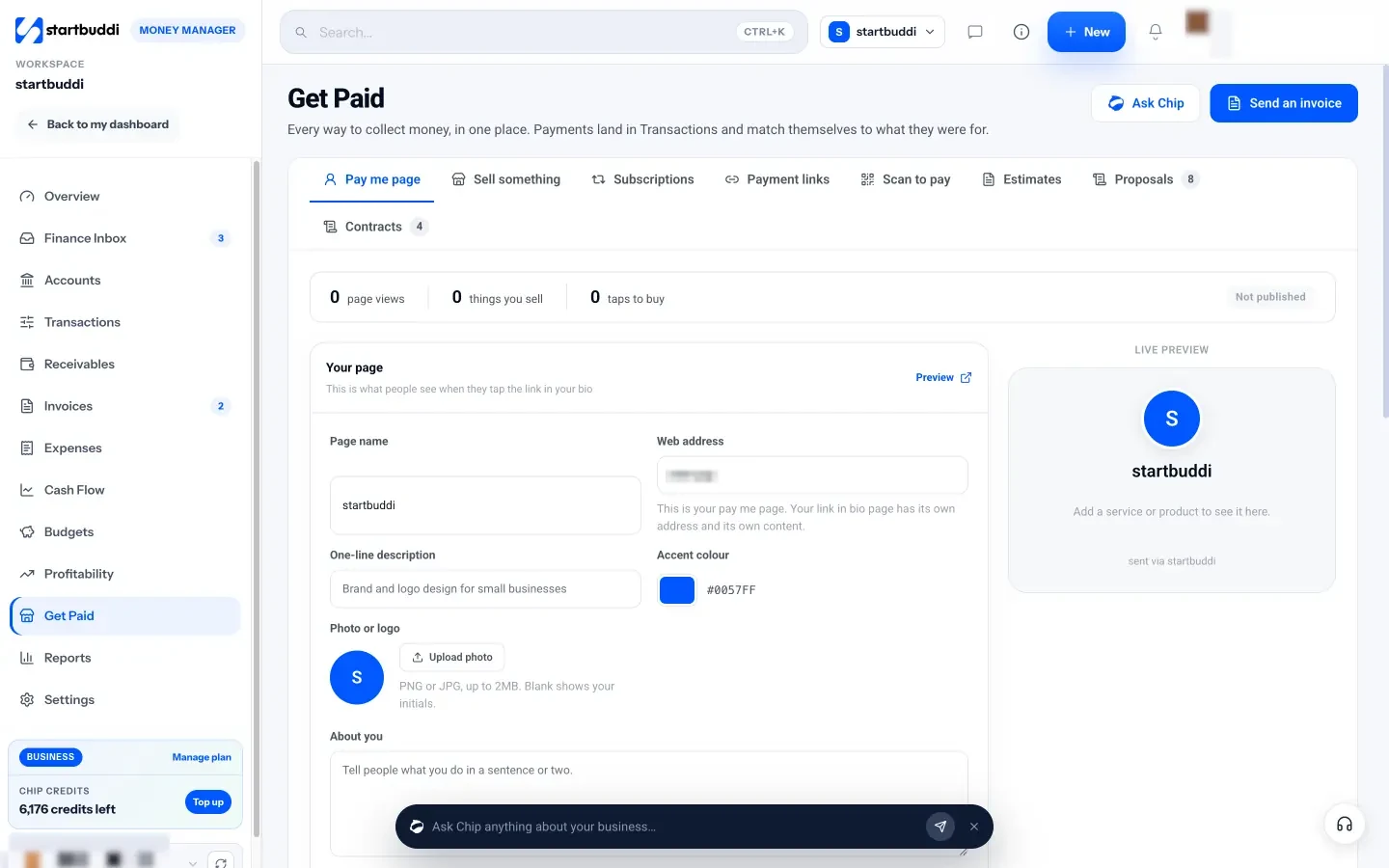
startbuddi never holds your money: each method pays your own account directly. In Get Paid you can then send invoices, payment links, a pay me page and subscriptions from one place.
startbuddi doesn’t support Apple Pay, Google Pay or Flutterwave, and it isn’t a card terminal. A free plan is available; see pricing for what each plan includes.
Get paid on the invoice, not after it
Connect Paystack or Stripe once, and every invoice, payment link and booking can take payment and mark itself paid. Start free with startbuddi, no card needed.
Frequently asked questions
What is a payment provider?
A payment provider is a company that lets a business accept electronic payments, such as cards, bank transfers and mobile money, and pays the money into the business's bank account minus a fee. It handles the checkout, the processing with banks and card networks, and the payout. Stripe and Paystack are examples.
What is the difference between a payment provider and a payment gateway?
A payment gateway is the secure checkout that captures the customer's payment details. A payment provider is the whole service, which usually includes a gateway plus processing, payouts, refunds and disputes. Small businesses normally sign up with a provider and get the gateway with it.
Which payment provider is best for a small business?
The best payment provider is the one your customers can pay with, in your country, at a fee you can price in. Businesses selling to customers in Nigeria, Ghana, Kenya or South Africa often choose Paystack for local methods such as transfer, USSD and mobile money. Businesses selling mainly by card in Europe or North America often choose Stripe.
How do I find out what a payment provider charges?
Check the provider's own pricing page for your country. Most charge on each successful payment, often a percentage plus a fixed amount, and international cards and currency conversion usually cost more. Rates change, so check before you sign up.
Do I need a business bank account to use a payment provider?
Usually yes, or at least an account in the business's name if you're registered as a company. Providers pay out to the account you register, and many check that the name matches your business. Even sole traders find a separate account makes records far easier.
Is a payment provider the same as a bank?
No. A bank holds your money in an account. A payment provider collects payments on your behalf and moves them into your bank account. Many payment providers work with partner banks behind the scenes, and in many countries they need their own licence from the central bank or financial regulator.
Chinedu Kalu is the co-founder and chief operating officer of startbuddi, responsible for how the company runs day to day. Chinedu writes about the operational side of a small business: registering and running the company, money, hiring and the routines that keep a team on track.
Co-founded startbuddi and runs its operations