How to Create a Client Portal for Your Service Business
How to create a client portal for a service business: pick a build option, decide what clients see, set secure access, load content, test, then invite.



Photo: NordWood Themes / Unsplash
Here is how to create a client portal: decide what each client needs to see, pick a build option (a shared folder, portal software or your own website), give each client a private space with their own sign-in, load current work and invoices, test it as the client, then invite them and keep every update there.
Key takeaways
- Start from the questions clients ask you every week. Those are the sections your portal needs.
- Give every client their own sign-in. Never one shared password, and never logins pasted into chat.
- Load real content before you invite anyone. An empty portal on day one is a portal nobody opens again.
- The portal only works if you use it: put every update, file and approval there, and point clients back to it.
- Portal software is the quickest route for most small teams; a shared folder is fine for one or two clients.
If you are still deciding whether you need one at all, read why a client portal saves service businesses hours first. This post is the how.
What you need before you start
- A list of your active clients and the projects or retainers for each.
- The files, deliverables and invoices you would share in the first week.
- Your logo, a brand colour and a two-line welcome message.
- A decision on who on your team answers portal messages.
- An hour for the first client. Later ones are quicker once you have a template.
How to create a client portal, step by step
1. List the questions clients keep asking
Open your email, WhatsApp and call notes for the last month and write down every question clients asked more than once. For most agencies, studios and consultants they fall into the same groups:
| Client question | Portal section that answers it |
|---|---|
| “Where are we with the project?” | Progress and milestones |
| “Can you resend the file?” | Files and deliverables |
| “Do you need anything from me?” | Approvals and a to-do list for the client |
| “How much do I owe?” | Invoices and what is paid |
| “Who do I talk to about this?” | Messages, with your team named |
If a section doesn’t answer a real question, leave it out. A portal with three useful sections beats one with twelve empty ones.
2. Decide what the client sees and what stays internal
A client portal is a window into your work, not the whole workshop. Write down, before you build anything, what is shared and what isn’t.
| Share with the client | Keep internal |
|---|---|
| Milestones and due dates | Your team’s task chat and notes |
| Final and review drafts | Rough working files |
| Items waiting for their approval | Supplier costs and margins |
| Their invoices and receipts | Other clients’ work |
| Their messages with your team | Time logs, unless you bill by the hour |
3. Choose how to build it
There are three common routes for a small business. Pick by how many clients you have and how much you want to keep in one place.
| Option | Good for | Watch out for |
|---|---|---|
| Shared folder per client (for example in Google Drive) | One or two clients, mostly file sharing | No approvals, invoices or progress view; permissions are easy to get wrong |
| Client portal software | Three or more clients, approvals and invoices in one place | Monthly cost; check clients don’t need paid seats |
| Members area on your own website | Businesses with a developer and unusual needs | Build time, upkeep and security are all on you |
If you go the folder route, know how sharing works. Google’s help page on sharing folders in Drive (checked on 1 October 2026) explains that everyone you share a folder with can open every file inside it, and a change to the folder’s sharing applies to everything in it. One stray internal file in a client folder is shared too.
4. Set up one space per client
Create a separate portal, or folder, for each client, named the way they’d recognise it: “Adire House website”, not “Project 0427”. Link it to the projects you are running for them, and put the sections in the order the client will check them, usually progress first, then items waiting on them, then files, then invoices.
If you run several projects for one client, keep them in the same portal. Clients think in terms of “my work with you”, not your project codes.
5. Set up access and security
This is the step people rush. Get it right once and reuse it for every client.
- One sign-in per person. Each person on the client’s side gets their own access, so you can see who looked at what and remove someone who leaves.
- Least access. A billing contact may only need invoices; a marketing manager may need approvals but not contracts.
- No passwords in chat. If you need the client’s logins (a website host, a social account), collect them in a secure, logged place, never in WhatsApp or email.
- Remove access at the end. Plan the handover now: what the client keeps, what you delete, when the portal closes.
In the UK, the data protection rules require “appropriate technical and organisational measures” to protect personal data, and the ICO’s guide to data security (checked on 1 October 2026) sets out what that means for a small organisation. Nigeria’s data protection law and others have similar duties. Our small business cybersecurity checklist covers the basics on your side.
6. Brand it and write the welcome message
Add your logo and brand colour so the client knows it’s you, not a phishing page. Then write a short welcome message that tells them what the portal is for. You can copy this one:
Hi Amara, welcome to your Adire House portal. This is where you’ll see how the website is going, approve designs and find your invoices. When something needs you, it will show at the top. If you have a question, message us here and Kemi will reply within one working day.
7. Load real content before you invite anyone
Add the current milestones, at least one file or draft, the next item for approval and any open invoice. Write the first update as a message in the portal. When the client signs in for the first time, they should see their work, not a blank template.
8. Test it as the client
Open the portal as the client would: a private browser window, or the “view as client” preview your software offers. Check three things. Is anything internal showing? Can they find the item waiting for approval in under ten seconds? Does it work on a phone? Most clients will open it from a link on their phone.
9. Invite the client and make it the habit
Send the invite, then introduce the portal on the kick-off call and show them where things are. Our chapter on the client onboarding process covers where that call fits.
After that, the portal only stays alive if you use it. Post the weekly update there. Ask for approvals only there. When a client asks for a file on WhatsApp, send the portal link rather than the file. Consistency is what turns it into the first place clients look.
Worked example: a portal for a four-person design studio
The studio, client and timings below are illustrative. A four-person design studio in Nairobi has six active clients and sets up portal software, starting with its biggest client, a café group having its brand and website redone.
| Step | What the studio did | Time |
|---|---|---|
| Questions | Found five repeat questions in a month of WhatsApp messages | 20 minutes |
| Sections | Progress, Approvals, Files, Invoices, Messages | 5 minutes |
| Access | Owner as client admin, finance manager as billing contact only | 5 minutes |
| Content | Two milestones, the logo shortlist for approval, one open invoice | 15 minutes |
| Test | Previewed as the client on a phone; hid one internal brief | 10 minutes |
| Invite | Sent on the kick-off call and walked through it together | 10 minutes |
That is about an hour for the first client. The studio saved the setup as its template, and the other five portals took about 20 minutes each, so all six were live in a little under three hours.
Common mistakes when you create a client portal
- Inviting clients to an empty portal. First impressions stick. Load content first.
- Keeping two channels going. If updates still go out on email and WhatsApp as well, clients learn to ignore the portal.
- Sharing too much. A whole project folder often holds drafts, notes and costs the client shouldn’t see.
- One login for the whole client team. You lose track of who approved what, and you can’t remove one person.
- Asking clients to make an account and remember a password. Every extra step loses some clients. Sign-in by email link removes most of the friction.
- Never closing it. Finished projects should be handed over and archived, with access removed.
For more on running the work itself, the chapter on keeping clients in the loop in our guide on how to run client projects covers weekly updates and approvals in detail.
How to create a client portal in startbuddi
In startbuddi, client portals live in Work and connect to your projects, contacts, documents and invoices. Our help article on client portals has every setting; here is the short version.
- Create the portal. Go to Work, open Client portals and click Create a portal. Pick the client contact and company, name the portal, add your logo, brand colour and a welcome message.
- Choose what the client sees. Link the projects, then tick and order the parts the client sees, such as projects, milestones, deliverables, files, documents, invoices and approvals. Under How items reach the portal, choose Only items I share with this portal or Everything in its projects marked client-visible.
- Turn on approvals. With approvals on, a shared deliverable can’t be marked done until the client approves it or asks for changes. You can set reminders for approvals.
- Run an onboarding checklist. Start a checklist from the new client onboarding template: the client books the kick-off, uploads files and shares logins, which go into the portal’s encrypted access vault with every view logged.
- Preview, then invite. Use View as client to check it, then invite people from People. They get a one-time sign-in link by email, with no password, no startbuddi account and no seat used.
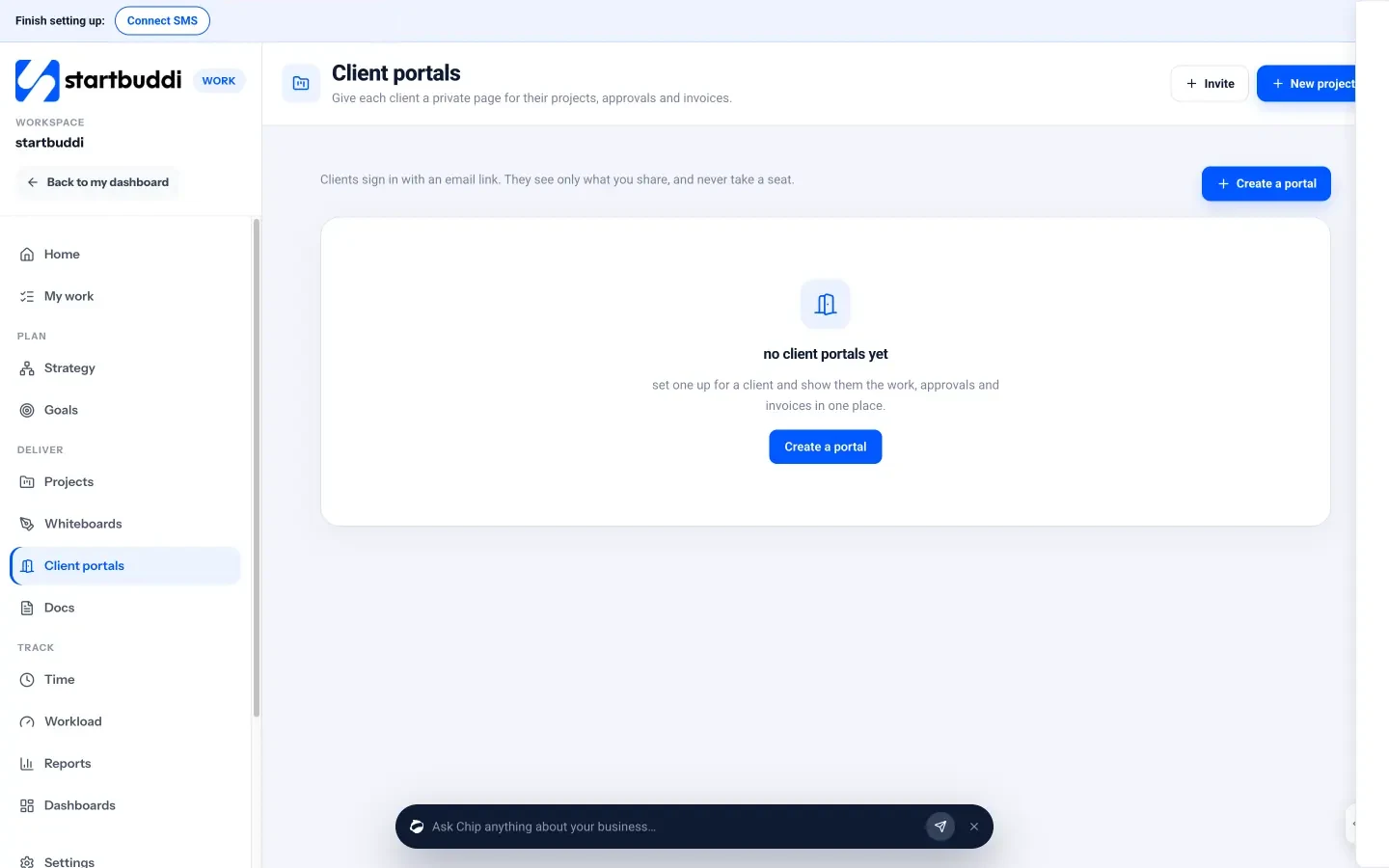
Portal messages also arrive in your Inbox, so the team can reply from there, and client requests become tasks on the project. On Growth and higher plans, the portal chat has a Call button so you and the client can talk without setting up a meeting link.
You can build and preview a portal on the free plan; inviting clients unlocks on paid plans, with more live portals on higher plans. See client portals for the full feature list, pricing for plans, and how agencies use startbuddi from pitch to invoice.
Frequently asked questions
How do I create a client portal for free?
The simplest free option is a shared folder per client in a tool like Google Drive, with each client's own email given access. It handles files but not approvals, invoices or progress. Some portal tools, including startbuddi, let you build and preview a portal free, then charge to invite clients.
What should a client portal include?
Include what clients ask you about most: project progress and milestones, files and deliverables, items waiting for their approval, invoices and a message thread with your team. Leave out internal notes, drafts and costs. Start small and add sections only when clients need them.
How long does it take to set up a client portal?
With portal software, the first client usually takes about an hour, including deciding what to share and loading the first content. Later clients take less time once you have a template. Building a portal into your own website takes far longer and needs a developer.
Is a client portal secure?
It can be, if each person has their own sign-in, clients see only their own space, and logins are never shared in chat. Check how your tool stores files and passwords and whether it logs who viewed what. Remove access when a project ends.
Do clients need to create an account to use a client portal?
It depends on the tool. Some ask clients to create an account and password; others, including startbuddi, send a one-time sign-in link by email instead. Fewer steps usually means more clients actually use it.
Omolola Akiyode is the operations and project manager at startbuddi, leading cross-functional projects and the content that helps founders get set up. Omolola writes about projects, websites and getting found online, and turns complex ideas into clear, practical steps.
Runs operations and projects at startbuddi