How to Answer Business Calls After Hours: A Small Business Guide
How to answer business calls after hours without working all night: voicemail script, on-call rota, answering service, WhatsApp away message and web chat.


Photo: Fumiaki Hayashi / Unsplash
Here’s how to answer business calls after hours without working all night: decide which calls are emergencies, record a voicemail that promises a callback time, forward only urgent calls to an on-call phone or an answering service, and move everything else to channels that can wait: WhatsApp away messages, website chat and online booking. Then call everyone back first thing.
Key takeaways
- Most after-hours callers don’t need you that night. They need to know when you’ll call back, and they need it said clearly.
- Write down what counts as an emergency before you set anything up. It decides whether you need an on-call rota or just a good voicemail.
- Give callers somewhere else to go: a booking link, WhatsApp or website chat. Many would rather type than leave a message.
- An answering service or virtual receptionist covers the phone line itself. AI tools on chat channels cover written enquiries, not your phone number.
- The morning callback is the step most businesses skip, and it’s where the jobs are won.
Why after-hours calls matter for a small business
The calls that come in after 6pm are often the ones with intent: a burst pipe, a client who’s finally free to talk, someone comparing three quotes on their sofa. If they hit a full voicemail box or a phone that rings out, they call the next name on the list.
You can’t be on the phone all night, and you shouldn’t try. The aim is narrower: no caller left wondering, real emergencies reach someone, and everyone else gets a fast answer in the morning. That’s a customer service standard you can actually keep.
What you need
- A list of what counts as an emergency for your business, and what doesn’t.
- Your business hours, set the same everywhere: phone greeting, Google Business Profile, WhatsApp Business and website.
- A phone or phone system that can forward calls and record a voicemail greeting.
- A place to log every missed call and message, so nothing is forgotten by morning.
- Optional: an on-call rota, an answering service, or website chat.
How to answer business calls after hours, step by step
1. Decide what counts as an emergency
Write two short lists. An emergency is anything where waiting until morning causes real harm or real cost: no water, no power, a security alarm, a patient in pain, an event happening tomorrow. Everything else, such as quotes, price questions, rescheduling and general enquiries, can wait.
A plumber in Nairobi might list burst pipes, leaks through a ceiling and no water. A wedding photographer might list nothing at all, apart from the night before a wedding. If your emergency list is empty, you don’t need anyone on call; you need a great voicemail and a morning routine.
2. Set your hours once, everywhere
Callers check your hours before they ring. Use the same hours on your voicemail, website and listings. Google lets you set regular hours, special hours for holidays and “more hours” for things like delivery on your Business Profile (checked on 1 October 2026). Mismatched hours are the quickest way to annoy someone at 8pm.
3. Record a voicemail that gives a callback time
A good after-hours greeting does four things: confirms who they’ve reached, says you’re closed, says exactly when you’ll call back, and tells emergencies what to do. Keep it under 30 seconds.
Copy and adapt this script:
“Hi, you’ve reached Bright Fix Plumbing. We’re closed right now. Our hours are 8am to 6pm, Monday to Saturday. Leave your name, number and what you need, and we’ll call you back before 9am. For a burst pipe or no water, press 1 now to reach our on-call plumber. You can also book a visit or message us on WhatsApp through the link on our website. Thanks for calling.”
Check your voicemail box isn’t full, and test the greeting from another phone.
4. Forward urgent calls to an on-call phone
If you do have emergencies, forward them rather than everything. Common setups:
- A separate emergency number that rings the on-call person’s phone, while the main line goes to voicemail.
- A “press 1” option on a phone system, sending urgent callers to the on-call phone.
- An on-call rota for teams, so the same person isn’t woken every night. Rotate weekly and pay or give time back for it.
Agree what the on-call person does: attend, give advice by phone, or book the first slot in the morning. Write it down so callers get the same answer whoever picks up.
5. Use an answering service if you need a human on the line
An answering service or virtual receptionist answers your calls in your business name, takes messages and passes on urgent ones using your script. It suits clinics, property managers and trades with lots of evening calls. Ask providers how they charge (per call, per minute or monthly), how messages reach you, and whether they can follow your emergency list.
An AI receptionist is the automated version. Check carefully which channels it covers: some answer your phone line, others only website or chat channels.
6. Give callers a channel that doesn’t need you awake
Many after-hours callers would happily type instead. Point them to:
- WhatsApp Business away messages. WhatsApp lets you schedule an away message to send “outside of business hours”, once your hours are set in your business profile, according to its help centre (checked on 1 October 2026). Say when you’ll reply and include your booking link. Our guide to WhatsApp Business for customer service covers the rest of the setup.
- Website chat. A chat widget can answer common questions from your own information and collect contact details overnight.
- Online booking. If the call was going to end in “when can you come?”, a booking page answers that at 11pm.
- Email auto-replies that say when you’ll respond.
7. Call everyone back first thing
Block the first 30 to 60 minutes of the day for callbacks, in order: emergencies handled overnight (to check all is well), then quotes and new enquiries, then everything else. Call back before the time your greeting promised. If you can’t reach someone, send a WhatsApp or text so they know you tried.
Which after-hours option fits your business?
| Option | Best for | What it costs you | Watch out for |
|---|---|---|---|
| Voicemail with a callback time | Businesses with no true emergencies | Nothing beyond your phone plan | A full or vague voicemail loses callers |
| Emergency line or “press 1” | Trades, property, IT support | On-call time and phone setup | Burnout if one person is always on call |
| On-call rota | Teams of three or more | Pay or time off for on-call staff | Needs clear rules on what to attend |
| Answering service or virtual receptionist | High call volume, clinics, property | A monthly or per-call fee | Script quality and how fast messages reach you |
| WhatsApp away message | Customers who message first | Free in WhatsApp Business | Only works if your hours are set |
| Website chat and online booking | Enquiries, quotes and bookings | Varies by tool | Doesn’t answer your phone line |
Worked example: a three-person plumbing firm in Accra
This is an illustrative example. Bright Fix Plumbing gets about 15 calls a week after 6pm. The owner looks at a month of missed-call logs and sorts them:
| Type of call | Calls a week | What changes |
|---|---|---|
| Real emergencies (burst pipes, no water) | 3 | Sent to an emergency number covered by a weekly rota of the three plumbers |
| Quote requests | 7 | Voicemail points to WhatsApp and the booking link; called back before 9am |
| Rescheduling and questions | 5 | Answered by the WhatsApp away message and a morning reply |
Each plumber is now on call one week in three instead of every night. Twelve of the fifteen weekly calls move to the morning without losing anyone, because callers are told exactly when they’ll hear back. If even two of the seven quote requests a week turn into jobs because they were called back by 9am instead of at lunchtime, that’s eight or nine extra jobs a month the business would otherwise lose to a faster competitor.
Common mistakes
- A greeting with no callback time. “We’ll get back to you” sounds like never. Say “before 9am”.
- Forwarding every call to your mobile. You’ll answer the 10pm price question and resent the business.
- Different hours on different channels. Callers notice, and it looks careless.
- No log. Missed calls written on scraps of paper get lost. Keep one list and clear it each morning.
- Promising an AI or answering service will handle things it can’t. Check which channels and which tasks it really covers before you tell customers.
How to do this in startbuddi
startbuddi doesn’t answer your business phone number, so calls to your landline or mobile still need you, a phone system or an answering service. It helps with the enquiries that can move off the phone overnight.
- Let Chip answer messages outside business hours. In the Inbox settings, switch Chip on per channel and choose when it replies, including “Outside business hours”. It can tell customers it’s an AI, and it hands the conversation to your team when someone asks for a person. Chip auto-reply needs a paid plan and uses Chip credits.
- Add website chat, with voice. Put the website chat widget on your site so Chip answers visitors from the knowledge you approve. Visitors can also start a voice call with Chip from the widget, as a browser call (currently in Beta). Calls use Chip credits by the minute.
- Send callers to your booking page. Put the link in your voicemail and away messages so people can book the first free slot. Each confirmed booking gets an automatic reminder at the time you choose.
- Clear the inbox each morning. Overnight chats, WhatsApp messages and emails land in one shared inbox, so the morning callback list is already in one place.
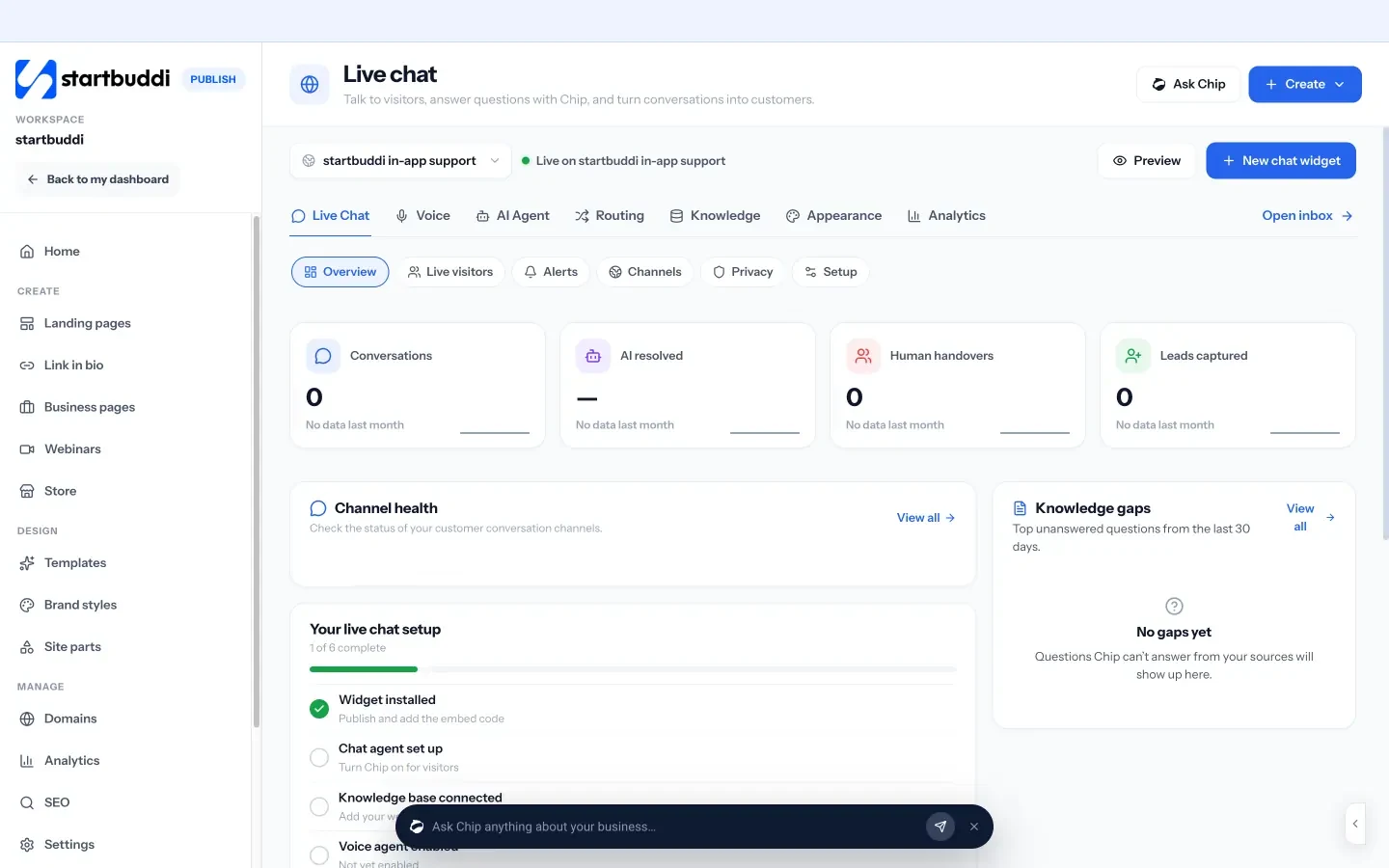
Read more about website chat and voice, see how startbuddi works as a CRM for service businesses, or check pricing for what each plan includes. A free plan is available.
Close the phone without losing the customer
Write your emergency list, record a greeting with a callback time and give callers somewhere to go overnight. To cover chats and messages while you’re closed, start free with startbuddi and set up the Inbox and website chat.
Frequently asked questions
How do small businesses answer calls after hours?
Most use a voicemail greeting that gives a callback time, plus a way for real emergencies to reach someone: an emergency number, call forwarding or an answering service. Many also move non-urgent enquiries to WhatsApp, website chat or online booking. Then they call everyone back first thing in the morning.
What should an after-hours voicemail say?
It should give your business name, say you're closed, state your opening hours and exactly when you'll call back, and tell emergency callers what to do. Point people to WhatsApp or your booking link too. Keep it under 30 seconds and check the voicemail box isn't full.
Should I answer business calls on my personal phone at night?
Only for real emergencies, and ideally through a separate number or a forwarding rule rather than giving out your personal mobile. Answering every call at night trains customers to ring late and wears you out. A clear voicemail and a fast morning callback keep most customers happy.
Is an answering service worth it for a small business?
It's worth it when you get regular after-hours calls that need a human on the line, such as in trades, property or healthcare, and missing them costs you jobs. If you rarely get evening calls, a good voicemail, a WhatsApp away message and online booking usually cover it for far less. Compare providers on price per call, script quality and how fast messages reach you.
Can AI answer my business phone after hours?
Some AI receptionist products connect to a phone line and others only answer on websites or chat channels, so check what each covers. In startbuddi, Chip answers inbox and website chat messages and can take browser voice calls from the website chat widget (in Beta), but it doesn't answer your business phone number.
How quickly should I return after-hours calls?
Return them before the time your greeting promises, ideally in the first hour you open. Handle anything urgent from overnight first, then new enquiries and quotes. If you can't reach someone, send a message so they know you tried.
Tiwalade Joanna Okedara-Kalu is the founder, CEO and CTO of startbuddi, the business system that brings clients, bookings, invoices, projects, marketing and the Chip AI assistant into one place. Tiwalade builds software around how service businesses really work day to day, and writes about client management, getting paid on time and why small businesses outgrow the tools they start with.
Founded startbuddi and leads its product and engineering