Best Communication Tools for Small Businesses in 2026: Options Compared
Communication tools for small businesses compared: WhatsApp Business, shared inboxes, live chat, team chat, video and phone, with prices and honest limits.



The best communication tools for small businesses cover two conversations: the one with customers and the one inside the team. The WhatsApp Business app is the free starting point for customers. A shared inbox such as startbuddi or Front helps once several people reply. Slack or Google Workspace handles the team, and Zoom covers long video calls.
startbuddi is our product. We’ve listed its limits next to everyone else’s, and every price below comes from the vendor’s own pricing page, checked on 1 October 2026.
Key takeaways
- Sort your needs into customer messages, team chat, video calls and phone calls before you compare any tools. Most small businesses don’t need all four on day one.
- The WhatsApp Business app is free and covers a lot for a one or two person business: a profile, away messages, quick replies, labels and a catalogue.
- When more than one person answers customers, a shared inbox stops two people replying to the same message and stops messages falling through the gaps.
- Team chat and video are cheap or free at small sizes. Customer-facing tools (shared inbox, live chat, business phone) are where the real monthly cost sits.
- Every tool you add is another login and another place to search. Count the whole stack.
Communication tools for small businesses compared
Prices are the lowest paid plan per user (or per seat or licence) a month, billed yearly, as each vendor showed them on 1 October 2026, unless the table says otherwise.
| Tool | Best for | Lowest paid plan | Free plan | Standout feature |
|---|---|---|---|---|
| startbuddi | Service businesses that want customer messages, team chat and calls in one place | See pricing | Yes | WhatsApp, email, Instagram, Facebook, SMS and website chat in one inbox, with Chip |
| WhatsApp Business app | Solo owners and small teams whose customers already use WhatsApp | Free | Yes | Catalogue, labels and quick replies on your phone |
| Google Workspace | Business email, calendar and video meetings | €6.80 Business Starter (shown in euros) | No, 14-day trial | Gmail on your domain plus Meet and Chat |
| Slack | Teams that run their day in chat | $7.25 Pro | Yes, 90 days of history | Channels and thousands of integrations |
| Zoom Workplace | Frequent or long video calls with clients | $14.16 Pro | Yes, 40-minute meetings | Meetings of up to 30 hours on Pro |
| Front | Teams sharing an email inbox | $25 Starter per seat | No, 14-day trial | Shared email with assignment and comments |
| Tidio | Website chat with an AI agent | $24.17 Starter per month (whole account) | Yes, 50 conversations a month | Live chat, WhatsApp, Instagram and Messenger together |
| Aircall | Small sales or support teams on the phone | $30 Essentials per licence, 3 minimum | No, trial minutes | Business phone numbers with call recording |
How we chose these communication tools
Each tool had to:
- help a small business talk to customers, to each other, or both;
- publish its prices on its own site, or be free;
- offer a free plan or a free trial;
- work on a phone as well as a computer, because owners answer customers from wherever they are.
We read every vendor’s pricing and product pages on 1 October 2026. We haven’t run hands-on tests, so we describe what each plan includes rather than how it feels day to day. Some vendors change prices by country or show them in your local currency, so check before you buy.
What does a small business actually need to communicate?
Most “communication” problems in a small business are really one of four jobs:
- Customers messaging you: WhatsApp, Instagram DMs, Facebook, email and the chat box on your website. This is where sales are won or lost, because a slow reply loses the booking.
- Your team talking to each other: quick questions, handovers and “who’s covering Saturday?”.
- Calls with a face: consultations, client check-ins and team meetings.
- Phone calls: still how many customers book a plumber or a clinic.
The order matters. A two-person cleaning company in Nairobi needs job 1 sorted long before it needs job 2. A ten-person agency in London probably has jobs 2 and 3 covered by its email suite and struggles with job 1. Our online collaboration tools comparison covers the team side (docs, whiteboards, files) in more depth; this page leans towards conversations with customers.
1. startbuddi
startbuddi is an all-in-one workspace for service businesses: customers, messages, bookings, projects and payments in one place, with an AI assistant called Chip. For communication it has three parts.
Best for: service businesses where several people answer customers on WhatsApp, Instagram and email, and where the team also needs to talk about those customers.
Key features
- Inbox: WhatsApp, email, SMS, website chat, Instagram and Facebook messages land in one shared inbox. You can assign a conversation, leave internal notes, use quick replies, schedule a send and reply on a different channel from the one the message came in on. This is what an omnichannel inbox means in practice.
- Chip: suggests and drafts replies you can edit. On Growth, Chip can answer WhatsApp, website chat and inbox messages for you, straight away, after a set number of minutes or outside business hours, and hands the thread to a person when the customer asks.
- Chat and Live: startbuddi Chat has channels, direct messages and a room for every project. From Starter, Live adds drop-ins (quick calls inside chats, DMs and projects) and video meetings that guests join from a link, with recording and Chip notes.
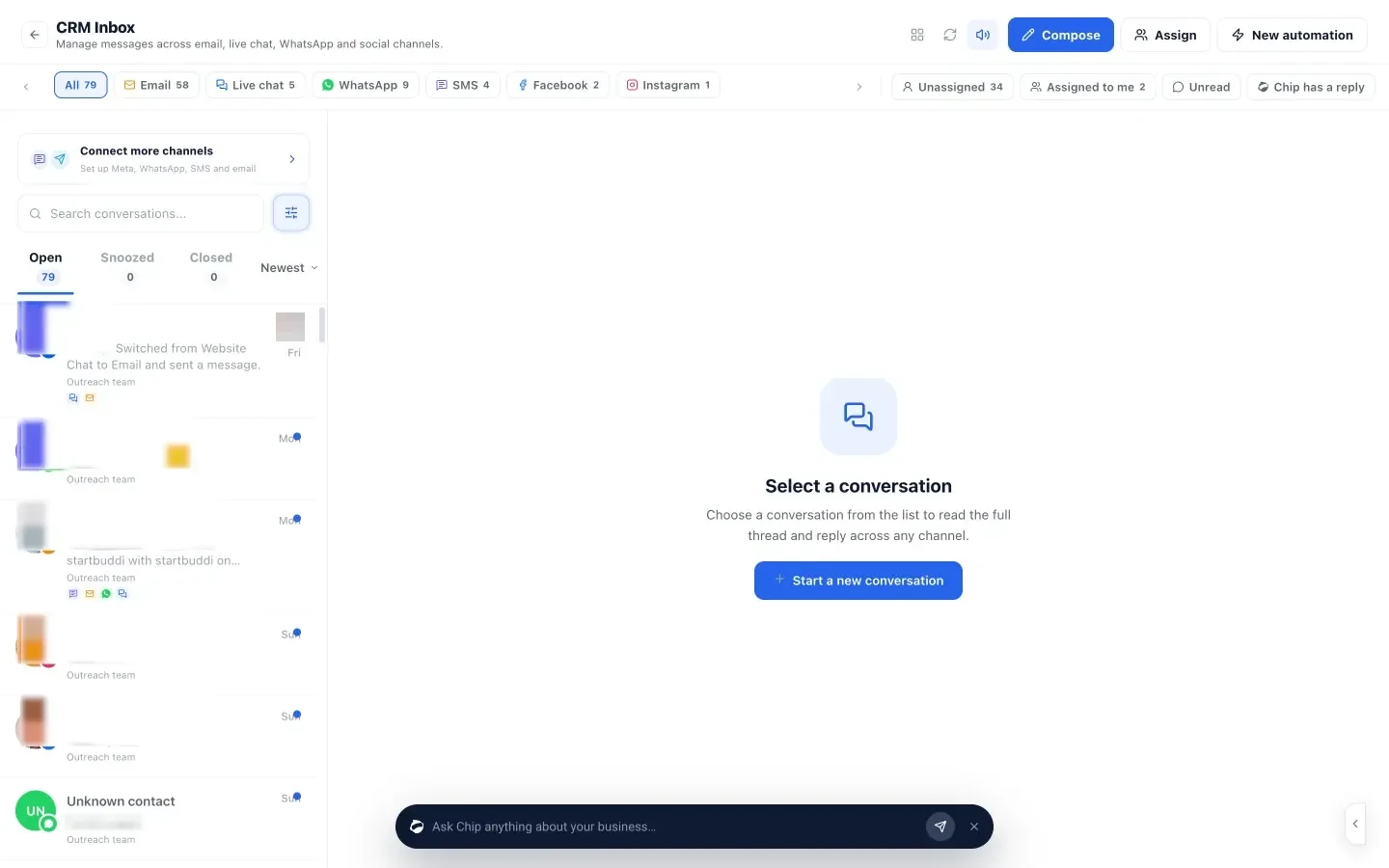
Pricing: a free plan is available. See startbuddi pricing for what each plan includes.
Pros
- Customer messages sit on the customer record, next to their bookings, quotes and invoices.
- One inbox for every channel, shared by the whole team.
- Team chat and video calls come in the same workspace, so you don’t need a separate chat tool at small sizes.
Cons
- WhatsApp and SMS in the inbox need Starter or above, and Chip’s automatic replies need Growth.
- No business phone line or calling customers from the CRM yet.
- It doesn’t host your business email, so you’ll keep Gmail, Google Workspace or Microsoft 365 for that.
- Chat checks for new messages every few seconds rather than instantly, replies are quoted in the main conversation rather than in threads, and there are no typing indicators.
Who should skip it: businesses that only need internal team chat and already have a CRM they like.
2. WhatsApp Business app
The WhatsApp Business app is Meta’s app for small businesses. Meta’s WhatsApp Business FAQ describes it as free to use.
Best for: solo owners and small teams whose customers already message them on WhatsApp, which in Lagos, Accra or Nairobi is most of them.
Key features: a business profile with your hours and website, an automatic greeting for new customers, away messages outside business hours, quick replies, labels to sort chats, a catalogue of products or services, and broadcasts. Meta’s features page says you can link up to 10 devices and agents to one account.
Pricing: free. Messages and calls go over your phone’s data or Wi-Fi.
Pros
- Free, and your customers already have WhatsApp.
- Catalogue and labels are enough to run a small order book.
Cons
- Everything lives on one number and its linked devices, with no assignment or reporting.
- Customer history isn’t connected to your invoices or bookings.
Who should skip it: businesses whose customers mostly email or call. Our guide to using WhatsApp Business for customer service shows how far the free app goes before you need more.
3. Google Workspace
Google Workspace bundles Gmail on your own domain with Calendar, Meet video calls, Chat and Drive.
Best for: professional email and meetings, which nearly every business needs whatever else it uses.
Key features: Gmail with your business address, Google Meet for up to 100 participants on Business Starter (150 on Standard), Google Chat for team messages, and 30 GB of pooled storage per person on Starter.
Pricing: Google shows prices in your local currency. The page we saw on 1 October 2026 listed Business Starter at €6.80 per user a month and Business Standard at €13.60, with 10% off for new customers’ first 12 months on up to 20 users. There’s a 14-day trial.
Pros
- Email, calendar, video and chat in one subscription.
- Familiar to almost everyone you’ll hire.
Cons
- No free plan for a business domain.
- Not a customer inbox: shared email still means forwarding and “did you reply to her?”.
Who should skip it: teams already on Microsoft 365.
4. Slack
Slack is team chat organised into channels, with a huge library of integrations.
Best for: teams of five or more who run their day in chat.
Key features: channels, direct messages, huddles, Slack Connect for talking to other companies, and app integrations.
Pricing: Free keeps 90 days of message history, allows up to 10 integrations, and limits meetings and external messages to one-to-one. Pro is $7.25 per user a month billed yearly ($8.75 monthly). Business+ is $15 billed yearly ($18 monthly).
Pros
- The most polished team chat.
- Connects to almost every other tool you use.
Cons
- On Free, decisions older than 90 days disappear from view.
- It’s internal: customer messages still live somewhere else.
Who should skip it: a team of two or three, where a WhatsApp group or your workspace’s built-in chat is enough.
5. Zoom Workplace
Zoom Workplace is best known for video meetings, with AI meeting summaries.
Best for: consultants, coaches and agencies who meet clients by video several times a week.
Key features: screen sharing and breakout rooms on every plan, meetings of up to 30 hours on Pro, 10 GB of cloud storage per user on Pro, and up to 300 participants on Business.
Pricing: Basic is free with meetings of up to 40 minutes and 100 participants, and 3 AI summaries a month. Pro is $14.16 per user a month billed yearly ($16.99 monthly). Business is $18.33 yearly ($21.99 monthly).
Pros
- Reliable and familiar to clients.
- Unlimited meeting summaries on paid plans.
Cons
- The 40-minute cap on free meetings cuts off a typical consultation.
- Often duplicates Google Meet or Teams you already pay for.
Who should skip it: teams whose email suite already includes video meetings.
6. Front
Front is a shared inbox built on email, with assignment and internal comments.
Best for: teams that get most customer contact by email: agencies, property managers, logistics firms.
Key features: shared email inboxes, assignment, internal comments on messages and analytics. Starter supports one channel type (email, Front Chat or SMS). Professional adds more channels, including social and WhatsApp, which is a paid add-on.
Pricing: Starter is $25 per seat a month billed yearly, for up to 10 seats. Professional is $65 per seat a month billed yearly, for up to 50 seats. There’s a 14-day trial with no card needed.
Pros
- Strong for teams drowning in shared email.
- Comments keep internal discussion off the customer thread.
Cons
- Starter covers one channel type only.
- WhatsApp costs extra even on Professional.
Who should skip it: businesses whose customers mostly use WhatsApp and Instagram rather than email.
7. Tidio
Tidio is a website chat tool with an AI agent called Lyro, plus WhatsApp, Instagram, Messenger and email in the same inbox.
Best for: businesses that get enquiries through their website and want help answering them.
Key features: live chat on your website, the Lyro AI agent, automated flows, and WhatsApp, Instagram, Messenger and email channels on every plan.
Pricing: Free includes 50 billable conversations a month and 10 seats. Starter is $24.17 a month billed yearly ($290 a year) for 100 conversations. Growth starts at $49.17 a month billed yearly. The Lyro AI agent is an add-on from $32.50 a month for 50 conversations.
Pros
- A real free plan with 10 seats.
- Website chat and social messages in one place.
Cons
- Pricing is by conversations, so a busy month costs more.
- The AI agent is a separate add-on.
Who should skip it: businesses that rarely get website enquiries.
8. Aircall
Aircall is a cloud phone system for small sales and support teams.
Best for: teams in the US or Canada where customers still call to book or buy.
Key features: a local or toll-free number, call recording, an automated phone menu (IVR), SMS and MMS, and 250+ integrations on Essentials. Professional adds smart routing, callbacks and a power dialler.
Pricing: Essentials is $30 per licence a month billed yearly and Professional $50, both with a minimum of 3 licences. Unlimited inbound and domestic calls are for the US and Canada. Extra numbers are $6 a month each.
Pros
- Proper business phone features without hardware.
- Call recordings help with training and disputes.
Cons
- The 3-licence minimum makes it $90 a month or more.
- Unlimited calling covers the US and Canada only.
Who should skip it: solo owners, and businesses where customers prefer to message.
Worked example: two stacks for a four-person business
These figures are illustrative, using the list prices above and billed yearly where offered. Taxes and add-ons aren’t included.
A beauty salon in Lagos whose customers book on WhatsApp and Instagram:
| Need | Tool | Monthly cost |
|---|---|---|
| Customer messages | WhatsApp Business app | Free |
| Team chat | A WhatsApp group | Free |
| Total | Free |
This works until two receptionists start answering the same customers, or until the owner wants to see which messages became bookings. That’s the point to look at a shared inbox that sits next to bookings.
A four-person consultancy in Toronto that meets clients by video and gets enquiries by email and website chat:
| Need | Tool | Monthly cost |
|---|---|---|
| Email and calendar | Google Workspace Business Starter | 4 × €6.80 = €27.20 |
| Team chat | Slack Pro | 4 × $7.25 = $29.00 |
| Long client calls | Zoom Pro, 2 users | 2 × $14.16 = $28.32 |
| Website chat | Tidio Starter | $24.17 |
| Total | €27.20 plus $81.49 |
That’s four logins and four bills before any CRM. If the same team used one workspace for the inbox, chat and video, it would keep only the email subscription on top.
How to choose communication tools for a small business
- List where your customers actually message you today. Count a week of enquiries by channel. Buy for the channels with the most messages, not the ones you wish customers used.
- Decide who answers. One person can manage on a phone. Two or more need a shared inbox with assignment, or messages get missed and double-answered.
- Set a reply-time target. If you can’t meet it during jobs or appointments, choose a tool with auto-replies or an AI assistant that can answer simple questions.
- Check the free plan limits against a normal month: message history, conversations and meeting length.
- Add up the whole stack per person per month, as in the worked example.
For the habits that matter more than any tool, our guide to customer service for small business covers reply times, tone and handovers. If WhatsApp is your main channel, see how WhatsApp works with a CRM.
Bring your customer conversations into one inbox
If messages are scattered across phones, DMs and email, start with one shared inbox and add the rest when you need it. startbuddi has a free plan with no card needed; see pricing for what each plan unlocks.
Frequently asked questions
What is the best communication tool for a small business?
There's no single best tool, because customer messages and team chat are different jobs. For customers, the free WhatsApp Business app is the usual starting point, and a shared inbox such as startbuddi helps once several people reply. For the team, Slack or Google Workspace covers chat and meetings.
What is the best app for small business communication with customers?
For most service businesses it's the app customers already use, which is often WhatsApp. The WhatsApp Business app is free and adds a profile, away messages, quick replies and labels. When several staff answer, move to a shared inbox that brings WhatsApp, email and social messages together.
Are there free communication tools for small businesses?
Yes. The WhatsApp Business app is free, Slack has a free plan with 90 days of history, Zoom's free plan allows 40-minute meetings, Tidio's free plan covers 50 website conversations a month, and startbuddi has a free plan. Check each limit against a normal month before relying on it.
Do I need Slack if my team uses WhatsApp?
Not at first. A WhatsApp group works for a team of two or three. Move to proper team chat when work and personal messages start mixing, when you need to find old decisions, or when the team grows beyond a handful of people.
What is a shared inbox and when do I need one?
A shared inbox lets several people see, assign and answer customer messages from one place, with notes the customer doesn't see. You need one when more than one person replies to customers, or when messages arrive on several channels and some go unanswered.
Can one tool handle both customer and team communication?
Yes, some can. startbuddi puts customer messages in a shared inbox and has team chat and video calls in the same workspace. Many businesses still keep a separate email suite, because business email hosting is a different service.
Olabimpe Salami is the email and outreach specialist at startbuddi. Olabimpe writes about the messages that bring customers in and back: email, WhatsApp and SMS campaigns, follow-ups, and turning enquiries into paying clients.
Runs email and outreach at startbuddi



